

Business Outcomes
Prioritize errors by impact
User and Business-Impact Analysis
Measure impact on transactions
Prioritization
Priority model factors
Security and Privacy
Mask sensitive error data
Overview
GermainUX continuously detects and analyzes errors across user experiences, business workflows, applications, integrations and supporting technologies. Instead of treating every logged error as equally important, GermainUX helps teams determine which failures affect users or business operations, how often they occur, who is affected and what should be resolved first. By combining error categorization, user-impact analysis, journey analytics, Session Replay, transaction tracing and AI-assisted investigation, GermainUX helps organizations reduce technical noise and focus on the errors that damage adoption, productivity, conversion, customer satisfaction and operational reliability.Business Outcomes
GermainUX helps organizations:- Prioritize errors according to user and business impact—not log volume alone.
- Separate new issues from known recurring errors.
- Distinguish user-facing failures from hidden background errors and expected validation events.
- Quantify the users, sessions, transactions and workflows affected.
- Replay what users experienced before and after a failure.
- Identify the application, code, query, integration or infrastructure condition responsible.
- Understand where errors disrupt customer journeys and business processes.
- Validate that remediation eliminated the error and restored the intended experience.
The Error-Investigation Workflow
GermainUX supports a complete workflow from detection to resolution:DetectCategorizeQuantifyReplayDiagnosePrioritizeResolveValidate
For each error, teams can investigate:
- What failed?
- Is the error new or already known?
- Was it visible to the user?
- Was the event an actual software failure or expected user validation?
- How often does it occur?
- Which users, sessions and transactions are affected?
Show all 10
Show all 10
- Which journeys or business processes are disrupted?
- What happened immediately before and after the error?
- Which code, dependency or technology component caused it?
- What is the recommended next action?
Errors GermainUX Can Analyze
GermainUX can analyze errors and failure conditions across multiple business and technology contexts.
Not every business problem in these categories is a software error. GermainUX can correlate errors with behavioral, process and data conditions so teams can identify the actual source of the failed outcome.
Software Errors Versus User Validation
An event visible to a user is not always evidence that the software is broken.
User validation events may still reveal design, training or process friction, but they should not be counted under the same technical KPI as broken software workflows.
User-Facing Versus Background Errors
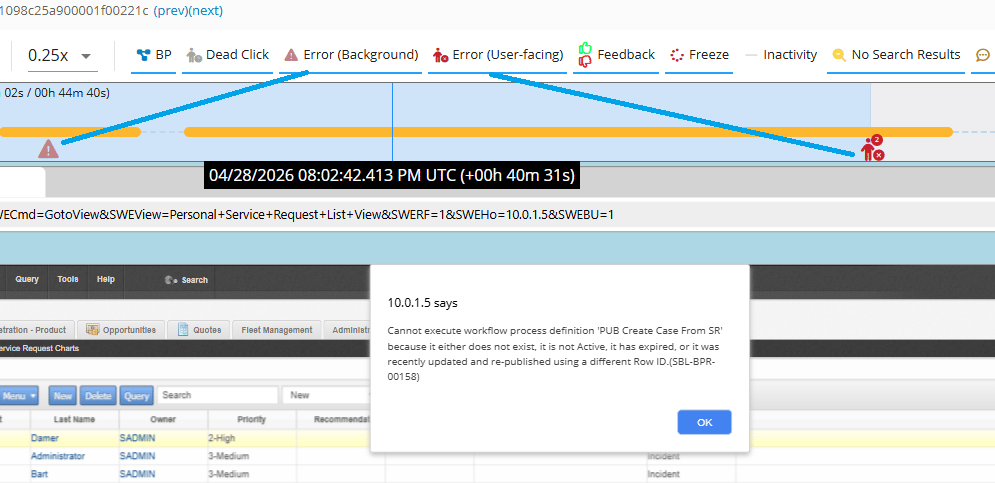
GermainUX can distinguish errors users directly experienced from failures captured only in technical telemetry.User-Facing Errors
These may appear as:- Error messages or warnings
- Failed or broken functionality
- Popups and dialogs
- Incomplete transactions
- Unresponsive controls
- Visible page or application failures
Background Errors
Background errors occur within applications, integrations or infrastructure without being directly displayed to users. They may still:- Delay processing
- Corrupt or prevent data synchronization
- Cause a later user-facing failure
- Reduce application performance
- Break an operational workflow
- Affect downstream systems or business outcomes
New Versus Known Errors
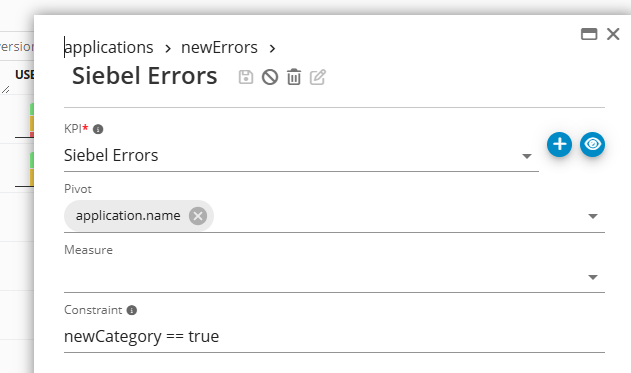
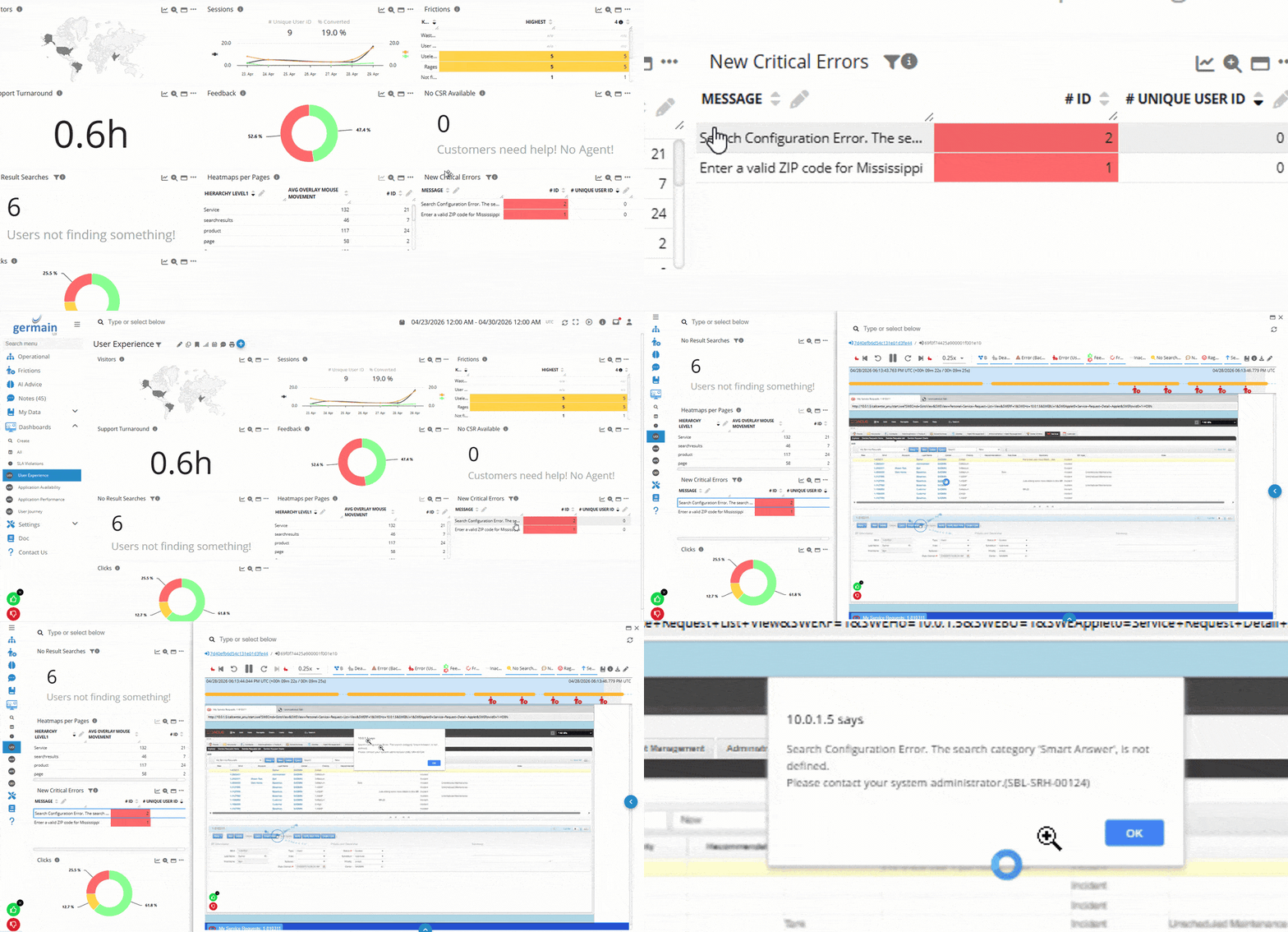
High-volume environments can generate millions of error events. GermainUX Categorization helps group related errors and distinguish new patterns from known ones.New Errors
New errors may indicate:- A recent code or configuration regression
- A new dependency failure
- An emerging production condition
- A previously unseen user or workflow scenario
- A change in data, infrastructure or integration behavior
newCategory == true—so teams can focus on emerging failures.
Known Errors
Known errors are recognized as matching an existing category or pattern. This does not mean they are harmless or safe to ignore. A known error may still require priority when:- Its frequency or affected-user count increases
- It begins affecting a critical workflow
- Its business impact becomes greater
- It appears in a new application version or segment
- An earlier remediation was incomplete
- Its recurrence violates an SLA
User and Business-Impact Analysis
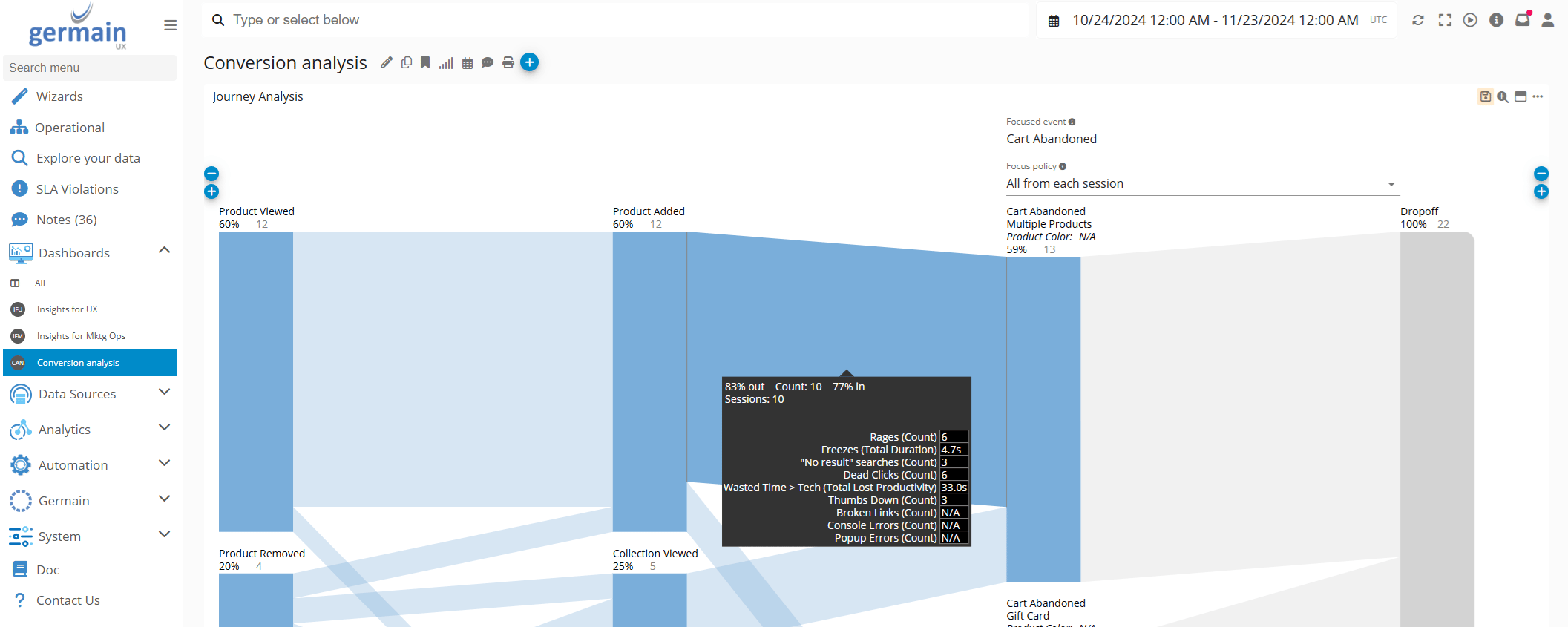
Error frequency alone does not reveal importance. One error affecting a critical transaction may matter more than thousands of harmless background events. GermainUX can quantify impact using measures such as:- Users and sessions affected
- Error occurrences and recurrence rate
- Transactions and workflow instances affected
- Conversion and abandonment impact
- Revenue impact, when configured
- Lost productivity and time wasted
Show all 9
Show all 9
- Applications, pages, products or process steps affected
- Customer, employee or business segment
- SLA priority and operational severity
Reproduce the User Experience with Session Replay
Difficult production errors can take hours, days or weeks to reproduce manually. GermainUX Session Replay lets teams inspect what the user actually experienced when the error occurred. Replay can show:- The user’s objective and preceding actions
- The page, screen or workflow step involved
- The visible message or broken behavior
- Clicks, input, navigation and application-state changes
- What the user attempted after the error
- Whether the user recovered, abandoned or repeated the action
- Nearby browser, network and technology events
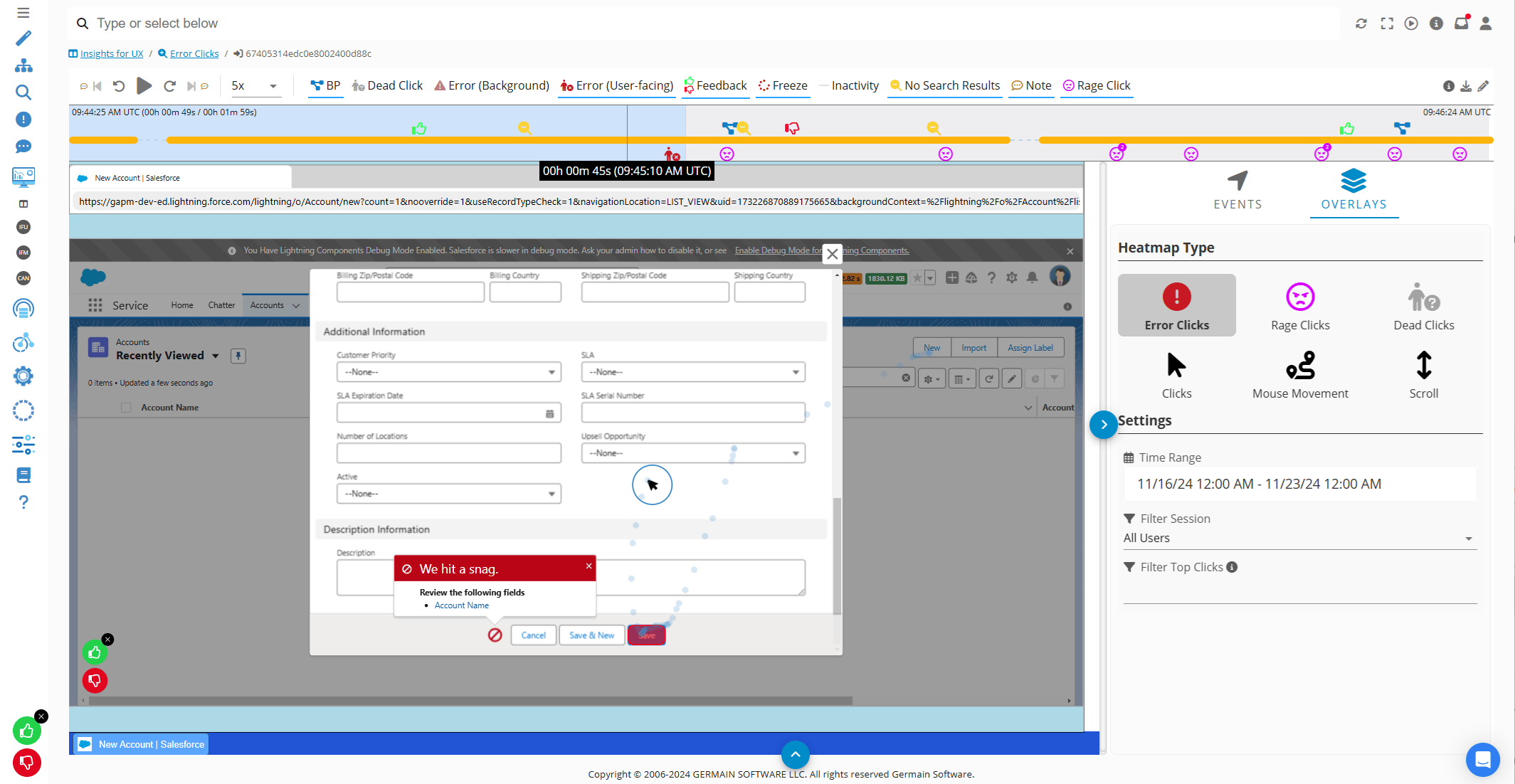
Error Click Heatmap
The Error Click Heatmap shows where user clicks are associated with errors or failed application behavior. It helps identify:- Page elements generating the most error-related interactions
- Broken controls or links
- Errors concentrated around a particular workflow step
- Interface failures affecting many users
- Areas requiring representative Session Replay analysis
Root-Cause Analysis
GermainUX can correlate an error with the transaction and technology activity surrounding it. Depending on the monitored architecture, teams can trace:User actionBrowser or applicationNetworkApplication codeIntegrationDatabaseInfrastructure
Supporting evidence can include:
- Error messages and stack traces
- Console events
- HTTP requests and responses
- Application methods and code execution
- Database queries
- Integration calls
- Application and infrastructure metrics
- Correlation, transaction and session identifiers
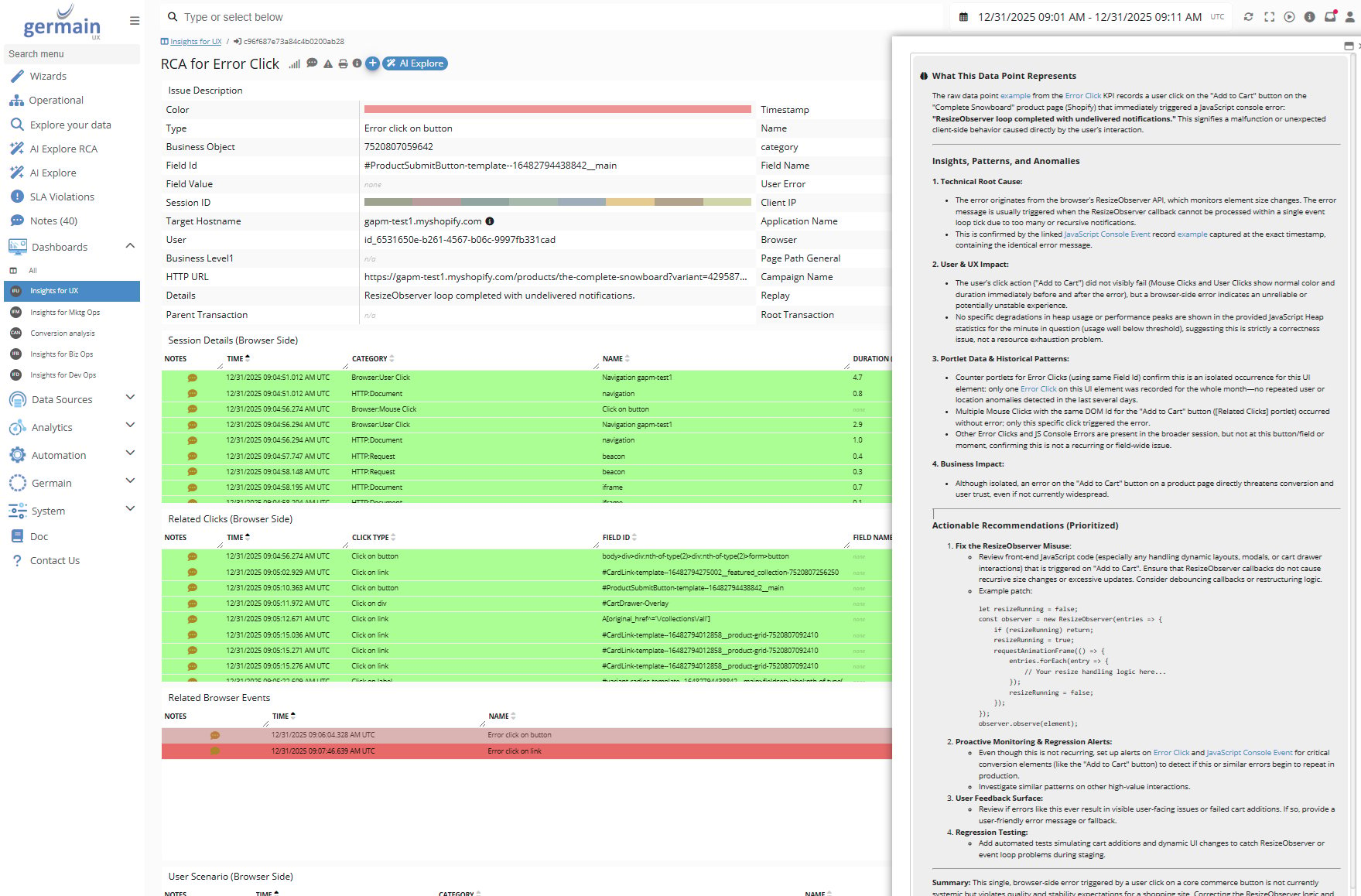
AI Explore
- Why does this error occur?
- Is it increasing or behaving abnormally?
- Which users and workflows are most affected?
- What other KPIs changed at the same time?
- What is the likely root cause?
- What evidence supports that conclusion?
- What should be investigated next?
AI Explore - GermainUX
Prioritization
A practical error-priority model should combine several factors:
This prevents teams from prioritizing solely by raw occurrence count or technical severity.
Alerts, Ownership and Remediation
GermainUX can turn error analysis into action through:- Real-time alerts and SLA notifications
- Scheduled error summaries
- Assignment and collaboration workflows
- Links to Session Replay and root-cause evidence
- Dynamic investigation or remediation actions
- Approved automated recovery workflows
Validate Resolution
After a fix is deployed, GermainUX can verify whether:- The error stopped occurring
- The affected-user count declined
- The workflow or conversion recovered
- A new error replaced the previous symptom
- Performance and user behavior improved
- The issue remains resolved across versions, segments and environments
AI KPIs
AI Error Analysis KPI provides an AI-generated analysis of error events to help teams quickly understand errors and support further investigation. For the complete KPI definition, see AI KPIs and other KPIs.Security and Privacy
Error messages, stack traces, network responses and Session Replay may contain sensitive information. GermainUX should be configured to mask, anonymize or exclude sensitive data and restrict access to authorized users. Collection, retention and analysis should follow the organization’s security, privacy and compliance requirements.Additional Resources
AI
Insights & Recommendations
Outliers And Anomaly Detection
Read more
Analytics
More Analytics Features
Automation
More Automation Features
Dashboards
Dashboards and reports overview
Reports
Automatic and scheduled reports
Management
More Management Features
Get Help
Contact GermainUX Support
The Germain Team can help you set this up.
Can't find what you need?
Search all GermainUX docs with Ctrl + K, or use the feedback buttons at the bottom of this page to tell us what is missing.
The content of this document is proprietary to GERMAIN SOFTWARE.