

Incident Management Scope
Deploy .../...
Configure .../..
Deployment and configuration
Overview
Deploy GermainUX Engine on a BigPanda to enable:- Real users and sessions
- Customer navigation and actions
- Storefront performance
- JavaScript and browser errors
- Network requests
- Product discovery
Incident Management Scope
Prerequisites
Before deployment:Identify the BigPanda stores, channels, storefronts, and environments to monitor
Obtain permission to manage storefront scripts
Confirm that browsers can reach GermainUX through HTTPS
Define application and environment names
Identify the storefront and checkout domains
Review consent and privacy requirements
Define masking, Session Replay, and retention rules
Identify test, bot, administrator, and synthetic traffic to exclude
Test the deployment on a nonproduction storefront or theme
Create the BigPanda Incident Management Profile
- Go to Workspace > Settings > Wizards.
- Select BigPanda.
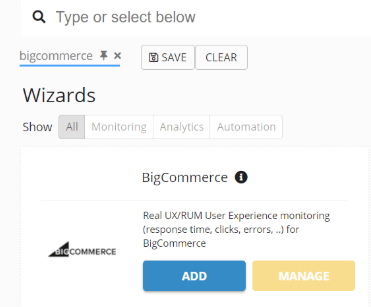
- Enter the application name and storefront URL.
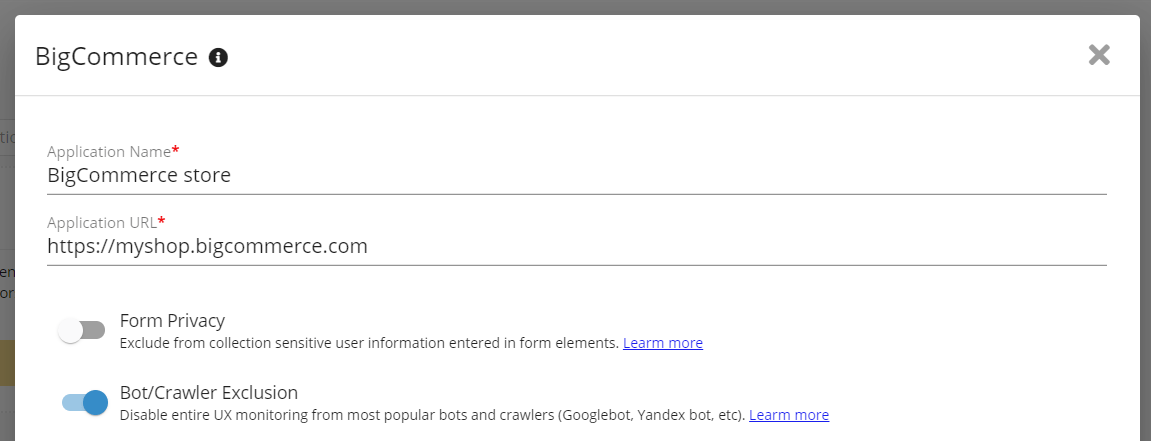
BigPanda Parameters - GermainUX
- Configure the environment and privacy settings.
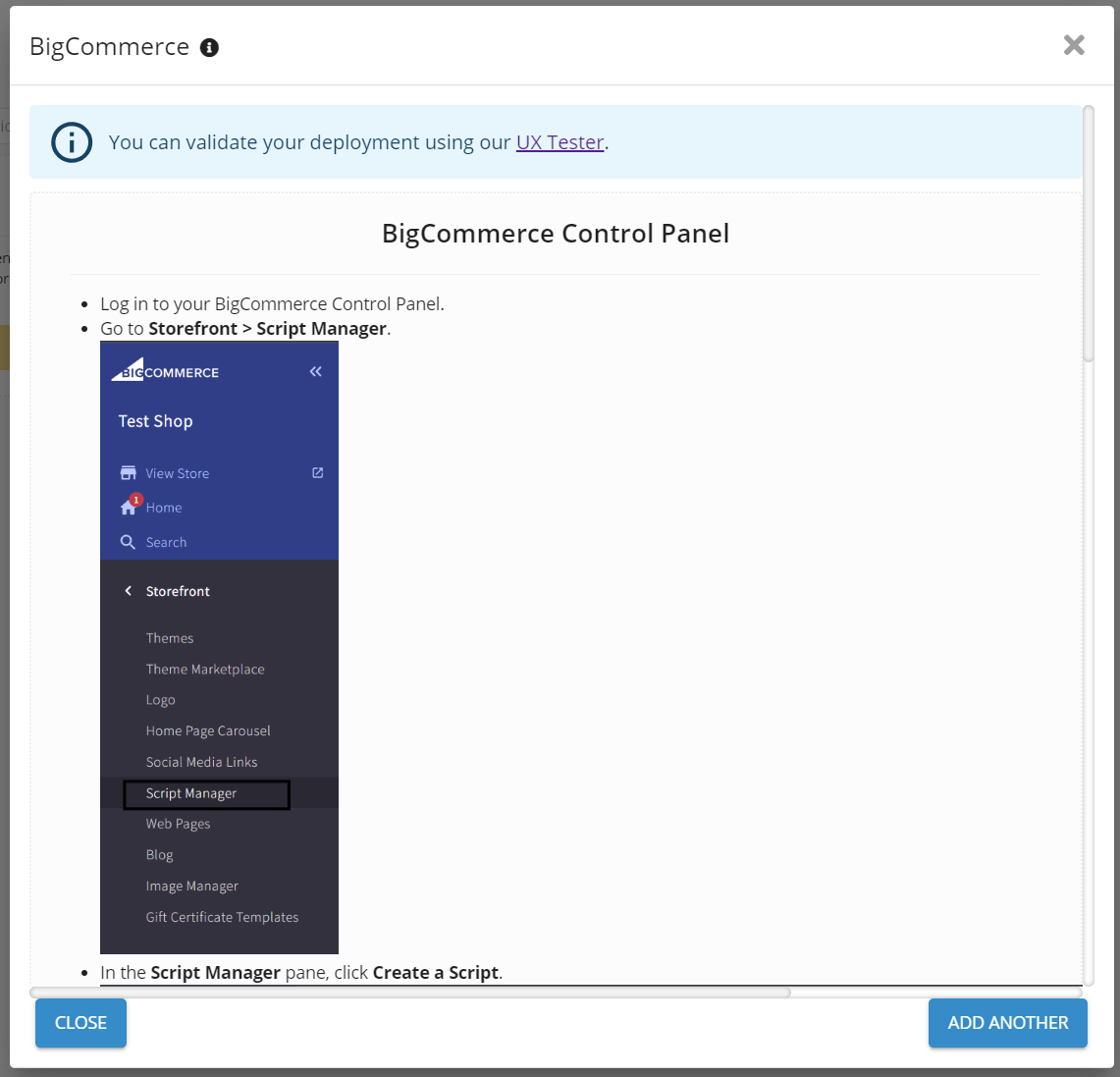
BigPanda Wizard Summary - GermainUX
- Complete the wizard.
- Copy the generated GermainUX RUM JS loader.
- Go to Workspace > Analytics > UX Monitoring Profiles.
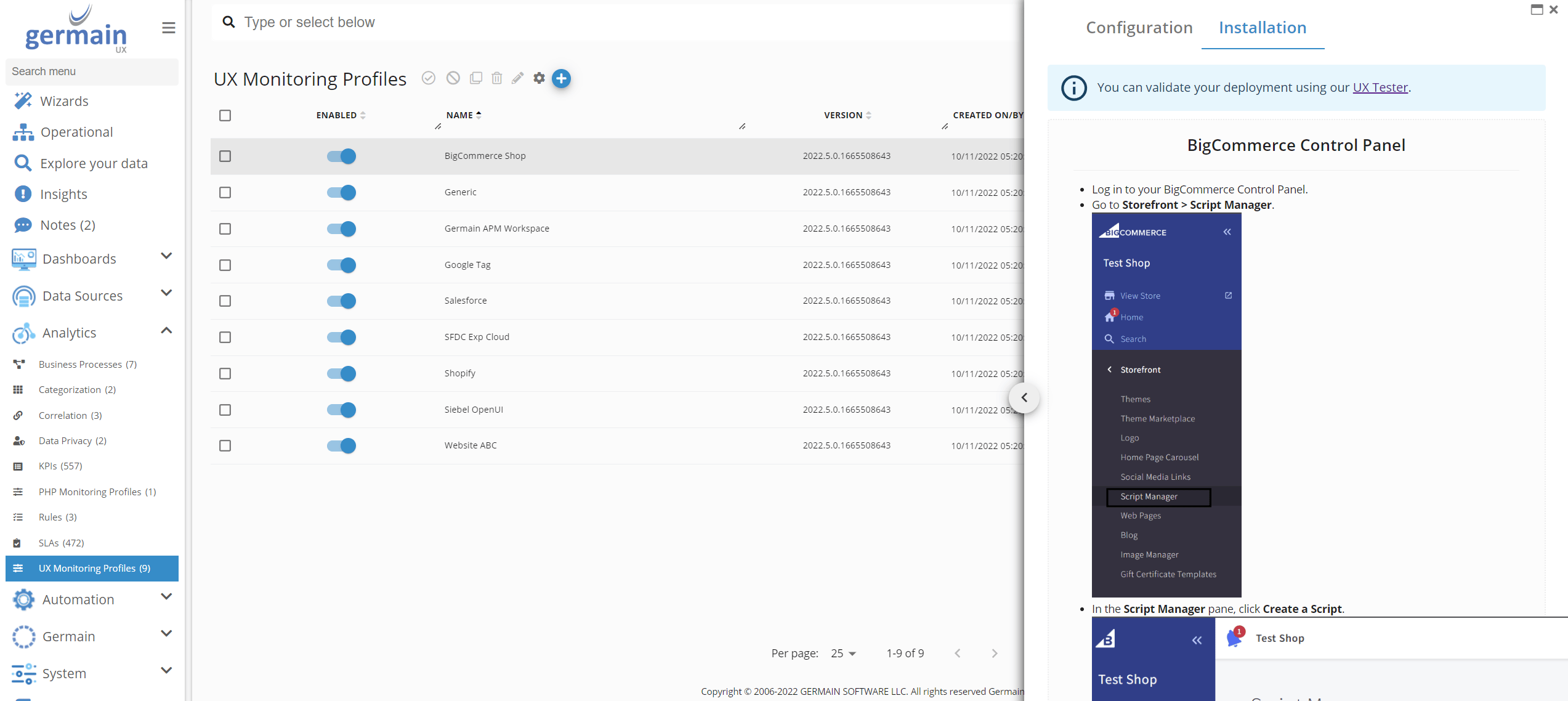
BigPanda Control Panel - GermainUX
- Select the BigPanda profile.
- Open the configuration editor.
- Select Installation.
Deploy Through BigPanda Script Manager
For a standard BigPanda storefront:Sign in to the BigPanda control panel
Open Storefront > Script Manager
Create a script
Enter a clear name, such as GermainUX RUM
Select the storefront pages and script location specified by the GermainUX wizard
Select the appropriate consent category
Paste the generated GermainUX loader
Save the script
Open the storefront and validate monitoring
Deploy Through a Stencil Theme
Use theme deployment when Script Manager is unavailable or when the organization manages monitoring through its theme-release process.Add the generated loader to the common storefront layout
Load it early enough to capture the initial page experience
Ensure it appears only once on each page
Rebuild and test the theme
Publish the approved theme
Confirm that RUM JS remains present after future theme updates
Deploy on a Headless Storefront
For a customer-controlled React, Angular, Vue, Next.js, or other headless storefront:Add RUM JS to the top-level application document or common layout
Configure the BigPanda store, channel, site, and environment context
Initialize monitoring once
Configure client-side route monitoring
Normalize product, category, cart, and checkout URLs
Instrument business events that cannot be derived reliably from browser activity
Validate server-side rendering and client-side navigation where applicable
Configure Consent
Align GermainUX collection with the storefront’s consent mechanism. Depending on the organization’s policy:- Prevent RUM JS from loading until consent is granted.
- Load GermainUX with restricted collection before consent.
- Disable Session Replay until the required consent is available.
- Stop or update collection when consent changes.
- Exclude users or regions requiring different treatment.
Configure Customer-Journey Events
Configure or instrument important commerce events such as:- Storefront viewed
- Search submitted
- No search results
- Category viewed
- Product viewed
- Product option selected
Show all 13
Show all 13
- Product added to cart
- Product removed from cart
- Cart viewed
- Checkout started
- Checkout step completed
- Checkout error
- Order confirmed
- Payment-card information
- Authentication tokens
- Customer-entered text
- Full addresses
- Sensitive personal information
- Complete request or response payloads
Checkout and Payment Monitoring
Checkout visibility depends on where GermainUX is permitted to execute. GermainUX can monitor:- Cart-to-checkout navigation
- Checkout steps visible in the monitored context
- User actions
- Performance
- Browser and network errors
- Abandonment
- Order confirmation
- The parent storefront cannot inspect protected third-party content.
- GermainUX must be separately authorized and deployed in that context.
- Some payment providers do not permit custom monitoring.
- The journey can still be analyzed before leaving and after returning to the storefront.
- Server-side order and payment status can be incorporated through approved APIs or webhooks.
Configure Privacy and Session Replay
Before enabling production monitoring:- Mask passwords and authentication fields.
- Exclude payment and address fields.
- Mask customer names, emails, and phone numbers.
- Remove tokens and sensitive query parameters.
- Exclude confidential account pages where required.
- Restrict access to Session Replay.
Show all 9
Show all 9
- Configure sampling and retention.
- Review product and cart attributes.
- Apply appropriate regional consent rules.
Configure API and Webhook Monitoring
Deploy a GermainUX Engine when server-side BigPanda data is required. Depending on the available APIs and permissions, GermainUX can collect:- Orders
- Carts
- Customers or customer segments
- Products
- Store and channel context
- Webhook events
- API availability and response time
- Integration errors
Configure Synthetic Monitoring
Use the GermainUX RPA Bot Recorder and Engine to execute critical storefront scenarios, such as:- Homepage availability
- Product search
- Product-detail navigation
- Add to cart
- Cart update
- Customer login
- Checkout start
- Approved test checkout
Validate the Deployment
After deployment:Open the storefront
Confirm that RUM JS loads once
Verify that a user session appears in GermainUX
Browse categories and products
Perform a search
Add and remove a product from the cart
Start checkout
Complete an approved test order where permitted
Confirm that events use the correct store, channel, and environment
Verify browser errors and network requests
Open Session Replay
Confirm that sensitive values are masked
Test consent acceptance, rejection, and withdrawal
Test desktop and mobile storefronts
Confirm that bot and synthetic traffic is categorized correctly
Troubleshooting
No storefront telemetry appears
Verify that:- The script is enabled in Script Manager or the active theme.
- The correct storefront and page scope are selected.
- The browser can reach GermainUX.
- Content Security Policy permits the required connections.
- Consent has been granted when required.
- The storefront URL matches the UX Monitoring Profile.
- Filters do not exclude the session.
Events are duplicated
Confirm that GermainUX is not deployed simultaneously through:- Script Manager
- Theme files
- Tag management
- A headless application
- The RUM Browser Extension
Checkout telemetry is missing
Check whether:- The checkout page permits the custom script.
- Checkout uses another domain or cross-origin frame.
- A third-party payment provider owns the page.
- Consent settings differ during checkout.
- The GermainUX script is enabled for checkout pages.
Orders and browser conversions do not match
Browser events can be blocked, interrupted, duplicated, or abandoned before the order is finalized. Use authoritative order data from BigPanda APIs or webhooks to confirm completed transactions and revenue.Deployment and configuration
- Run the BigPanda wizard by following Deploy Monitoring for BigPanda.
- Deploy GermainUX RUM JS through BigPanda Script Manager, the storefront theme, or the customer-controlled headless application.
- Configure customer-journey events for search, product discovery, cart, checkout, and order confirmation using the User Monitoring and Replay APIs.
- Configure User Monitoring and Session Replay, including consent, masking, exclusions, bot filtering, sampling, and retention.
- Deploy the GermainUX Engine for BigPanda APIs, webhooks, integrations, reports, and automation.
- Deploy the GermainUX RPA Bot Recorder and configure synthetic scenarios for storefront availability, search, cart, login, and checkout.
- Configure Business-Process Monitoring for customer journeys, conversion, abandonment, process duration, overrun, and funnel drop-off.
- Configure KPIs, SLAs, dashboards, alerts, and scheduled reports in the GermainUX Monitoring and Analytics workspace.
Get Help
Contact GermainUX Support
Can't find what you need?
The content of this document is proprietary to GERMAIN SOFTWARE.