

Create the BigPanda Integration
Create the GermainUX HTTP Action
Payload Fields and Severity
Troubleshooting
Overview
GermainUX sends alerts to BigPanda through a GermainUX HTTP Action that POSTs each SLA breach to the BigPanda Alerts API. BigPanda then deduplicates, correlates and prioritizes those alerts alongside your other monitoring sources. What you get:- GermainUX SLA breaches (failed transactions, slow responses, application errors, failed synthetic scenarios) appear as BigPanda alerts.
- Each alert carries GermainUX context: KPI, SLA, severity, host and error details.
- Repeat breaches of the same KPI and SLA collapse into one BigPanda alert instead of a stream of duplicates.
Architecture
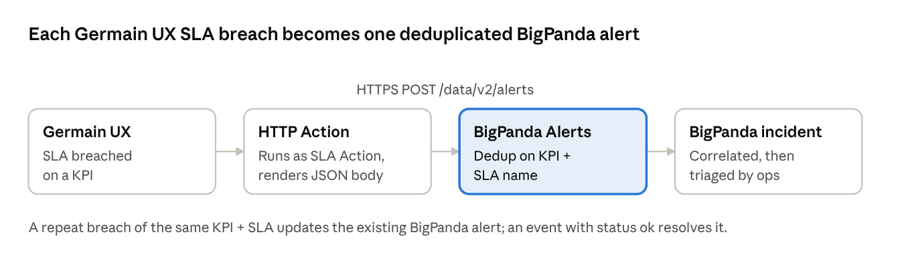
HTTPS POST /data/v2/alerts), where it is deduplicated on KPI + SLA name and correlated into incidents.
ok resolves it.
Step 1: Create the Alerts REST API integration in BigPanda
Create the integration
Name the integration
GermainUX or GermainUX - Production.Generate the App Key
app_key.Get a User API Key
Note your region's endpoint
https://api.eu.bigpanda.io/data/v2/alerts. A successful request returns 201.Step 2: Create the HTTP Action in GermainUX
Go to: GermainUX Workspace > Automation > HTTP Select the Add icon to open the HTTP Action wizard. The same wizard is available under Settings > Wizards > HTTP Action.Configure the Action
Configure the HTTP Request
Request Body Template
The body is a FreeMarker template rendered against the SLA alert context:<BigPanda App Key> with the App Key from Step 1, and set source and environment to match the KPI. Use ?json_string on every value taken from the context, so quotes and line breaks in error details don’t break the JSON.
Step 3: Assign the HTTP Action to an SLA
Open the KPI you want to send to BigPanda
Select or configure an SLA
Add the HTTP Action as the SLA Action
Send Alert to BigPanda HTTP Action as the SLA’s SLA Action.Repeat for every KPI and SLA that should reach BigPanda
context.sla and context.kpi values the template uses.
Step 4: Finish and Test
Confirm the Action Service can reach BigPanda
Complete the wizard, then run the HTTP Action manually from the Workspace and confirm it reports success
In BigPanda, confirm the alert appears on the integration and opens an incident
Force a controlled SLA breach on a test KPI and confirm the alert arrives with the right KPI, SLA, host, status and description
Trigger the same breach again and confirm BigPanda updates the existing alert instead of creating a new one
Confirm the API key does not appear in GermainUX logs or notifications
Assign the action to production SLAs
Payload Fields and Severity Mapping
BigPanda deduplicates alerts on the fields named inprimary_property and secondary_property. The template uses the KPI name and SLA name, so repeat breaches of the same SLA update one BigPanda alert.
Severity Mapping
BigPanda accepts fourstatus values. The template sets status from context.sla.severity.ordinal(), where 0 is the most severe SLA level. Test the mapping before production.
Resolving Alerts in BigPanda
The HTTP Action sends an event when an SLA is breached. A BigPanda alert resolves when it receives an event with"status": "ok" and the same kpi and check values. Choose one of these approaches:
- Resolve in BigPanda: operators resolve the incident in BigPanda once the issue is fixed.
- Send an
okevent from GermainUX: create a second HTTP Action with the same body and"status": "ok", and attach it to an SLA or rule that fires when the KPI recovers. - Resolve through the BigPanda API: call the Resolve Alerts endpoint with the BigPanda alert IDs (up to 500 alerts per request, one request per second).
Troubleshooting
References
GermainUX
- BigPanda Incident Intelligence
- Moogsoft (HTTP Action setup and SLA Action assignment)
- Configure Execution of HTTP Request
- HTTP and HTTPS Execution
- Contact GermainUX Support
BigPanda
Get Help
Contact GermainUX Support
Can't find what you need?
The content of this document is proprietary to GERMAIN SOFTWARE.