
⚙️ Configure AI Services and Prompts for Automated Actions
GermainUX AI Services can be customized to support your organization’s applications, data, business objectives, privacy policies, and automation requirements.
AI-driven features are prompt-based. Each prompt can be tailored to a specific use case, data type, KPI, model, and expected output.
📋 Configuration Overview
|
Capability |
Description |
|---|---|
|
Prompt-driven analysis |
AI features use configurable prompts to generate summaries, classifications, explanations, and recommendations. |
|
Use-case-specific prompts |
Different prompts can be created for sessions, errors, feedback, conversations, workflows, conversion, adoption, productivity, and technology data. |
|
KPI selection |
Prompts can use preconfigured or custom GermainUX KPIs as context. |
|
LLM selection |
Each prompt can use an available model appropriate for its use case. |
|
Online or local models |
Supported features can use externally hosted models or models running within the customer’s environment. |
|
Feature controls |
AI can be enabled or disabled globally and, where supported, for individual features. |
|
Automation integration |
AI outputs can trigger alerts, actions, approvals, remediation, or other workflows. |
Model availability and online or local execution support may vary by AI feature.
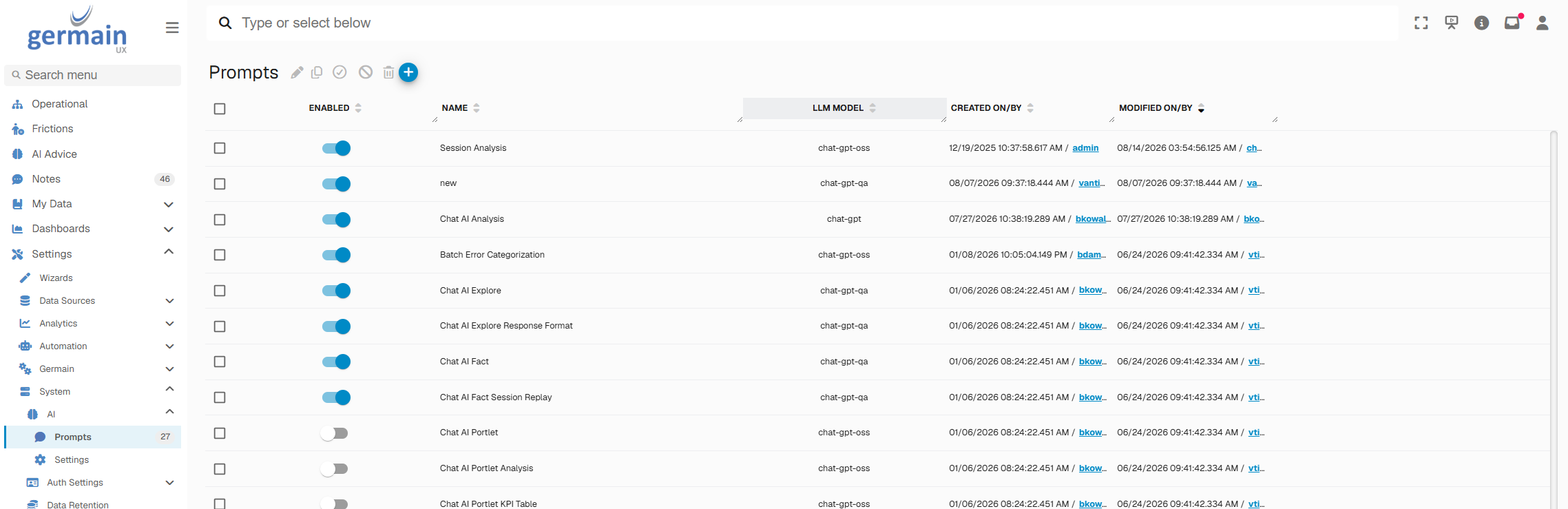
🔍 Select an LLM
Choose the model that will analyze the GermainUX data associated with a prompt.
Go to:
GermainUX Workspace -> System -> AI -> Prompts
Then:
-
Select or create a prompt.
-
Open the Model field.
-
Select the LLM.
-
Save the configuration.
Consider the model’s analytical quality, speed, context capacity, infrastructure requirements, privacy characteristics, and operating cost.
🌐 Choose Online or Local Execution
For supported models and features, AI processing can run:
|
Mode |
Advantages |
Considerations |
|---|---|---|
|
Online |
Access to externally hosted models that may provide stronger performance, larger context windows, or faster processing. |
Data-governance approval, external data transfer, availability, and usage costs may apply. |
|
Local or offline |
Keeps AI processing within the customer-controlled environment and can better support strict privacy or data-residency requirements. |
Requires suitable infrastructure and may have throughput, model-quality, or context-length limitations. |
Go to:
GermainUX Workspace -> System -> AI -> Prompts
Select a prompt and configure its available Online/Offline setting.
Some capabilities—particularly AI Explorer—may require or perform better with supported online models.
Before enabling online processing, confirm that the selected configuration complies with your organization’s privacy, security, contractual, and regulatory requirements.
✏️ Customize an AI Prompt
Prompts can be tailored to the application, KPI, data type, business process, or analytical objective.
Go to:
GermainUX Workspace -> Left Menu → Settings --> System -> AI -> Prompts
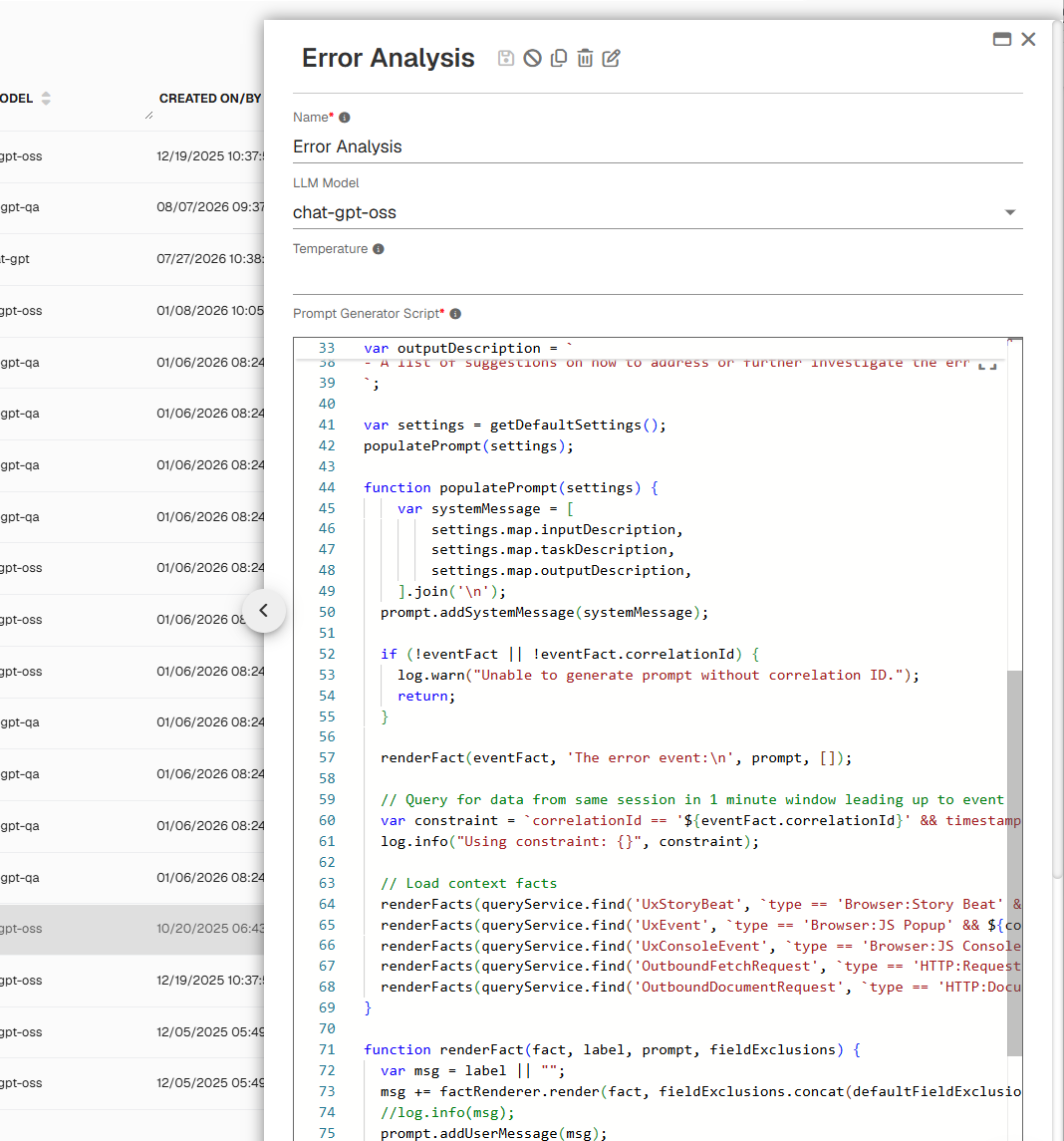
Then:
-
Select an existing prompt or create one.
-
Edit the prompt in the right-side configuration panel.
-
Select the appropriate model.
-
Configure online or local execution, when available.
-
Reference the required GermainUX data and KPIs.
-
Define the expected analysis and output.
-
Save and test the prompt.
💡 A prompt can instruct GermainUX to:
|
Action |
|---|
|
Summarize a recorded user session. |
|
Identify UX, workflow, or technology friction. |
|
Analyze errors and their user impact. |
|
Categorize and prioritize feedback. |
|
Evaluate a conversation or chatbot interaction.7 |
|
Identify causes of conversion drop-offs. |
|
Recommend corrective actions. |
|
Produce structured output for downstream automation. |
For example, a session-analysis prompt can combine User Session Replay, user interactions, errors, performance transactions, business-process steps, feedback, and application metadata to explain what occurred and recommend next steps.
🔗 Connect AI Analysis to Automated Actions
AI results can be used with GermainUX automation capabilities to create an agentic workflow.
Depending on the use case, GermainUX can:
-
Detect a configured condition.
-
Collect the relevant KPI and contextual data.
-
Execute the selected AI prompt.
-
Generate a summary, classification, priority, or recommendation.
-
Trigger an alert, API call, script, ticket, report, remediation, or approval workflow.
-
Monitor subsequent data to determine whether the issue was resolved.
Actions can execute automatically or require human approval based on the organization’s policies and the risk associated with the action.
📦 Additional Resources
-
Examples of AI Insights & Recommendations
-
AI Management
-
AI Advice dashboard
-
AI Explore diagnosis feature
-
More Analytics Features
-
More Automation Features
-
Management Features.
ℹ️ Get Help
The Germain Team can help you set this up. Contact GermainUX Support.
Component: Agent, Engine, Mobile, RPA Bot Recorder, RUM JS, RUM Ext, RUM Windows
Service: Automation
Feature Availability: 2014.1 or later