
⚙️ WebDriver Auto-Update
Synthetic monitoring environments commonly use browser-automation frameworks such as Selenium and Microsoft Edge WebDriver. When Microsoft Edge updates automatically, the installed browser and WebDriver versions may become incompatible, causing synthetic scenarios to fail even though the monitored application remains healthy.
GermainUX can automatically detect and resolve these version mismatches, keeping synthetic monitoring operational without manual intervention.
Microsoft requires the first three components of the four-part Microsoft Edge and Edge WebDriver version numbers to match. See Microsoft Edge WebDriver documentation.
🔧 Traditional Manual Process
Without automation, operations teams must:
|
Step |
|
|---|---|
|
1 |
Identify the installed browser version. |
|
2 |
Download the corresponding WebDriver. |
|
3 |
Stop any processes using the current driver. |
|
4 |
Replace the WebDriver executable. |
|
5 |
Restart or validate the synthetic monitoring service. |
This manual process can cause:
|
Issue |
|---|
|
Synthetic monitoring downtime |
|
Operational overhead |
|
Overnight alert noise |
|
False-positive incidents |
|
Unnecessary escalations |
🤖 Automated Resolution
GermainUX provides a self-healing workflow that:
|
Action |
|---|
|
Detects the installed Microsoft Edge version. |
|
Detects the installed Edge WebDriver version. |
|
Compares the first three version components. |
|
Downloads the matching WebDriver when a mismatch is detected. |
|
Replaces the existing driver. |
|
Validates the updated version. |
|
Allows synthetic monitoring to continue without manual intervention. |
⚙️ Configuration
This example uses a PowerShell script executed by a GermainUX Engine on Windows Server.
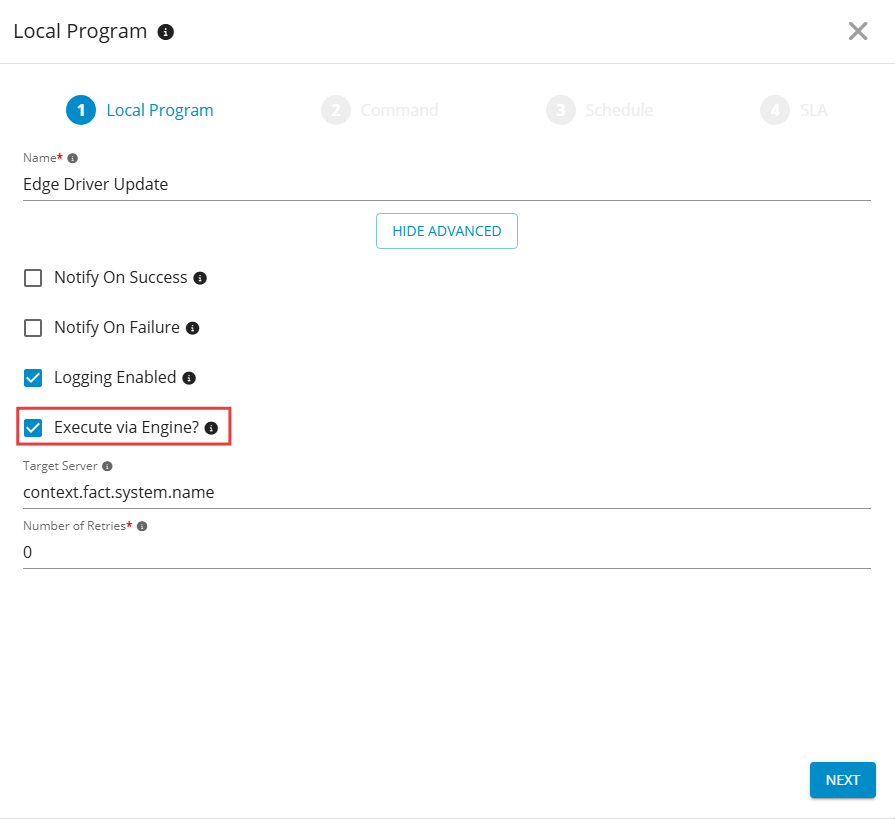
1️⃣ Create a Local Program
Go to GermainUX Workspace > Automation > Local Program, and then click Add New Configuration.
Configure:
|
Field |
Example |
|---|---|
|
Name |
|
|
Execute via Engine |
Enabled |
|
Engine |
The Engine installed on the synthetic monitoring server |
Enabling Execute via Engine ensures that the script runs on the server where Microsoft Edge and Edge WebDriver are installed.
2️⃣ Add the PowerShell Script
Click Add New Script, and then add the following PowerShell script.
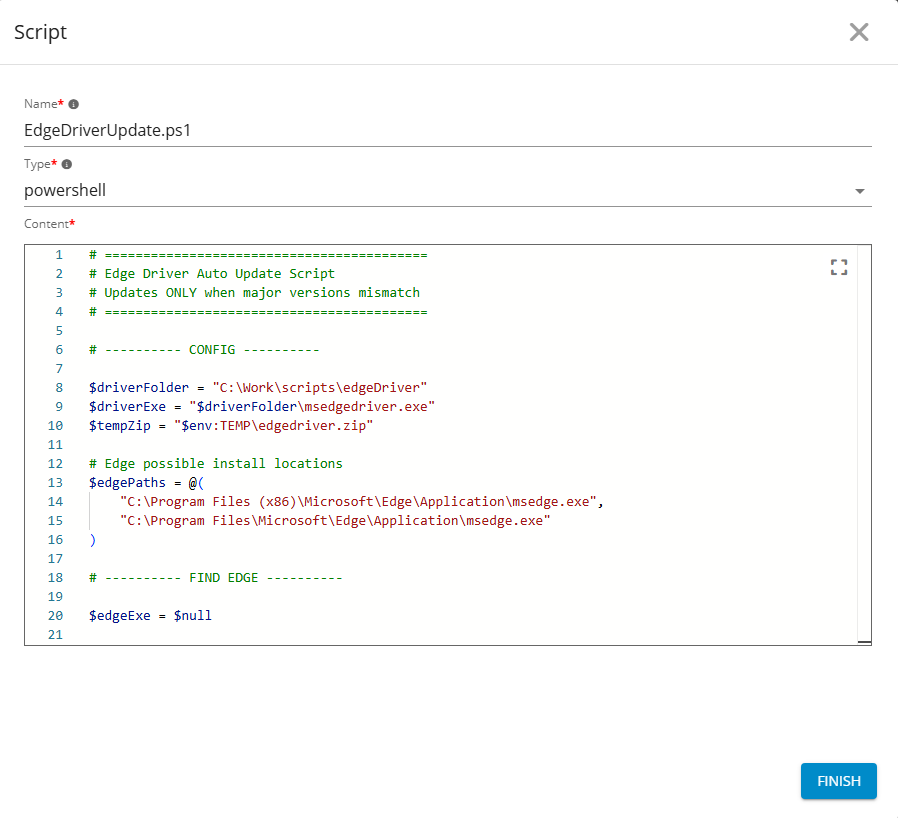
Update $driverFolder to match the Edge WebDriver location used by your synthetic monitoring environment.
# =====================================================
# Microsoft Edge WebDriver Auto-Update
# Updates the driver when the first three version
# components do not match the installed Edge browser.
# =====================================================

# ---------- CONFIGURATION ----------

$driverFolder = "C:\Work\scripts\edgeDriver"
$driverExe = Join-Path $driverFolder "msedgedriver.exe"
$tempZip = Join-Path $env:TEMP "edgedriver.zip"
$tempExtract = Join-Path $env:TEMP "edgedriver-extract"

$edgePaths = @(
    "C:\Program Files (x86)\Microsoft\Edge\Application\msedge.exe",
    "C:\Program Files\Microsoft\Edge\Application\msedge.exe"
)

# ---------- FIND MICROSOFT EDGE ----------

$edgeExe = $edgePaths |
    Where-Object { Test-Path $_ } |
    Select-Object -First 1

if (-not $edgeExe) {
    Write-Host "ERROR: Microsoft Edge was not found."
    exit 1
}

# ---------- GET BROWSER VERSION ----------

$browserVersion = ((Get-Item $edgeExe).VersionInfo.ProductVersion).Trim()
$browserParts = $browserVersion.Split(".")

if ($browserParts.Count -lt 3) {
    Write-Host "ERROR: Unable to parse the Microsoft Edge version."
    exit 1
}

$browserCompatibilityVersion = ($browserParts[0..2] -join ".")

Write-Host "Installed Edge version: $browserVersion"

# ---------- GET DRIVER VERSION ----------

$driverVersion = $null
$driverCompatibilityVersion = $null

if (Test-Path $driverExe) {
    try {
        $driverOutput = & $driverExe --version
        $driverVersion = [regex]::Match(
            $driverOutput,
            '\d+\.\d+\.\d+\.\d+'
        ).Value

        if ($driverVersion) {
            $driverParts = $driverVersion.Split(".")
            $driverCompatibilityVersion = ($driverParts[0..2] -join ".")
            Write-Host "Installed Edge WebDriver version: $driverVersion"
        }
    }
    catch {
        Write-Host "Unable to determine the installed WebDriver version."
    }
}
else {
    Write-Host "Edge WebDriver was not found."
}

# ---------- COMPARE VERSIONS ----------

if (
    $driverCompatibilityVersion -and
    $browserCompatibilityVersion -eq $driverCompatibilityVersion
) {
    Write-Host "SUCCESS: Edge and Edge WebDriver are compatible."
    Write-Host "No update is required."
    exit 0
}

Write-Host "A WebDriver version mismatch was detected."
Write-Host "Downloading the matching Edge WebDriver..."

# ---------- PREPARE UPDATE ----------

New-Item -ItemType Directory -Force -Path $driverFolder | Out-Null

Get-Process msedgedriver -ErrorAction SilentlyContinue |
    Stop-Process -Force

foreach ($path in @($tempZip, $tempExtract)) {
    if (Test-Path $path) {
        Remove-Item $path -Recurse -Force
    }
}

$downloadUrl = "https://msedgedriver.microsoft.com/$browserVersion/edgedriver_win64.zip"

Write-Host "Download URL: $downloadUrl"

# ---------- DOWNLOAD ----------

try {
    Invoke-WebRequest -Uri $downloadUrl -OutFile $tempZip -ErrorAction Stop
}
catch {
    Write-Host "ERROR: Unable to download Edge WebDriver."
    Write-Host $_.Exception.Message
    exit 1
}

# ---------- EXTRACT ----------

try {
    Expand-Archive `
        -Path $tempZip `
        -DestinationPath $tempExtract `
        -Force `
        -ErrorAction Stop
}
catch {
    Write-Host "ERROR: Unable to extract Edge WebDriver."
    Write-Host $_.Exception.Message
    exit 1
}

$downloadedDriver = Join-Path $tempExtract "msedgedriver.exe"

if (-not (Test-Path $downloadedDriver)) {
    Write-Host "ERROR: msedgedriver.exe was not found in the archive."
    exit 1
}

# ---------- REPLACE DRIVER ----------

try {
    Copy-Item $downloadedDriver $driverExe -Force -ErrorAction Stop
}
catch {
    Write-Host "ERROR: Unable to replace the existing Edge WebDriver."
    Write-Host $_.Exception.Message
    exit 1
}

# ---------- CLEAN UP ----------

foreach ($path in @($tempZip, $tempExtract)) {
    if (Test-Path $path) {
        Remove-Item $path -Recurse -Force
    }
}

# ---------- VERIFY ----------

try {
    $newDriverOutput = & $driverExe --version
    $newDriverVersion = [regex]::Match(
        $newDriverOutput,
        '\d+\.\d+\.\d+\.\d+'
    ).Value

    $newDriverParts = $newDriverVersion.Split(".")
    $newDriverCompatibilityVersion = ($newDriverParts[0..2] -join ".")

    Write-Host "Updated Edge WebDriver version: $newDriverVersion"

    if ($newDriverCompatibilityVersion -eq $browserCompatibilityVersion) {
        Write-Host "SUCCESS: Edge WebDriver was updated successfully."
        exit 0
    }

    Write-Host "ERROR: Edge and Edge WebDriver remain incompatible."
    exit 1
}
catch {
    Write-Host "ERROR: Unable to validate the updated Edge WebDriver."
    Write-Host $_.Exception.Message
    exit 1
}
The script:
|
Behavior |
|---|
|
Locates the installed Microsoft Edge executable. |
|
Reads the browser and WebDriver versions. |
|
Compares their first three version components. |
|
Stops active |
|
Downloads and extracts the matching 64-bit Windows driver. |
|
Replaces the existing executable. |
|
Validates compatibility after installation. |
|
Returns exit code |
3️⃣ Configure the Command
Configure the Local Program to execute the PowerShell script.
|
Field |
Example |
|---|---|
|
Program |
|
|
Arguments |
|
|
Expected Exit Value |
|
|
Timeout |
A duration sufficient to download, extract, and validate the driver |
|
Notify on Failure |
Enabled |
|
Logging Enabled |
Enabled |
Use only the PowerShell execution policy permitted by your organization’s security requirements.
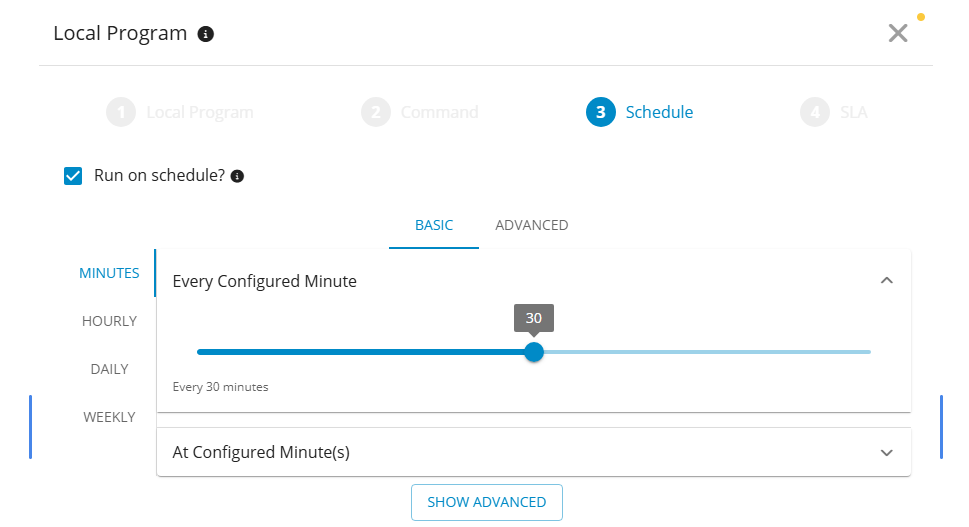
📅 4. Configure the Schedule
Choose a schedule based on browser-update frequency and synthetic monitoring requirements.
|
Consideration |
Example |
|---|---|
|
Execution frequency |
Every six hours or once per day |
|
Execution window |
Before critical synthetic monitoring cycles |
|
Execution overlap |
Run when no synthetic scenario is actively using the driver |
|
Failure notification |
Notify administrators when synchronization fails |
⏰ 5. Configure an SLA Trigger
The action can also run when an SLA condition indicates a possible driver mismatch.
Possible triggers include:
|
Trigger |
|---|
|
Synthetic scenario execution failures |
|
A sudden increase in failed synthetic transactions |
|
WebDriver startup failures |
|
A detected browser and driver mismatch |
An SLA-triggered action enables GermainUX to initiate remediation only when monitoring degradation occurs.
✅ Result
Once configured, the GermainUX Engine automatically synchronizes Microsoft Edge WebDriver with the installed Edge browser. The workflow can run on a schedule or in response to an SLA condition.
This reduces false-positive failures, monitoring interruptions, manual maintenance, and unnecessary incident escalations.
💡 Additional Automation Use Cases
The same GermainUX automation pattern can support:
|
Use Case |
|---|
|
Infrastructure maintenance |
|
Service recovery |
|
Dependency synchronization |
|
Environment consistency enforcement |
|
Automated remediation |
|
Configuration validation |
📋 Operational Recommendations
|
Recommendation |
|---|
|
Test the script in a non-production environment. |
|
Run the GermainUX Engine with only the permissions required to update the driver. |
|
Restrict outbound downloads to trusted Microsoft endpoints. |
|
Schedule updates when no synthetic scenario is using the driver. |
|
Enable execution logging and failure notifications. |
|
Validate your organization’s code-signing and software-download requirements before deployment. |
|
Maintain a recoverable copy of the previous driver when required by your change-management policy. |
ℹ️ Get Help
The Germain Team can help you set this up. Contact GermainUX Support.
Component: Engine
Feature Availability: 2026.1 or later