
⚙️ GermainUX AI configuration
GermainUX AI can be configured to align with an organization’s approved models, hosting standards, security policies, and compliance requirements.
👥 Administrators can:
|
Action |
|---|
|
Select the LLM used by GermainUX. |
|
Choose online or offline execution. |
|
Enable or disable AI capabilities. |
|
Customize prompts for specific use cases and data. |
🔎 Select an LLM
GermainUX supports multiple LLM integration approaches.
🔗 Integration Options
|
Approach |
Description |
|---|---|
|
Internally hosted API |
Connect to a model hosted within the organization and exposed through an OpenAI-compatible API endpoint. |
|
Model runner |
Connect to a model served through a supported runner, such as Ollama. |
|
GermainUX AI Service |
Run a supported model directly within the GermainUX AI Service using compatible model files and frameworks, such as Transformers. |
|
Externally hosted API |
Connect to an approved cloud-hosted model through its supported API. |
To select a model, go to:
GermainUX Workspace -> Settings -> System -> AI -> Prompts -> Model
ℹ️ Information Required for a Hosted LLM API
If GermainUX will connect to a hosted model, provide:
|
Item |
Description |
|---|---|
|
API endpoint |
URL used to access the hosted model. |
|
Authentication |
Required authentication method and securely configured credentials. |
|
API specification |
Whether the service provides an OpenAI-compatible API or another supported interface. |
|
Model identifier |
Name or identifier of the model to invoke. |
|
Network requirements |
Proxy, firewall, certificate, or routing requirements. |
Store API keys and other secrets in an approved credential configuration. Do not include them directly in prompts or documentation.
💻 Information Required for a Local LLM
If the model will run within the GermainUX environment, provide:
|
Item |
Description |
|---|---|
|
Framework or runtime |
Runtime used to load and execute the model. |
|
Model format |
Format and location of the model files. |
|
Hardware requirements |
Required CPU, GPU, memory, and storage capacity. |
|
Security requirements |
Data-access, isolation, and credential requirements. |
|
Network constraints |
Rules governing model downloads, updates, and service communication. |
|
Performance requirements |
Expected response time, context size, concurrency, and throughput. |
After the hosting method and interface are confirmed, GermainUX can configure its AI services to use the organization’s approved LLM.
🔄 Online or Offline Execution
Most supported models can operate in one of two modes:
|
Mode |
Description |
|---|---|
|
Online |
GermainUX connects to a model hosted outside the GermainUX AI Service. |
|
Offline |
The model runs directly within the GermainUX AI Service and does not require an external inference endpoint. |
Select the appropriate mode based on data privacy, compliance, latency, model capability, infrastructure, and cost requirements.
To configure the execution mode, go to:
GermainUX Workspace -> System -> AI -> Prompts, select a prompt, and configure its Online/Offline setting.
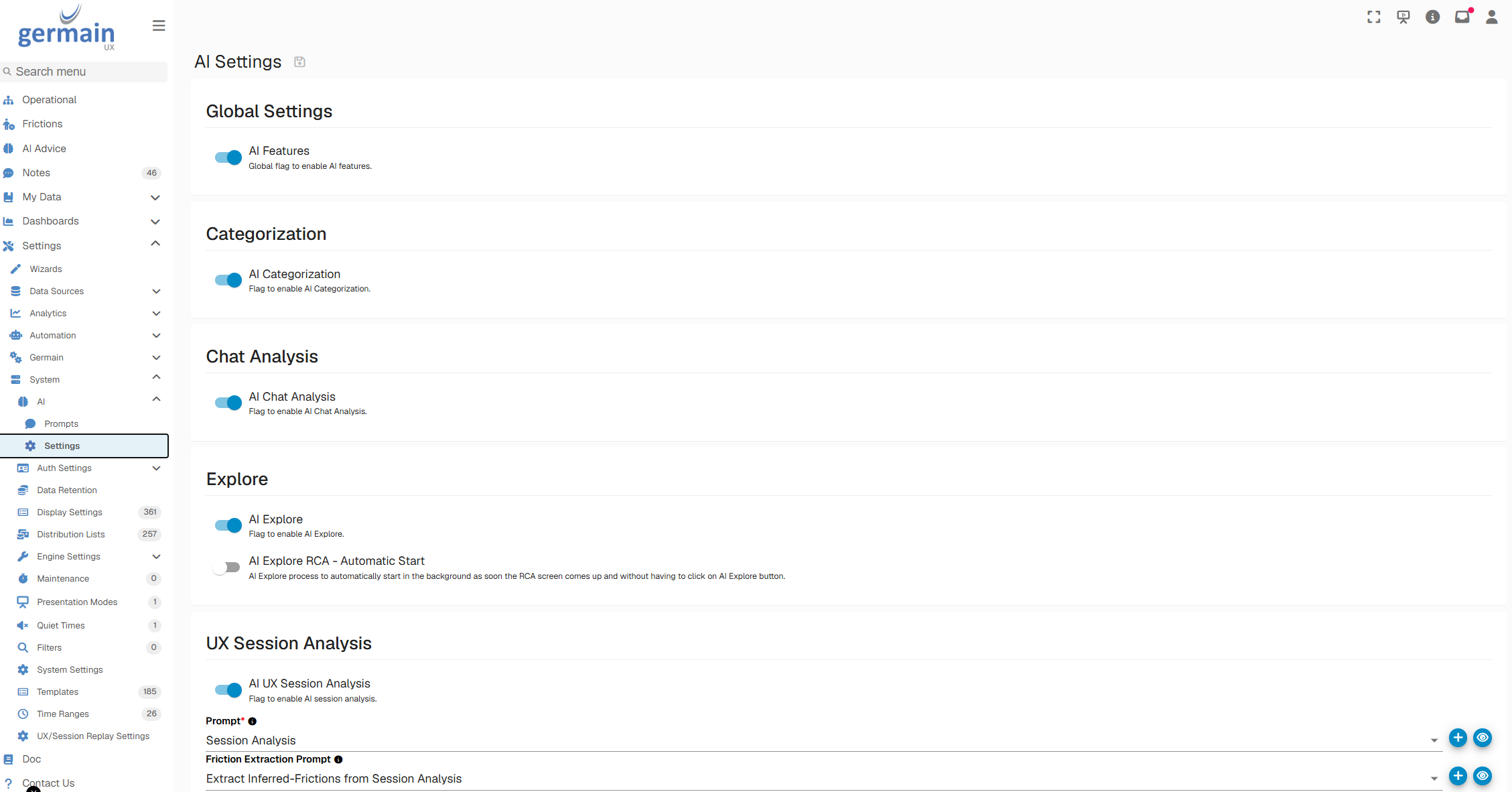
⛔ Enable or Disable AI Features
AI features are disabled by default to support organizational security, privacy, and compliance reviews.
Administrators can review and control individual AI capabilities based on internal policies and approved use cases.
Go to:
GermainUX Workspace -> System -> AI -> Settings
Before enabling an AI feature, review:
|
Consideration |
|---|
|
The data sent to the model |
|
The model and hosting location |
|
Data-retention policies |
|
Personal or sensitive information handling |
|
Authentication and network controls |
|
Applicable regulatory requirements |
✏️ Customize AI Prompts
Prompts can be customized to use preconfigured or custom KPIs. This allows organizations to tailor AI-generated analysis, summaries, recommendations, and automated workflows to their terminology and operational requirements.
Go to:
GermainUX Workspace -> System -> AI -> Prompts
Select a prompt, and then edit it in the right panel.
Before deploying a customized prompt:
-
Validate it with representative data.
-
Confirm that sensitive information is handled appropriately.
-
Review the generated results for accuracy and consistency.
-
Test failure and incomplete-data scenarios.
-
Control access to prompt configuration.
-
Maintain a version history for production prompts.
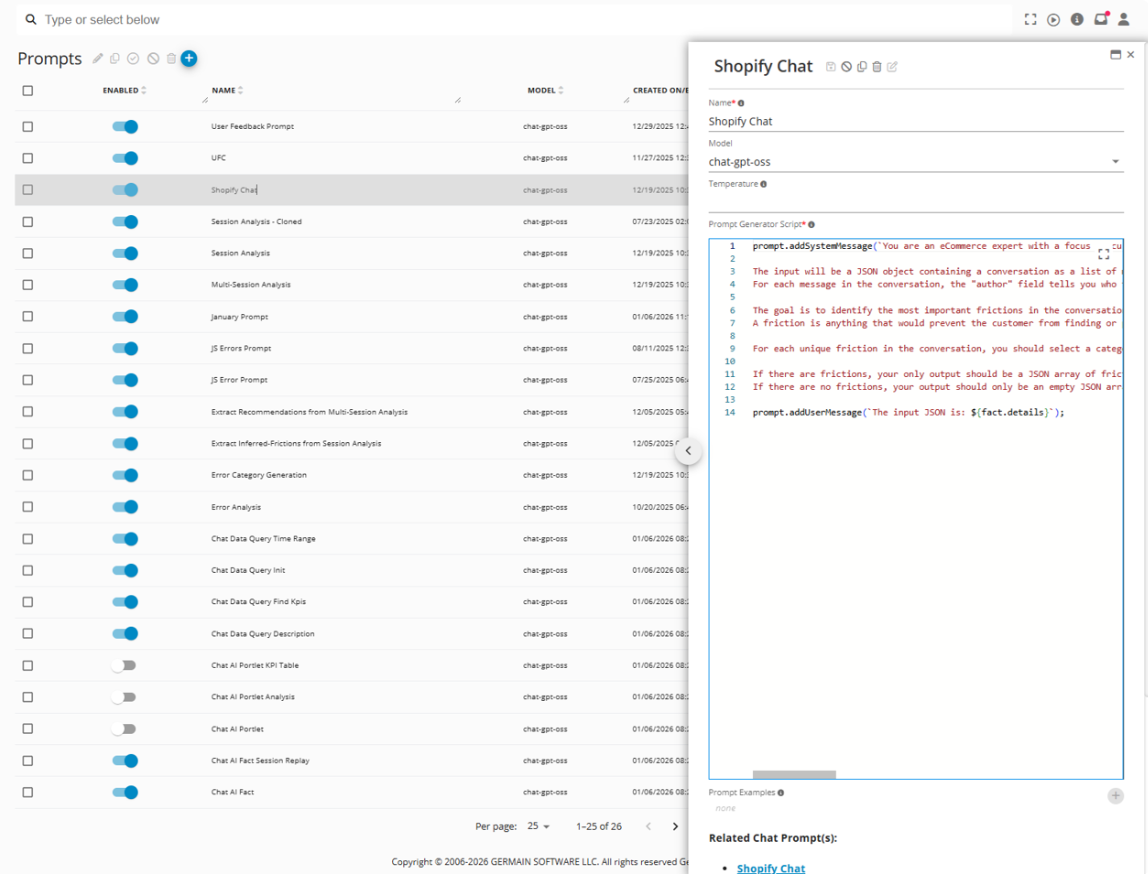
Edit an AI Prompt - GermainUX
📦 Additional Resources
-
AI Insights & Recommendations
-
Other Management Features.
-
Analytics Features
-
Automation Features
ℹ️ Get Help
The Germain Team can help you set this up. Contact GermainUX Support.
Service: Analytics, Automation
Feature Availability: 2023.1 or later