

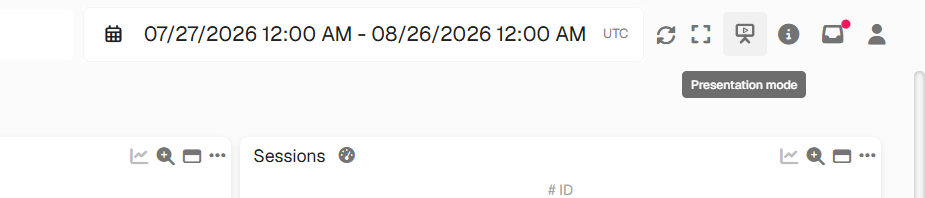
Start Presentation Mode - GermainUX
Use cases
- Production-monitoring rooms
- Network or security operations centers
- War rooms
- Shared office displays
- Large wall-mounted screens
Configure Presentation Mode
1
Log in to the Germain Workspace
2
Go to Left Menu -> Settings --> System -> Presentation Mode
3
Add the dashboards you want to display
4
Arrange the dashboards in the desired rotation order
5
Save the configuration
6
Start Presentation Mode
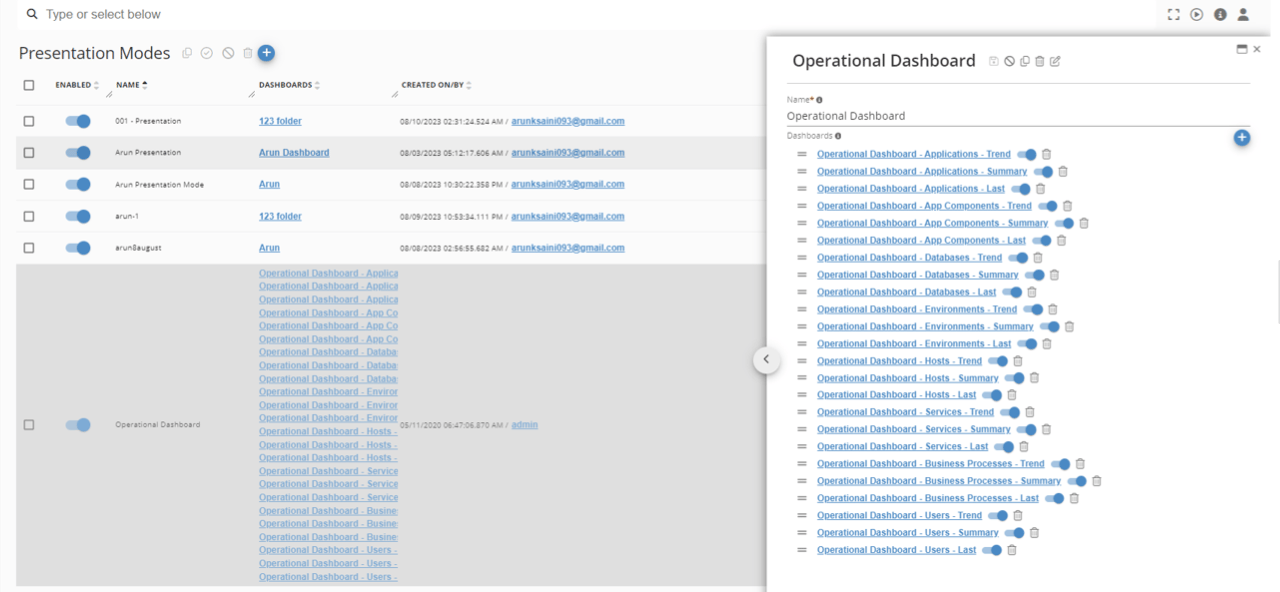
Configure Presentation Mode - GermainUX
Get Help
Contact GermainUX Support
The GermainUX team helps you get up and running faster, empower your team, turn data into actionable insights, and optimize performance to deliver measurable business outcomes.
Can't find what you need?
Search all GermainUX docs with Ctrl + K, or use the feedback buttons at the bottom of this page to tell us what is missing.
The content of this document is proprietary to GERMAIN SOFTWARE.