

Detect PDF issue on SFDC/Salesforce
Automation
Deprecated Solr
Maintenance
Exclude a portion of the UI (GDPR / PCI)
Monitoring & Analytics
Poor Network/Grade
Monitoring & Analytics
User Feedback (at scale)
Monitoring & Analytics
Roadmap 2023
Email for roadmap details
11/30/22
Vulnerabilities & Fixes
Automation - Detect PDF issue on SFDC/Salesforce
Description
This client wanted to proactively, and in real-time, detect issues related to opening a PDF document on/from salesforce.com. The client also wanted to identify these issues before a real SFDC user experiences it. To do that, we recorded a Selenium script using Germain RPA Bot Recorder and used thedriver.getWindowsHandles method to switch to another tab within a Selenium script: https://www.tutorialspoint.com/what-is-the-difference-between-getwindowhandle-and-getwindowhandles-in-selenium
Notes
- Germain has built-in capabilities to simplify the 1) recording 2) deployment 3) and management of a Selenium script.
- This use case was on Salesforce.com. The approach is valid for any other app where you would want to automate PDF opening issues or other use cases related to tab management and issue detection.
Maintenance - Deprecated Solr
Years ago, we started out using Solr as a Data Indexer and only later used Elasticsearch as a Datamart. More recently — as we have been scaling Germain to support our ever-growing client’s needs — we faced a number of challenges:- Scalability limitations with Solr.
- Many advanced features we rely on are not, or only poorly, supported by Solr. We had to limit our capabilities to the lowest common denominator between the two products.
- Had to maintain two separate versions of our indexer code for Solr and ES; this increased code complexity, maintenance and QA effort.
- This switch to ES reduces the overall number of services needed by Germain.
- System requirements remain the same; any CPU / RAM previously set aside for Solr can be used for ES instead.
- For customers currently using a relational database (MySQL, Oracle, etc.) for their Datamart, they can continue to do so. For the next upgrade, we will switch out Solr for ES.
Monitoring & Analytics - Exclude a portion of the UI (GDPR / PCI)
Description
This client needed a portion of the Siebel User Interface to NOT be monitored by Germain, for privacy concerns. So we enhanced our existing exclusion mechanism to support this requirement.Configure
Data Privacy (GDPR, PCI, PII).Monitoring & Analytics - Poor Network/Grade
Description
Our RUM/Real User Monitoring capability has the ability to identify Network Grade. This makes it easier for you to know whether the Network is at the root-cause of a slow page.Configuration
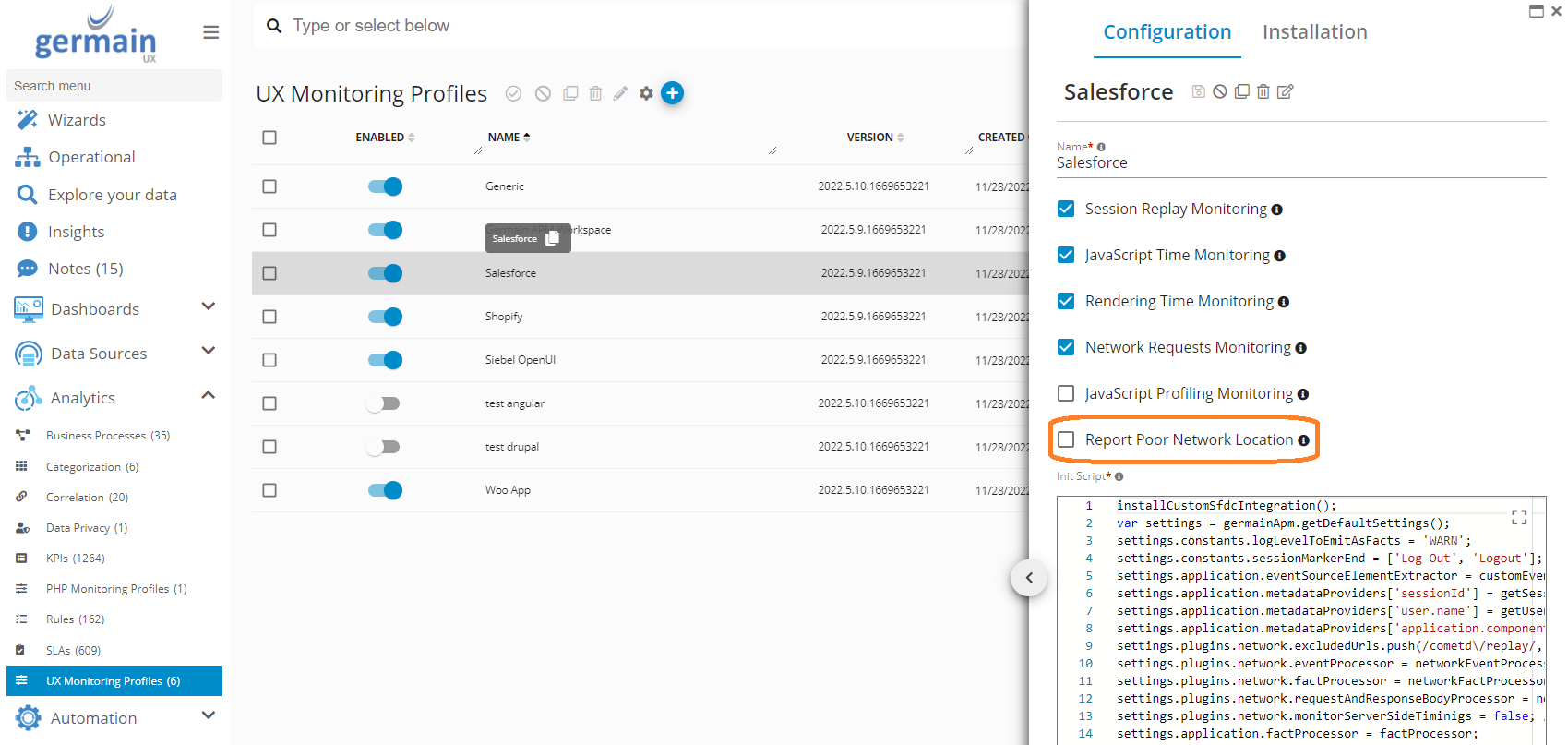
This works for both Germain RUM “Browser Extension” or “JavaScript”.Enable “Report Poor Network Location”
- Log on to Germain
- left menu > Analytics > UX Monitoring Profiles
Modify SLA
The following line can be added to the Germain RUM’s init-script to modify the list of poor grades (i.e. what is considered a “poor network”): settings.plugins.poorNetworkLocation.poorGrades = [‘slow-2g’, ‘2g’, ‘3g’]; For example, ‘3g’ can be removed so only ‘2g’ and below are considered poor.
Source: https://developer.mozilla.org/en-US/docs/Glossary/Effective_connection_type
Data Model
KPI: UxMetric- Type: [Browser:Poor Network]
- Value: [DownlinkMbps] - The values of ‘
slow-2g’, ‘2g’, ‘3g’, and ‘4g’ are determined using observed round-trip times and downlink values. - Name: [NetworkGrade]
- Location: [LocationDimension]
Note
Network can also be monitored via a Germain Engine. More details here.Monitoring & Analytics - User Feedback (at scale)
Description
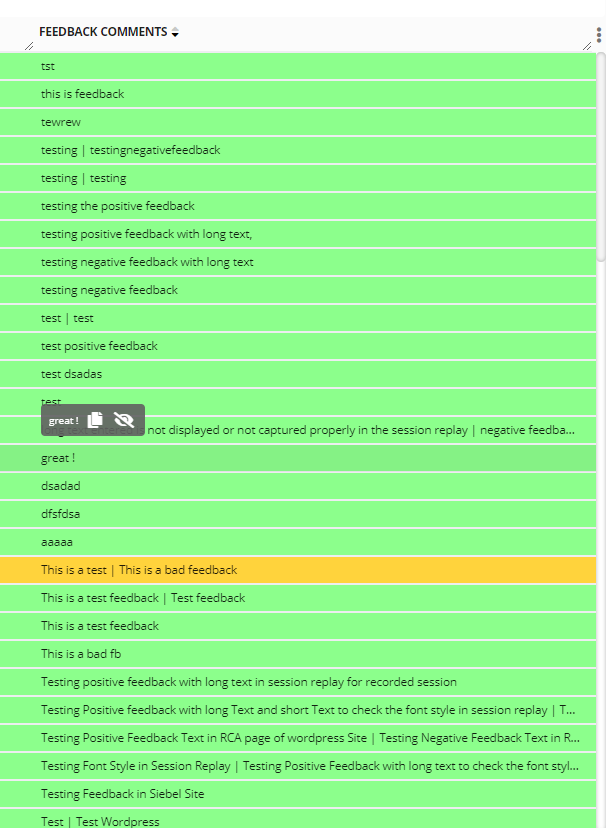
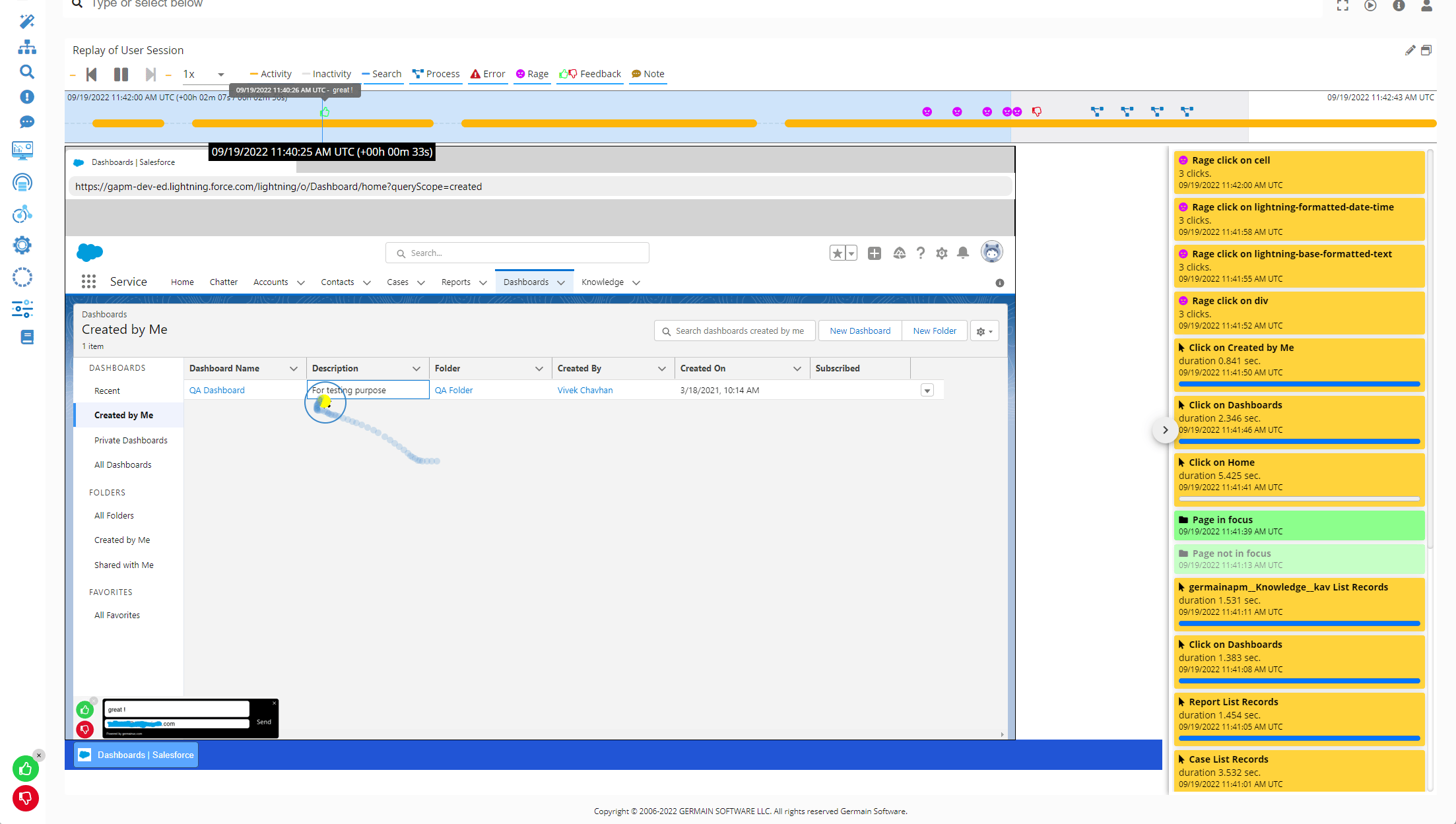
Application Users, when monitored by Germain, have the ability to provide feedback by clicking Thumbs Up/Down icons and/or entering text and an email address into our Feedback popup windows. Initially implemented six months ago, User Feedback was only visible at the RCA dashboard level, requiring watching individual User Sessions for each piece of feedback. Now, User Feedback is available “at scale” on Aggregate and Drill-through dashboards. Users can analyze the volume, type, and trend of feedback provided by thousands of users, and drill down into specific feedback for more detail. Monitored Users provide feedback in real-time via a popup window that appears on the Monitored application. The look-and-feel of this Feedback popup window is configurable to match the monitored application’s interface.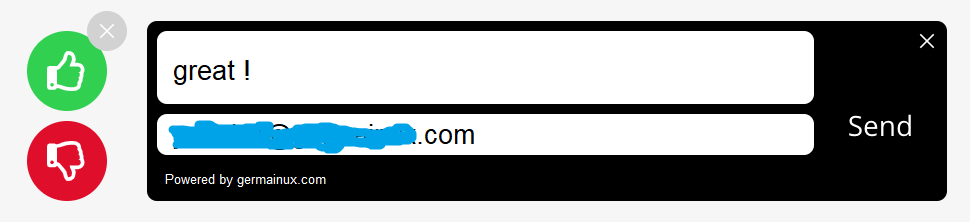
- Aggregate dashboards (providing volume, types, and feedback trends at scale)

- Drill-through dashboards
- RCA dashboard (where users can “replay” a recorded user session by Germain)
Configure
Detailed Instructions for enabling the User Feedback Popup are provided here.Roadmap 2023
Our 2023 roadmap has been finalized. Please email us at info@germainux.com if you need details. Thanks to all our Clients for sharing their feedback all year round. This is truly valuable to us.Vulnerabilities & Fixes - 11/30/22
Descriptions As part of our SOC2 compliance program, here are the security breaches that have been found in the past weeks. We remain available to help you with these issues. If you have not already, you can create a ticket here: https://germainux.atlassian.net/servicedesk/customer/portal/1 or email us at info@germainux.com.2022.3.52
Download:GermainAPMEngine-2022.3-52-binary.tar.gz (no longer available) GermainAPMEngine-2022.3-52-binary.zip (no longer available) GermainAPMServer-2022.3-52-binary.tar.gz (no longer available) GermainAPMServer-2022.3-52-binary.zip (no longer available) GermainAPMService-2022.3-52-binary.tar.gz (no longer available) GermainAPMService-2022.3-52-binary.zip (no longer available)
Docker: public.ecr.aws/h0m9e4y5/germainapm-engines:2022.3-52
public.ecr.aws/h0m9e4y5/germainapm-server:2022.3-52
public.ecr.aws/h0m9e4y5/germainapm-services:2022.3-52
2022.4.29
Download:GermainAPMEngine-2022.4-29-binary.tar.gz (no longer available) GermainAPMEngine-2022.4-29-binary.zip (no longer available) GermainAPMServer-2022.4-29-binary.tar.gz (no longer available) GermainAPMServer-2022.4-29-binary.zip (no longer available) GermainAPMService-2022.4-29-binary.tar.gz (no longer available) GermainAPMService-2022.4-29-binary.zip (no longer available)
Docker: public.ecr.aws/h0m9e4y5/germainapm-engines:2022.4-29
public.ecr.aws/h0m9e4y5/germainapm-server:2022.4-29
public.ecr.aws/h0m9e4y5/germainapm-services:2022.4-29
Get Help
Contact GermainUX Support
The GermainUX team helps you get up and running faster, empower your team, turn data into actionable insights, and optimize performance to deliver measurable business outcomes.
Can't find what you need?
Search all GermainUX docs with Ctrl + K, or use the feedback buttons at the bottom of this page to tell us what is missing.
The content of this document is proprietary to GERMAIN SOFTWARE.