

Bot (tips)
Automation
Application Crash RCA
Monitoring & Analytics
Docker
Monitoring & Analytics
Automation - Bot (tips)
Description
Here are some TIPs on using Germain’s bot (that is integrated with Selenium), all this to help avoid UX and Process issues. While working with Selenium, a few scenarios can occur which can prevent the bot from performing as expected. Such scenarios are:- Bot tries to perform an action before the webpage is fully loaded
- Bot tries to click on an element before it is ready to be interacted with
- AlertIsPresent()
- elementSelectionStateToBe()
- elementToBeClickable()
- elementToBeSelected()
- frameToBeAvaliableAndSwitchToIt()
- invisibilityOfTheElementLocated()
Show all 18
Show all 18
- invisibilityOfElementWithText()
- presenceOfAllElementsLocatedBy()
- presenceOfElementLocated()
- textToBePresentInElement()
- textToBePresentInElementLocated()
- textToBePresentInElementValue()
- titleIs()
- titleContains()
- visibilityOf()
- visibilityOfAllElements()
- visibilityOfAllElementsLocatedBy()
- visibilityOfElementLocated()
Root-cause of the issue
This snippet of code was responsible for causing this inconsistent behavior wait.until(ExpectedConditions.visibilityOfElementLocated(By.xpath(“//a[text()=‘Overview’]”)));Solution
The following code resolved this issue wait.until(ExpectedConditions.elementToBeClickable(By.xpath(“//a[text()=‘Overview’]”))); This new code is more stable because it waits for the element to be clickable before it tries to perform an action on it.Complete Solution - Full Synthetic Scenario
Monitoring & Analytics - Application Crash RCA
Description
In my 25 years of experience, I have seen plenty of applications crashing—sometimes hundreds of times a day. Some of these crashes impact a business quite significantly, while some don’t. Either way, many of these crashes aren’t reported because users are too busy and can work around them. In the meantime, user experience degrades and business losses increase. It takes days—and sometimes even weeks—to analyze the business impact of hundreds of application crashes, making it nearly impossible. An application restart is often the easy ‘solution,’ but that’s not enough. Severe business impact? Or can it be ignored?Germain can help save significant RCA time by automatically reporting the number of user and/or business processes that are affected by application crashes. That way, your Ops team can focus on the crashes that are critical to your business. Recurring or new?
Germain can help save significant analysis time by automatically analyzing and distinguishing crashes that occurred before, crashes that the development team is actively trying to fix, and the crashes that are “new”/have never been seen before. This allows your Devops teams to focus on analyzing the new problems that are critical to the business. This is very handy when dealing with hundreds of crashes per day.
Benefit
Significantly improve UX and Process performance by finding within minutes (instead of months) critical Application Crashes that affect the business the most, and finding their root-cause, which in turns improve Customer Experience, Retention or Sales.Configuration
CategorizationMonitoring & Analytics - Docker
Description
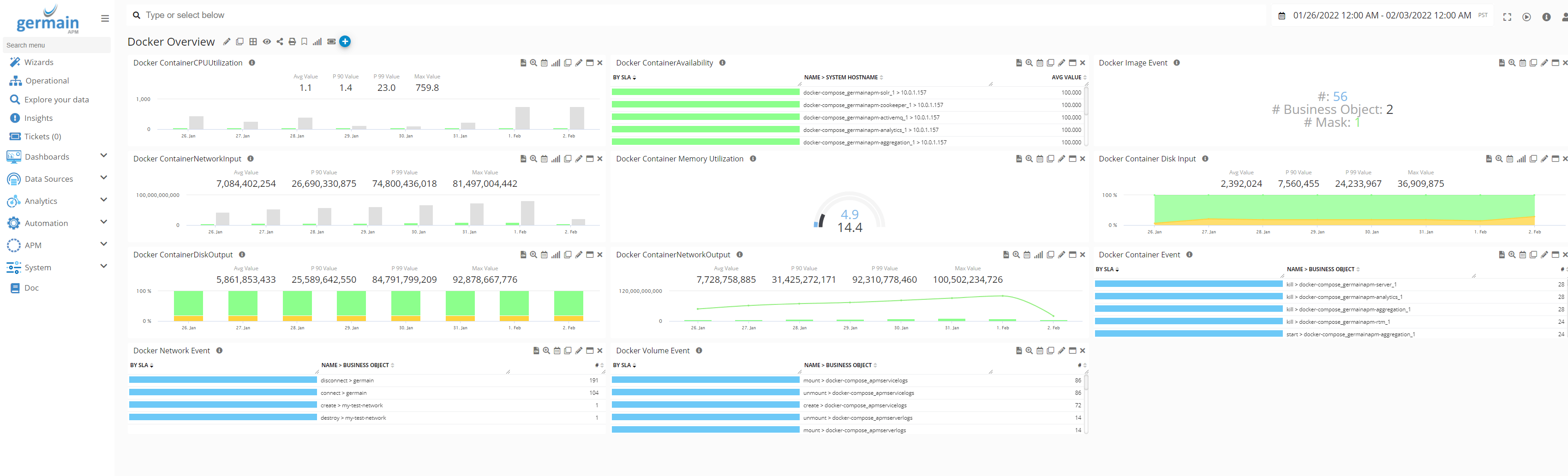
If, like many organizations, you are leveraging Docker, you are likely facing a number of new challenges as you try to scale your organization with it. Germain can now help proactively detect performance issues before the issues impact your business. Germain can also help troubleshoot issues in real-time via a number of new mechanisms in the areas of synthetic, predictive, and reactive real-time monitoring. Docker-related KPI currently preconfigured in Germain:- Volume Events (via Drool file, HTTP Log)
- Container
- Network monitoring (via Docker’s rest api)
- Disk monitoring(via Docker’s rest api)
- Components monitoring(via Docker’s rest api)
- Files Creation monitoring(via Docker’s rest api)
- Profiles Creation(via Docker’s rest api)
Configuration
Docker ObservabilityGet Help
Contact GermainUX Support
The GermainUX team helps you get up and running faster, empower your team, turn data into actionable insights, and optimize performance to deliver measurable business outcomes.
Can't find what you need?
Search all GermainUX docs with Ctrl + K, or use the feedback buttons at the bottom of this page to tell us what is missing.
The content of this document is proprietary to GERMAIN SOFTWARE.