

Saved 1.5 month to identify 1)repro scenario 2)root-cause 3)solution to fix a Siebel CRM OM crash
Customer Story
Analytics - "Static Content" time insights (for User login, Page Navigation or Page Refresh)
for Siebel CRM - SR Broker & SC Broker
Analytics
Synthetic Transaction (e.g. for BAM, SOA, OSB, etc)
Automation
Apache SolR and ElasticSearch
Benchmark
Integrated Apache SolR for Data Indexing and Discovery (<500ms search in a 1 Million dataset)
Backend
Replaced Payara by Tomcat/Spring Boot
Backend
Easier/more natural way to Add Metric
Dashboard
Filtering
Dashboard
Search Dashboard
Dashboard
UI polishing and UX improvement
Dashboard
Data anonymization
Documentation
Rest APIs
Documentation
Customer Story - Saved 1.5 month to identify 1)repro scenario 2)root-cause 3)solution to fix a Siebel CRM OM crash
One of our clients saved 1.5 month of troubleshooting and negative business impact using Germain and germain CRT in conjunction, to detect, troubleshoot, reproduce and fix a Siebel CRM Object Manager crash that had been occurring on their production environment.Success story details: click here
Analytics - “Static Content” time insights (for User login, Page Navigation or Page Refresh)
Description
Time breakdown for any Static Content (css, js, images, etc), that gets downloaded during a User login, Page Navigation or Page Refresh, is now provided on any Root-cause Analysis dashboard. Many customers had been asking about this and some of you have already benefited from that enhancement. This enhancement applies to any web application (Angular JS, HTML, JS, React, SPA, Salesforce.com, Siebel CRM, etc)Example
e.g. The root-cause analysis of a user logging on to Siebel CRM now shows the time it takes loading CSS, Javascripts, Images.Analytics - for Siebel CRM - SR Broker & SC Broker
Enhancement of the monitoring rules that are in charge of monitoring performance of Siebel CRM’s SR Broker and SC Broker, to help detect early sign of “hangs”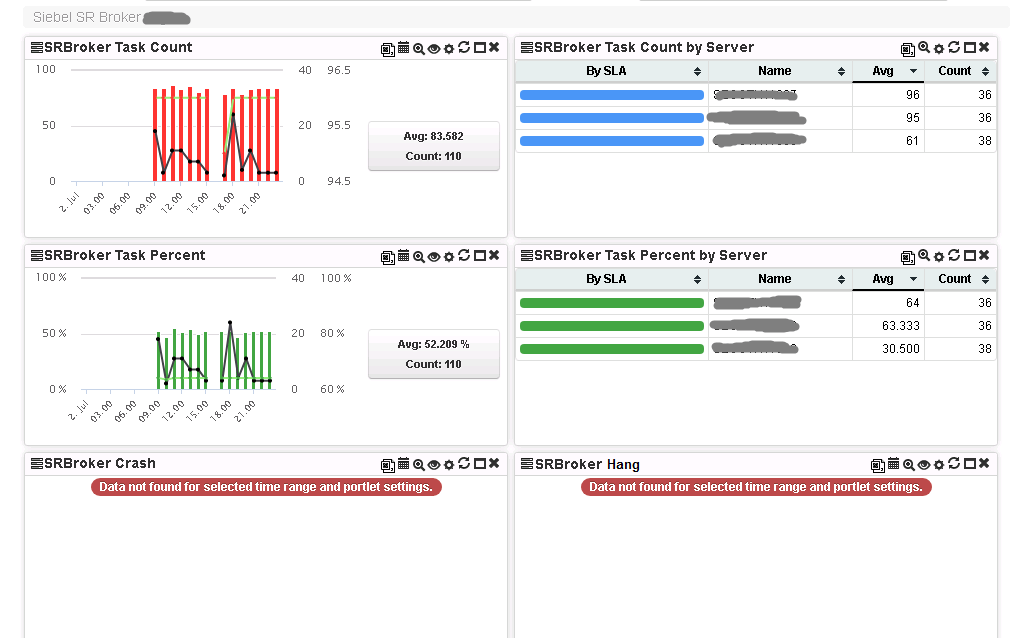
Automation - Synthetic Transaction (e.g. for BAM, SOA, OSB, etc)
This isn’t a new feature, but a reminder that as part of the Germain’s automation framework, Synthetic Transaction can be configured. e.g. for one of our customers, we have configured Synthetic Logins against their Oracle BAM, SOA and OSB technologies, providing details analytics and email alert whenever these Synthetic Transactions become slow or fail. As any other configuration in Germain, these synthetic transaction are stored as “metadata” and can be shared with any other customers upon request.Benchmark - Apache SolR and ElasticSearch
Support ElasticSearch for server-side data indexing and discovery if you want Germain to rely on this technology.Comparative Analysis of Apache SolR and ElasticSearch
Backend - Integrated Apache SolR for Data Indexing and Discovery (<500ms search in a 1 Million dataset)
New Data Search capability we introduced last month, needed a server-side data indexing and data discovery mechanism, to enable fast data/insights searching. We benchmarked SolR and ElasticSearch and found SolR significantly faster and more robust in the area of NLP/ML, so went ahead and integrated SolR in Germain.Benchmark
- Indexed 1million rows in less than 4 min using our own 3-year old desktop, without any tuning
- Searched on this 1 million row is taking at the most 500ms
Comparison of Apache SolR & ElasticSearch
Backend - Replaced Payara by Tomcat/Spring Boot
Description
Replaced Glassfish/Payara by Tomcat/Spring Boot to significantly improve availability, scalability and flexibility of monitoring and automation provided by Germain.How to configure
GermainUX - Enterprise (on Tomcat)Dashboard - Easier/more natural way to Add Metric
Description
This is to help fasten creation of dashboard on any Standard Dashboard via the ADD METRIC button we added last month. At this point, when users click the Add Metric, they are 1)first offered an easy/natural way to add a metric by simply typing a series of keywordsor if none of the metrics that are offered to them are what they need, they can 2)click the “add a more complex metric” link, which re-directs them to a more flexible way to add one or several metric within a single portlet (which is the mechanism customers have used so far).Demo
Dashboard - Filtering
Description
No change to the filtering mechanism other than the fact that we have moved out the ability to add a metric to a dashboard from within the Filter panel as users would find that too confusing. You can now create a dashboad via 1)Add Metric 2)Search Dashboard (newly introduced this month) 3)Config ConsoleDemo
Dashboard - Search Dashboard
Description
Introducing a new Search Dashboard that allows users to find insights within their data and save the search result in a standard dashboard. Demo:Dashboard - UI polishing and UX improvement
New Tree control
New Tree control that provides:- Search a Dashboard
- Better user experience
Portlet enhancements
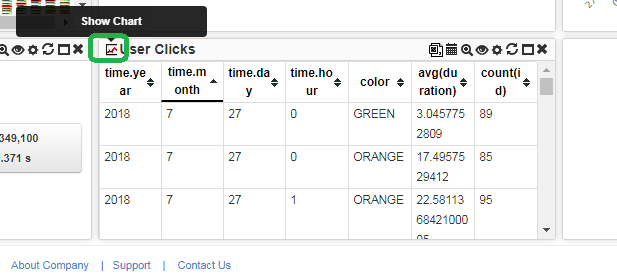
Look-and-feel, icons cleanup and “no data available..” message/refresh button.Tabular-to-graph switch on portlet
Switch from Graphical to Tabular representation of your data. That feature was available on a few portlet, it is made available on every portlet that can support that, on any aggregate dashboard.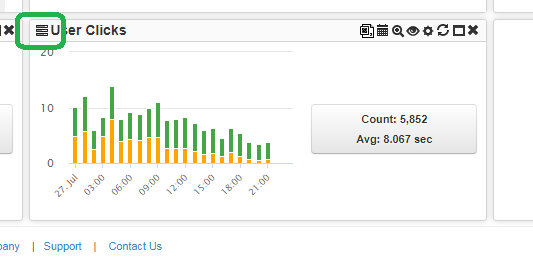
Documentation - Data anonymization
Description
Doc updates with regards to how anonymize sensitive data collected by Germain.Documentation - Rest APIs
Documentation: Data Query API
Get Help
Contact GermainUX Support
The GermainUX team helps you get up and running faster, empower your team, turn data into actionable insights, and optimize performance to deliver measurable business outcomes.
Can't find what you need?
Search all GermainUX docs with Ctrl + K, or use the feedback buttons at the bottom of this page to tell us what is missing.
The content of this document is proprietary to GERMAIN SOFTWARE.