

Customer Journey - Multi cluster layer/drilldown support on flow graph
Analytics
Analytics for DAC and Informatica
Ready-made ETL analytics
Analytics for Oracle BIP
Ready-made BIP analytics
Analytics for OBIEE
Prebuilt OBIEE monitoring
Analytics for Siebel CRM
Siebel UX and availability metrics
show Inactive User on session replay
Analytics
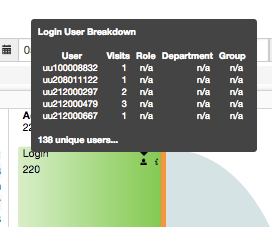
User tooltip on flow graph
Analytics
2 urls added to all email alerts
Automation
3 new portlet types: Gauge, Counter and Multi-kpi Tabular portlet
Dashboard
added graphical representation of each portlet
Dashboard
Raw data now available on First level dashboard
Dashboard
SLA-colored User Clicks for user session recording/replay portlet
Dashboard
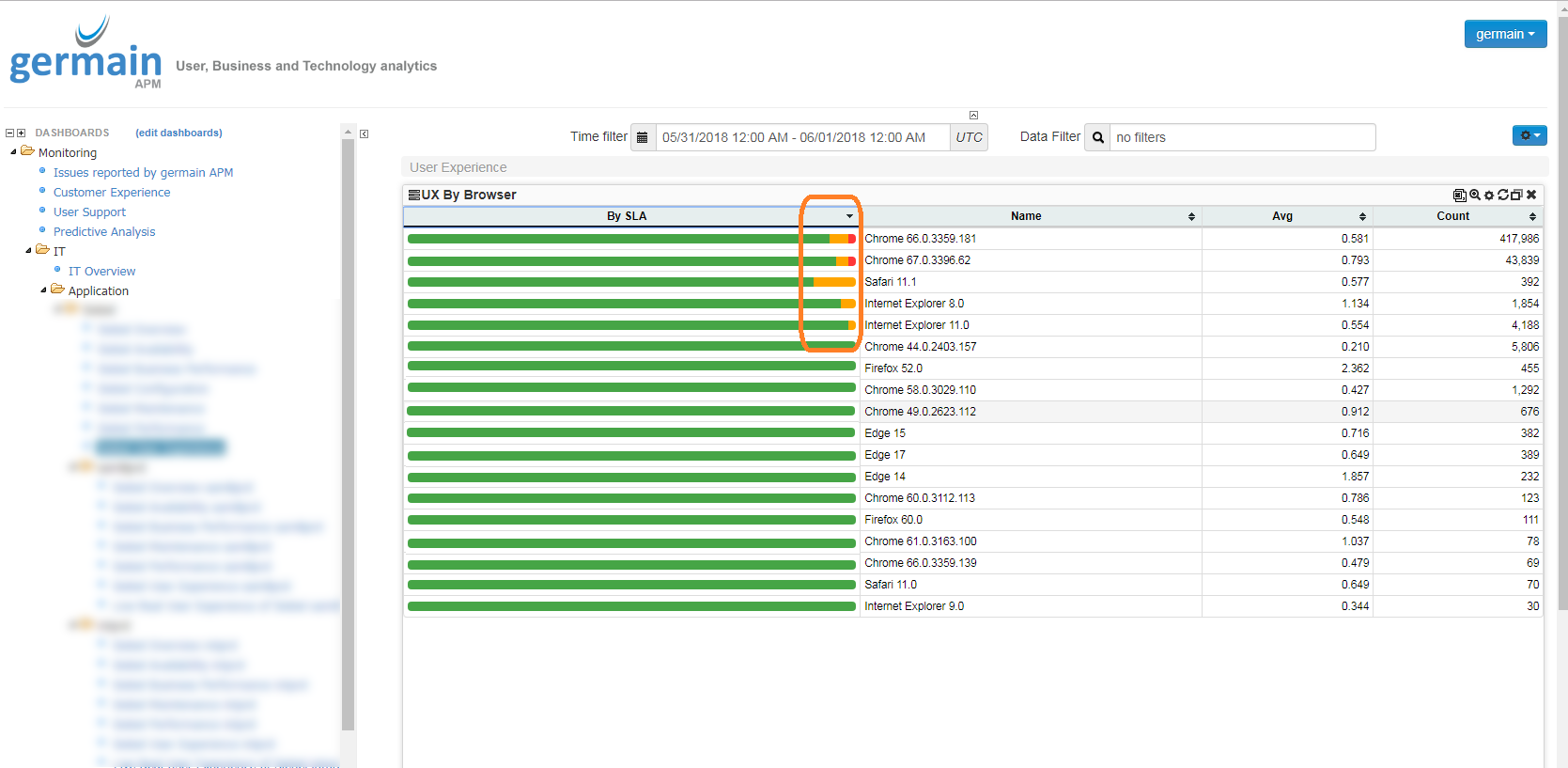
Sorting on Color aggregate
Dashboard
kickoff of a UI generation effort - scheduled for v9
Dashboard
Bug fixes in May 2018
Maintenance
Analytics - Customer Journey - Multi cluster layer/drilldown support on flow graph
Drilldown within a flow portlet is now supported. N level can be defined. This feature can be used for Business Processes, User Scenarios, Customer Journeys, etcUse Cases
- Useful when you want to analyze User Scenarios, by starting looking at the highlevel/big picture, from page-to-page navigation, then looking at individual clicks on each individual pages on drilldown on a “page” (which we refer to as a “cluster”)
- Monitoring and analyzing Customer Journeys from milestone-to-milestone (e.g. chat, email conversation, phone call, ecommerce site visit, etc) and then looking at individual steps within each milestone - screenshot showing an implementation at one of our clients
Examples (click here to view a video of that CX feature)
Analytics for DAC and Informatica
Description
Additional new metadata to further enhance monitoring and analysis of DAC and Informatica:- Added OS analytics specific to DAC and Informatica
- Added process analytics for DAC and Informatica
Analytics for Oracle BIP
Description
Additional new metadata to further enhance monitoring and analysis of Oracle BI Publisher:- Added OS analytics specific to Oracle BIP
- Added Process analytics specific to Oracle BIP
Analytics for OBIEE
Description
Additional OBIEE monitoring and analytics (user experience, performance and availability) have been configured for some of our clients and available upon request.- Added synthetic user transaction for OBIEE
- Enhanced analytics of OBIEE Web Server
- Enhanced analytics of OBIEE logs
Analytics for Siebel CRM
Additional new metadata to further enhance monitoring and analysis of Siebel CRM user experience, performance and availability:- Enhanced Recording/Replay of Siebel User Sessions
- Enhanced analytics to help investigate Siebel Application Crashes
- Added analytics of Siebel Javascript Errors
Analytics - show Inactive User on session replay
Understand when a user is actively using/browsing your app/website or not. That new feature works for any web app (Most recent Javascript framework, Salesforce.com, Siebel CRM, etc) Replay a Session excluding when a user is inactive:

Analytics - User tooltip on flow graph
Description
Automation - 2 urls added to all email alerts
Any email alert, that gets sent by Germain, to report a business or technology issue, now contains two URLs the germain user can click on to:- View, on Germain dashboard, the data/event that is reported in that email
- View, on Germain dashboard, the alert itself, so you can take further action (re-assign, raise/lower priority, etc) on the business or technology issue that got reported
Dashboard - 3 new portlet types: Gauge, Counter and Multi-kpi Tabular portlet
Gauge portlet
Counter portlet
Multi-kpi portlet
Dashboard - added graphical representation of each portlet
This is part of a much bigger effort to make Germain easier to configure.Dashboard - Raw data now available on First level dashboard
Raw data available on Tabular portlet for First-Level dashboardDashboard - SLA-colored User Clicks for user session recording/replay portlet
Example below shows the replay of a User Session that was recording by Germain in real-time, monitoring that custom html web app that is showed on the left side of that below screenshot. The user clicking/typing that was performed by that user during that session, is listed on the right side of that screenshot, and is now showed with color, color that is driven by the SLAs that are defined in Germain (and configurable).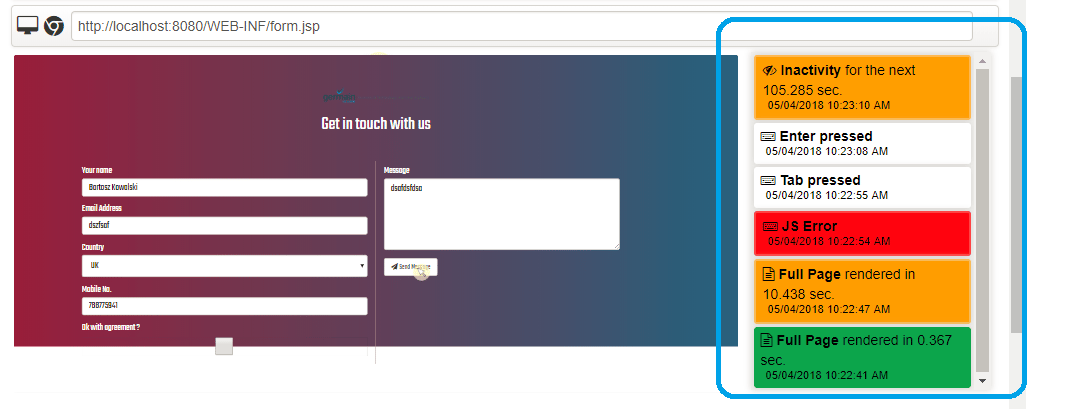
Dashboard - Sorting on Color aggregate
Description
Dashboard - kickoff of a UI generation effort - scheduled for v9
Now that we have a significantly more flexible and scalable backend architecture, we have started re-thinking the way the dashboard is implemented (taking our customers’ feedback as top priority) for sole purpose to make Germain easier and more fun to use (e.g. allow non-technical individuals to configure Germain and much more). We will disclose any details once this UI revamp is ready as that will be announced in Germain v9.0 release. ETA is being worked on and we are tentatively planning to disclose in 06/30/18 release note. In the meantime, if there are -anything- that you wish to see on Germain dashboard, now is a great time to share your feedback with us if you have not already done so, or you can always share it later too 🙂.Maintenance - Bug fixes in May 2018
(if needed, we can provide details or/and patch for these bugs that got fixed this month) Fixed Bug - user session replay: forward/backward click-to-click does not properly workFixed bug - flow portlet - selecting a view (on view list on left inside) resets the zoom state
Fixed bug - siebel rca dashboard : cant maximize fdr portlet
Fixed bug - user session replay missing
Fixed bug - portlet show 4/1 data whereas filter
Fixed bug - user affected by crash missing
Fixed bug - cannot move portlet up on any RCA dashboard
Fixed bug - xls export feature does not work
Fixed bug - Portlets lost all previous settings after clicking back button
Fixed bug - zoom in/out control is re-positioned on the portlet as we move in/out low-priority
Fixed bug - session replay: meaning of “timeout” question
Fixed bug - flow graph fails
Fixed bug - geomap cannot show ux session
Fixed bug - “Whitelabel Error Page” while downloading SQL text
Fixed bug - Siebel-specific - js script to be fixed to exclude getAlarm
Get Help
Contact GermainUX Support
The GermainUX team helps you get up and running faster, empower your team, turn data into actionable insights, and optimize performance to deliver measurable business outcomes.
Can't find what you need?
Search all GermainUX docs with Ctrl + K, or use the feedback buttons at the bottom of this page to tell us what is missing.
The content of this document is proprietary to GERMAIN SOFTWARE.