

60% performance improvement of User Login
Customer Story
Analytics - "Static Content" time analysis for Clicks
Correlation engine (for facts)
Analytics
Data Search
Analytics
Display Name for KPI & Field
Analytics
Business Process - Monitor BPs that contain more steps than configured
Analytics
Monitor & disregard Targeted Clicks
Analytics
Exclude Field Value(s) from User Session Replay
Analytics
garbage collection stats, class & system stats
Analytics for Java
Doc update for Java code & JVM real-time monitoring/profiling
Analytics for Java/JVM
Siebel Session Replay Fix
Recording playback corrected
Crash RCA dashboard
Analytics for Siebel CRM
Be alerted when S_EVT_REQ exceeds N rows and view the rows
Analytics for Siebel CRM
Dynamic DB Table creation
Configuration
Dynamic Type creation
Configuration
External Table content in an Email alert or Portlet
Configuration
3-5% performance degradation for IE user when User Replay enabled
Maintenance
~30% Insert throughput improvement
Maintenance
Clustered deployment of germain APM
Maintenance
Oracle UPT vs germain APM and germain CRT
Competitive analysis
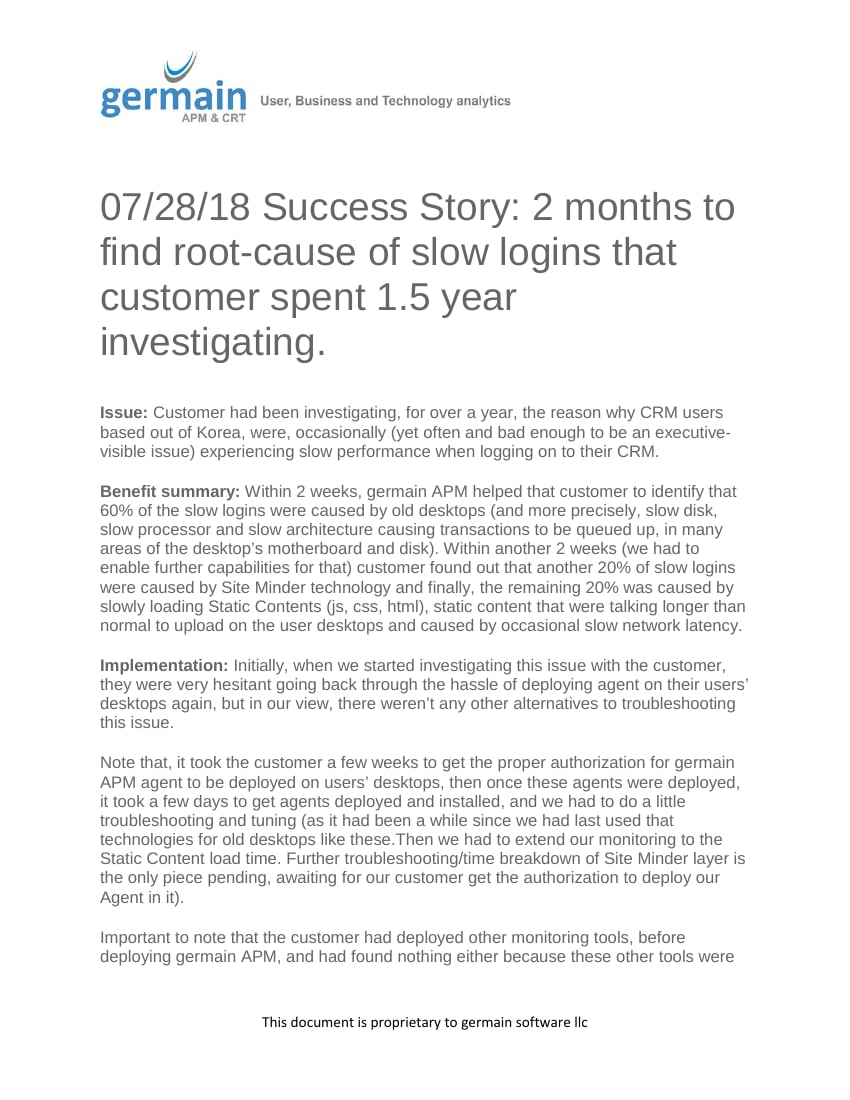
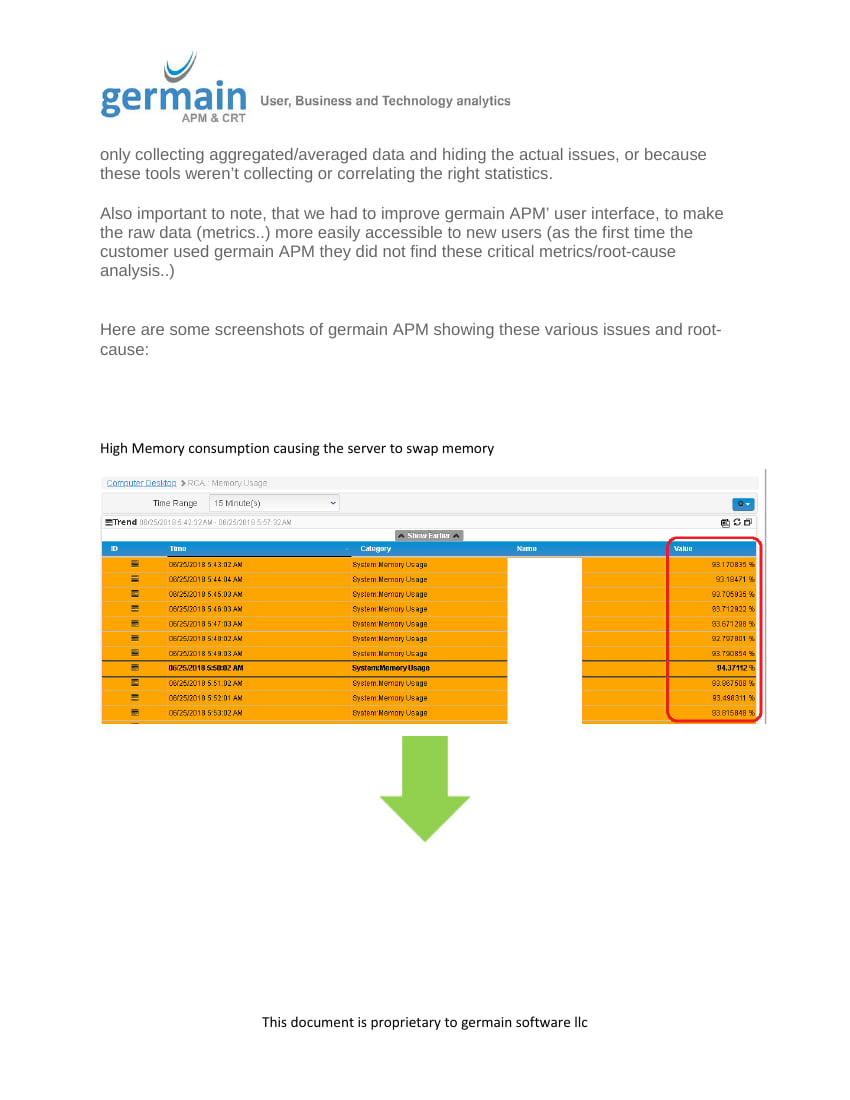
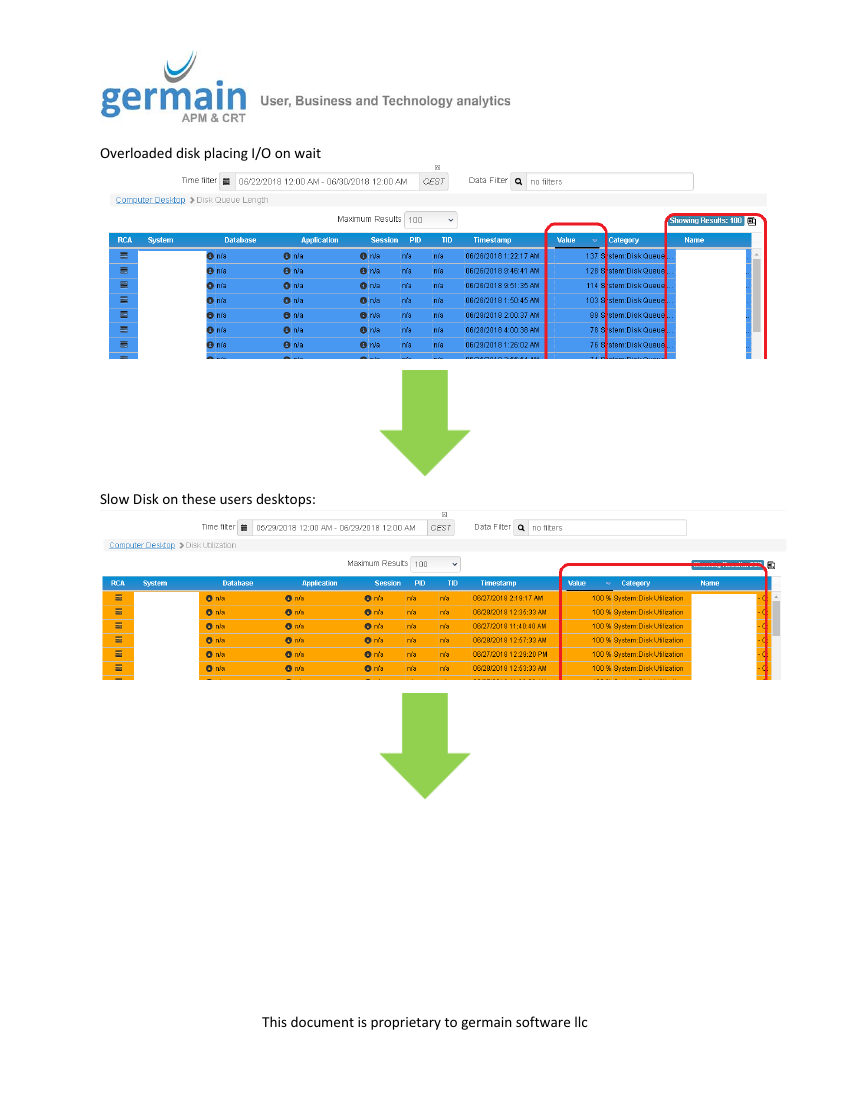
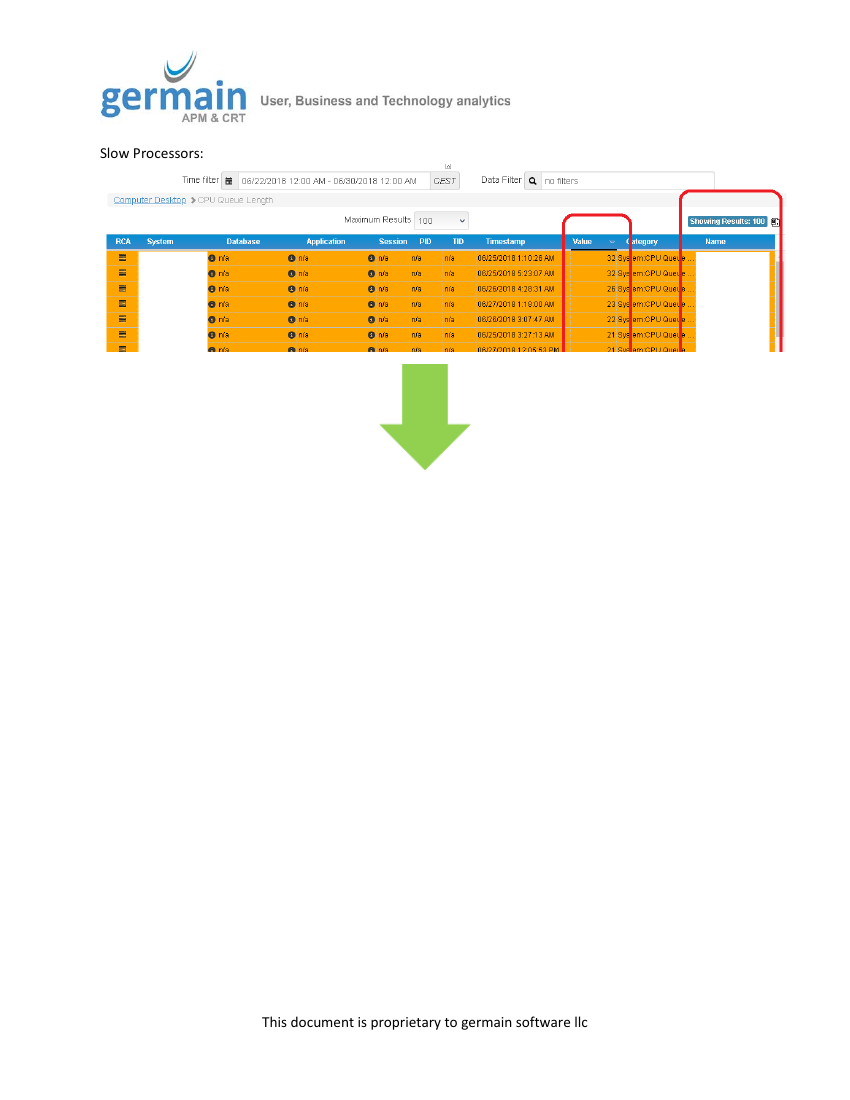
Customer Story - 60% performance improvement of User Login
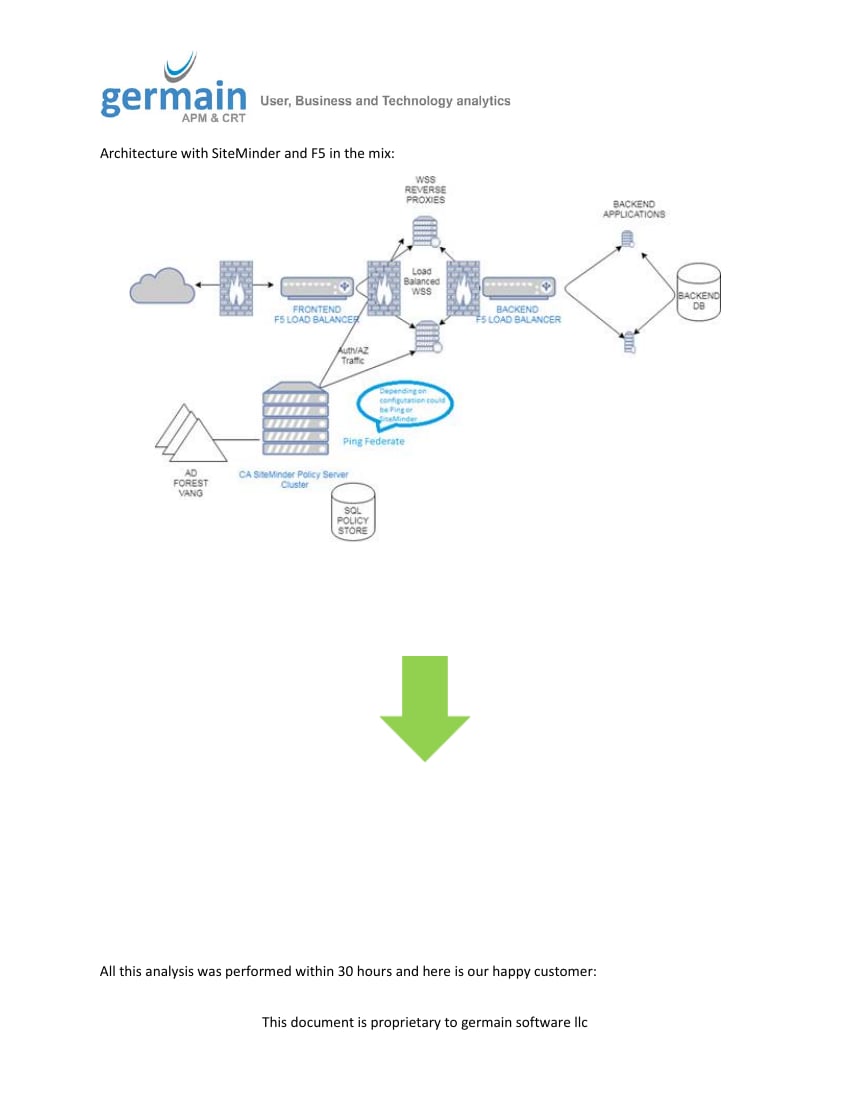
One our clients found a way to improve by 60% the User Login response time to its CRM application, within 2 weeks of using germain Germain, issue that the customer had been investigating for 1.5 years before using germain Germain. Unfortunate Note: the customer first failed finding insights using germain Germain, we had to step in and help…which made us realize that we have to improve the way data and insights are visible on germain Germain dashboard. We will be implementing a number of enhancements to make data and insights easily accessible by users that have never used germain Germain before..stay tune.Customer Story details
Read the full success story (7 pages)
Read the full success story (7 pages)
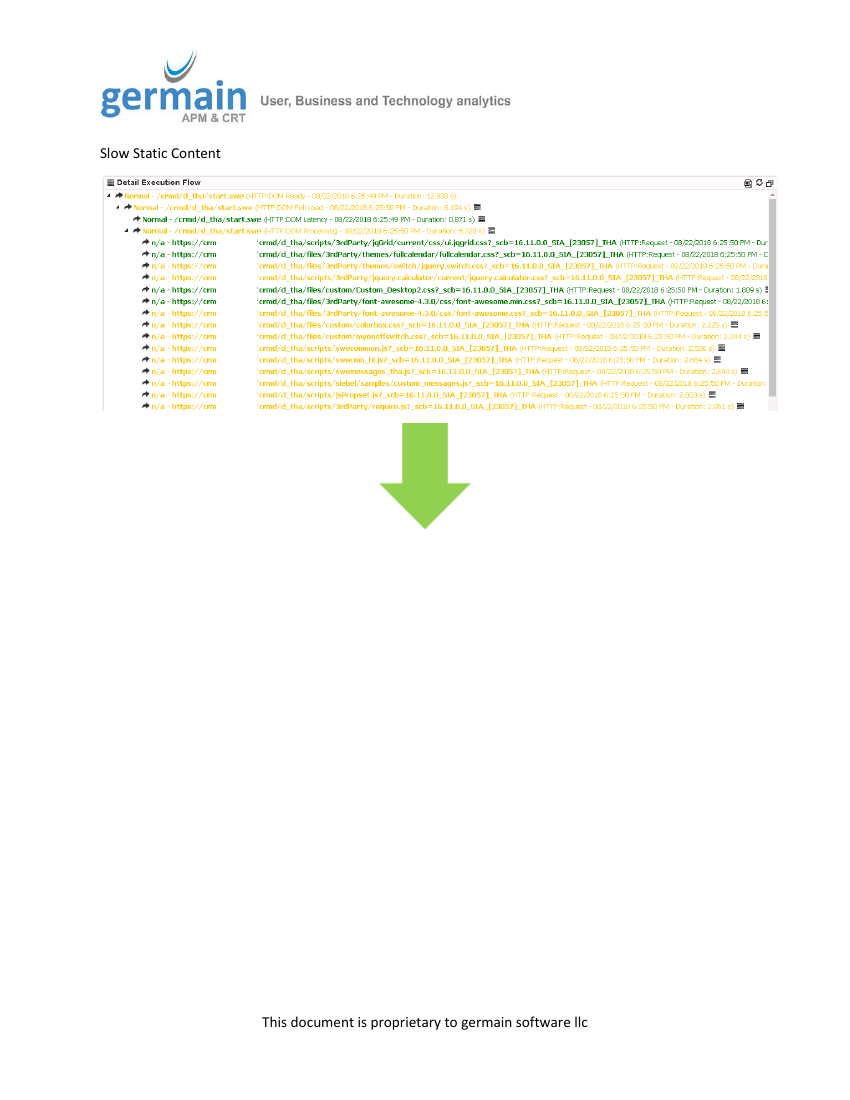

Analytics - “Static Content” time analysis for Clicks
Description
Real-time Static Content (JS, CSS, Images) load time analysis is now available on User Click RCA dashboard, so you know how much time is spent downloading any JS, CSS, Images… from the network, which typically occurs when a user clicks on page, button, etc. This is similar to what we did for User Login, last month. Supported browsers: : Chrome52+, Firefox57+, Opera39+ Unsupported browsers: IE, Edge.Examples
RCA of a Drilldown and of a click on a View on Siebel CRM (same as for any other web apps e.g. Angular, Html, React, Salesforce.com, etc Note that these screenshots are not showing the server-side portion of the RCA (e.g. Backend Transaction, Code, SQL, etc) that is yet supported.Analytics - Correlation engine (for facts)
This new Correlation Engine is another great step forward to have Germain provide smarter insights (in the past, Germain used to correlate some data, but none of that correlation was configurable).- Any data, that Germain collects, can be correlated to one another.
- Correlation is configurable via config console
- One or many properties (id, name, etc) can be used for correlation
Configuration
This new correlation engine is preconfigured to analyze the root-cause of a Siebel Object Manager crash, so we will be using that as our use case to show you and it can be configured.- Open up Germain Configuration Console and go to germain.apm.analytics.correlationScenarios
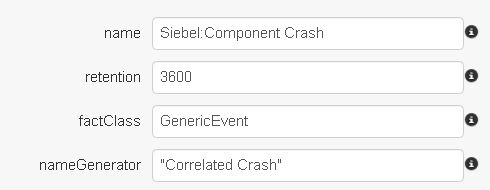
- Create a new correlation scenario:
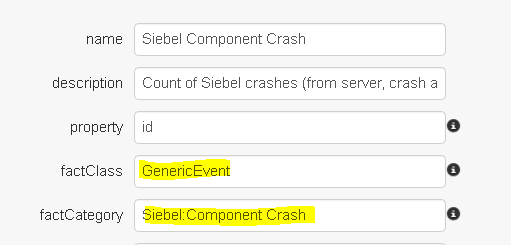
Name – value to be used to configure a KPI to show the correlated data
Retention – how long to keep the correlated data in cache. In this case, we expect all raw crash data to be received within 1 hour
Fact class – model type to store correlated data in
Name Generator – MVEL expression that will populate the “name” field on the correlated data point
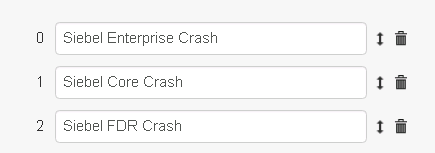
- Select the KPIs that will contain the raw data to correlate.
In this example, there are 3 Siebel crash data types that are collected by Germain. Any data point that matches either of the KPIs will be included by the correlation service as part of this scenario
- Configure how incoming KPIs / raw data are correlated.
Name – an identifier to uniquely identify this type
Key Expression – an MVEL expression that will generate a key for this correlation scenario from a raw data point. In this example, the key is comprised of server name and process ID, but other values are possible as well (ex: session ID). Any raw facts that share the same key value will be correlated.
Filters – Specifies filters on the raw data, if any. This makes it possible to assign raw data to a specific correlation type.
In this example of a Siebel Crash, we will only define a single type for this purpose:
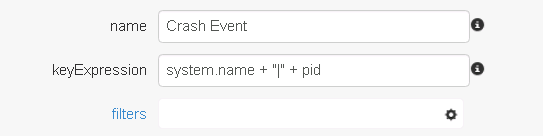
- Example of Filters

- Define which fields to exclude from correlation for the “Crash Event” type. Any fields not included on this list will be copied from the raw data to the correlated fact. For example, since system.name is not included in the list, the correlated fact’s system.name will match the raw facts’ system names.
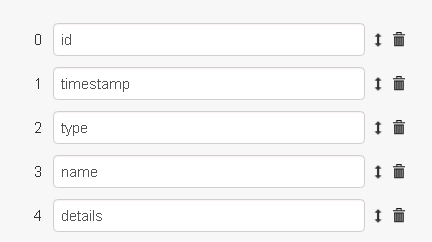
Once the correlation scenario has been created, the system will begin processing incoming raw data. - In order to visualize the correlated data on a dashboard, create a new KPI that matches the Fact Class and Name properties of the scenario:
Analytics - Data Search
Description
Search feature is now an enhanced keyword-guided search, closer to what a human being would type while searching for data or insights. This is the third round of enhancements. To support this search mechanism, we have enhanced the back-end caching capability and reached a 14 millisecondresponse time to get 5 million record updated.Example of searches
Count users Count session ID Volume of rounds played where map is OREGON Total Amount Spent per player after 2015 January 1stDemo/video: click here
Analytics - Display Name for KPI & Field
Description
A KPI and/or field(s) can have a DISPLAY NAME different than the default name. This is useful when you want Germain users to search “business data” or “data they know” instead of requiring these users to learn the “internal data model”. How to configure display names: Configuration console > KPI > “Display Name” field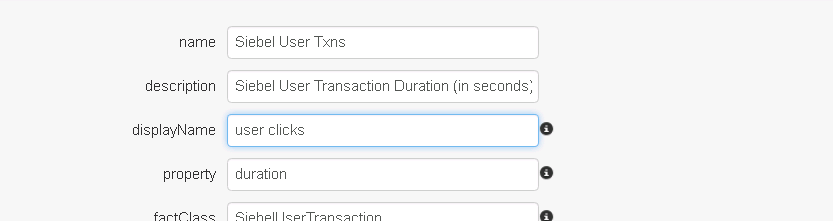
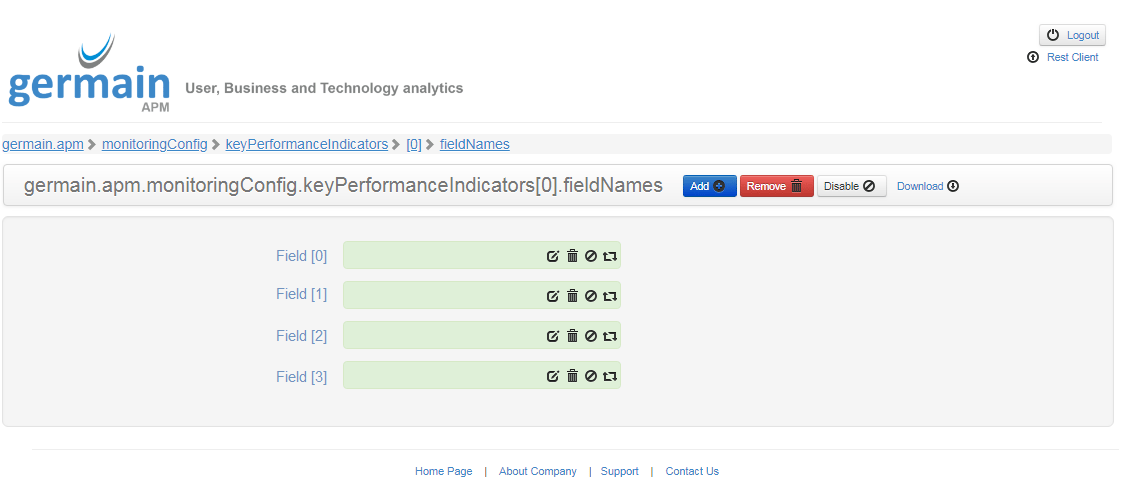

Analytics - Business Process - Monitor BPs that contain more steps than configured
Description
Business Processes that contain more steps than configured are now supported/monitored by Germain. Available in Germain 8.5 and up.Analytics - Monitor & disregard Targeted Clicks
Description
One of our customers asked us to detect the first click that a user makes on a specific web page and they wanted to record the 1st click that a user makes on any of the documents (pdf, xls, etc) that are available on that page and derive analytics from it. To complicate things, there is a short / letter menu which lets users navigate to documents starting with a specific letter of the alphabet. If they do so, we are to disregard that click on record only the following click on an actual document / link as before. Example:- Navigate to page
- Click on “W”
- Click on “Waitlisted Segments”
This should be recorded as “Click on Waitlisted Segments”.
Analytics - Exclude Field Value(s) from User Session Replay
Description
You can exclude any field’s value from being displayed during the replay of any user session. Useful when you don’t want the Germain user to see sensitive data e.g. personal information, financial information, etcExample of how the Session Replay looks when Field Values are excluded
wildcard ”****” are used to show that even though the application user typed/selected value(s), these values are hidden to the Germain user.Analytics for Java - garbage collection stats, class & system stats
Description
Enhancement of our Java monitoring capability, now providing garbage collection stats, class loading stats, system load average stats from JVMRoot-cause Analysis
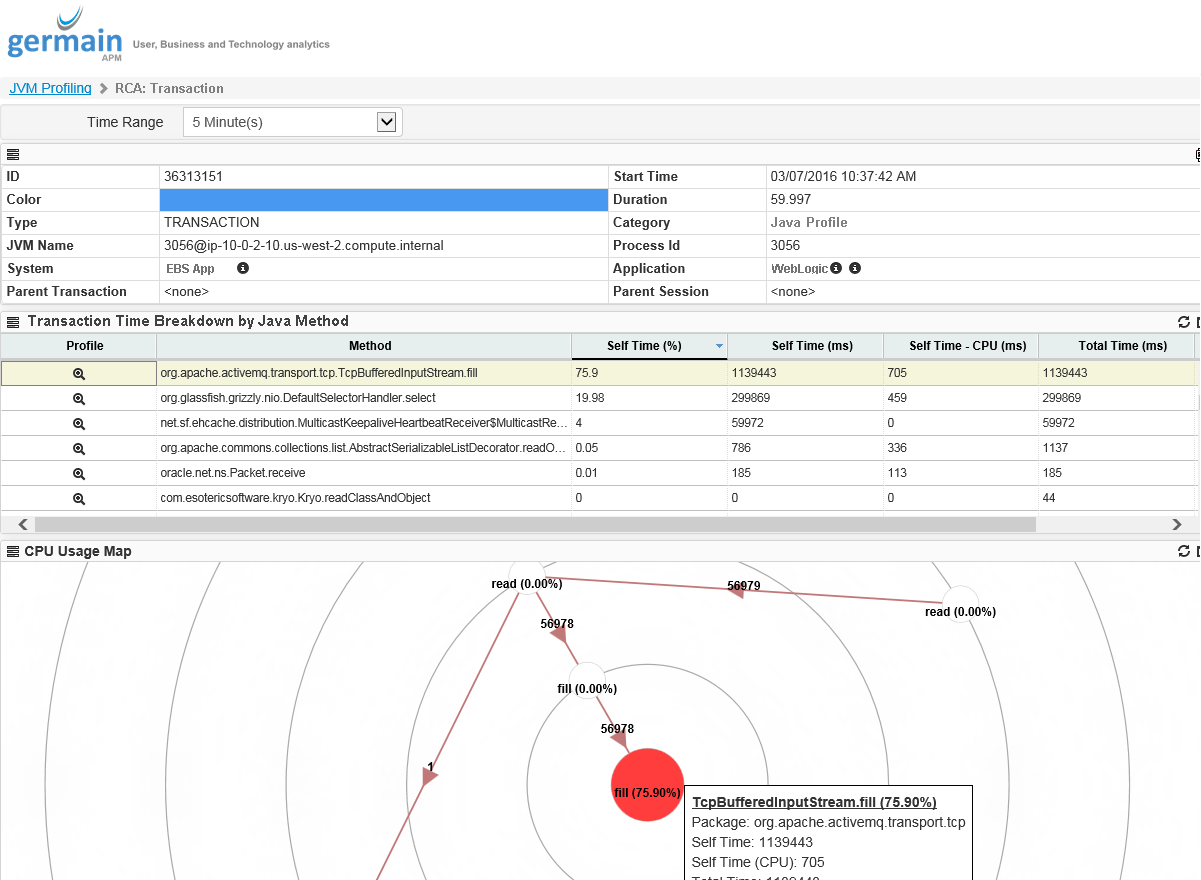
Aggregation & drilldown to raw data (new)
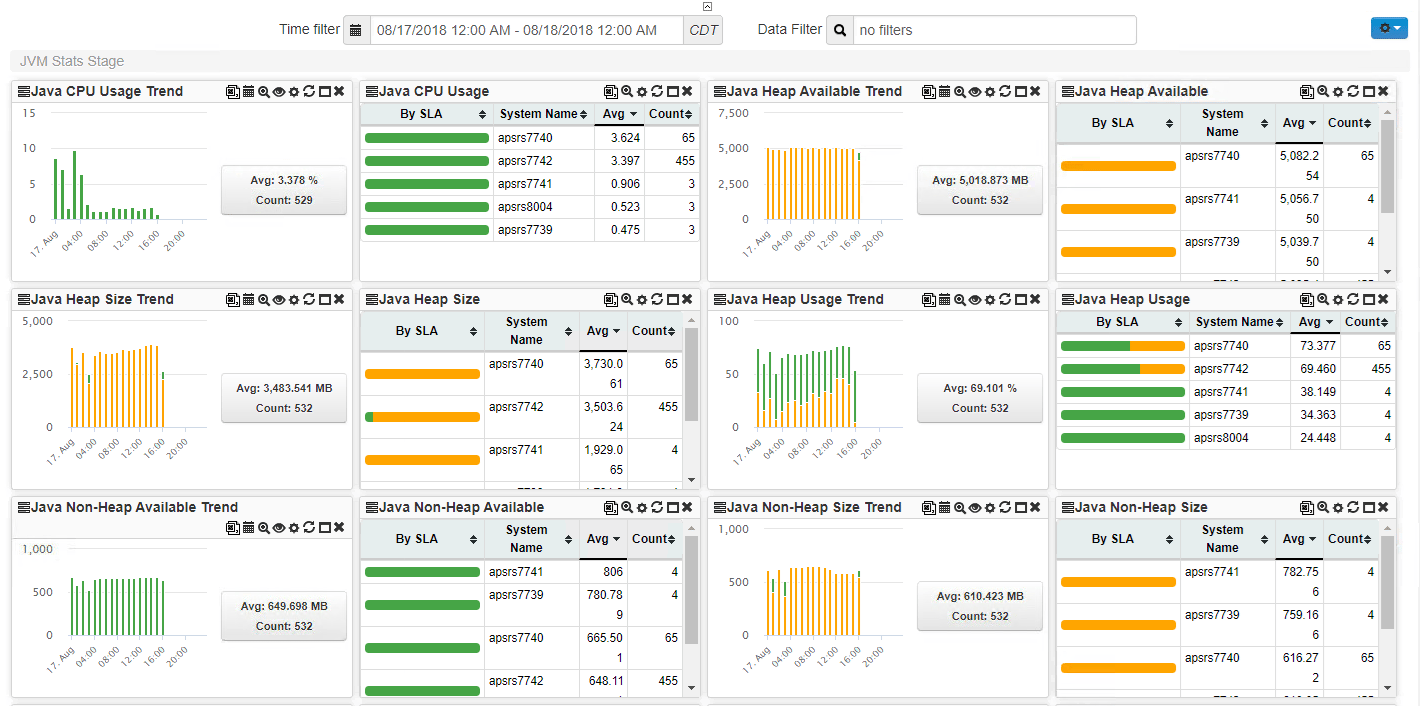
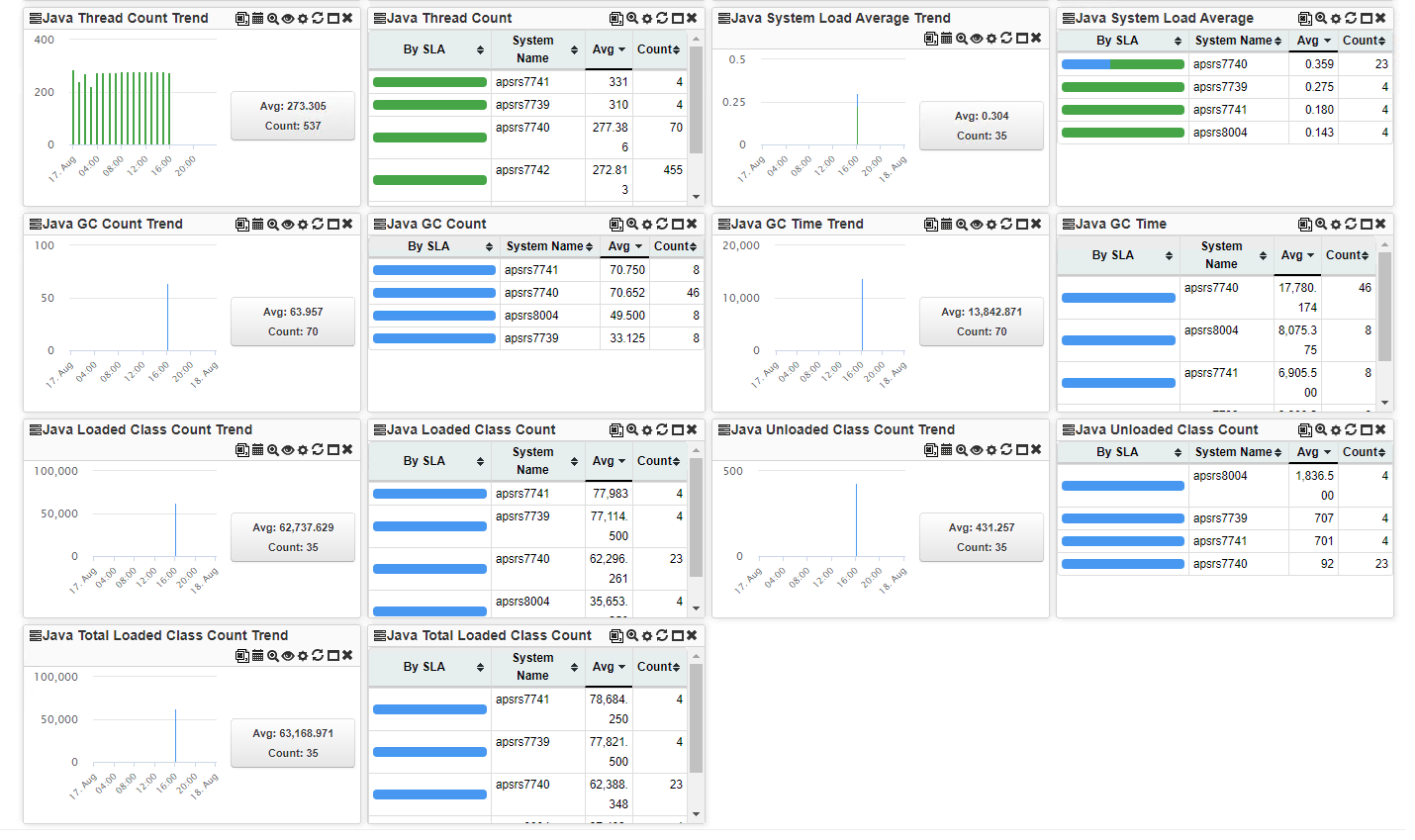
Analytics for Java/JVM - Doc update for Java code & JVM real-time monitoring/profiling
Document updated:Analytics for Siebel CRM (IP17)- User Session Record/Reconstruct/Replay bug fixed
Description
Fixed a bug that was preventing User Sessions to be recorded, reconstructed and replayed of users browsing Oracle Siebel CRM IP17.Video/demo showing 3 user session replays for Siebel,Salesforce.com and an Wordpress web app.
Analytics for Siebel CRM - Crash RCA dashboard
Description
The new Correlation engine is preconfigured to help identify root-cause of a Siebel Crash, the dashboard that present the RCA looks like this:- Description of the crash

- Files and/or Events (produced by the application crash)

- Core root-cause analysis
- FDR file root-cause analysis
- Enterprise and Object Manager log files root-cause analysis
- User Error(s):

- User(s) that lost their session:

- Infrastructure Trend Analysis (Memory, Cpu, Network Usage of the crashed process, etc)

- Recorded video of the User Scenario (includes mouse moves, clicks, value that used selected on picklists, dropdowns…and data that used typed)

- Browser Transaction (of the user session that caused the crash):

- Server Transaction (of the user session that caused the crash):

- Browser Transaction of all user sessions (that had a session running within that process)

- Server Transaction of all user sessions (that had a session running within that process)

Analytics for Siebel CRM - Be alerted when S_EVT_REQ exceeds N rows and view the rows
Germain can be configured to send an email when a specific/configurable threshold, set against an external database table, is met (e.g. in this example, sends email alert when S_EVT_REQ exceeds 2500 rows) and you can also add a portlet to visualize the database records that triggered that Alert (e.g. the 2500 records in S_EVT_REQ). These aren’t new features, but just something a client asked us to configure.Configure: click here
Example:Configuration - Dynamic DB Table creation
Description
Allows you to create your own custom Database Table within Germain data model, without having to deploy a new release of Germain. These Tables can be used to store data which does not fit the out-of-the-box data model. Some customers have used this mechanism to integrate Germain with other database and store data into Germain datamart. How to create a new custom database table:- Open the Germain config console and navigate to germain.apm.monitoringConfig.systemConfig.datamart.dynamicTypes
- Add new dynamic type
- name: we’ll chose “CustomFact” as a name for this example
- parentClass: For most use cases, parentClass should be set to “com.germainsoftware.apm.data.model.Fact”.
- tableName: name of the table you wish to create (in the below example, we created a table called “TEST_FACT”)
Once done, click on “Create”:
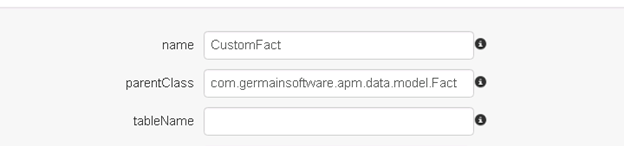
- Next, define the fields that should be available on your new model class. By default, all model types have the following properties:
- id (Unique identifier)
- timestamp (Date/Time associated with the data)
- type (Type identifier which ties the data to a KPI)
You do not need to define these above properties. - A few examples of custom fields:
- If you want to store a single string value, for example a session ID, you can use the following field configuration:
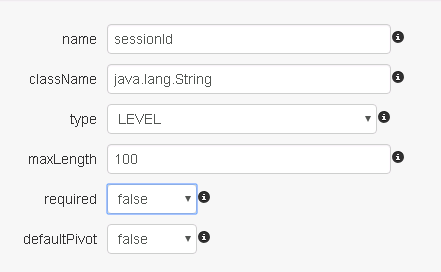
- If you want to store a numeric value, for example the duration of a transaction, you can use the following field configuration:
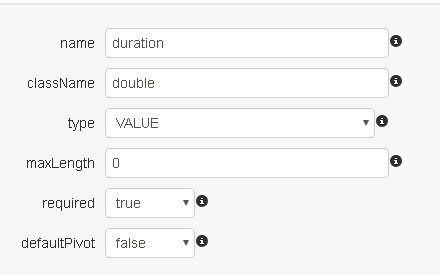
- If you want to store system information on the custom fact, you can use the existing system dimension data type:
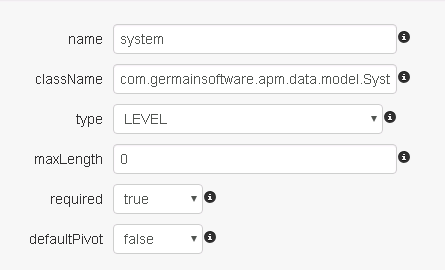
There are other pre-defined dimensions available that cover many common use cases. Out-of-the-box, Germain contains dimensions to store the information like: user, user agent (browser), database, application, location, HTTP referrer, etc.
- If you want to store a single string value, for example a session ID, you can use the following field configuration:
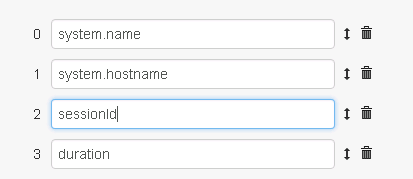
- Once you have defined the custom fields on your model, you must choose which of these should be included for aggregation. Any fields that are not included will only be available as long as there is raw data. Once the raw data has been purged, only aggregated fields will remain. To configure the aggregated fields, navigate back to the custom type and click on the aggregateFields collection. Then add any field names that you want to include – as before, you do not need to specify the build-in fields id, type, and timestamp.
- At this point your model is complete. In order to make the Germain system aware of the new model, a restart of the Germain services is necessary.
- Once the services have been restarted, you can now retrieve the schema for your database implementation by navigating to the following URL on your browser:
https://<path to your Germain>/query/schema/<database flavor>/<type name>
For example, to get the schema for a type named “CustomFact” on Oracle, use the following URL:
https://<path to your Germain>/query/schema/ORACLE/CustomFact
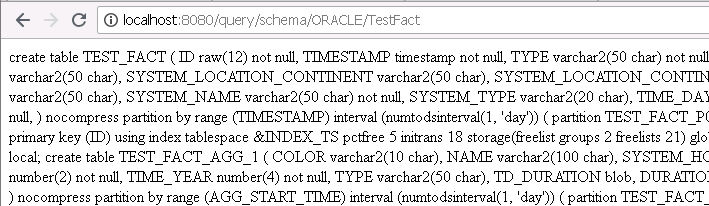
Once you create the tables in your datamart schema, you are ready to reference the new model type in monitoring rules and KPIs.
Configuration - Dynamic Type creation
Description
We/you can now dynamically create new data “Type” for raw data.Benefit of having data types/model classes
- improved performance over storing different types of data in a single table and
- being able to have fact types with lots of different properties.
Use Case
e.g. One of our customers uses Germain to find insights within its Teradata datamart. That Teradata datamart has a significant number of types of raw data that needs to be stored into Germain datamart, for further analysis, which is now possible with this new enhancement.Configuration - External Table content in an Email alert or Portlet
Description
Here is how you can include the content/row(s) of an external Table (table that isnt in Germain database) into a Germain email alert (or alternatively on a portlet): click hereMaintenance - 3-5% performance degradation for IE user when User Replay enabled
Description
Two of our clients reported that users were experiencing performance degradation of their web application whenever they were accessing their application with Microsoft Internet Explorer and Germain’s User Session Replay was enabled. We have implemented a number of optimization bringing down the degradation to 3-5%.Maintenance - ~30% Insert throughput improvement
Description
Increased by 30% our DB throughput to individual Germain database tables by expanding parallelism for data insert.Examples
- One of our client has increased from 1,500 to 2,000 database insert per second (using a low-end hardware and Oracle database) => ~170 Million db inserts per day
- At another client we reached 40,000 database insert per second at another client using MemSQL in-memory database as datastore for Germain => ~3.5 billion db inserts per day
Maintenance - Clustered deployment of germain APM
Full support for clustered deployment of Germain (available in Germain 8.5 and up)Competitive analysis - Oracle UPT vs germain APM and germain CRT
We have been asked a number of times over the past months, to compare germain Germain and germain CRT to Oracle Siebel UPT. We have used UPT in the past and again refreshed our knowledge this past month using their latest version. Here is our take on it but in the end, please try them out and you will see the differences by yourself.Get Help
Contact GermainUX Support
The GermainUX team helps you get up and running faster, empower your team, turn data into actionable insights, and optimize performance to deliver measurable business outcomes.
Can't find what you need?
Search all GermainUX docs with Ctrl + K, or use the feedback buttons at the bottom of this page to tell us what is missing.
The content of this document is proprietary to GERMAIN SOFTWARE.