

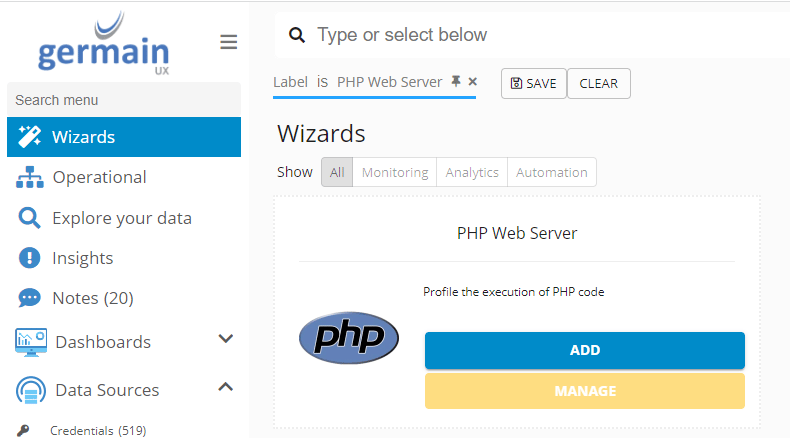
1. Start the PHP Monitoring Wizard
Open the PHP wizard
6. Apply the PHP Monitoring Configuration
Configure areas and settings
8. Deploy the GermainUX Engine
Install an engine on PHP
17. Review Privacy
Check collected PHP data
Overview
PHP monitoring uses:- GermainUX - Agent
- GermainUX - Code Profiler
- GermainUX - Engine
- GermainUX - PHP Monitoring Profile
- GermainUX - PHP Server Profile
- xhprof
Requirements
Before deployment, verify:- PHP 7.4 or later
- Access to the PHP application server
- Ability to install the
xhprofPHP extension - Ability to install a GermainUX Engine
- Ability to deploy
germainapm.php - Ability to modify the PHP application’s entry points
- Network connectivity between the PHP environment and GermainUX
1. Start the PHP Monitoring Wizard
In Germain Workspace, navigate to: Left Menu → Wizards Select the PHP monitoring deployment Wizard available for your GermainUX environment. Use the Wizard as the primary workflow for creating or applying the PHP monitoring configuration. The resulting configuration should include the PHP monitoring profile, components, component templates, server profile, KPIs, correlation scenarios, and RCA dashboard required for PHP monitoring.2. Select or Create the PHP Server
Select the server hosting the PHP application. If the server does not yet exist in GermainUX, create it during the deployment workflow. Use consistent server and application naming across environments such as:- Production
- Staging
- Development
3. Select the Monitored Application
Select or create the PHP application that GermainUX will monitor. The application association allows PHP telemetry to be correlated with:- Browser activity
- PHP transactions
- SQL
- Network requests
- Integrations
- Infrastructure
4. Install xhprof
Install thexhprof extension on the PHP application server.
xhprof provides the profiling capability required for PHP execution monitoring.
5. Enable the xhprof Extension
Enablexhprof in the PHP configuration.
For example:
php.ini.
Verify that the extension loads successfully.
6. Apply the PHP Monitoring Configuration
The PHP monitoring deployment includes configuration in the following GermainUX areas:germain.apm.monitoringClient.phpMonitoringProfilesgermain.apm.monitoringConfig.componentsgermain.apm.monitoringConfig.componentTemplatesgermain.apm.monitoringConfig.serverProfilesgermain.apm.monitoringConfig.keyPerformanceIndicatorsgermain.apm.analytics.streamCorrelationScenariosgermain.apm.workspace.rcaDashboards
7. Apply the PHP Server Profile
Apply the: PHP Server profile to the PHP application server. The server profile associates the PHP monitoring components and configuration with the selected environment.8. Deploy the GermainUX Engine
PHP monitoring requires a GermainUX Engine. If an appropriate Engine is not already available, deploy one through:Germain WorkspaceLeft MenuWizardsEngine
9. Install the PHP Agent
Install the GermainUX PHP Agent file on the web server:germainapm.php
Place the file where it can be loaded by the PHP application.
10. Configure germainapm.php
Populate the required settings ingermainapm.php.
These include values such as:
GERMAIN_SERVICES_URL
PROFILE_NAME
and any other environment-specific values required by the PHP monitoring package.
PROFILE_NAME should correspond to the PHP monitoring profile applied to the application.
11. Instrument the PHP Application
Include the GermainUX PHP Agent in the PHP application’s entry points. For example:12. Configure Browser Correlation — Where Required
Where PHP transactions need to be correlated with actual user activity, deploy GermainUX browser monitoring for the associated web application. This enables transaction paths such as:User ActionBrowserPHP TransactionSQL / API
Use the corresponding UX Monitoring Profile and RUM deployment workflow for the browser application.
13. Restart or Reload the Application Environment
Restart or reload the PHP environment where required after:- Installing xhprof
- Updating
php.ini - Installing the PHP Agent
- Updating the application bootstrap or entry points
- Applying monitoring configuration
14. Generate Representative Transactions
Exercise representative PHP application activity. For example:BrowserPHPSQLResponse
BrowserPHPExternal APIResponse
PHPIntegrationDownstream Service
Use transactions containing the components that GermainUX is expected to monitor.
15. Validate PHP Telemetry
Verify that GermainUX receives:- PHP transactions
- PHP code execution
- Network requests
- SQL execution
- Integration activity
- Correlation context
- Application
- Server
- PHP monitoring profile
- PHP Server profile
16. Verify in Germain State
Open:Germain WorkspaceGermainState
Confirm that the required:
- Engine
- Node
- Monitoring configuration
- PHP environment
17. Review Privacy
Before broad production deployment, review information collected from PHP transactions. Pay particular attention to:- URL parameters
- Request parameters
- Form data
- SQL values
- Session identifiers
- Authentication information
Show all 9
Show all 9
- User information
- API payloads
- Application-specific sensitive data
Next Steps
Once PHP monitoring is operational, configure:- PHP monitoring profile
- Sampling
- Transaction monitoring
- Code profiling
- Network requests
- SQL
Show all 16
Show all 16
- Integrations
- KPIs
- SLAs
- Correlation
- RCA
- Categorization
- Alerts
- Automation
- Dashboards
- Reports
Get More Information
PHP environments can vary significantly depending on storefront customization, extensions, integrations, infrastructure, and security requirements. The GermainUX team can help configure the appropriate monitoring scope, privacy controls, analytics, alerts, and automation for your PHP environment. Please contact us for any help.Get Help
Contact GermainUX Support
The GermainUX team helps you get up and running faster, empower your team, turn data into actionable insights, and optimize performance to deliver measurable business outcomes.
Can't find what you need?
Search all GermainUX docs with Ctrl + K, or use the feedback buttons at the bottom of this page to tell us what is missing.
The content of this document is proprietary to GERMAIN SOFTWARE.