

User Click Response Time (now end-to-end!)
Monitoring & Analytics
User Click RCA (Response Time Breakdown)
Monitoring & Analytics
User Click RCA (Browser Console)
Monitoring & Analytics
User Monitoring & Session Replay of Siebel CRM Users on Firefox
Monitoring & Analytics
Fetch API
Monitoring & Analytics
Postgres DB
Monitoring & Analytics
Synthetic Transaction (on windows)
Monitoring & Analytics
Monitoring & Analytics - "is not [...]" in your search
Siebel CRM IP18
Monitoring & Analytics
Siebel CRM - Tasks
Monitoring & Analytics
is your app 100% available?
Monitoring & Automation
Business Process
Training
User Replay (db sizing estimates)
Sizing
Selenium (better than hp loadrunner..)
Load Testing
minor enh & bugs (March)
Maintenance
Monitoring & Analytics - User Click Response Time (now end-to-end!)
Description
User Click’s Response Time is now the end-to-end time i.e. exactly what the user experiences. Starting in this release, all the processing (rendering time, scripting time, etc) that takes place just after the last HTTP request (of a Click) is included in the response time of a click. As you know, before we were missing that portion. This enhancement works for any web application that Germain monitors, such as/not limited to: Angular JS, Drupal, MarkoJS, React, Salesforce.com, Siebel CRM, Wordpress, etcMonitoring & Analytics - User Click RCA (Response Time Breakdown)
Description
User Click, Move, Page response time are broken down and includes the following:- Network/Server Side/Database time
- Scripting time
- Rendering + Painting time
- Waiting on User input
- Other time
Example
Java app
Transaction executed at Browser, Jvm and Database levels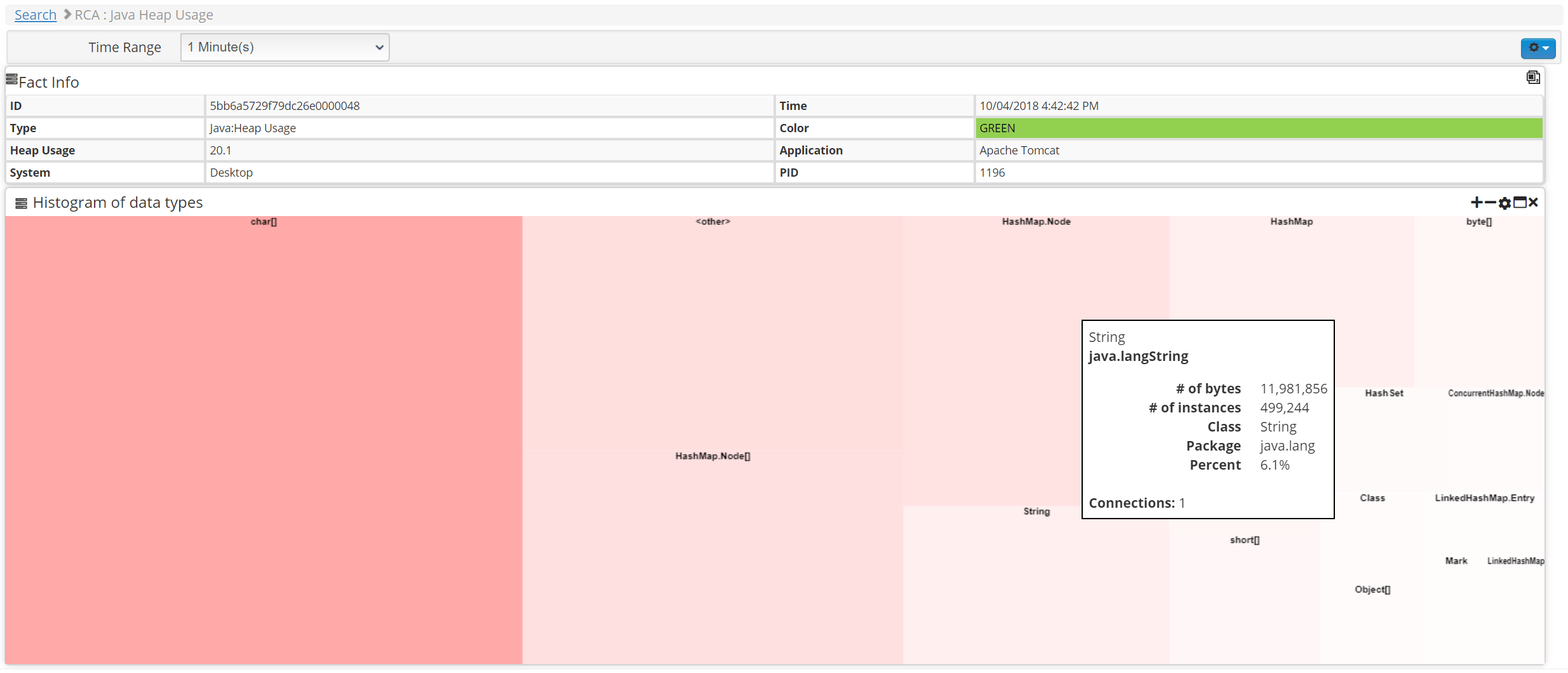
MarkoJS/NodeJS app
Transaction executed at Browser, Network, MarkoJS, NodeJS, MySql levels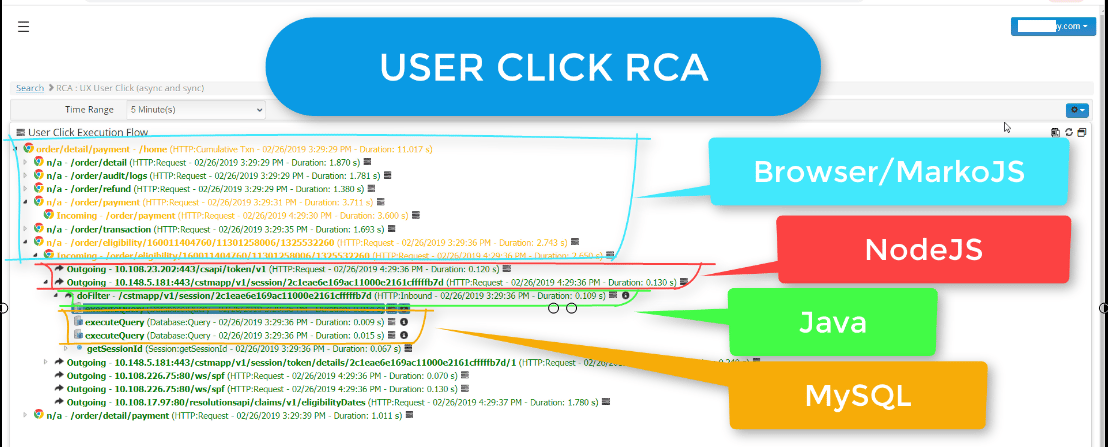
.NET app
Transaction executed at Browser, Network, CLR and Database levelsPHP
Transaction executed at Browser, Network, CLR and Database levels
SalesForce app
Transaction executed at Browser, Network, and Backend SFDC application.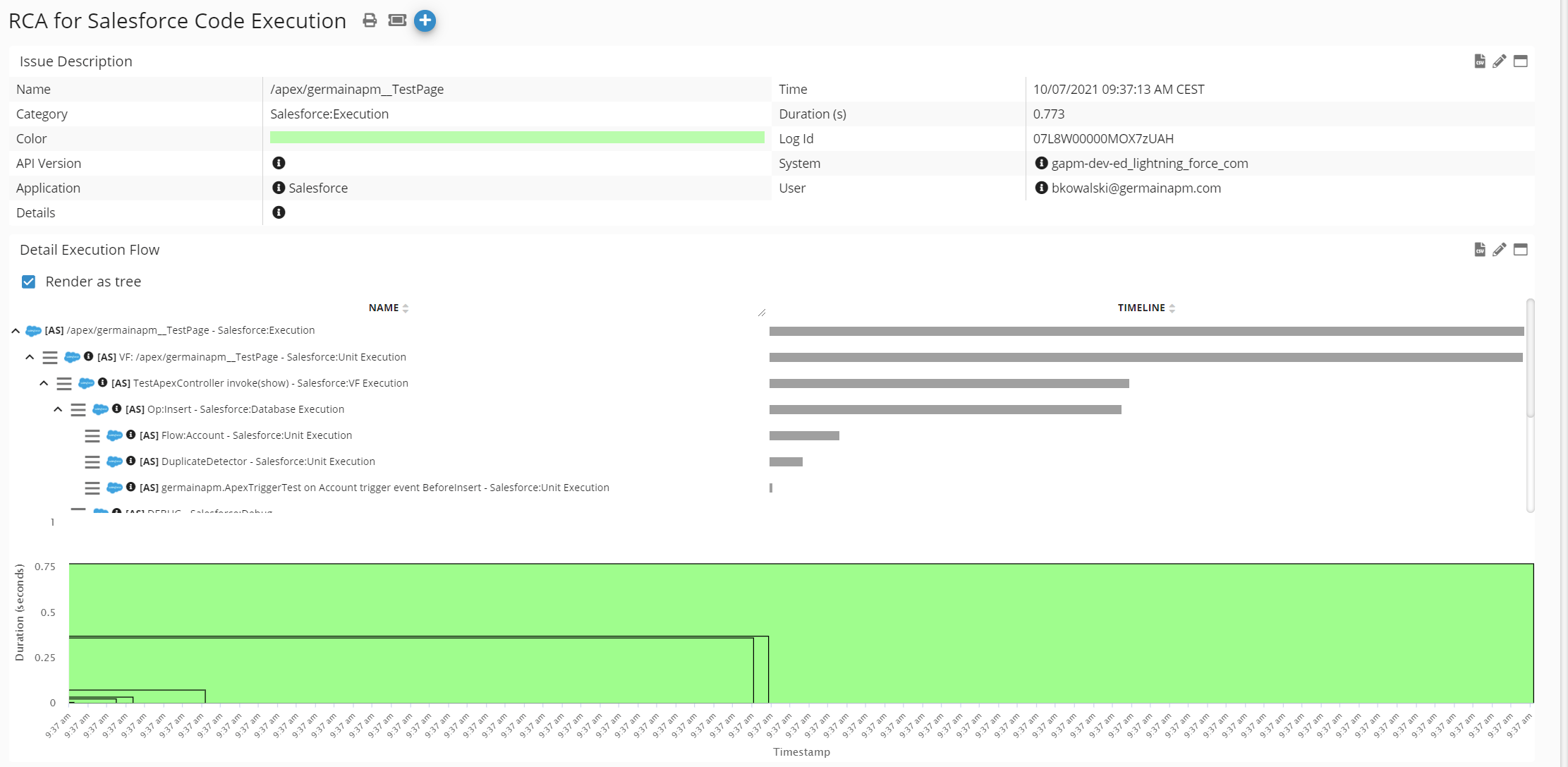
Siebel CRM app
Transactions executed at Browser, Network, Web, Application and Database levels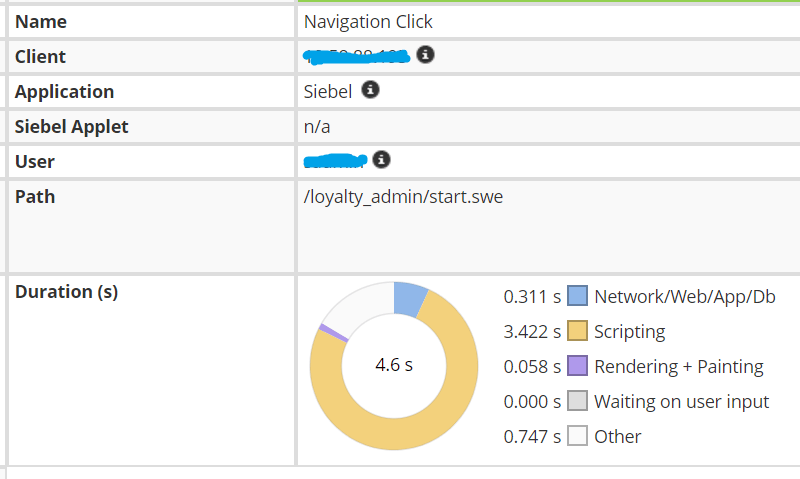
Configuration
More details on Tracing and Correlation
This is all customizable. contact us if needed.
Monitoring & Analytics - User Click RCA (Browser Console)
Description
In addition to the “warning” and “error” browser console messages, that Germain is preconfigured to monitor, Germain is able to monitor other messages typically produced by/available within a Browser Console, such as Trace, Info or/and Debug .Configuration
In Germain JS script, set this array to any of these values: ConsoleMonitoring.consoleMethods = [‘info’, ‘debug’, ‘error’, ‘warn’, ‘trace’] (by default Germain JS script is configured like this: ConsoleMonitoring.consoleMethods = [ ‘error’, ‘warn’])Benefit
When investigating a very-hard-to-understand User issue (slowness, error, etc), instead of calling the user and having them to troubleshoot the issue with them, you can just enable that parameter in Germain and let Germain collect that data, review that data in Germain dashboard, etcMonitoring & Analytics - User Monitoring & Session Replay of Siebel CRM Users on Firefox
Description
Germain is able to record and let you replay a Firefox User (using any web app).Example
of Germain that captures and lets you replay what a User did while browsing Oracle Siebel CRM IP17 with FirefoxReminder/Support for User Replay
Browsers supporting the Recordingof a User Session (by Germain js): Chrome, Edge, Firefox, Internet Explorer, SafariBrowsers supporting the Replayof a User Session (on Germain dashboard): Chrome, Safari (If you need version details please contact us)
Monitoring & Analytics - Fetch API
Description
Germain’s UX monitoring now monitors web apps that use the Fetch API (the newest way for script to make HTTP requests in the browser)Monitoring & Analytics - Postgres DB
Description
Postgres database(Prepared and SQL statements, etc) can now be monitored by GermainMonitoring & Analytics - Synthetic Transaction (on windows)
Description
If you are experiencing issues on Synthetic Transaction with a Germain engine that is deployed on a Windows machine, make sure that the browser version (installed on the machine) is the exact same as the web driver that is used by GermainConfiguration
Click / Synthetic User ScenarioMonitoring & Analytics - “is not […]” in your search
Description
Fixed a bug that was preventing users to use the “IS NOT …” query filter when they do a search on Germain dashboard.Example
Monitoring & Analytics - Siebel CRM IP18
Description
Support for monitoring of Oracle Siebel CRM IP18. All User, Process and Technology performance monitoring, analytics and automation that are available in Germain are available for Siebel CRM IP18Monitoring & Analytics - Siebel CRM - Tasks
Description
Clarification about the feature that was released last month. Siebel CRM Object Manager “Tasks” are monitored 24x7. It is critical to being able to monitor them and identify the ones that are stuck or failing. This is better than monitoring Tasks via Siebel Server Manager (as you are able to get additional information about the health of the task, its identify, etc); And there often are 10 to 20 Millions of Tasks that are instantiated per day on a Siebel environment.Example
Task analytics can be viewed on many different dashboards (e.g. default Siebel Performance, Siebel Availability dashboards, and once you drilldown, details is available on the “Extra Info” field, etc)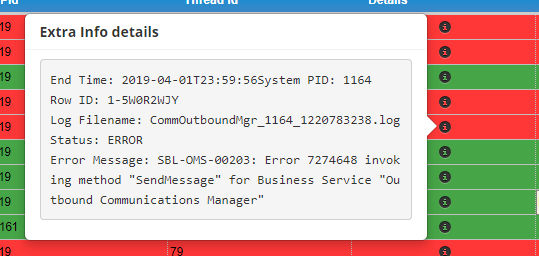
Monitoring & Automation - is your app 100% available?
Description
Read this if you need to make your mission-critical business application or technology 100% available (excluding upgrade-related downtime and issue that cannot be worked around by the restart of one or several software component). You could use the same approach or (if you need this to work in a self-contained/single on-premise deployment) you can alternatively have this running in a watchdog service. Cloud Germain has become 100% available (excluding upgrade-related downtime and issue that cannot be worked around by the restart of one or several software component) owing to the monitoring and auto-restart mechanisms that we have recently configured in Germain (mechanims that has been in the automation framework ever since 2014 yet that we never really used for our self!). These monitoring and auto-restart mechanisms are currently running on a dedicated Germain cloud instance which in charge of monitoring all other Germain cloud instances (hosted on AWS).Configuration
The relevant configuration in Germain:- SLA for the query that gets status of services from cloud-mgmt system:
- Action to kick off the restart script:
- cloud-service-restart.sh (full script shown below)
cloud-service-restart.sh
cloud-service-restart.sh
cloud-service-restart.sh
- The concept of “order” doesn’t apply – any one service will be restarted if it becomes unresponsive
- The only condition that is handled is if the service doesn’t respond to 5 consecutive failures to respond over the network (Germain cloud-mgmt executes 1 such check per minute for each service it manages)
- all these are examples and can configured to behave differently..feel free to ask us if needed.
Training - Business Process
Description
Updated the doc that explains how to configure Business Process. There is still a long way to go before that doc reflects all capability of this BP monitoring feature but at least what is currently in that doc is accurate! 🙂Sizing - User Replay (db sizing estimates)
Description
In case you have not enabled the User Replay feature, note that it requires significant additional database storage (there is no free lunch! 🙂) and that additional DB storage very much depends on the 1)technology (e.g. AngularJS, WordPress, Salesforce.com, Siebel CRM, etc) 2)version of the technology 3)customization built in the technology (when that applies) 4) user activity on the technology/app 5)settings of the User Replay feature. Here are some indications of what a db storage looks like for two out-of-the-box Oracle Siebel CRM: | 1-hour Session Replay Size (examples) | | MB/h | | | | --- | --- | --- | --- | --- | --- | | 30s seekinterval | 2 min seek interval | 5 min seek interval | | | | Siebel Open UI 8.1 (OOTB) | Extreme User Activity | 31.00 | 27.50 | 26.80 | | Expected User Activity | 6.40 | 2.90 | 2.20 | | | Idle User Activity | 4.00 | 1.20 | 0.47 | | | Siebel Open UI IP17 (OOTB) | Extreme User Activity | 10.40 | 7.50 | 6.90 | | Expected User Activity | 8.20 | 5.30 | 4.70 | | | Idle User Activity | 3.90 | 1.00 | 0.39 | | Notes:
- Complete sizing sheet is available here:
- and a reminder we can help size for your technologies whenever you need @ no extra cost.
Load Testing - Selenium (better than hp loadrunner..)
Description
Selenium offers a compelling alternative to traditional load testing tools for teams looking to get a more realistic picture of how their web application performs under load. The key difference: Selenium simulates the browser, while a tool like HP LoadRunner simulates traffic by sending raw HTTP requests directly to the server. That distinction matters more than it sounds.Why the distinction matters
HP LoadRunner (and most classic load-testing tools) work at the protocol level: they record the HTTP calls a browser would make, then replay thousands of copies of those calls concurrently. This is efficient and can generate huge request volumes cheaply, but it skips everything that happens inside the browser:- JavaScript execution and rendering time
- DOM manipulation and reflows
- Client-side frameworks (React, Angular, etc.) doing their own work
- Real browser network behavior (connection reuse, caching, async asset loading)
- CSS/asset loading order and its effect on perceived load time
Getting started
Typical setup at a high level:- Write (or record) a Selenium script that walks through a realistic user journey in your app.
- Run multiple instances of that script in parallel — via Selenium Grid, a cloud browser provider, or containerized browsers — to simulate concurrent users.
- Capture timing metrics from the browser side (page load, time to interactive, specific element render times) alongside your usual server-side metrics.
- Compare results against your target concurrency and acceptable latency thresholds.
Injecting GermainUX-RUM JS monitoring into the load test
Because Selenium drives a real browser instance rather than firing raw HTTP requests, you can install any browser extension before a test run — which means you can test your application both with and without an extension-delivered app in place, and compare the results. One example our clients use: they install the GermainUX-RUM Extension, which in turn enables Real-time User Experience Monitoring (GermainUX-RUM JS) on the load-tested app — exactly the same way it works for end users who run the app in their own browsers and are monitored by our platform. This injection serves two purposes: it lets you load test GermainUX-RUM JS itself under realistic concurrency, and it lets you monitor your automated test runs so the captured sessions are available for later review. Selenium supports loading a browser extension at session startup:- Chrome/Chromium options (extension loading via .crx or unpacked path): selenium.dev — Chrome browser docs
- Firefox options and add-on installation: selenium.dev — Firefox browser docs
- General driver options reference: selenium.dev — Driver options
Maintenance - minor enh & bugs (March)
Minor enhancements and bugs that have been addressed in March:Get Help
Contact GermainUX Support
The GermainUX team helps you get up and running faster, empower your team, turn data into actionable insights, and optimize performance to deliver measurable business outcomes.
Can't find what you need?
Search all GermainUX docs with Ctrl + K, or use the feedback buttons at the bottom of this page to tell us what is missing.
The content of this document is proprietary to GERMAIN SOFTWARE.