

Supported Components
Native coverage and limits
Configure Real-User Monitoring
Browser profile for SAP Commerce Cloud app
Configure Log and File Monitoring
Custom parsers for SAP Commerce Cloud logs
Configure Business-Process Monitoring
Build processes from events
Overview
Configure GermainUX to monitor supported SAP Commerce Cloud browser interfaces and the surrounding technical environment. Depending on the components deployed, GermainUX can monitor:
This guide assumes that the required GermainUX components have already been deployed for SAP Commerce Cloud.
Supported Components
GermainUX does not natively:
- Instrument or profile ABAP code
- Debug ABAP execution in real time
- Automatically extract data from every SAP transaction or administration tool
- Automatically collect SAT, ST12, ST05, ST03N, or ST22 data
- Automatically trace browser activity through ABAP and database execution
- Parse every SAP Commerce Cloud log, dump, or proprietary file format
- Monitor every SAP Commerce Cloud database without an appropriate supported database monitor
Configure Applications and Environments
Create clear application and environment definitions for the SAP Commerce Cloud interfaces being monitored. For other browser-based SAP applications (such as SAP Fiori, SAPUI5, and SAP Web GUI), examples include:Configure Real-User Monitoring
In the left menu, go to Settings > Analytics > UX Monitoring Profiles. Select the profile created for the SAP Commerce Cloud browser application. Configure:Browser Coverage
RUM JS can monitor browser-accessible content in the context where the script executes. Coverage depends on:- Script placement
- Same-origin restrictions
- Frames
- Content Security Policy
- SAP application architecture
- Browser security
- User consent
Navigation
For other browser-based SAP applications (such as SAP Fiori and SAPUI5), views can change without full page loads. Configure logical page detection if the default browser navigation does not identify these transitions correctly. SAP-specific naming may require custom extraction rules.User Identification
Where permitted, configure approved identifiers such as:- Username
- Role
- Department
- Business unit
- Location
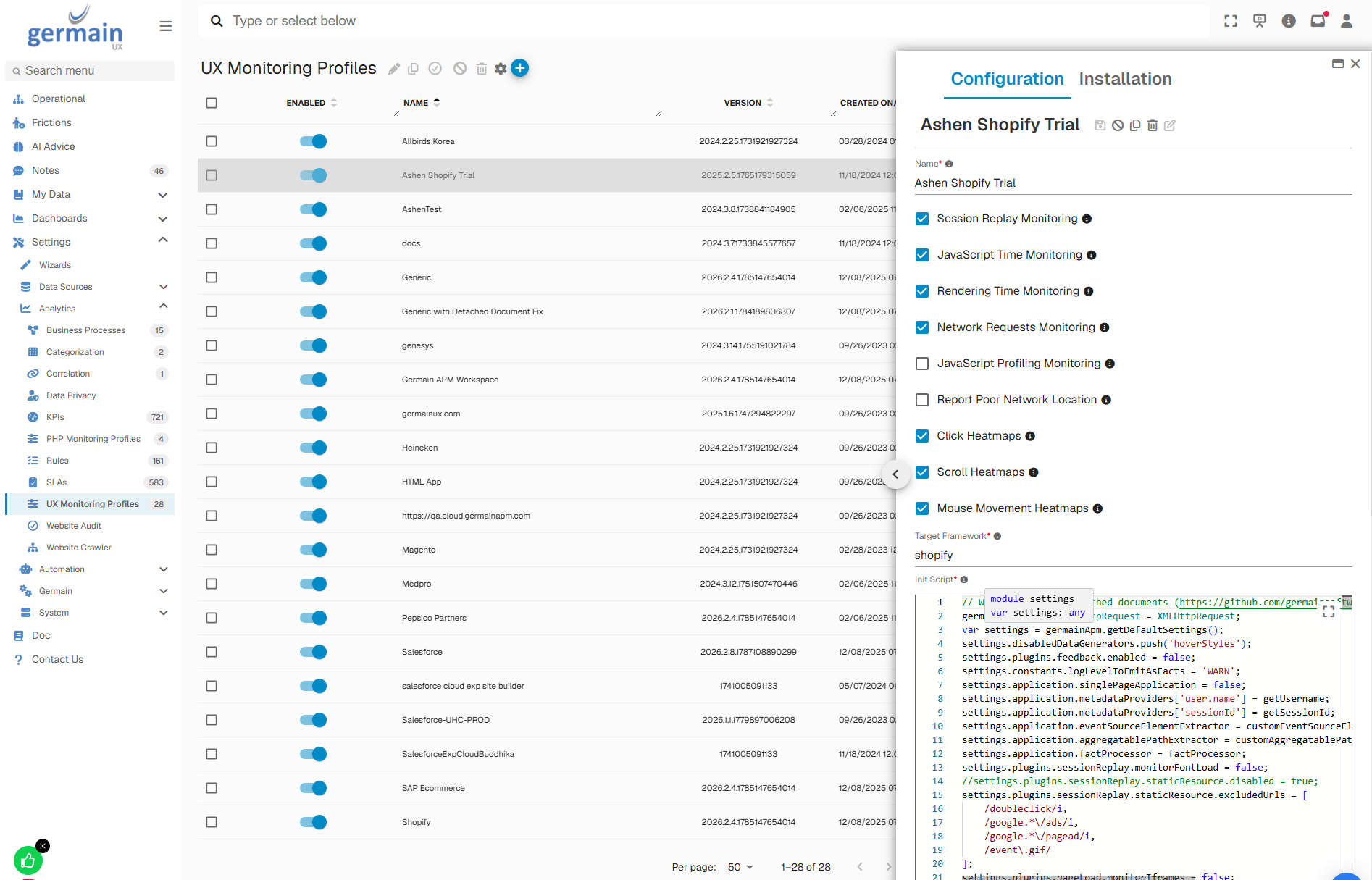
UX Monitoring Profile configuration (example profile, similar for SAP Commerce Cloud) - GermainUX
Configure Session Replay
Configure:- Replay enablement
- Sampling
- Maximum duration
- Input masking
- Text masking
- Element exclusion
- Page exclusion
- Consent
- Retention
- Access control

Session Replay of an SAP Commerce Cloud user journey - GermainUX
Configure Browser-Side Error Monitoring
RUM JS can collect supported browser-side conditions such as:- JavaScript errors
- Unhandled promise rejections
- Failed HTTP requests
- Resource-loading failures
- Custom application events
- Visible messages when suitable detection rules are configured
Do not classify every SAP Commerce Cloud message, validation dialog, HTTP failure, or console entry as an application error.
Configure Browser Diagnostics
Use the JS Profiler when standard RUM data is insufficient to diagnose a browser-side issue. The JS Profiler can analyze:- JavaScript execution
- Long-running browser activity
- Browser freezes
- Network activity
- Client-side errors
- Browser-side SAPUI5 behavior
- ABAP execution
- SAP application-server internals
- Database statements executed by ABAP
- Server-side SAP call stacks
Configure HTTP Endpoint Monitoring
The Engine can execute generic HTTP checks against reachable SAP Commerce Cloud endpoints. For each supported endpoint, configure:- URL
- Method
- Authentication
- Timeout
- Schedule
- Expected status
- Optional response validation
- Privacy rules
- Alert thresholds
Configure Log and File Monitoring
The Engine can monitor files that are:- Accessible from the Engine
- Text-based or otherwise supported
- Matched by an approved path
- Parsed by a suitable generic or custom parser
- Path and pattern
- Encoding
- Timestamp
- Multiline handling
- Rotation behavior
- Severity extraction
- Application and environment
- Privacy rules
Configure Crash and Dump Monitoring
The Engine can detect the creation of files in a monitored directory and collect approved metadata. This can be used to detect:- New diagnostic files
- New crash files
- File size
- Creation time
- Host
- Path
Configure Database Monitoring
Use an existing GermainUX database monitor only when the database technology and GermainUX version are supported. Potential capabilities depend on the database monitor and can include:- Availability
- Connection time
- Capacity
- Sessions
- Locks
- Queries
- Errors
- Resource utilization
Configure Server Monitoring
The Engine can monitor supported operating systems through available mechanisms such as WMI, SSH, or another supported collector. Potential metrics include:- CPU
- Memory
- Disk
- Process status
- Service status
- Network availability
- Uptime
Configure Business-Process Monitoring
GermainUX can build business processes from events collected by RUM JS, Engine monitors, or custom integrations. Examples for other browser-based SAP applications (such as SAP Fiori, SAPUI5, and SAP Web GUI) might include:- Purchase requisition
- Invoice approval
- Sales-order processing
- Employee self-service
- Start event
- Completion event
- Steps
- Failure conditions
- Abandonment timeout
- Expected duration
- Correlation logic
- Application and environment
- Completion
- Abandonment
- Process duration
- Step duration
- Repetition
- Errors
- Overruns
- Lost productivity
Configure Synthetic Monitoring
Use the RPA Bot Recorder to create Selenium scenarios for supported browser-based SAP Commerce Cloud applications. For other browser-based SAP applications (such as SAP Fiori and SAPUI5), examples include:- Open the login page
- Sign in
- Open the Fiori launchpad
- Launch an application
- Perform a read-only lookup
- Validate an expected result
- Sign out
- Dedicated test credentials
- Stable selectors
- Safe test data
- Functional validations
- Execution infrastructure
- Scheduling
- Alert configuration
Configure Feedback
The RUM JS feedback feature can be enabled on browser-based SAP Commerce Cloud pages where RUM JS is running. Feedback can be correlated with:- Session
- Page
- Browser event
- Error
- Performance
- Session Replay
Configure Outlier Detection
Outlier detection can be applied to SAP Commerce Cloud KPIs after sufficient data has been collected. Examples include:- User-interaction duration
- Page duration
- HTTP response time
- Business-process duration
- Error volume
- Host or database metric
Configure Correlation
GermainUX can correlate data when compatible identifiers are collected. Potential attributes include:- Timestamp
- User
- Session
- Request ID
- Correlation ID
- Transaction ID
- Application
- Environment
- Compatible identifiers
- Instrumented or observable components
- Collection of those identifiers
- Correlation rules
- Validation of clock synchronization
Configure Dashboards and Alerts
Use the KPIs produced by the configured data sources to build dashboards for:- User experience
- Browser errors
- Business processes
- Synthetic availability
- HTTP endpoints
- Logs
- Hosts
- Supported databases
- Data quality
- Collection frequency
- KPI meaning
- Baseline behavior
- Appropriate warning and critical thresholds
Related Documentation
Get Help
GermainUX can help determine which monitoring, analytics and automation capabilities are appropriate for your SAP Commerce Cloud environment.Contact GermainUX Support
The GermainUX team helps you get up and running faster, empower your team, turn data into actionable insights, and optimize performance to deliver measurable business outcomes.
Can't Find What You Need?
Search all GermainUX docs with Ctrl + K, or use the feedback buttons at the bottom of this page to tell us what is missing.
The content of this document is proprietary to GERMAIN SOFTWARE.