

Deploy Monitoring for SAP Commerce Cloud
Deploy RUM JS for SAP Commerce Cloud
Deploy the Engine for SAP Commerce Cloud
Deploy the RPA Bot Recorder
Overview
Deploy GermainUX across the appropriate SAP Commerce Cloud access points to monitor real-user experience, business processes, browser performance, APIs, logs, infrastructure, databases, and synthetic user journeys. The required components depend on the SAP Commerce Cloud interfaces and monitoring objectives in scope.Supported Monitoring Layers
Important JS Profiler Limitation
The JS Profiler analyzes JavaScript and network activity within the user’s browser. It does not execute or directly profile server-side ABAP code. Use the Engine, SAP Commerce Cloud APIs, logs, traces, or other server-side telemetry to monitor ABAP execution and backend processing. Browser and server-side data can then be correlated when compatible identifiers are available.Plan the Deployment
Before installing components, identify:Select the Required Components
Prerequisites
GermainUX Environment
Confirm that:- GermainUX Cloud or on-premise is available.
- The Workspace is accessible.
- The required licenses and components are enabled.
- The monitored environment can reach the GermainUX ingestion endpoints.
- Appropriate users have access to configuration and dashboards.
SAP Commerce Cloud Access
Obtain the access required for the selected monitoring layers:- Permission to modify or extend browser-based SAP Commerce Cloud pages, when using direct RUM deployment
- Administrative access for supported browser extensions, when required
- API credentials
- Read access to approved log directories
- Database monitoring credentials
- Network access between the Engine and monitored resources
- Dedicated synthetic user credentials
- Approval for production data collection
Network Requirements
Allow the required traffic between:- User browsers and GermainUX
- GermainUX Engine and SAP Commerce Cloud APIs
- GermainUX Engine and SAP Commerce Cloud hosts
- GermainUX Engine and databases
- Synthetic execution nodes and SAP Commerce Cloud applications
- GermainUX components and the GermainUX platform
- Firewalls
- Proxies
- TLS certificates
- DNS
- Load balancers
- VPN requirements
- Authentication gateways
- Content Security Policy
Deploy RUM JS for SAP Commerce Cloud
RUM JS provides browser-side real-user monitoring for supported SAP Commerce Cloud web interfaces.Capabilities
RUM JS can capture: Session Replay reconstructs the browser experience from captured events. It is not a video recording.Create the SAP Commerce Cloud Profile
In the left menu, go to Settings > Wizards.Select SAP
Enter the application name
Enter the SAP Commerce Cloud application URL
Select or enter the environment
Configure the available privacy and monitoring options
Review the wizard summary
Complete the generated installation steps
Return to the Installation Instructions
You can reopen the generated deployment instructions:Go to Settings > Analytics > UX Monitoring Profiles
Select the SAP Commerce Cloud monitoring profile
Open Installation in the configuration editor
Choose a RUM JS Deployment Method
The available method depends on how the SAP Commerce Cloud storefront or other SAP interface is hosted and controlled. Potential methods include:- Directly adding the generated RUM JS loader to the application
- Using an SAP-supported application extension or shell integration
- Deploying through an approved tag-management mechanism
- Injecting through an authorized reverse proxy
- Using a managed GermainUX browser extension when the SAP Commerce Cloud root page cannot be modified
Configure URL and Application Matching
Include:- Primary SAP Commerce Cloud application URL
- Alternate hostnames
- Load-balanced URLs
- Launchpad paths
- Locale-specific paths
- Authentication redirects
- Relevant embedded applications
Configure User Identification
Where approved, configure stable non-sensitive identifiers such as:- SAP Commerce Cloud username
- User role
- Department
- Business unit
- Location
- Application role
Configure Privacy
Before production deployment, configure:- Text masking
- Input masking
- Element exclusion
- Page exclusion
- Request and response capture
- URL and query-string sanitization
- Session Replay sampling
- Consent requirements
- Data retention
- Role-based access
Validate RUM JS
Open the monitored SAP Commerce Cloud application
Sign in with an approved test account
Navigate through several SAP Commerce Cloud pages or Fiori applications
Perform representative actions
Generate a safe validation message or test error when possible
Open GermainUX
Confirm that the session appears under the correct application
Verify pages, clicks, requests, errors, and replay
Confirm that sensitive values are protected
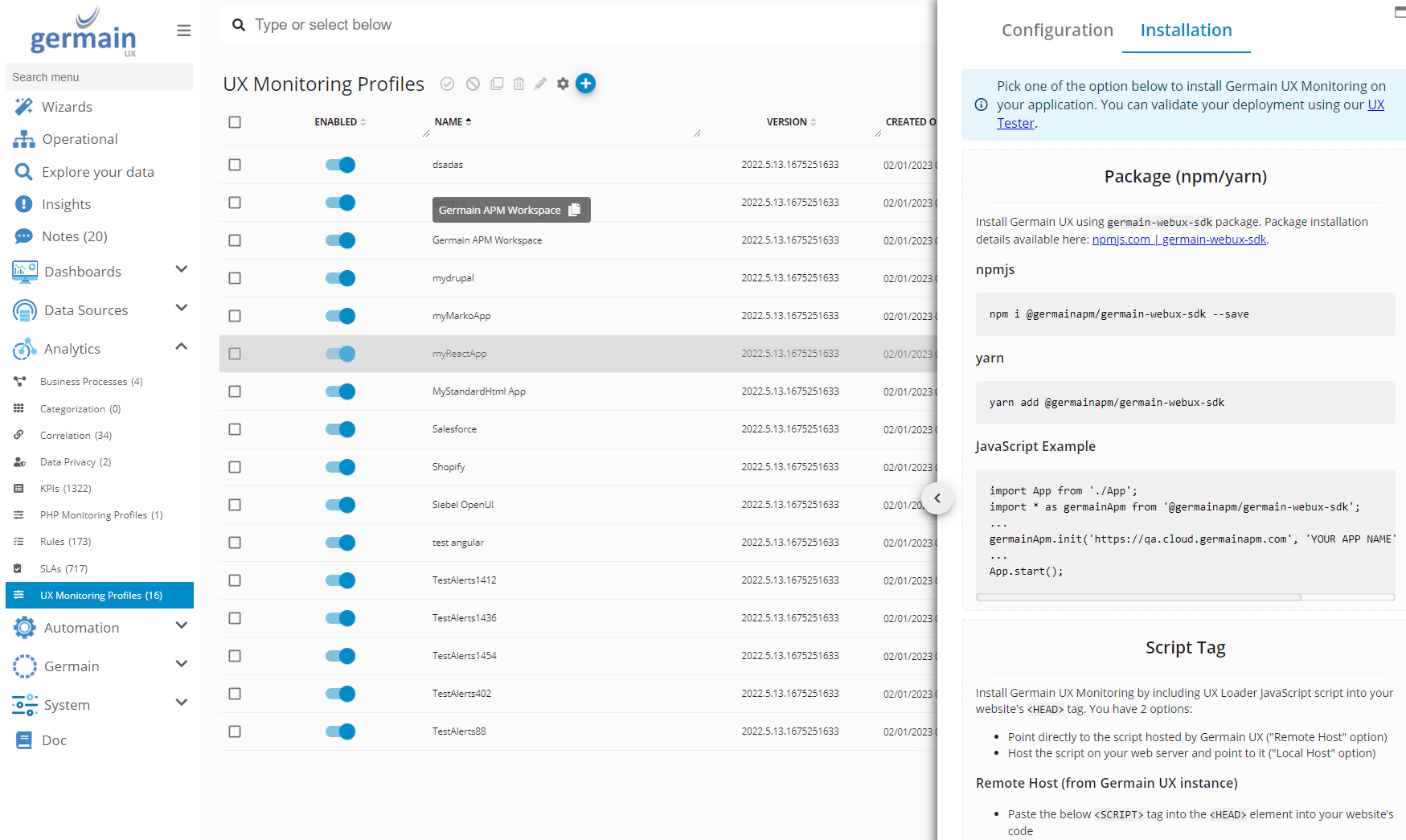
UX Monitoring Profile with installation instructions (example profile) - GermainUX
Deploy the Engine for SAP Commerce Cloud
The GermainUX Engine monitors SAP Commerce Cloud through supported APIs, logs, files, databases, and connected infrastructure.Select the Engine Location
Deploy the Engine on a host that:- Can reach the monitored SAP Commerce Cloud resources
- Can reach the GermainUX platform
- Meets the supported operating-system and runtime requirements
- Has sufficient CPU, memory, and disk capacity
- Uses synchronized time
- Is monitored and maintained
- Complies with network-segmentation requirements
Configure Credentials
Create credentials for the required resources:- SAP Commerce Cloud APIs
- Operating-system access
- Log and file access
- Databases
- Integration endpoints
- Proxies
Configure API Monitoring
The Engine can monitor supported SAP Commerce Cloud endpoints for:- Availability
- Response time
- Status codes
- Functional success
- Error messages
- Throughput
- Authentication failures
- Integration health
- Name
- URL
- Method
- Authentication
- Schedule
- Timeout
- Success criteria
- Response validation
- Privacy rules
- Alert thresholds
Configure SAP Commerce Cloud Log Monitoring
Identify the approved files and logs required for operational monitoring. Configure:- Host
- File path or pattern
- File encoding
- Rotation behavior
- Multiline-event rules
- Timestamp extraction
- Severity extraction
- Error and warning patterns
- Application and environment
- Sensitive-data masking
- Collection frequency
- Retention
Configure Database Monitoring
The database configuration depends on the database used by the SAP Commerce Cloud environment. Monitor supported:- Availability
- Connection success
- Response time
- Capacity
- Sessions and connections
- Locking and blocking
- Long-running queries
- Errors
- Resource consumption
Validate the Engine
Confirm that:- The Engine is running.
- It appears with the intended Engine name.
- API checks complete successfully.
- Log events are collected once.
- Timestamps and severity values are parsed correctly.
- Database connections work.
- Credentials have only the required permissions.
- Collected data appears under the correct SAP Commerce Cloud application and environment.
- Alerts are not generated by test or setup noise.
Deploy the JS Profiler for SAP Commerce Cloud
Use the JS Profiler when RUM JS identifies a browser-side problem but additional JavaScript or network evidence is required.Recommended Deployment Scope
Deploy the JS Profiler to:- QA engineers
- Application support
- Selected diagnostic users
- Test workstations
- Controlled production users affected by a difficult issue
Capabilities
The JS Profiler can provide deeper browser-side information about:- JavaScript execution
- Long-running browser operations
- Browser freezes
- Network activity
- Client-side errors
- Browser objects and resources
- Performance bottlenecks visible in the browser
Deployment
Open the JS Profiler deployment instructions
Install the supported extension or profiling mechanism
Apply the SAP Commerce Cloud application and user targeting rules
Configure profiling duration and sampling
Restart or reopen the browser if required
Reproduce the problem
Confirm that profiler data appears in GermainUX
Deploy the RPA Bot Recorder
The RPA Bot Recorder helps record Selenium-based synthetic SAP Commerce Cloud user scenarios.Recommended Scenarios
Record critical processes such as:- Open the SAP Commerce Cloud storefront
- Sign in
- Search for a product
- Add a product to the cart
- View the cart
- Start checkout
- Validate that expected data is displayed
- Sign out
Record a Scenario
Install the RPA Bot Recorder extension
Open the target SAP Commerce Cloud application
Start recording
Perform the scenario using a dedicated test account
Add explicit validations
Replace unstable selectors where necessary
Remove sensitive test data
Save the Selenium scenario
Deploy it to the required synthetic execution node
Configure its schedule, timeout, and alert rules
Synthetic-Account Safety
Use:- Dedicated test accounts
- Minimum required permissions
- Reversible test data
- A defined cleanup process
- Non-production environments when possible
Validate Synthetic Monitoring
Confirm that:- The scenario runs unattended.
- Authentication works.
- Selectors remain stable.
- Each step has an appropriate timeout.
- Functional validations detect incorrect application behavior.
- Screenshots and diagnostics exclude sensitive data.
- Synthetic traffic is distinguishable from real users.
- Failures generate the intended alert.
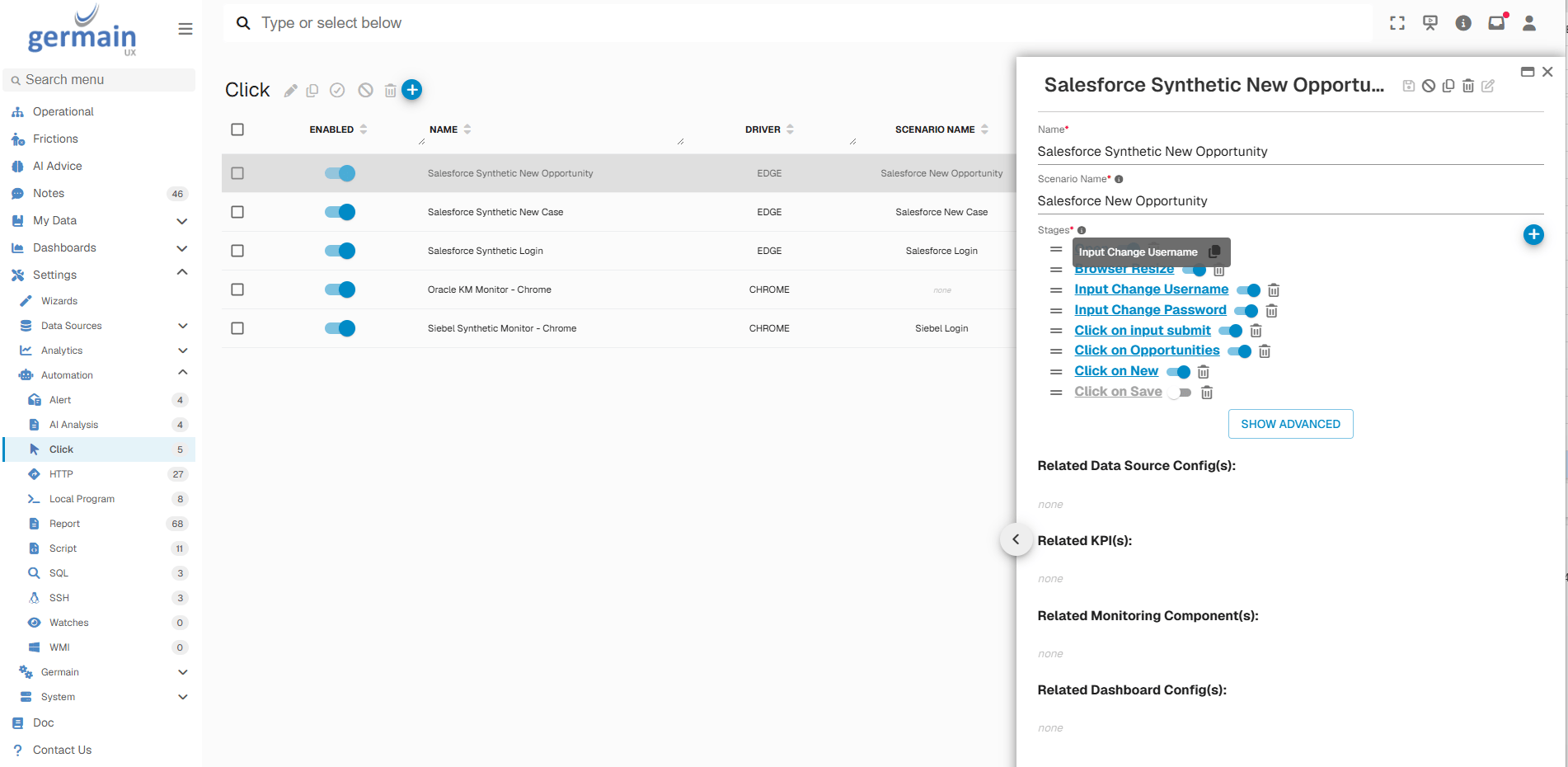
Click automation scenarios in Settings > Actions > Click - GermainUX
Correlate Frontend and Backend Monitoring
For end-to-end analysis, deploy both RUM JS and the Engine. Where supported and approved, correlate data using:- Session identifier
- Request or correlation identifier
- User identifier
- Transaction identifier
- Business document identifier
- Application and environment
- Timestamp
A user action in the browser
The resulting network request
SAP Commerce Cloud API or integration activity
Log events
Database activity
The final user-visible outcome
Deploy Business-Process Monitoring
Configure the SAP Commerce Cloud workflows that matter to the organization. Examples include:- Product discovery
- Search to product
- Product to cart
- Cart to checkout
- Checkout to order
- Customer registration
- Login and password recovery
- Return request
- Support or chat journey
- Start condition
- Completion condition
- Required and optional steps
- Failure conditions
- Abandonment timeout
- Expected duration
- Application and environment
- Correlation identifiers
- Relevant user or business dimensions
- Lost productivity
- Process overruns
- Repeated steps
- Abandonment
- Errors
- Slow system response
- Ineffective SAP Commerce Cloud workflows
- Users or segments requiring assistance
Configure Alerts and Automation
After establishing a representative baseline, configure alerts for:- SAP Commerce Cloud application unavailable
- Synthetic scenario failure
- API failure
- Log error increase
- Database capacity or performance issue
- User-facing application error
- Silent application error
- Business-process failure
- Response-time degradation
- Increase in affected users
- Send notifications
- Create incidents or tickets
- Run diagnostic scripts
- Call approved APIs or webhooks
- Generate recurring reports
- Perform authorized corrective actions
Production Rollout Checklist
Before completing the deployment, verify that:Troubleshooting
No Browser Data Appears
Confirm that:- The RUM loader is installed.
- The SAP Commerce Cloud URL matches the UX monitoring profile.
- The browser can reach GermainUX.
- Content Security Policy permits the required endpoints.
- Consent allows collection.
- The script executes in the correct application context.
- The monitored SAP Commerce Cloud page is not isolated inside an inaccessible cross-origin frame.
Sessions Appear but Navigation Is Missing
SAP Commerce Cloud applications can update views without full page loads. Configure logical navigation and route detection for the Commerce Cloud interface rather than relying only on browser page-load events.Engine Data Does Not Appear
Verify:- Engine status
- Network connectivity
- Credentials
- Proxy configuration
- File permissions
- Database permissions
- API authentication
- Application and environment mapping
- Collection schedules
JS Profiler Does Not Capture ABAP
This is expected. The JS Profiler collects browser-side JavaScript and network information. Use Engine-based server telemetry, SAP Commerce Cloud logs, APIs, or traces for ABAP and backend analysis.Synthetic Scenarios Are Unstable
Review:- Dynamic element identifiers
- Frame and window transitions
- Explicit waits
- Authentication redirects
- SAP Commerce Cloud UI changes
- Test-data dependencies
- Session timeout
- Network latency
Related Documentation
Get Help
GermainUX can help determine which monitoring, analytics and automation capabilities are appropriate for your SAP Commerce Cloud environment.Contact GermainUX Support
Can't Find What You Need?
The content of this document is proprietary to GERMAIN SOFTWARE.