

When to Use GermainUX Mobile App
Mobile monitoring use cases
Requirements
Confirm before deployment
Configuration Overview
Settings you can adjust
Get Help
Contact support for help
Overview
GermainUX Mobile App provides monitoring and automation capabilities for supported native Android applications and devices. Use GermainUX Mobile App to understand application stability, performance, errors, device conditions, and user experience for supported Android applications. For web applications accessed from a mobile device, use GermainUX Real User Monitoring instead.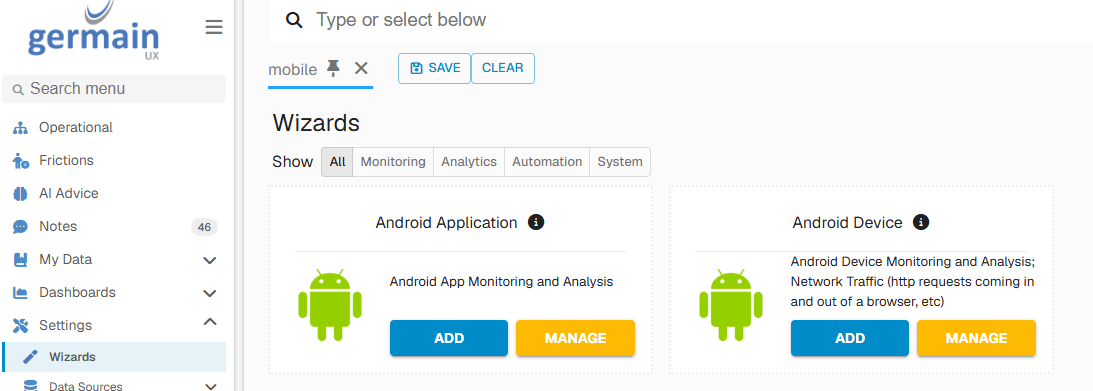
Android Mobile Wizards in GermainUX - GermainUX
When to Use GermainUX Mobile App
Capabilities
Depending on the application and monitoring configuration, GermainUX can provide:Architecture
Android ApplicationGermainUX Mobile MonitoringGermainUX Enterprise
GermainUX Enterprise can be deployed in GermainUX Cloud or within your infrastructure.
Requirements
Before deployment, confirm:- Android compatibility
- Access to modify and rebuild the application
- Required Android permissions
- Network access to GermainUX
- Obfuscation requirements
- Security and privacy requirements
Deployment Overview
1
Confirm application compatibility
2
Add the required Android permissions
3
Add the GermainUX Android monitoring library
4
Configure obfuscation when applicable
5
Initialize GermainUX
6
Configure the ingestion endpoint
7
Rebuild the application
8
Validate telemetry
9
Release through your normal application-delivery process
Configuration Overview
Configuration can include:- Application identity
- Monitoring scope
- Data-distribution frequency
- User context
- Logging
- Exception monitoring
- Exclusions
- Masking
- Anonymization
Security and Data Privacy
Before production deployment:- Identify data that will be collected.
- Exclude unnecessary data.
- Mask or anonymize personal identifiers.
- Use secure connectivity.
- Follow applicable notification and consent requirements.
- Validate privacy with representative workflows.
Validate
Confirm:- The application builds and starts normally.
- GermainUX initializes successfully.
- Required permissions are present.
- GermainUX is reachable.
- Telemetry appears in GermainUX.
- Application and device metadata are correct.
- Privacy controls operate correctly.
- Monitoring overhead is acceptable.
Related Documentation
Get Help
Contact GermainUX Support
The GermainUX team helps you get up and running faster, empower your team, turn data into actionable insights, and optimize performance to deliver measurable business outcomes.
Can't Find What You Need?
Search all GermainUX docs with Ctrl + K, or use the feedback buttons at the bottom of this page to tell us what is missing.
The content of this document is proprietary to GERMAIN SOFTWARE.