

Prerequisites
Requirements before bot setup
Configure Proactive Detection
Scenarios and detectable conditions
Analyze Results
Correlate bot failures with telemetry
Operational Guidelines
Run bots responsibly in production
Overview
GermainUX RPA bots execute recorded SAP Commerce Cloud user scenarios to detect application, performance, and business-process issues before users are affected. For compatible browser-based SAP Commerce Cloud applications, bots can continuously validate critical processes such as:
GermainUX can alert teams when a scenario fails or becomes slow. The GermainUX Engine can also initiate approved corrective actions, such as restarting an accessible service or integration.
Prerequisites
Before configuring an RPA bot:Record a Scenario
Use reliable element identifiers and outcome validations. Avoid depending only on screen position, timing, or temporary data.
Configure Proactive Detection
For each scenario, configure:- Execution schedule
- Maximum duration
- Step-level timeouts
- Expected application state
- Expected business outcome
- Retry behavior
- Execution location
- Alert conditions
- Maintenance periods
- Application unavailability
- Authentication failures
- Missing or incorrect page content
- Slow transactions
- Failed process steps
- Unexpected application messages
- JavaScript or network errors
- Commerce Cloud search, cart, or checkout failures
- Integration failures visible through the tested process
Configure Corrective Actions
When a failure is detected, GermainUX automation can initiate approved actions through the Engine, including:- Sending an alert or report
- Calling an HTTP endpoint or webhook
- Executing an authorized script
- Running a database operation
- Updating approved application data
- Restarting an accessible service or integration
- Creating or updating a ticket
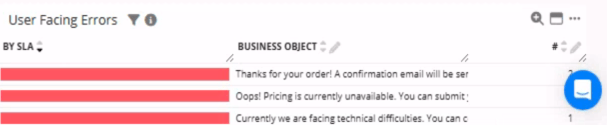
Diagnose and resolve SAP Commerce Cloud user errors - GermainUX
Analyze Results
Use GermainUX dashboards to review:- Scenario availability
- Success and failure rates
- End-to-end duration
- Step duration
- Error messages
- Screenshots and execution evidence
- Performance trends
- Corrective actions performed
- Recovery results
Validation
After enabling the bot:Operational Guidelines
Get Help
GermainUX can help determine which monitoring, analytics and automation capabilities are appropriate for your SAP Commerce Cloud environment.Contact GermainUX Support
The GermainUX team helps you get up and running faster, empower your team, turn data into actionable insights, and optimize performance to deliver measurable business outcomes.
Can't Find What You Need?
Search all GermainUX docs with Ctrl + K, or use the feedback buttons at the bottom of this page to tell us what is missing.
The content of this document is proprietary to GERMAIN SOFTWARE.