

Overview
What RUM JS captures
Configure the UX Monitoring Profile
Choose what gets captured
Privacy and Security
Protect sensitive data first
Validate
Confirm data is arriving
Overview
GermainUX RUM JS monitors the experience of real users interacting with web applications. It captures performance, behavior, errors, business activity, and Session Replay directly from the user’s browser and sends the resulting telemetry to GermainUX for real-time analysis. Use GermainUX RUM JS when you control the monitored web application and can add GermainUX JavaScript to its pages or application shell. Depending on the UX monitoring profile, GermainUX can capture: This telemetry can be correlated with backend, database, infrastructure, and business-process monitoring.When to Use RUM JS
Use RUM JS when:- You control the application or its tag-management configuration.
- You want continuous Real User Monitoring.
- You need Session Replay.
- You want to analyze user behavior, conversion, adoption, performance, or friction.
- Monitoring can execute from the application’s JavaScript context.
RUM JS or RUM Extension or RUM Windows?
How It Works
A typical architecture is:Web ApplicationGermainUX RUM JSGermainUX Enterprise
When a user opens the application:
- GermainUX RUM JS loads.
- It retrieves its monitoring configuration.
- It captures telemetry permitted by the UX monitoring profile.
- Privacy rules are applied.
- The browser sends telemetry to GermainUX.
- GermainUX processes and correlates the data for analysis, dashboards, alerts, Session Replay, and automation.
Requirements
At a high level, confirm:- JavaScript is enabled.
- The application uses a supported browser.
- The browser can reach GermainUX.
- Content Security Policy permits required GermainUX resources.
- Firewall and proxy configuration permits required connections.
- Privacy configuration has been reviewed.
Deployment Options
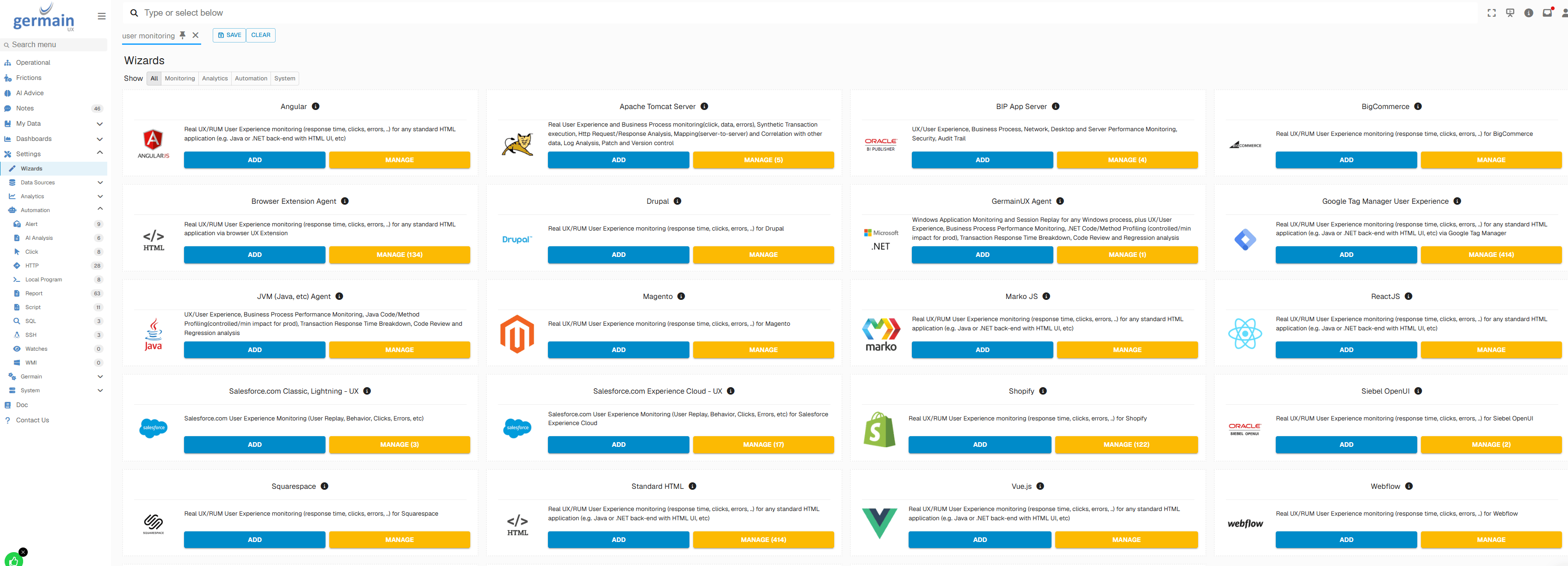
User Monitoring Wizards in GermainUX - GermainUX
- Application templates
- Shared layouts
- Tag-management platforms
- Content-management systems
- eCommerce platforms
- Framework-specific integrations
- Platform-specific integrations
Deployment Overview
The general process is:1
Define the monitored application in GermainUX
2
Create or select the UX monitoring profile
3
Configure privacy and exclusions
4
Obtain the RUM JS deployment configuration
5
Add it to the application
6
Validate in non-production
7
Confirm telemetry and Session Replay
8
Validate sensitive-data handling
9
Roll out progressively to production
Google Tag Manager
For applications that use Google Tag Manager, follow the dedicated procedure: Deploy RUM JS with Google Tag Manager The GTM-specific tag creation, trigger configuration, publishing, and verification steps should remain only on that child page.Supported Platforms and Frameworks
RUM JS can be used with supported:- JavaScript frameworks
- CRM applications
- eCommerce platforms
- CMS platforms
- Business applications
- Custom web applications
Configure the UX Monitoring Profile
The UX monitoring profile controls what RUM JS captures. Typical areas include:- Session monitoring
- Session Replay
- Page and route tracking
- User interactions
- Network requests
- JavaScript errors
- Performance
- Business-process detection
- Privacy
- Element and page exclusions
- Sampling
- Data volume
Privacy and Security
Configure privacy before production monitoring. Determine:- Which applications and pages may be monitored
- Which users may be monitored
- Which fields must never be collected
- Which elements must be masked or excluded
- Whether user identifiers should be anonymized
- Who may access Session Replay
- Appropriate data retention
Content Security Policy
Applications using Content Security Policy may need to permit the GermainUX script and required network connections. Apply only the GermainUX origins and directives required by the selected deployment. Coordinate production CSP changes with the appropriate application-security team.Validate
After deploying RUM JS, confirm:- GermainUX JavaScript loads successfully.
- Required connections to GermainUX succeed.
- The correct application and UX monitoring profile are applied.
- User sessions appear.
- Interactions and performance data appear.
- Errors are captured.
- Session Replay operates when enabled.
- Privacy rules behave correctly.
- Authenticated workflows
- Unauthenticated workflows
- Browsers
- Application routes
- Subdomains
Production Rollout
For high-traffic applications, use a staged rollout:1
Validate in development or QA
2
Test privacy and Content Security Policy
3
Deploy to a limited user population
4
Review data quality and overhead
5
Adjust monitoring configuration where required
6
Expand progressively
Troubleshooting
At a high level, if no telemetry appears, verify:- Script deployment
- Application configuration
- UX monitoring profile
- GermainUX connectivity
- Firewall and proxy configuration
- Content Security Policy
- Application URL scope
Get Help
Contact GermainUX Support
The GermainUX team helps you get up and running faster, empower your team, turn data into actionable insights, and optimize performance to deliver measurable business outcomes.
Can't Find What You Need?
Search all GermainUX docs with Ctrl + K, or use the feedback buttons at the bottom of this page to tell us what is missing.
The content of this document is proprietary to GERMAIN SOFTWARE.