

Commerce
Conversion
Processes
Errors
Monitoring & Automation Capabilities
GermainUX also provides comprehensive monitoring for SAP Commerce Cloud (formerly SAP Hybris), with capabilities comparable to those available for Shopify, including real-user monitoring, Session Replay, conversion analysis, product and cart events, checkout monitoring, customer feedback, error analysis, business-process monitoring, synthetic monitoring, and integration observability.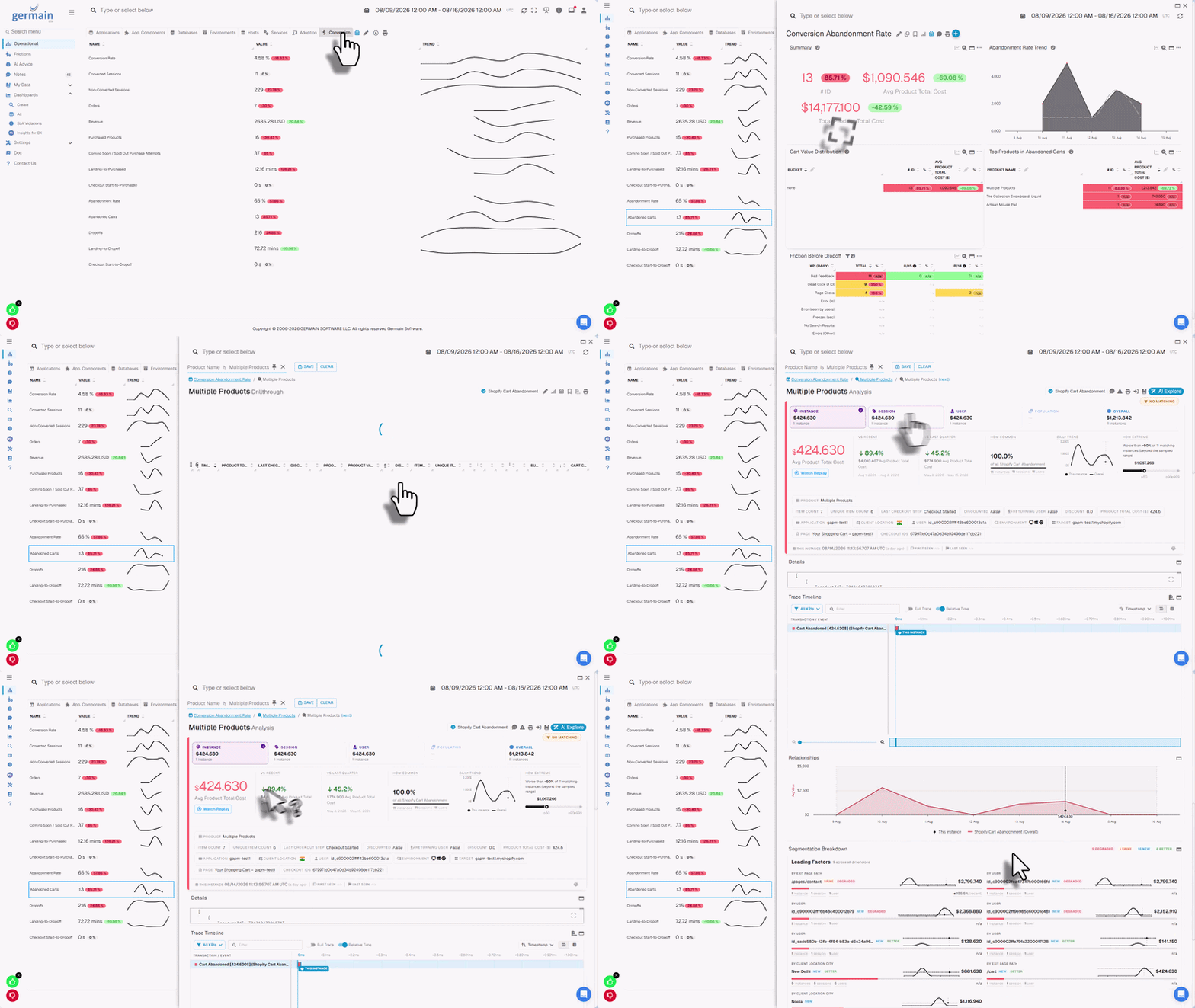
Real-time conversion friction detection, analytics and recommendations for SAP Commerce Cloud
Supported SAP use cases
GermainUX can help teams:- Improve SAP application adoption
- Increase SAP Commerce Cloud conversion
- Identify ineffective or unnecessarily complex workflows
- Reduce employee and customer frustration
- Detect application and integration failures
- Understand abandonment and drop-off
Show all 12
Show all 12
- Identify lost productivity
- Accelerate user support
- Analyze errors according to business impact
- Detect availability problems before users report them
- Prioritize improvements using real-user evidence
- Validate improvements after releases or configuration changes
Monitoring & Automation components
SAP Commerce Cloud monitoring
SAP Commerce Cloud, historically called SAP Hybris, is SAP’s enterprise e-commerce platform. GermainUX can monitor SAP Commerce Cloud across the customer journey, from initial landing and product discovery through cart, checkout, purchase, feedback, and post-purchase activity.Commerce monitoring capabilities
SAP Commerce Cloud storefronts
RUM JS can be deployed in compatible:- Traditional SAP Commerce Cloud storefronts
- Accelerator-based storefronts
- Spartacus storefronts
- Composable storefronts
- Headless storefronts
- Custom JavaScript storefronts
Real-user monitoring
For compatible browser-based SAP applications, RUM JS can capture:- User sessions
- Logical pages and application views
- Clicks and interactions
- Browser and JavaScript errors
- Network and resource requests
- User-perceived performance
Show all 12
Show all 12
- Browser and device information
- Custom application and commerce events
- Session Replay
- Heatmap data
- User feedback
- Business-process steps
Session Replay
GermainUX reconstructs the monitored browser experience from captured DOM changes, interactions, network activity, and related browser events. Replay enables teams to investigate:- Customer complaints
- Abandoned journeys
- Failed checkout attempts
- Ineffective SAP workflows
- Application errors
Show all 10
Show all 10
- Rage and dead clicks
- Slow user actions
- Confusing validation
- Unexpected navigation
- Repeated or unnecessary steps

Understand what SAP users struggle with in real time
SAP Commerce Cloud events
GermainUX can collect or derive events that describe customer behavior and commerce outcomes. Examples include:- Category Viewed
- Product Viewed
- Search Submitted
- Search with No Results
- Filter Applied
- Sort Applied
Show all 17
Show all 17
- Product Added to Cart
- Product Removed from Cart
- Cart Viewed
- Checkout Started
- Checkout Step Completed
- Checkout Validation
- Checkout Failed
- Order Completed
- Customer Registered
- Login Completed
- Feedback Submitted
Conversion monitoring

Real-time conversion ops dashboard for SAP Commerce Cloud
Landing Page
Category Viewed
Product Viewed
Product Added to Cart
Cart Viewed
Checkout Started
Order Completed
- Overall conversion rate
- Product-view-to-cart rate
- Search-to-product rate
- Category-to-product rate
- Cart-to-checkout rate
- Checkout completion rate
Show all 16
Show all 16
- Cart abandonment
- Checkout abandonment
- Step conversion and drop-off
- Conversion by product or category
- Conversion by customer segment
- Conversion by campaign or traffic source
- Conversion by browser, device, or location
- Errors associated with lost conversion
- Performance associated with abandonment
- Estimated revenue impact
Product-discovery analysis
GermainUX can help identify:- Searches returning no results
- Searches that do not lead to a product
- Categories that do not lead to product views
- Products viewed but not added to the cart
- Sold-out product encounters
Show all 9
Show all 9
- Ineffective filtering or sorting
- Repeated searches
- Frustrating product-navigation paths
- Products associated with errors or slow performance
Cart and checkout analysis
GermainUX can analyze:- Products added to and removed from the cart
- Cart value and quantity, when approved and available
- Cart abandonment
- Checkout entry
- Checkout progression
- Step duration
Show all 12
Show all 12
- Checkout validation
- Payment submission events
- Checkout failures
- Checkout completion
- Third-party service failures
- Customer behavior preceding abandonment

Cart and checkout analysis
Customer-feedback monitoring
The GermainUX feedback popup can collect customer feedback directly from a monitored SAP Commerce Cloud storefront. Feedback can be correlated with:- Customer session
- Page
- Product or category
- Cart or checkout stage
- Browser and device
Show all 9
Show all 9
- Error
- Performance
- Conversion outcome
- Session Replay

Allow SAP users to provide feedback, understand the context, and act on it
Heatmaps and behavioral analysis
For supported browser pages, GermainUX can provide:- Click heatmaps
- Error-click heatmaps
- Rage-click heatmaps
- Dead-click heatmaps
- Mouse-movement heatmaps
- Scroll heatmaps
- Elements customers interact with most
- Controls that appear interactive but do nothing
- Repeated frustrated interactions
- Important content customers do not reach
- Layouts that create unnecessary friction
- Differences across devices or customer segments
Business-process monitoring
GermainUX can construct SAP business processes from events collected through RUM JS, the Engine, synthetic monitoring, or custom integrations.
Track and improve ineffective processes
Commerce processes
- Product discovery
- Search to product
- Product to cart
- Cart to checkout
- Checkout to order
Show all 9
Show all 9
- Customer registration
- Login and password recovery
- Return request
- Support or chat journey

Analyze business processes and frictions at scale
Enterprise SAP processes
- Purchase requisition
- Purchase-order approval
- Invoice approval
- Sales-order entry
- Expense submission
- Material lookup
- Employee self-service
- Start event
- Completion event
- Steps
- Optional and alternative paths
- Failure conditions
Show all 9
Show all 9
- Abandonment timeout
- Expected duration
- Correlation rules
- Application and environment
- Completion
- Abandonment
- Step drop-off
- Slow steps
- Rework
Show all 9
Show all 9
- Repeated actions
- Application errors
- Process overruns
- Estimated lost productivity

Analyze every step of a process
Browser-side JavaScript diagnostics
The JS Profiler can provide deeper browser-side information about:- JavaScript execution
- Function and call-stack activity
- Long-running browser operations
- Browser freezes
- Client-side errors
- Network activity
- Frontend-framework behavior
- Third-party scripts

Browser-side JavaScript diagnostics
SAP Commerce Cloud Java monitoring
SAP Commerce Cloud uses Java-based server components. The GermainUX Code Profiler may monitor those components when:- The Java runtime and application server are supported.
- The organization controls the runtime.
- Profiler-agent installation is permitted.
- The deployment is approved.
- Required network communication is available.
- Java transaction tracing
- Method-level performance
- Exceptions
- Outbound calls
- Database-call correlation
- Time spent in supported Java components
Transaction Performance Comparison
When analyzing a slow or failed SAP Commerce Cloud transaction, use Comparison to compare its performance with another execution of the same transaction, such as the fastest, slowest, most recent, first seen, or last seen. Comparison can reveal:- Differences in execution time for the same SAP Commerce Cloud operation
- Which steps, checkout stages, or API calls caused the slowdown
- Performance differences between successful and failed SAP Commerce Cloud transactions
- Errors or bottlenecks affecting commerce workflows
- Potential root causes of transaction performance degradation
HTTP, API, and integration monitoring
The GermainUX Engine can monitor reachable SAP-related endpoints for:- Availability
- Response time
- HTTP status
- Timeout
- Authentication failure
- Expected response content
- Configured functional success
- SAP Commerce Cloud OCC APIs
- REST endpoints
- OData services
- SOAP services
- Payment integrations
Show all 10
Show all 10
- Search services
- Inventory services
- CRM or ERP integrations
- Shipping and tax services
- Customer-identity services
Log and file monitoring
The Engine can monitor accessible SAP-related logs and text files when the format is supported or an appropriate parser is configured. Potential sources include:- Commerce application logs
- Web-server logs
- Integration logs
- Job logs
- Security logs
- Exported diagnostic files
- Path and pattern
- Encoding
- Timestamp
- Multiline handling
- Rotation
- Severity
- Application and environment
- Privacy rules
Server and database monitoring
For customer-controlled environments, the Engine can monitor supported:- Operating-system hosts
- Processes and services
- CPU, memory, and disk
- Network availability
- Databases
Show all 10
Show all 10
- Connections
- Capacity
- Locks
- Queries
- Errors
Synthetic monitoring
Use the RPA Bot Recorder to create Selenium scenarios for supported browser-based SAP applications.SAP Commerce Cloud scenarios
Open the storefront
Search for a product
Open a product page
Add a product to the cart
View the cart
Start checkout
Validate price or availability
Sign in
Confirm that a critical integration works
Enterprise SAP scenarios
Open the login page
Sign in
Open the Fiori launchpad
Launch an application
Perform a read-only lookup
Validate an expected result
Sign out
Error monitoring
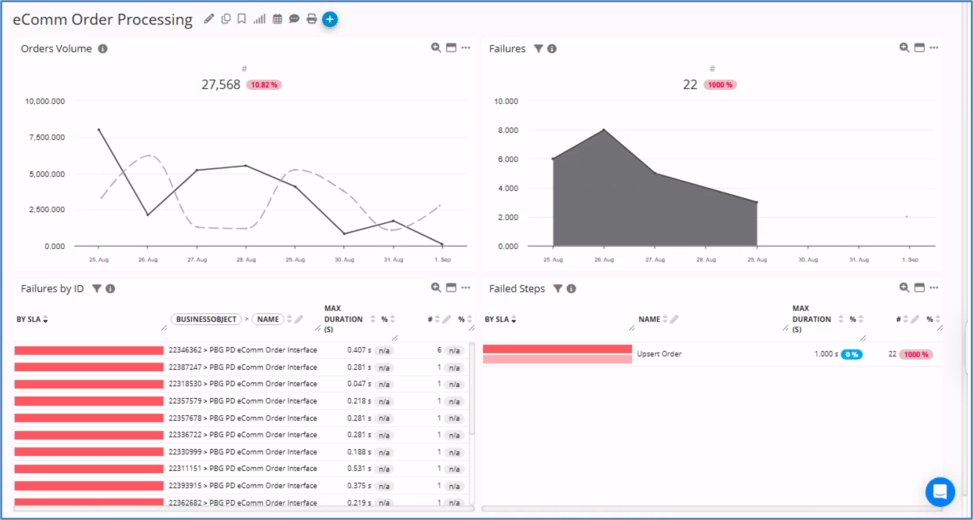
Detect and fix SAP order failures in real time
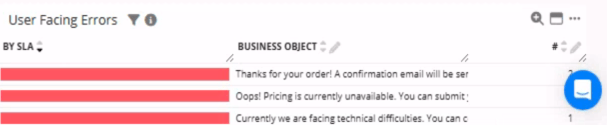
Diagnose and resolve SAP user errors
- Browser events
- JavaScript
- Network requests
- HTTP checks
- Application logs
Show all 9
Show all 9
- Java exceptions, when Code Profiler is available
- Integrations
- Supported databases
- Synthetic scenarios
Outlier detection and analysis
GermainUX can apply outlier detection to collected SAP-related KPIs, including:- User-action duration
- Page duration
- Checkout duration
- Business-process duration
- HTTP response time
- Error volume
- Host metrics
- Supported database metrics
Alerts, reports, and automation
GermainUX can:- Alert on configured KPI
Recommended dashboards
Depending on the deployed monitoring, dashboards can cover:- SAP Commerce Cloud conversion
- Product discovery
- Cart and checkout
- Customer experience
- Customer feedback
- Application adoption
Show all 13
Show all 13
- User productivity
- Business-process efficiency
- Browser performance
- Error impact
- HTTP and integration availability
- Synthetic monitoring
- Server and supported database health
Additional Resources
Deploy
Configure
AI
Analytics
Automation
Dashboard & Reports
Get Help
Contact GermainUX Support
Can't find what you need?
The content of this document is proprietary to GERMAIN SOFTWARE.