

What You Get
Questions answered and use cases
What GermainUX Captures
Turns, errors and panel use
Turn It On
Profile and conversation analysis
Troubleshooting
Missing data and timings
Overview
Agentforce is the Salesforce AI assistant that employees open from the Lightning header to ask questions and act on records. GermainUX monitors every Agentforce conversation from the employee’s browser. It records what was asked, what Agentforce answered, how long it took, and whether the answer helped. This shows you how Agentforce performs for your employees: how long they wait for answers, how often it fails, and which answers they reject. Because the data comes from the same session as the rest of the Salesforce activity, you can replay any conversation in the Agentforce panel, next to the clicks, pages and errors around it.What You Get
Salesforce tells you how many Agentforce requests ran. GermainUX tells you what those requests were like for the employee: how long they waited, whether they got an answer, and what they did next. Agentforce monitoring helps you answer questions such as:- Which agents and questions are slowest to answer?
- How often does Agentforce fail, and is it Salesforce, throttling or the agent itself?
- Which answers do employees dislike, and what did they ask?
- Do employees type their own questions or rely on suggestions?
- Which employees use Agentforce regularly, and which try it once and stop?
- What was the employee doing in Salesforce right before and after the conversation?
Slow or Failed TurnsAgent and Error TypeAffected EmployeesConversationSession Replay
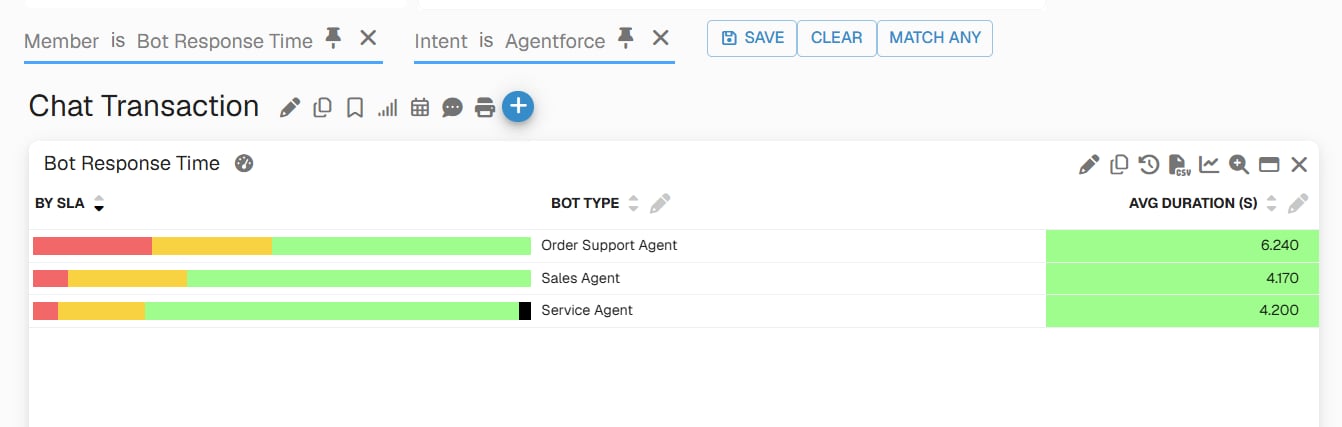
Agentforce Bot Response Time by Agent - GermainUX
Use Cases
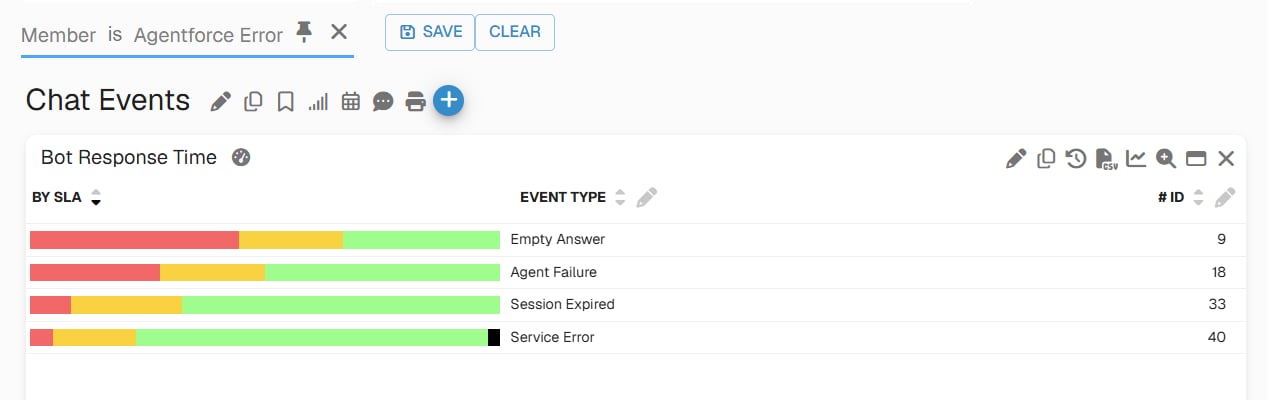
Agentforce Errors by Type - GermainUX
What GermainUX Captures
GermainUX turns each question and answer into a turn, and groups turns into a conversation by the Agentforce session ID, which it stores as the Conversation ID. Every record carries the agent’s name as the Responder, so you can compare agents side by side.Each Question and Answer
For every turn, GermainUX creates aBot Response Time transaction. Its duration is the time from sending the question to receiving the full answer. On orgs that use the Agent API, GermainUX also creates a Bot First Response Time transaction: the time until the first part of the answer arrived. Orgs where the panel uses Aura actions record Bot Response Time only.
Each turn records the following in the Details of its Bot Response Time transaction:
- The employee’s question and Agentforce’s answer
- How the question was asked: typed, a welcome suggestion, or a follow-up suggestion
- The turn number within the conversation
- The agent steps shown while answering, such as “Getting record details”
- Lightning components that Agentforce rendered in the answer
- The number of cited references
- Whether Salesforce flagged the content as unsafe
- The types of the messages in the answer
- On a failed turn, the error Salesforce returned
Conversation, Error and Feedback Events
GermainUX also records each Agentforce like or dislike as User Feedback, so Agentforce ratings appear next to the rest of your Salesforce feedback. To compare ratings by agent, use the Agentforce Feedback event, which carries the agent as its Responder. See User Feedback for Salesforce.
GermainUX classifies every failed turn, so you can tell a Salesforce outage from an agent that has no answer:
Every Agentforce Error also counts as a User-Facing Error. Agentforce failures therefore appear in the User-Facing Error KPI and in the session’s error count, next to the other errors your Salesforce users see.
Agentforce Panel Load and Actions
GermainUX times the Aura calls the panel makes around a conversation, as transactions named Agentforce followed by the action. Agentforce Panel Load is the call the panel makes to look up its agent (getBotId). It times that request, not how long the panel takes to appear on screen. The other actions are named after the Salesforce action, such as Agentforce Get Agents, Agentforce Get Welcome Utterances, Agentforce Get Recommended Utterances and Agentforce Get Plan. For Agentforce Get Plan, the plan itself is stored in Details.
When Salesforce sends several of these actions in one request, each transaction shows the duration of that whole request.
Panel Interactions
GermainUX records how employees use the panel itself:- Agentforce Panel Opened and Agentforce Panel Closed
- Agentforce Panel Pinned and Agentforce Panel Unpinned
- Agentforce Suggestion Selected, with the suggestion text
- Agentforce Answer Copied
- Agentforce Agent Switched, with the previous and new agent
AI Analysis of Agentforce Conversations
GermainUX ships a chat processor and an AI prompt for Agentforce conversations. In GermainUX settings, both are named Agentforce, after the conversations they analyze. When the processor is on, GermainUX groups the turns of each conversation into one Chat Conversation record, with its transcript, message counts and response times. It creates this record once the conversation has ended. GermainUX then sends the transcript, with the prompt, to the AI model configured in GermainUX. The prompt returns two results:- Frictions: anything that kept the employee from finishing the task quickly. GermainUX records each friction as an AI Chat Friction event, named after the friction category, and adds the number of frictions to the conversation.
- A summary: two to three sentences on what the employee asked and how the conversation ended. GermainUX records it as one AI Chat Summary event named
Conversation Summary, with the summary text in Details. A conversation gets a summary even when the AI finds no frictions.
- Agentforce didn’t understand the request
- Agentforce couldn’t find or act on the record
- The answer was wrong, generic or incomplete
- An action failed, or needed confirmation repeatedly
- The employee had to rephrase or repeat the request
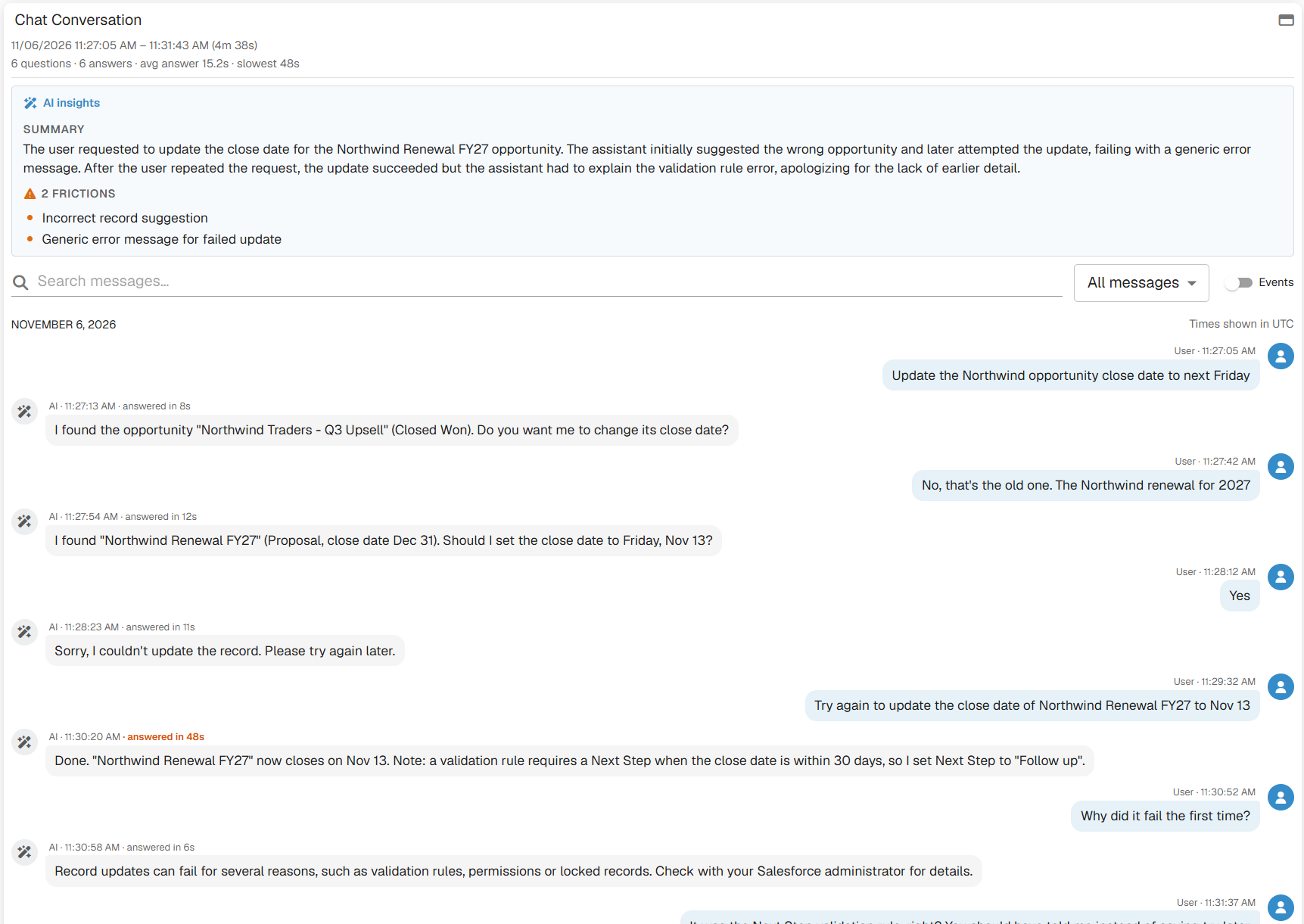
Agentforce Conversation with AI Summary and Frictions - GermainUX

AI Chat Friction Events for Agentforce Conversations - GermainUX
Turn On Agentforce Monitoring
Agentforce monitoring is part of the GermainUX Salesforce UX Monitoring Profile. Once the profile monitors your Lightning users, GermainUX captures Agentforce turns, errors, feedback and panel use with no extra setup. Before you start, make sure that:- Salesforce RUM monitoring is deployed, see Salesforce Monitoring Deployment
- Your Salesforce users are monitored by the Salesforce UX Monitoring Profile
- Agentforce is enabled in your Salesforce org and available to those users
Turn On AI Conversation Analysis
AI analysis of Agentforce conversations is off by default. To turn it on:1
Confirm AI features are on
In the left menu, go to Settings > System > AI > Settings and check that AI Features is enabled.
2
Check the prompt for Agentforce conversations
In the left menu, go to Settings > System > AI > Prompts and confirm that the prompt named Agentforce is enabled.
3
Enable the chat processor for Agentforce conversations
In the left menu, go to Settings > System > AI > Settings. In the Chat Analysis section, open Processors, enable the processor named Agentforce, and save.
Troubleshooting
No Agentforce data at all
No Agentforce data at all
GermainUX reads Agentforce turns from the requests the Agentforce panel sends. Check that:
- The employee is monitored by the Salesforce UX Monitoring Profile.
- Network Requests Monitoring is on in that profile. In the left menu, go to Settings > Analytics > UX Monitoring Profiles, open the Salesforce profile, and check the setting.
- The employee uses Agentforce from the Lightning panel, in a browser that GermainUX monitors.
No Bot First Response Time
No Bot First Response Time
Bot First Response Time is only recorded on orgs that use the Agent API. On those orgs, it also needs the browser’s timing data for the Agent API request. If Salesforce doesn’t allow cross-origin timing for that request, GermainUX records Bot Response Time only.No Chat Conversation, AI Chat Friction or AI Chat Summary records
No Chat Conversation, AI Chat Friction or AI Chat Summary records
Chat Conversation records need the chat processor named Agentforce. AI Chat Friction and AI Chat Summary events also need AI features and the prompt named Agentforce. All three are covered in Turn On AI Conversation Analysis.These records only appear once a conversation has ended and GermainUX has closed it. A conversation without frictions gets a Chat Conversation record and an AI Chat Summary event, but no AI Chat Friction events.If you customized the prompt named Agentforce, it produces a summary only when its text asks for one. Keep the instruction to summarize the conversation in your version of the prompt.
KPIs for Agentforce
GermainUX stores Agentforce data in its standard chat and feedback KPIs. To see Agentforce only, filter on Chat =Agentforce, or on the event names above.
On Chat Transaction and Chat Event records, Agentforce fills these fields:
Split charts by Responder to compare agents, or filter on one Conversation ID to see every record of a conversation.
See Agentforce KPIs in the Salesforce KPI list, alongside the other Salesforce KPIs.
Additional Resources
Chat Analysis
AI analysis of chat and chatbot conversations
User Monitoring and Session Replay
Salesforce RUM and replays
Analytics
More Analytics Features
Get Help
Contact GermainUX Support
The GermainUX team helps you get up and running faster, empower your team, turn data into actionable insights, and optimize performance to deliver measurable business outcomes.
Can't Find What You Need?
Search all GermainUX docs with Ctrl + K, or use the feedback buttons at the bottom of this page to tell us what is missing.
The content of this document is proprietary to GERMAIN SOFTWARE.