

Commerce
Conversion
Processes
Errors
Monitoring & Automation Capabilities
GermainUX also provides comprehensive monitoring for SAP Commerce Cloud (formerly SAP Hybris), with capabilities comparable to those available for Shopify, including real-user monitoring, Session Replay, conversion analysis, product and cart events, checkout monitoring, customer feedback, error analysis, business-process monitoring, synthetic monitoring, and integration observability.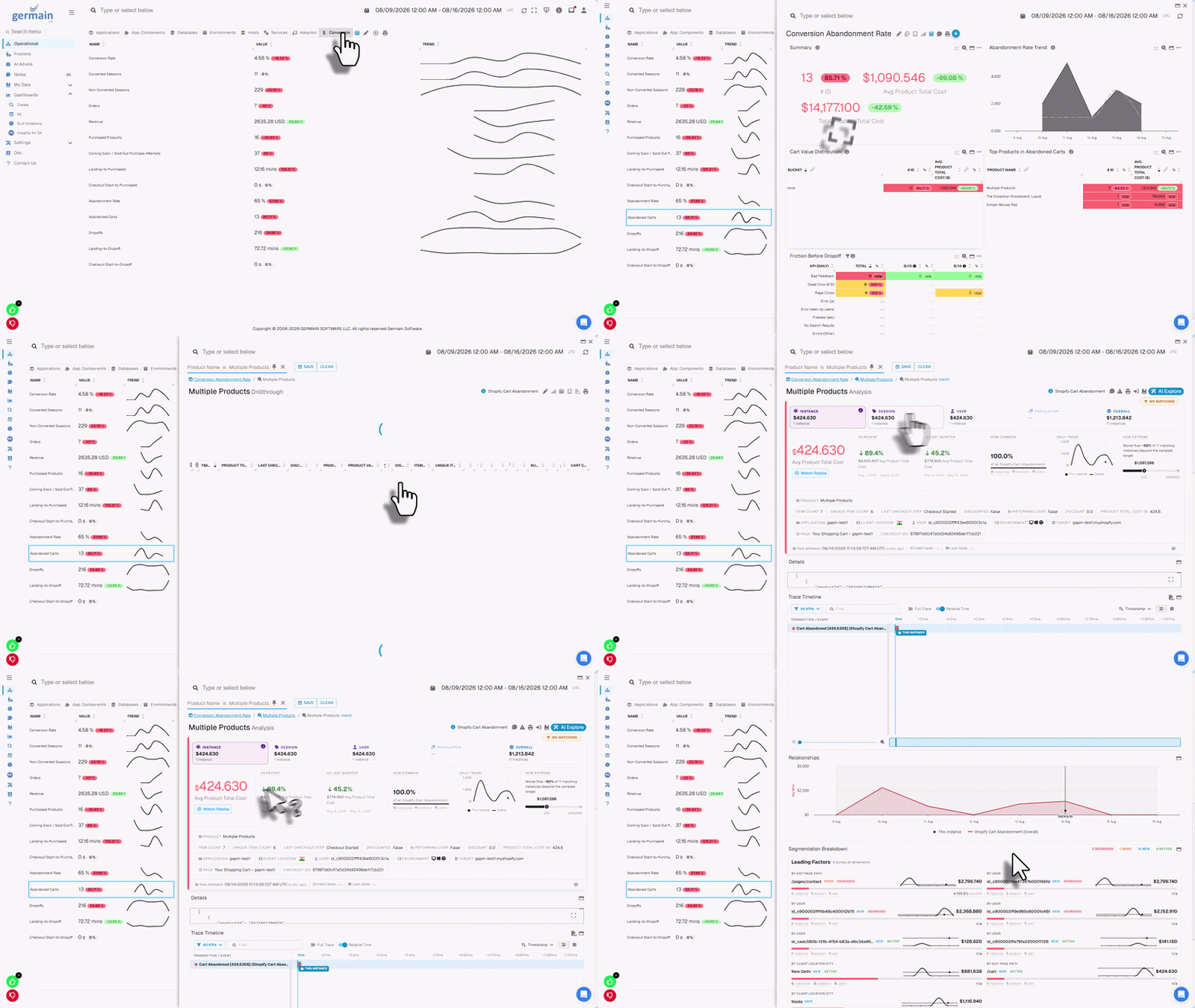
Real-time conversion friction detection, analytics and recommendations for SAP Commerce Cloud
Supported SAP use cases
GermainUX can help teams:- Improve SAP application adoption
- Increase SAP Commerce Cloud conversion
- Identify ineffective or unnecessarily complex workflows
- Reduce employee and customer frustration
- Detect application and integration failures
- Understand abandonment and drop-off
Show all 12
Show all 12
- Identify lost productivity
- Accelerate user support
- Analyze errors according to business impact
- Detect availability problems before users report them
- Prioritize improvements using real-user evidence
- Validate improvements after releases or configuration changes
Monitoring & Automation components
SAP Commerce Cloud monitoring
SAP Commerce Cloud, historically called SAP Hybris, is SAP’s enterprise e-commerce platform. GermainUX can monitor SAP Commerce Cloud across the customer journey, from initial landing and product discovery through cart, checkout, purchase, feedback, and post-purchase activity.Commerce monitoring capabilities
SAP Commerce Cloud storefronts
RUM JS can be deployed in compatible:- Traditional SAP Commerce Cloud storefronts
- Accelerator-based storefronts
- Spartacus storefronts
- Composable storefronts
- Headless storefronts
- Custom JavaScript storefronts
Real-user monitoring
For compatible browser-based SAP applications, RUM JS can capture:- User sessions
- Logical pages and application views
- Clicks and interactions
- Browser and JavaScript errors
- Network and resource requests
- User-perceived performance
Show all 12
Show all 12
- Browser and device information
- Custom application and commerce events
- Session Replay
- Heatmap data
- User feedback
- Business-process steps
Session Replay
GermainUX reconstructs the monitored browser experience from captured DOM changes, interactions, network activity, and related browser events. Replay enables teams to investigate:- Customer complaints
- Abandoned journeys
- Failed checkout attempts
- Ineffective SAP workflows
- Application errors
Show all 10
Show all 10
- Rage and dead clicks
- Slow user actions
- Confusing validation
- Unexpected navigation
- Repeated or unnecessary steps
.png?fit=max&auto=format&n=Jw6D65yKWJ4U5yOS&q=85&s=1727aaf5a9b77f6b79f49e3b68a5d052)
Understand what SAP users struggle with in real time
SAP Commerce Cloud events
GermainUX can collect or derive events that describe customer behavior and commerce outcomes. Examples include:- Category Viewed
- Product Viewed
- Search Submitted
- Search with No Results
- Filter Applied
- Sort Applied
Show all 17
Show all 17
- Product Added to Cart
- Product Removed from Cart
- Cart Viewed
- Checkout Started
- Checkout Step Completed
- Checkout Validation
- Checkout Failed
- Order Completed
- Customer Registered
- Login Completed
- Feedback Submitted
Conversion monitoring
.gif?s=f8a061adad40af34b3a24f504f3150a0)
Real-time conversion ops dashboard for SAP Commerce Cloud
Landing Page
Category Viewed
Product Viewed
Product Added to Cart
Cart Viewed
Checkout Started
Order Completed
- Overall conversion rate
- Product-view-to-cart rate
- Search-to-product rate
- Category-to-product rate
- Cart-to-checkout rate
- Checkout completion rate
Show all 16
Show all 16
- Cart abandonment
- Checkout abandonment
- Step conversion and drop-off
- Conversion by product or category
- Conversion by customer segment
- Conversion by campaign or traffic source
- Conversion by browser, device, or location
- Errors associated with lost conversion
- Performance associated with abandonment
- Estimated revenue impact
Product-discovery analysis
GermainUX can help identify:- Searches returning no results
- Searches that do not lead to a product
- Categories that do not lead to product views
- Products viewed but not added to the cart
- Sold-out product encounters
Show all 9
Show all 9
- Ineffective filtering or sorting
- Repeated searches
- Frustrating product-navigation paths
- Products associated with errors or slow performance
Cart and checkout analysis
GermainUX can analyze:- Products added to and removed from the cart
- Cart value and quantity, when approved and available
- Cart abandonment
- Checkout entry
- Checkout progression
- Step duration
Show all 12
Show all 12
- Checkout validation
- Payment submission events
- Checkout failures
- Checkout completion
- Third-party service failures
- Customer behavior preceding abandonment
.png?fit=max&auto=format&n=Jw6D65yKWJ4U5yOS&q=85&s=2d6f8c21ebf29dc5692477a636810321)
Cart and checkout analysis
Customer-feedback monitoring
The GermainUX feedback popup can collect customer feedback directly from a monitored SAP Commerce Cloud storefront. Feedback can be correlated with:- Customer session
- Page
- Product or category
- Cart or checkout stage
- Browser and device
Show all 9
Show all 9
- Error
- Performance
- Conversion outcome
- Session Replay
.png?fit=max&auto=format&n=Jw6D65yKWJ4U5yOS&q=85&s=38424d5f3983a1ee3ca28b25f3436292)
Allow SAP users to provide feedback, understand the context, and act on it
Heatmaps and behavioral analysis
For supported browser pages, GermainUX can provide:- Click heatmaps
- Error-click heatmaps
- Rage-click heatmaps
- Dead-click heatmaps
- Mouse-movement heatmaps
- Scroll heatmaps
- Elements customers interact with most
- Controls that appear interactive but do nothing
- Repeated frustrated interactions
- Important content customers do not reach
- Layouts that create unnecessary friction
- Differences across devices or customer segments
Business-process monitoring
GermainUX can construct SAP business processes from events collected through RUM JS, the Engine, synthetic monitoring, or custom integrations..jpg?fit=max&auto=format&n=Jw6D65yKWJ4U5yOS&q=85&s=6c1d0ad29ec844b051bc828395b8e4e1)
Track and improve ineffective processes
Commerce processes
- Product discovery
- Search to product
- Product to cart
- Cart to checkout
- Checkout to order
Show all 9
Show all 9
- Customer registration
- Login and password recovery
- Return request
- Support or chat journey
.jpg?fit=max&auto=format&n=Jw6D65yKWJ4U5yOS&q=85&s=98f185b9d7e910efd43615694111b572)
Analyze business processes and frictions at scale
Enterprise SAP processes
- Purchase requisition
- Purchase-order approval
- Invoice approval
- Sales-order entry
- Expense submission
- Material lookup
- Employee self-service
- Start event
- Completion event
- Steps
- Optional and alternative paths
- Failure conditions
Show all 9
Show all 9
- Abandonment timeout
- Expected duration
- Correlation rules
- Application and environment
- Completion
- Abandonment
- Step drop-off
- Slow steps
- Rework
Show all 9
Show all 9
- Repeated actions
- Application errors
- Process overruns
- Estimated lost productivity
.png?fit=max&auto=format&n=Jw6D65yKWJ4U5yOS&q=85&s=0ea91d87aad7d2f59a047eac50ed3b80)
Analyze every step of a process
Browser-side JavaScript diagnostics
The JS Profiler can provide deeper browser-side information about:- JavaScript execution
- Function and call-stack activity
- Long-running browser operations
- Browser freezes
- Client-side errors
- Network activity
- Frontend-framework behavior
- Third-party scripts
.png?fit=max&auto=format&n=Jw6D65yKWJ4U5yOS&q=85&s=e80ca3e3258d0bd72cc86e7b0f377532)
Browser-side JavaScript diagnostics
SAP Commerce Cloud Java monitoring
SAP Commerce Cloud uses Java-based server components. The GermainUX Code Profiler may monitor those components when:- The Java runtime and application server are supported.
- The organization controls the runtime.
- Profiler-agent installation is permitted.
- The deployment is approved.
- Required network communication is available.
- Java transaction tracing
- Method-level performance
- Exceptions
- Outbound calls
- Database-call correlation
- Time spent in supported Java components
HTTP, API, and integration monitoring
The GermainUX Engine can monitor reachable SAP-related endpoints for:- Availability
- Response time
- HTTP status
- Timeout
- Authentication failure
- Expected response content
- Configured functional success
- SAP Commerce Cloud OCC APIs
- REST endpoints
- OData services
- SOAP services
- Payment integrations
Show all 10
Show all 10
- Search services
- Inventory services
- CRM or ERP integrations
- Shipping and tax services
- Customer-identity services
Log and file monitoring
The Engine can monitor accessible SAP-related logs and text files when the format is supported or an appropriate parser is configured. Potential sources include:- Commerce application logs
- Web-server logs
- Integration logs
- Job logs
- Security logs
- Exported diagnostic files
- Path and pattern
- Encoding
- Timestamp
- Multiline handling
- Rotation
- Severity
- Application and environment
- Privacy rules
Server and database monitoring
For customer-controlled environments, the Engine can monitor supported:- Operating-system hosts
- Processes and services
- CPU, memory, and disk
- Network availability
- Databases
Show all 10
Show all 10
- Connections
- Capacity
- Locks
- Queries
- Errors
Synthetic monitoring
Use the RPA Bot Recorder to create Selenium scenarios for supported browser-based SAP applications.SAP Commerce Cloud scenarios
Open the storefront
Search for a product
Open a product page
Add a product to the cart
View the cart
Start checkout
Validate price or availability
Sign in
Confirm that a critical integration works
Enterprise SAP scenarios
Open the login page
Sign in
Open the Fiori launchpad
Launch an application
Perform a read-only lookup
Validate an expected result
Sign out
Error monitoring
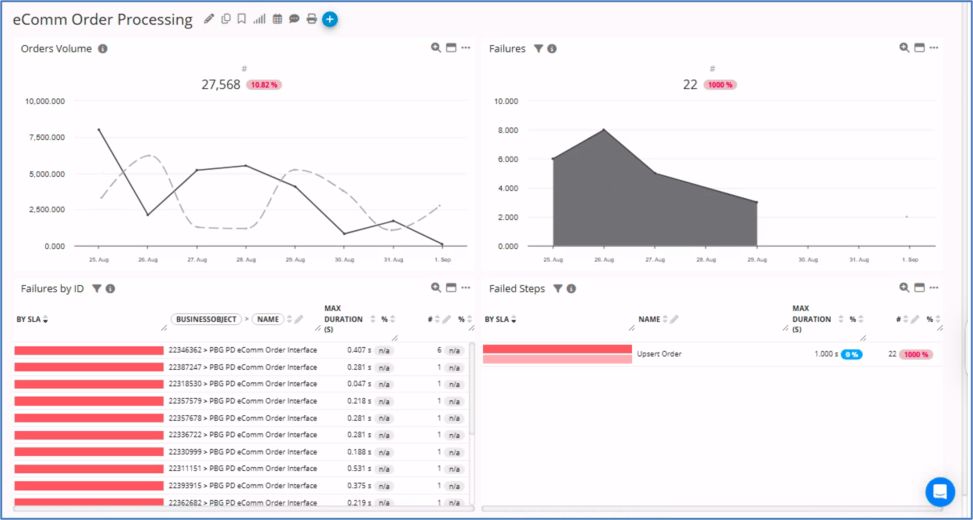
Detect and fix SAP order failures in real time
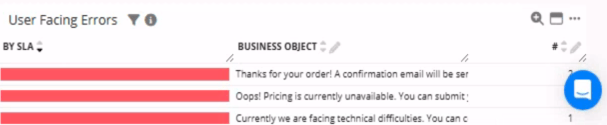
Diagnose and resolve SAP user errors
- Browser events
- JavaScript
- Network requests
- HTTP checks
- Application logs
Show all 9
Show all 9
- Java exceptions, when Code Profiler is available
- Integrations
- Supported databases
- Synthetic scenarios
Outlier detection and analysis
GermainUX can apply outlier detection to collected SAP-related KPIs, including:- User-action duration
- Page duration
- Checkout duration
- Business-process duration
- HTTP response time
- Error volume
- Host metrics
- Supported database metrics
Alerts, reports, and automation
GermainUX can:- Alert on configured KPI
Recommended dashboards
Depending on the deployed monitoring, dashboards can cover:- SAP Commerce Cloud conversion
- Product discovery
- Cart and checkout
- Customer experience
- Customer feedback
- Application adoption
Show all 13
Show all 13
- User productivity
- Business-process efficiency
- Browser performance
- Error impact
- HTTP and integration availability
- Synthetic monitoring
- Server and supported database health
Additional Resources
Deploy
Configure
AI
Analytics
Automation
Dashboard & Reports
Get Help
Contact GermainUX Support
Can't find what you need?
The content of this document is proprietary to GERMAIN SOFTWARE LLC.