

Monitoring Components
Engine, logs and JVM
Deploy Server-Side Monitoring
Engine setup for OBIEE
Configure Log Access
Grant access to logs
Validate the Deployment
Run OBIEE test activity
Monitoring Components
Depending on the required monitoring scope, GermainUX can use:
Additional Java/JVM monitoring can be deployed according to the architecture of the OBIEE environment.
1. Start the OBIEE Server Wizard
In Germain Workspace, navigate to:Left MenuWizardsOBIEE Server
Start the OBIEE Server Wizard.
The Wizard guides you through deployment of monitoring for the OBIEE environment.
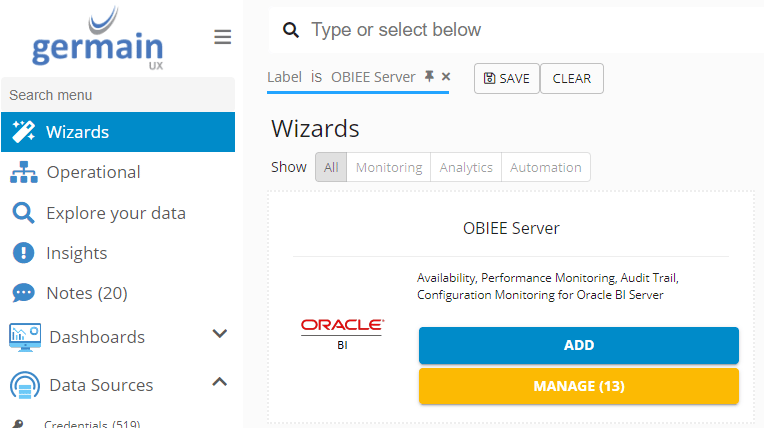
2. Configure the OBIEE Environment
Configure the OBIEE environment according to the options provided by the Wizard. Identify the appropriate:- OBIEE environment
- Server
- Application
- Monitoring components
3. Deploy Server-Side Monitoring
Deploy the GermainUX Engine monitoring required for the OBIEE server environment. Ensure the selected GermainUX Engine has the required connectivity to the OBIEE environment. Server-side monitoring provides the technical telemetry used to analyze OBIEE availability and performance.4. Deploy Real User Monitoring
Where actual OBIEE user experience needs to be monitored, deploy the appropriate GermainUX browser monitoring component. Use:- RUM JS where browser-side monitoring can be deployed within the application.
- RUM Browser Extension where extension-based monitoring is appropriate.
5. Deploy Java / JVM Monitoring
Where JVM and Java-level visibility is required, deploy the appropriate GermainUX Java monitoring capabilities for the OBIEE environment. This enables analysis of:- JVM performance
- CPU
- Memory
- Garbage collection
- Threads
- Java execution
6. Configure Log Access
Configure access to the OBIEE logs required for monitoring. Select only logs relevant to operational monitoring and troubleshooting. Verify that the GermainUX monitoring component can access the configured log sources.7. Configure Synthetic Monitoring — Optional
Use the GermainUX RPA Bot Recorder when proactive synthetic monitoring of important OBIEE user workflows is required. Synthetic monitoring can complement Real User Monitoring by continuously validating representative application journeys even when no real users are active.8. Review Data Privacy
Before production deployment, review the data captured from OBIEE. Pay particular attention to:- User information
- Report content
- Business data displayed within OBIEE
- Authentication information
- Session identifiers
- URLs and parameters
- Sensitive application content
9. Validate the Deployment
Execute representative OBIEE activity. For example:User LoginNavigate OBIEEOpen ContentInteract with Application
Verify the monitoring components deployed for your environment.
Depending on scope, confirm:
- User sessions are received
- User actions are captured
- OBIEE availability is monitored
- Web-server telemetry is received
- JVM telemetry is received
- Java profiling operates where enabled
Show all 9
Show all 9
- Logs are collected
- Server telemetry is received
- Monitoring is associated with the correct application and environment
Next Steps
Once monitoring is operational, configure:- User-experience monitoring
- JVM monitoring
- Java profiling
- Log monitoring
- KPIs
- SLAs
Show all 12
Show all 12
- Categorization
- Correlation
- Privacy
- Alerts
- Automation
- Dashboards and reports
Get More Information
OBIEE environments can vary significantly depending on storefront customization, extensions, integrations, infrastructure, and security requirements. The GermainUX team can help configure the appropriate monitoring scope, privacy controls, analytics, alerts, and automation for your OBIEE environment. Please contact us for any help.Get Help
Contact GermainUX Support
The GermainUX team helps you get up and running faster, empower your team, turn data into actionable insights, and optimize performance to deliver measurable business outcomes.
Can't find what you need?
Search all GermainUX docs with Ctrl + K, or use the feedback buttons at the bottom of this page to tell us what is missing.
The content of this document is proprietary to GERMAIN SOFTWARE.