

Classic and Lightning
Real User Monitoring and Session Replay
Configure Salesforce CSP Trusted Sites
Salesforce Integration Monitoring
Deploy GermainUX for Salesforce Classic and Lightning
GermainUX can monitor Salesforce from the user interface through the underlying Salesforce services and integrations. A complete deployment can provide:- Real User Monitoring
- Session Replay
- User feedback
- Adoption and workflow analysis
- Salesforce and integration monitoring
- Visualforce and JavaScript diagnostics
- Synthetic monitoring
- Alerts, insights, and automated actions
Select the Required Deployment
- RUM Extension, installed in each user’s browser or deployed through enterprise browser-management policy. This is the recommended option for Salesforce Lightning and Salesforce Classic.
- RUM JS, loaded by the Germain RUM Agent utility item that you deploy into your Salesforce org and add to the Lightning utility bar.
Real User Monitoring Deployment Options
The RUM Extension is the recommended option for Salesforce. It covers the pages RUM JS can’t, such as Setup, Salesforce Classic and pages outside the Lightning app, and it starts monitoring with the page load. RUM JS through the Germain RUM Agent is the alternative for Salesforce Lightning when browser extensions can’t be deployed to your users. It needs no extension, but it only monitors the Lightning apps whose utility bar loads it. See the limits below. Both options use the Salesforce UX Monitoring Profile. For what it captures, see Salesforce Browser Monitoring Data.Deployment Overview
A typical deployment follows this sequence:Real User Monitoring and Session Replay
Requirements
Before deploying Salesforce Real User Monitoring, confirm the following:Option 1: Deploy RUM JS Through the Salesforce Lightning Utility Bar
RUM JS is loaded by the Germain RUM Agent, an Aura utility item that you deploy into your Salesforce org. When a user opens a Lightning app with the utility item, the agent loads its monitoring script from your GermainUX instance and starts monitoring. The GermainUX team provides the Germain RUM Agent, either as a package installation URL or as a Salesforce DX project to deploy with the Salesforce CLI. Before you start, make sure that:- You can edit Lightning apps in the target org
- Browsers can reach your GermainUX instance
- To deploy with the CLI, the Salesforce CLI (
sf) is installed
-
Install the Germain RUM Agent:
- From a package: open the package installation URL from the GermainUX team and install the package. When it completes, confirm that the package appears under Installed Packages.
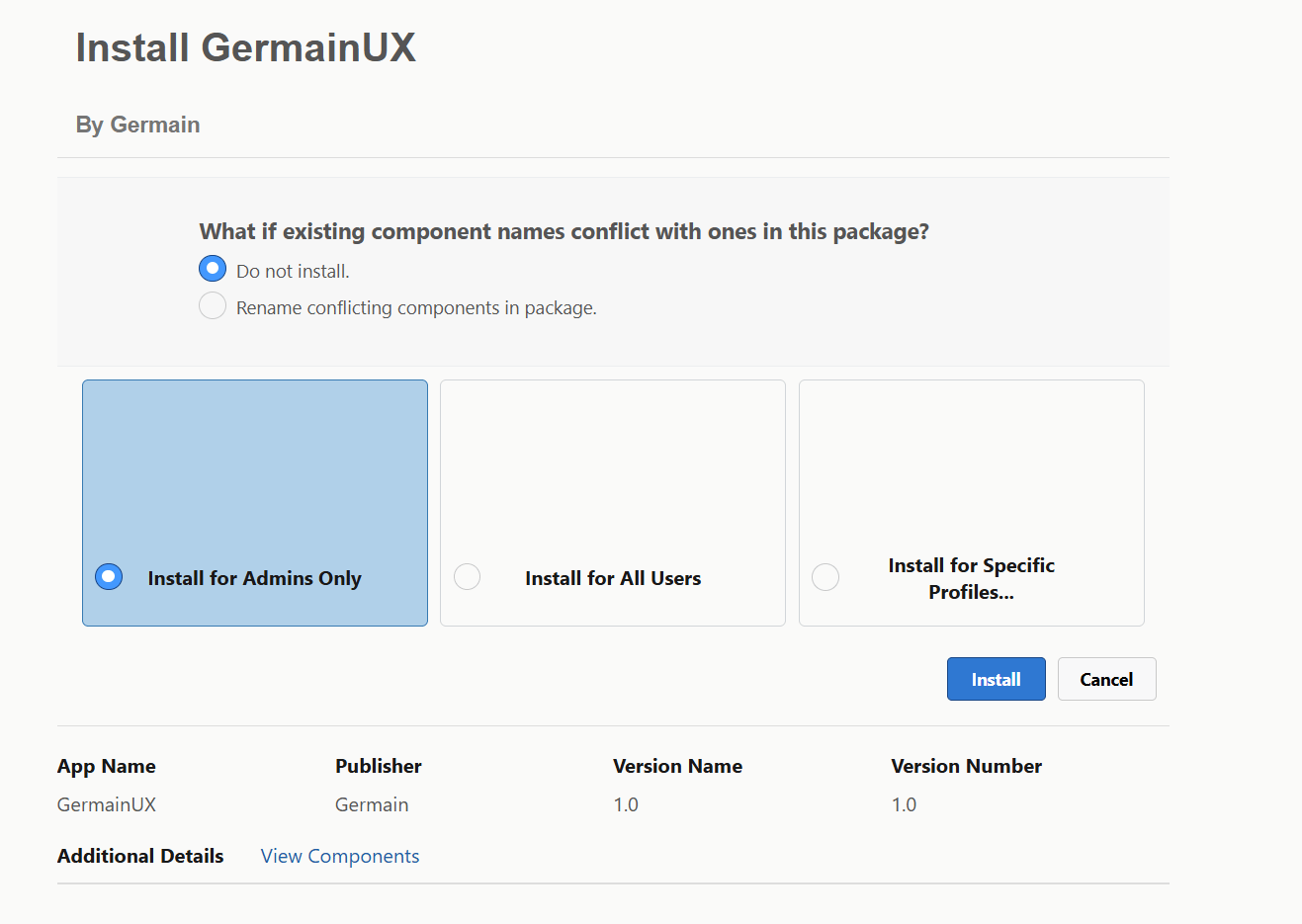
Install GermainUX Salesforce Aura package - GermainUX
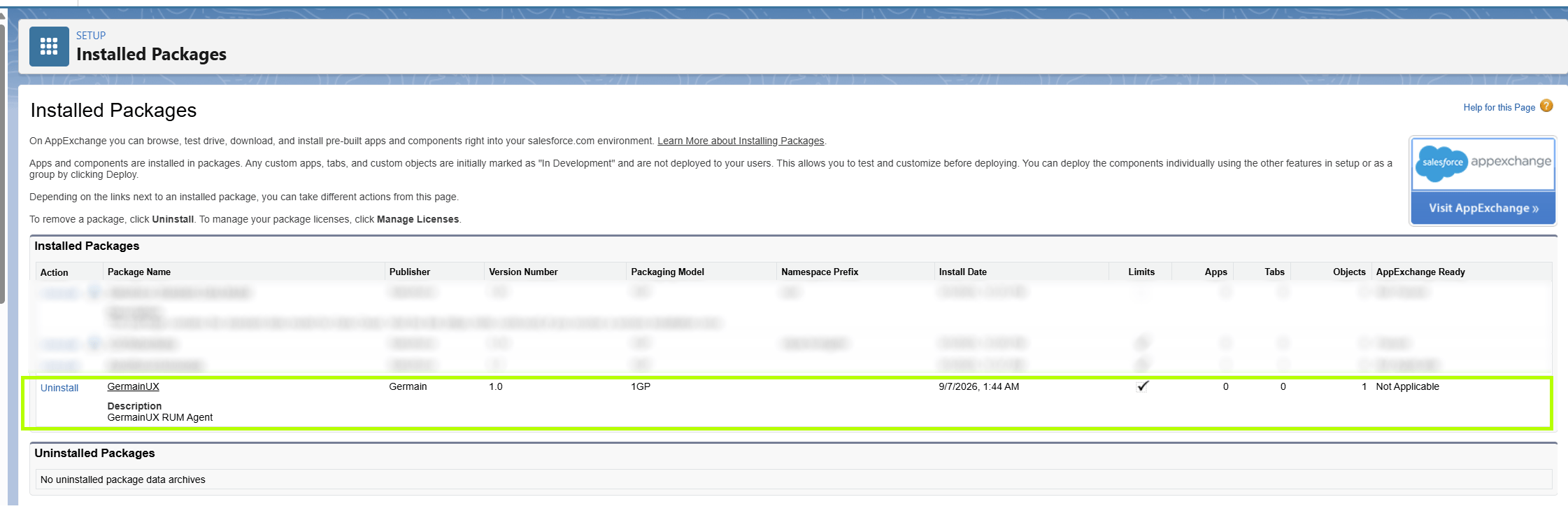
GermainUX package listed under Installed Packages - GermainUX
- With the Salesforce CLI: log in to the org, then deploy the project from its folder.
A production org also runs the Apex tests during deployment:
- From a package: open the package installation URL from the GermainUX team and install the package. When it completes, confirm that the package appears under Installed Packages.
- In Salesforce Setup, open App Manager.
-
Edit the target Lightning app, such as Service Console.
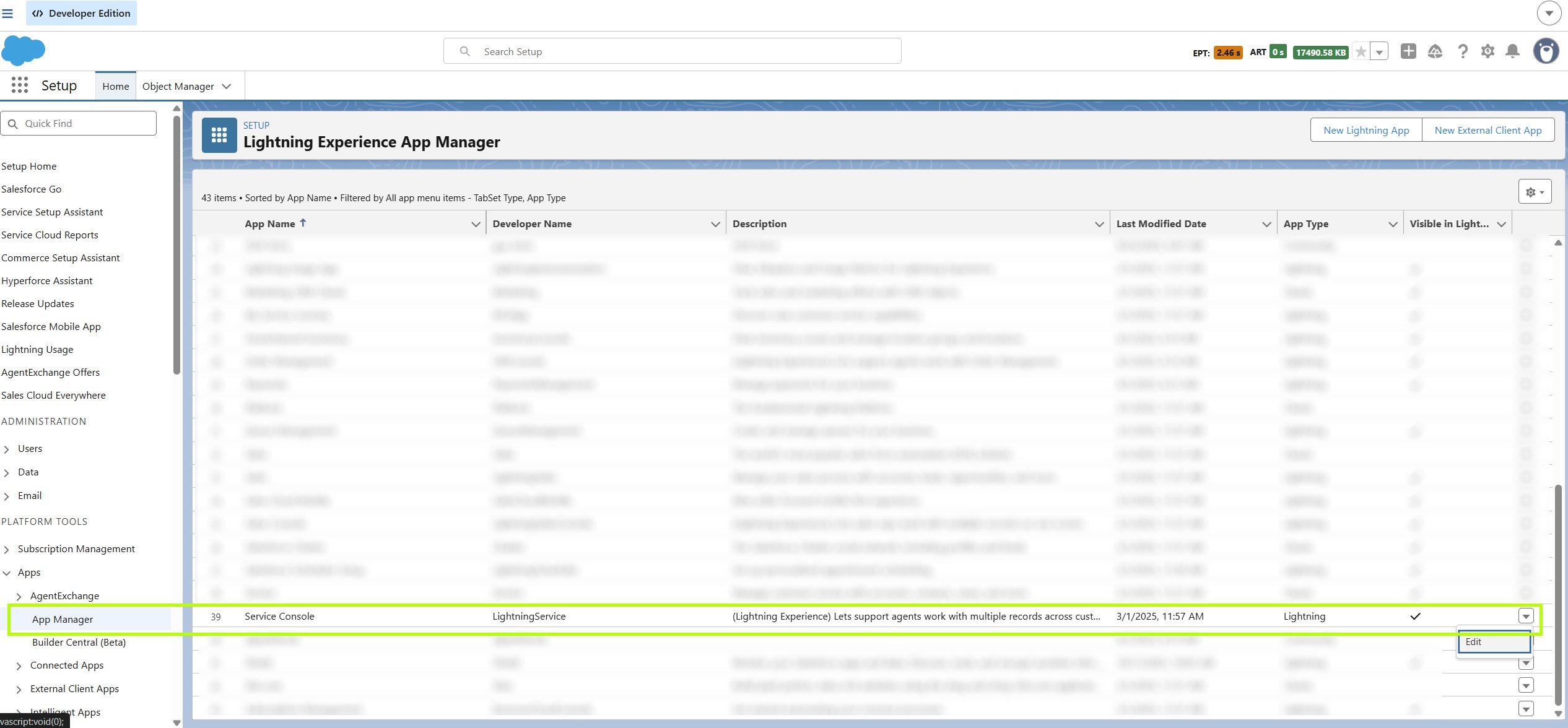
Edit target Lightning app in App Manager - GermainUX
-
Open Utility Items (Desktop Only).
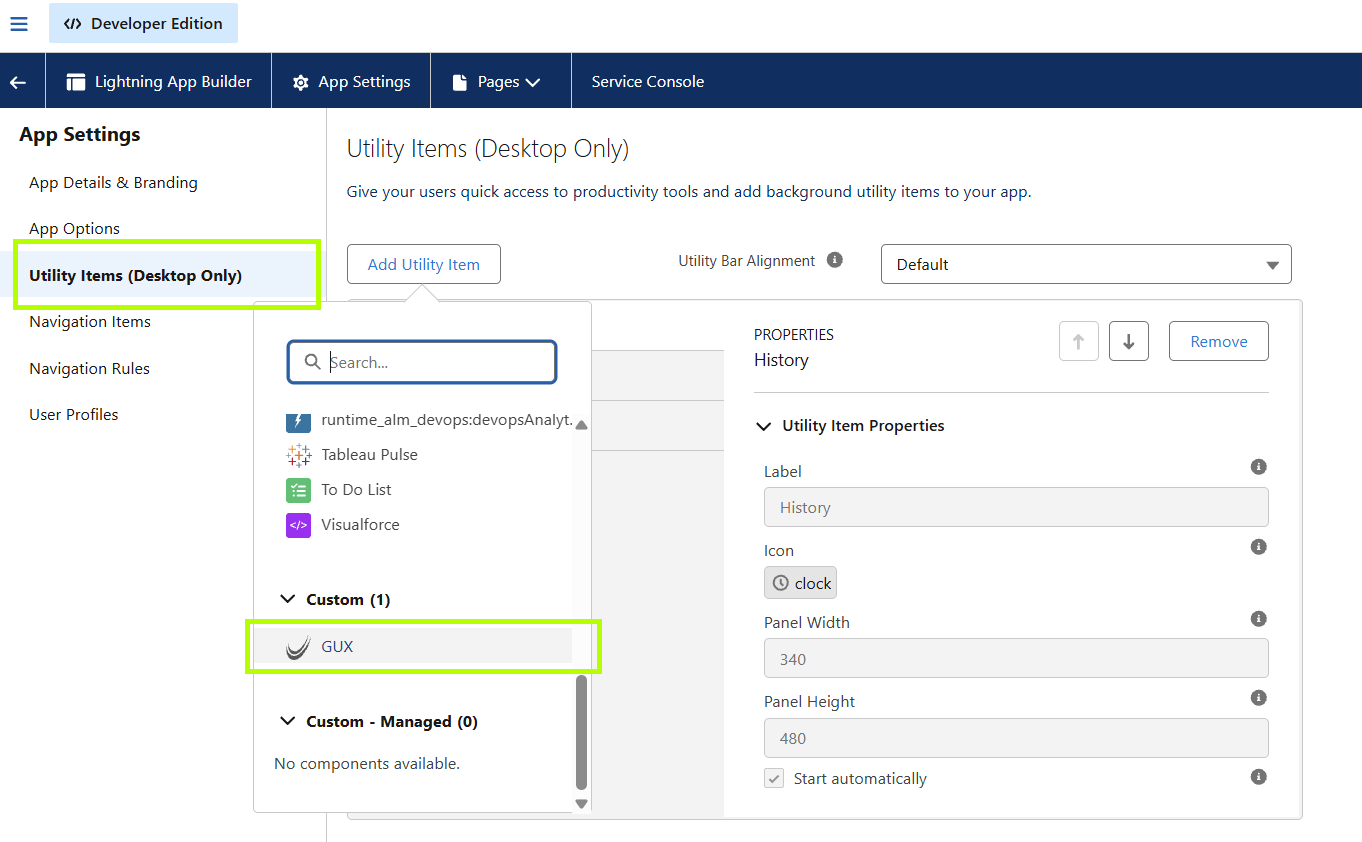
Utility Items configuration in Lightning app - GermainUX
- Select Add Utility Item, then choose GUX, the Germain RUM Agent component. Keep its label GUX, or give it a label your users recognize.
-
Enable Start automatically, and save the app. Without it, the agent only loads once a user opens the utility panel.
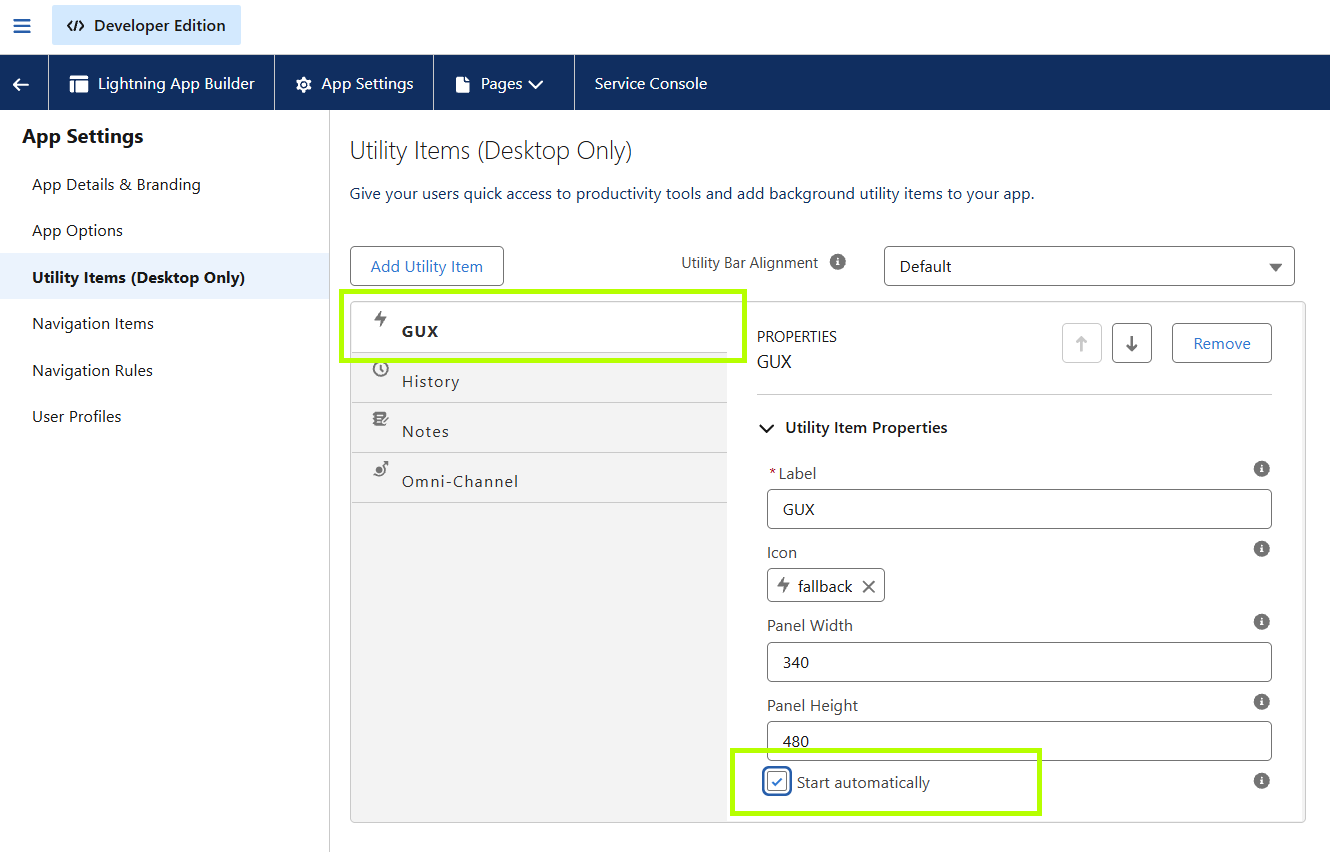
Configure GUX utility item properties with Start automatically enabled - GermainUX
-
Open the app, click GUX (or the label you gave it) in the utility bar, enter these values, and click Apply:
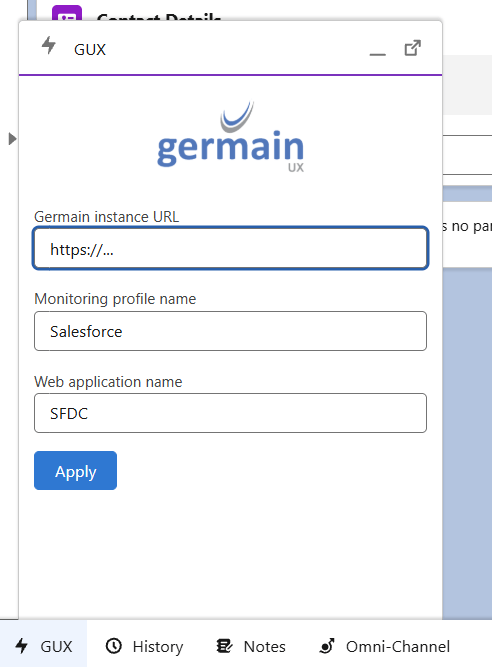
Germain RUM Agent Settings in the Utility Bar - GermainUX
Germain RUM Agent Constraints
- The agent runs at Salesforce API version 39.0, which keeps Lightning Locker off for the component so it can load RUM JS. Don’t raise its API version.
- Salesforce retires API versions 31.0 to 40.0 in June 2028, so this deployment method has a known end date.
- The GermainUX team distributes the agent directly, not through AppExchange.
- It only runs in Lightning apps with a utility bar.
RUM JS vs RUM Extension Comparison
Option 2: Deploy the RUM Extension
The RUM Extension is the recommended option for Salesforce Lightning and Salesforce Classic. Use it unless browser extensions can’t be deployed to your users.Organization-Wide Deployment
Use enterprise browser-management policies, such as Windows Group Policy, to deploy the extension to all applicable Salesforce users. This approach is recommended for managed production environments because it provides:- Consistent installation
- Centralized upgrades
- Reduced user involvement
- Controlled extension permissions
- Reliable monitoring coverage
Individual Deployment
Install the extension manually for selected users when:- Running a proof of concept
- Testing a new configuration
- Troubleshooting a specific user issue
- Monitoring a small user group
Configure the RUM Extension
After installation, configure the extension using one of these methods:Option 1: Automatic Extension Configuration
On request, the Germain Team can provide a prefilled/preconfigured extension so no manual configuration changes are needed.Option 2: Manual Extension Configuration
Use manual configuration when selected users should control whether Salesforce monitoring is active.Open the GermainUX RUM Extension from the browser toolbar
Enter the base URL of your GermainUX environment
Select Add New Website
Configure:
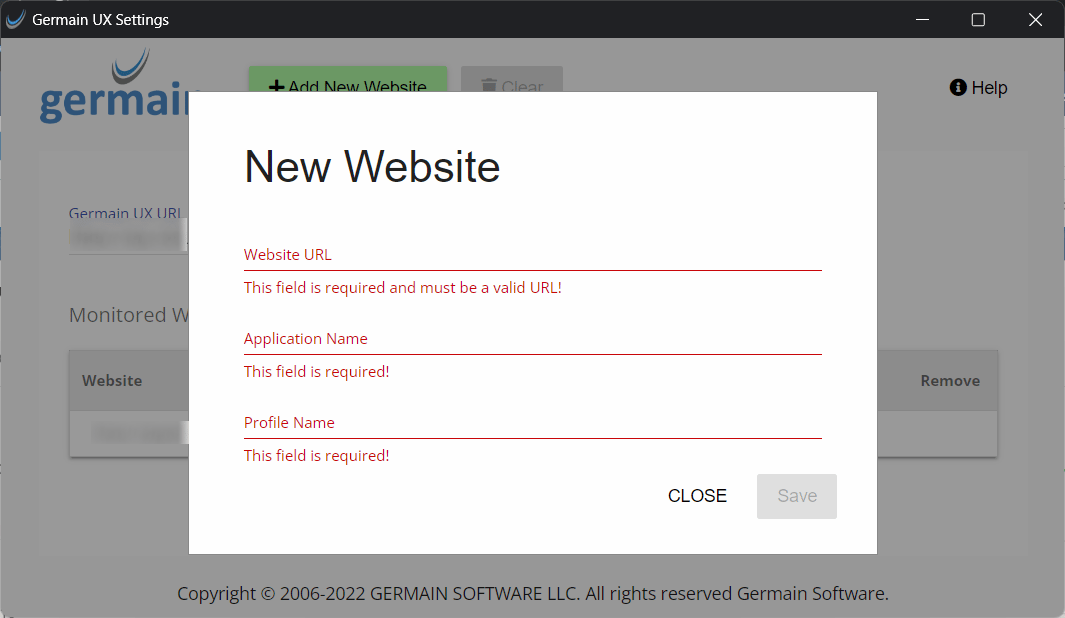
GermainUX RUM Extension settings with website and profile configuration - GermainUX
Save the configuration
Reload Salesforce
Confirm that monitoring is enabled in the extension
Configure Salesforce CSP Trusted Sites
Configure CSP Trusted Sites whether the extension is configured automatically or manually. In Salesforce:- Open Setup.
- Search for Trusted URLs.
- Add the required origins.
- Set each entry to Active.
- Select the appropriate Salesforce context.
- Enable only the CSP directives required by the integration.
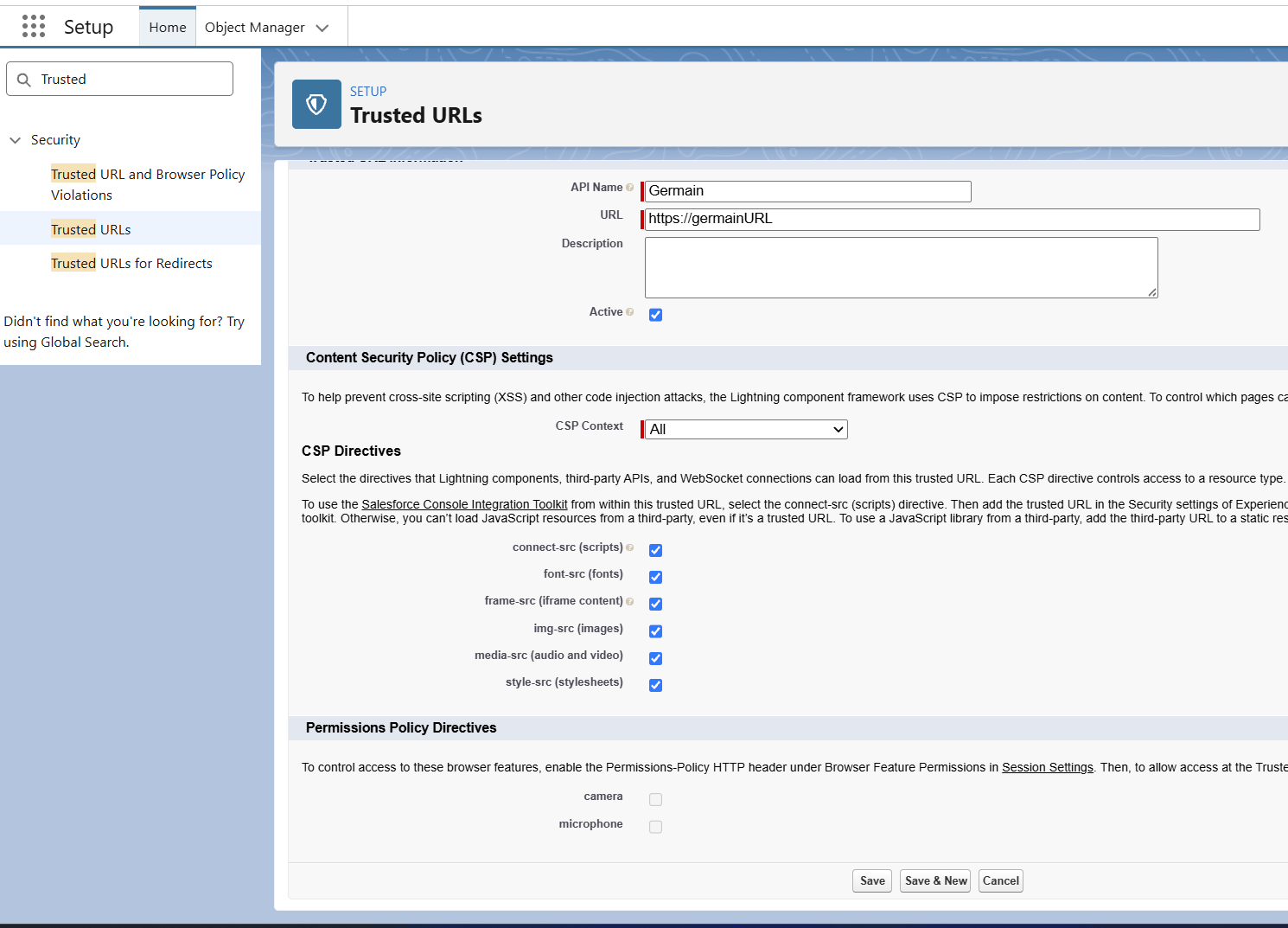
Configure Salesforce CSP Trusted Sites for GermainUX origins - GermainUX
GermainUX entry needs at least the connect-src directive. The browser loads its monitoring configuration from GermainUX and sends monitoring data to /ingestion/beacon/fact on that origin.
Do not add URL paths, wildcards, or unrelated domains unless specifically required.
Validate Real User Monitoring
After deployment:Open Salesforce in a supported non-private browser window
Confirm that the RUM Extension is installed and enabled
Confirm that the Salesforce website appears in the extension configuration
Perform several Salesforce actions:
- Navigate to another page.
- Open a record.
- Click a button.
- Run a search.
- Complete a monitored workflow step.
- In GermainUX, verify that:
- A user session appears.
- User clicks and navigation are captured.
- Page and interaction durations are available.
- The correct application and profile are assigned.
- Session Replay opens and contains the expected activity.
- Sensitive values are masked or excluded as designed.
- Browser extension policies
- CSP Trusted Sites
- Network access to GermainUX
- Application and profile names
- Salesforce origin matching
- Browser console and extension errors
- Private-browsing status
Enable User Feedback
GermainUX can allow Salesforce users to provide feedback directly from the application. The feedback can be correlated with:- The affected user session
- Session Replay
- User interactions
- Errors
- Performance
- Workflow context
- Technical telemetry
Configure Salesforce Business-Process Monitoring
GermainUX can monitor Salesforce workflows in real time and identify:- Slow workflow steps
- Process overruns
- Abandonment and drop-offs
- Repeated actions
- Ineffective navigation
- Unexpected paths
- Lost productivity
- Differences between user groups, teams, profiles, or application versions
Salesforce Application and Integration Monitoring
User-experience monitoring captures what happens in the browser. The GermainUX Engine integration adds visibility into Salesforce services and connected systems. This can include:- Salesforce APIs
- Apex activity
- SOQL queries
- Server-side errors
- Workflow and trigger delays
- Integration availability and performance
- Related external services
Deploy Engine Monitoring for Salesforce
Deploy Deeper JavaScript Diagnostics
The standard RUM Extension captures Salesforce user experience and Session Replay. Deploy the GermainUX JS Profiler when deeper browser diagnostics are required for selected users, such as:- JavaScript execution problems
- Browser freezes
- Client-side errors
- Slow functions
- Salesforce page or component behavior
- Browser objects associated with a failure
- Evidence similar to browser developer tools without asking the affected user to reproduce the problem manually
Deploy Synthetic Salesforce Monitoring
The GermainUX RPA Bot Recorder records a Salesforce workflow as a Selenium-based synthetic scenario. Use synthetic monitoring to:- Test Salesforce continuously
- Detect problems before real users report them
- Validate login and critical workflows
- Monitor from multiple locations
- Compare availability and performance over time
- Confirm that a production fix remains effective
- Schedule it at the required frequency
- Deploy it across multiple locations or URLs
- Monitor execution
- Restart it
- Upgrade it remotely
- Alert when availability or performance degrades
Configure Alerts and Automation
Collected Salesforce telemetry can trigger:- SLA alerts
- AI-generated analysis
- Email or scheduled reports
- Tickets
- Webhooks and outbound HTTP actions
- Diagnostic scripts
- Authorized local programs
- Synthetic validations
- Other corrective or investigative workflows
Production Validation Checklist
Before completing the deployment, verify:Get Help
GermainUX can help determine which monitoring, analytics and automation capabilities are appropriate for your Salesforce environment.Contact GermainUX Support
Can't Find What You Need?
The content of this document is proprietary to GERMAIN SOFTWARE.