

Advice Areas
Outcomes AI Advice targets
Understand a Recommendation
Review evidence behind advice
Prioritize Improvements
Rank by business impact
Act on Advice
From advice to action
Overview
The AI Advice Dashboard provides AI-generated recommendations based on data monitored and analyzed by GermainUX. It helps teams move from: What is happening? → What should we improve? Recommendations can be generated from monitored data and summarized user sessions at scale.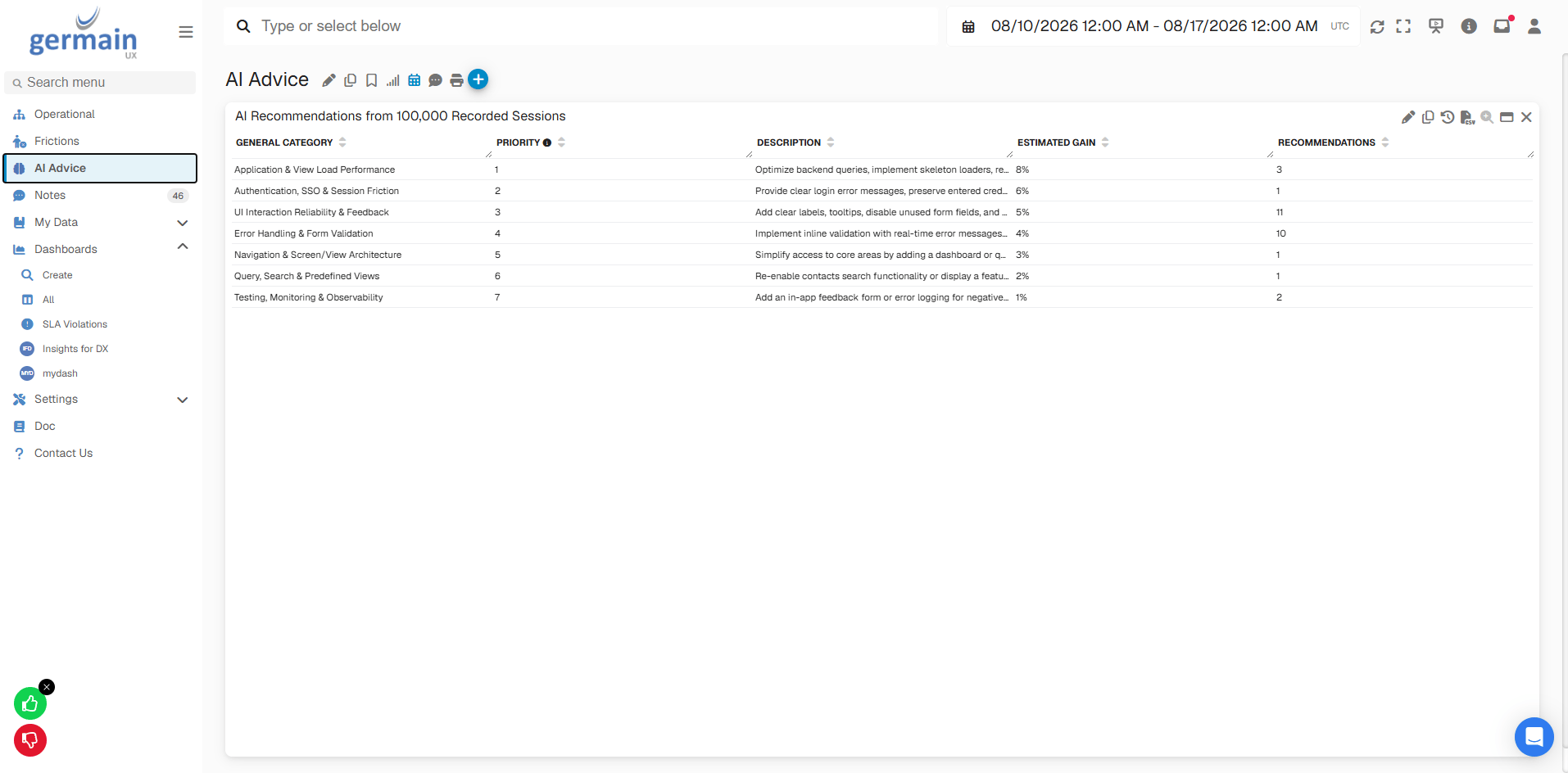
AI Advice Dashboard - GermainUX
Advice Areas
AI Advice is organized around the primary outcomes GermainUX helps organizations improve:Understand a Recommendation
Depending on the available monitored data and analysis, an AI recommendation can include:- Recommended improvement
- Estimated impact (Impacted User, Loss Productivity, Drop-off, Not Converted, Revenue Loss, etc)
- Affected users or segments
- Supporting evidence
- Related frictions
- Links to more detailed investigations
Prioritize Improvements
AI Advice helps teams focus on improvements with the greatest potential impact rather than reviewing every individual session, error, or friction manually. For example:Observed FrictionAI AnalysisAffected PopulationEstimated ImpactRecommended Improvement
Act on Advice
After reviewing a recommendation, teams can determine the appropriate next action. Depending on the configured GermainUX capabilities, this can include:- Documenting a finding
- Creating or updating a ticket
- Notifying the appropriate team
- Adjusting an application or workflow
- Executing an approved automated action
- Continuing monitoring to validate the result
ObserveAnalyzePrioritizeActValidate
Related Documentation
Analytics Dashboards
Read more
Analysis
Dashboard (aggregatelevel or individual fact)
AI
Insights & Recommendations
Automation
More Automation Features
Frictions Dashboard
Read more
Related KPIs
Read more
User Sessions Replay
Read more
Get Help
Contact GermainUX Support
The GermainUX team helps you get up and running faster, empower your team, turn data into actionable insights, and optimize performance to deliver measurable business outcomes.
Can't find what you need?
Search all GermainUX docs with Ctrl + K, or use the feedback buttons at the bottom of this page to tell us what is missing.
The content of this document is proprietary to GERMAIN SOFTWARE.