

GermainUX notifications
Alerts, reports and requests
Notification Types
Events that need attention
View Notifications
Opening the notifications indicator
Read and Unread Status
Marking items read or unread
GermainUX notifications
GermainUX notifications keep users informed about events, requests, alerts, SLA results, reports, and automated actions that require their attention.Notification indicator
When a user has unread notifications, a red indicator appears in the upper-right corner of GermainUX Workspace. The number displayed indicates how many notifications are available to that user.Notification Types
GermainUX can generate notifications for:View Notifications
To open the Notifications page:- Locate the notification indicator in the upper-right corner of GermainUX Workspace.
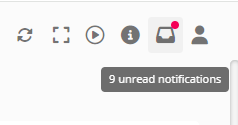
- Select the indicator.
- Review the available notifications.
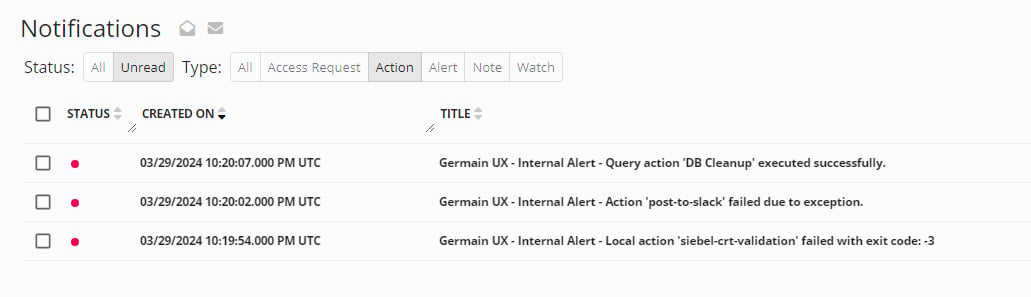
Read and Unread Status
Each user can manage the status of their notifications.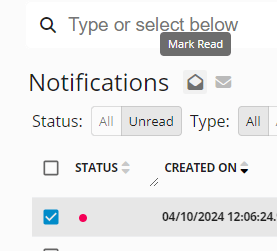
The unread count is updated according to the notification status for the current user.
Additional Resources
Analytics
More Analytics Features
Automation
More Automation Features
Dashboard & Reports
Dashboard & Reports
Management
More Management Features
Get Help
Contact GermainUX Support
The GermainUX team helps you get up and running faster, empower your team, turn data into actionable insights, and optimize performance to deliver measurable business outcomes.
Can't find what you need?
Search all GermainUX docs with Ctrl + K, or use the feedback buttons at the bottom of this page to tell us what is missing.
The content of this document is proprietary to GERMAIN SOFTWARE.