

Configure Monitoring for RingCentral
2. Configure Browser Monitoring — Optional
16. Configure Security and Privacy
Troubleshooting
Overview
Configure how GermainUX collects, analyzes, correlates, and alerts on RingCentral activity after the required GermainUX components have been deployed.1. Configure RingCentral Call Monitoring
Configure the RingCentral integration used by the GermainUX Engine to collect supported SIP-over-WebSocket call-signaling events. Define:- RingCentral connection endpoint
- Authentication
- Required signaling or subscription scope
- GermainUX application
- Environment
- Destination KPIs
- Collection behavior
- Reconnection behavior
- Permitted call properties
- Permitted participant properties
- Masking and exclusion requirements
Call Events
Depending on the events exposed by RingCentral, GermainUX can collect:- Call started
- Call connected
- Call ended
- Call direction
- Call duration
- Ringing or waiting duration
- Call/session identifier
- User or extension
- Call result
- Failure or termination status
KPI Mapping
Map collected events to the applicable GermainUX KPIs. Examples include:- RingCentral Call
- Call Started
- Call Connected
- Call Ended
- Call Failure
- RingCentral Session Event
2. Configure Browser Monitoring — Optional
Configure browser monitoring when RingCentral or the related CRM needs to be analyzed from the user’s perspective.RUM Extension
For RingCentral-hosted applications, use the RUM Extension when supported. In the left menu, go to Settings > Wizards > Browser Extension Agent. Create or select the monitored application and configure:- Application name
- RingCentral URL
- GermainUX environment
- Host when required
- Software/application
- UX Monitoring Profile
- Privacy configuration
RUM JS
When monitoring a customer-controlled application that embeds or integrates RingCentral, configure the corresponding GermainUX RUM JS monitoring. In the left menu, go to Settings > Wizards. Search for the appropriate RUM or JS wizard for the monitored application. Configure:- Application
- Website URL
- Environment
- UX Monitoring Profile
- Privacy
- User/session identification
- Bot and crawler exclusions
3. Configure Session Replay — Optional
When Session Replay is permitted, configure it for the RingCentral or CRM UX Monitoring Profile. In the left menu, go to Settings > Analytics > UX Monitoring Profiles. Select the applicable profile. Configure as required:- Session Replay enabled/disabled
- Sensitive-field exclusion
- Masking
- Anonymization
- URL exclusions
- User/session properties
- IP exclusions
- Bot/crawler exclusions
- Replay access
- Retention
4. Configure CRM Correlation
When RingCentral is used with a CRM, configure the properties required to correlate interactions across systems. Useful properties can include:- Agent ID
- User ID
- RingCentral extension
- Call ID
- Session ID
- Customer ID
- Contact ID
- Case ID
- Service-request ID
- Lead ID
- Opportunity ID
- Interaction timestamp
- User sessions
- CRM transactions
- Business processes
- Application errors
- Integrations
- Supporting technology
5. Configure Business Processes
Define the RingCentral-enabled workflows that are important to the business. For each process, configure:- Start event
- Milestones
- Completion event
- Failure condition
- Abandonment condition
- Expected duration
- Relevant users
- Relevant teams
- Business-impact measures
Customer Support
Sales
After-Call Work
- End-to-end duration
- Time at each stage
- Repeated steps
- Abandonment
- Process failures
- After-call work
- Lost productivity
- Affected users and teams
6. Configure Supporting-System Monitoring
Configure monitoring for customer-controlled technology that can affect RingCentral workflows. Depending on the environment, this can include: Correlating this telemetry with RingCentral activity helps identify whether an issue originated in the browser, CRM, integration layer, network, or supporting infrastructure.7. Configure Synthetic Monitoring — Optional
Use the GermainUX RPA Bot Recorder to configure approved synthetic scenarios. Configure:- Test account
- Target application
- Scenario steps
- Execution schedule
- Expected results
- Timeout
- Failure conditions
- Target Engine
- Notifications
8. Configure Conversation Analysis — Optional
RingCentral signaling does not include the spoken conversation. When an authorized textual source is available, GermainUX can analyze conversation content from sources such as:- Call transcripts
- Chat transcripts
- Messaging conversations
- Customer-service notes
- Conversation events exposed by an authorized API
- Sentiment
- Intent
- Topics
- Friction
- Escalation indicators
- Recurring concerns
- Customer-defined phrases
9. Configure KPIs
Configure the KPIs required for your RingCentral use cases. Typical KPIs include:- RingCentral Call
- Call Started
- Call Connected
- Call Ended
- Call Failure
- RingCentral Session Event
- Browser Error
- Outbound HTTP Request
- Business Process
10. Configure Measures
Measures can include:11. Configure Pivots
Analyze RingCentral KPIs using pivots such as:12. Configure SLA Thresholds
Configure SLAs for conditions that require attention. Examples include: Thresholds should reflect the organization’s actual operating expectations. A long or short call is not necessarily an issue without the relevant business context.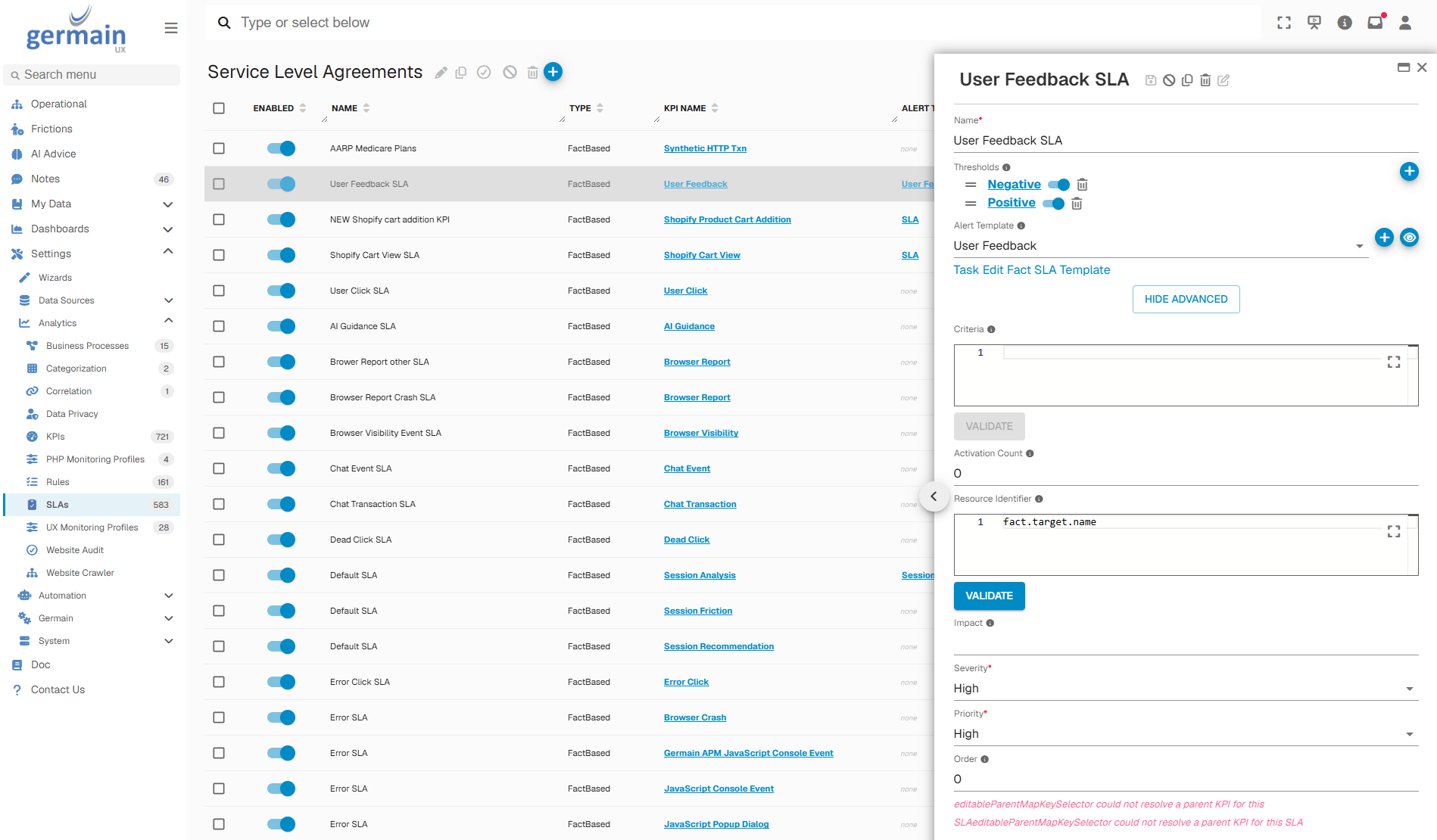
SLA Configuration Example - GermainUX
13. Configure Rules and Automated Analysis
Use GermainUX Rules to identify more advanced RingCentral conditions. Rules can combine RingCentral data with:- CRM KPIs
- User-experience KPIs
- Application errors
- Integration errors
- Infrastructure KPIs
- Business-process KPIs
14. Configure Alerts and Watches
Configure notifications for RingCentral conditions requiring attention. GermainUX can:- Send an alert
- Notify subscribed users through a Watch
- Generate a scheduled report
- Generate an event-driven report
- Initiate an approved diagnostic workflow
- Call an authorized endpoint
- Execute an approved corrective action
15. Configure Dashboards and Reports
Create dashboards appropriate for the teams using RingCentral data. Examples include:RingCentral Operations
- Call volume
- Call duration
- Failure rate
- Ringing/waiting time
- Concurrent activity
- Availability
Agent Experience
- Calls per agent
- Time on calls
- After-call work
- CRM performance
- Browser errors
- User friction
Customer-Service Workflow
- End-to-end process duration
- Process failures
- Abandonment
- Repeated steps
- Integration errors
- Lost productivity
Technical Operations
- RingCentral event failures
- Browser errors
- HTTP failures
- CTI/integration errors
- API performance
- Infrastructure health
16. Configure Security and Privacy
Before production monitoring, define: Recommended practices include:- Use dedicated integration accounts.
- Use dedicated synthetic-monitoring accounts.
- Grant only required permissions.
- Protect credentials.
- Encrypt connections.
- Mask or exclude sensitive information.
- Restrict access using GermainUX roles.
- Validate privacy settings before production deployment.
17. Validate the Configuration
Call Monitoring
Perform an approved test call and confirm:- Start event appears
- Connection event appears
- End event appears
- Duration is correct
- Direction is correct
- User/extension is correct when available
- Status is correct
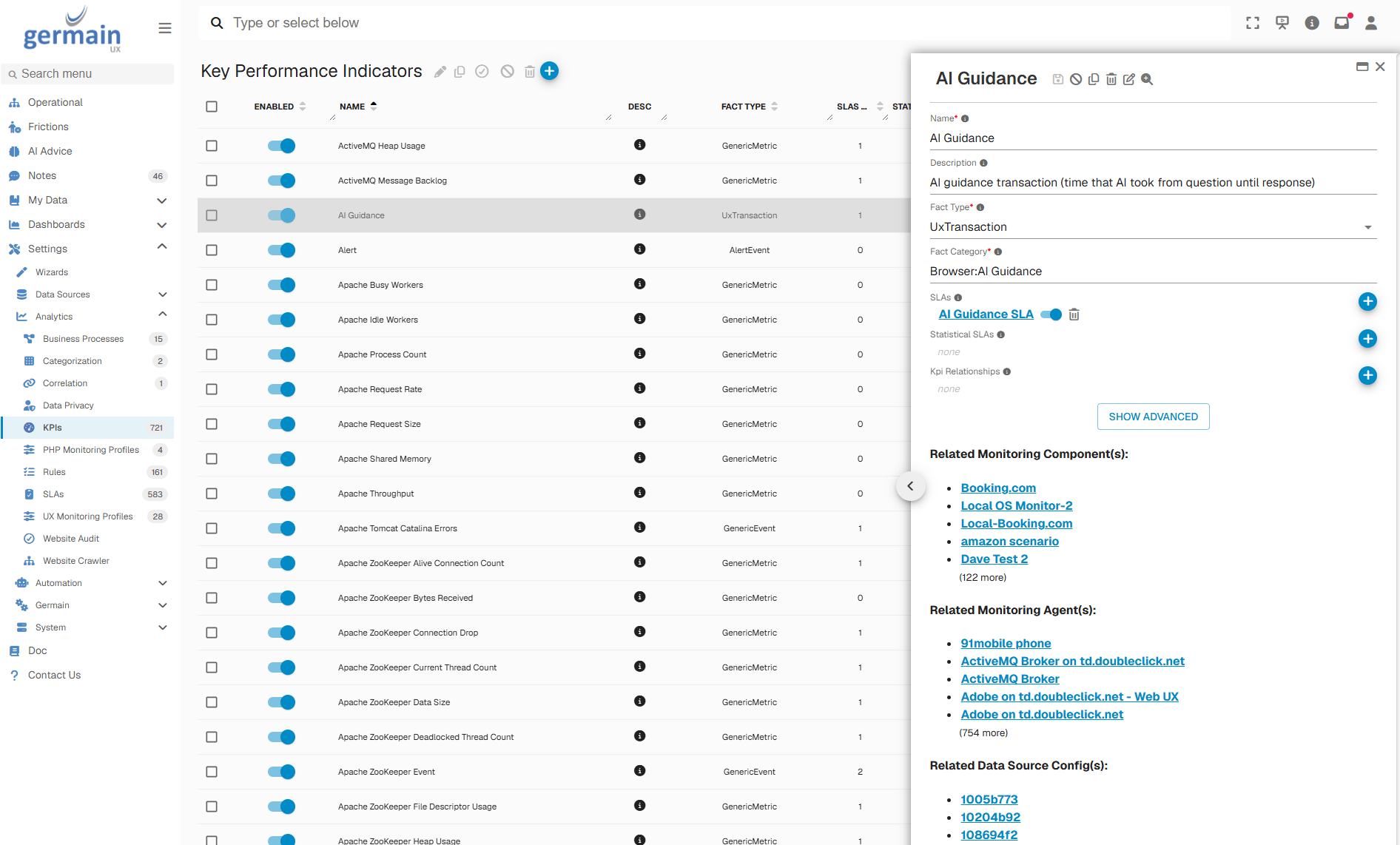
KPI Configuration Example - GermainUX
Browser Monitoring
Perform representative browser actions and confirm:- UX events appear
- Network requests appear
- JavaScript errors are detected
- Session Replay works when enabled
- Sensitive information is protected
CRM Correlation
Confirm that GermainUX correctly associates:- RingCentral call
- Agent
- Browser session
- CRM interaction
- Business process
SLA and Alerting
Safely reproduce a test condition and verify:- KPI status
- SLA status
- Rule behavior
- Alert
- Watch
- Report
- Authorized automation
Troubleshooting
RingCentral Events Are Missing
Verify:Engine is running
Engine is connected to Germain Enterprise
RingCentral endpoint is reachable
Firewall and proxy configuration is correct
Authentication is valid
Required permissions are available
Required RingCentral signaling scope is available
RingCentral collection is enabled
Destination application and KPIs are correct
Engine logs contain no connection, authorization, parsing, or reconnect errors
Browser Events Are Missing
Verify:RUM JS or RUM Extension is loaded
RingCentral/CRM URL matches the configured application
UX Monitoring Profile is enabled
Browser security policies permit monitoring
Cross-origin restrictions are understood
Privacy exclusions are not excluding all activity
CRM Correlation Is Incomplete
Verify:Both systems are collecting data
A common identifier is available
User and extension mappings are correct
Timestamps are synchronized
Correlation time windows are appropriate
Relevant CRM workflow events are being collected
Get Help
RingCentral monitoring can be customized according to the application’s components, user journeys, errors, performance requirements, privacy requirements, APIs, and integrations. GermainUX can help determine which monitoring, analytics and automation capabilities are appropriate for your RingCentral environment.Contact GermainUX Support
Can't Find What You Need?
The content of this document is proprietary to GERMAIN SOFTWARE.