

Php 7.4
Monitoring & Analytics
IE 8 & IE 5 support
Monitoring & Analytics
Execute an Action on a Remote Engine
Automation
Execute an Action on a Schedule
Automation
Execute an Action via a click on Dashboard or Alert
Automation
Issues/Incidents can be assigned to 1-to-many person
Management
Other Bugs and Enhancements (September)
Maintenance
Monitoring & Analytics - Php 7.4
Support for real-time monitoring and analysis of Php 7.4 application.Monitoring & Analytics - IE 8 & IE 5 support
Description
Real User Monitoring via our JS script, now supports Internet Explorer v5 and v8 (e.g. works for Siebel Users accessing Siebel HI via IE5 or IE8)Automation - Execute an Action on a Remote Engine
Description
To execute an action into a Germain Engine that is remote (e.g. you are using Germain cloud and need to execute a task into one or many of the engines that are running with your Data Center) Use cases:- Automated execution of an action on an engine for a given server (based on values in context coming from SLA for example)
- Manually triggered actions from workspace to run on one or more engine for specific set of servers
Configuration
Automation by Remote EngineAutomation - Execute an Action on a Schedule
Description
Action or Task (Click, Http action, Local Program, Script, Sql, Ssh or Wmi commands) can now be executed on a scheduleor at a specific time of day. A “schedule” field (instead of old “repeatSeconds”) is available both Deployment Wizards and Configuration Dashboards.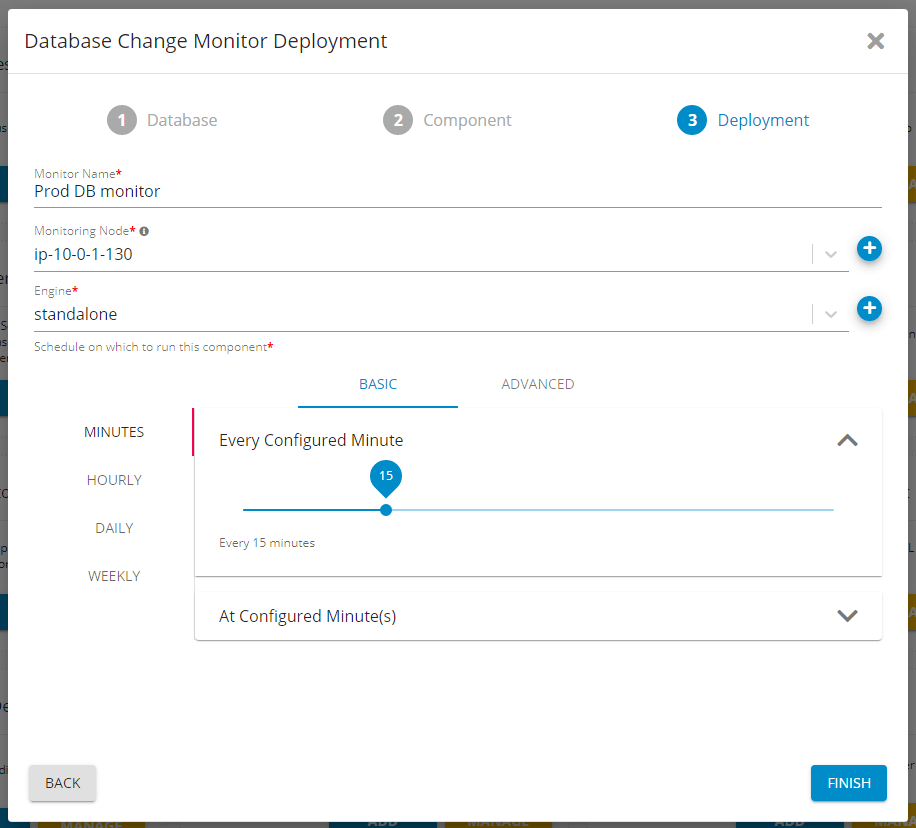
Configuration
Scheduling of an ActionAutomation - Execute an Action via a click on Dashboard or Alert
Description
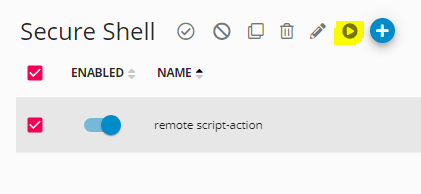
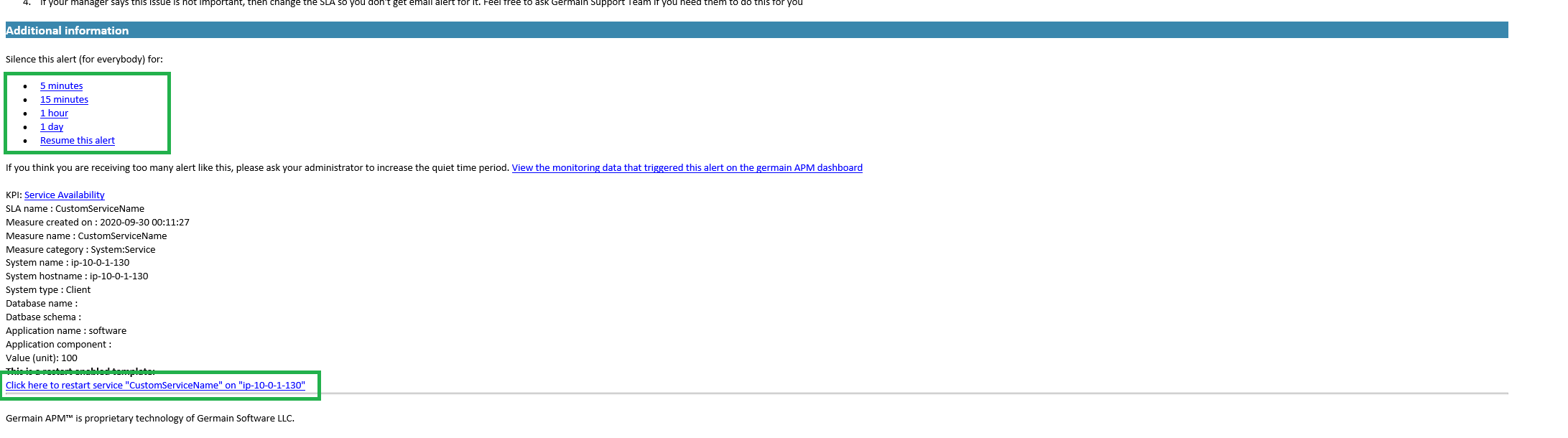
With our new UI (launched last march), it has had the ability to execute any type of “action” (i.e. an automated task execution, script execution, sql script execution, etc). That action can now be executed ‛on demand’ from Germain Dashboard or any Germain Alert. Example of Actions: Silence an alert, Restart a service, Clean up some data or files, etc. From Germain dashboard: Germain dashboard > Left Menu > Automation > Http Action, Local Program, Script, SQL.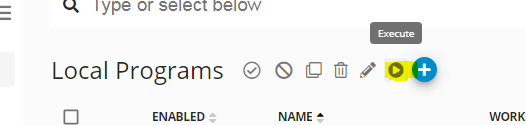
Configuration
Here is how to add a CTA/URL in a alert template.Management - Issues/Incidents can be assigned to 1-to-many person
Maintenance - Other Bugs and Enhancements (September)
Other Enhancements and Bugs that have been addressed this month. More details available upon request.| Release | Enhancement/bug | Technology | Function | Germain layer | Description | Status |
|---|---|---|---|---|---|---|
| 9/30/2020 | Bug | Enterprise | Ingestion Services error | Done | ||
| 9/30/2020 | Enhancement | Dashboard | portlet - : count of measures that exceed SLA | Done | ||
| 9/30/2020 | Bug | User Monitoring & Replay | Dashboard | user replay not working & timebar truncated | Done | |
| 9/30/2020 | Bug | Dashboard | • Comments field empty | Done | ||
| 9/30/2020 | Bug | Dashboard | germainsoftware/germain-product OOB dashboard JSONs contain bracket ”(” and/or ”)” in name or configured KPIs high priority | Done | ||
| 9/30/2020 | Enhancement | Java | Application Performance Monitoring | Enterprise | java - Memory Dump and Thread dump Client | Done |
| 9/30/2020 | Bug | Root-Cause Analysis | Dashboard | : Requirement: Need mora data in RCA Client need testing | Done | |
| 9/30/2020 | Enhancement | Filter | Dashboard | hard to understand “data filter” on a portlet client medium priority | Done | |
| 9/30/2020 | Enhancement | Dashboard | portlet granularity available on the portlet client medium priority | Done | ||
| 9/30/2020 | Enhancement | Alert | Dashboard | • Send “GREEN” alert once issue has been resolved client high priority | Done | |
| 9/30/2020 | Enhancement | Dashboard | : need to be able to grant editing of a dashboard without user having admin client high priority | Done | ||
| 9/30/2020 | Enhancement | Dashboard | : : Ability to display SQL statment on the drillthrough. client high priority | Done | ||
| 9/30/2020 | Enhancement | Filter | Dashboard | : : Ability to filter based on SQL query client high priority | Done | |
| 9/30/2020 | Bug | Siebel | Dashboard | • UX data in stage and prod contains no NAME or SIEBEL dimension values Client | Done | |
| 9/30/2020 | Enhancement | Cloud | germainsoftware/germain-product - Germain migrating to new host get 408 help wanted | Done | ||
| 9/30/2020 | Bug | Enterprise | Query error when running RAW query need testing | Done | ||
| 9/30/2020 | Enhancement | Dashboard | users have their own dashboard (from justin) high priority | Done | ||
| 9/30/2020 | Bug | .NET | Agent | • application monitored by .NET agent crashed blocked high priority | Done | |
| 9/30/2020 | Bug | Agent | • failing to get view hierarchy of a user click event high priority | Done | ||
| 9/30/2020 | Bug | .NET | Agent | • Missing active tab hierarchy in .NET monitor high priority | Done | |
| 9/30/2020 | Bug | .NET | Agent | • partial handling of SOAP requests in .NET monitor high priority | Done | |
| 9/30/2020 | Bug | .NET | Agent | : not updating root element reference if a window is programmatically closed in .NET monitor low priority | Done | |
| 9/30/2020 | Enhancement | HTTP | Agent | Capture (failed) HTTP requests | Done | |
| 9/30/2020 | Enhancement | Agent | Capture error count from UI high priority | Done | ||
| 9/30/2020 | Enhancement | Agent | Capture field change events high priority needs testing | Done | ||
| 9/30/2020 | Enhancement | Agent | Check that we capture information on img buttons medium priority | Done | ||
| 9/30/2020 | Enhancement | Agent | Check that we monitor web views medium priority | Done | ||
| 9/30/2020 | Enhancement | .NET | Filter | Agent | • filter sensitive information from .NET monitor | Done |
| 9/30/2020 | Enhancement | Agent | • generate ID for image buttons high priority needs testing | Done | ||
| 9/30/2020 | Enhancement | Agent | • include vs2019 redistributable in installer script low priority | Done | ||
| 9/30/2020 | Enhancement | .NET | Agent | • Test support for CEF Sharp browser in .NET monitoring low priority | Done | |
| 9/30/2020 | Enhancement | Agent | • Top-level tabs need check parent needs testing | Done | ||
| 9/30/2020 | Bug | Agent | Handled exception for certain mouse clicks high priority needs testing | Done | ||
| 9/30/2020 | Bug | .NET | Report | Agent | Improve click reporting for WPF applications in .NET monitor medium priority needs testing | Done |
| 9/30/2020 | Bug | .NET | Agent | Mouse clicks getting wrong elements in .NET monitor high priority | Done | |
| 9/30/2020 | Bug | .NET | Agent | Not capturing active/focused state for tab items in .NET monitoring context high priority | Done | |
| 9/30/2020 | Bug | .NET | Agent | Not capturing view hierarchy in .NET monitoring high priority | Done | |
| 9/30/2020 | Bug | .NET | Agent | Not getting context variables from WFP status bar in .NET monitoring high priority | Done | |
| 9/30/2020 | Bug | .NET | Agent | Not updating main window reference correctly in .NET monitoring high priority | Done | |
| 9/30/2020 | Enhancement | Agent | Track clicks on http links low priority | Done | ||
| 9/30/2020 | Bug | Dashboard | : : Display flags in drill-trough | Done | ||
| 9/30/2020 | Enhancement | Alert | Enterprise | sql action report attachment name need testing | Done | |
| 9/30/2020 | Bug | Dashboard | what version is on? old dashboard | Done | ||
| 9/30/2020 | Bug | Dashboard | No Percentile measures for existing portlets wontfix | Done | ||
| 9/30/2020 | Bug | Dashboard | • User data masking in the germain portal low priority | Done | ||
| 9/30/2020 | Enhancement | Dashboard | • Aggregation Portlet for Network/Web/App/Db/Scripting/Rendering/Waiting on user input high priority | Done | ||
| 9/30/2020 | Bug | Dashboard | • unable to save email | Done | ||
| 9/30/2020 | Enhancement | Oracle DB | Database Performance Monitoring | Enterprise | Germain - oracle db locking issue high-severity | Done |
| 9/30/2020 | Enhancement | Enterprise | a metric can be assigned to 1-to-many user | Done | ||
| 9/30/2020 | Enhancement | Oracle DB | Database Performance Monitoring | Enterprise | oracle db monitoring/tuning high-severity | Done |
| 9/30/2020 | Enhancement | Alert | Enterprise | • alert when IIS is slow or fails high-severity | Done | |
| 9/30/2020 | Enhancement | User Monitoring & Replay | Dashboard | • browser for which replay works / doesnt work high priority | Done | |
| 9/30/2020 | Enhancement | Cloud | hosted in AWS europe high priority | Done | ||
| 9/30/2020 | Enhancement | Cloud | user session time out of env? | Done | ||
| 9/30/2020 | Bug | Root-Cause Analysis | Dashboard | • incorrect value on RCA datetime picker | Done | |
| 9/30/2020 | Bug | Dashboard | • missing [apm state] info high priority | Done | ||
| 9/30/2020 | Enhancement | Dashboard | • missing EDIT icon on any portlet of a pivot dashboard | Done | ||
| 9/30/2020 | Bug | Dashboard | ui - portlet width (1,2,3 or 4 columns) and height high priority | Done | ||
| 9/30/2020 | Enhancement | Dashboard | : Tour / help videos shows every time you clear browser cache | Done | ||
| 9/30/2020 | Enhancement | Imap | Application Performance Monitoring | Dashboard | • IMAP Mailbox monitor help wanted | Done |
| 9/30/2020 | Enhancement | Engine | Engine / Proxy / Server connectivity issues | Done | ||
| 9/30/2020 | Bug | Dashboard | 8.5 - drilldown on user transaction shows more transactions that it should | Done | ||
| 9/30/2020 | Enhancement | Enterprise | Availability Capture Improvements | Done | ||
| 9/30/2020 | Bug | Siebel | Application Performance Monitoring | Enterprise | : Aggregation fails for Siebel BP Step | Done |
| 9/30/2020 | Enhancement | Siebel | Application Performance Monitoring | Enterprise | Capture the Siebel Object/Row Id | Done |
| 9/30/2020 | Enhancement | Dashboard | Clean up uiConfig / drop support for old dashboard UI | Done | ||
| 9/30/2020 | Enhancement | Engine | Engine ability to execute task when request issued from Germain cloud | Done | ||
| 9/30/2020 | Enhancement | Enterprise | ”do not run automation tasks during | Done | ||
| 9/30/2020 | Enhancement | Database Performance Monitoring | Enterprise | DB Query monitoring | Done | |
| 9/30/2020 | Enhancement | Synthetic Transaction | Enterprise | proactive monit - automatically generate synthetic transaction | Done | |
| 9/30/2020 | Enhancement | Synthetic Transaction | Enterprise | : automatically add synthetic PING command (5min interval) between each User and Web Server | Done | |
| 9/30/2020 | Enhancement | Alert | Enterprise | executive email alert | Done | |
| 9/30/2020 | Enhancement | Engine | Implement “holding pattern” for engine manager if server is unavailable design | Done | ||
| 9/30/2020 | Enhancement | Mbeans | Engine | Improve Engine MBeans | Done | |
| 9/30/2020 | Enhancement | GoLang | Enterprise | golang profiling 7.1 | Done | |
| 9/30/2020 | Bug | Dashboard | Month granularity fails in query service | Done | ||
| 9/30/2020 | Bug | Dashboard | Portlet Fails when Standard Deviation is used in Summary | Done | ||
| 9/30/2020 | Enhancement | Infrastructure Performance Monitoring | Enterprise | Server Availability Context | Done | |
| 9/30/2020 | Bug | Dashboard | Server Profiles - Unable to apply profiles question | Done | ||
| 9/30/2020 | Bug | Dashboard | add a new email to the dashboard sharing feature does not work high priority | Done | ||
| 9/30/2020 | Enhancement | Dashboard | Germain State doesn’t show server name for DB monitors | Done | ||
| 9/30/2020 | Bug | Dashboard | • cannot create a dashboard folder without specifying parent medium priority waiting for testing | Done | ||
| 9/30/2020 | Bug | Dashboard | • cors error on QA for maps high priority | Done | ||
| 9/30/2020 | Bug | Dashboard | • Failed to execute ‘px’ on ‘CSS’: The provided double value is non-finite. | Done | ||
| 9/30/2020 | Bug | Dashboard | • incorrect use of moment.tz high priority | Done | ||
| 9/30/2020 | Bug | Dashboard | • name for SLA shown as none medium priority | Done | ||
| 9/30/2020 | Bug | Root-Cause Analysis | Dashboard | • RCA not showing many of the configured portlets high priority | Done | |
| 9/30/2020 | Bug | User Monitoring & Replay | Dashboard | • seeking within a session replay may only update event list high priority | Done | |
| 9/30/2020 | Bug | Dashboard | : Portlet height cannot be set via “Height” high priority | Done | ||
| 9/30/2020 | Enhancement | Dashboard | Config - agent deployment mechanism low priority | Done | ||
| 9/30/2020 | Bug | Root-Cause Analysis | Dashboard | Drillthrough from RCA creates invalid filter string | Done | |
| 9/30/2020 | Enhancement | Dashboard | • drilldown on ALL dashboard high priority | Done | ||
| 9/30/2020 | Enhancement | Root-Cause Analysis | Dashboard | to drag-resize portlet height on RCA low priority | Done | |
| 9/30/2020 | Bug | Dashboard | General Health portlet not showing error when queries fail | Done | ||
| 9/30/2020 | Enhancement | Dashboard | History -> Error instead of “Loading” client low priority | Done | ||
| 9/30/2020 | Bug | Report | Dashboard | many counters seem to be reported wrong numbers (for Native App Startup kpi) | Done | |
| 9/30/2020 | Bug | Dashboard | Mouse cursor moves while loading message is being shown client high priority | Done | ||
| 9/30/2020 | Bug | Dashboard | ntabular to use the whole height high priority | Done | ||
| 9/30/2020 | Bug | Dashboard | On Firefox, Ultra Narrow Screens Hide Data client | Done | ||
| 9/30/2020 | Bug | Dashboard | Portlet fails when P90 used in summary high priority | Done | ||
| 9/30/2020 | Enhancement | Dashboard | portlet when maximized shouldnt be larger than the desktop size.. client | Done | ||
| 9/30/2020 | Bug | Dashboard | Potentially showing wrong name in error message | Done | ||
| 9/30/2020 | Enhancement | Dashboard | product tour - helphero high priority waiting for testing | Done | ||
| 9/30/2020 | Bug | Dashboard | qa env - kpi name missing on portlet high priority | Done | ||
| 9/30/2020 | Bug | Root-Cause Analysis | Dashboard | RCA - Slow Detail Execution Flow performance | Done | |
| 9/30/2020 | Bug | Dashboard | • pwd reset link in email is wrong test on QA after upgrade | Done | ||
| 9/30/2020 | Bug | Search | Dashboard | Searching only allows Free Text Search client | Done | |
| 9/30/2020 | Enhancement | Dashboard | Skipping ahead in time can lead to “missed” content client | Done | ||
| 9/30/2020 | Enhancement | Dashboard | UI/UX: Heatmap portlet low priority | Done | ||
| 9/30/2020 | Bug | Dashboard | Units mislabaled on mouseover info window. high priority | Done | ||
| 9/30/2020 | Enhancement | Dashboard | Feature: Heatmap design | Done | ||
| 9/30/2020 | Enhancement | User Replay | Dashboard | Replay Exclusions (data non-stored vs data not-displayed) | Done | |
| 9/30/2020 | Enhancement | Cloud | ”contact us” to be added for [unlimited virtual cloud ] | Done | ||
| 9/30/2020 | Enhancement | Cloud | $ missing for unlimited onpremise | Done | ||
| 9/30/2020 | Enhancement | Cloud | ip@ of the new prospect in email test | Done | ||
| 9/30/2020 | Bug | Spring | Cloud | Spring context not invalidated on logout low priority | Done | |
| 9/30/2020 | Enhancement | Cloud | website prod - top menu turns red after visiting pricing page | Done | ||
| 9/30/2020 | Enhancement | Database | germainsoftware/germain-product Some KPIs missing default units in OOTB | Done | ||
| 9/30/2020 | Dashboard | Should ‘Compare To’ icon be displayed in portlet for user with only ‘View’ privileges? invalid question | Done | |||
| 9/30/2020 | Dashboard | Should ‘Manage’ button not be displayed for all Wizards? question | Done | |||
| 9/30/2020 | Filter | Dashboard | Should ‘none’ value filters be not displayed results? question | Done | ||
| 9/30/2020 | Dashboard | Should ‘UX Agents’ not be added in ‘Edit UX Script’ window? question | Done | |||
| 9/30/2020 | Enhancement | Alert | Dashboard | Should Alert Sent column not be displayed in RCA for Alerts page? | Done | |
| 9/30/2020 | Dashboard | Should Delete icon not be displayed in Dashboard page? question | Done | |||
| 9/30/2020 | Bug | Root-Cause Analysis | Dashboard | Should details in few sections of RCA page not be displayed? | Done | |
| 9/30/2020 | Dashboard | Should few fields not be displayed in Drillthrough page? question | Done | |||
| 9/30/2020 | Filter | Dashboard | Should filters applied in Dashboard carry forward to Drillthrough page? question | Done | ||
| 9/30/2020 | Alert | Dashboard | Should ID not be displayed as one of the columns in Drillthrough on Alert page? question | Done | ||
| 9/30/2020 | Root-Cause Analysis | Dashboard | Should resizing a portlet in RCA page reflects the changes in all other RCA pages of same KPI? | Done | ||
| 9/30/2020 | Alert | Dashboard | Should user not be able to adjust or resize sections in alerts page? question | Done | ||
| 9/30/2020 | Bug | Dashboard | ‘Compare To’ window is not displayed properly in Dashboard page high priority | Done | ||
| 9/30/2020 | Bug | Dashboard | ‘Last 2 months’ Time Range displays error in Trend section help wanted high priority | Done | ||
| 9/30/2020 | Bug | Filter | Dashboard | ‘Out of Bound Exception’ error is displayed on applying ‘Id’ filter in Drillthrough and Dashboard pages high priority | Done | |
| 9/30/2020 | Bug | Root-Cause Analysis | Dashboard | ‘Prev’ and ‘Next’ links are not displayed in RCA Page after navigating back from any page high priority | Done | |
| 9/30/2020 | Bug | Dashboard | ‘Trend Granularity’ icon is not displayed for ‘N tabular Portlet’ high priority | Done | ||
| 9/30/2020 | Bug | Dashboard | Able to add duplicate portlets in Pivot page low priority | Done | ||
| 9/30/2020 | Bug | Dashboard | Actions added in ‘Edit Maintenance’ window are not displayed until refreshing the page high priority | Done | ||
| 9/30/2020 | Enhancement | Filter | Dashboard | Add-on dropdown options are not available for filters in drilldown and drillthrough pages | Done | |
| 9/30/2020 | Bug | Alert | Dashboard | Alert Occurred and First occurred time in Report is different from actual time high priority | Done | |
| 9/30/2020 | Bug | Alert | Dashboard | Alerts emails are sent even when there are no lists in Distribution Lists page | Done | |
| 9/30/2020 | Bug | User Monitoring & Replay | Dashboard | All Enabled columns are not displayed in ‘Session Replay Drillthrough’ page high priority | Done | |
| 9/30/2020 | Bug | Dashboard | apm state - Bad Request: Invalid field: node.name | Done | ||
| 9/30/2020 | Bug | Dashboard | Blank Drillthrough page is displayed on disabling all columns high priority | Done | ||
| 9/30/2020 | Bug | Dashboard | • cannot add sla from config editor high priority | Done | ||
| 9/30/2020 | Bug | Dashboard | • code editor validation messages persist when changing between config objects | Done | ||
| 9/30/2020 | Bug | Dashboard | • Copy icon on tooltip has its own tooltip (with empty string) | Done | ||
| 9/30/2020 | Bug | Dashboard | • Dashboard fails if any requests are aborted | Done | ||
| 9/30/2020 | Bug | Root-Cause Analysis | Dashboard | • rca details are cut-off high priority | Done | |
| 9/30/2020 | Bug | Dashboard | • Trend graph axes are no longer synchronized | Done | ||
| 9/30/2020 | Bug | Dashboard | : “Maximize” and “Restore” to not resize are that text uses in details pane | Done | ||
| 9/30/2020 | Bug | Dashboard | : Cannot update user email address. | Done | ||
| 9/30/2020 | Bug | Dashboard | : Default sorting not being applied | Done | ||
| 9/30/2020 | Bug | Dashboard | : Save disabled, but error not displayed | Done | ||
| 9/30/2020 | Bug | Dashboard | Bulk edit icon displays disabled checkboxes on selecting multiple Roles high priority | Done | ||
| 9/30/2020 | Bug | Search | Dashboard | Calendar is displayed in guided search on clicking Explore in Drillthrough page of Query high priority question | Done | |
| 9/30/2020 | Bug | Dashboard | Changes for ‘User Time Zone’ are not displayed until refreshing the page for ‘Business’ and ‘Technical’ Profile Types high priority | Done | ||
| 9/30/2020 | Enhancement | Dashboard | cloud & ootb - any displayed dashboard to be highlighted in menu | Done | ||
| 9/30/2020 | Bug | Root-Cause Analysis | Dashboard | Color is displayed in text format in User Session RCA page unlike as color bar available in other RCA pages high priority | Done | |
| 9/30/2020 | Bug | Dashboard | Column Headers ‘System Location’, ‘User Location’ and ‘Target Location’ are displayed multiple times in exported file of Session Info high priority | Done | ||
| 9/30/2020 | Bug | Dashboard | Content is not displayed as mandatory field in ‘Add Rule’ window high priority | Done | ||
| 9/30/2020 | Bug | Dashboard | Credentials is not marked as mandatory field in ‘Add Component Type’ window unlike Edit Component window for Http Component high priority | Done | ||
| 9/30/2020 | Enhancement | Dashboard | Dashboards Overview page is displayed on clicking Dashboards dropdown in side menu pane | Done | ||
| 9/30/2020 | Enhancement | Dashboard | deletion of a record reset the “all” dashboard layout | Done | ||
| 9/30/2020 | Enhancement | Dashboard | duplicate/overlap add/manage button on wizard page on MAC | Done | ||
| 9/30/2020 | Bug | Dashboard | Error is displayed for ‘Order By’ field in Tabular portlet interface high priority | Done | ||
| 9/30/2020 | Bug | User Monitoring & Replay | Dashboard | Error is displayed in ‘Network Latency Portlet’ of RCA in User Session Replay high priority | Done | |
| 9/30/2020 | Bug | Alert | Dashboard | Export file in RCA for Alerts page do not display Start and End times high priority | Done | |
| 9/30/2020 | Enhancement | Dashboard | export file missing units | Done | ||
| 9/30/2020 | Bug | Search | Dashboard | Few Name options in search dropdown are different from actual Wizard names blocked high priority | Done | |
| 9/30/2020 | Bug | Dashboard | Few pages are not highlighted in the side menu pane on navigating from Wizards page high priority | Done | ||
| 9/30/2020 | Bug | Search | Dashboard | Filter ‘Commands > Arguments’ is duplicated in search dropdown medium priority | Done | |
| 9/30/2020 | Bug | Filter | Dashboard | Filter criteria ‘Query’s Using High Watermark’ display invalid results high priority wontfix | Done | |
| 9/30/2020 | Bug | Filter | Dashboard | Filters ‘Component’s Filter Timeout’, ‘Component’s Repeat Seconds’, ‘Component’s Targets’ displays incorrect results high priority | Done | |
| 9/30/2020 | Enhancement | Java, DB2 | Dashboard | GS-990 - Java Agent - Support DB2 data sources blocked | Done | |
| 9/30/2020 | Bug | Dashboard | Hovering message of Monitoring Script and Init Script is displayed only when user scrolls to the end high priority | Done | ||
| 9/30/2020 | Bug | Dashboard | In workspace: Cannot save on “log definition” config screen | Done | ||
| 9/30/2020 | Bug | Alert | Dashboard | Invalid Start and End time are displayed in RCA for Alerts page high priority | Done | |
| 9/30/2020 | Bug | Dashboard | Issues in ‘Maximizing’ and ‘Compare To’ with incognito window high priority | Done | ||
| 9/30/2020 | Bug | Android | Dashboard | Issues with ‘Android Application’ Wizard high priority | Done | |
| 9/30/2020 | Enhancement | Root-Cause Analysis | Dashboard | Issues with sizing of ‘Issue Description’ section in few RCA pages help wanted | Done | |
| 9/30/2020 | Enhancement | Dashboard | Layout changes made to portlet positions are not retained after navigating back from Drillthrough/Other pages | Done | ||
| 9/30/2020 | Bug | Dashboard | Modified timing is not displayed until refreshing the page high priority | Done | ||
| 9/30/2020 | Bug | Dashboard | Monitoring Script and Init Script are not aligned properly in View window for UX Profile high priority | Done | ||
| 9/30/2020 | Bug | Dashboard | Navigating back from any wizard always displays ‘All’ section in Wizards page high priority | Done | ||
| 9/30/2020 | Enhancement | Dashboard | Nested Config Items | Done | ||
| 9/30/2020 | Bug | Dashboard | network wizard failed and back button issue | Done | ||
| 9/30/2020 | Bug | Alert | Dashboard | No Color is displayed for Alert sessions in Similar Alerts section in RCA for Alerts page high priority | Done | |
| 9/30/2020 | Bug | Dashboard | no data when clicking BACK from UX session drillthrough high priority | Done | ||
| 9/30/2020 | Bug | Dashboard | Observations for ‘Profile Types’ high priority | Done | ||
| 9/30/2020 | Bug | Dashboard | Portlet Sessions takes around 3 hours to display in Dashboard Page high priority wontfix | Done | ||
| 9/30/2020 | Bug | Dashboard | Recorded Session takes around 1 hour to appear for ‘TIMED_OUT’ status high priority invalid | Done | ||
| 9/30/2020 | Bug | Dashboard | Renaming portlet adds new portlet instead of renaming existing portlet high priority | Done | ||
| 9/30/2020 | Bug | Filter | Dashboard | Results are not filtered in Germain state page on clicking manage button for ‘Wizards’ other than ‘Profile Servers’ high priority | Done | |
| 9/30/2020 | Bug | Dashboard | • asking “save your changes?” or page freezes! (on display setting view) | Done | ||
| 9/30/2020 | Bug | Dashboard | ux - unable to create a user profile that only sees dashboards | Done | ||
| 9/30/2020 | Bug | Dashboard | Save icon doesn’t re-enable high priority | Done | ||
| 9/30/2020 | Bug | Dashboard | Save icon is enabled even when there are no changes in Data Retention page high priority | Done | ||
| 9/30/2020 | Bug | Dashboard | Save icon is not enabled in ‘Edit UX Type Definition’ window for changes related to Extractors high priority | Done | ||
| 9/30/2020 | Enhancement | Dashboard | Scripts / Actions - Allow additional Germain context help wanted | Done | ||
| 9/30/2020 | Bug | Search | Dashboard | SEARCH does not use the same time/tz as Dashboard | Done | |
| 9/30/2020 | Bug | Dashboard | Server options are not displayed in any order in dropdown for ‘Profile Servers’ in Wizards page high priority | Done | ||
| 9/30/2020 | Enhancement | Dashboard | Sorting for ‘ENABLED’ column displays incorrect results | Done | ||
| 9/30/2020 | Bug | Root-Cause Analysis | Dashboard | Sub impact is displayed as ‘null’ in export file of ‘RCA’ page and blank in export file of ‘Drillthrough’ page high priority | Done | |
| 9/30/2020 | Enhancement | Dashboard | Suggestion: Way to fullscreen text boxes in details pane | Done | ||
| 9/30/2020 | Bug | Dashboard | Threshold values are not displayed in exported file of ‘User Session’ Portlet high priority | Done | ||
| 9/30/2020 | Bug | Dashboard | timerange - setting starttime=8 and endtime=4 assumes it is 8am-4am high priority | Done | ||
| 9/30/2020 | Bug | Dashboard | Unable to copy data from hovered message in View window high priority | Done | ||
| 9/30/2020 | Bug | Dashboard | Unable to delete dashboard attached to multiple Folders at a time high priority | Done | ||
| 9/30/2020 | Bug | Dashboard | Unable to sort ‘Extractors’ column in UX Type Definitions section high priority | Done | ||
| 9/30/2020 | Bug | Filter | Dashboard | Unable to validate few filters in Germain State page high priority | Done | |
| 9/30/2020 | Bug | Dashboard | Unsaved popup is displayed on accessing multiple configurations in ‘Component Types’ page high priority | Done | ||
| 9/30/2020 | Bug | Dashboard | Unsaved popup is not displayed for any changes before Resetting Password in Edit User window high priority | Done | ||
| 9/30/2020 | Bug | Dashboard | User is able to ‘Maximize’ portlet size to any extent high priority | Done | ||
| 9/30/2020 | Bug | Search | Dashboard | User is able to create Portlet with invalid characters on adding portlet using search queries high priority | Done | |
| 9/30/2020 | Enhancement | Dashboard | ux - red/green color for user role icons | Done | ||
| 9/30/2020 | Enhancement | Filter | Dashboard | ux - autocomplete for portlet FILTERS | Done | |
| 9/30/2020 | Bug | Dashboard | Validate button is not displayed on entering content in Rule field in full screen mode for Database Change Monitor and Database Query Monitor Component Types high priority | Done | ||
| 9/30/2020 | Bug | Dashboard | -fixed-tovalidate old color coding for systemic view Low Priority | Done |
Get Help
Contact GermainUX Support
The GermainUX team helps you get up and running faster, empower your team, turn data into actionable insights, and optimize performance to deliver measurable business outcomes.
Can't find what you need?
Search all GermainUX docs with Ctrl + K, or use the feedback buttons at the bottom of this page to tell us what is missing.
The content of this document is proprietary to GERMAIN SOFTWARE.