

Benefits
What battery monitoring delivers
Customize the Battery Threshold
Change the default 15% threshold
Privacy
Fingerprinting risk and safeguards
Deployment and Configuration
Deploy and configure battery checks
Overview
GermainUX RUM JS can monitor the battery status reported by supported browsers and create an event when:- The battery level reaches or falls below a configured threshold.
- The device’s charging status changes.
Benefits
Battery-Level Monitoring can help teams:- Identify sessions affected by a low battery level.
- Understand whether a device was charging or running on battery.
- Correlate battery conditions with user activity, application performance, and workflow completion.
- Analyze battery-status changes across users, devices, pages, and business processes.
- Notify interested GermainUX users when a relevant battery condition is detected.
- Create customer-specific analytics for mobile and field-work scenarios.
Preconfigured Monitoring
Battery monitoring is preconfigured in GermainUX RUM JS with a default low-battery threshold of 15%. When supported by the browser, GermainUX can create events for:
No customization is required when the default threshold meets the organization’s requirements.
Collected Information
Depending on browser support and the event type, a battery event can include:- Battery level
- Charging status
- Event timestamp
- User session
- Application
- Page or route
- Browser
- Device and operating-system context
- Other authorized session metadata
Customize the Battery Threshold
Customize the threshold only when the default value of 15% does not meet the monitoring requirement. The following example creates a low-battery event when the battery level reaches or falls below 30%:0 and 100.
Analysis
Battery events can be analyzed using measures such as:- Event count
- Unique users affected
- Unique sessions affected
- Battery level
- Charging-status changes
- Application
- Page or route
- User
- Role or team
- Browser
- Device
- Operating system
- Environment
- Business process
- Time period
Notifications
A low-battery or charging-status event can be used to:- Trigger an alert when a configured SLA is violated.
- Notify interested GermainUX users through a Watch.
- Include battery insights in a dashboard or report.
- Initiate an approved customer-specific workflow.
Browser Support and Limitations
Battery monitoring depends on the browser’s Battery Status API. The documented GermainUX capability is available in supported versions of Chromium-based browsers, including:- Google Chrome
- Microsoft Edge
- Opera
- Measure the application’s exact battery consumption.
- Prove that the monitored application caused the battery to discharge.
- Provide operating-system-level battery diagnostics.
- Work on every browser or device.
- Continue collecting after the browser or monitored page closes.
Privacy
Battery information can contribute to device fingerprinting when combined with other attributes. Before enabling production monitoring:- Confirm that battery-status collection is permitted.
- Collect only the information required for the approved use case.
- Avoid combining battery data with unnecessary personal or device identifiers.
- Restrict access to individual user and session data.
- Apply the organization’s retention and privacy policies.
- Disable battery monitoring when it is not required.
Validation
Follow these validation steps:1
Open the monitored application in a supported browser on a battery-powered device
2
Confirm that GermainUX RUM JS is running
3
Temporarily configure a threshold above the device’s current battery level
4
Reload the monitored application or reproduce the relevant battery event
5
Confirm that a battery-level fact appears in GermainUX
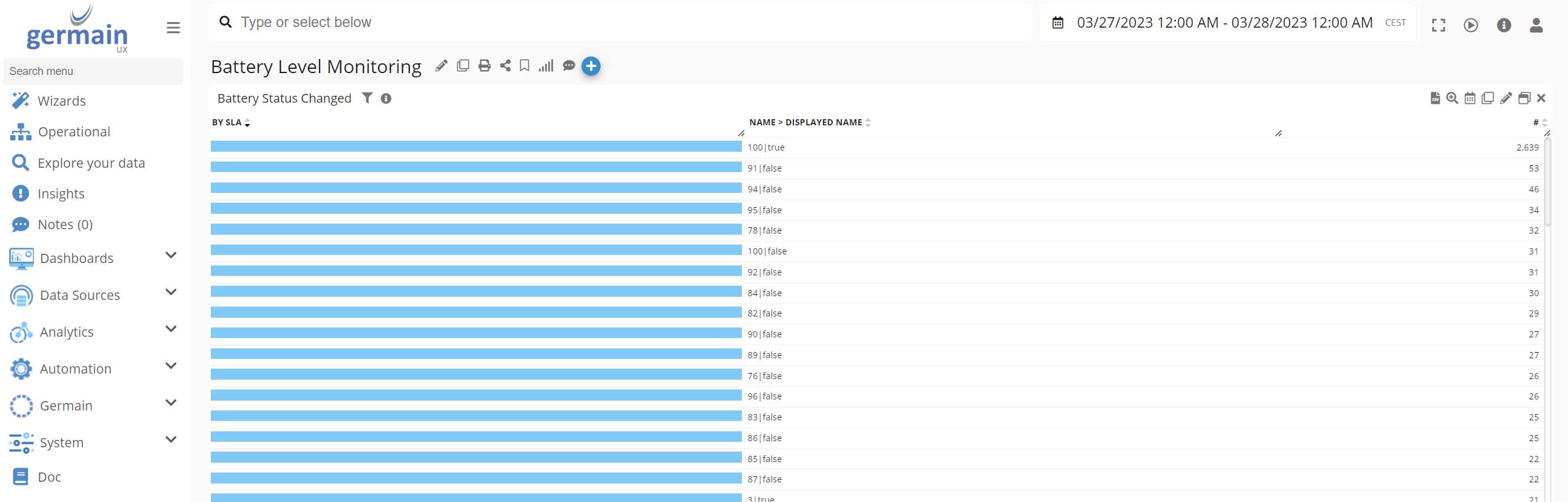
Battery Status Change on Analysis Portlet - GermainUX
6
Connect or disconnect the charger
7
Confirm that a charging-status-change event appears
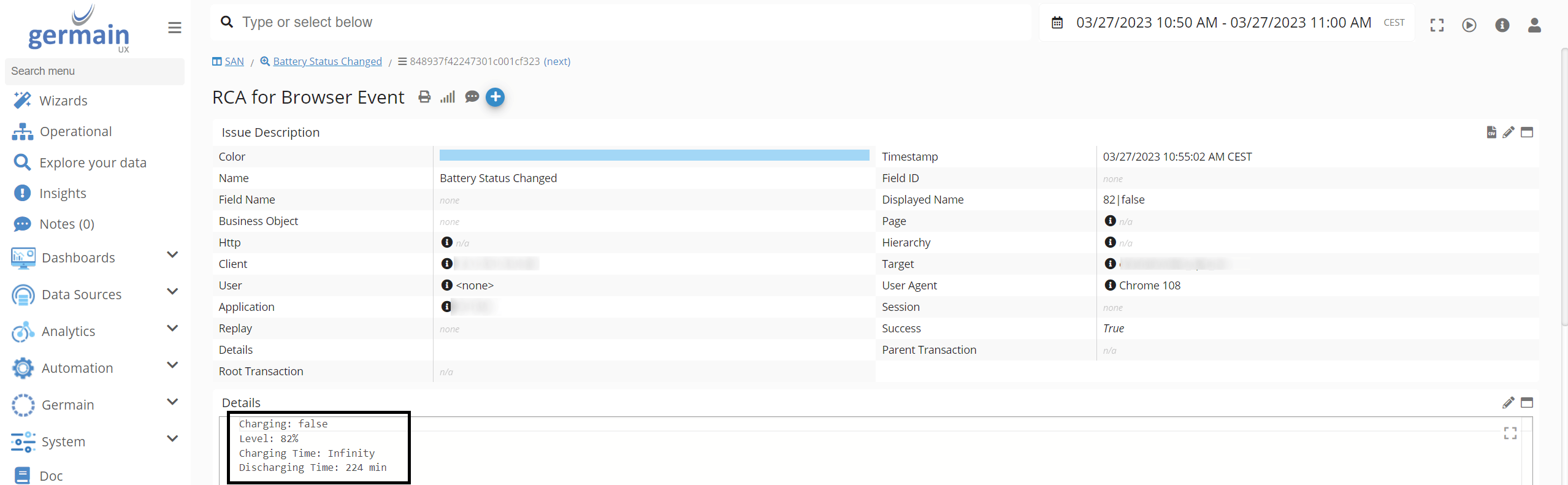
RCA of a Battery Status Change - GermainUX
8
Verify the application, session, browser, and battery properties
9
Restore the intended production threshold
Troubleshooting
If battery events are not collected:- Confirm that the application uses GermainUX RUM JS.
- Verify that the browser supports and exposes the Battery Status API.
- Test on a physical battery-powered device.
- Confirm that battery monitoring is enabled in the UX Monitoring Profile.
- Verify that the configured threshold is valid.
- Check the browser console for initialization errors.
- Confirm that the browser can send telemetry to GermainUX.
- Review sampling, consent, and privacy settings.
- Check whether browser or enterprise-security policies restrict battery access.
Deployment and Configuration
- Deploy GermainUX RUM JS.
- Confirm that the monitored browsers expose battery information.
- Use the preconfigured 15% threshold or configure a customer-specific threshold.
- Validate low-battery and charging-status-change events on a physical device.
- Review privacy, access, and retention requirements.
- Analyze battery events using the available browser and user-session KPIs.
- Configure alerts, Watches, dashboards, or reports only when required.
Get Help
Contact GermainUX Support
The GermainUX team helps you get up and running faster, empower your team, turn data into actionable insights, and optimize performance to deliver measurable business outcomes.
Can't Find What You Need?
Search all GermainUX docs with Ctrl + K, or use the feedback buttons at the bottom of this page to tell us what is missing.
The content of this document is proprietary to GERMAIN SOFTWARE.