

System Errors
Unhandled process-level failures
Configuration
Enabling exception monitoring
Handled Exceptions
Reporting caught errors manually
Warning Monitoring
Bugs and security warnings
System Errors
This monitoring can collect all types of custom and standard errors (AssertionError, EvalError, SyntaxError, RangeError, ReferenceError, TypeError, URIError) and all system errors including:
- Permission denied
- Address already in use
- Connection refused
- Connection reset by peer
- File exists
- Is a directory
- Too many open files in system
- No such file or directory
- Not a directory
- Directory not empty
- Operation not permitted
- Broken pipe
- Operation timed out
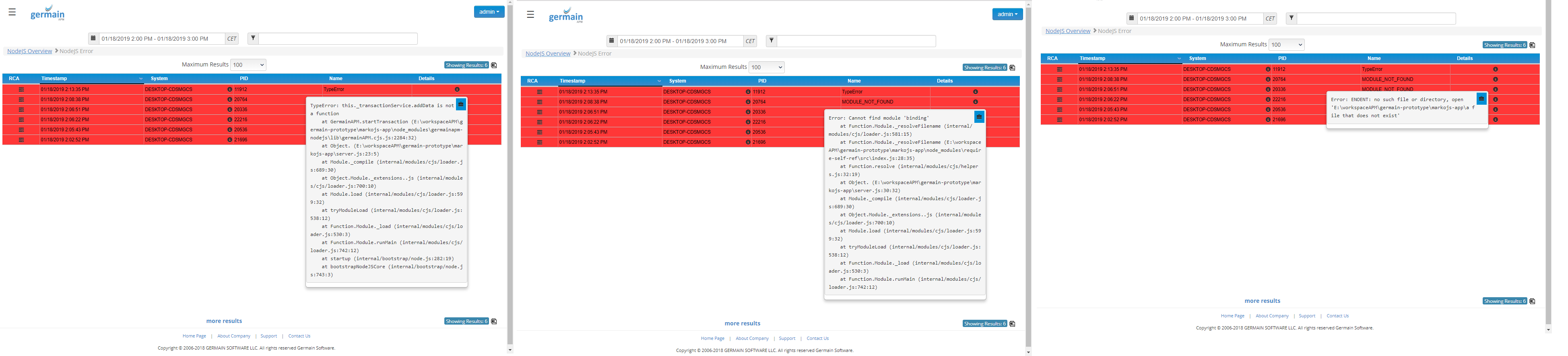
Node.js errors analyzed in GermainUX - GermainUX
Configuration
Unhandled Exceptions
Caught by Process
If you are already catching all unhandled exceptions by listening to theuncaughtException event on the process then you should explicitly collect the exception in your exception handler like this and disable config.monitoring.unhandledExceptions:
Uncaught by Process
If you don’t catch unhandled exceptions yet, you have 2 options to use our monitoring to catch them:Exit on Error
If you set theexitOnError:true then, once the exception is caught, we will exit from the process with id 1 (process.exit(1)). Node.js does recommend to exit from the process following an unhandled exception.
Correct configuration for this scenario:
Callback on Error
If you set theexitOnError:false but provide a function callback to the callbackOnError then, once the exception is caught, we will execute your callback by passing the Error instance as the only parameter. Node.js doesn’t recommend to proceed with any logic if an unhandled exception occurs.
Correct configuration for this scenario:
Disable Automatic Unhandled Exceptions Monitoring
You can disable this monitoring throughGermainAPMConfiguration:
Handled Exceptions
You can collect an exception / an error explicitly by adding the following code to your handled exception logic:Warning Monitoring
By default GermainUX monitors Node.js warnings (bad coding practices, bugs, or security vulnerabilities). You can disable this monitoring throughGermainAPMConfiguration:
Get Help
Contact GermainUX Support
The GermainUX team helps you get up and running faster, empower your team, turn data into actionable insights, and optimize performance to deliver measurable business outcomes.
Can't Find What You Need?
Search all GermainUX docs with Ctrl + K, or use the feedback buttons at the bottom of this page to tell us what is missing.
The content of this document is proprietary to GERMAIN SOFTWARE.