Turn a Customer Complaint into an Evidence-Backed Jira Ticket with the GermainUX MCP Server
Start from one customer’s complaint, find what happened in their session, who else it affected and what changed, and draft an engineering ticket with the evidence, from your AI assistant.
A customer writes to support: “I tried three times to update my card on your portal, and it keeps saying something went wrong.” The support agent can’t see what the customer saw. They pass the case to engineering, engineering can’t reproduce it, and the case goes back and forth until the customer gives up.The case has the customer’s words, not what the application did. It doesn’t say which request failed, since when, or whether anyone else hit it. Without that evidence, a real bug looks like a one-off, and the customers who failed and didn’t complain stay invisible.GermainUX records what every signed-in customer does and runs into on your portal: clicks, the requests behind them, the error messages they see, rage clicks, feedback and releases. With the GermainUX MCP Server, the support agent asks an AI assistant such as Claude about that customer in plain language. The assistant finds the session, reads what happened, checks how many other customers hit the same error and which release started it, and links to the evidence in GermainUX. It then drafts the engineering ticket with that evidence, ready to file in Jira.
This page uses a customer account portal, Claude and Jira as the example. The same approach works for any web or mobile application GermainUX monitors, any AI client that connects to the MCP Server, and any ticketing tool. When the question starts from a rise in cases rather than one customer, see Portal Case-Volume Analysis.
Questions It Answers
What happened to account 100482 when they tried to update their card?
Is it only this customer, or did others hit the same error?
Which customers are affected, and what do they have in common?
Since when, and did a release change something?
What should the engineering ticket say, and where is the evidence?
Is it fixed?
What GermainUX Watches
The assistant answers from the same KPIs the Workspace shows. Each signal is tied to the customer and the session it came from.
Signal
What it tells you
Where it comes from
Customer identity
Which customer a session belongs to, such as an account number, with their country and city
The investigation runs from one customer out to everyone, in one conversation with the assistant:
Find the customer’s session by their account number, and read its story: what they did, which request failed and which message they saw.
Query the failing request for every customer over the same days. The assistant groups the failures by country, browser, page or any other field, and finds what the affected customers have in common.
Look for a release that started it, and rule out what stayed normal.
Ask for links to the evidence in GermainUX: the session replay, the analysis and the list of failures.
Have the assistant draft the ticket with the evidence, file it in your ticketing tool, and ask again after the fix to confirm it worked.
See Example Prompts for how the assistant uses the MCP tools, and Available Tools for the full list.The example below comes from simulated data, and its numbers belong to the example.
Example: A Release Rejects Canadian and UK Postal Codes
At 09:00 UTC on a weekday, a portal release adds postal-code validation to the payment-method API. It only accepts US ZIP codes, so every card that a Canadian or UK customer saves gets an error. The portal shows “Something went wrong. Please try again.” That afternoon, account 100482 in Toronto tries three times, and the next morning their complaint reaches support.
1
Find the customer's session
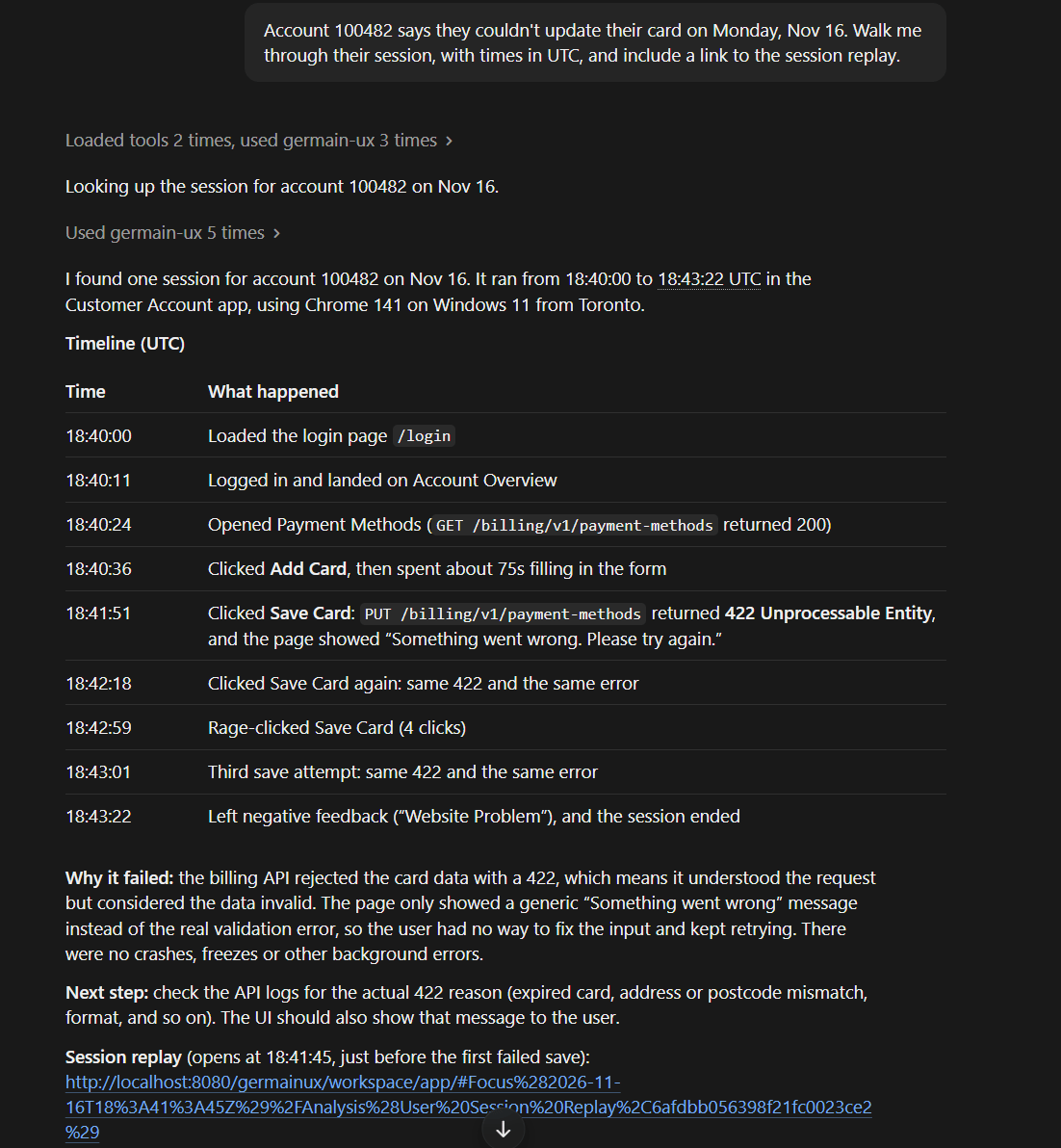
Ask: “Account 100482 says they couldn’t update their card on Monday, Nov 16. Walk me through their session, with times in UTC, and include a link to the session replay.”The assistant finds the customer’s sessions by account number (query_kpi), then reads the one from 18:40 (view_session_story). The customer opened Payment Methods, added a card and clicked Save Card three times. Each time, the request to save the card returned a 422 and the portal showed “Something went wrong. Please try again.” Between the second and third try, they rage-clicked Save Card, and before leaving they gave negative feedback. The assistant adds a link to the session in Session Replay (link_to_session_replay).
One Customer's Session, Told by the AI Assistant - Claude
2
Check who else
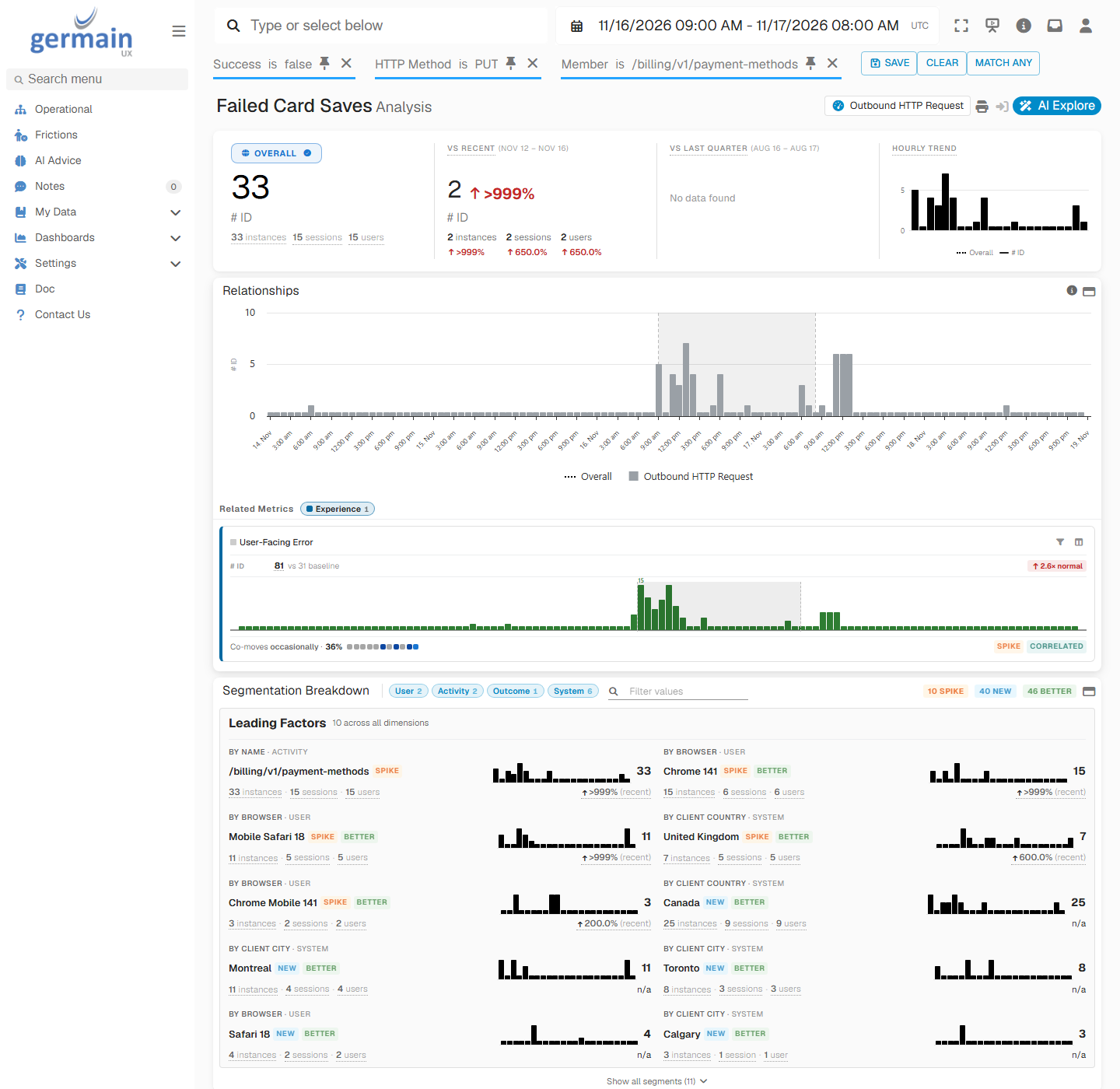
Ask: “Did other Customer Account customers get the same error between the Nov 16 09:00 UTC release and Nov 17 08:00 UTC? What do they have in common?”The assistant queries the same request for every customer from the release to the next morning (query_kpi) and groups the failures by country (get_field_values). In this example, 33 card saves failed between 09:00 and the next morning, against 2 in the same hours on the previous days. Canada has 25 of them, from 9 customers, and the United Kingdom 7, from 5 customers. The one other failure is a US customer who mistyped the card number. Account 100482 is one of 14 customers who couldn’t save a card. Most of them tried two or three times, and every one saw the same message.The same comparison is in the Workspace. In Aggregate Analysis of the failed card-save requests, Leading Factors rank the United Kingdom and Canada by country, and Montreal, Toronto and Calgary by city. Chrome 141 and Mobile Safari 18 rank too, only because most customers use them.
Failed Card Saves Analysis - GermainUX
3
Find what changed
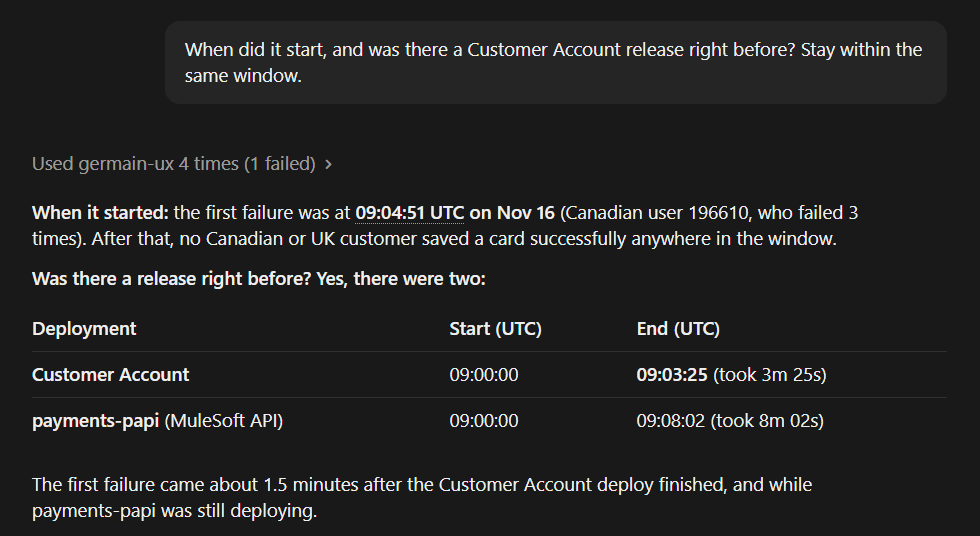
Ask: “When did it start, and was there a Customer Account release right before? Stay within the same window.”The first failure is at 09:04 UTC, a few minutes after the release starts. The assistant finds two deployments that started at 09:00 (query_kpi on Deployment Run): Customer Account release 2026.11.4 and an update of the payments-papi API. The API was rolled back at 10:15 and the failures carried on, so the Customer Account release is the change still in place.
Two Deployments Before the First Failure - Claude
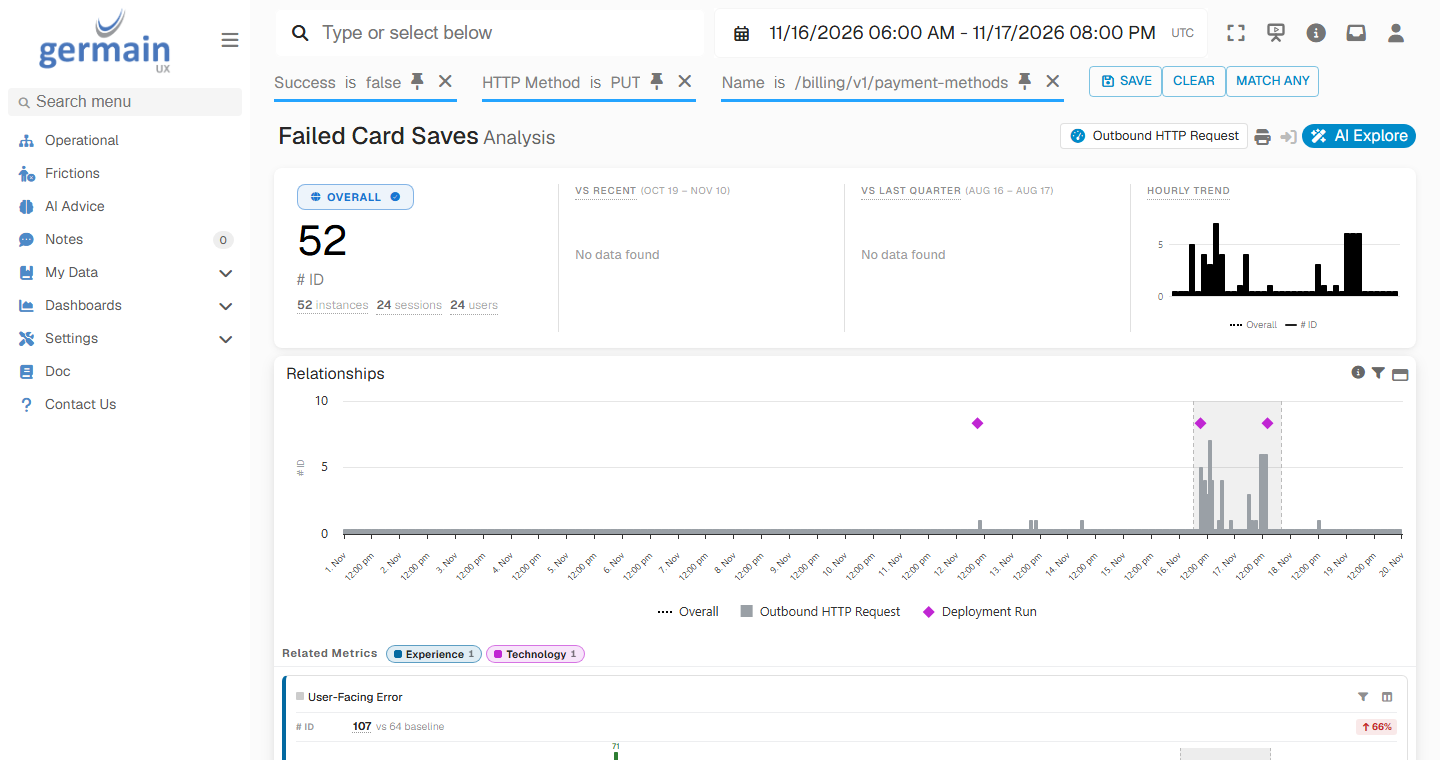
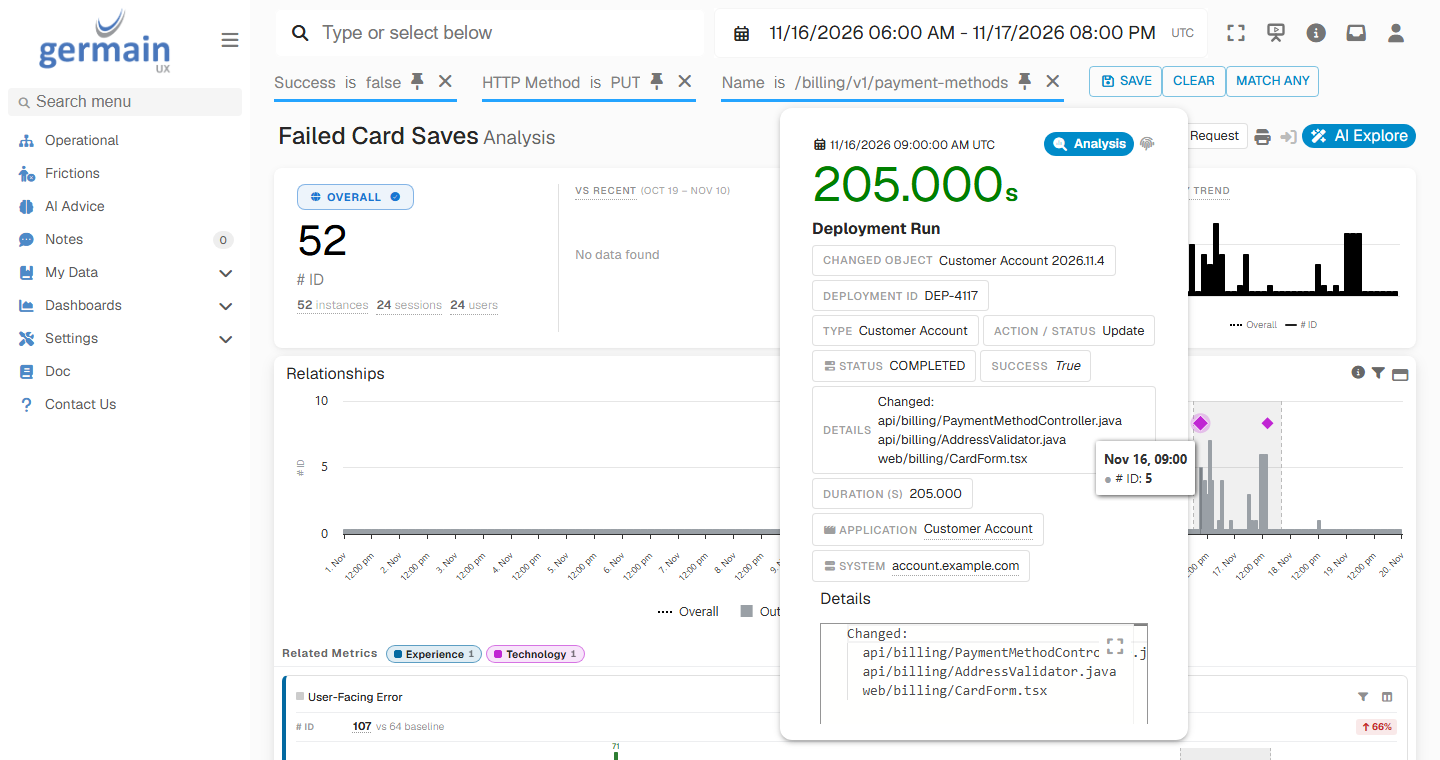
In the Workspace, the release shows as a marker on the failed card saves. The failures start at the marker of release 2026.11.4 and stop at the marker of the fix, 2026.11.5, the next afternoon.
Failed Card Saves Between the Release and the Fix - GermainUX
Hover the 2026.11.4 marker to see the release’s deployment ID, DEP-4117, and the files it changed.
Release 2026.11.4 Marker Details - GermainUX
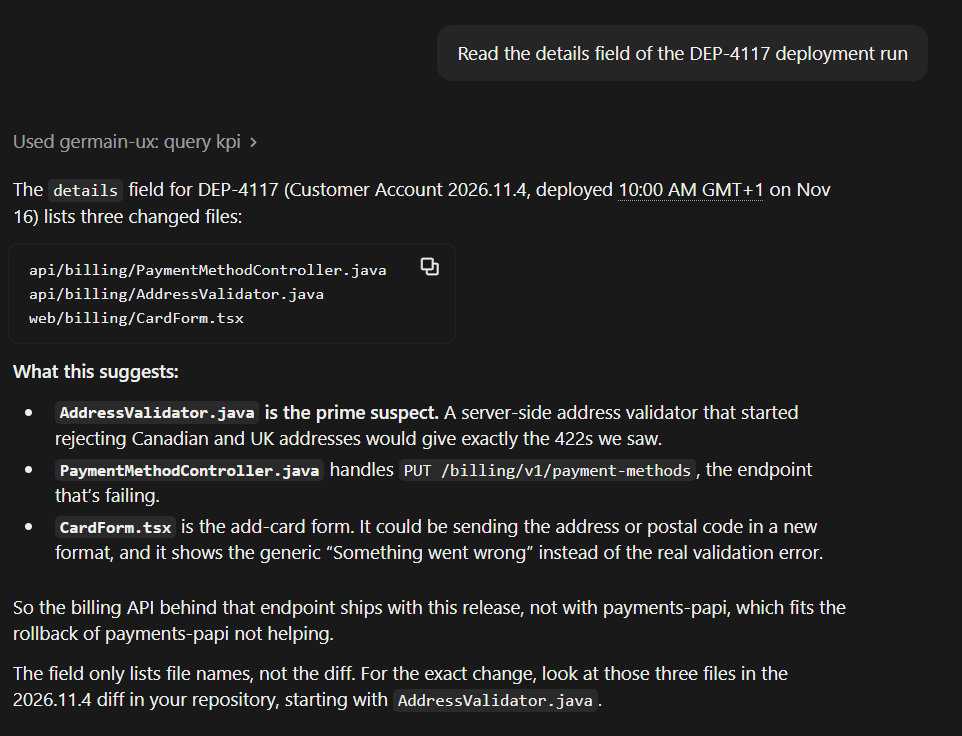
Then ask: “Read the details field of the DEP-4117 deployment run.” The details list the three files the release changed: the payment-method controller, the address validator and the card form. The assistant names the address validator as the prime suspect.
What the Release Changed - Claude
4
Rule out the rest
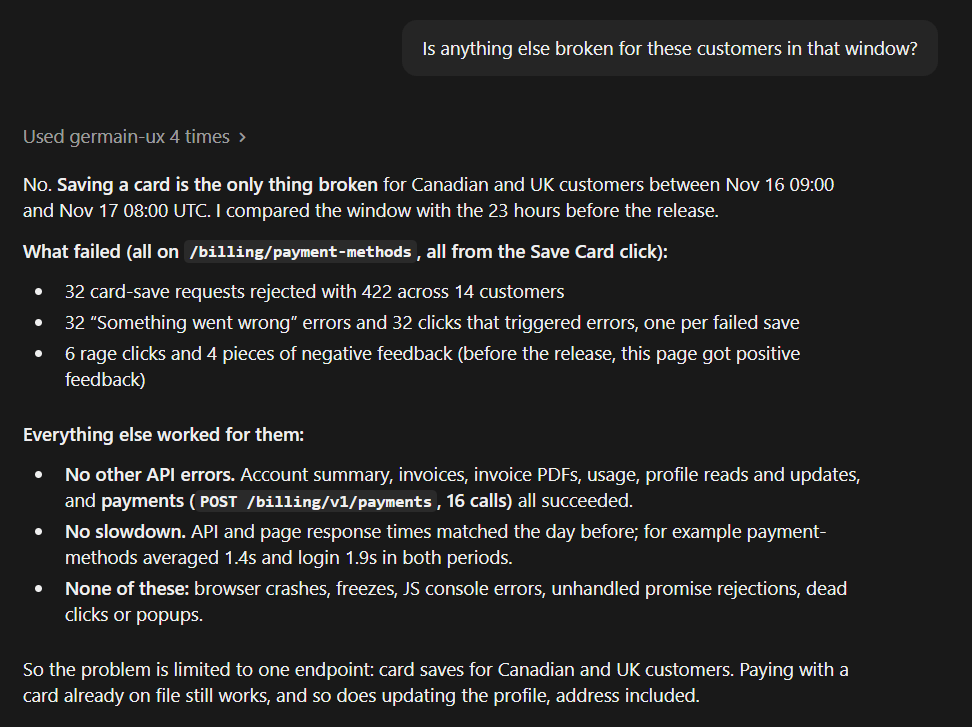
Ask: “Is anything else broken for these customers in that window?”In this example, everything else stays at its usual level. Canadian and UK customers log in, view invoices, update their profile and pay with a card already on file as usual. Response times match the day before: the card save fails, it doesn’t time out. The only change is the card save, for customers outside the US, since the release.
Nothing Else Broken - Claude
5
Draft the ticket
Ask: “Write a Jira bug for the Billing team with what we found, show it here ready to paste, and include the links.”The assistant gets the links from GermainUX (link_to_session_replay, link_to_analysis, link_to_drillthrough) and writes the bug, ready to paste into Jira. It names the release, the request and its 422 response, the countries affected, the number of customers, and the steps to reproduce with a Canadian postal code. Engineering doesn’t need to reproduce anything to start.The support agent files it in Jira. To keep the evidence in GermainUX too, they can add it as a Note on the customer’s session or on the analysis, assigned to the engineering team.
6
Confirm the fix
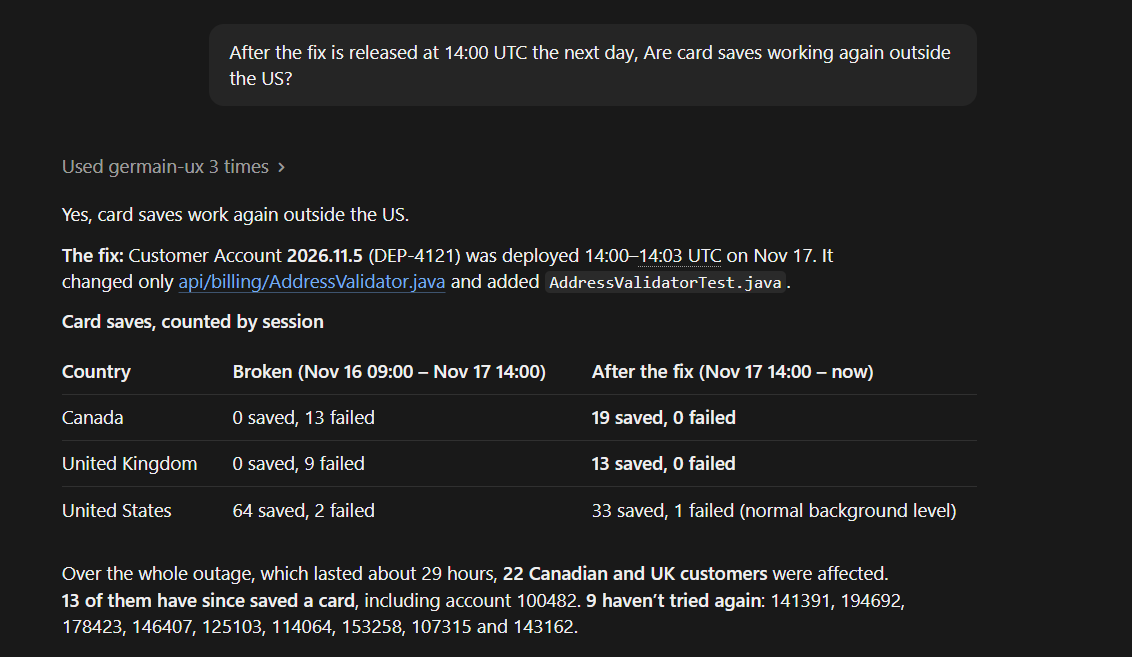
After the fix is released at 14:00 UTC the next day, ask: “Are card saves working again outside the US?”In this example, Canadian and UK card saves all succeed after the fix. Of the 22 customers affected over the 29-hour outage, 13 have saved a card since, including account 100482, and support can contact the 9 who haven’t tried again.
Card Saves Before and After the Fix - Claude
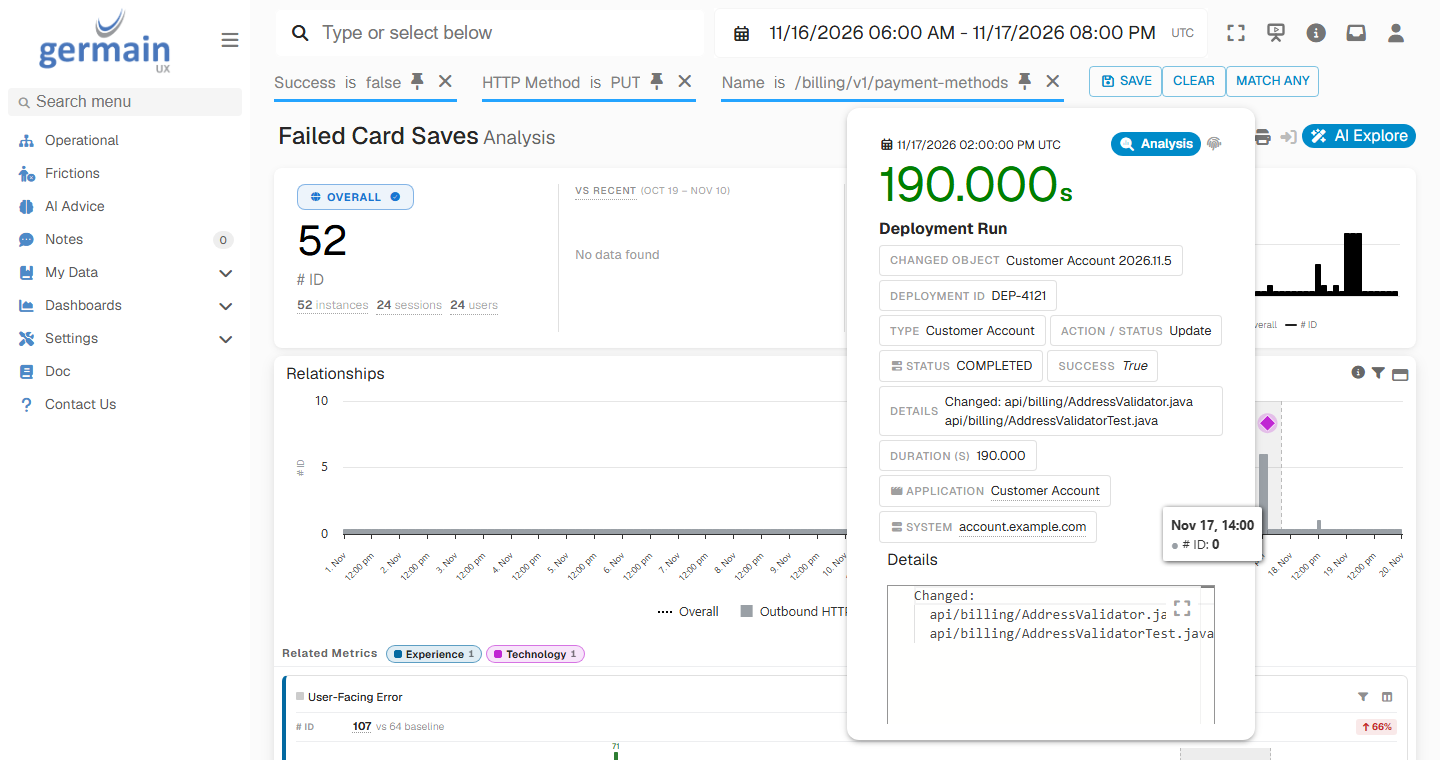
In the Workspace, the failures stop at the 2026.11.5 marker on the failed card saves chart above. Hover the marker to see the fix: deployment DEP-4121 changed the address validator and its test.
Release 2026.11.5 Marker Details - GermainUX
The support agent replies to the customer with what happened and that it’s fixed. The engineering team gets a ticket it can act on, and the list of the other affected customers lets support reach out to them before they complain.
Alert and Act
Most affected customers never complain, which is the reason to catch this sooner:
SLAs and outlier detection on the error rate of key requests, such as saving a card, by country, so a release that breaks one segment raises an alert
Synthetic user scenarios that save a card with a Canadian and a UK test account right after each release
Automated actions that roll back the release when the card-save SLA fires, with approval before they run
Percent change SLAs on negative feedback, so a rise in complaints on one page reaches the product team the same day
Set It Up
Each step adds value on its own. The assistant can answer more questions the more of the portal GermainUX monitors.
1
Monitor the portal
Deploy RUM JS on the portal so GermainUX records sessions, clicks, requests, errors and feedback. See Browser Monitoring for the other platforms GermainUX monitors.
2
Identify the customer
Configure a username extractor that sets the identifier your support team uses, such as the account number, on every session. Without it, the assistant can’t find a customer’s session. Review data privacy for what the sessions may contain.
3
Show releases on the timeline
Bring your portal releases into GermainUX as deployment events. The GermainUX team can help you connect your release pipeline. Then configure KPI relationships from your request and error KPIs to them, shown as markers. Give each relationship a constraint such as application.name == "Customer Account", or the releases of your other applications show on the portal’s charts too.
4
Enable the MCP Server for support
Enable the MCP Server and give the support agents a GermainUX account with access to the portal’s data. Every tool call runs as the signed-in user, so the agents see only what their account allows. See What users can see and do.
5
Connect the AI client
Connect the AI client the support agents use to the GermainUX MCP Server. The assistant writes the ticket as text, so it works with Jira or any other ticketing tool.
Additional Resources
MCP Server
Connect AI assistants to GermainUX
Analysis Dashboard
Aggregate and instance analysis
Use Cases
More Use Cases
Get Help
Every support team has its own portal, customer identifiers and ticketing workflow. The GermainUX team can help you identify customers in their sessions, bring your releases onto the timeline, set up the MCP Server for your support agents, and agree what a good engineering ticket includes.
Contact GermainUX Support
The GermainUX team helps you get up and running faster, empower your team, turn data into actionable insights, and optimize performance to deliver measurable business outcomes.
Can't Find What You Need?
Search all GermainUX docs with Ctrl + K, or use the feedback buttons at the bottom of this page to tell us what is missing.
The content of this document is proprietary to GERMAIN SOFTWARE.
Was this page helpful?
{"docsConfig":{"theme":"mint","$schema":"https://mintlify.com/docs.json","name":"GermainUX Docs","description":"GermainUX is a real-time Operational Experience Intelligence platform that combines Monitoring + Analytics + AI + Automation to help organizations detect and resolve user, workflow, and technology issues faster, in order to 1)Improve CRM and ERP Adoption and Productivity 2)Increase eCommerce Conversion","colors":{"primary":"#2E7DF2","light":"#5B9CFF","dark":"#1A5FC8"},"logo":{"light":"https://mintcdn.com/germain-ux/ok7-BbqwVV0uk3t8/images/logo-light.png?fit=max\u0026auto=format\u0026n=ok7-BbqwVV0uk3t8\u0026q=85\u0026s=3cfe3238ac55802e43da3e4da5806f0d","dark":"https://mintcdn.com/germain-ux/ok7-BbqwVV0uk3t8/images/logo-dark.png?fit=max\u0026auto=format\u0026n=ok7-BbqwVV0uk3t8\u0026q=85\u0026s=1886121bf4312c96b6321ea733078b7f","href":"/"},"favicon":"https://mintcdn.com/germain-ux/Jw6D65yKWJ4U5yOS/images/favicon.png?fit=max\u0026auto=format\u0026n=Jw6D65yKWJ4U5yOS\u0026q=85\u0026s=bcc4dd08f0edb299e0b2af2f079f8526","appearance":{"default":"light"},"background":{"color":{"light":"#FFFFFF","dark":"#00112A"}},"navbar":{"links":[{"href":"https://germainux.atlassian.net/servicedesk/customer/portal/1","label":"Ticket"},{"href":"https://calendly.com/germainux","label":"Schedule"}],"primary":{"type":"button","label":"Contact GermainUX","href":"https://docs.germainux.com/getting-started/support"}},"footer":{"socials":{"website":"https://germainux.com"}},"seo":{"metatags":{"canonical":"https://docs.germainux.com","og:locale":"en_US","og:site_name":"GermainUX Docs","twitter:card":"summary_large_image"},"indexing":"navigable"},"styling":{"eyebrows":"section","latex":true},"integrations":{"gtm":{"tagId":"GTM-MRCBSV5R"}},"contextual":{"options":["view","chatgpt","claude"],"display":"header"},"navigation":{"pages":[]}},"deployment":{"deploymentMetadataValue":{"subdomain":"germain-ux","hasAudioNarration":false,"actualSubdomain":"germain-ux","customDomains":["docs.germainux.com"],"gitSource":{"type":"github","owner":"germainsoftware","repo":"germain-docs","deployBranch":"main","contentDirectory":"","isPrivate":true,"mountPath":"","label":"","_id":"6ae890c6c73aaa2ebb8f7a7f"},"feedback":{"contextualFeedback":{"allowEmail":true,"textInputOnly":false},"edits":false,"issues":false,"thumbs":true},"entitlements":{"AI_CHAT":{"status":"ENABLED"},"WEB_MCP":{"status":"ENABLED"},"NARRATION":{"status":"ENABLED"}},"buildId":"6aff5aa41c16aa851360b30a","clientVersion":"0.0.4227","searchFilterCounts":[{"language":"default","tag":"Documentation","count":512},{"language":"default","tag":"GermainUX Documentation","count":512},{"language":"default","tag":"Integrations","count":274},{"language":"default","tag":"Release Notes","count":81},{"language":"default","tag":"Archive","count":73},{"language":"default","tag":"Management","count":57},{"language":"default","tag":"Analytics","count":53},{"language":"default","tag":"Deploy GermainUX","count":53},{"language":"default","tag":"Action","count":48},{"language":"default","tag":"Success Stories","count":34}],"searchSettings":{"fullPageSearch":true,"showContentSnippets":true}},"assistantConfig":{"enableAskAiButton":false,"enableStarterQuestions":false,"enableContextualStarterQuestions":false,"enableAskAiSearchBar":true},"basePath":"","hasChatPermissions":true,"hasWebMcpPermissions":true,"toggles":[{"name":"kill-isr","enabled":true,"variant":{"name":"disabled","enabled":false,"feature_enabled":true},"impressionData":false},{"name":"custom-rbac-roles","enabled":true,"variant":{"name":"disabled","enabled":false,"feature_enabled":true},"impressionData":false},{"name":"agent-mintlify-slack","enabled":true,"variant":{"name":"disabled","enabled":false,"feature_enabled":true},"impressionData":false},{"name":"agent-integrations-settings","enabled":true,"variant":{"name":"disabled","enabled":false,"feature_enabled":true},"impressionData":false},{"name":"rbac-expansion","enabled":true,"variant":{"name":"disabled","enabled":false,"feature_enabled":true},"impressionData":false},{"name":"automations-pr-grouping","enabled":true,"variant":{"name":"disabled","enabled":false,"feature_enabled":true},"impressionData":false},{"name":"custom-prefix","enabled":true,"variant":{"name":"disabled","enabled":false,"feature_enabled":true},"impressionData":false},{"name":"analytics-v7","enabled":true,"variant":{"name":"disabled","enabled":false,"feature_enabled":true},"impressionData":false},{"name":"user-flows-analytics","enabled":true,"variant":{"name":"disabled","enabled":false,"feature_enabled":true},"impressionData":false},{"name":"no-publish-flow","enabled":true,"variant":{"name":"disabled","enabled":false,"feature_enabled":true},"impressionData":false},{"name":"workos-onboarding","enabled":true,"variant":{"name":"disabled","enabled":false,"feature_enabled":true},"impressionData":false},{"name":"snapshot-serving-live","enabled":true,"variant":{"name":"disabled","enabled":false,"feature_enabled":true},"impressionData":false},{"name":"stripTemperatureMiddleware","enabled":true,"variant":{"name":"disabled","enabled":false,"feature_enabled":true},"impressionData":false},{"name":"support-platform-pylon-zendesk","enabled":true,"variant":{"name":"disabled","enabled":false,"feature_enabled":true},"impressionData":false},{"name":"snapshot-serving","enabled":true,"variant":{"name":"disabled","enabled":false,"feature_enabled":true},"impressionData":false},{"name":"instant-rollback","enabled":true,"variant":{"name":"disabled","enabled":false,"feature_enabled":true},"impressionData":false},{"name":"granular-notifications-server","enabled":true,"variant":{"name":"disabled","enabled":false,"feature_enabled":true},"impressionData":false},{"name":"granular-notifications","enabled":true,"variant":{"name":"disabled","enabled":false,"feature_enabled":true},"impressionData":false},{"name":"automations-fable","enabled":true,"variant":{"name":"disabled","enabled":false,"feature_enabled":true},"impressionData":false},{"name":"fixed-ai-action-pricing","enabled":true,"variant":{"name":"disabled","enabled":false,"feature_enabled":true},"impressionData":false},{"name":"automation-resolve-merge-conflict","enabled":true,"variant":{"name":"disabled","enabled":false,"feature_enabled":true},"impressionData":false},{"name":"scoped-publishing","enabled":true,"variant":{"name":"disabled","enabled":false,"feature_enabled":true},"impressionData":false},{"name":"mintql","enabled":true,"variant":{"name":"disabled","enabled":false,"feature_enabled":true},"impressionData":false},{"name":"page-level-analytics","enabled":true,"variant":{"name":"disabled","enabled":false,"feature_enabled":true},"impressionData":false},{"name":"editor-version-history-v2","enabled":true,"variant":{"name":"disabled","enabled":false,"feature_enabled":true},"impressionData":false},{"name":"billing-page-v2","enabled":true,"variant":{"name":"disabled","enabled":false,"feature_enabled":true},"impressionData":false},{"name":"full-page-search","enabled":true,"variant":{"name":"disabled","enabled":false,"feature_enabled":true},"impressionData":false},{"name":"workspace-projects","enabled":true,"variant":{"name":"disabled","enabled":false,"feature_enabled":true},"impressionData":false},{"name":"assistant-v5","enabled":true,"variant":{"name":"disabled","enabled":false,"feature_enabled":true},"impressionData":false},{"name":"fork-pr-previews","enabled":true,"variant":{"name":"disabled","enabled":false,"feature_enabled":true},"impressionData":false},{"name":"revalidation-jwt","enabled":true,"variant":{"name":"disabled","enabled":false,"feature_enabled":true},"impressionData":false},{"name":"workos-sso-scim","enabled":true,"variant":{"name":"disabled","enabled":false,"feature_enabled":true},"impressionData":false},{"name":"hobby-abuse-scan","enabled":true,"variant":{"name":"disabled","enabled":false,"feature_enabled":true},"impressionData":false},{"name":"dashboard-inbox","enabled":true,"variant":{"name":"disabled","enabled":false,"feature_enabled":true},"impressionData":false},{"name":"workos-signup","enabled":true,"variant":{"name":"disabled","enabled":false,"feature_enabled":true},"impressionData":false},{"name":"turbopuffer-dual-write","enabled":true,"variant":{"name":"disabled","enabled":false,"feature_enabled":true},"impressionData":false},{"name":"workos-enabled","enabled":true,"variant":{"name":"disabled","enabled":false,"feature_enabled":true},"impressionData":false},{"name":"approve-review-flow","enabled":true,"variant":{"name":"disabled","enabled":false,"feature_enabled":true},"impressionData":false},{"name":"editor-metadata","enabled":true,"variant":{"name":"disabled","enabled":false,"feature_enabled":true},"impressionData":false},{"name":"sso-setup-deadline-banner","enabled":true,"variant":{"name":"disabled","enabled":false,"feature_enabled":true},"impressionData":false},{"name":"turbopuffer-serve","enabled":true,"variant":{"name":"disabled","enabled":false,"feature_enabled":true},"impressionData":false},{"name":"live-agents","enabled":true,"variant":{"name":"disabled","enabled":false,"feature_enabled":true},"impressionData":false},{"name":"starter-pricing","enabled":true,"variant":{"name":"treatment","enabled":true,"payload":{"type":"string","value":"treatment"},"feature_enabled":true},"impressionData":false},{"name":"llms-txt-v2","enabled":true,"variant":{"name":"disabled","enabled":false,"feature_enabled":true},"impressionData":false},{"name":"wildcard-email-auth","enabled":true,"variant":{"name":"disabled","enabled":false,"feature_enabled":true},"impressionData":false}],"googleFontsInlined":false},"customCss":[]}
{"page":{"pagePath":"use-cases/complaint-to-ticket-analysis","slug":"/use-cases/complaint-to-ticket-analysis","pageMetadata":{"title":"Turn a Customer Complaint into an Evidence-Backed Jira Ticket with the GermainUX MCP Server","sidebarTitle":"Complaint Investigation with MCP","description":"Start from one customer's complaint, find what happened in their session, who else it affected and what changed, and draft an engineering ticket with the evidence, from your AI assistant.","icon":"lightbulb","keywords":["customer complaint investigation","can't reproduce bug","support to engineering escalation","Jira ticket from support case","MCP Server","Claude Jira bug report","AI assistant for support agents","session evidence","root cause analysis"],"href":"/use-cases/complaint-to-ticket-analysis"},"description":{"compiledSource":"\"use strict\";\nconst {jsx: _jsx} = arguments[0];\nconst {useMDXComponents: _provideComponents} = arguments[0];\nfunction _createMdxContent(props) {\n const _components = {\n p: \"p\",\n ..._provideComponents(),\n ...props.components\n };\n return _jsx(_components.p, {\n children: \"Start from one customer’s complaint, find what happened in their session, who else it affected and what changed, and draft an engineering ticket with the evidence, from your AI assistant.\"\n });\n}\nfunction MDXContent(props = {}) {\n const {wrapper: MDXLayout} = {\n ..._provideComponents(),\n ...props.components\n };\n return MDXLayout ? _jsx(MDXLayout, {\n ...props,\n children: _jsx(_createMdxContent, {\n ...props\n })\n }) : _createMdxContent(props);\n}\nreturn {\n default: MDXContent\n};\n","frontmatter":{},"scope":{}},"pageType":"default","mdx":{"mdxSource":{"compiledSource":"\"use strict\";const{Fragment:_Fragment,jsx:_jsx,jsxs:_jsxs}=arguments[0];const{useMDXComponents:_provideComponents}=arguments[0];const GxFooter=()=>_jsx(`p`,{className:`gx-fine`,children:`The content of this document is proprietary to GERMAIN SOFTWARE.`});const GxStyle=()=>_jsx(`style`,{children:`\n.gx-meta { display:flex; flex-direction:column; gap:10px; margin:22px 0 6px; padding:16px 18px; border:1px solid rgba(15,23,42,.08); border-radius:16px; background:rgba(46,125,242,.035); font-size:13.5px; }\n.gx-meta-row { display:flex; flex-wrap:wrap; align-items:center; gap:6px; }\n.gx-meta-label { width:96px; flex:none; color:#64748b; }\n.dark .gx-meta-label { color:#94a3b8; }\n.gx-meta code { border-color:rgba(46,125,242,.25) !important; color:#1A5FC8 !important; background:rgba(46,125,242,.08) !important; }\n.dark .gx-meta { background:linear-gradient(135deg,rgba(46,125,242,.16),rgba(0,17,42,.4)); border-color:rgba(91,156,255,.22); }\n.dark .gx-meta code { color:#BFD6FF !important; background:rgba(91,156,255,.12) !important; border-color:rgba(91,156,255,.28) !important; }\n.gx-list ul { columns:2; column-gap:24px; list-style:none !important; padding-left:0 !important; margin:14px 0 0 !important; }\n.gx-list ul:has(> li:only-child) { columns:1; }\n.gx-list li { break-inside:avoid; position:relative; padding:4px 0 4px 22px !important; margin:0 !important; font-size:14.5px; }\n.gx-list li::marker { content:\"\"; }\n.gx-list li::before { content:\"\"; position:absolute; left:3px; top:13px; width:7px; height:7px; border-radius:50%; background:#2E7DF2; opacity:.75; }\n.dark .gx-list li::before { background:#5B9CFF; }\n.gx-flow { display:flex; flex-wrap:wrap; align-items:center; gap:10px 32px; margin:16px 0; }\n.gx-flow span { position:relative; display:inline-flex; align-items:center; padding:6px 12px; border-radius:8px; font-size:13.5px; font-weight:500; background:#fff; border:1px solid rgba(15,23,42,.12); color:#0f172a; box-shadow:0 1px 2px rgba(15,23,42,.05); }\n.gx-flow span:first-child, .gx-flow span:last-child { background:rgba(46,125,242,.08); border-color:rgba(46,125,242,.25); color:#1A5FC8; }\n.gx-flow span:not(:last-child)::after { content:\"\\\\2192\"; position:absolute; left:calc(100% + 9px); color:#94a3b8; font-weight:400; }\n.dark .gx-flow span { background:rgba(255,255,255,.03); border-color:rgba(255,255,255,.12); color:#e2e8f0; box-shadow:none; }\n.dark .gx-flow span:first-child, .dark .gx-flow span:last-child { background:rgba(91,156,255,.10); border-color:rgba(91,156,255,.28); color:#BFD6FF; }\n.dark .gx-flow span:not(:last-child)::after { color:#64748b; }\n#sidebar li[id] > a > div:first-child:has(> svg[aria-hidden]) { display: none; }\n#sidebar svg[style*=\"mask-image\"], #sidebar-content svg[style*=\"mask-image\"], #navigation-items svg[style*=\"mask-image\"], aside svg[style*=\"mask-image\"] { display: none !important; }\n#sidebar div:has(> svg[style*=\"mask-image\"]), #sidebar-content div:has(> svg[style*=\"mask-image\"]), #navigation-items div:has(> svg[style*=\"mask-image\"]), aside div:has(> svg[style*=\"mask-image\"]) { display: none !important; }\n.gx-fine { margin-top:56px; padding-top:20px; border-top:1px solid rgba(15,23,42,.08); font-size:13px; color:#64748b; }\n.dark .gx-fine { border-top-color:rgba(255,255,255,.08); color:#94a3b8; }\n.gx-fine p { margin:0 !important; font-size:13px !important; color:inherit !important; }\n.eyebrow { font-size:13px !important; font-weight:700 !important; letter-spacing:.12em !important; text-transform:uppercase; color:#2E7DF2 !important; display:inline-flex; align-items:center; gap:8px; padding:4px 12px; border-radius:999px; background:rgba(46,125,242,.10); border:1px solid rgba(46,125,242,.25); height:auto !important; margin-bottom:6px; }\n.dark .eyebrow { color:#8DB8FF !important; background:rgba(91,156,255,.12); border-color:rgba(91,156,255,.30); }\n#page-title { letter-spacing:-.02em; }\n.dark #page-title { background:linear-gradient(90deg,#FFFFFF 0%,#BFD6FF 100%); -webkit-background-clip:text; background-clip:text; -webkit-text-fill-color:transparent; }\n.mdx-content h2:not(.not-prose) { position:relative; padding-left:16px; }\n.mdx-content h2:not(.not-prose)::before { content:\"\"; position:absolute; left:0; top:.2em; bottom:.2em; width:4px; border-radius:4px; background:linear-gradient(180deg,#2E7DF2,#5B9CFF); }\n.dark table th { color:#BFD6FF; }\n.dark table td:first-child { color:#FFFFFF; font-weight:500; }\n@media (max-width: 820px) { .gx-list ul { columns:1; } }\n.gx-list-more:not(.is-open) > ul > li:nth-child(n+11) { display:none; }\n.gx-more-toggle { display:inline-flex; align-items:center; gap:6px; margin:8px 0 12px 22px; padding:0; border:0; background:none; cursor:pointer; font-size:14px; font-weight:600; color:#1A5FC8; }\n.gx-more-toggle:hover { text-decoration:underline; }\n.gx-more-toggle::after { content:\"\\\\25BE\"; display:inline-block; font-size:12px; transition:transform .15s; }\n.gx-list-more.is-open .gx-more-toggle::after { transform:rotate(180deg); }\n.dark .gx-more-toggle { color:#8DB8FF; }\n/* === Concept #1: hero header + numbered section tiles === */\n#content-area { counter-reset: gxsec; }\n#header { position:relative; overflow:hidden; padding:36px 30px 24px; border-radius:24px; border:1px solid rgba(91,156,255,.22); background:radial-gradient(800px 300px at 100% 0%, rgba(46,125,242,.32), transparent 65%), #0B2147; }\n#header::before { content:\"\"; position:absolute; inset:0; pointer-events:none; background-image:linear-gradient(rgba(255,255,255,.045) 1px,transparent 1px),linear-gradient(90deg,rgba(255,255,255,.045) 1px,transparent 1px); background-size:34px 34px; -webkit-mask-image:linear-gradient(100deg,transparent 15%,#000 75%); mask-image:linear-gradient(100deg,transparent 15%,#000 75%); }\n#header > * { position:relative; }\n#header #page-title { color:#fff !important; -webkit-text-fill-color:#fff !important; background:none !important; font-size:clamp(1.9rem,3.4vw,2.6rem) !important; line-height:1.06 !important; font-weight:800 !important; letter-spacing:-.035em !important; }\n#header .prose, #header .prose p, #header p { color:rgba(222,233,255,.82) !important; font-size:1.06rem; line-height:1.6; }\n#header .eyebrow { color:#BFD6FF !important; background:rgba(91,156,255,.14) !important; border-color:rgba(91,156,255,.32) !important; }\n#header button, #header [role=\"button\"] { color:#DCE8FF !important; border-color:rgba(191,214,255,.25) !important; background:rgba(255,255,255,.04) !important; }\n#content-area:has(#content > .gx-meta:first-child) #header { border-radius:24px 24px 0 0; border-bottom:0; padding-bottom:18px; }\n#content:has(> .gx-meta:first-child) { margin-top:0 !important; }\n#content > .gx-meta:first-child { margin:0 !important; padding:4px 30px 28px !important; border-radius:0 0 24px 24px !important; border:1px solid rgba(91,156,255,.22) !important; border-top:0 !important; background:#0B2147 !important; }\n#content > .gx-meta:first-child:has(+ .columns) { border-radius:0 !important; border-bottom:0 !important; padding-bottom:18px !important; }\n#content > .gx-meta:first-child + .columns { margin:0 0 8px !important; padding:4px 30px 30px !important; border:1px solid rgba(91,156,255,.22); border-top:0; border-radius:0 0 24px 24px; background:#0B2147; gap:12px !important; }\n#content > .gx-meta:first-child + .columns > * { background:rgba(255,255,255,.035) !important; border-color:rgba(91,156,255,.28) !important; border-radius:16px !important; }\n#content > .gx-meta:first-child + .columns h2, #content > .gx-meta:first-child + .columns [data-component-part=\"card-title\"] { color:#fff !important; font-size:15px !important; overflow-wrap:normal !important; word-break:normal !important; }\n#content > .gx-meta:first-child + .columns p, #content > .gx-meta:first-child + .columns [data-component-part=\"card-content\"] { color:rgba(214,226,250,.7) !important; }\n#content > .gx-meta:first-child + .columns svg { background-color:#5B9CFF !important; }\n#content > .gx-meta:first-child .gx-meta-label { color:rgba(191,214,255,.6) !important; }\n#content > .gx-meta:first-child code { font-family:inherit !important; font-weight:600 !important; font-size:12.5px !important; padding:5px 13px !important; border-radius:999px !important; color:#DCE8FF !important; background:rgba(46,125,242,.14) !important; border:1px solid rgba(91,156,255,.55) !important; }\n#content > .gx-meta:first-child a { text-decoration:none !important; border:0 !important; }\n#content > .gx-meta:first-child a:not(:has(code)) { color:#BFD6FF !important; font-weight:600; }\n#content > .gx-meta:first-child .gx-meta-row > span:not(.gx-meta-label) { color:#86EFAC !important; background:rgba(34,197,94,.14) !important; border-color:rgba(134,239,172,.35) !important; }\n.mdx-content > h2:not(.not-prose), #content > h2 { counter-increment:gxsec; display:flex !important; align-items:center; gap:14px; padding-left:0 !important; margin-top:2.6em !important; font-weight:750; letter-spacing:-.02em; }\n.mdx-content > h2:not(.not-prose)::before, #content > h2::before { content:counter(gxsec, decimal-leading-zero) !important; position:static !important; flex:none; width:40px; height:40px; border-radius:12px; display:inline-flex; align-items:center; justify-content:center; font-size:13px; font-weight:700; letter-spacing:0; color:#fff; background:linear-gradient(135deg,#2E7DF2,#5B9CFF) !important; box-shadow:0 6px 18px rgba(46,125,242,.35); }\n@media (max-width:820px) { #header, #content > .gx-meta:first-child, #content > .gx-meta:first-child + .columns { padding-left:20px !important; padding-right:20px !important; } }\n#content-area:has(#content > .columns:first-child) #header { border-radius:24px 24px 0 0; border-bottom:0; padding-bottom:18px; }\n#content:has(> .columns:first-child) { margin-top:0 !important; }\n#content > .columns:first-child { margin:0 0 8px !important; padding:4px 30px 30px !important; border:1px solid rgba(91,156,255,.22); border-top:0; border-radius:0 0 24px 24px; background:#0B2147; gap:12px !important; }\n#content > .columns:first-child > * { background:rgba(255,255,255,.035) !important; border-color:rgba(91,156,255,.28) !important; border-radius:16px !important; }\n#content > .columns:first-child h2, #content > .columns:first-child [data-component-part=\"card-title\"] { color:#fff !important; font-size:15px !important; overflow-wrap:normal !important; word-break:normal !important; }\n#content > .columns:first-child p, #content > .columns:first-child [data-component-part=\"card-content\"] { color:rgba(214,226,250,.7) !important; }\n#content > .columns:first-child svg { background-color:#5B9CFF !important; }\n/* === Shell: concept #1 (top bar, menus, page) === */\n#navbar, #navbar-transition, #navbar > div { background:#00112A !important; }\n#navbar { border-bottom:1px solid rgba(91,156,255,.18) !important; }\n#navbar a, #navbar button, #navbar .nav-tabs-item { color:rgba(220,232,255,.78) !important; }\n#navbar a:hover, #navbar button:hover, #navbar .nav-tabs-item[data-active=\"true\"] { color:#FFFFFF !important; }\n#navbar a[class*=\"bg-primary\"], #navbar a[class*=\"bg-primary\"] * { color:#FFFFFF !important; }\n#navbar a[href=\"/\"], #navbar a[href=\"/\"] * { color:#FFFFFF !important; }\n#search-bar-entry { background:rgba(255,255,255,.06) !important; border:1px solid rgba(255,255,255,.14) !important; box-shadow:none !important; }\n#search-bar-entry, #search-bar-entry * { color:rgba(220,232,255,.72) !important; }\nhtml:not(.dark) #navbar img[src*=\"logo-light\"] { display:none !important; }\nhtml:not(.dark) #navbar img[src*=\"logo-dark\"] { display:block !important; }\nhtml:not(.dark) #sidebar, html:not(.dark) #sidebar-content { background:#FFFFFF !important; }\nhtml:not(.dark) #sidebar { border-right:1px solid #E6ECF5 !important; }\n#navigation-items .sidebar-group-header { font-size:11.5px !important; letter-spacing:.08em; text-transform:uppercase; }\nhtml:not(.dark) #navigation-items .sidebar-group-header { color:#0B1B33 !important; }\n#navigation-items a { font-size:13.5px !important; border-radius:10px !important; }\nhtml:not(.dark) #navigation-items a { color:#4A5A75 !important; }\nhtml:not(.dark) #navigation-items a:hover { background:#F1F5FC !important; color:#0B1B33 !important; }\n#navigation-items li[data-active] > a, #navigation-items a[aria-current=\"page\"], #navigation-items a[class*=\"bg-primary\"] { background:#EAF2FF !important; color:#1A5FC8 !important; font-weight:600 !important; box-shadow:inset 3px 0 0 #2E7DF2; }\n.dark #navigation-items li[data-active] > a, .dark #navigation-items a[aria-current=\"page\"], .dark #navigation-items a[class*=\"bg-primary\"] { background:rgba(46,125,242,.16) !important; color:#BFD6FF !important; }\nhtml:not(.dark) #table-of-contents a { color:#5B6B85; }\nhtml:not(.dark) .mdx-content h2, html:not(.dark) .mdx-content h3 { color:#0B1B33; }\nhtml:not(.dark) .mdx-content p, html:not(.dark) .mdx-content li { color:#33415C; }\n`});function _createMdxContent(props){const _components={a:`a`,code:`code`,em:`em`,li:`li`,ol:`ol`,p:`p`,strong:`strong`,tbody:`tbody`,td:`td`,th:`th`,thead:`thead`,tr:`tr`,ul:`ul`,..._provideComponents(),...props.components},{Badge,Card,CardGroup,Frame,Heading,OptimizedImage,Step,Steps,Table,_MdxComponentBoundary}=_components;if(!Badge)_missingMdxReference(`Badge`,true);if(!Card)_missingMdxReference(`Card`,true);if(!CardGroup)_missingMdxReference(`CardGroup`,true);if(!Frame)_missingMdxReference(`Frame`,true);if(!Heading)_missingMdxReference(`Heading`,true);if(!OptimizedImage)_missingMdxReference(`OptimizedImage`,true);if(!Step)_missingMdxReference(`Step`,true);if(!Steps)_missingMdxReference(`Steps`,true);if(!Table)_missingMdxReference(`Table`,true);if(!_MdxComponentBoundary)_missingMdxReference(`_MdxComponentBoundary`,true);return _jsxs(_Fragment,{children:[_jsxs(`div`,{className:`gx-meta`,children:[_jsxs(`div`,{className:`gx-meta-row`,children:[_jsx(`span`,{className:`gx-meta-label`,children:`Components`}),_jsx(_components.a,{href:`/deploy/germain-ux-engine`,children:_jsx(`code`,{children:`Engine`})}),_jsx(_components.a,{href:`/deploy/germain-ux-rum-js`,children:_jsx(`code`,{children:`RUM JS`})})]}),_jsxs(`div`,{className:`gx-meta-row`,children:[_jsx(`span`,{className:`gx-meta-label`,children:`Availability`}),_jsx(Badge,{color:`green`,children:`2026.3 or later`})]})]}),`\n`,_jsxs(CardGroup,{cols:4,children:[_jsx(Card,{title:`What GermainUX Watches`,icon:`binoculars`,href:`#what-germainux-watches`,children:_jsx(_components.p,{children:`Sessions, errors and releases per customer`})}),_jsx(Card,{title:`Find the Cause`,icon:`magnifying-glass-chart`,href:`#find-the-cause`,children:_jsx(_components.p,{children:`One customer to every customer`})}),_jsx(Card,{title:`Alert and Act`,icon:`bell`,href:`#alert-and-act`,children:_jsx(_components.p,{children:`Catch it before the next complaint`})}),_jsx(Card,{title:`Set It Up`,icon:`sliders`,href:`#set-it-up`,children:_jsx(_components.p,{children:`Portal, identity and MCP Server`})})]}),`\n`,_jsx(Heading,{level:`2`,id:`overview`,children:`Overview`}),`\n`,_jsx(_components.p,{children:`A customer writes to support: “I tried three times to update my card on your portal, and it keeps saying something went wrong.” The support agent can’t see what the customer saw. They pass the case to engineering, engineering can’t reproduce it, and the case goes back and forth until the customer gives up.`}),`\n`,_jsx(_components.p,{children:`The case has the customer’s words, not what the application did. It doesn’t say which request failed, since when, or whether anyone else hit it. Without that evidence, a real bug looks like a one-off, and the customers who failed and didn’t complain stay invisible.`}),`\n`,_jsxs(_components.p,{children:[`GermainUX records what every signed-in customer does and runs into on your portal: clicks, the requests behind them, the error messages they see, rage clicks, feedback and releases. With the `,_jsx(_components.a,{href:`/integrations/mcp-server`,children:`GermainUX MCP Server`}),`, the support agent asks an AI assistant such as Claude about that customer in plain language. The assistant finds the session, reads what happened, checks how many other customers hit the same error and which release started it, and links to the evidence in GermainUX. It then drafts the engineering ticket with that evidence, ready to file in Jira.`]}),`\n`,_jsxs(`div`,{className:`gx-flow`,children:[_jsx(`span`,{children:`Customer Complaint`}),_jsx(`span`,{children:`Their Session`}),_jsx(`span`,{children:`The Error`}),_jsx(`span`,{children:`Who Else`}),_jsx(`span`,{children:`What Changed`}),_jsx(`span`,{children:`Jira Ticket`})]}),`\n`,_jsxs(_components.p,{children:[`This page uses a customer account portal, Claude and Jira as the example. The same approach works for any web or mobile application GermainUX monitors, any AI client that `,_jsx(_components.a,{href:`/integrations/mcp-server/connect-an-ai-client`,children:`connects to the MCP Server`}),`, and any ticketing tool. When the question starts from a rise in cases rather than one customer, see `,_jsx(_components.a,{href:`/use-cases/portal-case-volume-analysis`,children:`Portal Case-Volume Analysis`}),`.`]}),`\n`,_jsx(Heading,{level:`3`,id:`questions-it-answers`,children:`Questions It Answers`}),`\n`,_jsx(`div`,{className:`gx-list`,children:_jsxs(_components.ul,{children:[`\n`,_jsx(_components.li,{children:`What happened to account 100482 when they tried to update their card?`}),`\n`,_jsx(_components.li,{children:`Is it only this customer, or did others hit the same error?`}),`\n`,_jsx(_components.li,{children:`Which customers are affected, and what do they have in common?`}),`\n`,_jsx(_components.li,{children:`Since when, and did a release change something?`}),`\n`,_jsx(_components.li,{children:`What should the engineering ticket say, and where is the evidence?`}),`\n`,_jsx(_components.li,{children:`Is it fixed?`}),`\n`]})}),`\n`,_jsx(Heading,{level:`2`,id:`what-germainux-watches`,children:`What GermainUX Watches`}),`\n`,_jsx(_components.p,{children:`The assistant answers from the same KPIs the Workspace shows. Each signal is tied to the customer and the session it came from.`}),`\n`,_jsxs(Table,{children:[_jsx(_components.thead,{children:_jsxs(_components.tr,{children:[_jsx(_components.th,{children:`Signal`}),_jsx(_components.th,{children:`What it tells you`}),_jsx(_components.th,{children:`Where it comes from`})]})}),_jsxs(_components.tbody,{children:[_jsxs(_components.tr,{children:[_jsx(_components.td,{children:_jsx(_components.strong,{children:`Customer identity`})}),_jsx(_components.td,{children:`Which customer a session belongs to, such as an account number, with their country and city`}),_jsxs(_components.td,{children:[_jsx(_components.a,{href:`/integrations/browser-monitoring/metadata-extractors`,children:`Metadata extractors`}),` on the portal`]})]}),_jsxs(_components.tr,{children:[_jsx(_components.td,{children:_jsx(_components.strong,{children:`Sessions`})}),_jsx(_components.td,{children:`Every session of a customer, with its pages, clicks, errors and feedback, as one timeline and story`}),_jsx(_components.td,{children:_jsx(_components.a,{href:`/analytics/user-monitoring-and-replay`,children:`User monitoring and Session Replay`})})]}),_jsxs(_components.tr,{children:[_jsx(_components.td,{children:_jsx(_components.strong,{children:`Requests`})}),_jsx(_components.td,{children:`Status and response time of every call the portal makes, such as saving a card`}),_jsx(_components.td,{children:_jsx(_components.a,{href:`/integrations/browser-monitoring/network-requests-monitoring`,children:`Network requests`})})]}),_jsxs(_components.tr,{children:[_jsx(_components.td,{children:_jsx(_components.strong,{children:`Errors and frustration`})}),_jsx(_components.td,{children:`The error messages customers see, error clicks and rage clicks`}),_jsxs(_components.td,{children:[_jsx(_components.a,{href:`/integrations/browser-monitoring/dead-error-and-rage-click-monitoring`,children:`Rage, error and dead clicks`}),`, `,_jsx(_components.a,{href:`/analytics/errors-analysis-ai-powered`,children:`error analysis`})]})]}),_jsxs(_components.tr,{children:[_jsx(_components.td,{children:_jsx(_components.strong,{children:`Feedback`})}),_jsx(_components.td,{children:`What customers say on the page, with a category and a comment`}),_jsx(_components.td,{children:_jsx(_components.a,{href:`/automation/user-feedback`,children:`User feedback`})})]}),_jsxs(_components.tr,{children:[_jsx(_components.td,{children:_jsx(_components.strong,{children:`Releases`})}),_jsx(_components.td,{children:`Portal releases, shown as markers on the timeline`}),_jsx(_components.td,{children:_jsx(_components.a,{href:`/analytics/kpis/kpi-relationships#marker`,children:`KPI relationships shown as markers`})})]})]})]}),`\n`,_jsx(Heading,{level:`2`,id:`find-the-cause`,children:`Find the Cause`}),`\n`,_jsx(_components.p,{children:`The investigation runs from one customer out to everyone, in one conversation with the assistant:`}),`\n`,_jsxs(_components.ol,{children:[`\n`,_jsx(_components.li,{children:`Find the customer’s session by their account number, and read its story: what they did, which request failed and which message they saw.`}),`\n`,_jsx(_components.li,{children:`Query the failing request for every customer over the same days. The assistant groups the failures by country, browser, page or any other field, and finds what the affected customers have in common.`}),`\n`,_jsx(_components.li,{children:`Look for a release that started it, and rule out what stayed normal.`}),`\n`,_jsx(_components.li,{children:`Ask for links to the evidence in GermainUX: the session replay, the analysis and the list of failures.`}),`\n`,_jsx(_components.li,{children:`Have the assistant draft the ticket with the evidence, file it in your ticketing tool, and ask again after the fix to confirm it worked.`}),`\n`]}),`\n`,_jsxs(_components.p,{children:[`See `,_jsx(_components.a,{href:`/integrations/mcp-server/example-prompts`,children:`Example Prompts`}),` for how the assistant uses the MCP tools, and `,_jsx(_components.a,{href:`/integrations/mcp-server#available-tools`,children:`Available Tools`}),` for the full list.`]}),`\n`,_jsx(_components.p,{children:`The example below comes from simulated data, and its numbers belong to the example.`}),`\n`,_jsx(Heading,{level:`3`,id:`example-a-release-rejects-canadian-and-uk-postal-codes`,children:`Example: A Release Rejects Canadian and UK Postal Codes`}),`\n`,_jsx(_components.p,{children:`At 09:00 UTC on a weekday, a portal release adds postal-code validation to the payment-method API. It only accepts US ZIP codes, so every card that a Canadian or UK customer saves gets an error. The portal shows “Something went wrong. Please try again.” That afternoon, account 100482 in Toronto tries three times, and the next morning their complaint reaches support.`}),`\n`,_jsxs(Steps,{children:[_jsxs(Step,{title:`Find the customer's session`,children:[_jsxs(_components.p,{children:[`Ask: `,_jsx(_components.em,{children:`“Account 100482 says they couldn’t update their card on Monday, Nov 16. Walk me through their session, with times in UTC, and include a link to the session replay.”`})]}),_jsxs(_components.p,{children:[`The assistant finds the customer’s sessions by account number (`,_jsx(_components.code,{children:`query_kpi`}),`), then reads the one from 18:40 (`,_jsx(_components.code,{children:`view_session_story`}),`). The customer opened `,_jsx(_components.strong,{children:`Payment Methods`}),`, added a card and clicked `,_jsx(_components.strong,{children:`Save Card`}),` three times. Each time, the request to save the card returned a 422 and the portal showed “Something went wrong. Please try again.” Between the second and third try, they rage-clicked `,_jsx(_components.strong,{children:`Save Card`}),`, and before leaving they gave negative feedback. The assistant adds a link to the session in Session Replay (`,_jsx(_components.code,{children:`link_to_session_replay`}),`).`]}),_jsx(Frame,{caption:`One Customer's Session, Told by the AI Assistant - Claude`,children:_jsx(OptimizedImage,{loading:`lazy`,src:`https://mintcdn.com/germain-ux/crszOw5noBC-NLv5/images/main/complaint-to-ticket-analysis/customer-session.png?fit=max\u0026auto=format\u0026n=crszOw5noBC-NLv5\u0026q=85\u0026s=9cf7ec93d396ee59c133ed7de7e93ef3`,alt:`Claude answer with a timeline of account 100482's session on Nov 16 in UTC: log in, Payment Methods, Add Card, three Save Card tries each returning 422 Unprocessable Entity with the message Something went wrong, a rage click, negative feedback, and a link to the session replay`,\"data-og-width\":`1102`,width:`1102`,\"data-og-height\":`1192`,height:`1192`,\"data-path\":`images/main/complaint-to-ticket-analysis/customer-session.png`,\"data-optimize\":`true`,\"data-opv\":`3`,srcset:`https://mintcdn.com/germain-ux/crszOw5noBC-NLv5/images/main/complaint-to-ticket-analysis/customer-session.png?w=280\u0026fit=max\u0026auto=format\u0026n=crszOw5noBC-NLv5\u0026q=85\u0026s=d7e2df8b7015931393f564421cd9e3ef 280w, https://mintcdn.com/germain-ux/crszOw5noBC-NLv5/images/main/complaint-to-ticket-analysis/customer-session.png?w=560\u0026fit=max\u0026auto=format\u0026n=crszOw5noBC-NLv5\u0026q=85\u0026s=f748a6367b938f2e7643441c35fcc79d 560w, https://mintcdn.com/germain-ux/crszOw5noBC-NLv5/images/main/complaint-to-ticket-analysis/customer-session.png?w=840\u0026fit=max\u0026auto=format\u0026n=crszOw5noBC-NLv5\u0026q=85\u0026s=e0d0e51f42db49c554694068682d5010 840w, https://mintcdn.com/germain-ux/crszOw5noBC-NLv5/images/main/complaint-to-ticket-analysis/customer-session.png?w=1100\u0026fit=max\u0026auto=format\u0026n=crszOw5noBC-NLv5\u0026q=85\u0026s=fa8c43a723f4f4823d152fa41ad4feeb 1100w, https://mintcdn.com/germain-ux/crszOw5noBC-NLv5/images/main/complaint-to-ticket-analysis/customer-session.png?w=1650\u0026fit=max\u0026auto=format\u0026n=crszOw5noBC-NLv5\u0026q=85\u0026s=9bd7061e8e741c61a544b90cd12613e1 1650w, https://mintcdn.com/germain-ux/crszOw5noBC-NLv5/images/main/complaint-to-ticket-analysis/customer-session.png?w=2500\u0026fit=max\u0026auto=format\u0026n=crszOw5noBC-NLv5\u0026q=85\u0026s=76dcce58a4441e9d808c666257d7caf1 2500w`})})]}),_jsxs(Step,{title:`Check who else`,children:[_jsxs(_components.p,{children:[`Ask: `,_jsx(_components.em,{children:`“Did other Customer Account customers get the same error between the Nov 16 09:00 UTC release and Nov 17 08:00 UTC? What do they have in common?”`})]}),_jsxs(_components.p,{children:[`The assistant queries the same request for every customer from the release to the next morning (`,_jsx(_components.code,{children:`query_kpi`}),`) and groups the failures by country (`,_jsx(_components.code,{children:`get_field_values`}),`). In this example, 33 card saves failed between 09:00 and the next morning, against 2 in the same hours on the previous days. Canada has 25 of them, from 9 customers, and the United Kingdom 7, from 5 customers. The one other failure is a US customer who mistyped the card number. Account 100482 is one of 14 customers who couldn’t save a card. Most of them tried two or three times, and every one saw the same message.`]}),_jsxs(_components.p,{children:[`The same comparison is in the Workspace. In `,_jsx(_components.a,{href:`/dashboards/analytics-dashboard/4-analysis-dashboard#aggregate-view-vs-instance-view`,children:`Aggregate Analysis`}),` of the failed card-save requests, `,_jsx(_components.a,{href:`/dashboards/analytics-dashboard/4-analysis-dashboard#leading-factors`,children:`Leading Factors`}),` rank the United Kingdom and Canada by country, and Montreal, Toronto and Calgary by city. Chrome 141 and Mobile Safari 18 rank too, only because most customers use them.`]}),_jsx(Frame,{caption:`Failed Card Saves Analysis - GermainUX`,children:_jsx(OptimizedImage,{loading:`lazy`,src:`https://mintcdn.com/germain-ux/crszOw5noBC-NLv5/images/main/complaint-to-ticket-analysis/failures-by-country.png?fit=max\u0026auto=format\u0026n=crszOw5noBC-NLv5\u0026q=85\u0026s=1ec8b4539f00377a3cca5923b4122ce3`,alt:`Analysis of failed card-save requests from the release to the next morning: 33 failures against 2 in the same hours on the previous days, with Leading Factors ranking the United Kingdom with 7 failures and Canada with 25 by client country, and Montreal, Toronto and Calgary by city`,\"data-og-width\":`1440`,width:`1440`,\"data-og-height\":`1400`,height:`1400`,\"data-path\":`images/main/complaint-to-ticket-analysis/failures-by-country.png`,\"data-optimize\":`true`,\"data-opv\":`3`,srcset:`https://mintcdn.com/germain-ux/crszOw5noBC-NLv5/images/main/complaint-to-ticket-analysis/failures-by-country.png?w=280\u0026fit=max\u0026auto=format\u0026n=crszOw5noBC-NLv5\u0026q=85\u0026s=61446809f4c3d734ce9afa5e337eb718 280w, https://mintcdn.com/germain-ux/crszOw5noBC-NLv5/images/main/complaint-to-ticket-analysis/failures-by-country.png?w=560\u0026fit=max\u0026auto=format\u0026n=crszOw5noBC-NLv5\u0026q=85\u0026s=da0a8826d86b861a3c5efcfe20b83a40 560w, https://mintcdn.com/germain-ux/crszOw5noBC-NLv5/images/main/complaint-to-ticket-analysis/failures-by-country.png?w=840\u0026fit=max\u0026auto=format\u0026n=crszOw5noBC-NLv5\u0026q=85\u0026s=c4d0a9eac46f79c5617250ceff315c35 840w, https://mintcdn.com/germain-ux/crszOw5noBC-NLv5/images/main/complaint-to-ticket-analysis/failures-by-country.png?w=1100\u0026fit=max\u0026auto=format\u0026n=crszOw5noBC-NLv5\u0026q=85\u0026s=8065db17ff7b21783221d0e3c83fe5fd 1100w, https://mintcdn.com/germain-ux/crszOw5noBC-NLv5/images/main/complaint-to-ticket-analysis/failures-by-country.png?w=1650\u0026fit=max\u0026auto=format\u0026n=crszOw5noBC-NLv5\u0026q=85\u0026s=6f4edee6cdedae71ddf9c4c3c22b5cb7 1650w, https://mintcdn.com/germain-ux/crszOw5noBC-NLv5/images/main/complaint-to-ticket-analysis/failures-by-country.png?w=2500\u0026fit=max\u0026auto=format\u0026n=crszOw5noBC-NLv5\u0026q=85\u0026s=aca84e81f2692f83d1bff6bd3defc0e5 2500w`})})]}),_jsxs(Step,{title:`Find what changed`,children:[_jsxs(_components.p,{children:[`Ask: `,_jsx(_components.em,{children:`“When did it start, and was there a Customer Account release right before? Stay within the same window.”`})]}),_jsxs(_components.p,{children:[`The first failure is at 09:04 UTC, a few minutes after the release starts. The assistant finds two deployments that started at 09:00 (`,_jsx(_components.code,{children:`query_kpi`}),` on `,_jsx(_components.strong,{children:`Deployment Run`}),`): Customer Account release 2026.11.4 and an update of the `,_jsx(_components.code,{children:`payments-papi`}),` API. The API was rolled back at 10:15 and the failures carried on, so the Customer Account release is the change still in place.`]}),_jsx(Frame,{caption:`Two Deployments Before the First Failure - Claude`,children:_jsx(OptimizedImage,{loading:`lazy`,src:`https://mintcdn.com/germain-ux/crszOw5noBC-NLv5/images/main/complaint-to-ticket-analysis/release-check.png?fit=max\u0026auto=format\u0026n=crszOw5noBC-NLv5\u0026q=85\u0026s=3dea56d127fc459a565b6d168592fdf5`,alt:`Claude answer: the first failure at 09:04:51 UTC on Nov 16, with two deployments that started at 09:00, Customer Account and payments-papi, and the first failure about 1.5 minutes after the Customer Account deploy finished`,\"data-og-width\":`980`,width:`980`,\"data-og-height\":`536`,height:`536`,\"data-path\":`images/main/complaint-to-ticket-analysis/release-check.png`,\"data-optimize\":`true`,\"data-opv\":`3`,srcset:`https://mintcdn.com/germain-ux/crszOw5noBC-NLv5/images/main/complaint-to-ticket-analysis/release-check.png?w=280\u0026fit=max\u0026auto=format\u0026n=crszOw5noBC-NLv5\u0026q=85\u0026s=ef3682fb1b5e4b006d38c841ae8a18fd 280w, https://mintcdn.com/germain-ux/crszOw5noBC-NLv5/images/main/complaint-to-ticket-analysis/release-check.png?w=560\u0026fit=max\u0026auto=format\u0026n=crszOw5noBC-NLv5\u0026q=85\u0026s=e0e6ddc41f90259fb06bdf0f368a3c77 560w, https://mintcdn.com/germain-ux/crszOw5noBC-NLv5/images/main/complaint-to-ticket-analysis/release-check.png?w=840\u0026fit=max\u0026auto=format\u0026n=crszOw5noBC-NLv5\u0026q=85\u0026s=de711f5a38a72f49e923ef4d5ad6da91 840w, https://mintcdn.com/germain-ux/crszOw5noBC-NLv5/images/main/complaint-to-ticket-analysis/release-check.png?w=1100\u0026fit=max\u0026auto=format\u0026n=crszOw5noBC-NLv5\u0026q=85\u0026s=c53918c0a2df122cf5d414557a4da27a 1100w, https://mintcdn.com/germain-ux/crszOw5noBC-NLv5/images/main/complaint-to-ticket-analysis/release-check.png?w=1650\u0026fit=max\u0026auto=format\u0026n=crszOw5noBC-NLv5\u0026q=85\u0026s=5866477c785fd4240db3bac6fc9d84a7 1650w, https://mintcdn.com/germain-ux/crszOw5noBC-NLv5/images/main/complaint-to-ticket-analysis/release-check.png?w=2500\u0026fit=max\u0026auto=format\u0026n=crszOw5noBC-NLv5\u0026q=85\u0026s=2754284f8861118350525cfb9f8c7fc0 2500w`})}),_jsxs(_components.p,{children:[`In the Workspace, the release shows as a `,_jsx(_components.a,{href:`/analytics/kpis/kpi-relationships#marker`,children:`marker`}),` on the failed card saves. The failures start at the marker of release 2026.11.4 and stop at the marker of the fix, 2026.11.5, the next afternoon.`]}),_jsx(Frame,{caption:`Failed Card Saves Between the Release and the Fix - GermainUX`,children:_jsx(OptimizedImage,{loading:`lazy`,src:`https://mintcdn.com/germain-ux/crszOw5noBC-NLv5/images/main/complaint-to-ticket-analysis/release-markers.png?fit=max\u0026auto=format\u0026n=crszOw5noBC-NLv5\u0026q=85\u0026s=926afb2112ef2e495e47ea4ca1c5582d`,alt:`Failed card saves analysis with the Relationships chart from Nov 1 to Nov 20: Deployment Run markers for the releases on Nov 12, Nov 16 and Nov 17, and failures only between release 2026.11.4 on Nov 16 and the fix 2026.11.5 on Nov 17`,\"data-og-width\":`1440`,width:`1440`,\"data-og-height\":`760`,height:`760`,\"data-path\":`images/main/complaint-to-ticket-analysis/release-markers.png`,\"data-optimize\":`true`,\"data-opv\":`3`,srcset:`https://mintcdn.com/germain-ux/crszOw5noBC-NLv5/images/main/complaint-to-ticket-analysis/release-markers.png?w=280\u0026fit=max\u0026auto=format\u0026n=crszOw5noBC-NLv5\u0026q=85\u0026s=72af1b146f9ae19f23ffd1b5b43c8f54 280w, https://mintcdn.com/germain-ux/crszOw5noBC-NLv5/images/main/complaint-to-ticket-analysis/release-markers.png?w=560\u0026fit=max\u0026auto=format\u0026n=crszOw5noBC-NLv5\u0026q=85\u0026s=53f768cb1c51d0219727bbbd76cf9430 560w, https://mintcdn.com/germain-ux/crszOw5noBC-NLv5/images/main/complaint-to-ticket-analysis/release-markers.png?w=840\u0026fit=max\u0026auto=format\u0026n=crszOw5noBC-NLv5\u0026q=85\u0026s=6d0f17e40cd67e814f7f8677cff6b2cd 840w, https://mintcdn.com/germain-ux/crszOw5noBC-NLv5/images/main/complaint-to-ticket-analysis/release-markers.png?w=1100\u0026fit=max\u0026auto=format\u0026n=crszOw5noBC-NLv5\u0026q=85\u0026s=138051908e980b8a52cbb7a5036ccc5d 1100w, https://mintcdn.com/germain-ux/crszOw5noBC-NLv5/images/main/complaint-to-ticket-analysis/release-markers.png?w=1650\u0026fit=max\u0026auto=format\u0026n=crszOw5noBC-NLv5\u0026q=85\u0026s=be642c9c098fd48c1477a5ed1a29026f 1650w, https://mintcdn.com/germain-ux/crszOw5noBC-NLv5/images/main/complaint-to-ticket-analysis/release-markers.png?w=2500\u0026fit=max\u0026auto=format\u0026n=crszOw5noBC-NLv5\u0026q=85\u0026s=b4904cc186f8a6f09bbe50a3477ed08a 2500w`})}),_jsx(_components.p,{children:`Hover the 2026.11.4 marker to see the release’s deployment ID, DEP-4117, and the files it changed.`}),_jsx(Frame,{caption:`Release 2026.11.4 Marker Details - GermainUX`,children:_jsx(OptimizedImage,{loading:`lazy`,src:`https://mintcdn.com/germain-ux/crszOw5noBC-NLv5/images/main/complaint-to-ticket-analysis/release-marker-details.png?fit=max\u0026auto=format\u0026n=crszOw5noBC-NLv5\u0026q=85\u0026s=bbd8f9620777d727f4c972235728336b`,alt:`Failed card saves analysis with the Nov 16 release marker hovered: Deployment Run Customer Account 2026.11.4 with deployment ID DEP-4117, status COMPLETED, application Customer Account, and details listing PaymentMethodController.java, AddressValidator.java and CardForm.tsx`,\"data-og-width\":`1440`,width:`1440`,\"data-og-height\":`760`,height:`760`,\"data-path\":`images/main/complaint-to-ticket-analysis/release-marker-details.png`,\"data-optimize\":`true`,\"data-opv\":`3`,srcset:`https://mintcdn.com/germain-ux/crszOw5noBC-NLv5/images/main/complaint-to-ticket-analysis/release-marker-details.png?w=280\u0026fit=max\u0026auto=format\u0026n=crszOw5noBC-NLv5\u0026q=85\u0026s=d34d138863e87297f3210c822c91bd8c 280w, https://mintcdn.com/germain-ux/crszOw5noBC-NLv5/images/main/complaint-to-ticket-analysis/release-marker-details.png?w=560\u0026fit=max\u0026auto=format\u0026n=crszOw5noBC-NLv5\u0026q=85\u0026s=f048e53005483c576103ad0f5872e5ff 560w, https://mintcdn.com/germain-ux/crszOw5noBC-NLv5/images/main/complaint-to-ticket-analysis/release-marker-details.png?w=840\u0026fit=max\u0026auto=format\u0026n=crszOw5noBC-NLv5\u0026q=85\u0026s=2b6ab80d04fa7a68a3f0080c23ece43f 840w, https://mintcdn.com/germain-ux/crszOw5noBC-NLv5/images/main/complaint-to-ticket-analysis/release-marker-details.png?w=1100\u0026fit=max\u0026auto=format\u0026n=crszOw5noBC-NLv5\u0026q=85\u0026s=6f7779df363dbc2b529d56a1b1c25aab 1100w, https://mintcdn.com/germain-ux/crszOw5noBC-NLv5/images/main/complaint-to-ticket-analysis/release-marker-details.png?w=1650\u0026fit=max\u0026auto=format\u0026n=crszOw5noBC-NLv5\u0026q=85\u0026s=8cadda0a84837ac28aafa5a566ff0946 1650w, https://mintcdn.com/germain-ux/crszOw5noBC-NLv5/images/main/complaint-to-ticket-analysis/release-marker-details.png?w=2500\u0026fit=max\u0026auto=format\u0026n=crszOw5noBC-NLv5\u0026q=85\u0026s=5b162b1c1eefacad47000dd55eab6453 2500w`})}),_jsxs(_components.p,{children:[`Then ask: `,_jsx(_components.em,{children:`“Read the details field of the DEP-4117 deployment run.”`}),` The details list the three files the release changed: the payment-method controller, the address validator and the card form. The assistant names the address validator as the prime suspect.`]}),_jsx(Frame,{caption:`What the Release Changed - Claude`,children:_jsx(OptimizedImage,{loading:`lazy`,src:`https://mintcdn.com/germain-ux/crszOw5noBC-NLv5/images/main/complaint-to-ticket-analysis/release-details.png?fit=max\u0026auto=format\u0026n=crszOw5noBC-NLv5\u0026q=85\u0026s=e0bb861a7954d3fdbc16e9c840d5f0c5`,alt:`Claude answer listing the files changed by deployment DEP-4117, Customer Account 2026.11.4: PaymentMethodController.java, AddressValidator.java and CardForm.tsx, with AddressValidator.java as the prime suspect`,\"data-og-width\":`962`,width:`962`,\"data-og-height\":`736`,height:`736`,\"data-path\":`images/main/complaint-to-ticket-analysis/release-details.png`,\"data-optimize\":`true`,\"data-opv\":`3`,srcset:`https://mintcdn.com/germain-ux/crszOw5noBC-NLv5/images/main/complaint-to-ticket-analysis/release-details.png?w=280\u0026fit=max\u0026auto=format\u0026n=crszOw5noBC-NLv5\u0026q=85\u0026s=4b1fc8e8191330761a22bf47bb6efee1 280w, https://mintcdn.com/germain-ux/crszOw5noBC-NLv5/images/main/complaint-to-ticket-analysis/release-details.png?w=560\u0026fit=max\u0026auto=format\u0026n=crszOw5noBC-NLv5\u0026q=85\u0026s=3370eabd591bec906bf69bc1680d9712 560w, https://mintcdn.com/germain-ux/crszOw5noBC-NLv5/images/main/complaint-to-ticket-analysis/release-details.png?w=840\u0026fit=max\u0026auto=format\u0026n=crszOw5noBC-NLv5\u0026q=85\u0026s=36b21ecabe668da1137edddde8656e71 840w, https://mintcdn.com/germain-ux/crszOw5noBC-NLv5/images/main/complaint-to-ticket-analysis/release-details.png?w=1100\u0026fit=max\u0026auto=format\u0026n=crszOw5noBC-NLv5\u0026q=85\u0026s=c0b97907cc706df11b492e66c107fae5 1100w, https://mintcdn.com/germain-ux/crszOw5noBC-NLv5/images/main/complaint-to-ticket-analysis/release-details.png?w=1650\u0026fit=max\u0026auto=format\u0026n=crszOw5noBC-NLv5\u0026q=85\u0026s=90305d3caac62f2fb18a03b9f288c523 1650w, https://mintcdn.com/germain-ux/crszOw5noBC-NLv5/images/main/complaint-to-ticket-analysis/release-details.png?w=2500\u0026fit=max\u0026auto=format\u0026n=crszOw5noBC-NLv5\u0026q=85\u0026s=511e5c91ba1b7725bb7008989e2d6489 2500w`})})]}),_jsxs(Step,{title:`Rule out the rest`,children:[_jsxs(_components.p,{children:[`Ask: `,_jsx(_components.em,{children:`“Is anything else broken for these customers in that window?”`})]}),_jsx(_components.p,{children:`In this example, everything else stays at its usual level. Canadian and UK customers log in, view invoices, update their profile and pay with a card already on file as usual. Response times match the day before: the card save fails, it doesn’t time out. The only change is the card save, for customers outside the US, since the release.`}),_jsx(Frame,{caption:`Nothing Else Broken - Claude`,children:_jsx(OptimizedImage,{loading:`lazy`,src:`https://mintcdn.com/germain-ux/crszOw5noBC-NLv5/images/main/complaint-to-ticket-analysis/rule-out-the-rest.png?fit=max\u0026auto=format\u0026n=crszOw5noBC-NLv5\u0026q=85\u0026s=a9565bedf02a6fa5f786caf7d86efcbe`,alt:`Claude answer: saving a card is the only thing broken for Canadian and UK customers, with 32 card saves rejected across 14 customers, while every other API call succeeded, response times matched the day before, and no crashes, freezes or dead clicks occurred`,\"data-og-width\":`972`,width:`972`,\"data-og-height\":`727`,height:`727`,\"data-path\":`images/main/complaint-to-ticket-analysis/rule-out-the-rest.png`,\"data-optimize\":`true`,\"data-opv\":`3`,srcset:`https://mintcdn.com/germain-ux/crszOw5noBC-NLv5/images/main/complaint-to-ticket-analysis/rule-out-the-rest.png?w=280\u0026fit=max\u0026auto=format\u0026n=crszOw5noBC-NLv5\u0026q=85\u0026s=de5eea795d4cf10728ad2e73947a67f2 280w, https://mintcdn.com/germain-ux/crszOw5noBC-NLv5/images/main/complaint-to-ticket-analysis/rule-out-the-rest.png?w=560\u0026fit=max\u0026auto=format\u0026n=crszOw5noBC-NLv5\u0026q=85\u0026s=911a707e128829c90f5ec85b0a6c4102 560w, https://mintcdn.com/germain-ux/crszOw5noBC-NLv5/images/main/complaint-to-ticket-analysis/rule-out-the-rest.png?w=840\u0026fit=max\u0026auto=format\u0026n=crszOw5noBC-NLv5\u0026q=85\u0026s=ca33d4e40f659be7edd9035735cf26f3 840w, https://mintcdn.com/germain-ux/crszOw5noBC-NLv5/images/main/complaint-to-ticket-analysis/rule-out-the-rest.png?w=1100\u0026fit=max\u0026auto=format\u0026n=crszOw5noBC-NLv5\u0026q=85\u0026s=27160ab07c061eaa96c6e3da3115ecd5 1100w, https://mintcdn.com/germain-ux/crszOw5noBC-NLv5/images/main/complaint-to-ticket-analysis/rule-out-the-rest.png?w=1650\u0026fit=max\u0026auto=format\u0026n=crszOw5noBC-NLv5\u0026q=85\u0026s=f1e6eb7696fe57ae360212e6c1894da6 1650w, https://mintcdn.com/germain-ux/crszOw5noBC-NLv5/images/main/complaint-to-ticket-analysis/rule-out-the-rest.png?w=2500\u0026fit=max\u0026auto=format\u0026n=crszOw5noBC-NLv5\u0026q=85\u0026s=ed755b07eb70ddd613135a99c7f8b382 2500w`})})]}),_jsxs(Step,{title:`Draft the ticket`,children:[_jsxs(_components.p,{children:[`Ask: `,_jsx(_components.em,{children:`“Write a Jira bug for the Billing team with what we found, show it here ready to paste, and include the links.”`})]}),_jsxs(_components.p,{children:[`The assistant gets the links from GermainUX (`,_jsx(_components.code,{children:`link_to_session_replay`}),`, `,_jsx(_components.code,{children:`link_to_analysis`}),`, `,_jsx(_components.code,{children:`link_to_drillthrough`}),`) and writes the bug, ready to paste into Jira. It names the release, the request and its 422 response, the countries affected, the number of customers, and the steps to reproduce with a Canadian postal code. Engineering doesn’t need to reproduce anything to start.`]}),_jsxs(_components.p,{children:[`The support agent files it in Jira. To keep the evidence in GermainUX too, they can add it as a `,_jsx(_components.a,{href:`/dashboards/note-ticket-dashboards`,children:`Note`}),` on the customer’s session or on the analysis, assigned to the engineering team.`]})]}),_jsxs(Step,{title:`Confirm the fix`,children:[_jsxs(_components.p,{children:[`After the fix is released at 14:00 UTC the next day, ask: `,_jsx(_components.em,{children:`“Are card saves working again outside the US?”`})]}),_jsx(_components.p,{children:`In this example, Canadian and UK card saves all succeed after the fix. Of the 22 customers affected over the 29-hour outage, 13 have saved a card since, including account 100482, and support can contact the 9 who haven’t tried again.`}),_jsx(Frame,{caption:`Card Saves Before and After the Fix - Claude`,children:_jsx(OptimizedImage,{loading:`lazy`,src:`https://mintcdn.com/germain-ux/crszOw5noBC-NLv5/images/main/complaint-to-ticket-analysis/fix-check.png?fit=max\u0026auto=format\u0026n=crszOw5noBC-NLv5\u0026q=85\u0026s=29767f5f563d57ad67fb3e3dfa5612f1`,alt:`Claude answer: card saves work again outside the US after Customer Account 2026.11.5 (DEP-4121) at 14:00 UTC on Nov 17. Counted by session, Canada goes from 0 saved and 13 failed to 19 saved and 0 failed, the United Kingdom from 0 saved and 9 failed to 13 saved and 0 failed, and the United States stays at its usual level. Of 22 affected Canadian and UK customers, 13 have saved a card since, including account 100482, and 9 haven't tried again`,\"data-og-width\":`1132`,width:`1132`,\"data-og-height\":`657`,height:`657`,\"data-path\":`images/main/complaint-to-ticket-analysis/fix-check.png`,\"data-optimize\":`true`,\"data-opv\":`3`,srcset:`https://mintcdn.com/germain-ux/crszOw5noBC-NLv5/images/main/complaint-to-ticket-analysis/fix-check.png?w=280\u0026fit=max\u0026auto=format\u0026n=crszOw5noBC-NLv5\u0026q=85\u0026s=c3f57653e3b72f44c0b2894ae22165d3 280w, https://mintcdn.com/germain-ux/crszOw5noBC-NLv5/images/main/complaint-to-ticket-analysis/fix-check.png?w=560\u0026fit=max\u0026auto=format\u0026n=crszOw5noBC-NLv5\u0026q=85\u0026s=23b7ba6b78ec7cbd5a0ebd7a397c3855 560w, https://mintcdn.com/germain-ux/crszOw5noBC-NLv5/images/main/complaint-to-ticket-analysis/fix-check.png?w=840\u0026fit=max\u0026auto=format\u0026n=crszOw5noBC-NLv5\u0026q=85\u0026s=cfbaa50e0bda8d4aebcf8b052163497f 840w, https://mintcdn.com/germain-ux/crszOw5noBC-NLv5/images/main/complaint-to-ticket-analysis/fix-check.png?w=1100\u0026fit=max\u0026auto=format\u0026n=crszOw5noBC-NLv5\u0026q=85\u0026s=c7a3cb5447fad77966bcd085223654b3 1100w, https://mintcdn.com/germain-ux/crszOw5noBC-NLv5/images/main/complaint-to-ticket-analysis/fix-check.png?w=1650\u0026fit=max\u0026auto=format\u0026n=crszOw5noBC-NLv5\u0026q=85\u0026s=4abb2ae8abc813e3d79a6636a4ce2205 1650w, https://mintcdn.com/germain-ux/crszOw5noBC-NLv5/images/main/complaint-to-ticket-analysis/fix-check.png?w=2500\u0026fit=max\u0026auto=format\u0026n=crszOw5noBC-NLv5\u0026q=85\u0026s=e8e30ab4ee2dd4b4245796c8e466be22 2500w`})}),_jsx(_components.p,{children:`In the Workspace, the failures stop at the 2026.11.5 marker on the failed card saves chart above. Hover the marker to see the fix: deployment DEP-4121 changed the address validator and its test.`}),_jsx(Frame,{caption:`Release 2026.11.5 Marker Details - GermainUX`,children:_jsx(OptimizedImage,{loading:`lazy`,src:`https://mintcdn.com/germain-ux/crszOw5noBC-NLv5/images/main/complaint-to-ticket-analysis/fix-marker-details.png?fit=max\u0026auto=format\u0026n=crszOw5noBC-NLv5\u0026q=85\u0026s=9a3e4e3462cac5e1273bed798f854bf8`,alt:`Failed card saves analysis with the Nov 17 release marker hovered: Deployment Run Customer Account 2026.11.5 at 14:00 UTC with deployment ID DEP-4121, status COMPLETED, and details listing AddressValidator.java and AddressValidatorTest.java, with no failed card saves after the marker`,\"data-og-width\":`1440`,width:`1440`,\"data-og-height\":`760`,height:`760`,\"data-path\":`images/main/complaint-to-ticket-analysis/fix-marker-details.png`,\"data-optimize\":`true`,\"data-opv\":`3`,srcset:`https://mintcdn.com/germain-ux/crszOw5noBC-NLv5/images/main/complaint-to-ticket-analysis/fix-marker-details.png?w=280\u0026fit=max\u0026auto=format\u0026n=crszOw5noBC-NLv5\u0026q=85\u0026s=e1f94ec9f09f398dd7ff96a9f32ec6ec 280w, https://mintcdn.com/germain-ux/crszOw5noBC-NLv5/images/main/complaint-to-ticket-analysis/fix-marker-details.png?w=560\u0026fit=max\u0026auto=format\u0026n=crszOw5noBC-NLv5\u0026q=85\u0026s=addb66faf341fa4d32a356535ce23d92 560w, https://mintcdn.com/germain-ux/crszOw5noBC-NLv5/images/main/complaint-to-ticket-analysis/fix-marker-details.png?w=840\u0026fit=max\u0026auto=format\u0026n=crszOw5noBC-NLv5\u0026q=85\u0026s=3e8447b019840084382bcb30a9f7eeab 840w, https://mintcdn.com/germain-ux/crszOw5noBC-NLv5/images/main/complaint-to-ticket-analysis/fix-marker-details.png?w=1100\u0026fit=max\u0026auto=format\u0026n=crszOw5noBC-NLv5\u0026q=85\u0026s=1e4424bab02f2c83e60b99b3c2dedf3f 1100w, https://mintcdn.com/germain-ux/crszOw5noBC-NLv5/images/main/complaint-to-ticket-analysis/fix-marker-details.png?w=1650\u0026fit=max\u0026auto=format\u0026n=crszOw5noBC-NLv5\u0026q=85\u0026s=c6677987a3c1850cf0fc2b612348c34e 1650w, https://mintcdn.com/germain-ux/crszOw5noBC-NLv5/images/main/complaint-to-ticket-analysis/fix-marker-details.png?w=2500\u0026fit=max\u0026auto=format\u0026n=crszOw5noBC-NLv5\u0026q=85\u0026s=888f137c6c41f9dc9d9ed64147388a31 2500w`})})]})]}),`\n`,_jsx(_components.p,{children:`The support agent replies to the customer with what happened and that it’s fixed. The engineering team gets a ticket it can act on, and the list of the other affected customers lets support reach out to them before they complain.`}),`\n`,_jsx(Heading,{level:`2`,id:`alert-and-act`,children:`Alert and Act`}),`\n`,_jsx(_components.p,{children:`Most affected customers never complain, which is the reason to catch this sooner:`}),`\n`,_jsx(`div`,{className:`gx-list`,children:_jsxs(_components.ul,{children:[`\n`,_jsxs(_components.li,{children:[_jsx(_components.strong,{children:_jsx(_components.a,{href:`/analytics/slas`,children:`SLAs`})}),` and `,_jsx(_components.a,{href:`/analytics/outlier-detection`,children:`outlier detection`}),` on the error rate of key requests, such as saving a card, by country, so a release that breaks one segment raises an alert`]}),`\n`,_jsxs(_components.li,{children:[_jsx(_components.strong,{children:_jsx(_components.a,{href:`/automation/notifications/create-an-alert`,children:`Alerts`})}),` when user-facing errors or rage clicks rise on a page, by email, `,_jsx(_components.a,{href:`/automation/notifications/microsoft-teams-notification`,children:`Microsoft Teams`}),` or `,_jsx(_components.a,{href:`/automation/notifications/slack`,children:`Slack`})]}),`\n`,_jsxs(_components.li,{children:[_jsx(_components.strong,{children:_jsx(_components.a,{href:`/automation/user-click-synthetic-user-scenario`,children:`Synthetic user scenarios`})}),` that save a card with a Canadian and a UK test account right after each release`]}),`\n`,_jsxs(_components.li,{children:[_jsx(_components.strong,{children:_jsx(_components.a,{href:`/automation/automated-actions#automated-technology-remediation-and-recovery`,children:`Automated actions`})}),` that roll back the release when the card-save SLA fires, with approval before they run`]}),`\n`,_jsxs(_components.li,{children:[_jsx(_components.strong,{children:_jsx(_components.a,{href:`/analytics/slas#percent-change-sla`,children:`Percent change SLAs`})}),` on negative feedback, so a rise in complaints on one page reaches the product team the same day`]}),`\n`]})}),`\n`,_jsx(Heading,{level:`2`,id:`set-it-up`,children:`Set It Up`}),`\n`,_jsx(_components.p,{children:`Each step adds value on its own. The assistant can answer more questions the more of the portal GermainUX monitors.`}),`\n`,_jsxs(Steps,{children:[_jsx(Step,{title:`Monitor the portal`,children:_jsxs(_components.p,{children:[`Deploy `,_jsx(_components.a,{href:`/deploy/germain-ux-rum-js`,children:`RUM JS`}),` on the portal so GermainUX records sessions, clicks, requests, errors and feedback. See `,_jsx(_components.a,{href:`/integrations/browser-monitoring`,children:`Browser Monitoring`}),` for the other platforms GermainUX monitors.`]})}),_jsx(Step,{title:`Identify the customer`,children:_jsxs(_components.p,{children:[`Configure a `,_jsx(_components.a,{href:`/integrations/browser-monitoring/metadata-extractors#username-extractor`,children:`username extractor`}),` that sets the identifier your support team uses, such as the account number, on every session. Without it, the assistant can’t find a customer’s session. Review `,_jsx(_components.a,{href:`/management/compliance-privacy-and-security/data-privacy`,children:`data privacy`}),` for what the sessions may contain.`]})}),_jsx(Step,{title:`Show releases on the timeline`,children:_jsxs(_components.p,{children:[`Bring your portal releases into GermainUX as deployment events. The `,_jsx(_components.a,{href:`#get-help`,children:`GermainUX team`}),` can help you connect your release pipeline. Then `,_jsx(_components.a,{href:`/analytics/kpis/kpi-relationships#configuration`,children:`configure KPI relationships`}),` from your request and error KPIs to them, shown as `,_jsx(_components.a,{href:`/analytics/kpis/kpi-relationships#marker`,children:`markers`}),`. Give each relationship a constraint such as `,_jsx(_components.code,{children:`application.name == \"Customer Account\"`}),`, or the releases of your other applications show on the portal’s charts too.`]})}),_jsx(Step,{title:`Enable the MCP Server for support`,children:_jsxs(_components.p,{children:[_jsx(_components.a,{href:`/integrations/mcp-server/enable-the-mcp-server`,children:`Enable the MCP Server`}),` and give the support agents a GermainUX account with access to the portal’s data. Every tool call runs as the signed-in user, so the agents see only what their account allows. See `,_jsx(_components.a,{href:`/integrations/mcp-server/enable-the-mcp-server#what-users-can-see-and-do`,children:`What users can see and do`}),`.`]})}),_jsx(Step,{title:`Connect the AI client`,children:_jsxs(_components.p,{children:[_jsx(_components.a,{href:`/integrations/mcp-server/connect-an-ai-client`,children:`Connect the AI client`}),` the support agents use to the GermainUX MCP Server. The assistant writes the ticket as text, so it works with Jira or any other ticketing tool.`]})})]}),`\n`,_jsx(Heading,{level:`2`,id:`additional-resources`,children:`Additional Resources`}),`\n`,_jsxs(CardGroup,{cols:3,children:[_jsx(Card,{title:`MCP Server`,icon:`plug`,href:`/integrations/mcp-server`,children:_jsx(_components.p,{children:`Connect AI assistants to GermainUX`})}),_jsx(Card,{title:`Analysis Dashboard`,icon:`magnifying-glass-chart`,href:`/dashboards/analytics-dashboard/4-analysis-dashboard`,children:_jsx(_components.p,{children:`Aggregate and instance analysis`})}),_jsx(Card,{title:`Use Cases`,icon:`lightbulb`,href:`/use-cases/overview`,children:_jsx(_components.p,{children:`More Use Cases`})})]}),`\n`,_jsx(Heading,{level:`2`,id:`get-help`,children:`Get Help`}),`\n`,_jsx(_components.p,{children:`Every support team has its own portal, customer identifiers and ticketing workflow. The GermainUX team can help you identify customers in their sessions, bring your releases onto the timeline, set up the MCP Server for your support agents, and agree what a good engineering ticket includes.`}),`\n`,_jsxs(CardGroup,{cols:2,children:[_jsx(Card,{title:`Contact GermainUX Support`,icon:`headset`,href:`/getting-started/support`,children:_jsx(_components.p,{children:`The GermainUX team helps you get up and running faster, empower your team, turn data into actionable insights, and optimize performance to deliver measurable business outcomes.`})}),_jsx(Card,{title:`Can't Find What You Need?`,icon:`magnifying-glass`,children:_jsxs(_components.p,{children:[`Search all GermainUX docs with `,_jsx(_components.strong,{children:`Ctrl + K`}),`, or use the feedback buttons at the bottom of this page to tell us what is missing.`]})})]}),`\n`,_jsx(_MdxComponentBoundary,{name:`GxFooter`,children:_jsx(GxFooter,{})}),`\n`,_jsx(_MdxComponentBoundary,{name:`GxStyle`,children:_jsx(GxStyle,{})})]})}function MDXContent(props={}){const{wrapper:MDXLayout}={..._provideComponents(),...props.components};return MDXLayout?_jsx(MDXLayout,{...props,children:_jsx(_createMdxContent,{...props})}):_createMdxContent(props)}return{GxFooter,GxStyle,default:MDXContent};function _missingMdxReference(id,component){throw new Error(`Expected `+(component?`component`:`object`)+\" `\"+id+\"` to be defined: you likely forgot to import, pass, or provide it.\")}","frontmatter":{},"scope":{"config":{},"pageMetadata":{"title":"Turn a Customer Complaint into an Evidence-Backed Jira Ticket with the GermainUX MCP Server","sidebarTitle":"Complaint Investigation with MCP","description":"Start from one customer's complaint, find what happened in their session, who else it affected and what changed, and draft an engineering ticket with the evidence, from your AI assistant.","icon":"lightbulb","keywords":["customer complaint investigation","can't reproduce bug","support to engineering escalation","Jira ticket from support case","MCP Server","Claude Jira bug report","AI assistant for support agents","session evidence","root cause analysis"],"href":"/use-cases/complaint-to-ticket-analysis"}}},"mdxSourceWithNoJs":null,"noJsSplices":[[136,153,"Style=()=>null;const GxFooter=()=>_jsx(`"],[255,12837,""],[54342,54362,"Style,GxFooter,defau"]]},"mdxExtracts":{"tableOfContents":[{"title":"Overview","slug":"overview","depth":2,"children":[{"title":"Questions It Answers","slug":"questions-it-answers","depth":3,"children":[]}]},{"title":"What GermainUX Watches","slug":"what-germainux-watches","depth":2,"children":[]},{"title":"Find the Cause","slug":"find-the-cause","depth":2,"children":[{"title":"Example: A Release Rejects Canadian and UK Postal Codes","slug":"example-a-release-rejects-canadian-and-uk-postal-codes","depth":3,"children":[]}]},{"title":"Alert and Act","slug":"alert-and-act","depth":2,"children":[]},{"title":"Set It Up","slug":"set-it-up","depth":2,"children":[]},{"title":"Additional Resources","slug":"additional-resources","depth":2,"children":[]},{"title":"Get Help","slug":"get-help","depth":2,"children":[]}],"codeExamples":{}},"jsLinks":[],"subdomain":"germain-ux","siteName":"GermainUX Docs","title":"Turn a Customer Complaint into an Evidence-Backed Jira Ticket with the GermainUX MCP Server - GermainUX Docs","navMaps":{"firstHrefInVersion":{},"firstHrefInLanguage":{}},"lastModified":"2026-11-19T14:31:43.461Z","originalFileLocation":"use-cases/complaint-to-ticket-analysis.mdx"},"headHtml":"\u003cscript data-mint-head>(function(){var d=document.documentElement,p=null;if(!p){try{p=localStorage.getItem(\"isDarkMode\")}catch(e){}if(p==='true')p='dark';else if(p==='false')p='light';if(p!=='light'\u0026\u0026p!=='dark'\u0026\u0026p!=='system')p=\"light\"}var r=p==='system'?(matchMedia(\"(prefers-color-scheme: dark)\").matches?'dark':'light'):p;d.classList.remove(r==='dark'?'light':'dark');d.classList.add(r);d.setAttribute(\"data-theme-preference\",p)})();\u003c/script>\u003cmeta data-mint-head name=\"description\" content=\"Start from one customer\u0026#x27;s complaint, find what happened in their session, who else it affected and what changed, and draft an engineering ticket with the evidence, from your AI assistant.\">\u003cmeta data-mint-head name=\"application-name\" content=\"GermainUX Docs\">\u003cmeta data-mint-head name=\"generator\" content=\"Mintlify\">\u003clink data-mint-head rel=\"icon\" type=\"image/png\" sizes=\"192x192\" href=\"/mintlify-assets/_mintlify/favicons/germain-ux/_Kw8Od9IpYFcCZNX/_generated/favicon/android-chrome-192x192.png\" media=\"(prefers-color-scheme: light)\">\u003clink data-mint-head rel=\"apple-touch-icon\" type=\"image/png\" sizes=\"180x180\" href=\"/mintlify-assets/_mintlify/favicons/germain-ux/_Kw8Od9IpYFcCZNX/_generated/favicon/apple-touch-icon.png\">\u003clink data-mint-head rel=\"icon\" type=\"image/png\" sizes=\"16x16\" href=\"/mintlify-assets/_mintlify/favicons/germain-ux/_Kw8Od9IpYFcCZNX/_generated/favicon/favicon-16x16.png\" media=\"(prefers-color-scheme: light)\">\u003clink data-mint-head rel=\"icon\" type=\"image/png\" sizes=\"32x32\" href=\"/mintlify-assets/_mintlify/favicons/germain-ux/_Kw8Od9IpYFcCZNX/_generated/favicon/favicon-32x32.png\" media=\"(prefers-color-scheme: light)\">\u003clink data-mint-head rel=\"shortcut icon\" type=\"image/x-icon\" href=\"/mintlify-assets/_mintlify/favicons/germain-ux/_Kw8Od9IpYFcCZNX/_generated/favicon/favicon.ico\" media=\"(prefers-color-scheme: light)\">\u003clink data-mint-head rel=\"icon\" type=\"image/png\" sizes=\"192x192\" href=\"/mintlify-assets/_mintlify/favicons/germain-ux/_Kw8Od9IpYFcCZNX/_generated/favicon-dark/android-chrome-192x192.png\" media=\"(prefers-color-scheme: dark)\">\u003clink data-mint-head rel=\"icon\" type=\"image/png\" sizes=\"16x16\" href=\"/mintlify-assets/_mintlify/favicons/germain-ux/_Kw8Od9IpYFcCZNX/_generated/favicon-dark/favicon-16x16.png\" media=\"(prefers-color-scheme: dark)\">\u003clink data-mint-head rel=\"icon\" type=\"image/png\" sizes=\"32x32\" href=\"/mintlify-assets/_mintlify/favicons/germain-ux/_Kw8Od9IpYFcCZNX/_generated/favicon-dark/favicon-32x32.png\" media=\"(prefers-color-scheme: dark)\">\u003clink data-mint-head rel=\"shortcut icon\" type=\"image/x-icon\" href=\"/mintlify-assets/_mintlify/favicons/germain-ux/_Kw8Od9IpYFcCZNX/_generated/favicon-dark/favicon.ico\" media=\"(prefers-color-scheme: dark)\">\u003cmeta data-mint-head property=\"og:title\" content=\"Turn a Customer Complaint into an Evidence-Backed Jira Ticket with the GermainUX MCP Server - GermainUX Docs\">\u003cmeta data-mint-head property=\"og:description\" content=\"Start from one customer\u0026#x27;s complaint, find what happened in their session, who else it affected and what changed, and draft an engineering ticket with the evidence, from your AI assistant.\">\u003cmeta data-mint-head property=\"og:site_name\" content=\"GermainUX Docs\">\u003cmeta data-mint-head property=\"og:url\" content=\"https://docs.germainux.com/use-cases/complaint-to-ticket-analysis\">\u003cmeta data-mint-head property=\"og:type\" content=\"website\">\u003cmeta data-mint-head property=\"og:image\" content=\"https://germain-ux.mintlify.site/_mintlify/api/og/v2?division=Use+Cases\u0026amp;title=Turn+a+Customer+Complaint+into+an+Evidence-Backed+Jira+Ticket+with+the+GermainUX+MCP+Server\u0026amp;description=Start+from+one+customer%27s+complaint%2C+find+what+happened+in+their+session%2C+who+else+it+affected+and+what+changed%2C+and+draft+an+engineering+ticket+with+the+eviden\u0026amp;theme=f29cc06a49affea3bfdf77b7\u0026amp;signature=617d67d821bf0d9c10a23e3ba8371e625c6221878ab5c86954308f8a5f15d36d\">\u003cmeta data-mint-head property=\"og:image:width\" content=\"1200\">\u003cmeta data-mint-head property=\"og:image:height\" content=\"630\">\u003cmeta data-mint-head name=\"twitter:card\" content=\"summary_large_image\">\u003cmeta data-mint-head name=\"twitter:title\" content=\"Turn a Customer Complaint into an Evidence-Backed Jira Ticket with the GermainUX MCP Server - GermainUX Docs\">\u003cmeta data-mint-head name=\"twitter:description\" content=\"Start from one customer\u0026#x27;s complaint, find what happened in their session, who else it affected and what changed, and draft an engineering ticket with the evidence, from your AI assistant.\">\u003cmeta data-mint-head name=\"twitter:image\" content=\"https://germain-ux.mintlify.site/_mintlify/api/og/v2?division=Use+Cases\u0026amp;title=Turn+a+Customer+Complaint+into+an+Evidence-Backed+Jira+Ticket+with+the+GermainUX+MCP+Server\u0026amp;description=Start+from+one+customer%27s+complaint%2C+find+what+happened+in+their+session%2C+who+else+it+affected+and+what+changed%2C+and+draft+an+engineering+ticket+with+the+eviden\u0026amp;theme=f29cc06a49affea3bfdf77b7\u0026amp;signature=617d67d821bf0d9c10a23e3ba8371e625c6221878ab5c86954308f8a5f15d36d\">\u003cmeta data-mint-head name=\"twitter:image:width\" content=\"1200\">\u003cmeta data-mint-head name=\"twitter:image:height\" content=\"630\">\u003cmeta data-mint-head name=\"msapplication-config\" content=\"/mintlify-assets/_mintlify/favicons/germain-ux/_Kw8Od9IpYFcCZNX/_generated/favicon/browserconfig.xml\">\u003cmeta data-mint-head name=\"apple-mobile-web-app-title\" content=\"GermainUX Docs\">\u003cmeta data-mint-head name=\"msapplication-TileColor\" content=\"#2E7DF2\">\u003cmeta data-mint-head name=\"og:locale\" content=\"en_US\">\u003clink data-mint-head rel=\"canonical\" href=\"https://docs.germainux.com/use-cases/complaint-to-ticket-analysis\">\u003clink data-mint-head rel=\"alternate\" type=\"application/xml\" href=\"/sitemap.xml\">\u003clink data-mint-head rel=\"alternate\" type=\"text/markdown\" href=\"/use-cases/complaint-to-ticket-analysis.md\">\u003cscript data-mint-head type=\"application/ld+json\">{\"@context\":\"https://schema.org\",\"@graph\":[{\"@type\":\"Organization\",\"@id\":\"https://docs.germainux.com/#organization\",\"name\":\"GermainUX Docs\",\"url\":\"https://docs.germainux.com\",\"logo\":{\"@type\":\"ImageObject\",\"url\":\"https://mintcdn.com/germain-ux/ok7-BbqwVV0uk3t8/images/logo-light.png?fit=max\u0026auto=format\u0026n=ok7-BbqwVV0uk3t8\u0026q=85\u0026s=3cfe3238ac55802e43da3e4da5806f0d\"}},{\"@type\":\"WebSite\",\"@id\":\"https://docs.germainux.com#website\",\"name\":\"GermainUX Docs\",\"url\":\"https://docs.germainux.com\",\"publisher\":{\"@id\":\"https://docs.germainux.com/#organization\"}},{\"@type\":\"WebPage\",\"@id\":\"https://docs.germainux.com/use-cases/complaint-to-ticket-analysis#webpage\",\"url\":\"https://docs.germainux.com/use-cases/complaint-to-ticket-analysis\",\"name\":\"Turn a Customer Complaint into an Evidence-Backed Jira Ticket with the GermainUX MCP Server\",\"description\":\"Start from one customer's complaint, find what happened in their session, who else it affected and what changed, and draft an engineering ticket with the evidence, from your AI assistant.\",\"dateModified\":\"2026-11-19T14:31:43.461Z\",\"isPartOf\":{\"@id\":\"https://docs.germainux.com#website\"},\"breadcrumb\":{\"@id\":\"https://docs.germainux.com/use-cases/complaint-to-ticket-analysis#breadcrumb\"}},{\"@type\":\"BreadcrumbList\",\"@id\":\"https://docs.germainux.com/use-cases/complaint-to-ticket-analysis#breadcrumb\",\"itemListElement\":[{\"@type\":\"ListItem\",\"position\":1,\"name\":\"Use Cases\",\"item\":\"https://docs.germainux.com/use-cases/overview\"},{\"@type\":\"ListItem\",\"position\":2,\"name\":\"Turn a Customer Complaint into an Evidence-Backed Jira Ticket with the GermainUX MCP Server\",\"item\":\"https://docs.germainux.com/use-cases/complaint-to-ticket-analysis\"}]},{\"@type\":[\"Article\",\"TechArticle\"],\"@id\":\"https://docs.germainux.com/use-cases/complaint-to-ticket-analysis#article\",\"headline\":\"Turn a Customer Complaint into an Evidence-Backed Jira Ticket with the GermainUX MCP Server\",\"name\":\"Turn a Customer Complaint into an Evidence-Backed Jira Ticket with the GermainUX MCP Server\",\"description\":\"Start from one customer's complaint, find what happened in their session, who else it affected and what changed, and draft an engineering ticket with the evidence, from your AI assistant.\",\"url\":\"https://docs.germainux.com/use-cases/complaint-to-ticket-analysis\",\"mainEntityOfPage\":{\"@id\":\"https://docs.germainux.com/use-cases/complaint-to-ticket-analysis#webpage\"},\"dateModified\":\"2026-11-19T14:31:43.461Z\",\"keywords\":\"customer complaint investigation, can't reproduce bug, support to engineering escalation, Jira ticket from support case, MCP Server, Claude Jira bug report, AI assistant for support agents, session evidence, root cause analysis\",\"publisher\":{\"@id\":\"https://docs.germainux.com/#organization\"},\"isPartOf\":{\"@id\":\"https://docs.germainux.com#website\"}}]}\u003c/script>\u003cscript data-mint-head type=\"application/ld+json\">{\"@context\":\"https://schema.org\",\"@type\":\"WebSite\",\"name\":\"GermainUX Docs\",\"publisher\":{\"@type\":\"Organization\",\"name\":\"GermainUX Docs\"},\"provider\":{\"@type\":\"Organization\",\"name\":\"Mintlify\",\"url\":\"https://mintlify.com\"}}\u003c/script>","agentPointerHref":"/use-cases/complaint-to-ticket-analysis.md","siteName":"GermainUX Docs","nav":{"global":null,"tabs":[{"tab":"Documentation","pages":[{"title":"Documentation","href":""}]},{"tab":"Release Notes","pages":[{"title":"Release Notes","href":"/release-notes/overview"}]},{"tab":"Success Stories","pages":[{"title":"Success Stories","href":"/success-stories/overview"}]},{"tab":"Use Cases","groups":[{"group":"Use Cases","icon":"lightbulb","pages":[{"title":"Use Cases","sidebarTitle":"Use Cases","icon":"lightbulb","href":"/use-cases/overview"},{"title":"Find Why Agentforce Isn't Helping Your Salesforce Users","sidebarTitle":"Agentforce Adoption Analysis","icon":"lightbulb","href":"/use-cases/agentforce-adoption-analysis"},{"title":"Prevent and Trace Slow Calls Across RingCentral or Genesys, Salesforce Service Cloud and Citrix","sidebarTitle":"Call-to-Case Monitoring (CTI, Salesforce, Citrix)","description":"Catch what makes calls take longer before handle time climbs, and find the layer behind any slow call, from the phone system through the agent's Citrix desktop to the Salesforce case.","icon":"lightbulb","href":"/use-cases/call-to-case-monitoring"},{"title":"Turn a Customer Complaint into an Evidence-Backed Jira Ticket with the GermainUX MCP Server","sidebarTitle":"Complaint Investigation with MCP","icon":"lightbulb","href":"/use-cases/complaint-to-ticket-analysis"},{"title":"Find Why Oracle E-Business Suite Concurrent Requests Pile Up or Fail","sidebarTitle":"EBS Concurrent-Request Analysis","description":"Find out in minutes why EBS reports and jobs stay pending or end in error: a concurrent manager that stopped, a manager that blocks the others, or one program that fails on every run.","icon":"lightbulb","href":"/use-cases/ebs-concurrent-request-analysis"},{"title":"Prevent and Trace Failed Orders Across Salesforce, MuleSoft and SAP ERP","sidebarTitle":"Failed-Order Monitoring (Salesforce\u003c->MuleSoft\u003c->SAP)","icon":"lightbulb","href":"/use-cases/order-to-erp-monitoring"},{"title":"Maintenance impact analysis","href":"/use-cases/maintenance-impact-analysis"},{"title":"Find the Portal Failures Behind Rising Calls and Cases Across Salesforce Experience Cloud, Service Cloud and RingCentral","sidebarTitle":"Portal Case-Volume Analysis","icon":"lightbulb","href":"/use-cases/portal-case-volume-analysis"},{"title":"Find the Release Behind a Production Problem Across MuleSoft, NGINX and PostgreSQL","sidebarTitle":"Release-Impact Analysis","icon":"lightbulb","href":"/use-cases/release-impact-analysis"},{"title":"Find What Slows Down Your Salesforce Users Without Watching Every Session","sidebarTitle":"Salesforce AI Productivity Analysis","icon":"lightbulb","href":"/use-cases/salesforce-ai-friction-discovery"},{"title":"Save Customers Who Are About to Cancel on Salesforce Experience Cloud and Genesys Chat","sidebarTitle":"Salesforce Cancellation Prevention","icon":"lightbulb","href":"/use-cases/cancellation-journey-monitoring"},{"title":"Find Why Conversion Dropped on Your Shopify Store","sidebarTitle":"Shopify Conversion-Drop Analysis","icon":"lightbulb","href":"/use-cases/conversion-drop-analysis"},{"title":"Increase Oracle Siebel CRM Adoption by Finding, Hearing and Helping Stuck Users","sidebarTitle":"Siebel Adoption Enhancement","icon":"lightbulb","href":"/use-cases/siebel-adoption-enhancement"}]}]}]},"basePath":"","title":"Turn a Customer Complaint into an Evidence-Backed Jira Ticket with the GermainUX MCP Server - GermainUX Docs","deploymentId":"dpl_vSEmv961Ncyvz1psVwgUnTXQMSYk","buildId":"dpl_vSEmv961Ncyvz1psVwgUnTXQMSYk","dynamics":["07c022d89b","a74be98ba7"],"chunks":["Frame-BRsfsIIG.js","DynamicMarkdown-NFqqduU7.js","zoom-image-lightbox-BguUeq2N.js","lightbox-handle-r17bVUz3.js"]}