

What the AI Finds
Summaries, frictions and advice
Find the Cause
Three worked examples
Alert and Act
Catch it next time
Set It Up
Replay, AI and schedules
Overview
Your sales and service reps spend their day in Salesforce Lightning. GermainUX records every session, so the evidence of what slows them down is all there. But a single workday is hours of replay, and nobody has time to watch thousands of them. GermainUX lets AI do the watching. It summarizes each session, extracts the frictions it finds, and analyzes many sessions together to rank the problems that affect the most reps. Each finding links back to the exact moment in Session Replay, so you see the evidence before you act.Recorded SessionsAI Session SummaryAI FrictionsMulti-Session RankingSession Replay
This page uses Salesforce Lightning as the example. The same approach works for any application GermainUX records, including the ones your customers use.
Questions It Answers
- What did my reps struggle with this week?
- Which friction costs the most reps the most time?
- What happened in this rep’s session, without watching all of it?
- Is it a slow component, a confusing page or a missing feature?
- Which teams or roles are affected?
- Did the fix make the friction go away?
What the AI Finds
GermainUX turns recorded sessions into findings at three levels. Each one is stored as data, so you can count, filter and alert on it like any other KPI.
The AI works from what GermainUX already records in each session: clicks, pages, errors, slow actions, browser freezes, rage and dead clicks, and the steps of your business processes.
Find the Cause
The investigation moves from the whole population to one session, and back:- Read the multi-session summary or the AI Advice dashboard to see which frictions recur and how often.
- Open the Analysis Dashboard on the AI Session Friction KPI to see how many reps, teams and sessions each friction affects.
- Open one affected session. Read its AI summary, then jump to the friction’s moment in Session Replay.
- After the fix, check that the friction disappears from the next summary.
Example: The Weekly Summary Names the Top Friction
On Monday morning, the scheduled multi-session summary arrives. It lists the tasks reps performed last week, such as updating cases, logging calls and converting leads, with the frictions that recurred in each.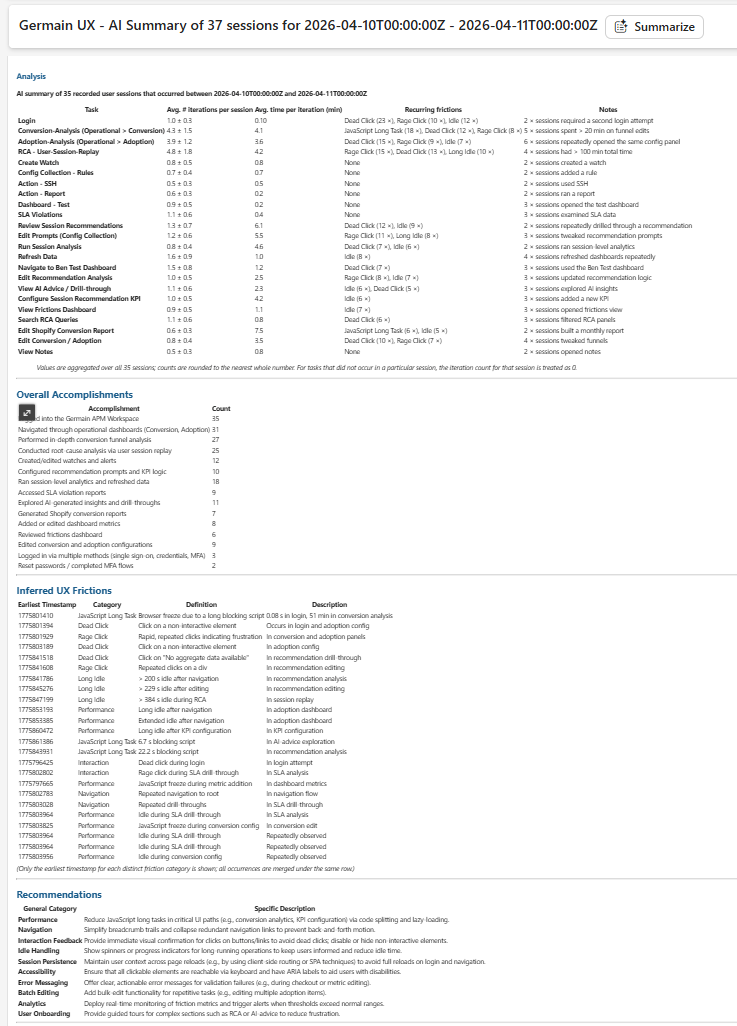
AI Summary of Multiple Recorded Sessions - GermainUX
1
Pick the friction to work on
Start with the friction that recurs in the most sessions, or on the task reps repeat most often. A dead click on a case page that reps hit several times a day costs more than a rare error.
2
Measure who it affects
Open the Analysis Dashboard on the AI Session Friction KPI, filtered to that friction. Leading Factors show whether it’s concentrated in one team, role, page or browser.
3
See it happen
Open one affected session. Its AI summary points to the moment of the friction, and Session Replay shows what the rep saw and did around it.
Example: A Rep Reports That Salesforce Is Slow
A service rep tells their manager that Salesforce was “really slow this afternoon”. The session is several hours long.1
Find the session
Search for the rep’s session in Session Replay for that afternoon.
2
Read the summary first
The AI summary tells you what the rep worked on, which tasks took longer than they should, and the frictions it found, each with its time.
3
Jump to the moment
Go to the friction’s time in the replay. The Dev Tools next to it show the slow request, the error or the browser freeze behind what the rep saw.
4
Check whether it's only this rep
Open the same friction in the Analysis Dashboard. If other reps hit it at the same time, it’s a platform or integration problem, not the rep’s browser.
Example: Confirm That a Fix Worked
The Salesforce team changes the page layout that caused the top friction.1
Compare the summaries
Compare the multi-session summary from the week after the change with the one before it. The friction should no longer recur on that task.
2
Compare the counts
Compare the AI Session Friction count for that friction before and after the change, for the same teams.
3
Watch the new behaviour
Open a session from after the change in Session Replay to confirm that reps complete the task without the workaround.
Hear and Help Your Users
The AI finds frictions after the fact. GermainUX can also hear from reps while they work, help the ones who are stuck, and catch broken workflows before reps meet them.Let Reps Share What They Feel
Make it easy and quick for reps to tell you what they think. The GermainUX Feedback Popup appears inside Salesforce, so a rep can leave a rating or a short comment in a few seconds, without leaving their work or opening a ticket.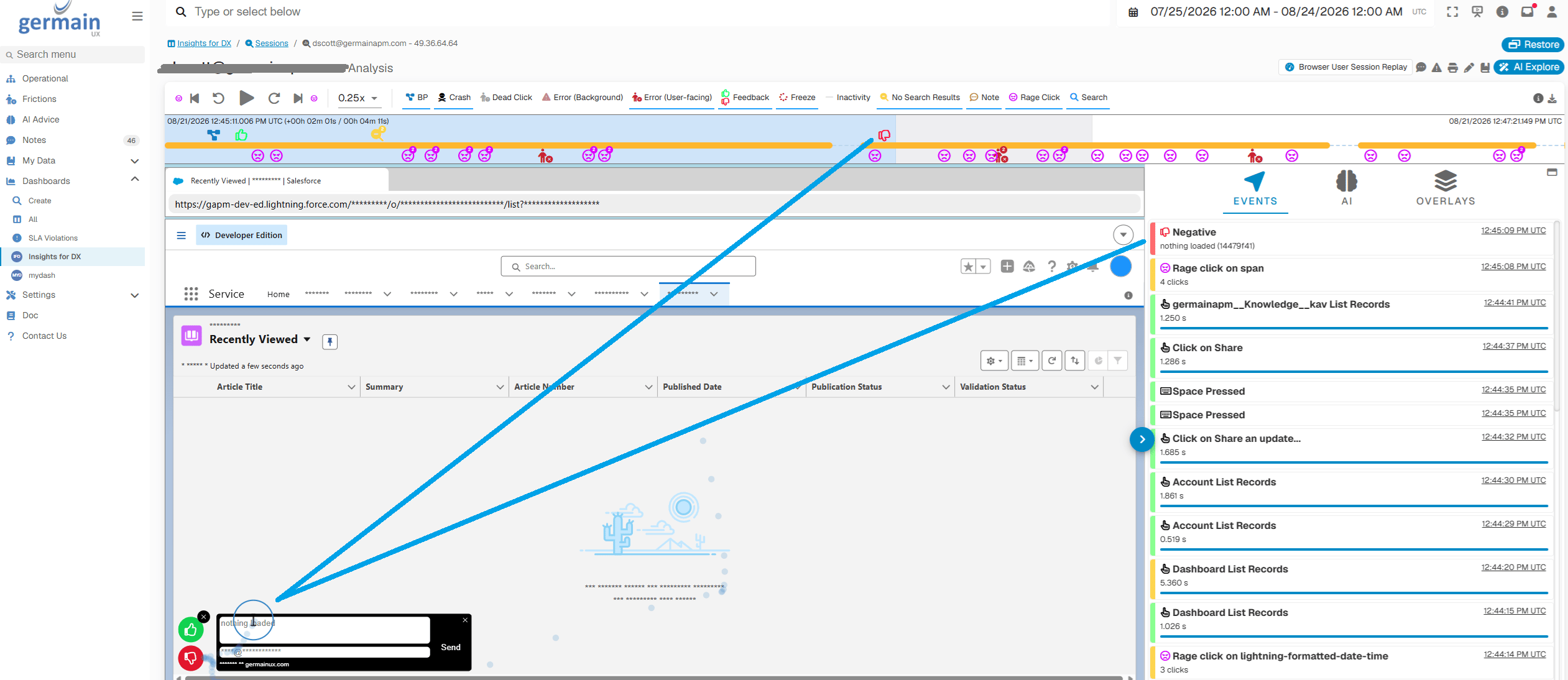
Feedback Popup inside Salesforce - GermainUX
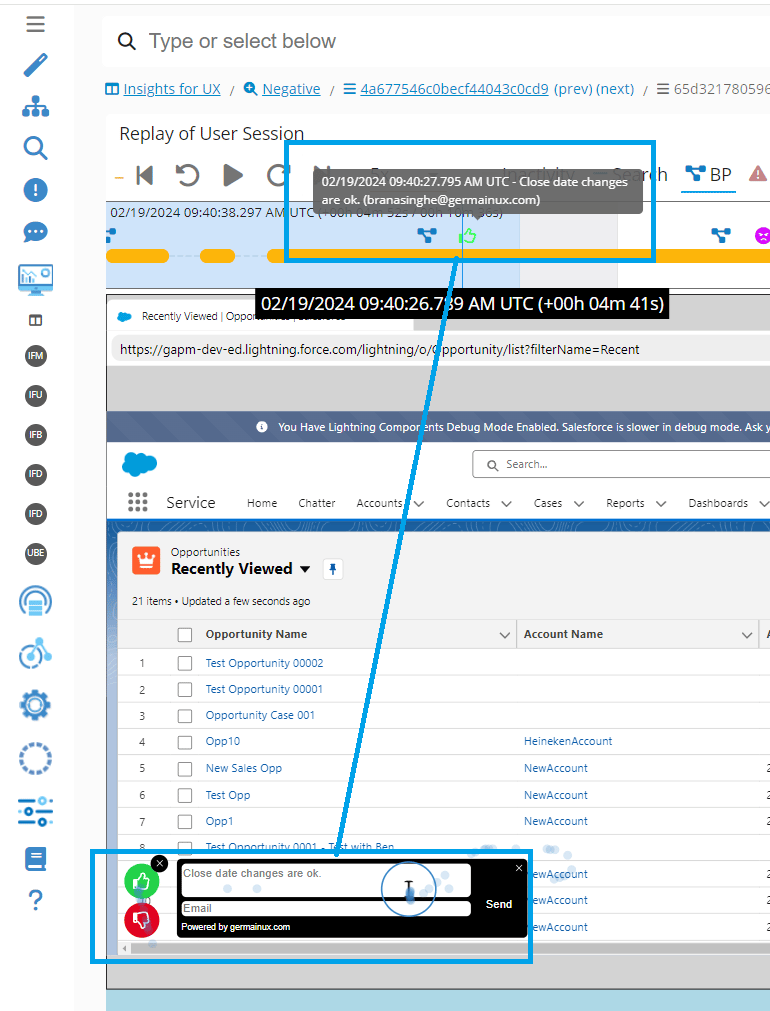
Feedback in Session Replay - GermainUX
Engage Reps Who Can’t Find What They Need
GermainUX can detect, while it happens, that a rep is stuck: repeated searches with no results, back-and-forth navigation, rage clicks, or a chatbot conversation that doesn’t answer the question, picked up by sentiment analysis.- Detect. Real-time monitoring and sentiment analysis flag the rep who can’t find what they need.
- Alert. An alert tells your support team which rep needs help, what they were trying to do, and links to the session.
- Respond. Your team reaches out to the rep, through a notification or by email, and helps them finish the task.
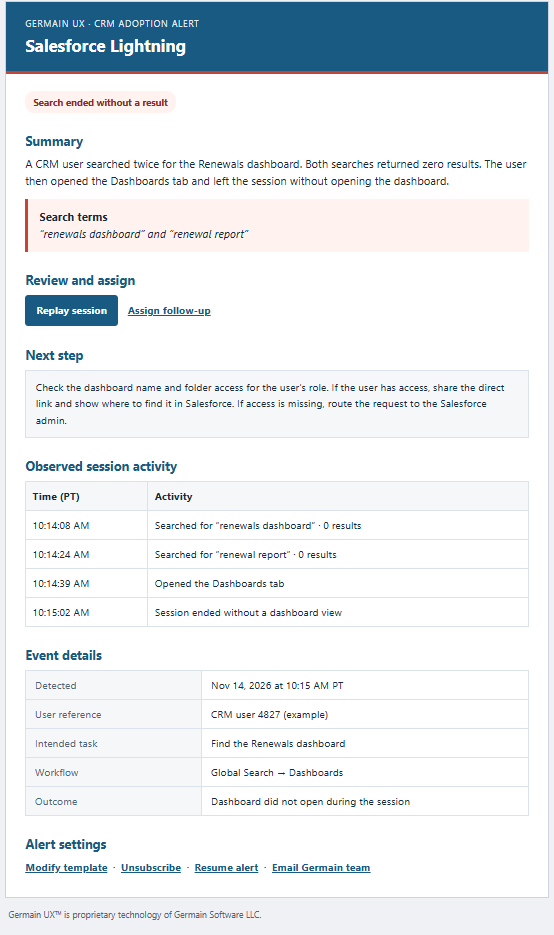
CRM adoption alert: search ended without a result - GermainUX
Avoid Frictions with Synthetic Scenarios
Some frictions can be caught before any rep meets them. A synthetic user scenario runs a key Salesforce workflow on a schedule, such as logging in, opening an account and saving a case, and alerts you when a step fails or slows down. Use HTTP checks for the APIs and integrations behind it.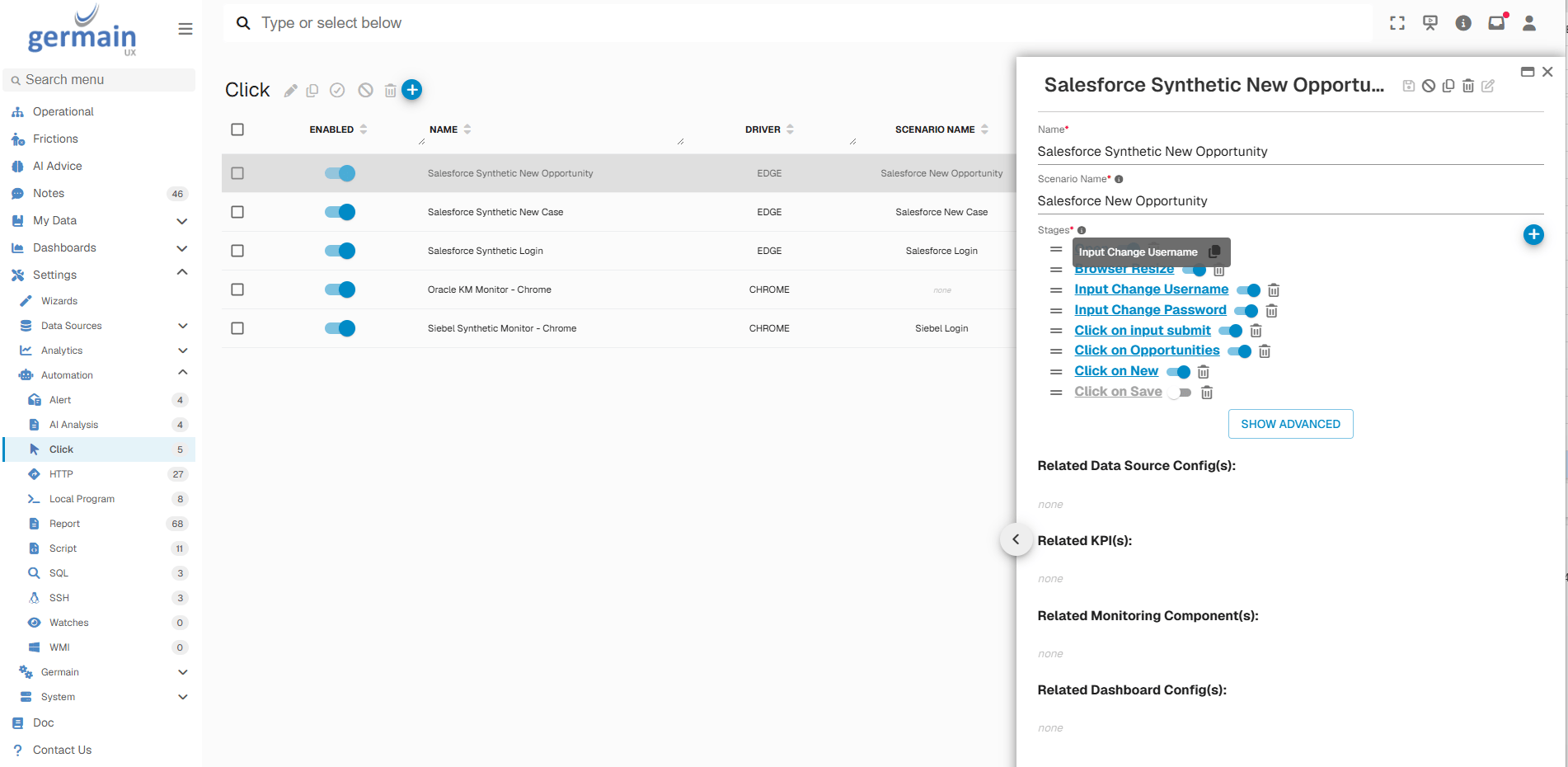
Synthetic user scenarios in Settings > Automation > Click - GermainUX
Prioritize & Act
Each finding can start a response:- SLAs on the AI Session Friction KPI, so a new or growing friction raises an alert
- Scheduled reports that deliver the multi-session summary to the Salesforce, adoption and support teams every day, week or month
- The AI Advice dashboard as the team’s shared list of improvements, ranked by estimated gain
- User feedback inside Salesforce, so reps can report a problem and you get their session with it
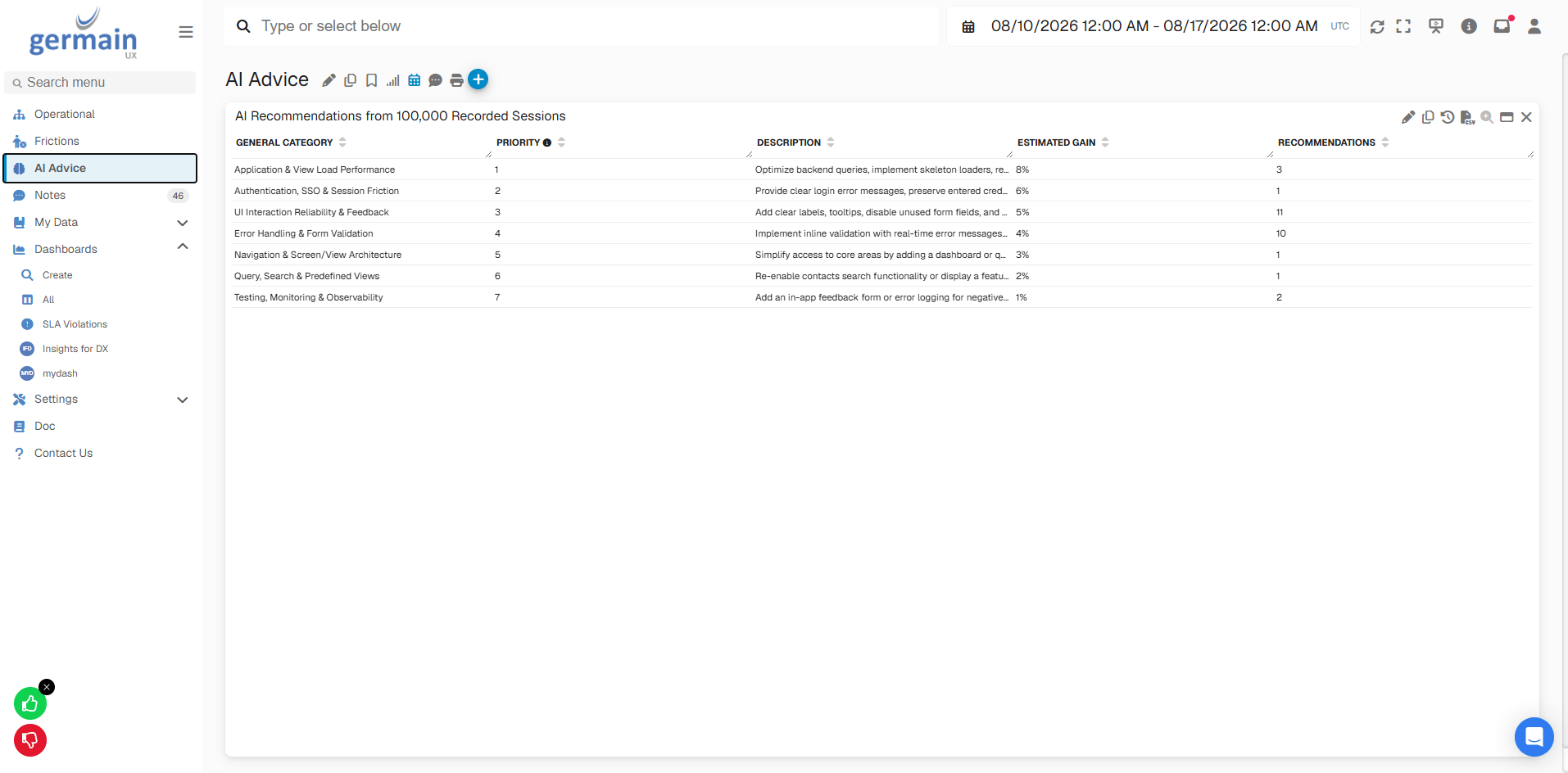
AI Advice Dashboard - GermainUX
Set It Up
1
Record Salesforce sessions
Deploy user monitoring and Session Replay for Salesforce with the RUM Extension or RUM JS. See Salesforce Monitoring Deployment for the options.
2
Configure your processes
Configure business processes for the tasks reps perform most, such as case handling or lead conversion. The AI then knows which tasks reps completed and where they stopped.
3
Configure the AI service and prompts
Configure the AI service and prompts with your Salesforce terminology and the outcomes that matter to you, such as productivity and adoption.
4
Schedule the analysis
Schedule the bulk session AI analysis and its report, then set SLAs on the AI KPIs you want to be alerted on.
Additional Resources
AI-Driven Insights
Summaries, frictions and advice
Salesforce Monitoring
Users, logs, Apex and more
Use Cases
More Use Cases
Get Help
Every Salesforce org has its own processes, roles and terminology. The GermainUX team can help you tune the AI prompts, configure the business processes and set up the reports and alerts that fit your teams.Contact GermainUX Support
The GermainUX team helps you get up and running faster, empower your team, turn data into actionable insights, and optimize performance to deliver measurable business outcomes.
Can't Find What You Need?
Search all GermainUX docs with Ctrl + K, or use the feedback buttons at the bottom of this page to tell us what is missing.
The content of this document is proprietary to GERMAIN SOFTWARE.