

Reach Customers Before They Leave
Detect, alert and respond
Connect the Signals
One customer across channels
Find Why Customers Cancel
One customer or all customers
Set It Up
What to deploy and configure
Overview
A customer who cancels a subscription, a contract or a policy rarely does it on impulse. First they look for an answer on your portal, open a chat that doesn’t help, or leave a frustrated comment. Then they open the cancellation page. The signals are there, but they sit in different tools, and your retention team hears about the customer only after they’re gone. GermainUX watches the whole journey in real time: the portal, the cancellation flow, the chat with your agents or chatbot, the feedback and the services behind them. When a customer starts to cancel, can’t get help or tells you they’re unhappy, GermainUX alerts your retention team with the customer’s context, so the team can reach out while there’s still time. At scale, it shows which journeys, frictions and failures drive cancellations.Portal (Web, Mobile, Self-Service)Chat and AgentsFeedbackCancellation JourneyRetention Team
The same approach works for any business where customers can cancel online: insurance, telecom, utilities, banking, media or software subscriptions. This page uses a Salesforce Experience Cloud portal with Genesys chat as the example. An affinity-insurance provider uses this approach to email its client service team, in real time, the details of clients who started but didn’t complete a cancellation, with a link to their recorded session.
Questions It Answers
- Which customers started to cancel today but haven’t finished?
- Which customers asked for help and didn’t get it?
- What did a customer try to do before opening the cancellation page?
- Which frictions, errors or unanswered questions come before most cancellations?
- Is the chat or the contract lookup failing for customers right now?
- Did our outreach keep the customer?
How Each Signal Is Monitored
GermainUX monitors each part of the journey with the components that fit it. All the data lands in one place, linked to the customer’s session.Reach Customers Before They Leave
Each signal can raise an alert to the team that can still change the customer’s mind.
The response follows the same three steps for every trigger:
- Detect. GermainUX recognizes the trigger in the customer’s session, chat or feedback.
- Alert. An alert by email or SMS, Microsoft Teams or Slack tells the team who the customer is, what they tried to do, the likely reason, and links to their recorded session.
- Respond. Someone from the team calls or emails the customer with help or a better offer. An automated action can also open a follow-up task in your CRM or a ticket in ServiceNow, so no customer is forgotten.
Connect the Signals to One Customer
A useful alert needs to know who the customer is. GermainUX links the signals through the customer’s session and their business identifiers:
To capture the customer or contract ID, add a metadata extractor that reads it from the page or from an API response. Without it, the alert says what happened but not to whom.
Prevent Avoidable Cancellations
Some customers cancel because something on your side failed. GermainUX tests the paths they rely on and watches the signals that come before failures.Test the Paths Customers Rely On
A synthetic user scenario signs in to the portal on a schedule, opens a contract and starts a chat, the way a customer does. Add HTTP checks for the contract lookup, billing and chat services. When a step fails or slows down, GermainUX alerts you before customers meet it.Watch the Early-Warning Signals
Set SLAs and outlier detection on these signals, so a growing problem raises an alert before it turns into cancellations.
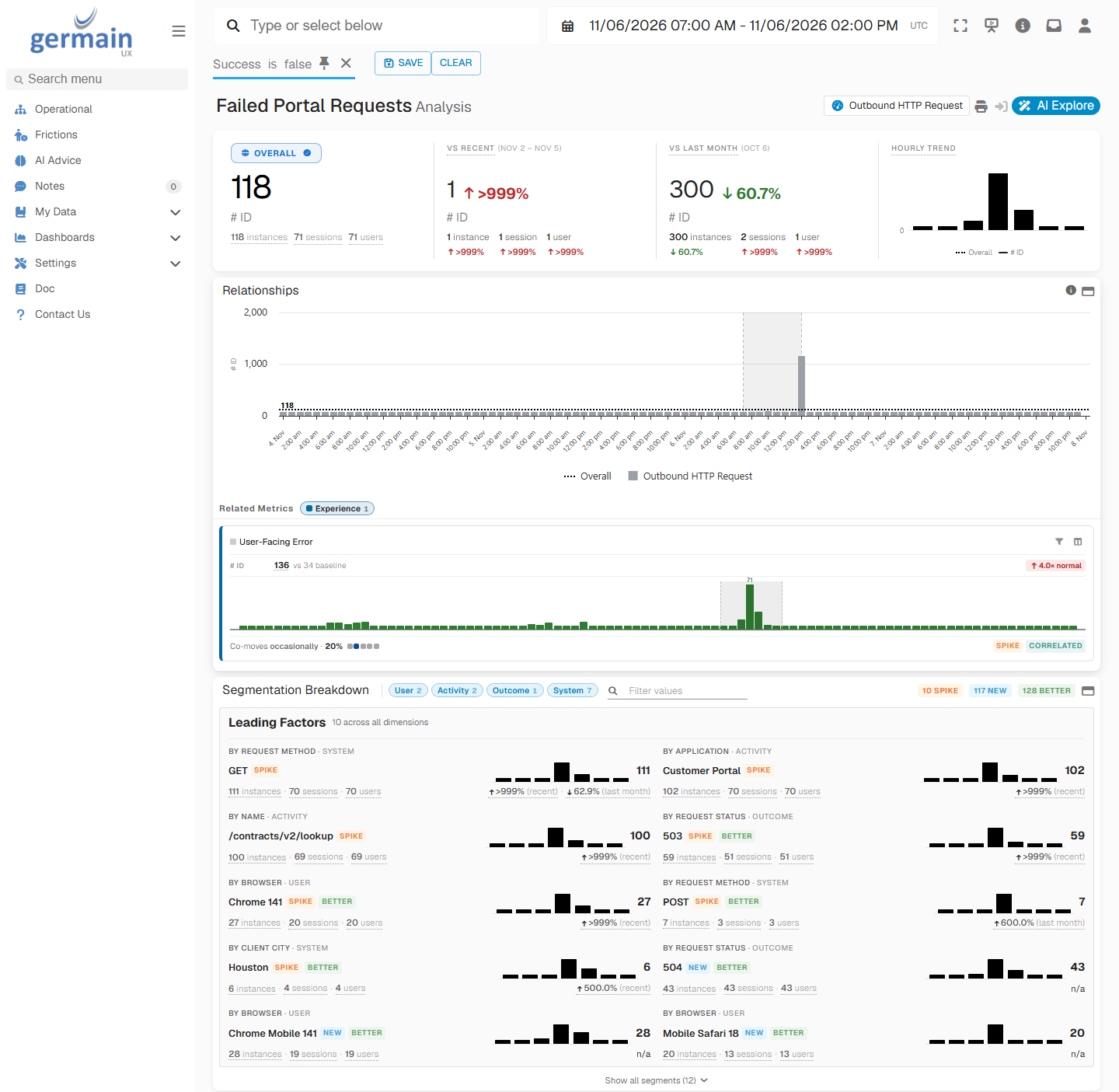
Failed Contract Lookups During an Outage - GermainUX
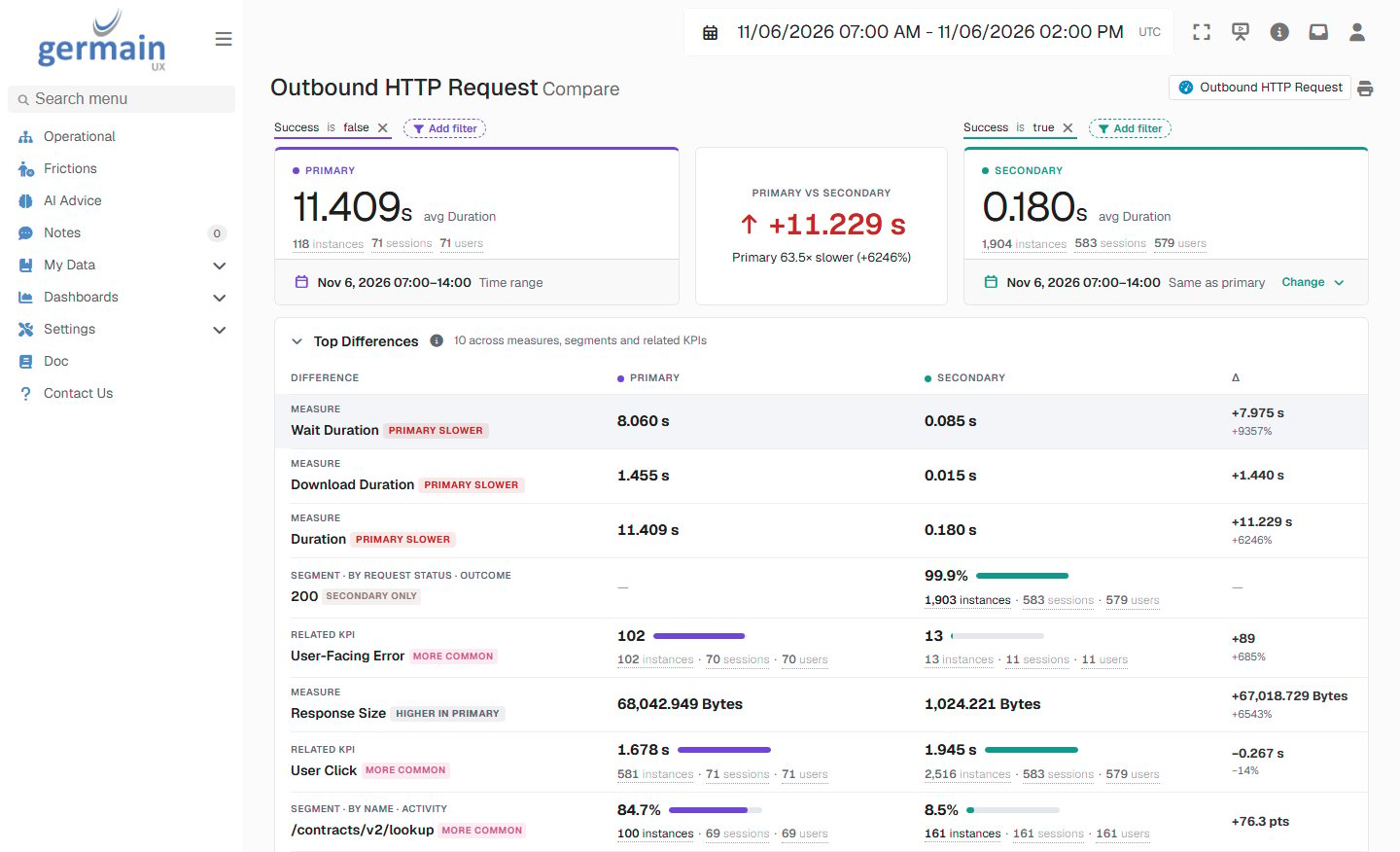
Failed and Successful Portal Requests Compared During an Outage - GermainUX
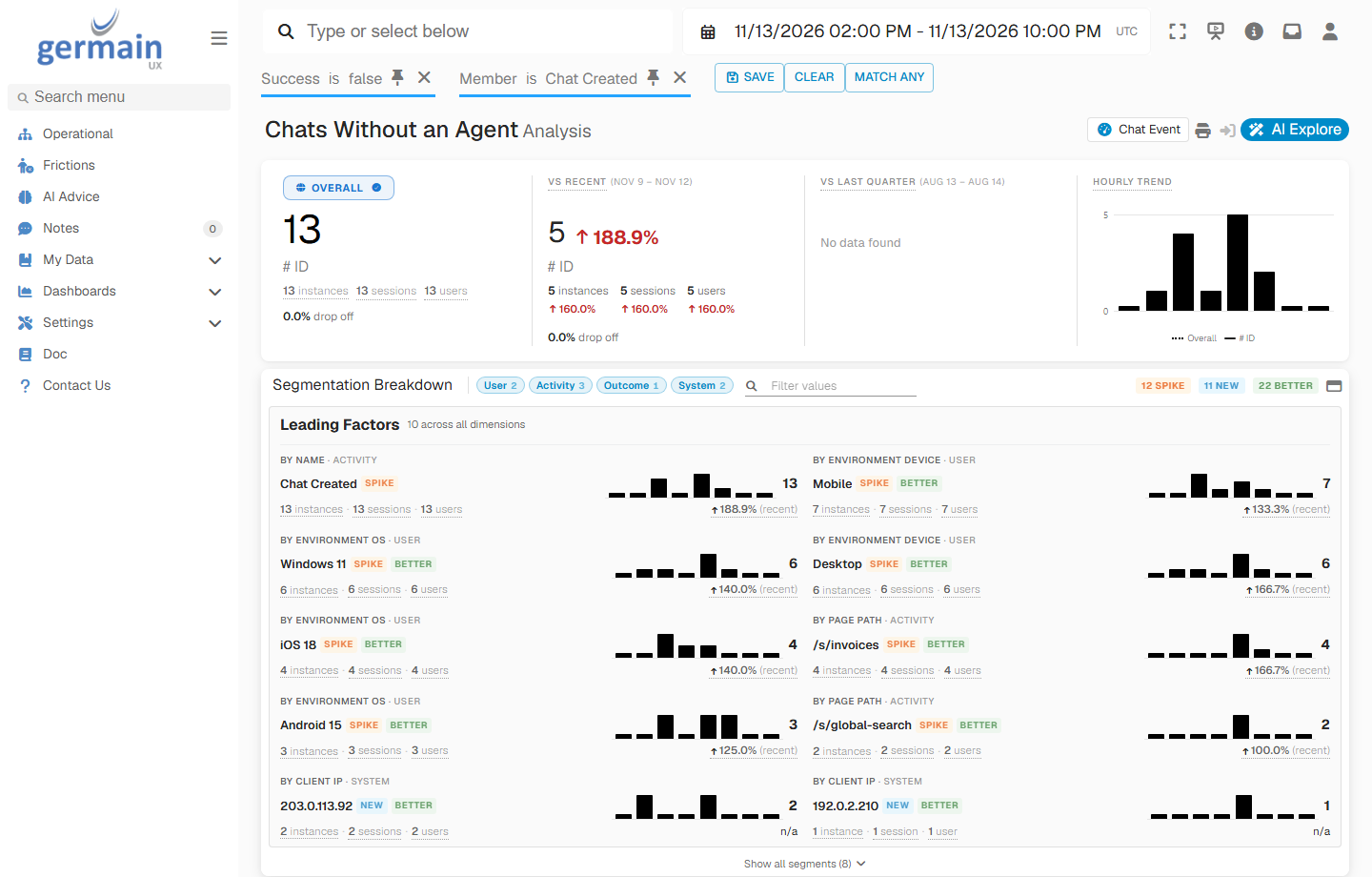
Chats Without an Agent on an Understaffed Evening - GermainUX
Find Why Customers Cancel
The alerts help one customer at a time. The analysis shows what drives cancellations across all of them.One Customer: Session Replay and AI Summary
Open the customer’s session from the alert. The AI session summary tells you what the customer tried to do and where they struggled. Session Replay shows the pages they visited, the errors they saw, the chat they had and the moment they opened the cancellation page. The person who calls the customer knows what went wrong before picking up the phone.All Customers: Journeys, Conversations and Feedback
Open the Analysis Dashboard on the cancellation journey:- Leading Factors show which regions, devices, browsers or pages cancel more than the others. To compare plans or products, filter the analysis on each one, or put them side by side on the Compare page.
- Customer journeys and drop-offs show the paths customers took before they cancelled, and where the ones who stayed went instead.
- Conversation categorization groups the chats before a cancellation by topic, such as prices, billing or a problem nobody solved.
- Feedback analysis groups the comments the same way.
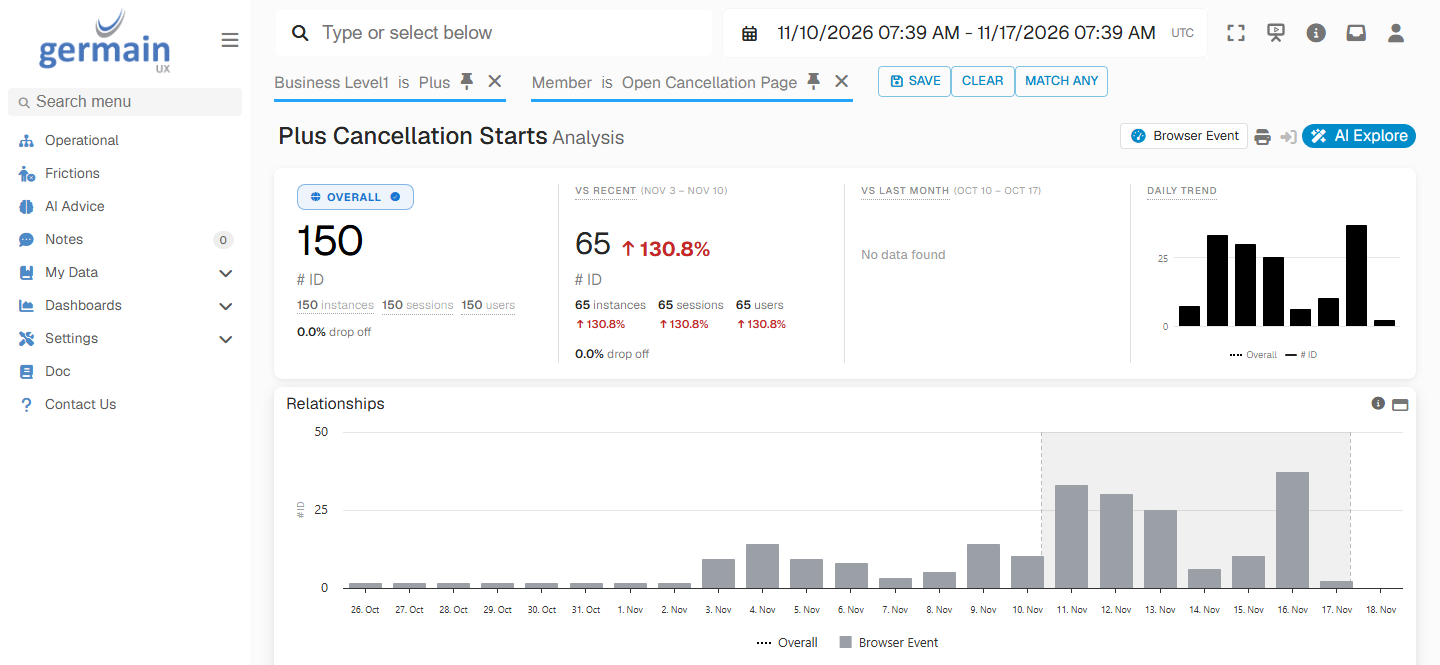
Plus Cancellation Starts After a Price Increase - GermainUX
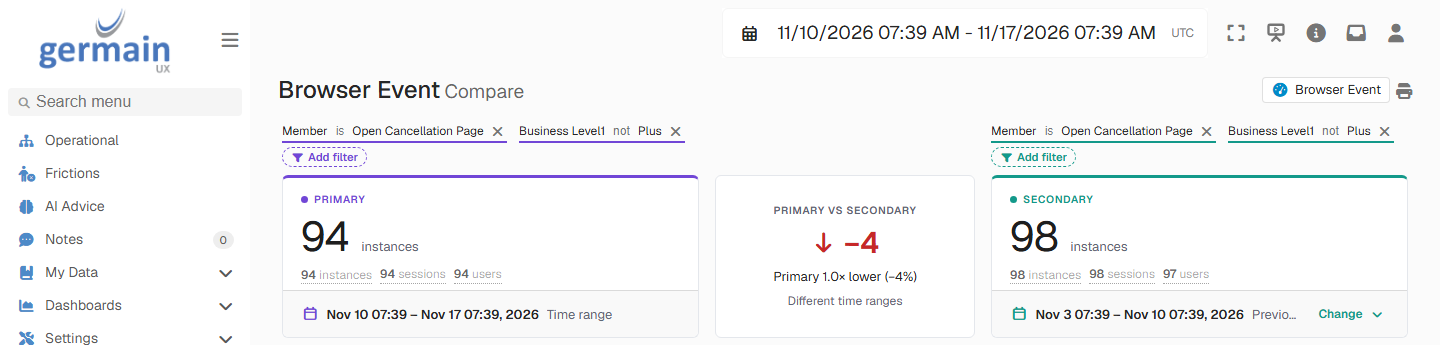
Cancellation Starts of the Other Plans Before and After the Price Increase - GermainUX
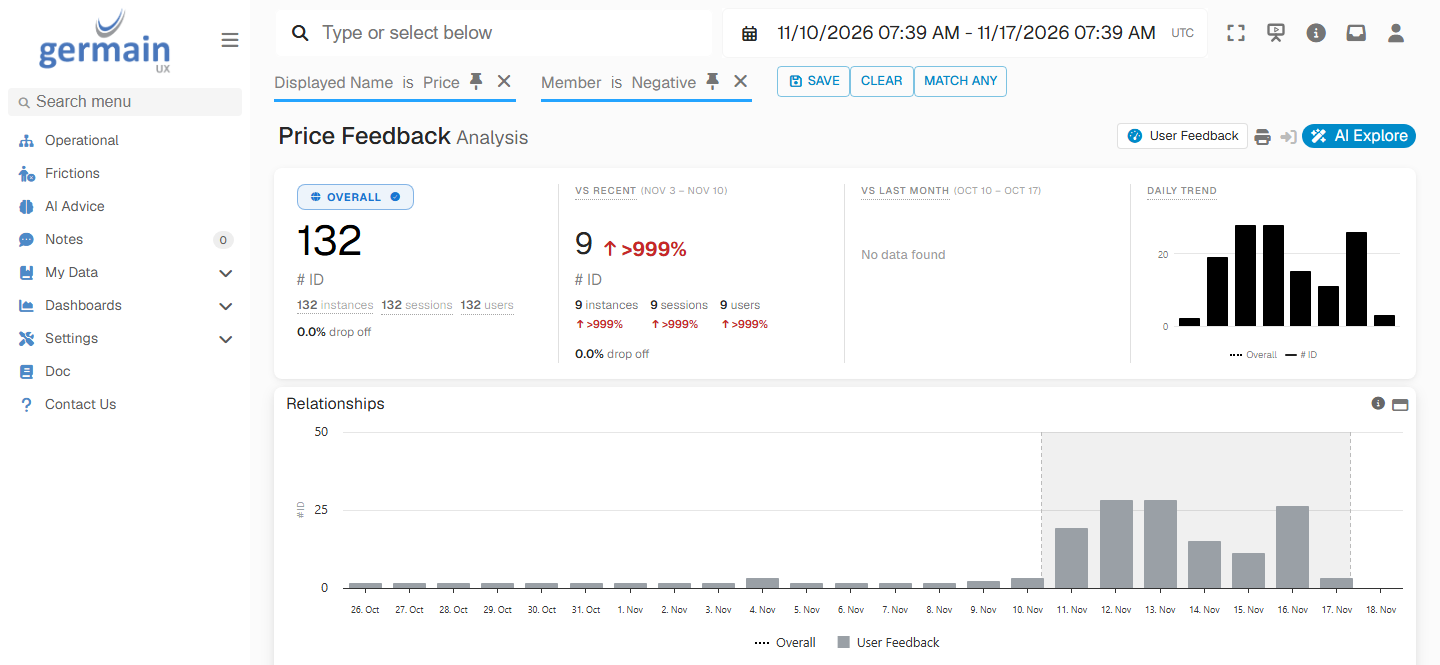
Negative Feedback About Price After the Plus Price Increase - GermainUX
Cancellations RiseAggregate AnalysisLeading FactorOne CustomerSession Replay
Set It Up
Each step adds value on its own. Start with the portal and the cancellation journey, then add the other signals.1
Monitor the portal
Deploy monitoring for Salesforce Experience Cloud, or RUM JS for your website. Configure privacy, and add a metadata extractor for the customer or contract ID.
2
Model the cancellation journey
Configure a business process for the cancellation flow, keyed on the customer or contract ID, with a timeout that marks the customers who start but don’t finish. Send the customer’s plan or product with each step, so the analysis can compare them.
3
Monitor the chat
Turn on chat and CTI monitoring for Genesys or your chat platform, and AI conversation analysis for the transcripts. Add Phrases of Interest for the words customers use when they want to leave.
4
Turn on the feedback popup
Enable the Feedback Popup on the portal, and decide who owns each kind of feedback.
5
Alert the right team
Create alerts for each trigger, with the customer’s context, and send each one to the team that owns it. Add synthetic scenarios and SLAs for the paths customers rely on.
Additional Resources
Chat Analysis
Agents, chatbots and outcomes
Salesforce Experience Cloud
Portals, journeys and feedback
Use Cases
More Use Cases
Get Help
Every business has its own cancellation flow, channels and retention offers. The GermainUX team can help you model the journey, choose the triggers and set up the alerts that reach your retention team in time.Contact GermainUX Support
The GermainUX team helps you get up and running faster, empower your team, turn data into actionable insights, and optimize performance to deliver measurable business outcomes.
Can't Find What You Need?
Search all GermainUX docs with Ctrl + K, or use the feedback buttons at the bottom of this page to tell us what is missing.
The content of this document is proprietary to GERMAIN SOFTWARE.