

Initialize the Database
Creating schemas and objects
Materialized-View Maintenance
Checking refresh jobs
Partition and Storage Maintenance
Monitoring partitions and growth
Production Checklist
Sizing and version support
Overview
GermainUX supports Oracle Database as an on-premise relational datastore. Oracle may be appropriate when:- Your organization is standardized on Oracle Database.
- Oracle administration, backup, security, and high-availability procedures already exist.
- A relational datastore is required.
- The expected GermainUX ingestion and analytics workload has been validated against Oracle.
Supported Capabilities
Oracle Database can provide:
The selected Oracle edition and configuration must support the features required by the GermainUX deployment.
Before You Begin
Confirm with Germain Software:- The Oracle Database version supported by your GermainUX release
- Required Oracle edition
- Required JDBC driver
- Character set and national character set
- Tablespace requirements
- Schema scripts required for the release
- Expected daily AA Unit volume
- Data-retention requirements
- Partitioning and maintenance requirements
- Upgrade or migration requirements
Requirements
Prepare:- A supported 64-bit operating system
- A supported Oracle Database instance
- An Oracle service name or pluggable database
- SYSDBA access for initial setup
- A supported Oracle JDBC driver
- Network connectivity from GermainUX Enterprise
- Sufficient CPU, memory, SSD storage, and IOPS
- Backup and recovery procedures
- TLS or approved encrypted database connectivity
- The GermainUX Service distribution package
GermainUX Schemas
GermainUX uses two Oracle schemas:
Use separate, strong credentials for each schema.
Prepare Oracle Database
Before running the GermainUX scripts:- Install or identify the supported Oracle Database instance.
- Create or select the Oracle service or pluggable database.
- Configure listeners and network access.
- Prepare the required tablespaces.
- Confirm character-set compatibility.
- Configure storage growth and alerting.
- Configure backups.
- Confirm connectivity from the GermainUX Enterprise host.
- Obtain the supported Oracle JDBC driver.
- Confirm that SYSDBA access is available for initial schema creation.
Initialize the Database
1. Extract the GermainUX Service Package
Extract the GermainUX Service release package to a directory referenced below as:2. Review the Release Instructions
Open:3. Locate the Oracle Scripts
The Oracle scripts are located in: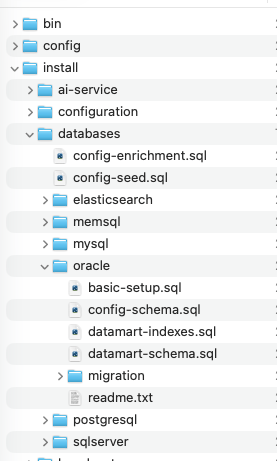
Oracle scripts in install/databases/oracle - GermainUX
4. Update the Setup Script
Open:xxxx—with strong, unique credentials for:
- Tablespace names
- Datafile locations
- Storage allocation
- User quotas
- Default and temporary tablespaces
- Granted privileges
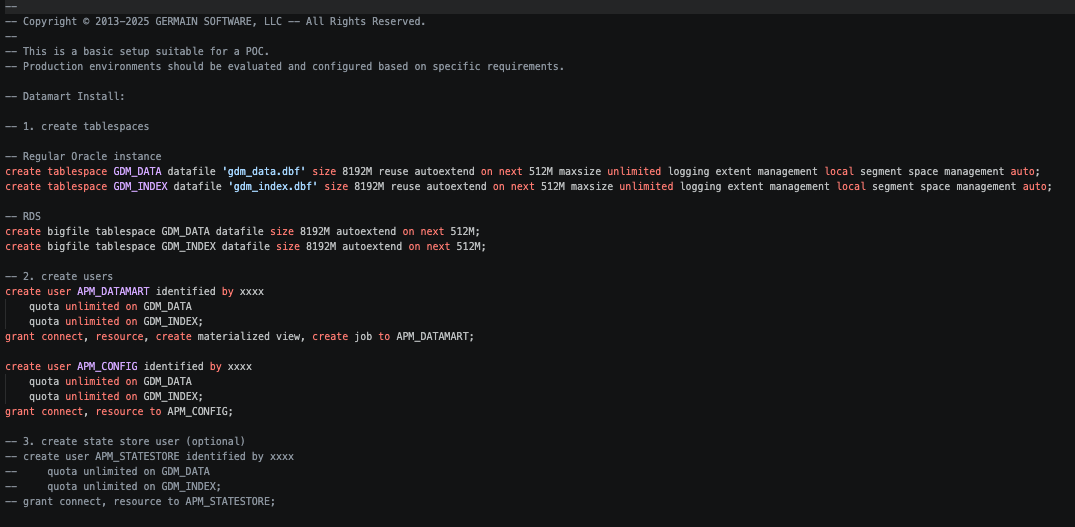
basic-setup.sql creating the tablespaces and the APM_DATAMART and APM_CONFIG users - GermainUX
The example script is intended for a proof of concept. Production tablespaces and storage should be sized and configured separately. The script also includes separate tablespace sections for a regular Oracle instance and for Amazon RDS: use only the section that matches your environment. Review any optional users in the script, such as
APM_STATESTORE, with Germain Software before creating them.5. Choose a SQL Client
Run the scripts using Oracle SQL Developer or another compatible SQL client. SQL Developer is recommended because some scripts contain blank lines withinINSERT statements that may not execute correctly under the default SQL*Plus behavior.
If SQL*Plus must be used, validate its blank-line and script-processing settings in a non-production environment first.
6. Run the Scripts in Sequence
Run the scripts in the exact order specified by:
Do not skip scripts or change their order unless instructed by Germain Software.
Initial Setup
Run thebasic-*.sql scripts as SYSDBA to create:
APM_CONFIGAPM_DATAMART- Required tablespaces or storage assignments
- Required roles and permissions
Configuration Schema
Connect as:config-*.sql scripts in the documented sequence.
Datamart Schema
Connect as:datamart-*.sql scripts in the documented sequence.
Configure GermainUX Enterprise
Configure GermainUX Enterprise with:- Oracle hostname
- Listener port
- Service name
APM_CONFIGusername and passwordAPM_DATAMARTusername and password- TLS settings
- Connection-pool settings
- Query and connection timeouts
- Supported Oracle JDBC driver
Validate the Setup
Before starting production monitoring:- Connect to Oracle using
APM_CONFIG. - Connect using
APM_DATAMART. - Confirm that the required tables, indexes, sequences, views, and materialized views exist.
- Verify that GermainUX Enterprise can connect to both schemas.
- Start GermainUX Enterprise.
- Review logs for schema, permission, JDBC, or connection errors.
- Save and retrieve a GermainUX configuration.
- Ingest a limited monitoring workload.
- Confirm that facts are stored in
APM_DATAMART. - Open representative dashboards and analyses.
- Validate retention and partition maintenance.
- Measure ingestion and query performance.
Materialized-View Maintenance
TheAPM_DATAMART schema includes materialized views that refresh periodically.
These jobs normally run without administrator intervention. If aggregated data becomes delayed or incomplete, inspect the Oracle refresh jobs:
Investigate repeated failures before manually changing or restarting a job.
Partition and Storage Maintenance
Monitor:- Tablespace utilization
- Datafile growth
- Partition growth
- Index growth
- Temporary tablespace utilization
- Archive-log volume
- Materialized-view refreshes
- Backup duration
- Query performance
Backup and Recovery
Back up both schemas:- Full database backups
- Archive logs
- Point-in-time recovery
- Off-host or protected backup copies
- Encryption
- Backup retention
- Recovery of individual schemas
- Periodic restore testing
Security
Before production use:- Use dedicated GermainUX schema accounts.
- Replace all example passwords.
- Apply least-privilege permissions.
- Restrict SYSDBA access.
- Encrypt database connections.
- Restrict network access by source and destination.
- Protect credentials outside source control.
- Enable auditing when required.
- Define credential-rotation procedures.
- Monitor failed authentication attempts.
Production Checklist
For supported Oracle versions, schema scripts, migration assistance, or production sizing, contact Germain team.Get Help
Contact GermainUX Support
The GermainUX team helps you get up and running faster, empower your team, turn data into actionable insights, and optimize performance to deliver measurable business outcomes.
Can't Find What You Need?
Search all GermainUX docs with Ctrl + K, or use the feedback buttons at the bottom of this page to tell us what is missing.
The content of this document is proprietary to GERMAIN SOFTWARE.