

Email Reports
Consolidated status email
Service-Availability Checks
Watch critical OS services
Messaging Checks
Monitor queue backlog and consumers
Troubleshooting
Fix Sentinel report issues
Overview
Sentinel independently monitors the health, availability, and performance of the GermainUX platform. It detects failures or degradation across the infrastructure, services, logs, and HTTP endpoints required by GermainUX, then summarizes the findings in a single email report. Because Sentinel operates separately from the GermainUX components it monitors, it can report a GermainUX outage even when the main platform is unavailable.What Sentinel Monitors
Sentinel can perform the following checks:
Legacy Sentinel report examples may reference ActiveMQ. GermainUX 2024.2 and later uses Kafka. Confirm that the Sentinel package and configuration used by your release contain the appropriate messaging checks.
Health Status
Sentinel classifies each check using the following status levels:
The thresholds that produce each status depend on the Sentinel configuration.
Email Reports
Sentinel consolidates all findings into a single email report. Report-delivery conditions are configurable, allowing reports to be sent:- After every Sentinel execution
- Only when a warning or failure is detected
- When a component’s status changes
- According to another environment-specific condition
- Which component is affected
- Which check failed
- Whether the issue is an outage or degradation
- The evidence that produced the status
- The host or endpoint involved
- When the underlying service or log was last active
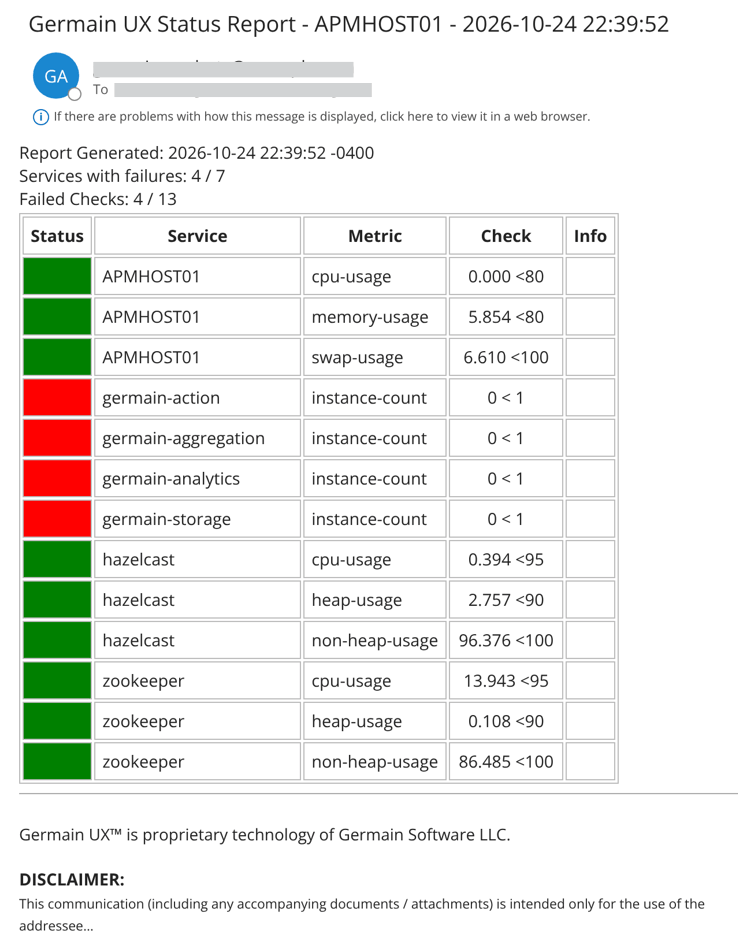
Example Sentinel status report email, with failed instance-count checks shown in red
Service-Availability Checks
Sentinel can monitor a configurable list of operating-system services. A service check may report:- Germain Enterprise services
- Action Services
- Aggregation Services
- Analytics Services
- Session Tracking Services
- Storage Services
- Real-Time Metrics Services
- Germain Engine Managers
- Infrastructure services
Log-Activity Checks
Sentinel can monitor local or remote log files and report:- Log path
- Last-modified timestamp
- Time since the last update
- Number of recent errors
- Number of recent warnings
- Whether configured thresholds were exceeded
HTTP Endpoint Checks
Sentinel can call configured HTTP endpoints and report their response status. Example:Messaging Checks
Sentinel can monitor the messaging layer used to transfer work between GermainUX components. Typical metrics include:- Broker availability
- Queue or topic backlog
- Consumer count
- Messages received
- Messages processed
- Memory utilization
- Persistent-store utilization
- Temporary-store utilization
- A growing queue indicates that consumers may not be processing messages quickly enough.
- A consumer count of zero may indicate that the corresponding GermainUX Service is unavailable.
- Increasing enqueue counts with unchanged dequeue counts indicate stalled processing.
- High memory or store utilization can prevent the broker from accepting new messages.
Recommended Configuration
At minimum, configure Sentinel to monitor:- ZooKeeper availability
- Kafka availability and consumer health—or ActiveMQ for legacy releases
- Hazelcast availability
- Germain Enterprise HTTP endpoints
- Every required GermainUX operating-system service
- GermainUX Service logs
- Tomcat and Enterprise logs
- Germain Engine Manager processes and logs
- Datastore availability
- Disk utilization on hosts containing logs, queues, or persistent data
Deployment Considerations
Sentinel should run independently from the GermainUX components it monitors whenever possible. If Sentinel runs on the same server as Germain Enterprise, a server-level outage may prevent both GermainUX and Sentinel from operating or sending an alert.Host Capability Checklist
Confirm that the Sentinel host can:
Use a dedicated service account with the minimum permissions required to perform these checks.
Validate Sentinel
After configuring Sentinel:1
Run it manually
2
Confirm that every expected component appears in the report
3
Verify that healthy components report green
4
Stop or simulate the failure of a non-production test service
5
Confirm that Sentinel detects the failure
6
Verify that the report is delivered to the intended recipients
7
Restore the test service
8
Confirm that Sentinel reports recovery
9
Review Sentinel’s own logs for errors
Avoid False Alerts
To reduce false or misleading reports:- Configure realistic response-time thresholds.
- Account for services that write logs infrequently.
- Exclude planned maintenance periods where supported.
- Monitor the correct process when multiple instances run on one host.
- Use stable endpoint URLs.
- Confirm that remote log shares remain available.
- Review thresholds after major changes in monitoring volume.
- Update Sentinel whenever GermainUX services, hosts, paths, or ports change.
Troubleshooting
A Service Is Reported as Unavailable but Is Running
Confirm that:- Sentinel uses the correct operating-system service name.
- The Sentinel account can query the service.
- Sentinel is checking the correct host.
- Multiple services do not share a confusing display name.
- Hostname resolution and remote-management access work.
A Log Is Reported as Stale
Verify:- The configured path is correct.
- The service is expected to write during the monitored period.
- The Sentinel account can read the file.
- The remote share is accessible.
- The inactivity threshold is appropriate.
- Log rotation did not move activity to a new filename.
An Endpoint Check Fails
Confirm:- The URL and port are correct.
- DNS resolves from the Sentinel host.
- Firewalls permit the request.
- TLS certificates are valid and trusted.
- Authentication is configured when required.
- The target service and its dependencies are running.
The Report Is Not Delivered
Check:- SMTP hostname and port
- Authentication credentials
- TLS settings
- Sender and recipient addresses
- Firewall access
- Report-delivery conditions
- Sentinel’s own logs
Operational Ownership
Assign responsibility for:- Reviewing Sentinel reports
- Responding to red and orange conditions
- Maintaining recipient lists
- Updating checks after infrastructure changes
- Testing Sentinel after GermainUX upgrades
- Periodically confirming that failure alerts are delivered
Get Help
Contact GermainUX Support
The GermainUX team helps you get up and running faster, empower your team, turn data into actionable insights, and optimize performance to deliver measurable business outcomes.
Can't Find What You Need?
Search all GermainUX docs with Ctrl + K, or use the feedback buttons at the bottom of this page to tell us what is missing.
The content of this document is proprietary to GERMAIN SOFTWARE.