

Request the Installation Packages
Get the release packages
Prepare the Deployment Hosts
Transfer and validate packages
Deploy the License
License location by platform
Prerequisite Checklist
Confirm before starting installation
Overview
Before installing GermainUX Enterprise on-premise, obtain the appropriate deployment packages and license from Germain Software.Required Packages Depend On:
- GermainUX version
- Deployment architecture
- Operating system
- Datastore
- Monitoring components
- Number and location of GermainUX servers
- Production and non-production environments
Request the Installation Packages
Contact Germain Software to request the latest supported GermainUX release. When submitting your request, provide:- Organization name
- Target GermainUX version, if known
- Deployment environment: development, QA, staging, or production
- Deployment method: standard, Docker, Kubernetes, or OpenShift
- Server operating systems
- Selected datastore
- Components to be deployed
- Expected installation date
Prepare the Deployment Hosts
After receiving the packages, transfer them securely to the appropriate hosts, which may include:- GermainUX Enterprise servers
- GermainUX service or infrastructure servers
- GermainUX Datastore servers
- GermainUX Engine servers
- Other hosts running licensed GermainUX components
- Each host has sufficient CPU, memory, and storage.
- Required software dependencies are installed.
- Required network connectivity is available.
- Installation accounts have the necessary permissions.
- Package checksums or signatures are verified when provided.
- The packages are stored in a location accessible only to authorized administrators.
Request the License
Provide Germain Software with the deployment information required to generate a license for your environment. This may include:- GermainUX Enterprise server IP addresses
- GermainUX Engine server IP addresses
- GermainUX-Agent or other licensed-component hosts
- Environment name
- Number of servers or nodes
- Production or non-production designation
- High-availability or cluster configuration
Deploy the License
After receiving the license: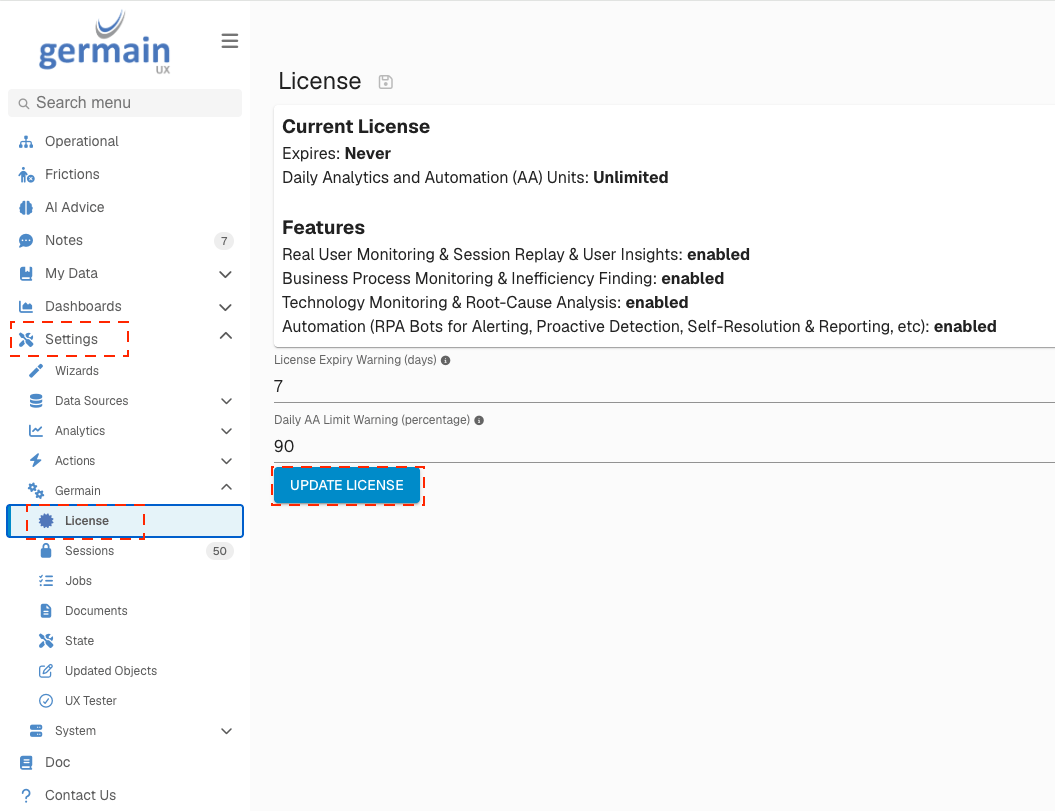
Update the license under Settings > Germain > License by pasting the license text or loading it from a file.
1
Navigate through the left menu Settings > Germain > License
2
Click on Update License
3
Paste the License text or Load the license from File to get it updated.
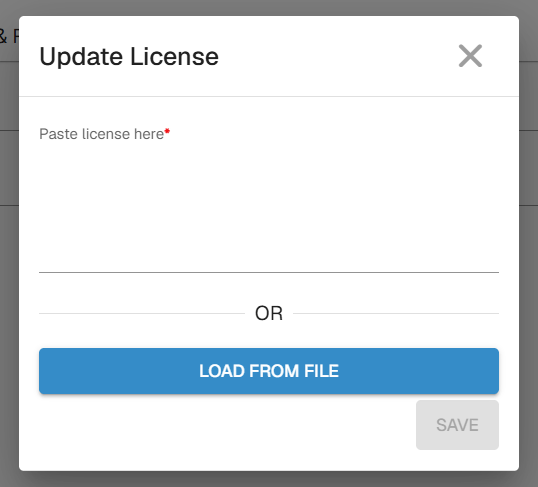
Paste the license text or load the license from a file, then apply the update.
4
Verify that the environment and licensed components are recognized
5
Confirm the license status in GermainUX Workspace
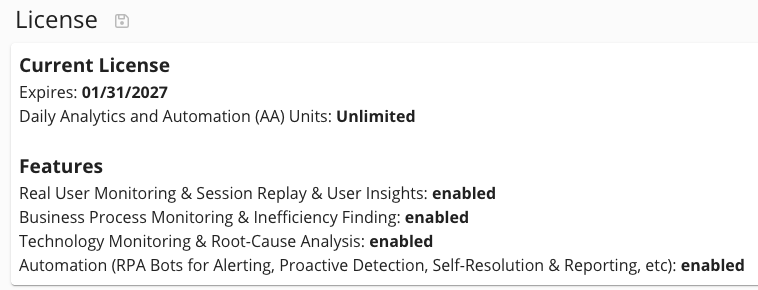
The License page shows the recognized environment, licensed components, and license status.
Prerequisite Checklist
Before beginning the installation, confirm that: Once these prerequisites are complete, proceed to the GermainUX Enterprise Installation Contact Germain Software to discuss an on-premise deployment or request assistance.Get Help
Contact GermainUX Support
The GermainUX team helps you get up and running faster, empower your team, turn data into actionable insights, and optimize performance to deliver measurable business outcomes.
Can't Find What You Need?
Search all GermainUX docs with Ctrl + K, or use the feedback buttons at the bottom of this page to tell us what is missing.
The content of this document is proprietary to GERMAIN SOFTWARE.