

Oracle Database Is Running Out of Space
Fixing storage exhaustion
Identify Partitioned Tables
Querying partition metadata
Drop Expired Partitions
DBA-only destructive step
Prevent Recurrence
Keeping storage from refilling
Oracle Database Is Running Out of Space
Symptoms
The Oracle database or anAPM_DATAMART tablespace is approaching its storage limit, datafiles are growing unexpectedly, or GermainUX can no longer insert monitoring data.
A common cause is that expired partitions have not been removed according to the configured GermainUX retention policy.
1. Confirm the Cause
Before deleting anything, determine whether storage is being consumed by:
Do not assume that old partitions are the cause until database utilization has been reviewed.
2. Identify Partitioned Tables
List the partitioned tables available to the current account:3. List the Partitions
To inspect the partitions of a specific table:<TARGET_TABLE_NAME> with the uppercase Oracle table name.
Review each partition’s boundary and confirm which dates it contains before considering removal.
4. Verify the Retention Policy
Check the configured retention periods in Settings > System > Data Retention.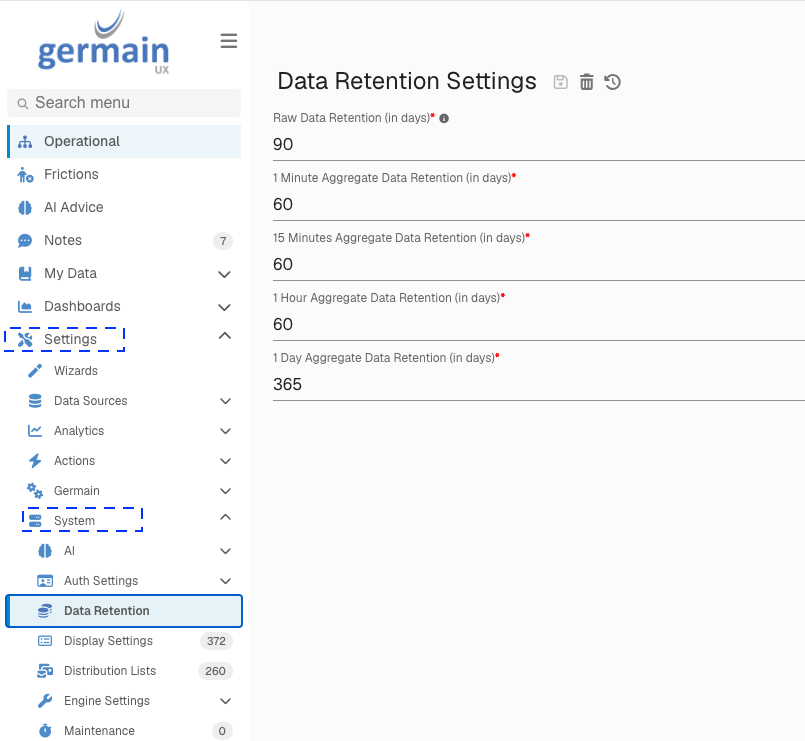
Data Retention Settings: retention periods for raw and aggregated data
- The applicable GermainUX retention period
- The partition’s date range
- Whether the data is still required for reporting, analysis, or compliance
- Whether aggregated data has been generated
- Whether a valid backup or snapshot exists
- Whether dependent indexes or materialized views will be affected
- Whether the partition is still receiving data
5. Drop Expired Partitions
Only a qualified Oracle DBA should remove partitions. Partition deletion is destructive and may be difficult or impossible to reverse without a valid backup. Use the Oracle-supportedALTER TABLE ... DROP PARTITION procedure appropriate for the installed Oracle version and the table’s partitioning strategy.
Do not copy a generic drop command into production without verifying:
- Schema
- Table
- Partition
- Retention boundary
- Index-maintenance behavior
- Backup availability
- Application impact
6. Validate After Removal
After removing an expired partition:1
Confirm that the intended partition was removed
2
Verify the status of affected indexes
3
Confirm that GermainUX continues to insert data
4
Validate representative dashboards and analyses
5
Check materialized-view refresh jobs
6
Review tablespace utilization
7
Confirm that no required data was removed
8
Verify that the automated retention process will handle future partitions
Prevent Recurrence
To prevent future storage exhaustion:- Monitor tablespace utilization.
- Alert before storage reaches a critical threshold.
- Review retention jobs regularly.
- Confirm that expired partitions are removed automatically.
- Monitor datafile auto-extension and maximum size.
- Track daily ingestion growth.
- Reassess storage when monitoring scope or retention increases.
- Periodically test backup and recovery procedures.
If old partitions are not being removed automatically, contact Germain Software before implementing a recurring manual deletion process.
Get Help
Contact GermainUX Support
The GermainUX team helps you get up and running faster, empower your team, turn data into actionable insights, and optimize performance to deliver measurable business outcomes.
Can't Find What You Need?
Search all GermainUX docs with Ctrl + K, or use the feedback buttons at the bottom of this page to tell us what is missing.
The content of this document is proprietary to GERMAIN SOFTWARE.