

Common Issues
Frequent problems and fixes
Connection Errors Under High Load
Ephemeral port exhaustion fixes
Network-Port Conflict
Tomcat port clashes
Contact GermainUX Support
Information to send support
Overview
Most GermainUX Enterprise issues can be diagnosed using the GermainUX Workspace and application logs. This section covers common startup, connectivity, and resource-exhaustion problems affecting on-premise deployments.Before Troubleshooting
Before restarting services or changing the configuration:- Record the time the issue occurred.
- Preserve the relevant GermainUX and Tomcat logs.
- Identify any recent deployment, Java, network, or configuration changes.
- Confirm which GermainUX components are affected.
- Check the availability of all required dependencies.
- Verify available CPU, memory, disk space, and network ports.
Initial Checks
Confirm that the required components are running and accessible:- GermainUX datastore
- ZooKeeper
- Kafka—or ActiveMQ for legacy releases
- Hazelcast
- Germain Enterprise on Tomcat
- GermainUX Services
- Germain nodes and monitoring components
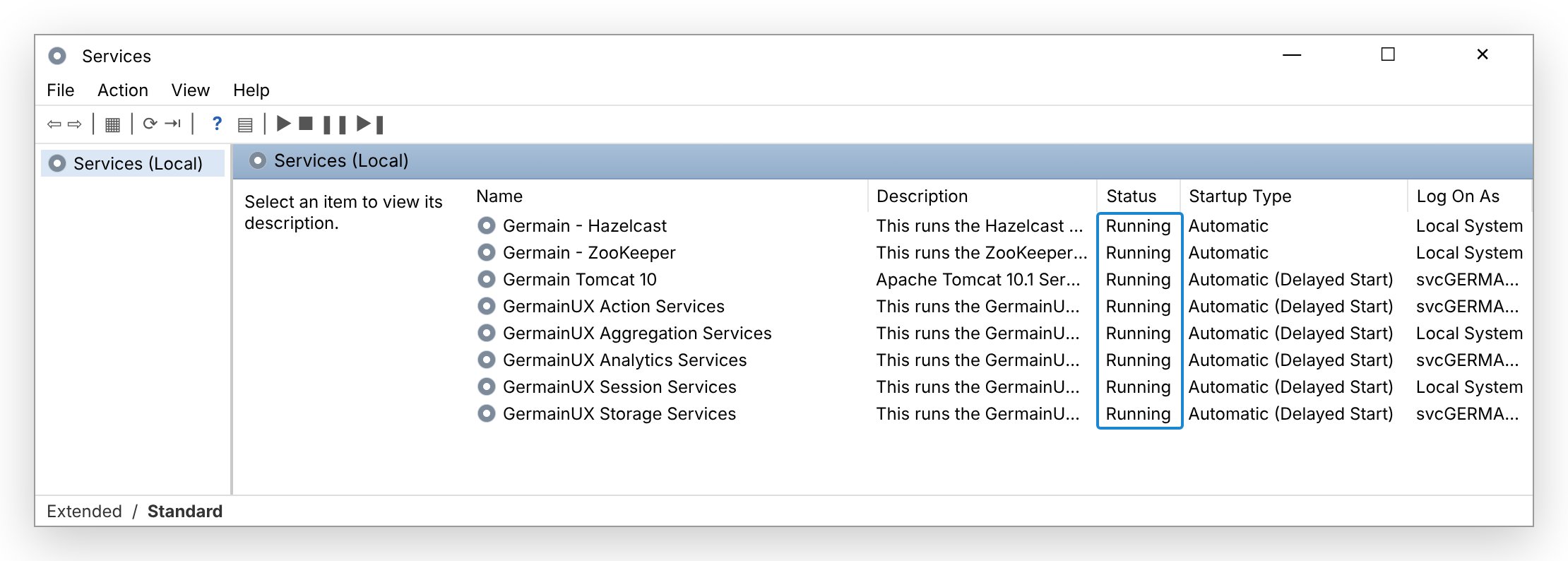
Required GermainUX components running in the Windows Services console
Common Issues
Germain Enterprise Does Not Start
Review the Tomcat startup log and check for:- An incorrect or unavailable Java runtime
- A port already used by another process
- Invalid Tomcat XML configuration
- Missing or inaccessible configuration files
- Insufficient JVM memory
- An unavailable ZooKeeper, Kafka, Hazelcast, or datastore connection
- Incorrect service-account permissions
- Invalid certificates or truststores
- Insufficient disk space
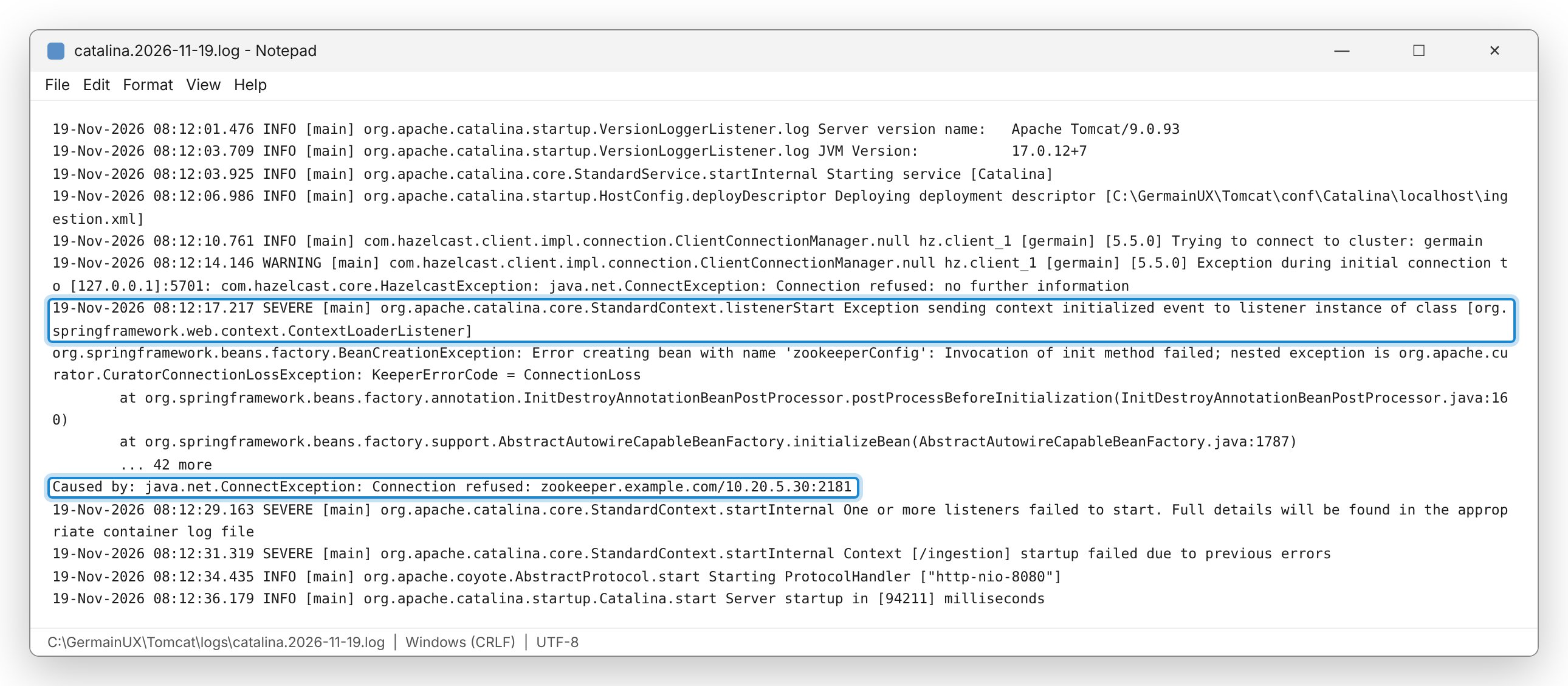
The first relevant exception in the Tomcat startup log
Connection Errors Under High Load
A substantial increase in monitored data can create many simultaneous TCP connections and exhaust the available ephemeral ports on the Germain Enterprise server. Typical symptoms include:- Intermittent Workspace or service connection errors
- Requests that time out during periods of high volume
- Many connections remaining in
TIME_WAIT - Normal behavior returning after traffic decreases or the server restarts
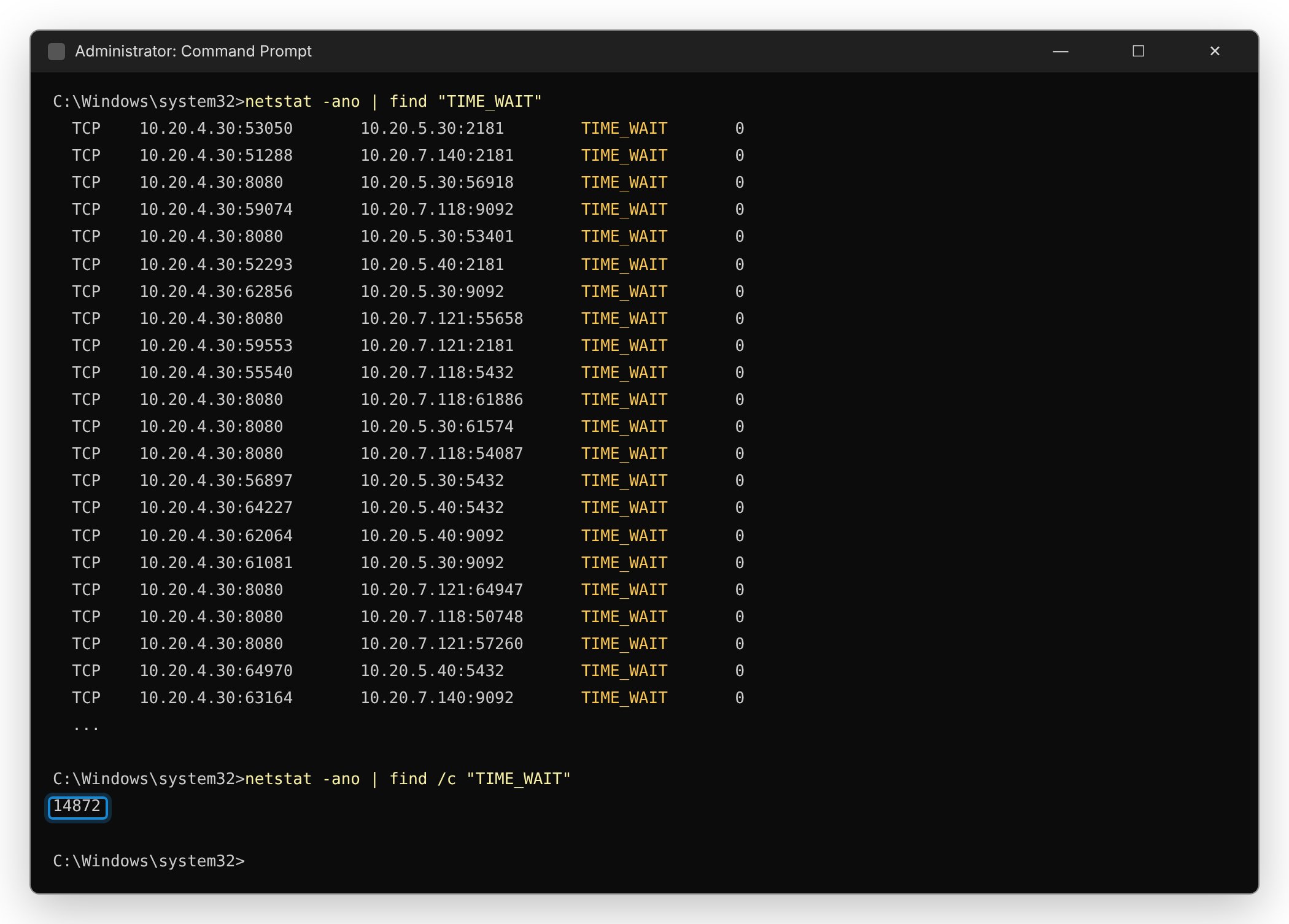
Many connections in the TIME_WAIT state, a sign of TCP port exhaustion
- Increasing the operating system’s available TCP port range
- Reducing the TCP
TIME_WAITduration - Increasing the Apache proxy server’s available worker threads
- Correcting excessive connection creation or missing connection reuse
- Scaling GermainUX Enterprise when sustained traffic exceeds capacity
MaxUserPort and TcpTimedWaitDelay.
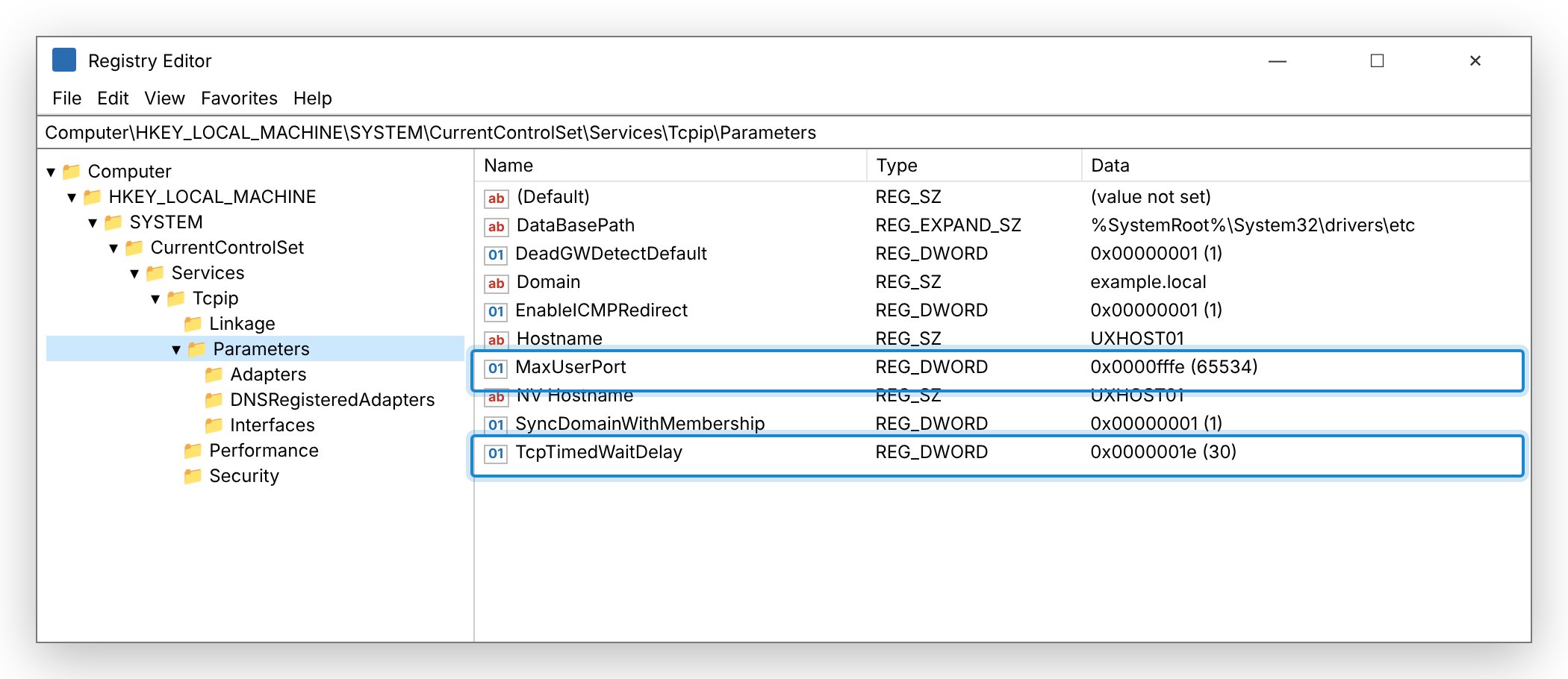
MaxUserPort and TcpTimedWaitDelay in the Windows TCP/IP registry parameters
Changes to Windows TCP registry settings affect the entire server. Back up the registry and obtain infrastructure approval before applying them. Do not treat operating-system tuning as a substitute for correcting connection leaks or inadequate capacity.
Enterprise Does Not Start After a Java Upgrade
When Java is upgraded or moved, the Windows Tomcat service may continue referencing the previous Java path. Open the Tomcat service configuration utility: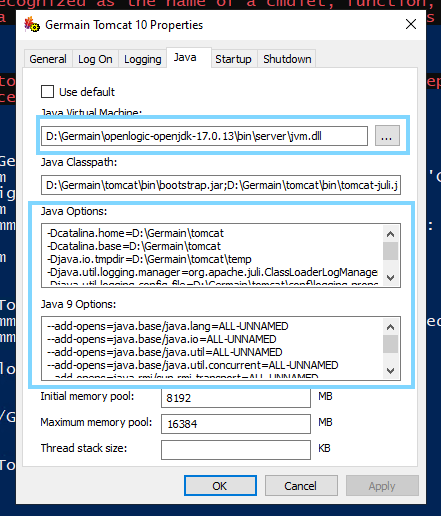
Java Virtual Machine path in the Tomcat service configuration utility
Network-Port Conflict
Germain Enterprise cannot start if another process already uses one of its configured Tomcat ports.Identify the Process on Linux
netstat is unavailable, use:
Identify the Process on Windows
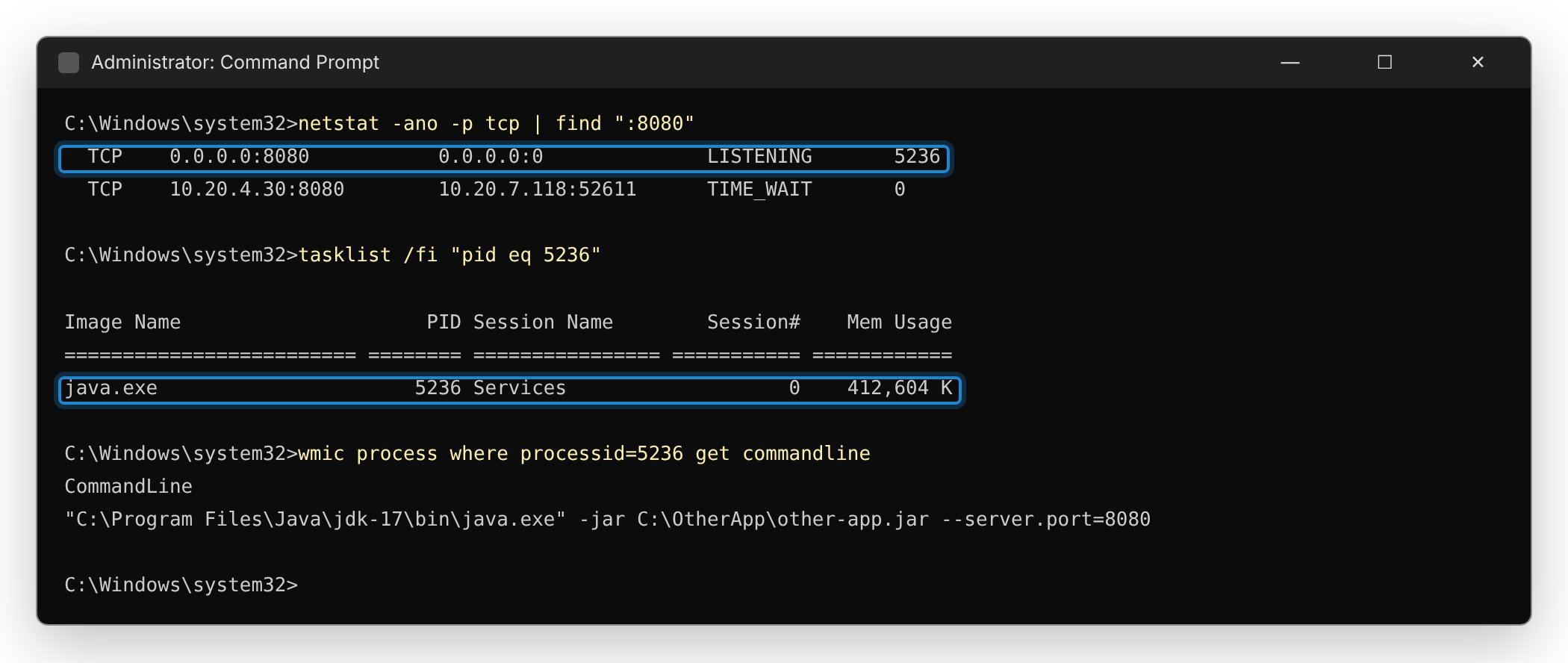
Finding the process that holds a Tomcat port with netstat and tasklist
Identify the Process with PowerShell
conf, not config.
Search for:
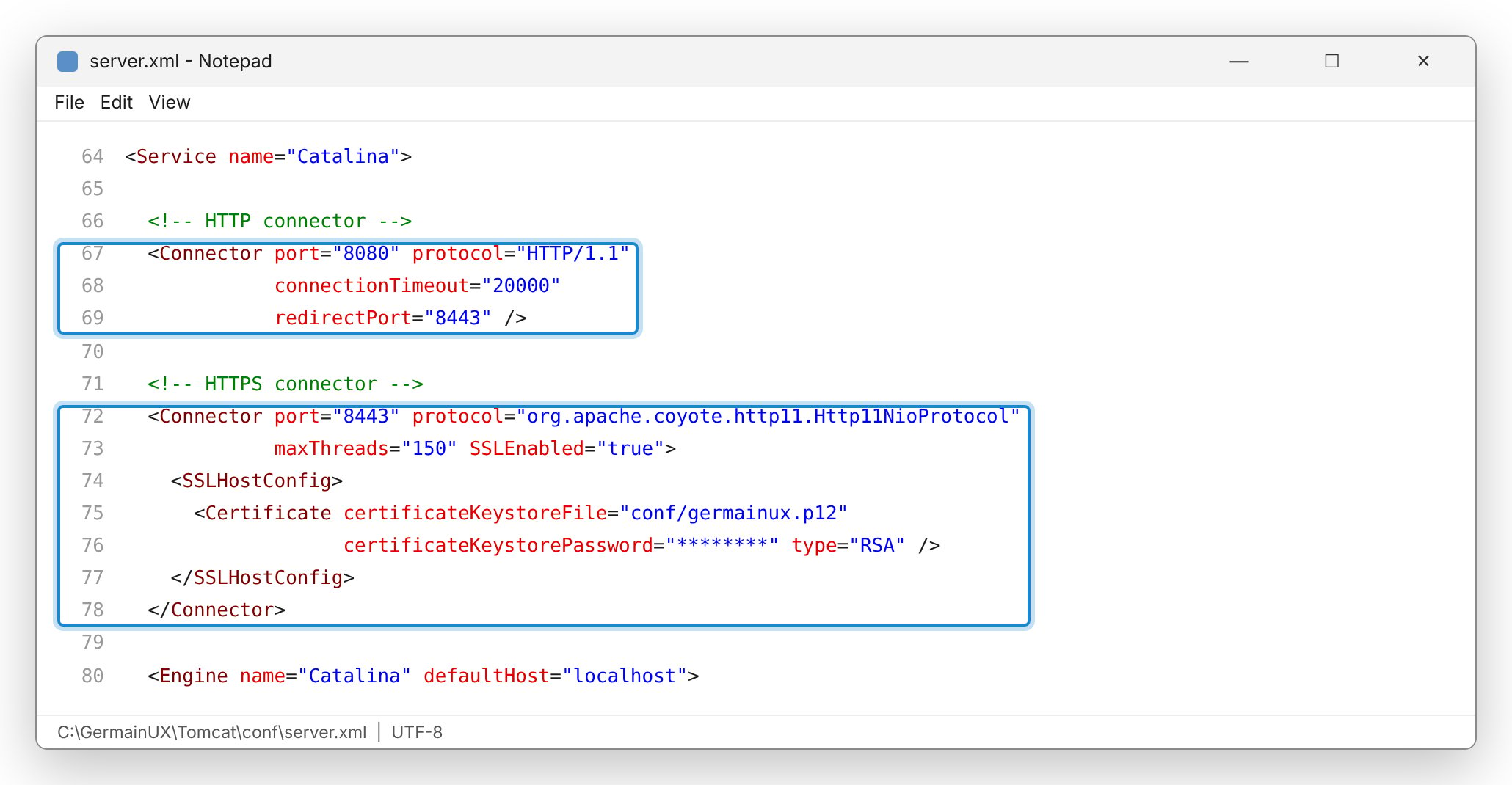
Tomcat Connector ports defined in server.xml
- Reconfiguring the other application to use a different port, or
- Assigning an available port to the affected Tomcat connector
Workspace Is Unavailable but Tomcat Is Running
Check:- The GermainUX web applications deployed successfully.
- The Tomcat logs contain no deployment exceptions.
- The Workspace context path is correct.
- The reverse proxy or load balancer can reach Tomcat.
- Authentication services are available.
- The database and ZooKeeper connections are operational.
- Browser requests are not failing with
404,502,503, or TLS errors.
Data Is Not Appearing
If the Workspace is accessible but no new data appears, verify:- Monitoring components are sending data.
- GermainUX Services are running.
- Kafka—or legacy ActiveMQ—accepts messages.
- Storage and analytics services are processing data.
- The datastore is available and writable.
- Queue or topic backlogs are not increasing.
- The correct environment and application configuration are active.
- Time synchronization is correct across all hosts.
After Applying a Fix
Confirm that:- Germain Enterprise starts without errors.
- The Workspace and Configuration Console are accessible.
- All GermainUX Services are running.
- Infrastructure dependencies remain connected.
- New telemetry is collected and processed.
- Queue or topic backlogs remain stable.
- No repeated connection, Java, or port errors appear.
- CPU, memory, disk, and TCP usage remain within acceptable limits.
Contact GermainUX Support
If the problem persists, provide:- GermainUX version
- Tomcat and Java versions
- Operating system
- Deployment topology
- Relevant logs covering the failure
- Exact timestamps
- Recent configuration or infrastructure changes
- Service status
- Port and process information
- CPU, memory, disk, and TCP-connection statistics
- Steps required to reproduce the issue
Get Help
Contact GermainUX Support
The GermainUX team helps you get up and running faster, empower your team, turn data into actionable insights, and optimize performance to deliver measurable business outcomes.
Can't Find What You Need?
Search all GermainUX docs with Ctrl + K, or use the feedback buttons at the bottom of this page to tell us what is missing.
The content of this document is proprietary to GERMAIN SOFTWARE.