

Windows Installation
Configure Kafka
Validate the Installation
Troubleshooting
Overview
Apache Kafka provides messaging services for GermainUX Enterprise and its nodes. Kafka replaces Apache ActiveMQ in GermainUX 2024.2 and later.Prerequisites
Before installing Kafka, confirm that:Windows Installation
Kafka runs on Windows through Windows Subsystem for Linux 2 (WSL2).1. Install WSL2
Open PowerShell as an administrator: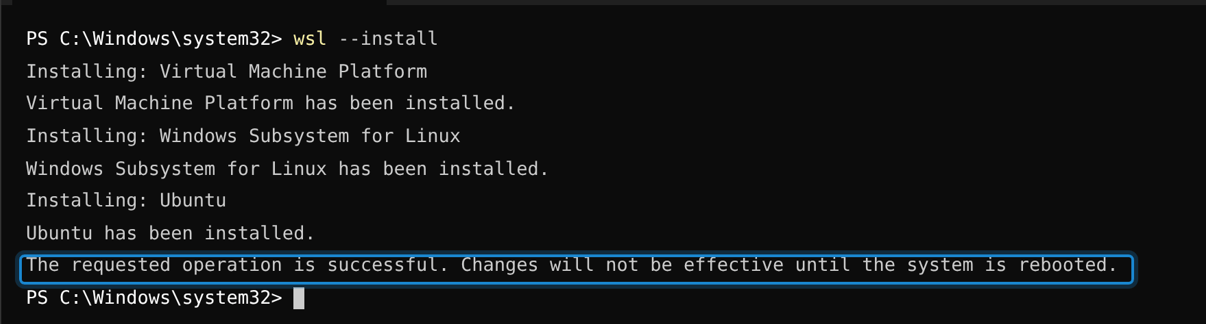
Installing WSL2 with wsl --install
2. Install JDK 17
Run the following commands in Ubuntu:
java -version output confirming OpenJDK 17 is installed
3. Download and Install Kafka
The example below uses Kafka 3.7.1. Use the version approved for your GermainUX release.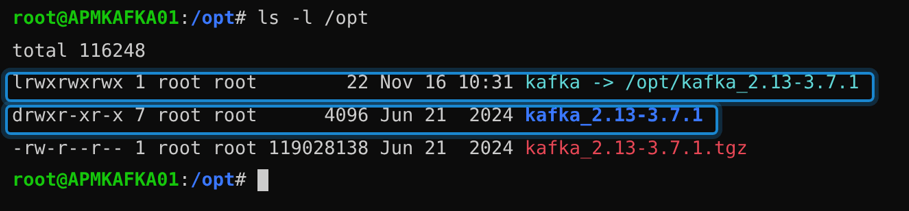
Extracted Kafka directory and the kafka symbolic link in /opt
Linux Installation
1. Install JDK 17
The following example applies to Ubuntu and other Debian-based distributions:2. Download and Install Kafka
Configure Kafka
The following configuration steps apply to both Linux and WSL2 installations.1. Configure the Data Directory
Open the KRaft server configuration: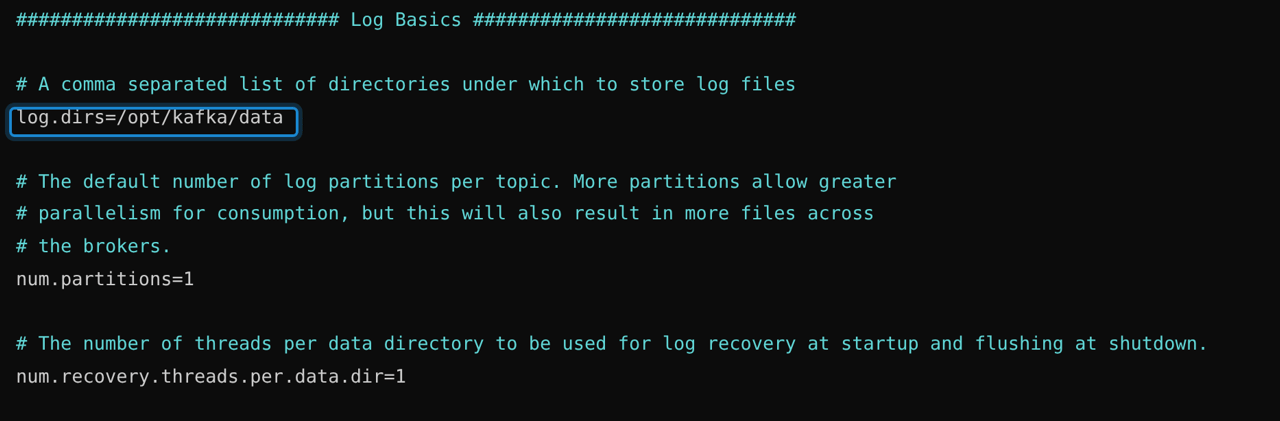
Kafka data directory set with log.dirs in server.properties
2. Configure Advertised Listeners
Kafka returns the address configured inadvertised.listeners to its clients. The address must therefore be resolvable and reachable from Germain Enterprise and every Germain node.
For a local, single-host deployment:
localhost with the Kafka server’s DNS name or reachable IP address:
localhost when GermainUX components connect from other hosts. Remote clients would interpret it as their own local machine.
If needed, also verify the listener binding:
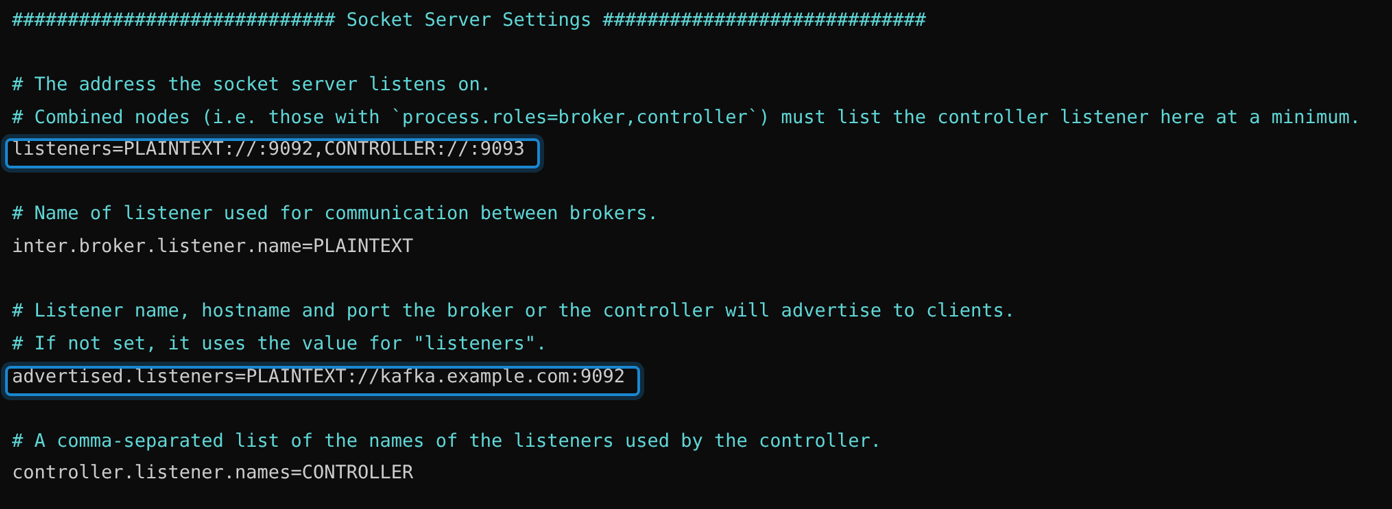
Listener and advertised listener settings in server.properties
Initialize Kafka Storage
Kafka storage must be formatted once before the broker starts for the first time. Generate a cluster ID:
Generated cluster ID and successful formatting of the Kafka storage directory
Start Kafka
Start Kafka in the foreground:Validate the Installation
Confirm That Kafka Is Listening

Kafka listening on port 9092
Test Connectivity from Each GermainUX Host
<kafka-host> with the hostname configured in advertised.listeners.

Testing connectivity to Kafka on port 9092 from a GermainUX host
Test Kafka Operations
Create a temporary topic:
Test topic created and listed with kafka-topics.sh

Kafka broker startup log confirming the transition from STARTING to STARTED
Start GermainUX
Use the following startup order:Start Kafka and wait until it is ready to accept connections
Start Germain Enterprise
Start the Germain nodes
Confirm that the GermainUX components connect to Kafka without errors
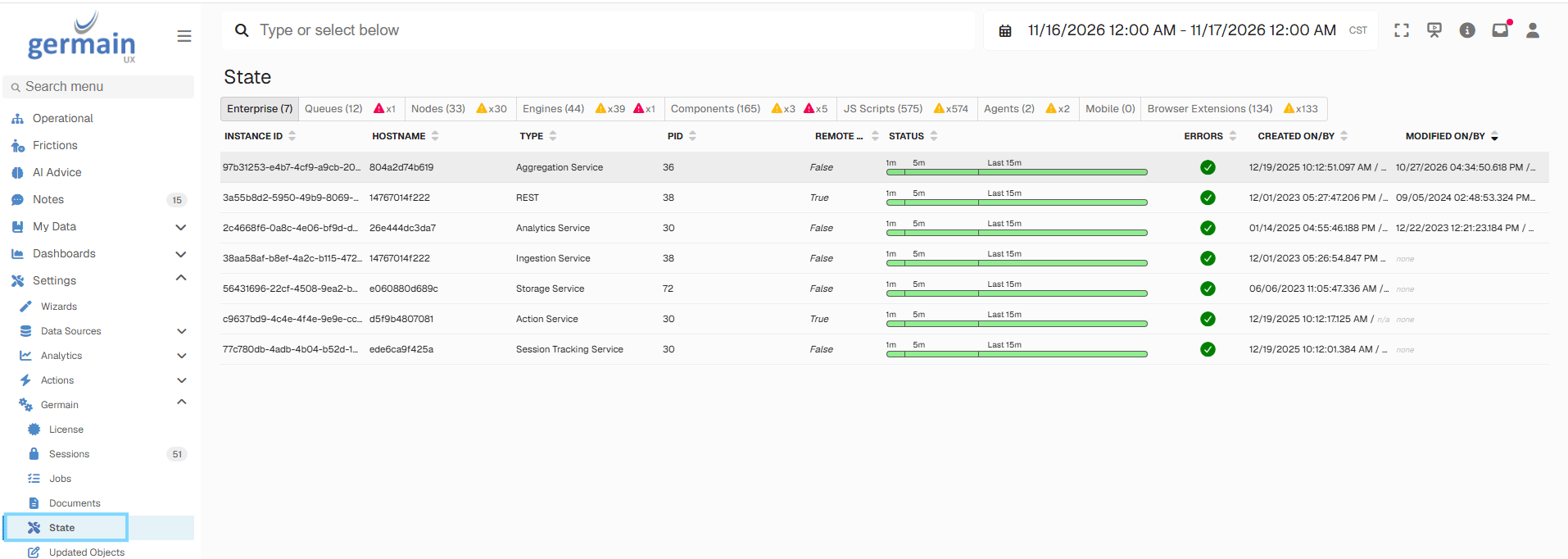
GermainUX components connected to Kafka
Production Considerations
The preceding procedure uses an unencryptedPLAINTEXT listener and a single Kafka broker. Before using this configuration in production, consider:
- TLS encryption
- Client authentication and authorization
- Multiple brokers and replication
- Disk-capacity monitoring
- Topic retention policies
- JVM and operating-system monitoring
- Automated startup and restart
- Configuration and data backups
- Firewall restrictions
- Log rotation
Troubleshooting
If GermainUX cannot connect to Kafka, verify:- Kafka is running.
- Port
9092is listening and accessible. advertised.listenerscontains a hostname reachable by every GermainUX host.- DNS resolves the advertised hostname correctly.
- No firewall blocks the connection.
- Kafka and GermainUX use compatible security settings.
- The Kafka data directory is writable and has sufficient space.
- Kafka started before Germain Enterprise and the nodes.
Get Help
Contact GermainUX Support
Can't Find What You Need?
The content of this document is proprietary to GERMAIN SOFTWARE.