

Business Outcomes
Reduce abandonment with evidence
Two Essential Metrics
Concentration and risk measures
Understand Why Users Drop Off
Linking symptoms to causes
Validate Improvement
Measure change after launch
Overview
A drop-off occurs when a user begins or meaningfully enters a page, feature, funnel or workflow but leaves before completing the intended action. It represents interrupted intent—whether the user intended to purchase, register, explore content, complete a business process or use an application feature. GermainUX automatically detects and analyzes drop-offs to help teams understand where users abandon, who is most affected, why abandonment occurs and what business outcome is lost.Business Outcomes
GermainUX Drop-Off Analysis helps organizations:- Identify the funnel stages, workflow steps and application features with the greatest abandonment.
- Quantify conversion loss, poor adoption, disengagement and incomplete work.
- Distinguish segments contributing the most drop-offs from segments with the highest individual risk.
- Correlate abandonment with behavior, errors, performance, content and process friction.
- Replay the sessions that contributed to a drop-off.
- Prioritize improvements according to affected users and business impact.
- Detect abnormal changes in drop-off behavior and alert the appropriate teams.
- Validate whether UX, process or technology changes improve completion.
Define the Intended Outcome First
Not every page exit or unfinished session is a drop-off. A user may have completed the intended task, found the required information or chosen to continue through another channel. Reliable drop-off analysis requires a defined or credibly inferred journey, including:- The entry or intent signal
- The expected milestones
- The successful completion event
- The conditions that indicate abandonment
- The time window within which completion is expected
- Any alternative paths that should still count as success
Types of Drop-Offs
These categories can overlap. A checkout abandonment is both a conversion drop-off and a journey interruption; the appropriate classification depends on the analytical objective.
Conversion Drop-Offs
Conversion drop-offs occur when a visitor or customer abandons an action connected to revenue, acquisition or another commercial outcome. Examples include:- Product viewed but not added to cart
- Product added to cart but checkout not started
- Checkout started but payment not completed
- Registration or lead form abandoned
- Trial or application process left incomplete
- Sales conversation ending without the intended progression
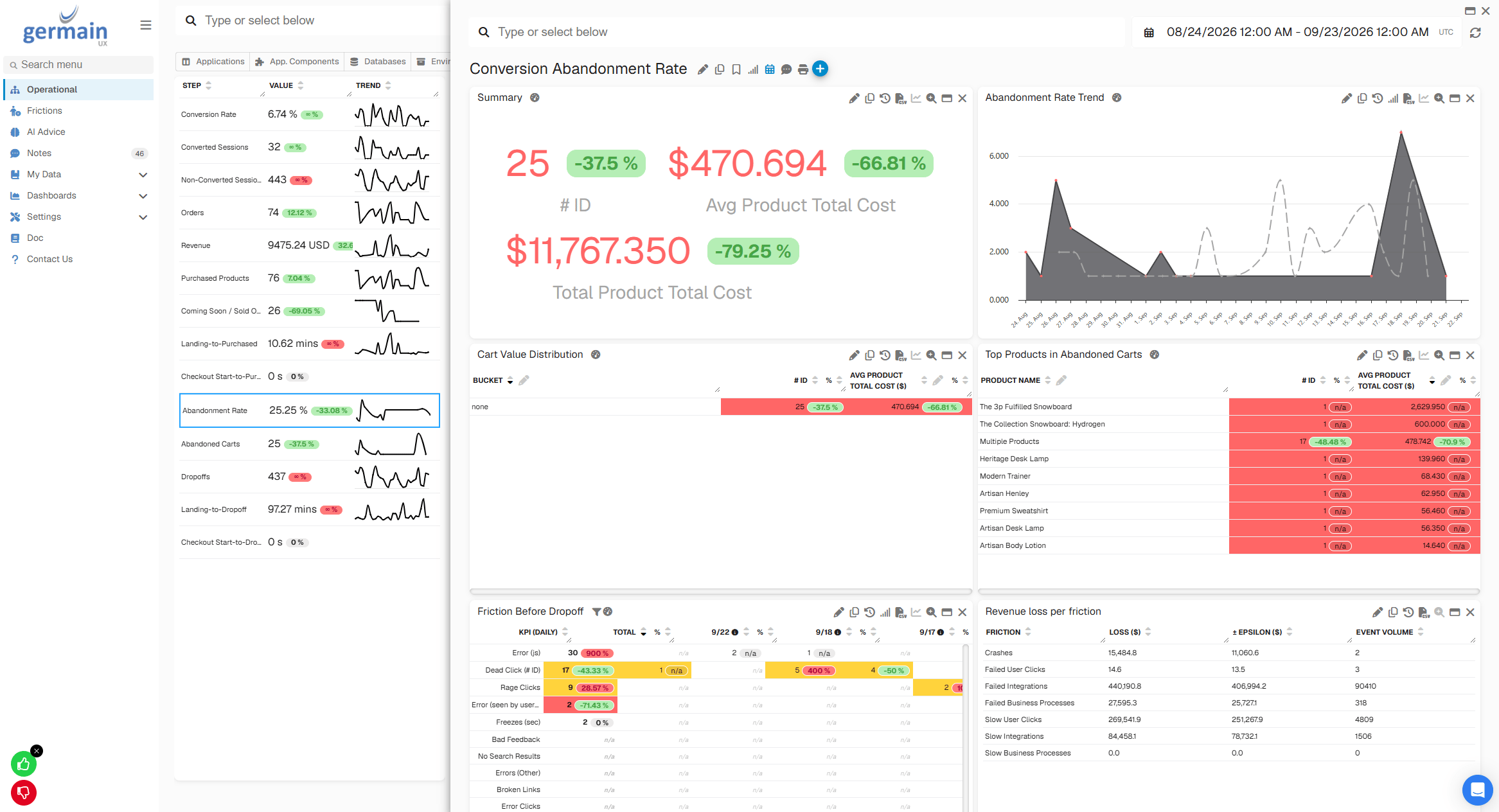
Cart abandonment, friction before drop-off, and revenue loss per friction - GermainUX
Adoption Drop-Offs
Adoption drop-offs occur when employees, customers or authenticated users begin a feature or business workflow but do not complete it. Examples include:- CRM user starts but does not submit a quote
- Employee abandons an ERP transaction
- User repeatedly opens but does not complete a feature
- Customer begins a self-service workflow and creates a support case instead
- User returns to an older workflow or application after attempting a new one
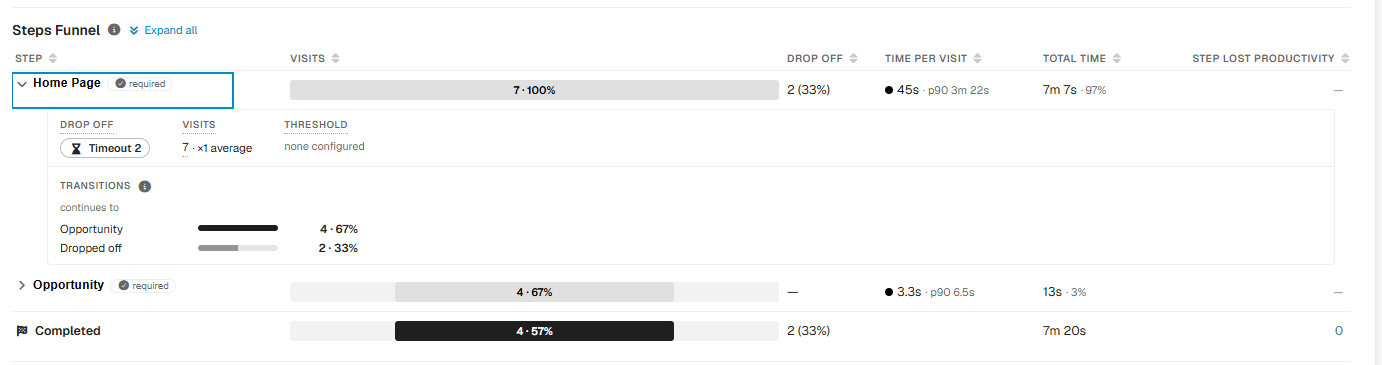
Steps Funnel with drop-off at each workflow step - GermainUX
Engagement and Exploration Drop-Offs
Engagement and exploration analysis measures how deeply users progress into content, features or journeys. Potential signals include:- Landing-page exit without a meaningful action
- Content viewed without progressing to the next expected step
- Dashboard opened without interacting with reports
- Search performed without opening a result
- Repeated navigation followed by abandonment
- Short or inactive sessions without journey progression
Two Essential Metrics
GermainUX uses two complementary measures to explain drop-off concentration and risk.Drop-Off Share
Formula:Drop-Off Share = Drop-offs in Segment ÷ Total Drop-offs in Analysis Scope
Drop-Off Share answers:
How much does this segment contribute to all observed drop-offs?
Drop-Off Rate
Formula:Drop-Off Rate = Drop-offs in Segment ÷ Eligible Sessions in Segment
Drop-Off Rate answers:
What is the probability that an eligible session in this segment will drop off?
Example
Assume the analysis contains:- 56 eligible sessions in one segment
- 16 drop-offs in that segment
- 26 drop-offs across the complete analysis scope
- Drop-Off Share:
16 ÷ 26 = 61.5% - Drop-Off Rate:
16 ÷ 56 = 28.6%
- Share of 61.5%: This segment produces most of the observed drop-offs.
- Rate of 28.6%: Slightly more than one in four eligible sessions in this segment drops off.
Additional Metrics
Depending on the journey and configured data, analysis can also include:- Eligible sessions and users
- Journey starts and completions
- Completion and conversion rate
- Drop-off count and trend
- Time spent before abandonment
- Last completed milestone
- Repeat attempts
- Lost productivity
- Cart, order or revenue value
- Error and performance conditions
- Return or recovery after drop-off
Automated Drop-Off Detection
GermainUX can continuously monitor configured journeys and detect when eligible users fail to reach the expected completion event. Automated analysis can:- Identify the stage where abandonment occurs
- Compare the current rate with a baseline or previous period
- Detect spikes, regressions and outliers
- Rank affected pages, products, teams or user segments
- Correlate drop-offs with related KPIs
- Surface representative Session Replays
- Generate alerts, summaries and recommendations
Segmentation and Leading Factors
Drop-off analysis becomes actionable when abandonment is broken down by relevant dimensions. Examples include:
Leading Factors help identify where drop-off behavior is degraded, unusually high, newly appearing or materially different from other segments.
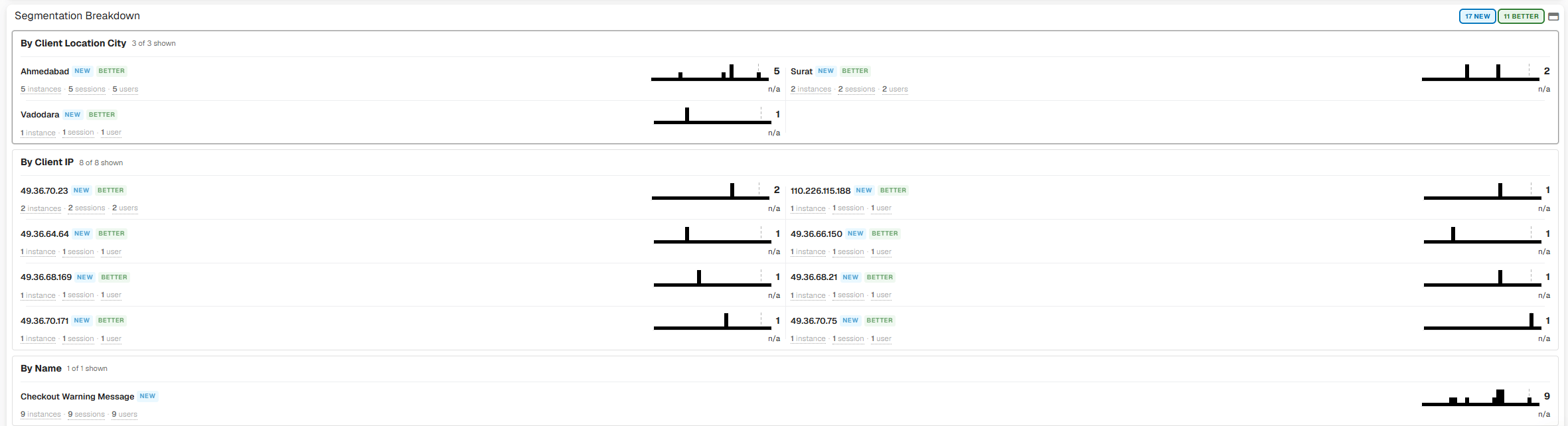
Segmentation Example - GermainUX
Understand Why Users Drop Off
A drop-off metric identifies the symptom. GermainUX correlates it with evidence that helps explain the cause.Behavioral Friction
- Rage clicks, dead clicks or repeated interactions
- Confusing navigation
- No-result searches
- Content or calls to action receiving little engagement
- Repeated attempts followed by abandonment

Rage Click Analysis with drop-off rate - GermainUX
Workflow Friction
- Excessive or unclear steps
- Long waits and manual approvals
- Missing information or dependencies
- Failed handoffs between systems or teams
- Automation that did not execute
Technology Friction
- User-facing errors
- Slow pages or application operations
- Browser freezes
- Failed APIs or integrations
- Payment, authentication or data failures
- Application or infrastructure availability problems
Experience and Business Conditions
- Unexpected fees or policies
- Product unavailable or out of stock
- Irrelevant landing-page content
- Insufficient payment or delivery options
- Poor chatbot or support interaction
- Campaign-to-landing-page mismatch
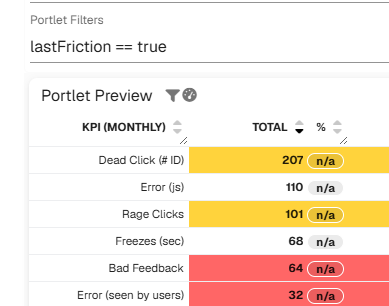
Find frictions that caused Dropoffs using the portlet filter: LastFriction=true - GermainUX
Session Replay
GermainUX Session Replay lets teams inspect what users experienced before abandoning. Replay can show:- The user’s path and apparent objective
- The last successfully completed milestone
- Clicks, input, searches and navigation
- Errors, delays and failed requests
- Signs of confusion or frustration
- What the user attempted immediately before leaving
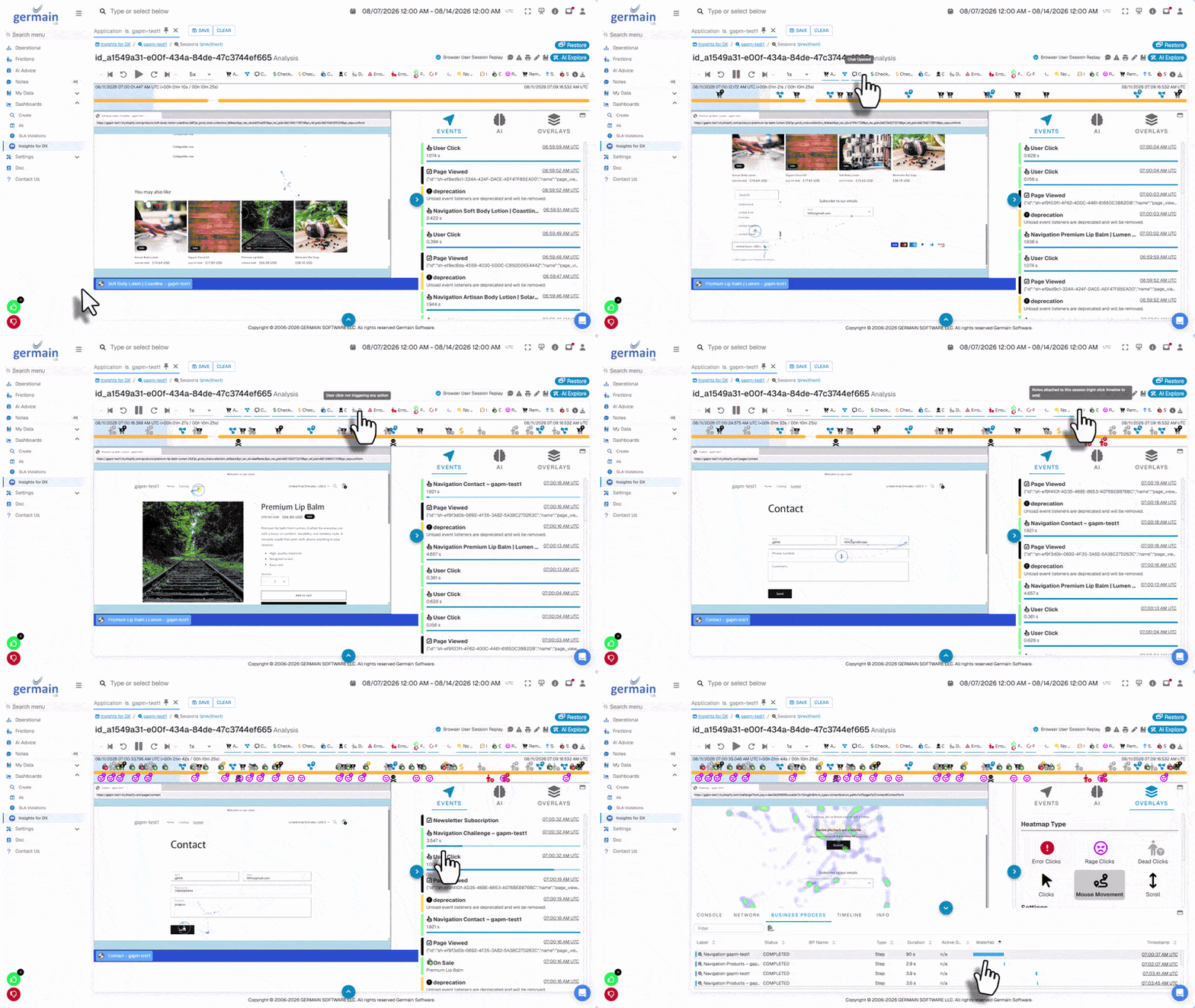
Replay a user session before drop-off - GermainUX
Focused Flow and Journey Analysis
Focused Flow visualizes progression and drop-off across configured journey milestones. It helps teams understand:- The number of users reaching each stage
- Completion and abandonment between stages
- Friction associated with each transition
- Differences across segments
- The business impact of each drop-off point
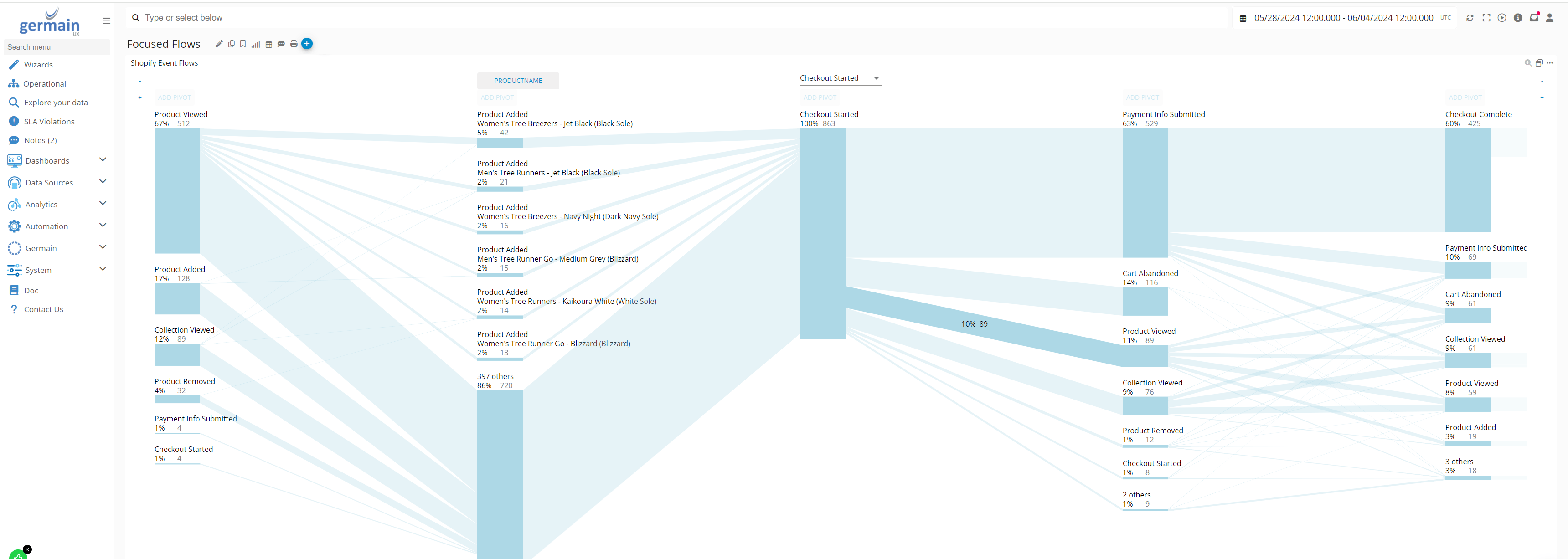
Focused Flow of an eCommerce journey with cart abandonment - GermainUX
AI-Assisted Analysis
AI Explore can help teams ask questions about the available drop-off evidence, including:- Why did this segment abandon more frequently?
- Which related KPIs changed at the same time?
- Which users, products or workflows are most affected?
- What patterns appear across the relevant sessions?
- Which probable causes should be investigated first?
- What corrective actions may reduce abandonment?
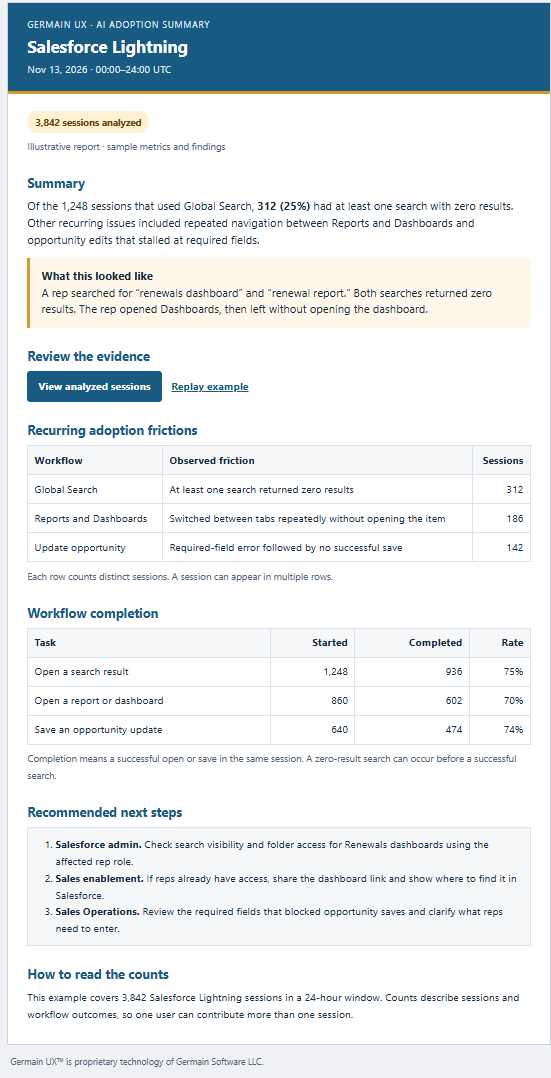
AI adoption summary with workflow completion rates - GermainUX
Alerts, Reports and Action
GermainUX can turn drop-off analysis into action through:- Real-time alerts when drop-off rates exceed configured thresholds
- Anomaly detection for unexpected spikes or regressions
- Scheduled conversion, adoption or productivity reports
- Links to affected segments and Session Replay
- Dynamic investigation actions
- Approved follow-up or remediation workflows
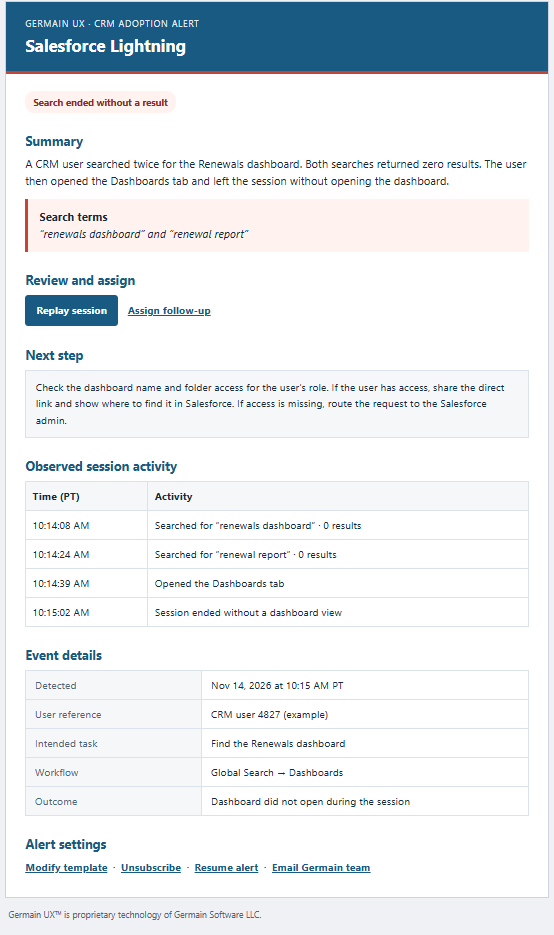
Alert for a session that ended without reaching its goal - GermainUX
Validate Improvement
After a UX, workflow, content or technology change is deployed, GermainUX can verify whether:- Drop-Off Rate decreased
- Drop-Off Share shifted away from the affected segment
- Journey completion improved
- Conversion, adoption or engagement increased
- Errors and delays declined
- Users completed the process faster
- The improvement persisted across devices, versions and segments
Additional Resources
Conversion Insights
Read more
AI
Insights & Recommendations
Analytics
More Analytics Features
Automation
More Automation Features
Dashboards
Dashboards and reports overview
Reports
Automatic and scheduled reports
Management
More Management Features
Get Help
Contact GermainUX Support
The GermainUX team helps you get up and running faster, empower your team, turn data into actionable insights, and optimize performance to deliver measurable business outcomes.
Can't Find What You Need?
Search all GermainUX docs with Ctrl + K, or use the feedback buttons at the bottom of this page to tell us what is missing.
The content of this document is proprietary to GERMAIN SOFTWARE.