

Elasticsearch Usage
Prepare Elasticsearch
Migrate Existing Data
Production Validation
Overview
Elasticsearch is the preferred datastore for on-premise GermainUX deployments. Its distributed search and analytics architecture is well suited to:- High-volume, near-real-time telemetry ingestion
- Time-series monitoring data
- Fast filtering and aggregation
- Full-text search
- Large dashboards and investigative queries
- Session Replay and technical traces
- Horizontal scaling
- Time-based retention
Before You Begin
Confirm with Germain Software:- The Elasticsearch version supported by your GermainUX release
- Required Elasticsearch plugins and settings
- Expected daily ingestion volume
- Raw and aggregated data-retention periods
- Session Replay volume
- Node and storage requirements
- High-availability requirements
- Authentication and TLS configuration
- Whether existing GermainUX data must be migrated
How GermainUX Uses Elasticsearch
Raw Data
Raw indexes retain the complete monitoring facts collected by GermainUX. Raw data is required for calculations that cannot be reliably reconstructed from aggregated data, including:- Percentiles
- Standard deviation
- Detailed root-cause analysis
- Instance-level investigation
- Technical tracing
- Other calculations that require the original distribution
Aggregated Data
GermainUX aggregation is similar to Elasticsearch rollups: detailed facts are summarized into larger time intervals to reduce long-term storage. GermainUX can aggregate data into hourly indexes that may be retained longer than the corresponding raw data. Aggregated indexes support measures such as:- Minimum
- Maximum
- Average
- Sum
- Count
Unified Queries
GermainUX can query raw and aggregated indexes through a single request and merge the results into one view. This allows recent periods to use detailed raw data while older periods use retained aggregates, subject to the measures supported by each data type.Time-Series Data
GermainUX time-series data streams are primarily append-only. For fact data streams, GermainUX can use a lifecycle such as:- New data is written to a hot index.
- After the configured hot period—typically one day—the index becomes read-only or moves to colder storage.
- Raw data remains available until its retention period expires.
- Aggregated indexes may be retained for a longer period.
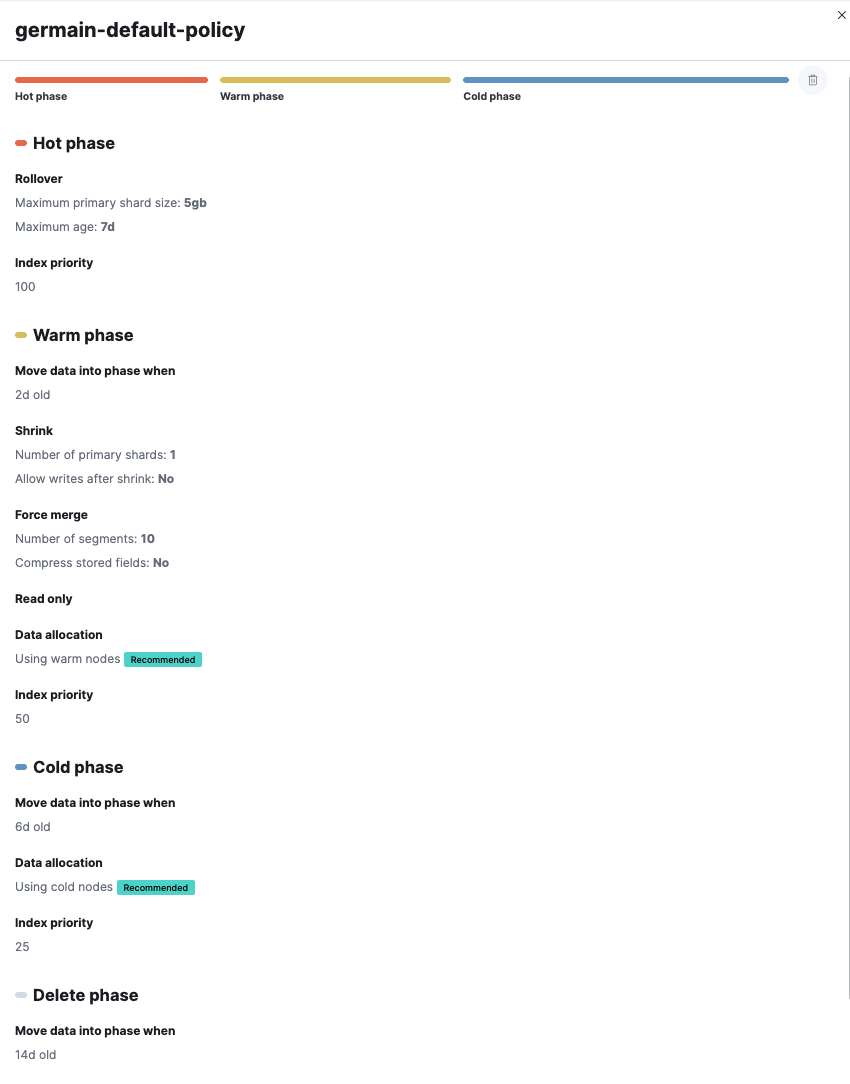
The germain-default index lifecycle policy in Kibana
Architecture Requirements
A GermainUX deployment using Elasticsearch generally requires: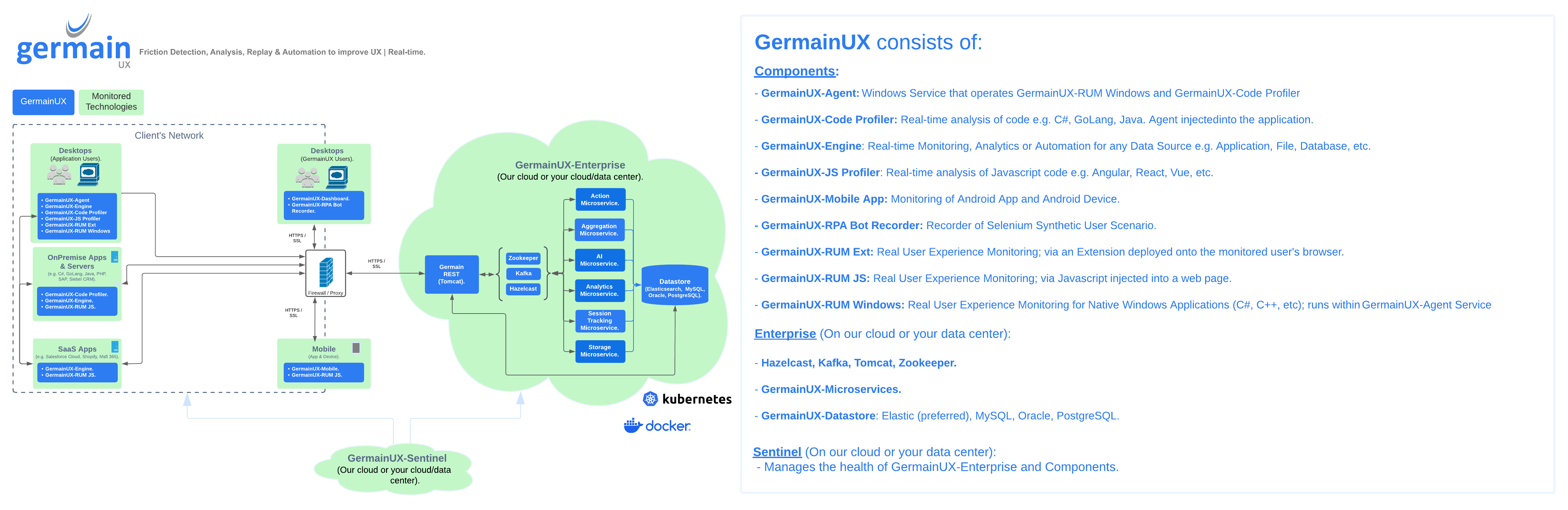
GermainUX architecture with Elasticsearch as the preferred datastore - GermainUX
- TLS
- Authentication and role-based access
- Backups or snapshots
- Monitoring
- Retention policies
- Sufficient operational free space
- Replication and high availability when required
Deployment Scenarios
New GermainUX Deployment
For a new deployment:- Prepare the Elasticsearch cluster.
- Configure security, networking, storage, and snapshots.
- Install the GermainUX search indexes and templates.
- Configure GermainUX Enterprise to connect to Elasticsearch.
- Initialize the required GermainUX data structures.
- Validate connectivity and query execution.
- Start monitoring with a limited data volume.
- Confirm ingestion, search, aggregation, retention, and performance.
- Expand to production volume.
Migration from Another Datastore or Environment
When migrating existing data:- Prepare the target Elasticsearch cluster.
- Export the GermainUX configuration from the source environment.
- Create a temporary GermainUX Enterprise instance.
- Connect the temporary instance to a separate SQL configuration database.
- Configure unique queue names so it does not interfere with the existing environment.
- Configure an appropriate Elasticsearch index prefix.
- Initialize the Elasticsearch data structures.
- Configure the migration tool.
- Migrate and validate each data type.
- Switch the target GermainUX environment only after validation is complete.
Prepare Elasticsearch
1. Provision the Infrastructure
Provision the required Elasticsearch nodes and storage based on:- Daily AA Unit volume
- Peak ingestion rate
- Total retained raw data
- Aggregated-data retention
- Session Replay
- Replication
- Query workload
- Expected growth
2. Configure Time
Configure Elasticsearch and GermainUX hosts with consistent:- Time zone
- System time
- Network Time Protocol synchronization
3. Configure Networking
Allow only the required communication between:- GermainUX Enterprise and Elasticsearch
- Authorized administrators and Elasticsearch
- Kibana and Elasticsearch, when Kibana is used
- Elasticsearch nodes within the cluster
- Snapshot repositories, when configured
4. Configure Security
Before production use:- Enable TLS for client and node communication.
- Enable authentication.
- Create dedicated GermainUX service accounts.
- Apply least-privilege roles.
- Restrict network access.
- Protect credentials outside source-controlled configuration.
- Configure audit logging when required.
- Secure Kibana if it is installed.
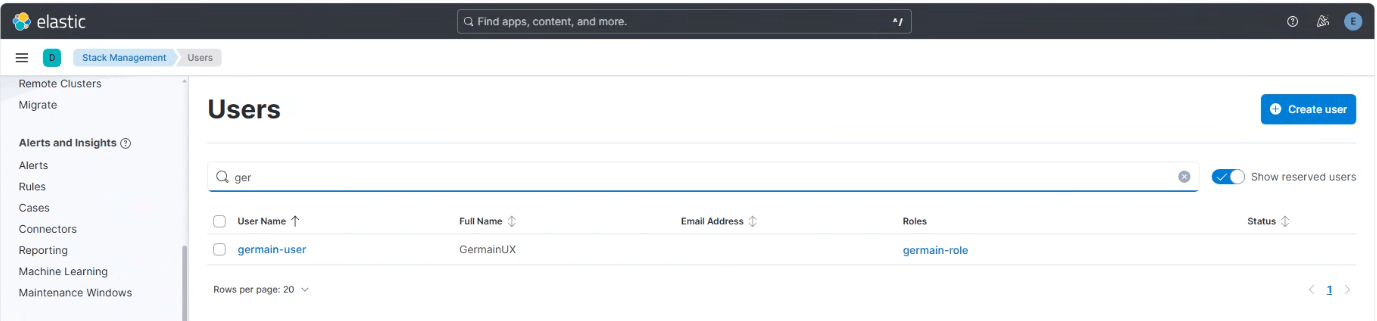
A dedicated GermainUX service account in Kibana, assigned only the roles GermainUX requires.
5. Configure Backups
Configure Elasticsearch snapshots to an approved repository. Validate:- Snapshot scheduling
- Retention
- Repository permissions
- Encryption
- Off-site or cross-region copies where required
- Restoration procedures
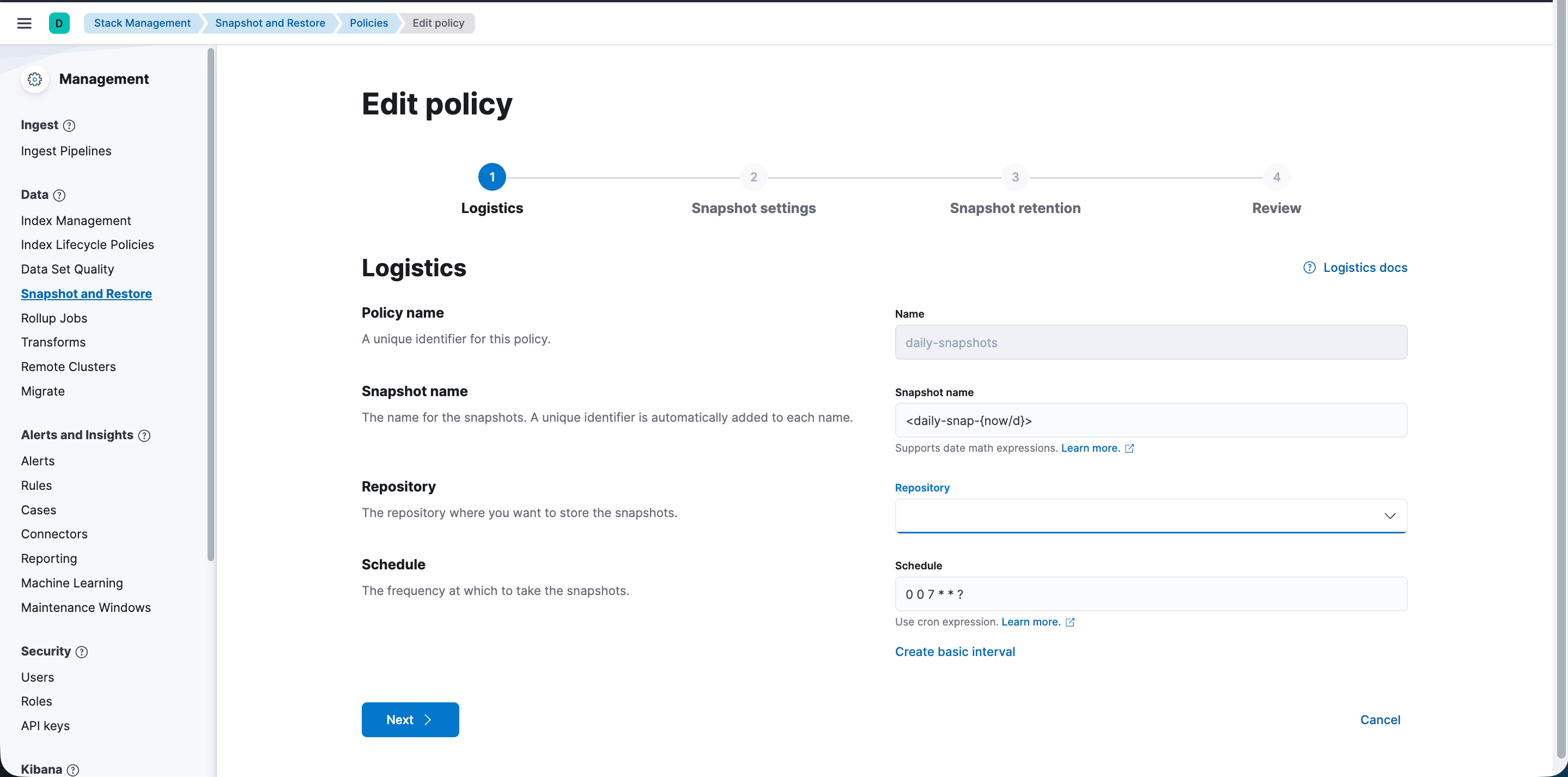
Snapshot policy in Kibana Snapshot and Restore - GermainUX
Configure GermainUX Enterprise
Temporary Migration Instance
A temporary GermainUX Enterprise instance may be required to prepare Elasticsearch before migrating existing data. It requires:- A SQL database for GermainUX configuration
- Access to the target Elasticsearch cluster
- Access to the required GermainUX packages and scripts
- A unique ActiveMQ queue prefix
- A unique Elasticsearch index prefix
Update common.properties
Configure the applicable properties in:
- Assign unique queue names or prefixes so the temporary instance can share ActiveMQ without consuming production messages.
- Set a meaningful Elasticsearch index prefix, such as one identifying the environment.
- Configure the Elasticsearch URL and connection settings.
- Configure authentication and TLS.
- Configure the SQL configuration database.
- Validate credentials and network connectivity.
Initialize the Datastore
1. Install Search Index Definitions
Import the GermainUX Elasticsearch index definitions from: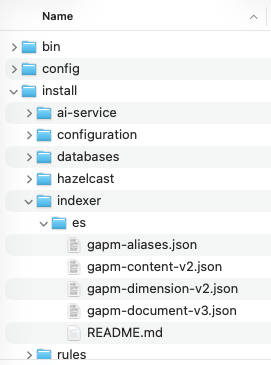
Elasticsearch index definitions in install/indexer/es - GermainUX
2. Start GermainUX Enterprise
Start the temporary or target GermainUX Enterprise instance and verify that it connects successfully to:- The SQL configuration database
- Elasticsearch
- ActiveMQ
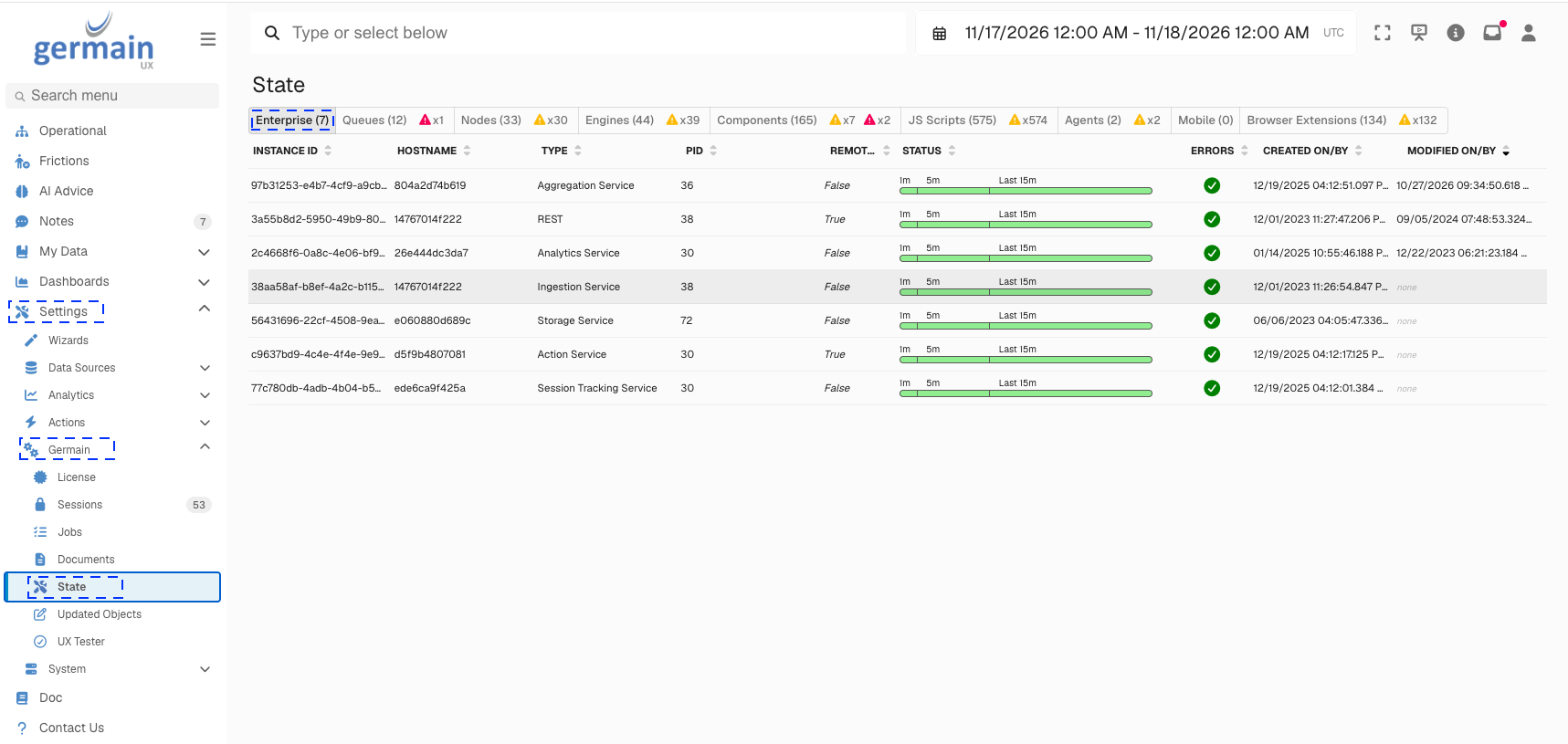
GermainUX Enterprise service health shows healthy connections to the each service. Settings > Germain > State
3. Apply the Remaining Elasticsearch Configuration
Use the GermainUX REST endpoint or deployment script provided for your release to create the remaining:- Index templates
- Data streams
- Lifecycle configuration
- Mappings
- Aliases
- Required GermainUX metadata
Migrate Existing Data
Configure the Migration Tool
Update the migration tool’s YAML configuration with:- Source datastore connection
- Target Elasticsearch connection
- Authentication
- TLS settings
- Index prefix
- Source and target environment
- Date range
- Batch size
- Data type
- Logging and output locations
Run the Migration
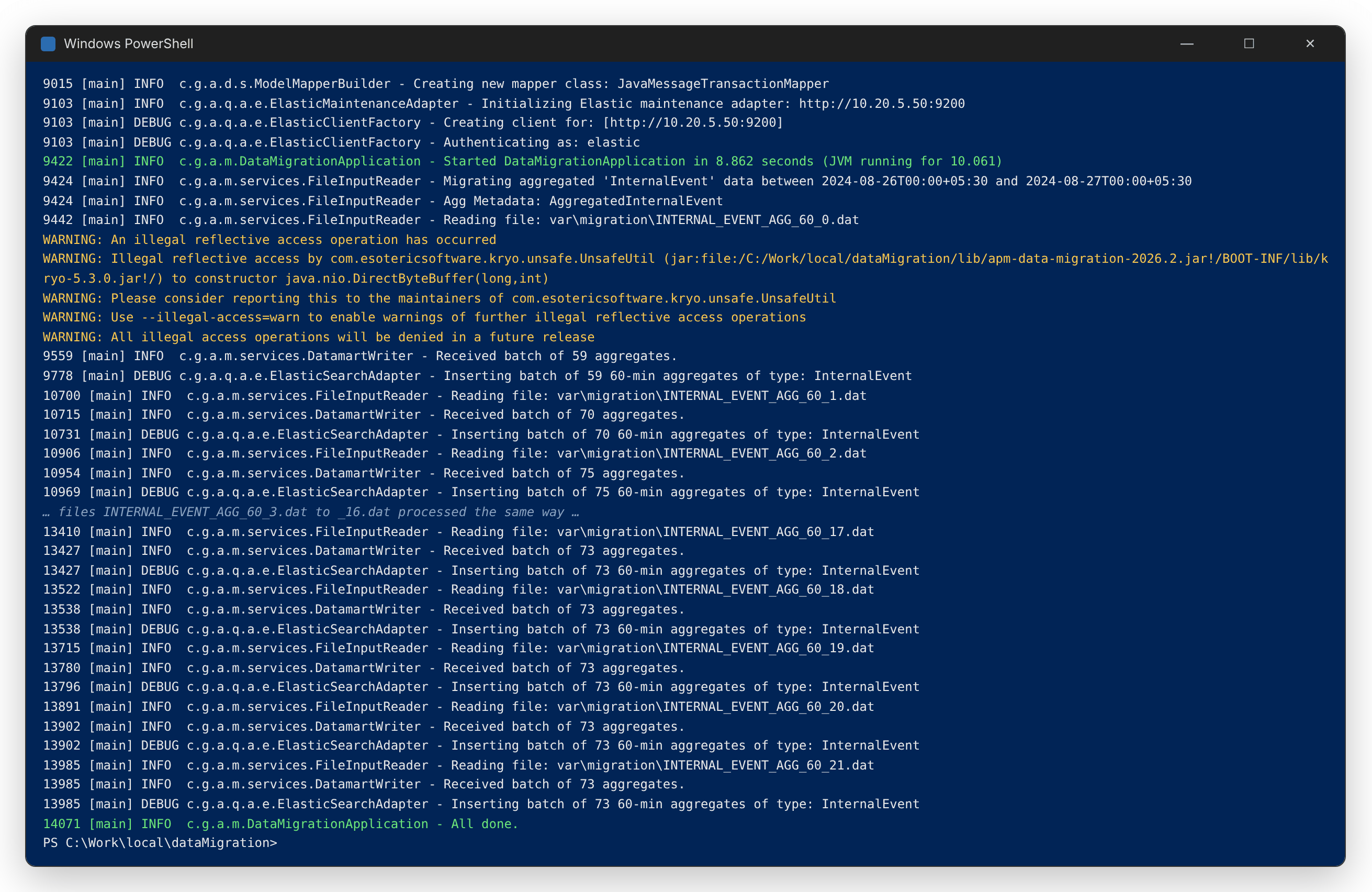
Migration tool log output confirms that the data type migrated successfully, with record counts and no errors.
- The source datastore can support the additional load.
- Elasticsearch can support the combined ingestion rate.
- The migration tool and version allow parallel execution.
- Sufficient CPU, memory, network, and storage capacity are available.
- Source-database load
- Migration throughput
- Elasticsearch indexing latency
- Rejected writes
- Disk utilization
- Cluster health
- Error and retry counts
Validate Migrated Data
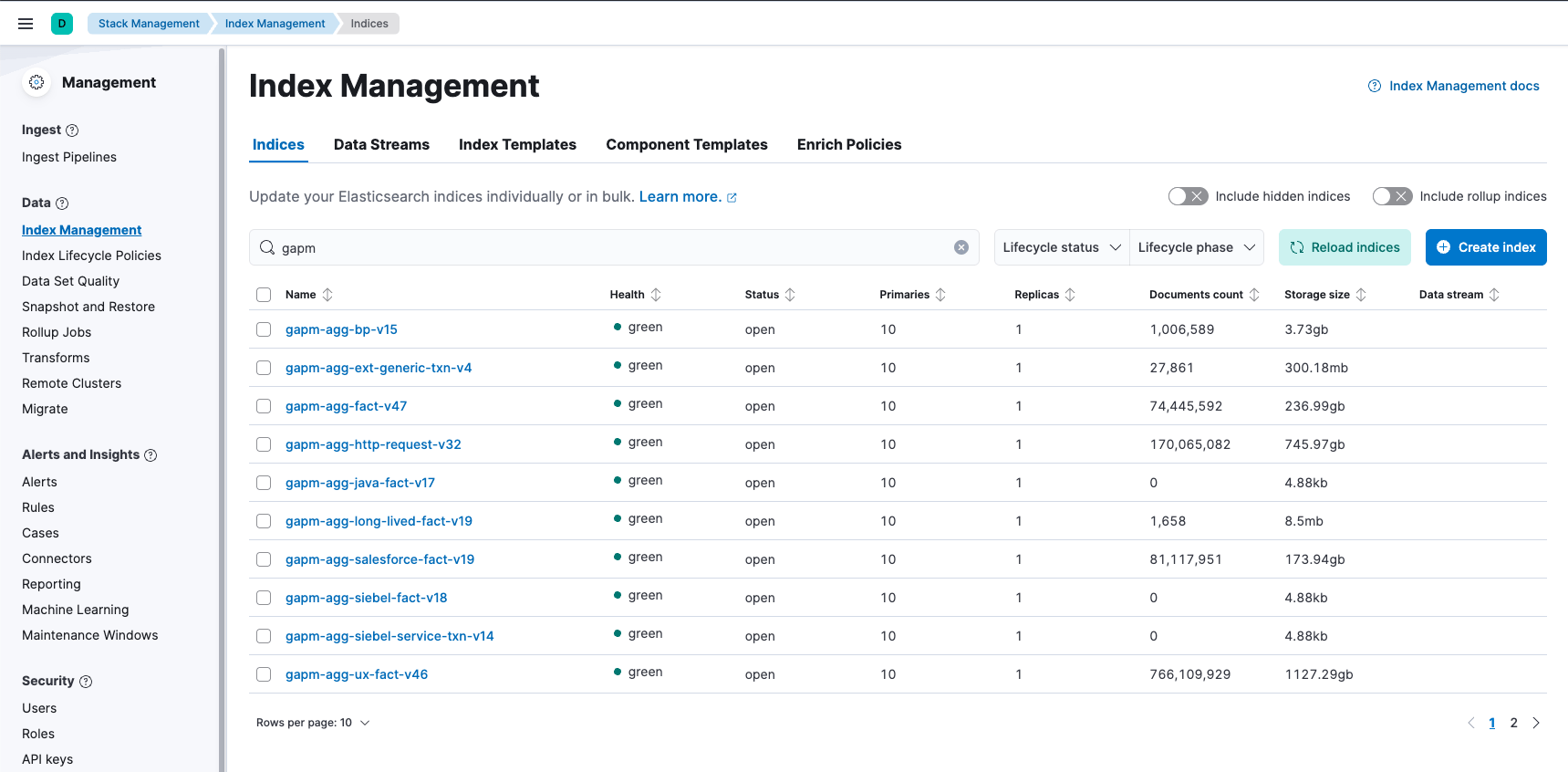
Index Management in Kibana shows the document count for each migrated GermainUX index, ready to compare with the source record counts. Stack Management > Index Management > Indices
- Record counts
- Minimum and maximum timestamps
- Application and environment values
- Daily volumes
- Key measures and pivots
- Representative raw facts
- Aggregated results
- Dashboard results
- Session Replay availability, when applicable
Validate Elasticsearch Queries
GermainUX can monitor and validate Elasticsearch queries. To configure query monitoring:- Open Germain Workspace.
- Go to Settings > System > Engine Settings > Component Types.
- Click Add.
- Select Elasticsearch Query Monitor Component.
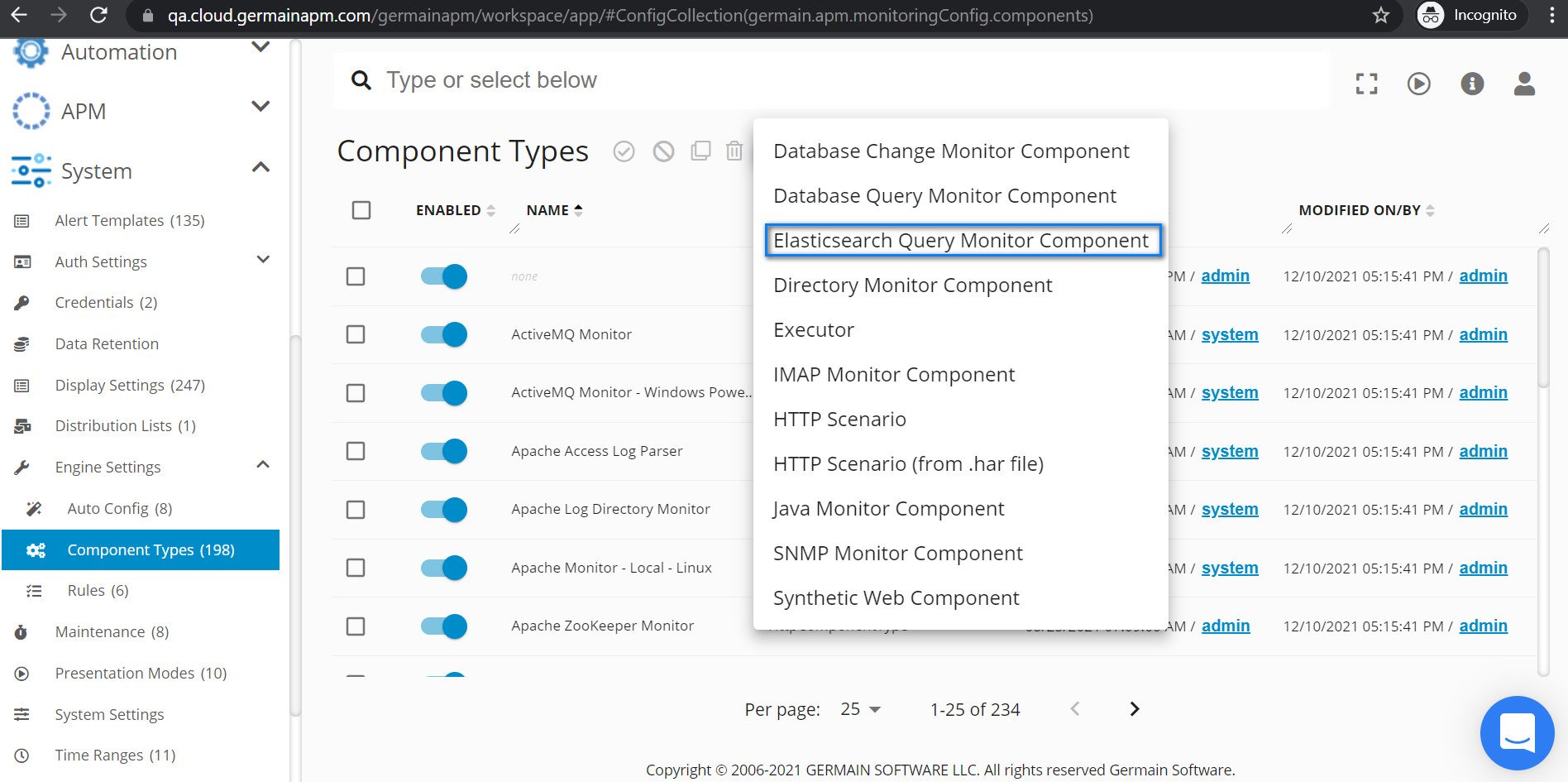
Elasticsearch Query Monitor Component on the Component Types page - GermainUX
- Complete the configuration.
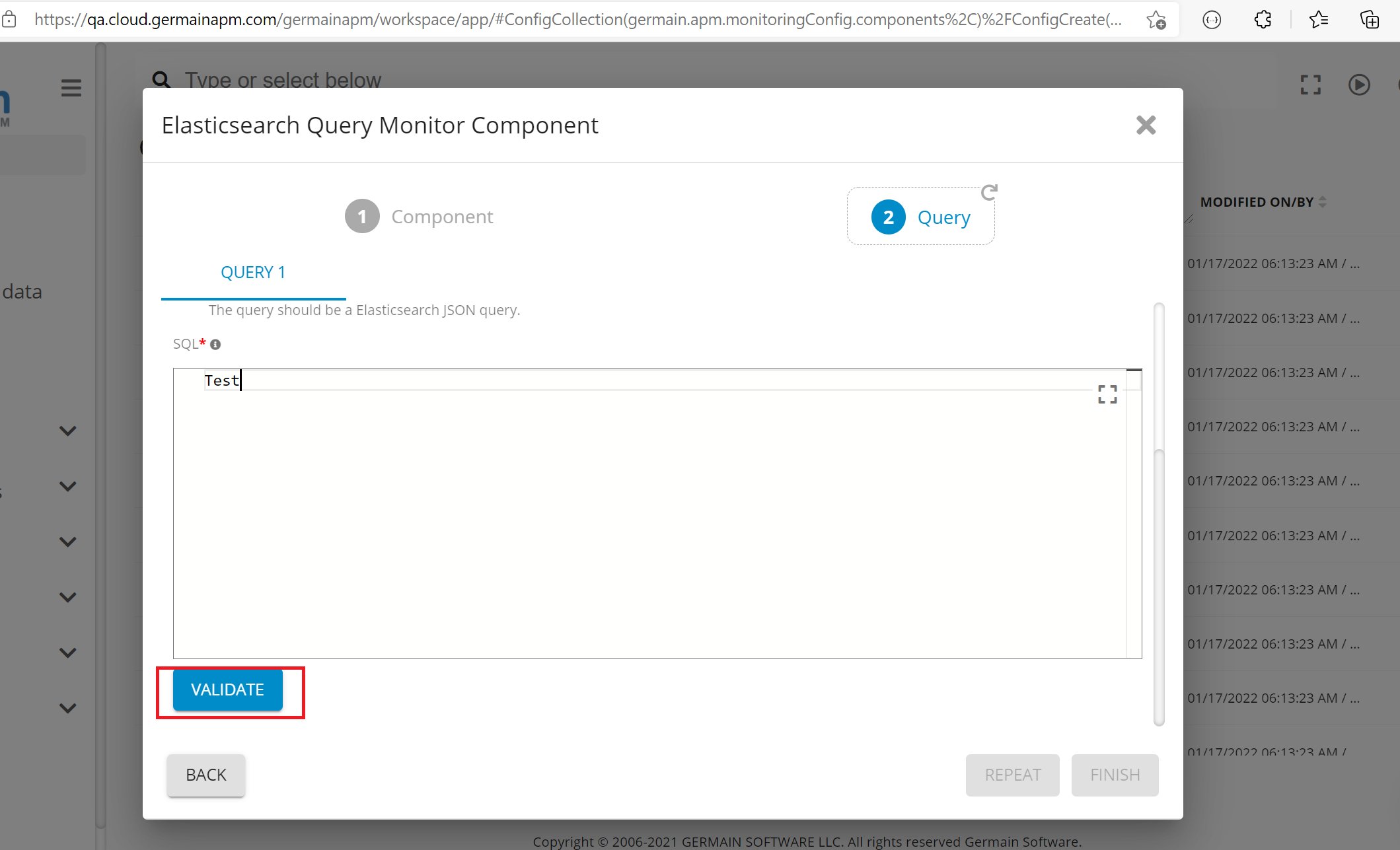
Elasticsearch Query Monitor Component configuration dialog - GermainUX
- Validate that the component can connect and execute its configured query.
- Connectivity
- Authentication
- TLS
- Index access
- Query syntax
- Expected results
- Query performance
Production Validation
Before production rollout, confirm that: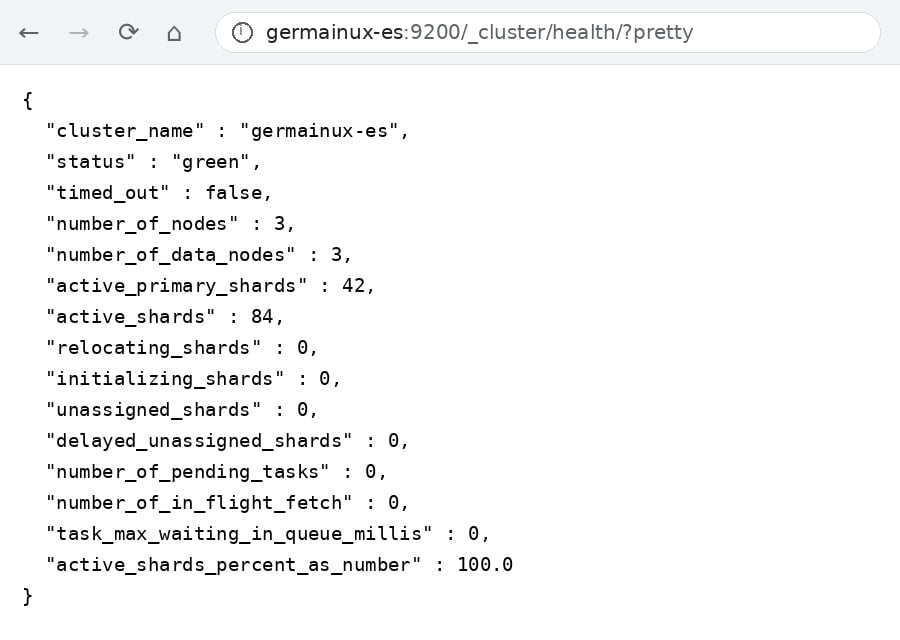
Elasticsearch cluster health with green status - GermainUX
Get Help
Contact GermainUX Support
Can't Find What You Need?
The content of this document is proprietary to GERMAIN SOFTWARE.