

Real User Monitoring
See real visitor experiences
Performance Monitoring
Find slow interactions fast
Uptime Monitoring
Synthetic checks of workflows
SLAs, Alerts, and Automation
Respond to detected conditions
Overview
Monitor and optimize the performance, user experience, conversion, and business workflows of Squarespace websites and eCommerce storefronts with GermainUX. GermainUX continuously analyzes real-user activity, application performance, errors, customer journeys, and business outcomes to help teams identify and resolve issues affecting customer experience and revenue.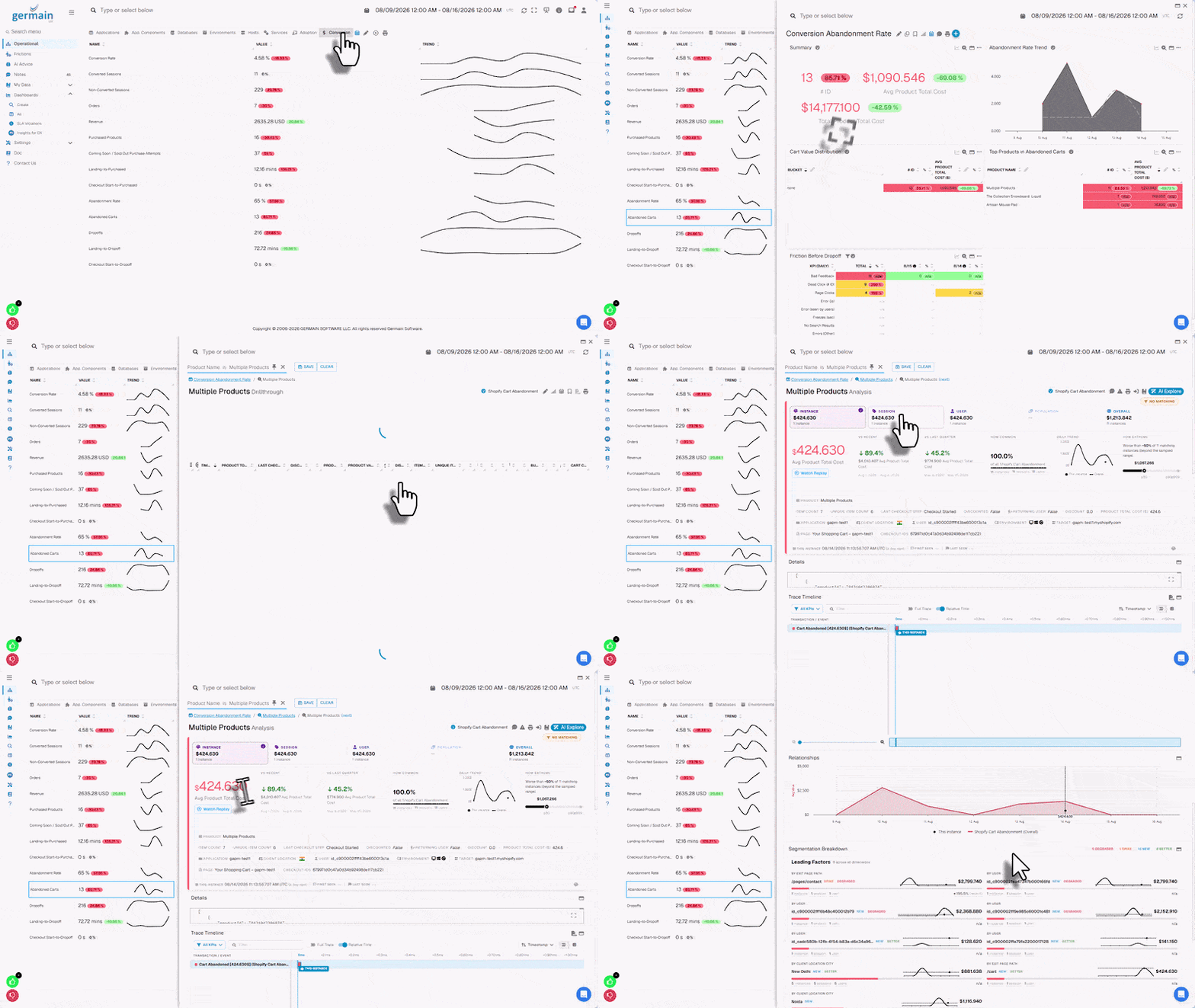
Real User Monitoring
Understand how real users experience your Squarespace website. GermainUX can monitor:- Page views
- User navigation
- Clicks and interactions
- Page-load performance
- Browser performance
- Network requests
Show all 11
Show all 11
- JavaScript errors
- User sessions
- Customer journeys
- Business transactions
- Conversion activity
Session Replay
GermainUX Session Replay reconstructs user activity on your Squarespace website, helping teams understand what customers experienced before an issue, abandonment, or conversion. Use Session Replay to investigate:- Navigation difficulties
- Repeated user actions
- Errors
- Slow interactions
- Checkout friction
- Abandoned workflows
- Conversion issues
- Unexpected application behavior
Conversion and Revenue Analysis
Analyze customer journeys and identify where revenue is being lost. GermainUX can help analyze:Product ViewAdd to CartCartCheckoutPurchase
Identify:
- Conversion rate
- Cart abandonment
- Checkout abandonment
- Funnel drop-off
- Errors affecting conversion
- Slow interactions affecting conversion
Show all 9
Show all 9
- Customer friction
- Revenue-impacting issues
- Differences between user populations or periods
Customer Journey Analysis
Analyze the steps customers take throughout your Squarespace website. Examples include:- Landing page
- Product browsing
- Product details
- Add to Cart
- Cart
- Checkout
- Purchase
- Post-purchase activity
- Where customers abandon
- Unexpected navigation
- Repeated steps
- Inefficient workflows
- Errors
- Performance bottlenecks
- Conversion opportunities
Transaction Performance Comparison
When analyzing a slow or failed Squarespace transaction, use Comparison to compare its performance with another execution of the same transaction, such as the fastest, slowest, most recent, first seen, or last seen. Comparison can reveal:- Differences in execution time for the same Squarespace transaction
- Which steps, checkout stages, or integrations caused the slowdown
- Performance differences between successful and failed Squarespace transactions
- Errors or bottlenecks affecting Squarespace customer journeys
- Potential root causes of transaction performance degradation
Performance Monitoring
Measure the performance experienced by Squarespace users. Analyze:- Page-load time
- User interaction response time
- Browser processing
- Network activity
- HTTP requests
- Third-party requests
Show all 9
Show all 9
- Slow resources
- JavaScript execution
- Performance trends
Error Monitoring
Detect errors affecting Squarespace users. Depending on the deployed monitoring components, GermainUX can identify:- JavaScript errors
- Browser console errors
- HTTP errors
- Failed network requests
- Resource-loading failures
- Integration failures
- Customer-defined application errors
JavaScript Analysis
For advanced browser troubleshooting, GermainUX JS Profiler can provide deeper analysis of JavaScript execution when supported. This can help identify JavaScript functions or execution paths contributing to:- Slow user interactions
- Browser processing delays
- Application freezes
- Poor responsiveness
Workflow Monitoring
Monitor important Squarespace business workflows. Examples include:Customer Journey
VisitBrowseProductCartCheckoutPurchase
Order Processing
Monitor the steps involved in order processing and fulfillment when the required data is available.Inventory
Analyze inventory-related activity and conditions when exposed through monitored interfaces or integrations.Marketing
Correlate campaigns with:- Website traffic
- User behavior
- Conversion
- Revenue
Integration Monitoring
Squarespace websites frequently depend on external services and integrations. GermainUX can help monitor and correlate activity involving:- Payment services
- Marketing platforms
- Analytics
- APIs
- Third-party JavaScript
- Customer-controlled services
- Other business applications
Uptime Monitoring
Proactively verify that the Squarespace website and critical workflows remain available. Synthetic monitoring can periodically execute approved scenarios such as:Open WebsiteBrowse ProductAdd to CartVerify Cart
This can identify availability or functional issues even when no real user is currently performing the workflow.
Synthetic User Monitoring
Use GermainUX RPA Bot Recorder to create synthetic user scenarios for critical Squarespace workflows. Examples include:- Open homepage
- Search or browse products
- Open product
- Add product to cart
- Open cart
- Begin checkout
- Verify expected page or content
Root Cause Analysis
GermainUX correlates user activity with available technical telemetry to help determine why an issue occurred. For example: Customer abandons checkout can be analyzed together with:User ActionsBrowser PerformanceJavaScript ErrorsNetwork RequestsThird-Party Integrations
This helps teams move from identifying a conversion problem to understanding its potential cause.
Analytics
Analyze Squarespace data by dimensions such as:- Page
- URL
- User
- Session
- Device
- Browser
Show all 15
Show all 15
- Operating system
- Geography
- Product
- Workflow
- Error
- Performance
- Conversion status
- Campaign
- Time period
SLAs, Alerts, and Automation
Configure GermainUX to detect conditions such as:- Website unavailable
- Slow page
- Slow interaction
- JavaScript error
- HTTP failure
- Integration failure
Show all 9
Show all 9
- Conversion-rate degradation
- Checkout abandonment increase
- Synthetic workflow failure
Additional Resources
Deploy
Monitoring or automation for Squarespace
Configure
Monitoring or automation for Squarespace
AI
Insights & Recommendations
Analytics
More Analytics Features
Automation
More Automation Features
Dashboards
Dashboards and reports overview
Reports
Automatic and scheduled reports
Get Help
Contact GermainUX Support
The GermainUX team helps you get up and running faster, empower your team, turn data into actionable insights, and optimize performance to deliver measurable business outcomes.
Can't find what you need?
Search all GermainUX docs with Ctrl + K, or use the feedback buttons at the bottom of this page to tell us what is missing.
The content of this document is proprietary to GERMAIN SOFTWARE.