

Monitoring And Analytics Features
Maintenance Features
Monitoring and Analytics Features
Clipboard Copy
Description Detailed/Raw insights like this one are now fully copied to the Clipboard. Previously, there was a bug where only the visible portion was copied. Detailed insights like these can primarily be found on Drill-through or RCA Dashboards in the GermainUX workspace.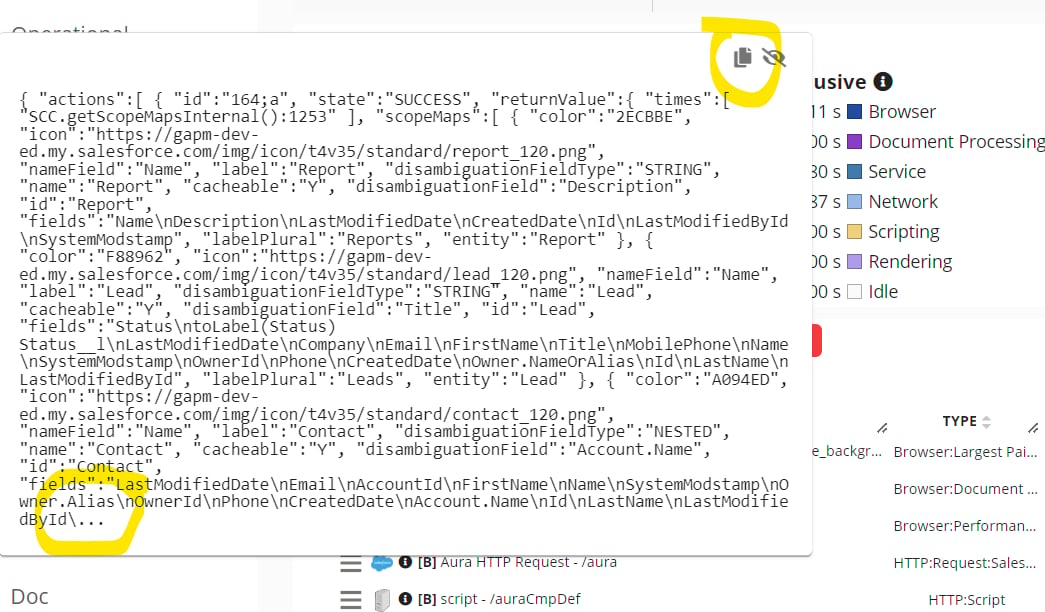
Detailed insight fully copyable on GermainUX
More details onGermainUX Workspace.
Collaborative Business Process/Workflow
Description This client required Germain’s assistance in identifying process/workflow inefficiencies while their employees used their homegrown HR Solution application and SFDC/Salesforce. To meet their requirements, we had to enhance our current Business Process (BP) engine and introduce a new Collaborative BP/Business Process/Workflow. In essence, this new workflow supports non-sequential processes/workflows that can be executed by one or many employees. Here are the differences between our “traditional” BP and the new “Collaborative” BP: “Traditional” Business Process Type- Configured with a fixed step definition in advance.
- Driven by data collected from Germain RUM or Engines (e.g., user clicks, mouse clicks, error events, log transactions).
- Steps are expected to be completed in sequence, one after the other.
- BP is considered completed when the last step is reached.
- BP steps do not need to be configured in advance; they are automatically discovered from the data.
- Driven by user activity data (note that this can be extended to other data types in the case of Customer Journey/multi-channel BP, but for now, our focus was on addressing our client’s requirements).
- Steps are not executed in sequence; users can generate more activity on a prior step at any time.
- The most notable feature of this new BP mechanism is that it accumulates durations into existing facts rather than creating new ones each time. As a result, the same BP step facts can have contributions from multiple users across multiple sessions.
- BP is considered completed when any activity is flagged as completed.
Configure
How to configure aExample
Example of Collaborative Business Process and how Loss of Productivity is identified
Lost Productivity reported in Days, Hours, Minutes and Second - GermainUX
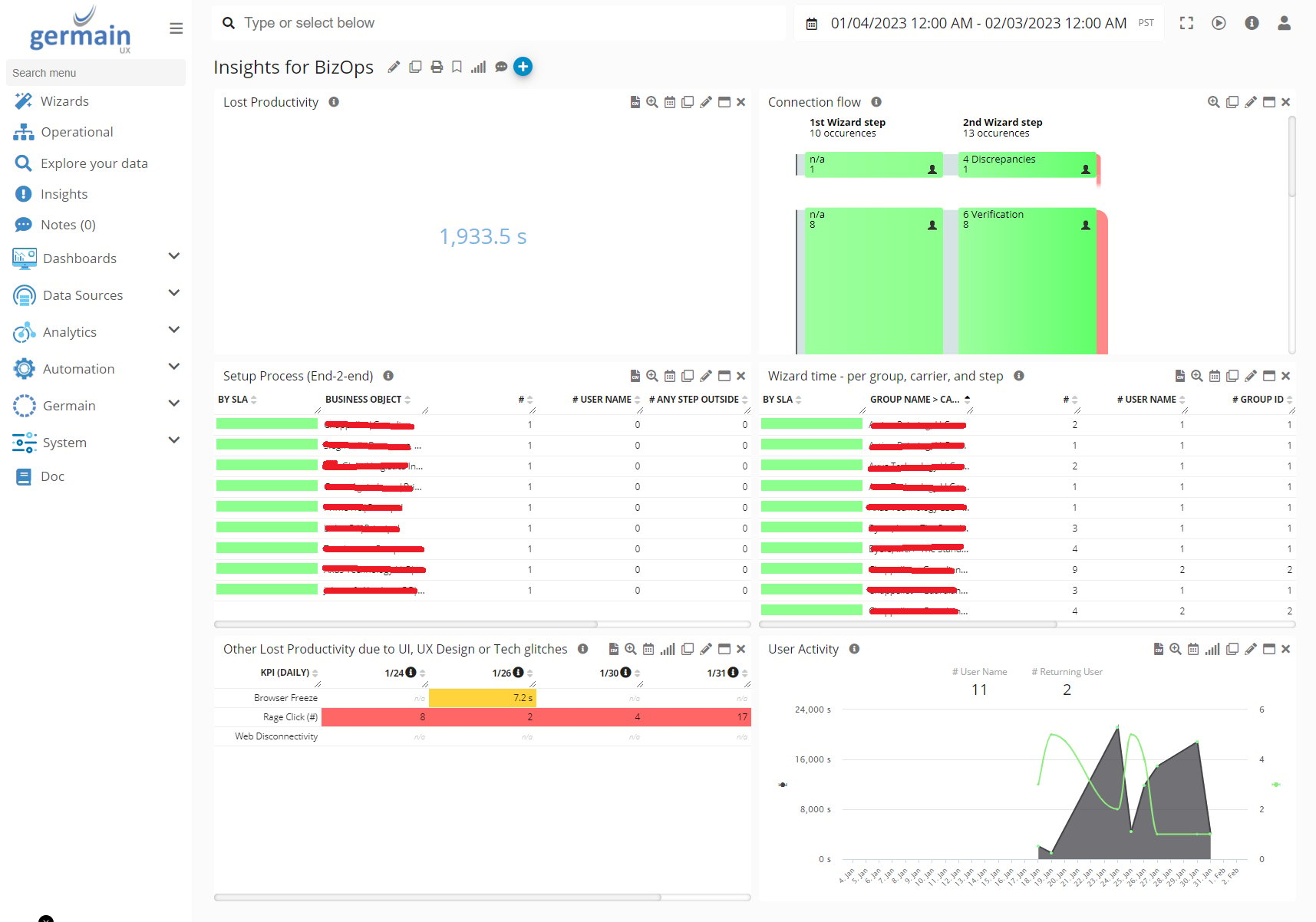
Collaborative Workflow & Lost of Productivity Finding - GermainUX
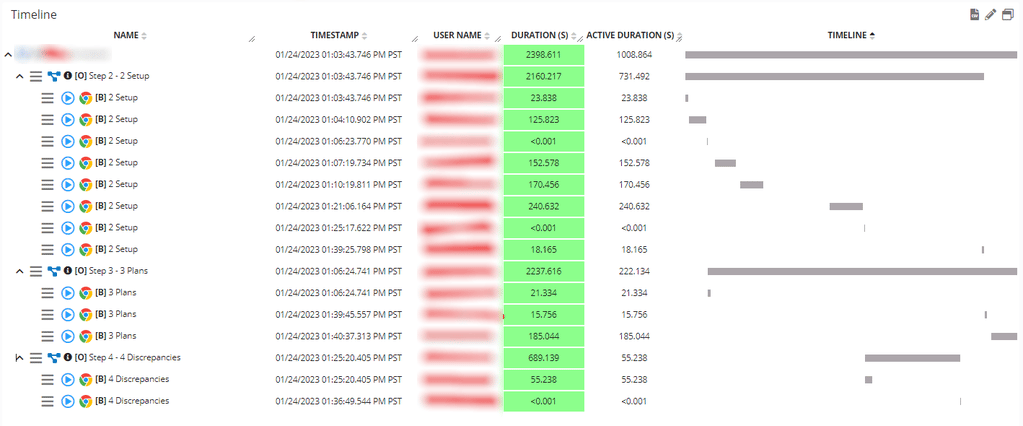
Time Breakdown by Process Phase / Employee - GermainUX
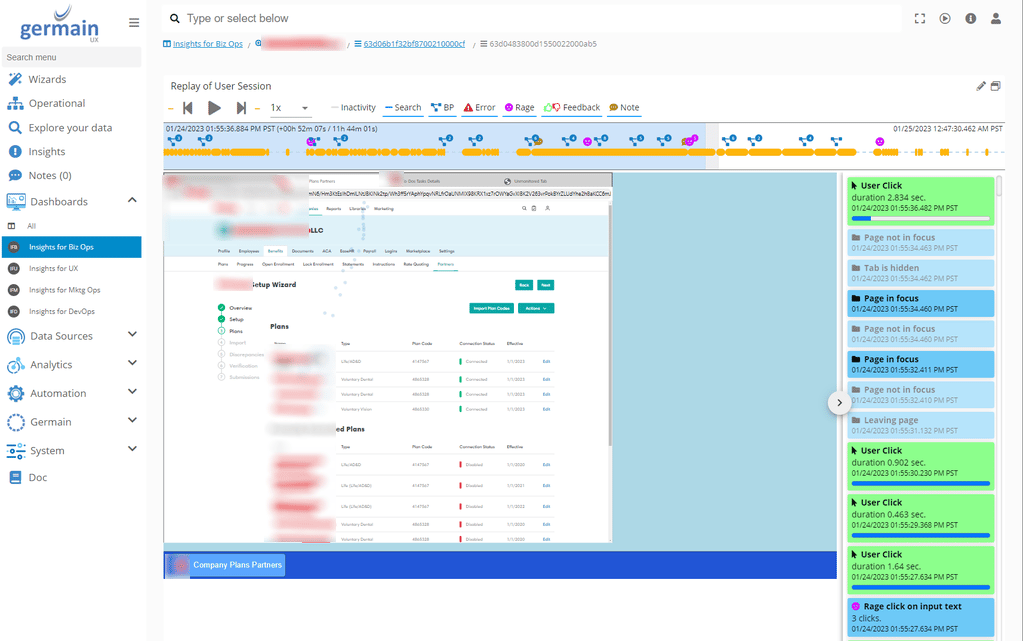
Blue Icons showing Every time an employee has performed one of the BP Steps
Filter Percent Change SLA with Baseline and Current Results
Description This enhancement aims to reduce the volume of alerts. Germain now includes the capability to apply constraints to a percent change Service Level Agreement (SLA) based on baseline and current results. A new configuration property called “Threshold Expression” has been introduced for statistical SLAs, which can support advanced constraints. It allows the utilization of the following variables:- Current: Represents the absolute value for the “current” period as defined by the SLA.
- Baseline: Represents the absolute value for the “baseline” period as defined by the SLA.
- Value: Represents the change between the baseline and current values, either absolute or in percentage, depending on the SLA configuration.
- Threshold: Represents the threshold value defined by the SLA.
Configuration
How to configure SLA.Example
For example, if both the baseline and current counts are less than 20, even if the percentage change exceeds a configured threshold, no alert will be triggered.N-Table - Multiple KPIs and Measures
Description N-Table now has the capability to display multipleKPIs and measures.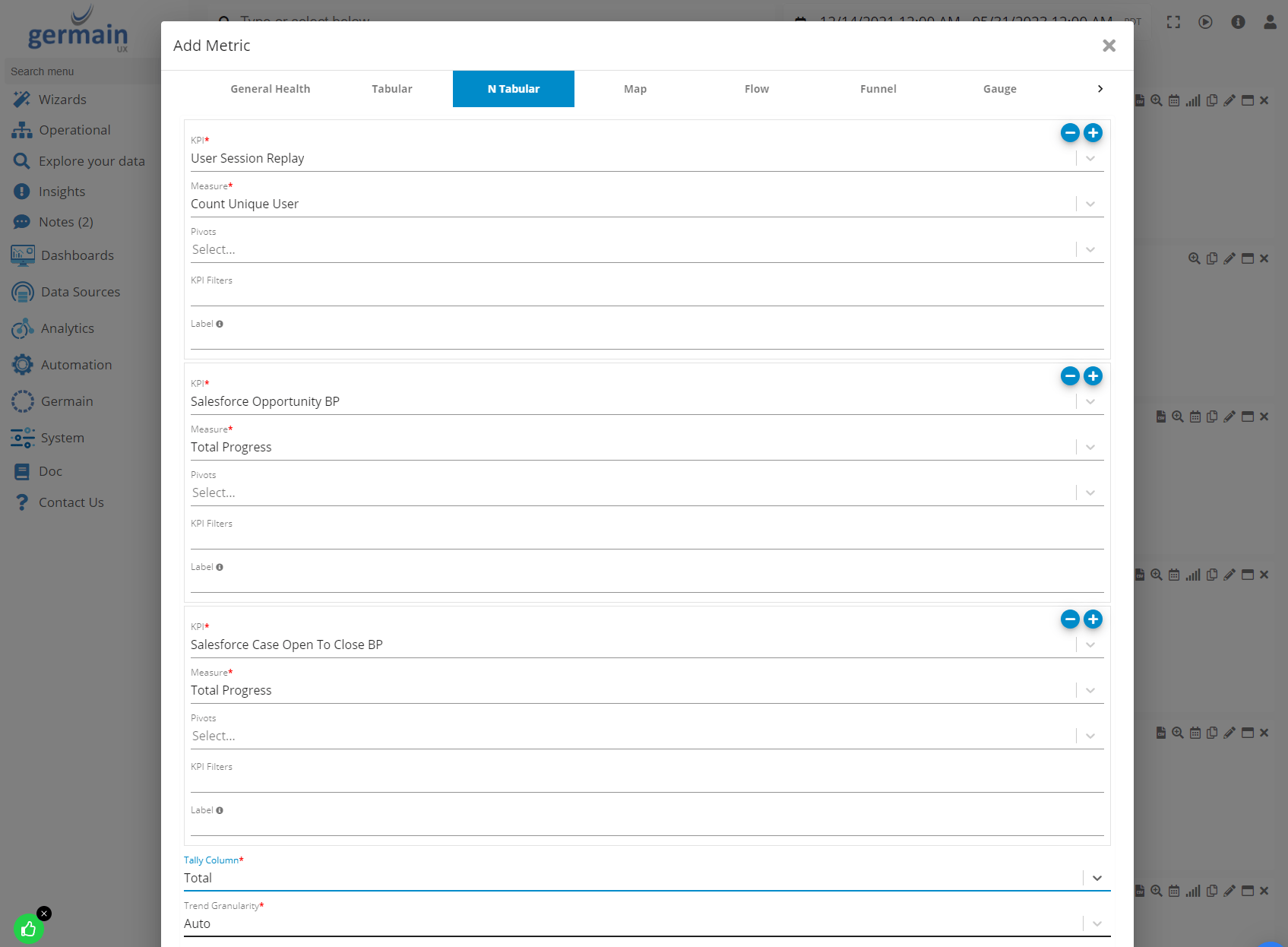
N-Table Portlet on GermainUX
More details on.
Operational Dashboard (Enhancements)
Description Several enhancements have been implemented in the Operational dashboard to facilitate quicker identification of user, process, or technology-related issues.- Metric Sorting: Improved functionality has been introduced to sort metrics, enabling easier analysis and identification of key areas.
- Tooltip Color Coding: To provide visual cues and aid in data interpretation, tooltips now include color coding, allowing for a quick understanding of metric performance.
- NPS/User Feedback: The Operational dashboard now includes metrics for NPS (Net Promoter Score), user feedback (positive/negative/comments), enabling better insights into user satisfaction and sentiment. These metrics remain accessible on any aggregate dashboards as well.
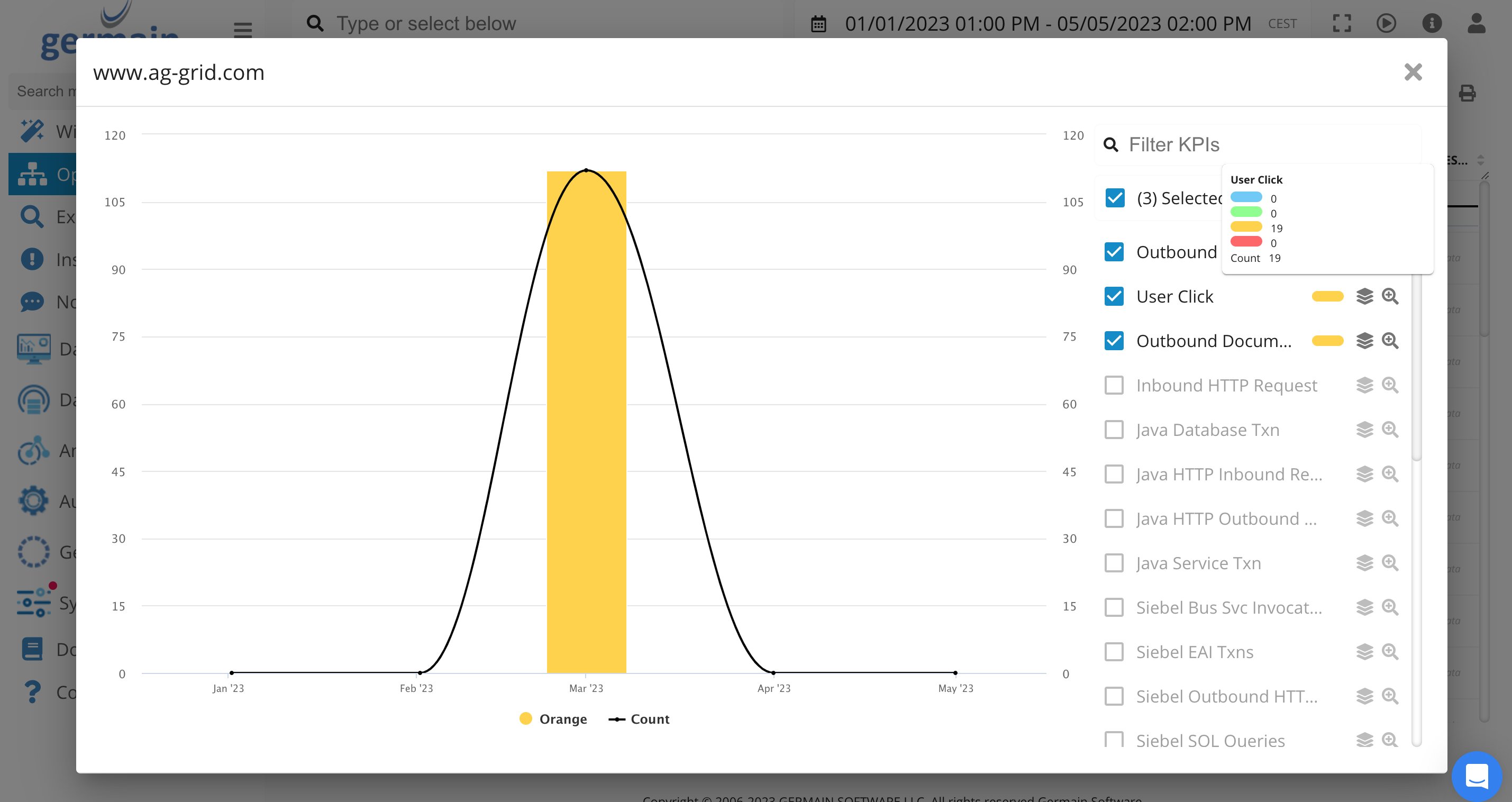
SLA Violation on Operational Dashboard of GermainUX

NPS/Real User Feedback on Operational Dashboard of GermainUX
More details on .
Percentiles on Drill-through
Description The functionality to show/hide percentiles on any Drill-through dashboards has been added.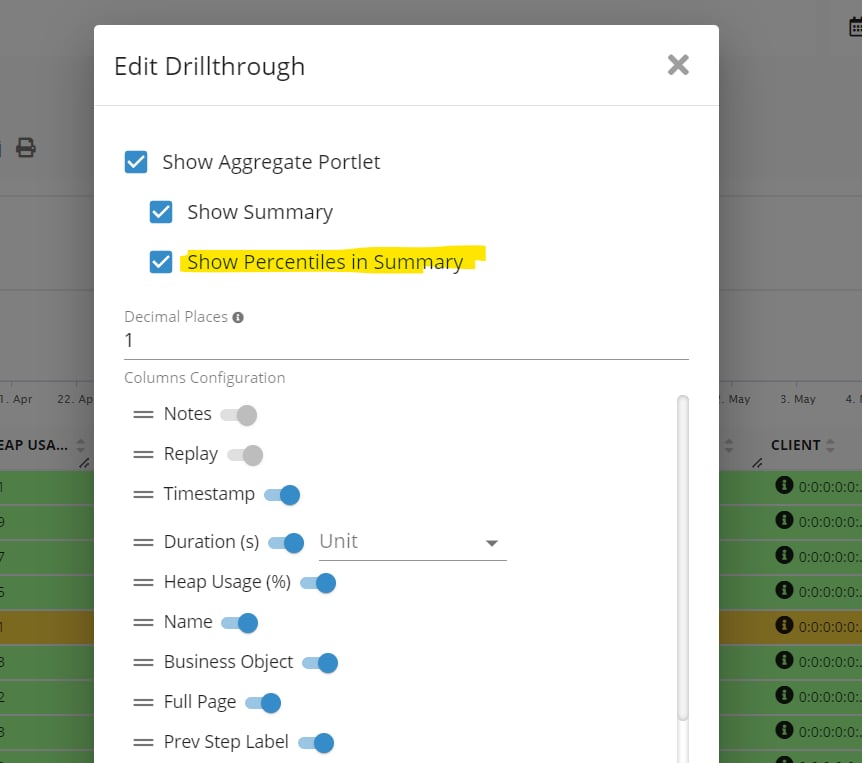
Percentiles on Drillthrough Dashboard - GermainUX
More details about .
Rage Click - Easier to Understand
Description Counter and Highlight features have been added to make it easier to identify the specific parts of the UI where a user repetitively clicked on while replaying a User Session video. Example
Rage Click Counter on GermainUX
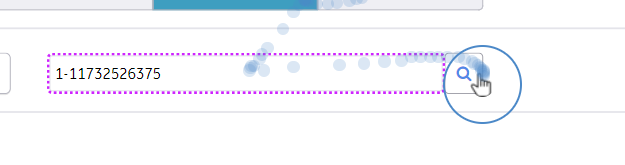
Rage Click Highlight on GermainUX
SLA Violation dashboard (Enhancements)
Description The SLA Violation Dashboard has been enhanced to provide improved visibility and ease of finding new or significant issues and threshold violations. Please note that the “SLA Violation” dashboard was previously referred to as the “Insights” Dashboard. Example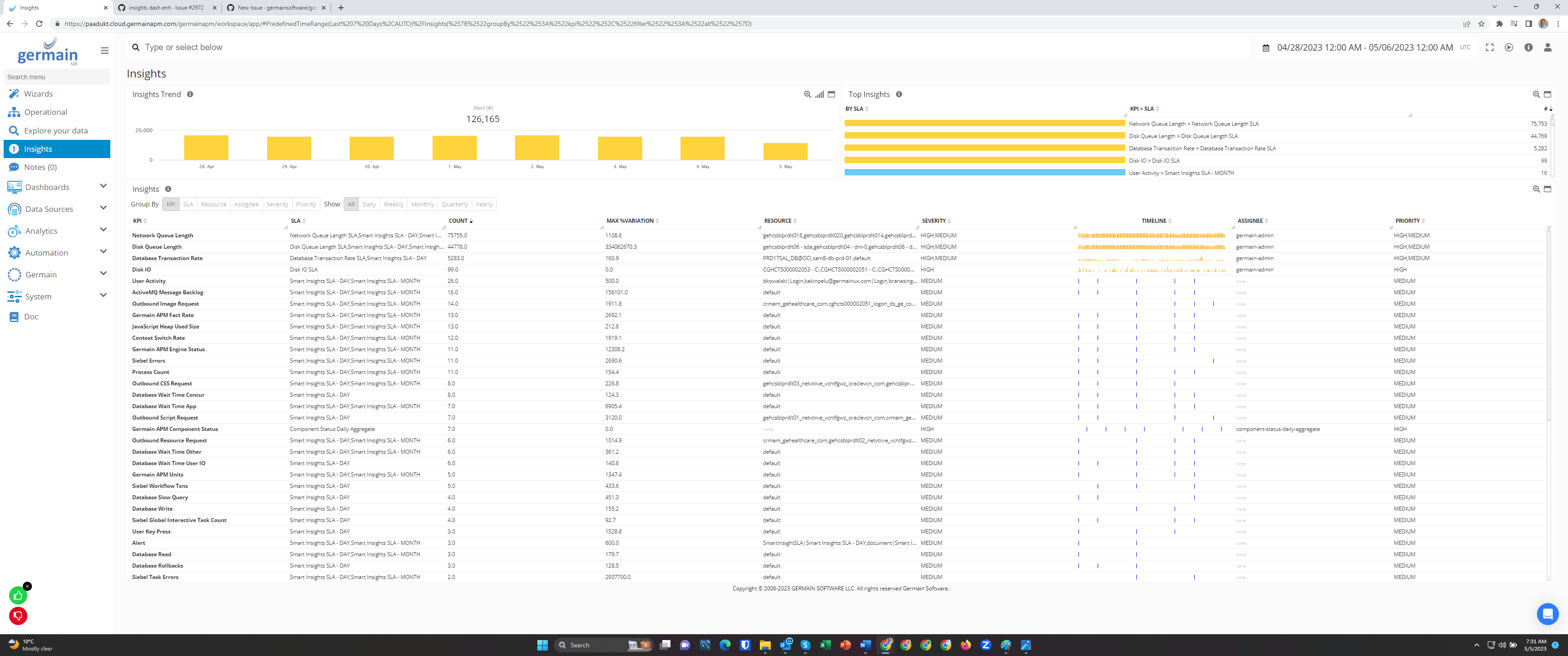
SLA Violation / Insight Dashboard of GermainUX
More details on SLA Violation Dashboard.
Synthetic User Scenario - Monitor & Replay
Description The SLA Violation Dashboard has undergone enhancements to enhance visibility and facilitate the identification of new or significant issues and threshold violations. It is important to note that the dashboard previously known as the “Insights” Dashboard is now referred to as the “SLA Violation” Dashboard. Configure How to Configure Germain Synthetic User Scenario / RPA Bots.Workspace Links Openable in New Tab
Description In various sections of the Germain Workspace, you can drill down into insights. We have introduced a new feature that allows you to open these drilldowns in new tabs. For instance, when clicking on options such as “View the worst (RCA),” “Raw … Instances,” or “Pivot on these… instances,” they will now be opened in a new browser tab for your convenience.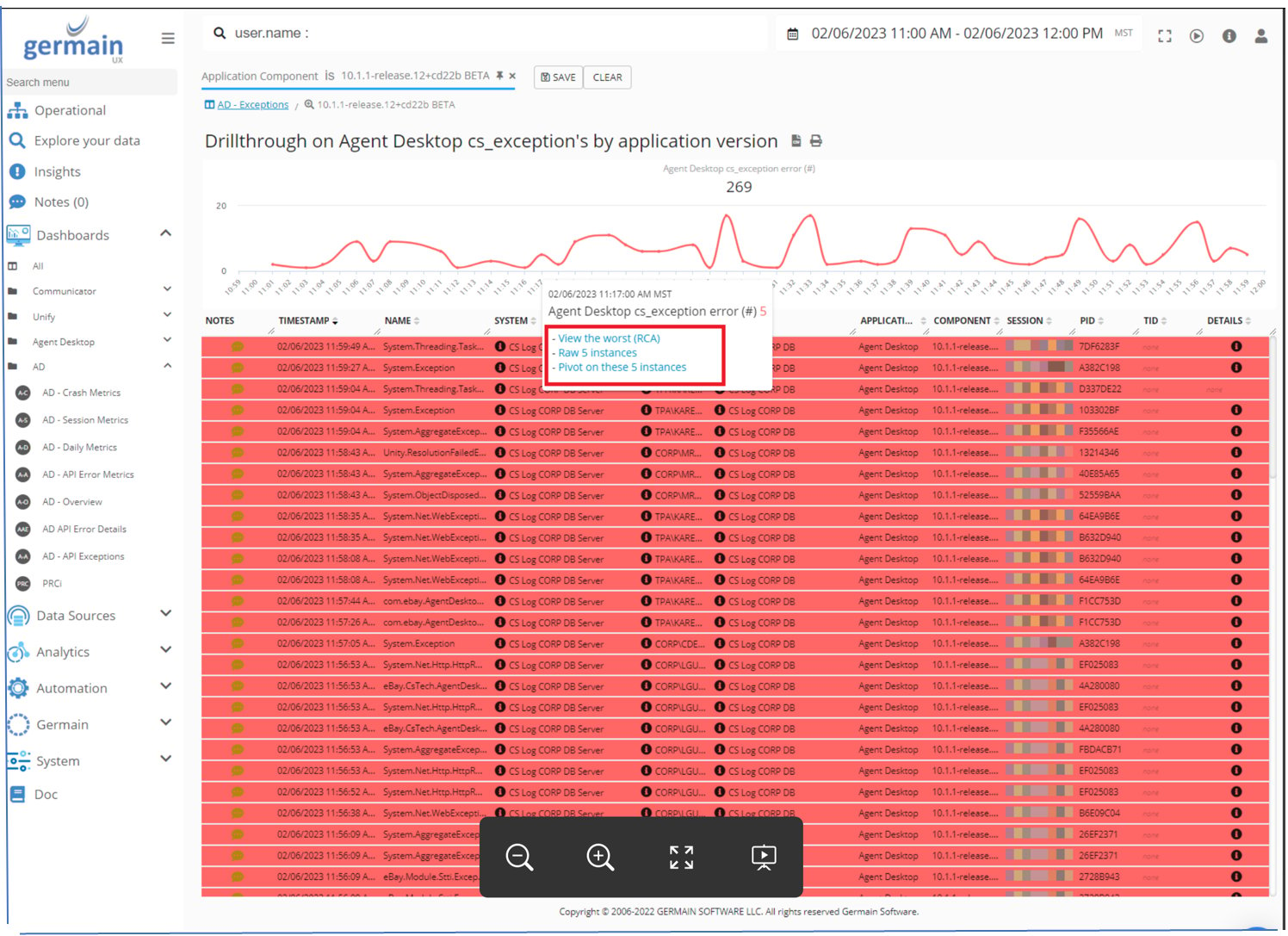
Clicking on a Link (e.g. “View the worst ..”) opens a new browser tab - GermainUX
More details on GermainUX Workspace.
Maintenance Features
Distributed Storage for Static Resources
Description Germain has transitioned from storing static resources on the filesystem, which previously required setting up network shares across servers hosting Tomcat instances. Instead, Germain now utilizes AWS S3 (Simple Storage Service) to store large static resources.Group Policy for Germain RUM Extension
Description A new feature called Generic Group Policy configuration has been introduced, allowing the system to listen for auto-configuration messages from a monitored application. More details: GermainUX-RUM Extension and for SFDC/Salesforce users: GermainUX-RUM Extension | Windows Group Policy (All Users)Hazelcast
Description Several enhancements have been made to the integration between Germain and Hazelcast, aimed at improving scalability.Kubernetes
Description Germain now offers comprehensive support for running on Kubernetes. To accomplish this, we have made enhancements to Germain’s Analytic and Real-Time Metrics (RTM) services, resulting in improved scalability for the Germain platform.Navigate to Referenced Object
Description Now, it is easier to navigate to the configuration object(s) that the current object depends on. Example Quickly find a rule that is used by a given monitor.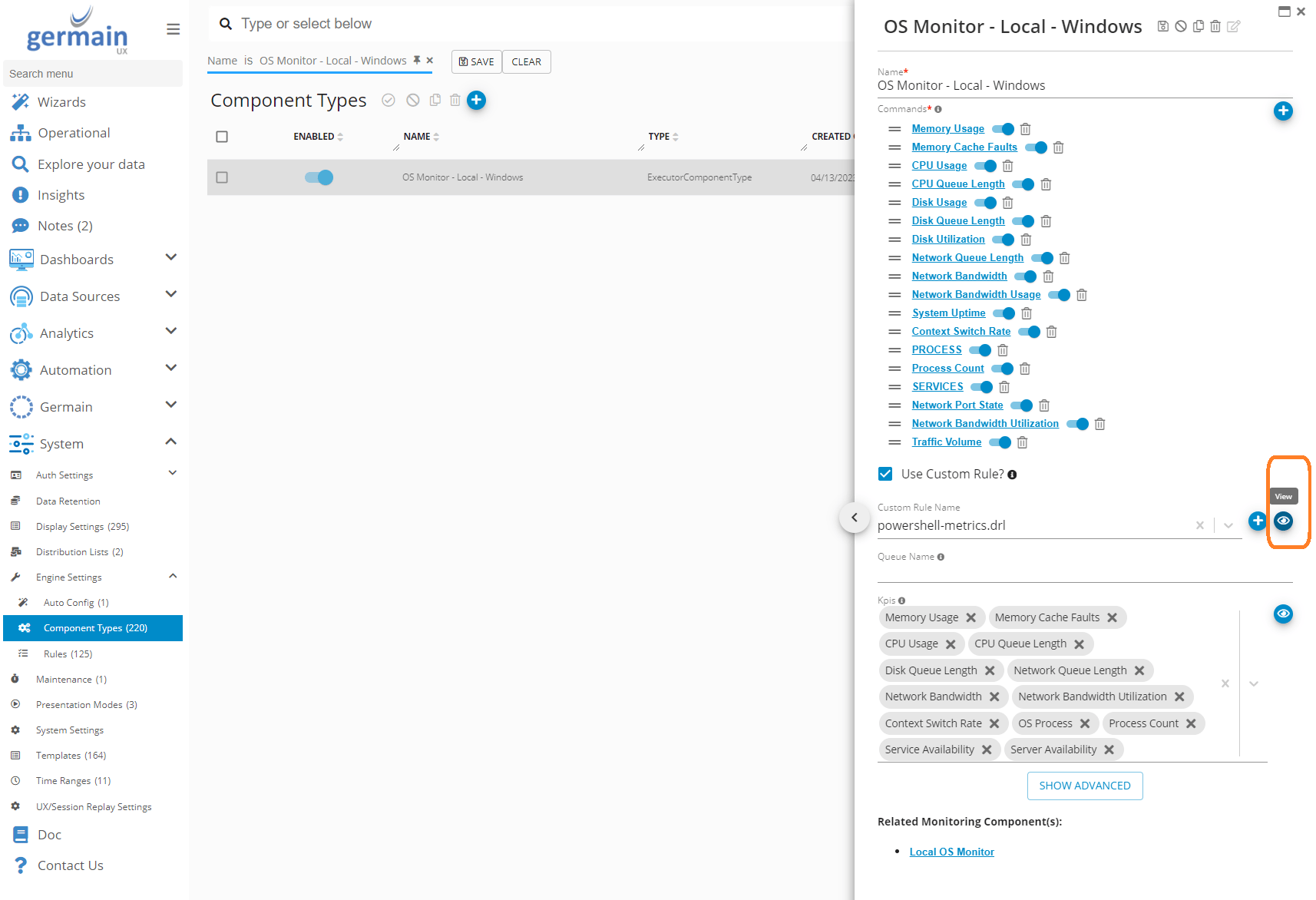
Component Types on GermainUX
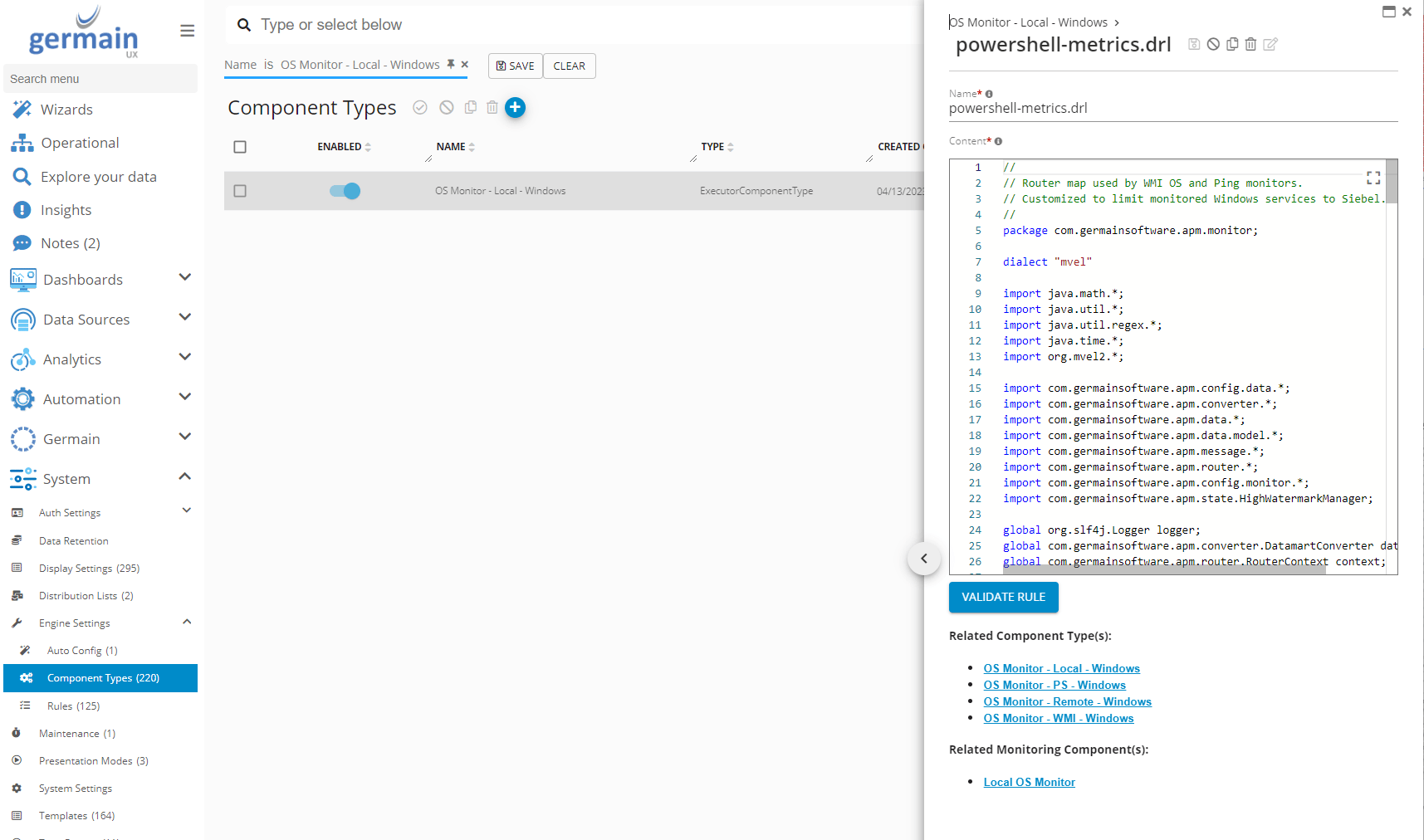
Rule for a Component Type on GermainUX
Remove the Need for “datamart” Schema Upgrade for Elastic Deployments
Description The ability to skip datamart schema upgrade via Flyway for Elastic deployments has been introduced. This enhancement significantly speeds up Germain upgrades.More details on Germain Datamart.
Syntactic/Bad Config Object Auto-Detection
Description To prevent customizations from causing issues in Germain, the platform now performs configuration checks during the saving process. This feature enables Germain to identify and flag any incorrect configurations, such as wrong objects in lists, map entry names not matching the key, and other similar issues.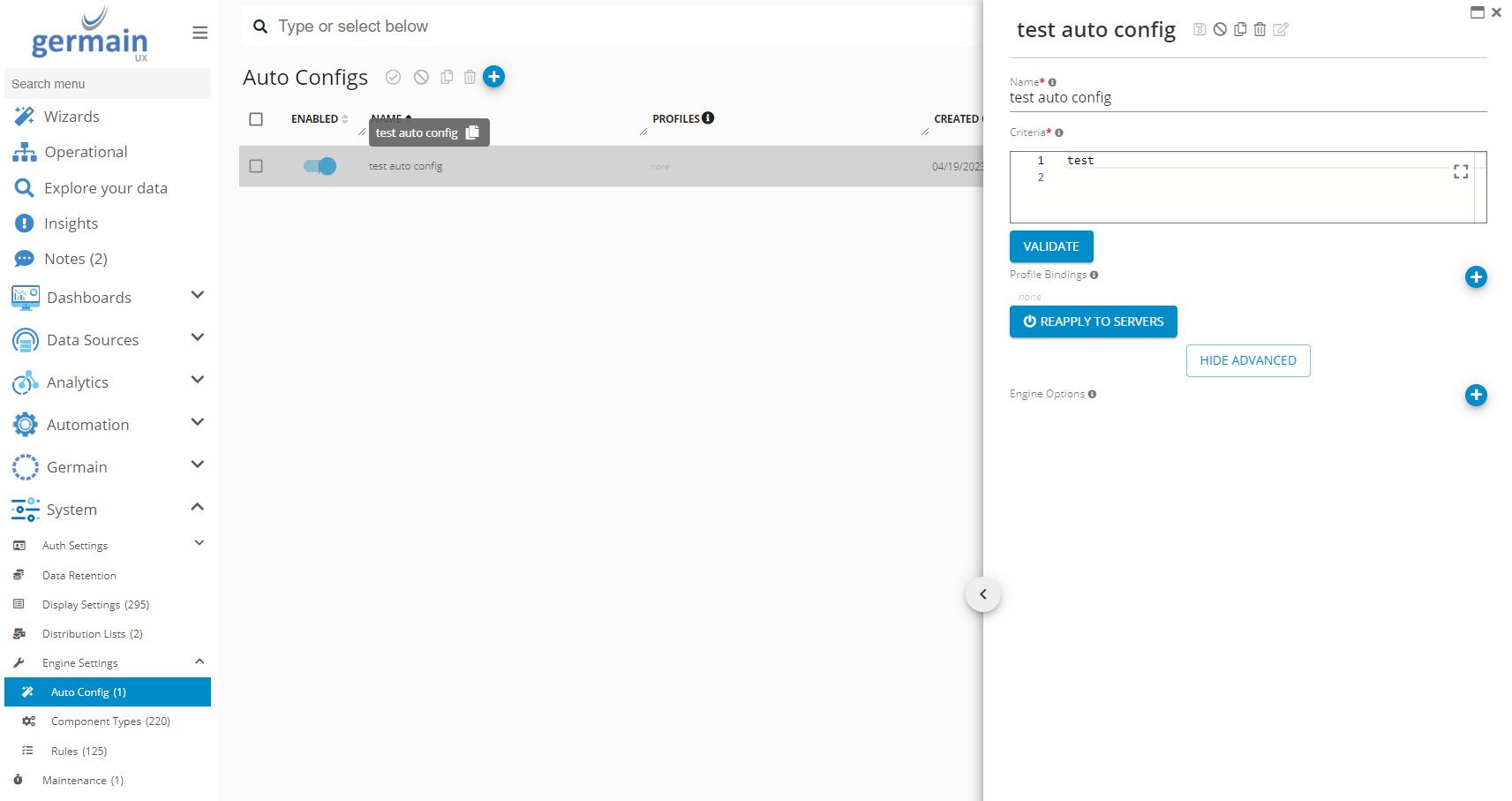
Auto config dashboard of GermainUX
SystemConfig.TimeZone for Dashboard’s default Timezone
Description This enhancement ensures that users have access to all aggregated data, as full aggregation now functions for all time zones, not just SystemConfig.TimeZone.ServiceNow
Description Germain now offers the ability to integrate with ServiceNow, allowing for the creation of a ServiceNow ticket for each Germain alert. Configuration For more information on the ServiceNow integration with GermainUX, please refer to the following documentation: ServiceNow Integration with GermainUXSlack
Description Germain now provides the capability to integrate with Slack, enabling the display of Germain alerts, notes, and tickets within the Slack platform. Configuration For more information on the Slack integration with GermainUX, please refer to the following documentation: Slack Integration with GermainUX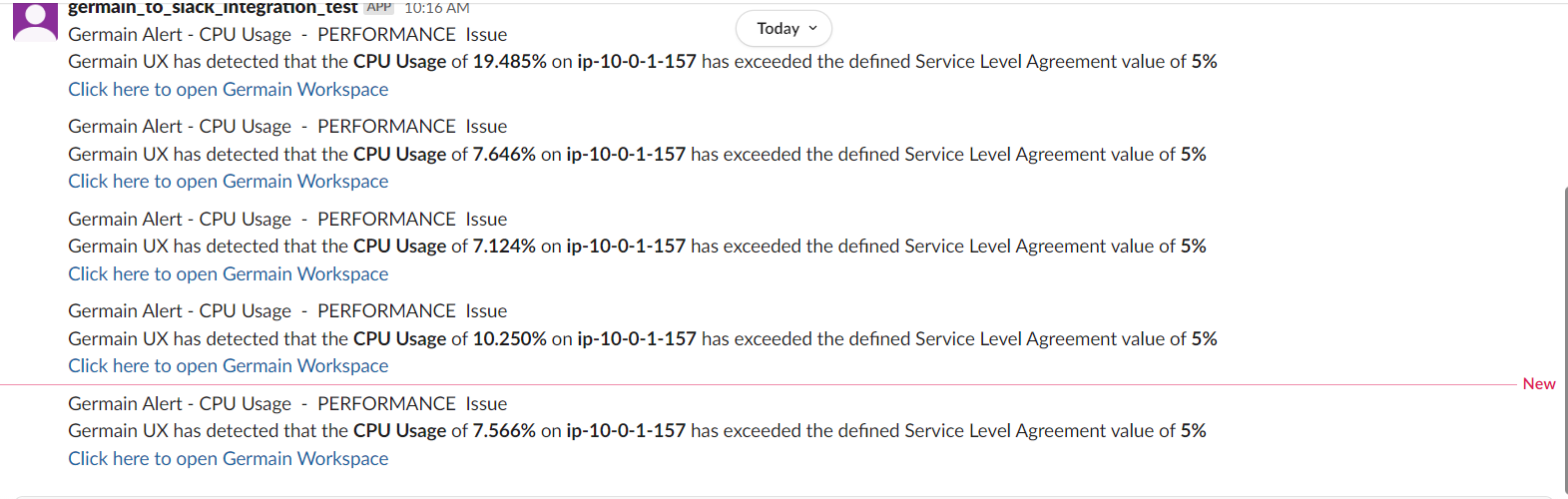
GermainUX Alert and Note on Slack
Security and Vulnerabilities Fixes
Download
https://germain-apm.s3.us-west-2.amazonaws.com/GermainAPM/2023/GermainAPMEngine-2023.2-12-binary.ziphttps://germain-apm.s3.us-west-2.amazonaws.com/GermainAPM/2023/GermainAPMEngine-2023.2-12-binary.tar.gz
GermainAPMServer-2023.2-12-binary.zip (no longer available) GermainAPMServer-2023.2-12-binary.tar.gz (no longer available) GermainAPMService-2023.2-12-binary.zip (no longer available) GermainAPMService-2023.2-12-binary.tar.gz (no longer available)
Get Help
Contact GermainUX Support
Can't find what you need?
The content of this document is proprietary to GERMAIN SOFTWARE.