
🤖 Features
GermainUX uses Large Language Models and other AI capabilities to automatically analyze complex monitoring data and transform it into clear, prioritized, and actionable insights.
Instead of requiring teams to manually review long user sessions, technical errors, application logs, conversations, or thousands of feedback comments, GermainUX can automatically:
|
Action |
|---|
|
Summarize what happened |
|
Identify recurring issues and behavioral patterns |
|
Categorize related data |
|
Explain the likely causes of an issue |
|
Identify affected users and business processes |
|
Estimate business or user impact |
|
Recommend corrective actions |
|
Prioritize improvement opportunities |
|
Trigger follow-up tasks and automations |
GermainUX AI connects user behavior, business workflows, application performance, errors, feedback, conversations, and Session Replay. This helps organizations detect issues faster and make better decisions across customer experience, application adoption, eCommerce conversion, employee productivity, product management, operations, compliance, and engineering.
💖 Core Benefits
|
Benefit |
Description |
|---|---|
|
Efficiency |
Reduces the time required to manually review sessions, errors, logs, feedback, and conversations. |
|
Clarity |
Transforms large volumes of raw data into understandable findings, themes, and recommendations. |
|
Consistency |
Applies repeatable prompts and analytical criteria across similar data, reducing variation in manual analysis. |
|
Prioritization |
Ranks issues and recommendations according to their reach, severity, and estimated impact. |
|
Context |
Connects AI findings with the underlying GermainUX metrics, user sessions, errors, traces, and workflows. |
|
Actionability |
Turns identified issues into recommendations, tickets, alerts, reports, or automated actions. |
|
Scalability |
Analyzes activity across many users and sessions without requiring every item to be reviewed individually. |
⚙️ From Raw Data to Action
GermainUX supports a continuous AI-assisted workflow:
Collect → Analyze → Categorize → Explain → Prioritize → Recommend → Act → Validate
📥 Workflow Steps
|
Step |
Description |
|---|---|
|
Collect: |
GermainUX monitors user behavior, business processes, application performance, errors, feedback, and conversations. |
|
Analyze: |
AI evaluates individual events, sessions, or groups of related data. |
|
Categorize: |
Similar issues and themes are grouped together. |
|
Explain: |
GermainUX summarizes what happened and identifies potential causes. |
|
Prioritize: |
Findings are ranked according to their impact and reach. |
|
Recommend: |
AI proposes actions that may improve the experience or resolve the issue. |
|
Act: |
GermainUX can create alerts, Notes, reports, or automated actions. |
|
Validate: |
Teams use GermainUX monitoring and analytics to confirm whether the change produced the expected improvement. |
📊 AI Advice Dashboard
The AI Advice Dashboard consolidates and prioritizes AI-generated optimization opportunities.
Recommendations are based on actual application usage and monitored evidence rather than generic best practices alone.
The dashboard can help teams identify:
|
Opportunity |
|---|
|
The most significant user-experience issues |
|
Adoption barriers in CRM, ERP, and internal applications |
|
Conversion problems in eCommerce journeys |
|
Workflow inefficiencies and lost productivity |
|
Recurring technical errors |
|
Application-performance issues |
|
Opportunities to simplify user journeys |
|
Improvements likely to affect the greatest number of users |
Each recommendation can include:
|
Component |
|---|
|
The identified issue |
|
Supporting evidence |
|
Affected users, sessions, or workflows |
|
Potential root cause |
|
Estimated business or productivity impact |
|
Recommended corrective action |
|
Relative priority |
This helps teams focus on the improvements most likely to produce measurable business results.
Prioritized AI Advice based on monitored application usage — GermainUX
💬 AI Explore
AI Explore provides a conversational, ChatGPT-like interface within the Analysis Dashboard.
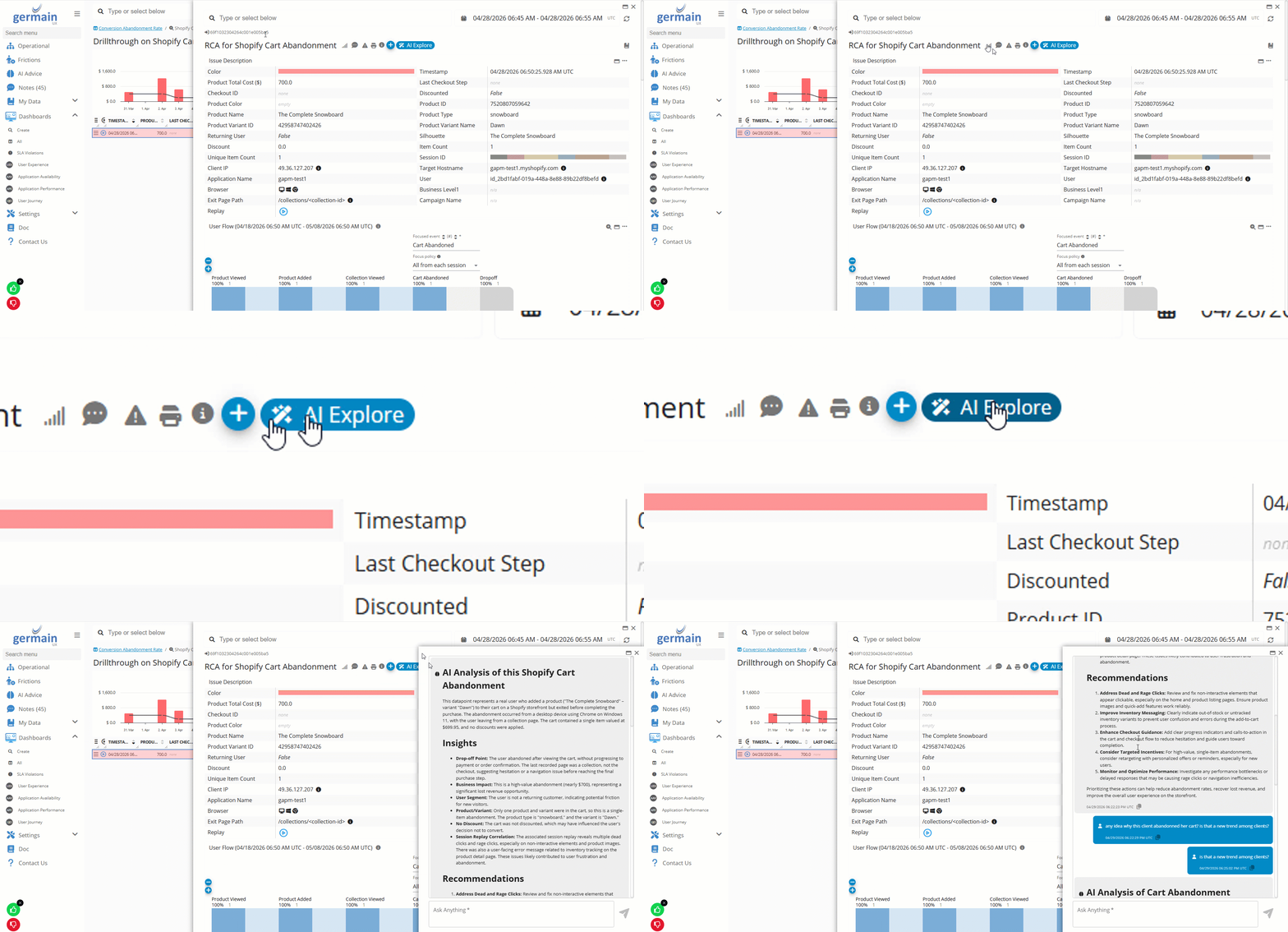
Users can ask natural-language questions about the KPI, issue, or instance currently being investigated. GermainUX uses the selected fact and its available analytical context—including trends, baselines, Related KPIs, Leading Factors, traces, and user-session data—to generate an answer.
AI Explore can help users:
|
Use Case |
|---|
|
Explain an insight |
|
Determine whether a KPI is abnormal |
|
Identify what changed at the same time |
|
Find where the issue is concentrated |
|
Summarize the affected population |
|
Identify potential root causes |
|
Recommend the next diagnostic step |
|
Suggest possible corrective actions |
Example questions include:
|
Question |
|---|
|
Why are Salesforce clicks slower than usual? |
|
Which users and pages are most affected? |
|
What changed when the error rate increased? |
|
Why did this user abandon the shopping cart? |
|
Which checkout frictions are affecting conversion? |
|
Is this problem isolated or widespread? |
|
What should the product or engineering team investigate next? |
🔍 Example: Cart Abandonment
A user abandons an eCommerce cart. AI Explore can analyze the available context to determine whether the session included:
|
Signal |
|---|
|
User-facing errors |
|
Slow pages or requests |
|
Repeated clicks |
|
Failed validation |
|
Navigation confusion |
|
Product or checkout issues |
|
Unexpected workflow changes |
It can then summarize the evidence and suggest likely explanations or follow-up actions.
💡 AI Recommendations
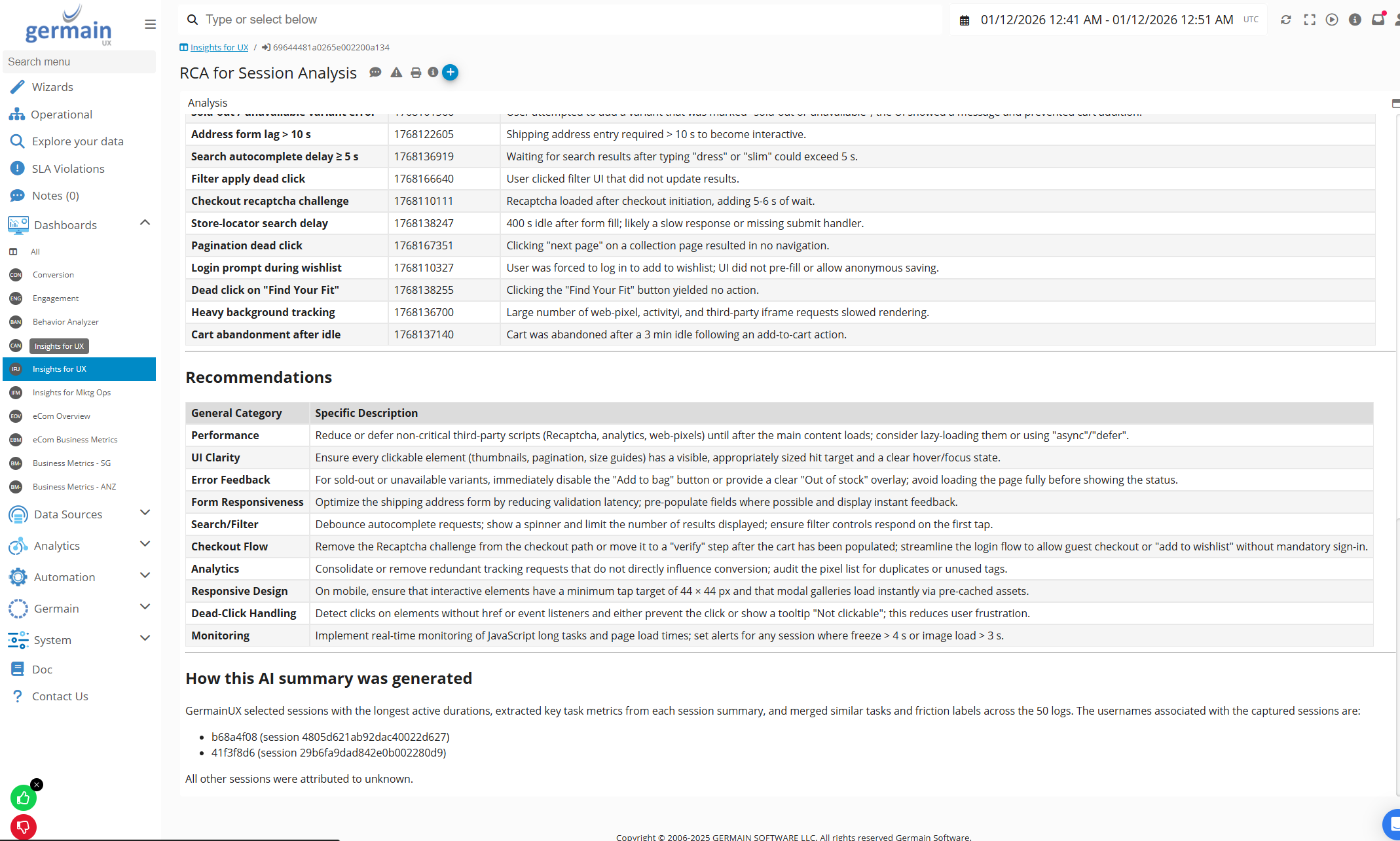
GermainUX can automatically generate recommendations from detected issues, summarized sessions, categorized feedback, conversation analysis, or other monitored evidence.
Recommendations can address:
|
Area |
|---|
|
UX improvements |
|
Workflow simplification |
|
Application-adoption barriers |
|
Conversion friction |
|
Employee-productivity loss |
|
Error remediation |
|
Application-performance problems |
|
Training or user-guidance needs |
|
Data privacy and compliance concerns |
Where sufficient evidence is available, a recommendation can include:
|
Element |
|---|
|
What should be changed |
|
Why the change is recommended |
|
Which users or processes would benefit |
|
Supporting monitoring evidence |
|
Estimated or measured impact |
|
Suggested priority |
AI-generated recommendations should be reviewed alongside the underlying GermainUX evidence before significant corrective action is taken.
👂 Conversation Friction Detection and Analysis
GermainUX can analyze collected chat, call, or message conversations to identify where interactions did not progress smoothly.
-
Alert when a customer isn’t getting help from a CSR or chatbot:
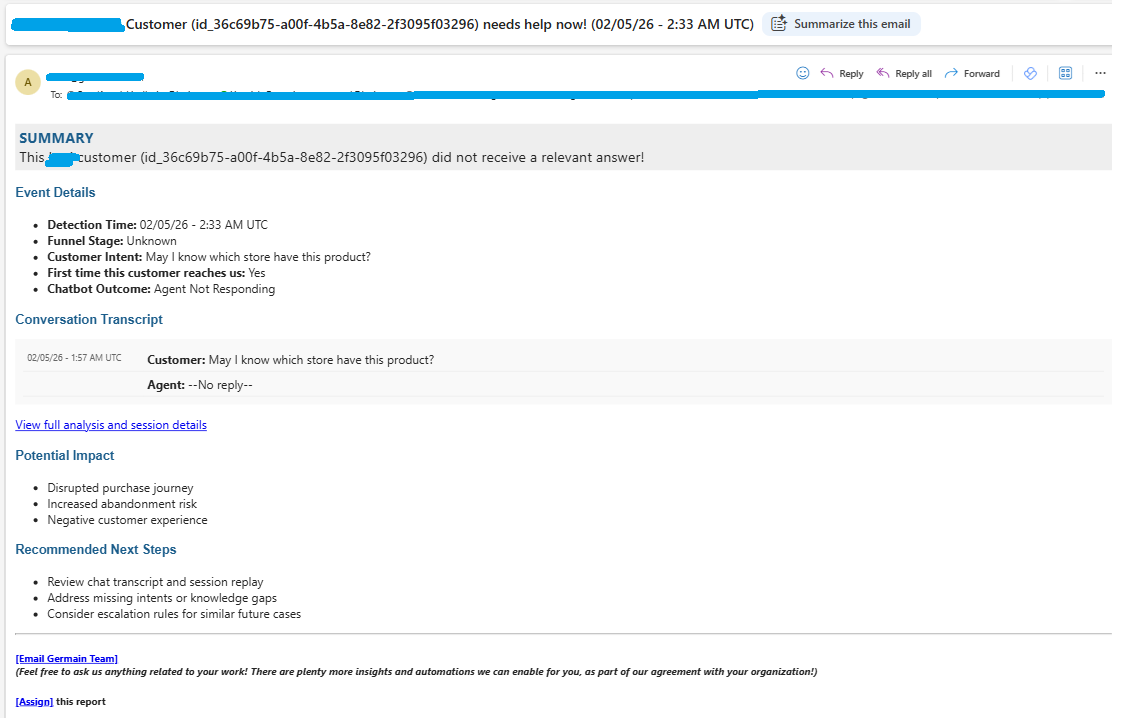
AI-powered conversation analysis can detect patterns such as:
|
Pattern |
|---|
|
Misunderstandings |
|
Repeated questions or explanations |
|
Repeated attempts to resolve the same issue |
|
Unanswered questions |
|
Unresolved problems |
|
Escalations |
|
Negative sentiment |
|
Customer or employee frustration |
|
Conversation abandonment |
|
Other friction signals |
This helps customer-experience, support, operations, and product teams identify recurring problems without manually reviewing every conversation.
📂 Conversation Categorization
GermainUX can automatically group conversations into meaningful categories and themes.
Examples include:
|
Category |
|---|
|
Billing or pricing questions |
|
Login and access problems |
|
Product questions |
|
Technical support issues |
|
Checkout problems |
|
Feature requests |
|
Complaints |
|
Unresolved service requests |
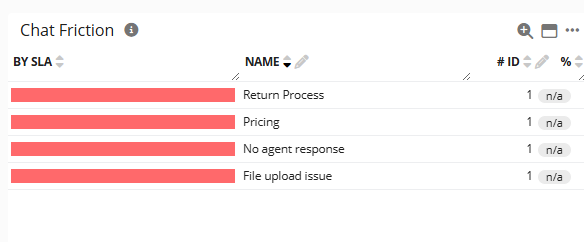
The resulting overview helps teams understand which conversation types occur most frequently and which require the most attention.
 New Error Detection and Analysis
GermainUX uses AI to categorize technical errors into meaningful groups and spot errors that are new, to your team focus on the new issues vs known errors that can be ignored.
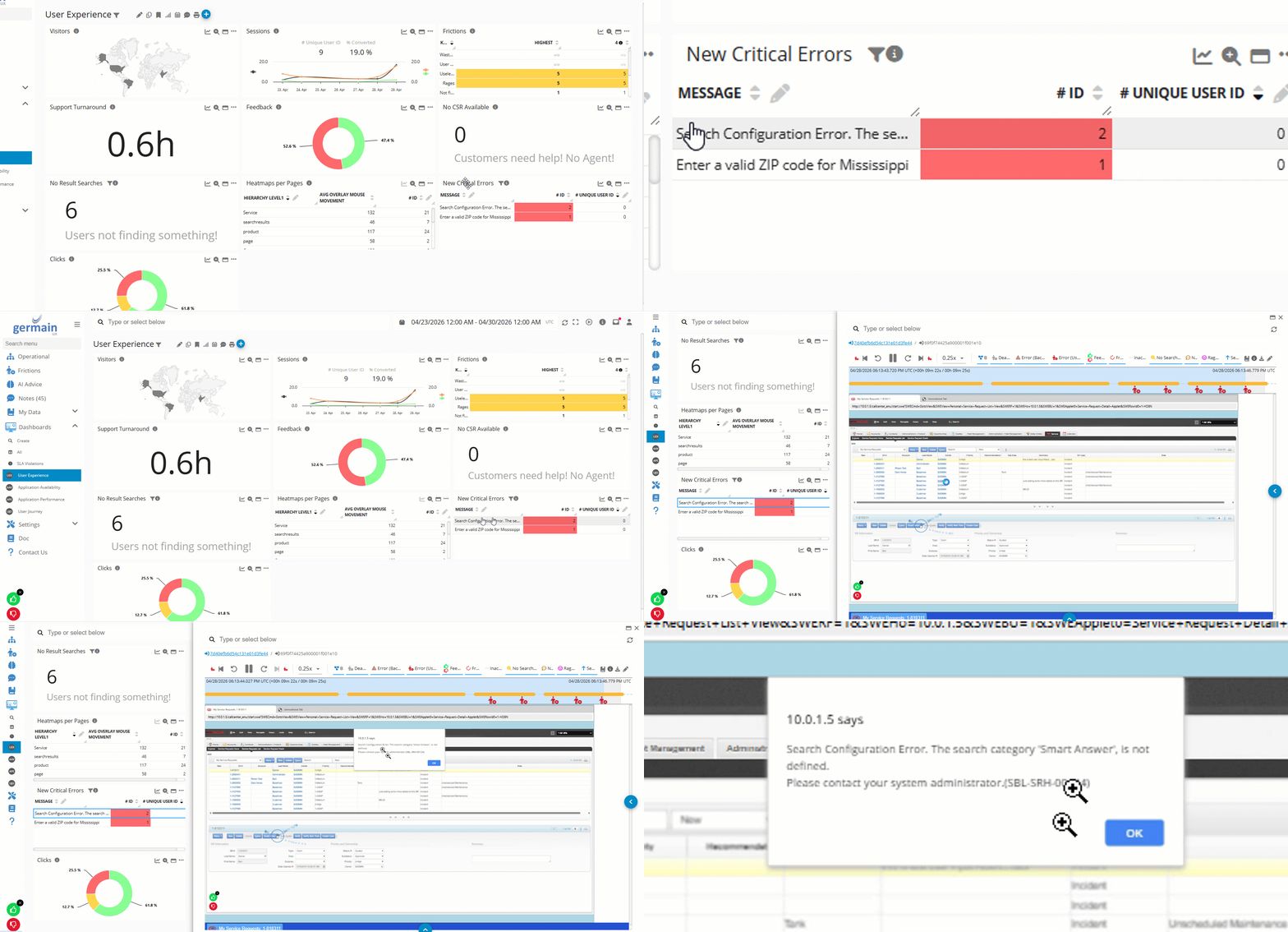
When a new error is detected, GermainUX can:
|
Action |
|---|
|
Compare it with previously categorized errors |
|
Reuse an existing category when the error is sufficiently similar |
|
Create a new category when no appropriate category exists |
|
Summarize the error |
|
Reduce duplicate error groups |
|
Improve aggregation and trend analysis |
This reduces the need to maintain extensive categorization scripts manually and makes it easier to understand the real number, frequency, and impact of distinct application problems.
AI-powered error categorization helps teams:
|
Benefit |
|---|
|
Identify newly emerging errors |
|
Separate new issues from known recurring ones |
|
Group variations of the same underlying problem |
|
Prioritize errors by frequency and user impact |
|
Connect technical errors with affected user sessions and workflows |
See Error Analysis.
🔒 PII Detection
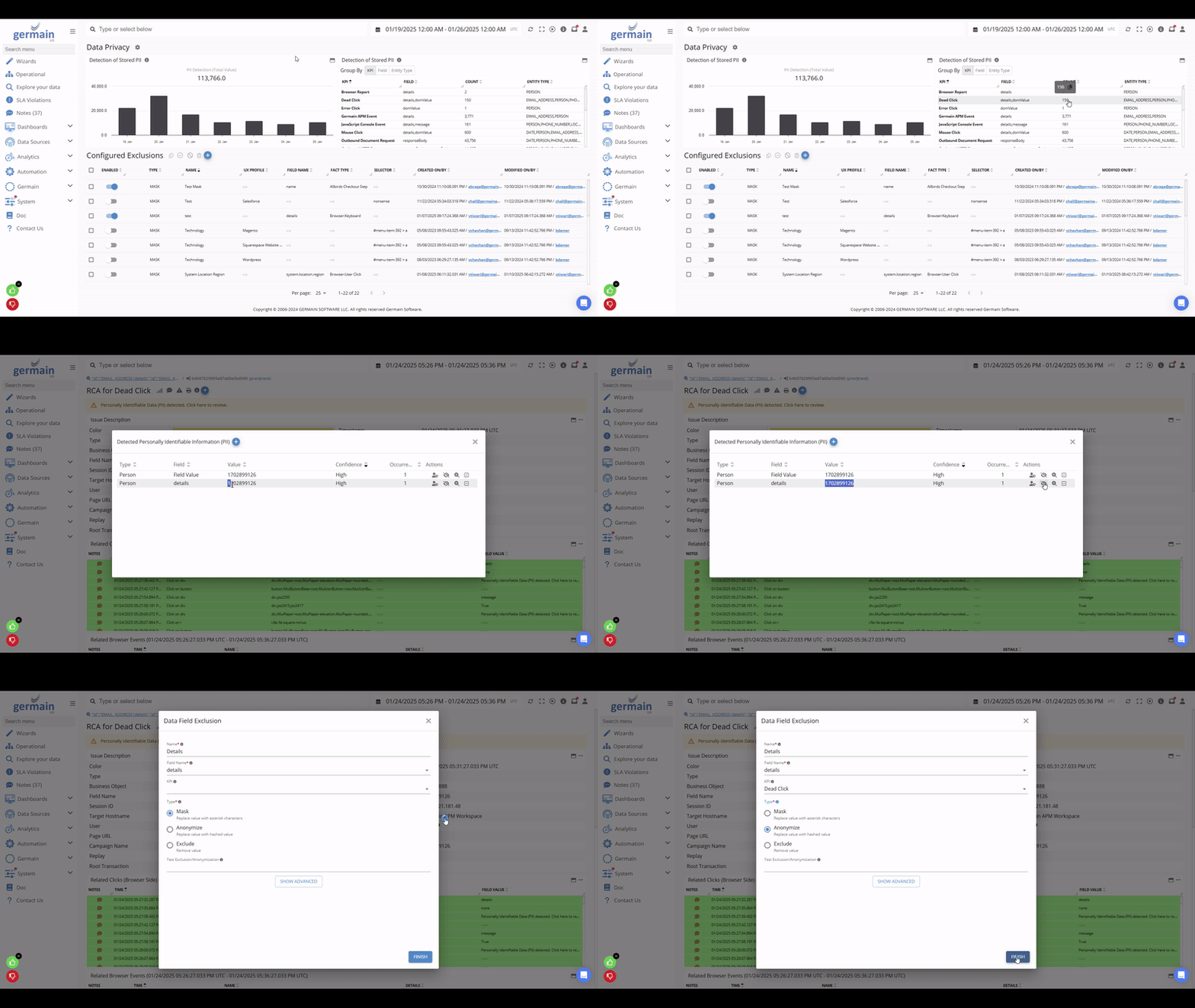
GermainUX can use AI to identify data that may contain Personally Identifiable Information or other sensitive information.
Depending on the configured privacy policy, detected data can be:
|
Action |
|---|
|
Masked |
|
Anonymized |
|
Excluded |
|
Ignored |
|
Flagged for review |
|
Processed according to another configured rule |
AI-powered PII detection can be applied to any applicable KPI and collected data.
Configuration options can include:
|
Option |
|---|
|
Sampling strategy |
|
Data-processing location |
|
Model selection and availability |
|
Infrastructure capacity |
|
Privacy requirements |
|
Fields or KPI types to analyze |
|
Actions applied when sensitive data is detected |
PII detection works with GermainUX Data Privacy configuration to help protect sensitive information before it is displayed or used in downstream analytics.
👤 User Session AI Analysis and Recommendations
GermainUX can use AI to analyze individual user sessions or groups of sessions.
This reduces the need to replay every session manually while preserving access to the underlying Session Replay and monitored evidence.
📄 Individual Session AI Summary
An Individual Session Summary provides a concise explanation of what occurred during a user session.
The summary can include:
|
Item |
|---|
|
The user's primary actions |
|
Tasks or processes completed |
|
Tasks or processes abandoned |
|
Errors encountered |
|
Application slowness |
|
Repeated or inefficient actions |
|
Rage clicks or other frustration signals |
|
Searches and navigation behavior |
|
Lost productivity |
|
Detected UX, workflow, or technology frictions |
|
Potential corrective actions |
Where available, a detected friction can link directly to the relevant Session Replay timestamp or monitored event. This allows users to move from the AI summary to the exact supporting evidence.
📈 Example: Salesforce User Session
For a Salesforce user, an AI summary might identify:
|
Detected Item |
|---|
|
The records viewed or updated |
|
The business process attempted |
|
Repeated navigation between screens |
|
Errors or validation messages |
|
Slow Lightning actions |
|
Steps that required excessive time |
|
Whether the user completed the intended task |
|
Opportunities to simplify the workflow or improve application performance |
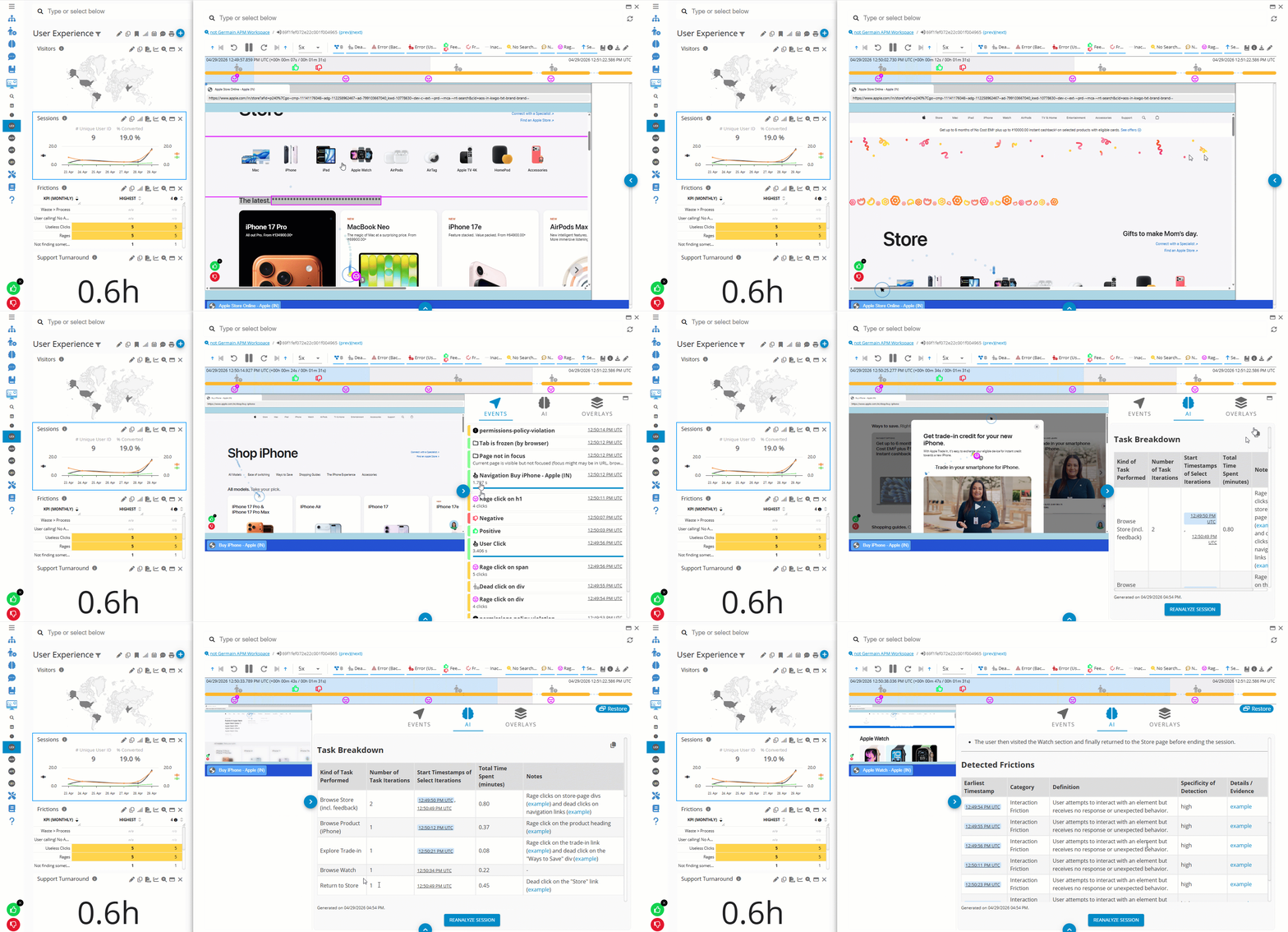
Additional examples are available for , Salesforce, SAP, and .
📅 Scheduled Bulk Session AI Analysis
GermainUX can automatically analyze multiple user sessions according to a schedule, such as daily or weekly.
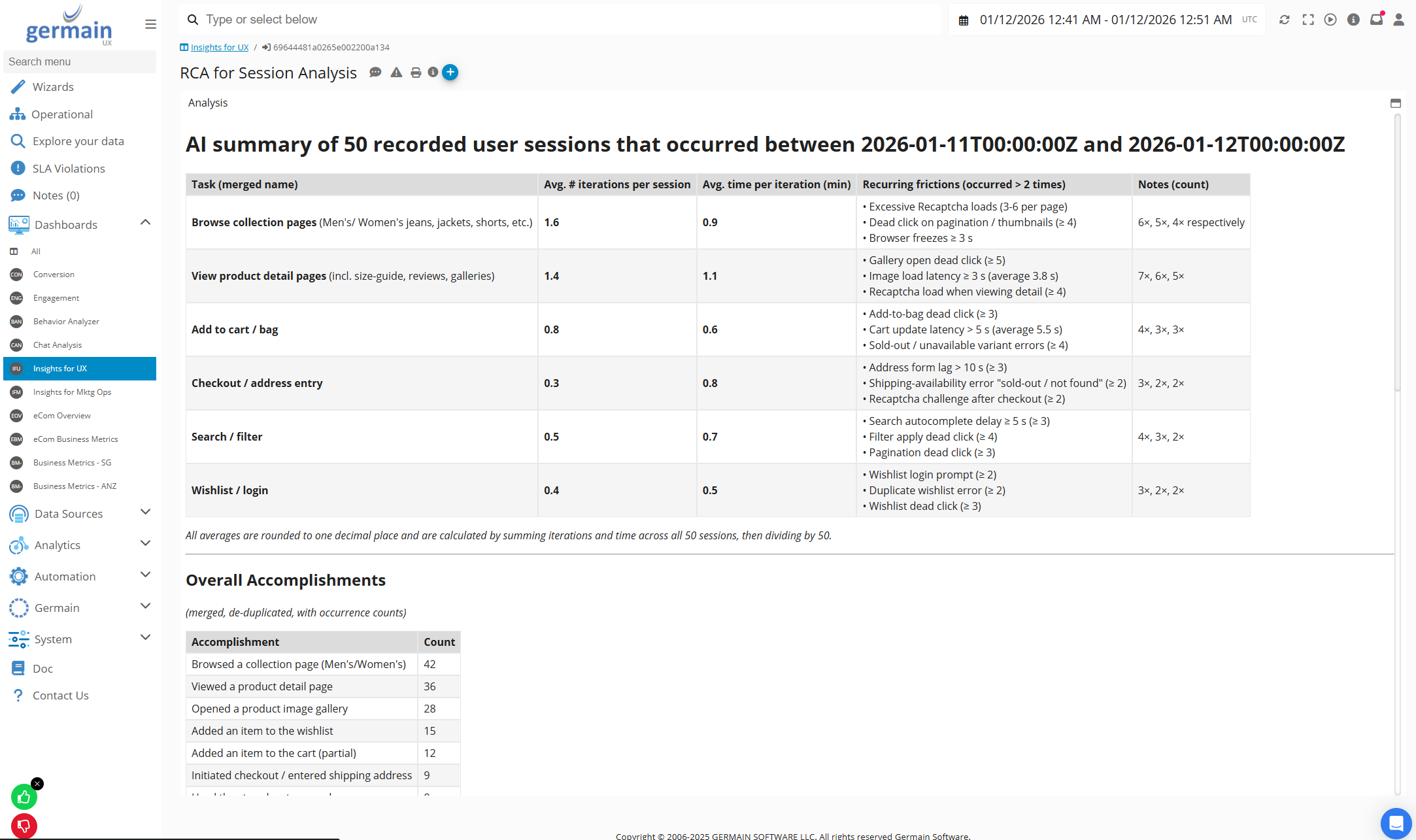
Instead of summarizing only one session, bulk analysis identifies patterns across an entire user population.
It can help determine:
|
Insight |
|---|
|
The most frequent user frictions |
|
The issues affecting the greatest number of users |
|
Recurring workflow problems |
|
Common sources of abandonment |
|
Features that users struggle to adopt |
|
Errors with the greatest user impact |
|
Application-performance problems affecting productivity |
|
Recommended improvements ranked by priority |
Scheduled AI analysis identifies, in seconds, the top issues affecting thousands of users and provides recommendations on how to solve them. Available under the AI Guidance KPI
📥 User Feedback Categorization
GermainUX can automatically analyze and group survey responses, feedback comments, and other user-provided text.
Instead of requiring teams to define and maintain every category manually, AI can identify recurring themes and generate the appropriate categories.
Example categories include:
|
Category |
|---|
|
Pricing |
|
Checkout issues |
|
Usability problems |
|
Feature requests |
|
Performance complaints |
|
Login or access issues |
|
Product availability |
|
Customer-service concerns |
|
Positive feedback |
Feedback categorization helps teams understand:
|
Insight |
|---|
|
What users discuss most frequently |
|
Which issues are increasing |
|
Which themes are associated with negative experiences |
|
Which requests affect the greatest number of users |
|
Which improvements should be prioritized |
⚙️ Configure the Categorization Prompt
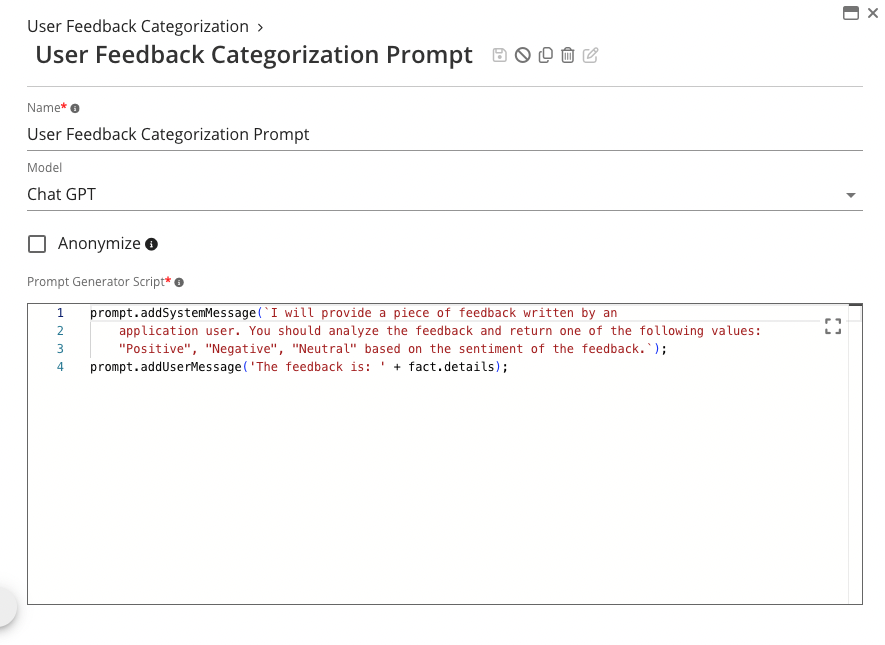
Administrators can configure an AI prompt that defines the purpose, expected output, and applicable instructions for feedback analysis.
A prompt can specify:
|
Prompt Element |
|---|
|
The type of feedback being analyzed |
|
Existing categories that should be reused |
|
When a new category should be created |
|
The information to extract |
|
The expected summary format |
|
The recommendations to generate |
🔁 Automatically Group Feedback
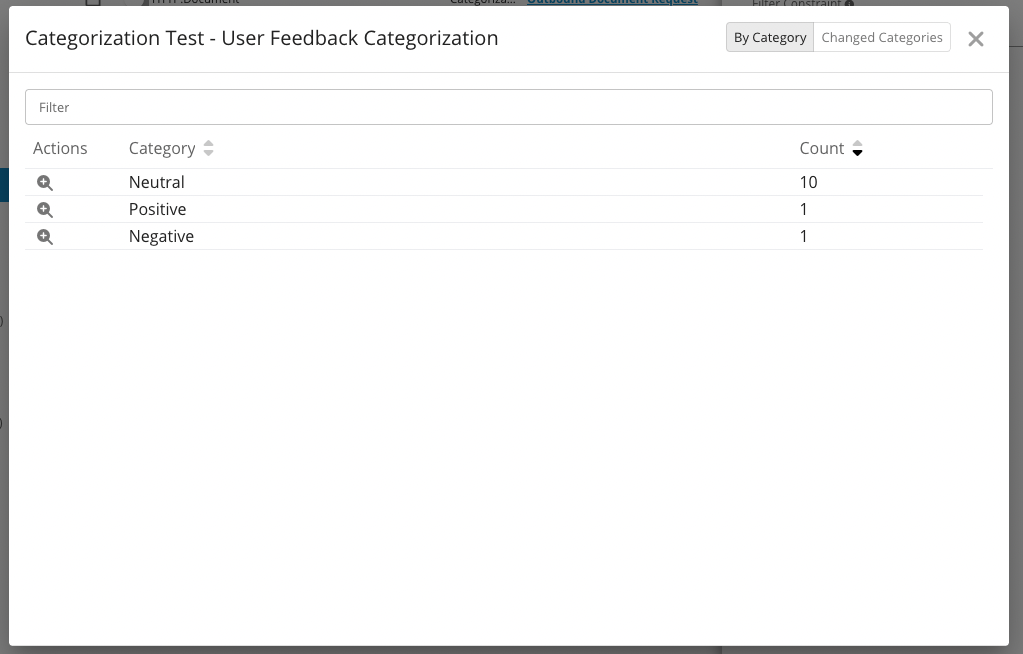
After the prompt and AI analysis are enabled, GermainUX automatically assigns feedback to the appropriate categories.
The categorized results can be displayed in dashboards, analyzed over time, filtered, reported, and used to prioritize improvements.
📁 Automated Reports
AI-generated insights and recommendations can be incorporated into scheduled reports.
Reports can provide:
|
Report Content |
|---|
|
Executive summaries |
|
Top detected issues |
|
Affected populations |
|
Trends and changes |
|
Supporting evidence |
|
Estimated business impact |
|
Prioritized recommendations |
They can be delivered daily, weekly, monthly, quarterly, or according to another configured schedule.
This allows stakeholders to receive updated insights without manually reviewing GermainUX dashboards or individual sessions.
🚀 Task Automation
Insights generated by GermainUX can trigger automated follow-up actions.
Depending on the configuration, GermainUX can:
|
Action |
|---|
|
Send an alert or email |
|
Create or update a Note |
|
Generate a report |
|
Call an API or webhook |
|
Execute a script |
|
Run a SQL statement |
|
Execute an HTTP, SSH, WMI, or local-program action |
|
Initiate another configured workflow |
For example:
|
Scenario |
|---|
|
A newly detected high-impact error can notify the application owner. |
|
A recurring checkout friction can generate a prioritized recommendation. |
|
A severe user-session issue can create a Note for investigation. |
|
A detected operational problem can initiate an approved remediation action. |
|
A weekly bulk-session analysis can generate and distribute an executive report. |
See Task Automation.
🔧 Configuration
AI capabilities are configured in Germain Workspace under:
|
Location |
|---|
|
Settings > System > AI > Prompts |
|
Settings > System > AI > Settings |
|
Settings > Automation > AI Analysis |
Configuration can include:
|
Configurable Item |
|---|
|
AI provider or model |
|
Prompts |
|
Analysis scope |
|
Input data |
|
Output format |
|
Schedule |
|
Privacy rules |
|
Follow-up actions |
|
Applicable KPIs or sessions |
Availability and results depend on the configured model, collected data, privacy settings, enabled monitoring capabilities, and infrastructure.
📈 AI KPIs
AI-driven analysis generates KPIs that can be used throughout GermainUX dashboards, analytics, reporting, alerting, and automation.
|
KPI |
What It Provides |
|---|---|
|
AI Session Analysis |
AI-generated analysis of a real user session. |
|
AI Session Friction |
Friction detected by AI within a real user session. |
|
AI Session Recommendation |
Recommendations generated by AI from a collection of user sessions. |
|
AI Error Analysis |
AI-generated analysis of error events. |
|
AI Chat Friction |
Friction detected by AI within a chat or conversation. |
For definitions and details about all AI-generated and AI-performance KPIs, see AI KPIs.
📦 Additional Resources
-
AI Management
-
AI Advice Dashboard
-
More Analytics Features
-
More Automation Features
-
Management Features.
ℹ️ Get Help
The Germain Team can help you set this up. Contact GermainUX Support.
Service: Analytics
Feature Availability: 2025.1 or later