

GermainUX AI Configuration
GermainUX AI can be configured to align with an organization’s approved models, hosting standards, security policies, and compliance requirements. Administrators can:- Select the LLM used by GermainUX.
- Choose online or offline execution.
- Enable or disable AI capabilities.
- Customize prompts for specific use cases and data.
Select an LLM
Choose an LLM integration
Online or Offline Execution
Hosted versus local execution
Enable or Disable AI Features
Control features by policy
Customize AI Prompts
Tailor prompts to your KPIs
Select an LLM
GermainUX supports multiple LLM integration approaches.Integration Options
Choosing the Right LLM
GermainUX supports several LLMs, but no single LLM is the best fit for every use case. Accuracy, speed, cost, privacy and hosting requirements vary from one model to another and from one use case to another. LLMs we have seen deliver value for some or several GermainUX use cases include:- OpenAI
- Claude
- Llama
- Muse
- Gemini
- Phi
- Mistral
- Qwen
- DeepSeek
Information Required for a Hosted LLM API
If GermainUX will connect to a hosted model, provide:Store API keys and other secrets in an approved credential configuration. Do not include them directly in prompts or documentation.
Information Required for a Local LLM
If the model will run within the GermainUX environment, provide:
After the hosting method and interface are confirmed, GermainUX can configure its AI services to use the organization’s approved LLM.
Online or Offline Execution
Most supported models can operate in one of two modes:
Select the appropriate mode based on data privacy, compliance, latency, model capability, infrastructure, and cost requirements.
To configure the execution mode, go to Settings > System > AI > Prompts, select a prompt, and configure its Online/Offline setting.
Enable or Disable AI Features
AI features are disabled by default to support organizational security, privacy, and compliance reviews. Administrators can review and control individual AI capabilities based on internal policies and approved use cases. In the left menu, go to Settings > System > AI > Settings. Before enabling an AI feature, review:- The data sent to the model
- The model and hosting location
- Data-retention policies
- Personal or sensitive information handling
- Authentication and network controls
- Applicable regulatory requirements
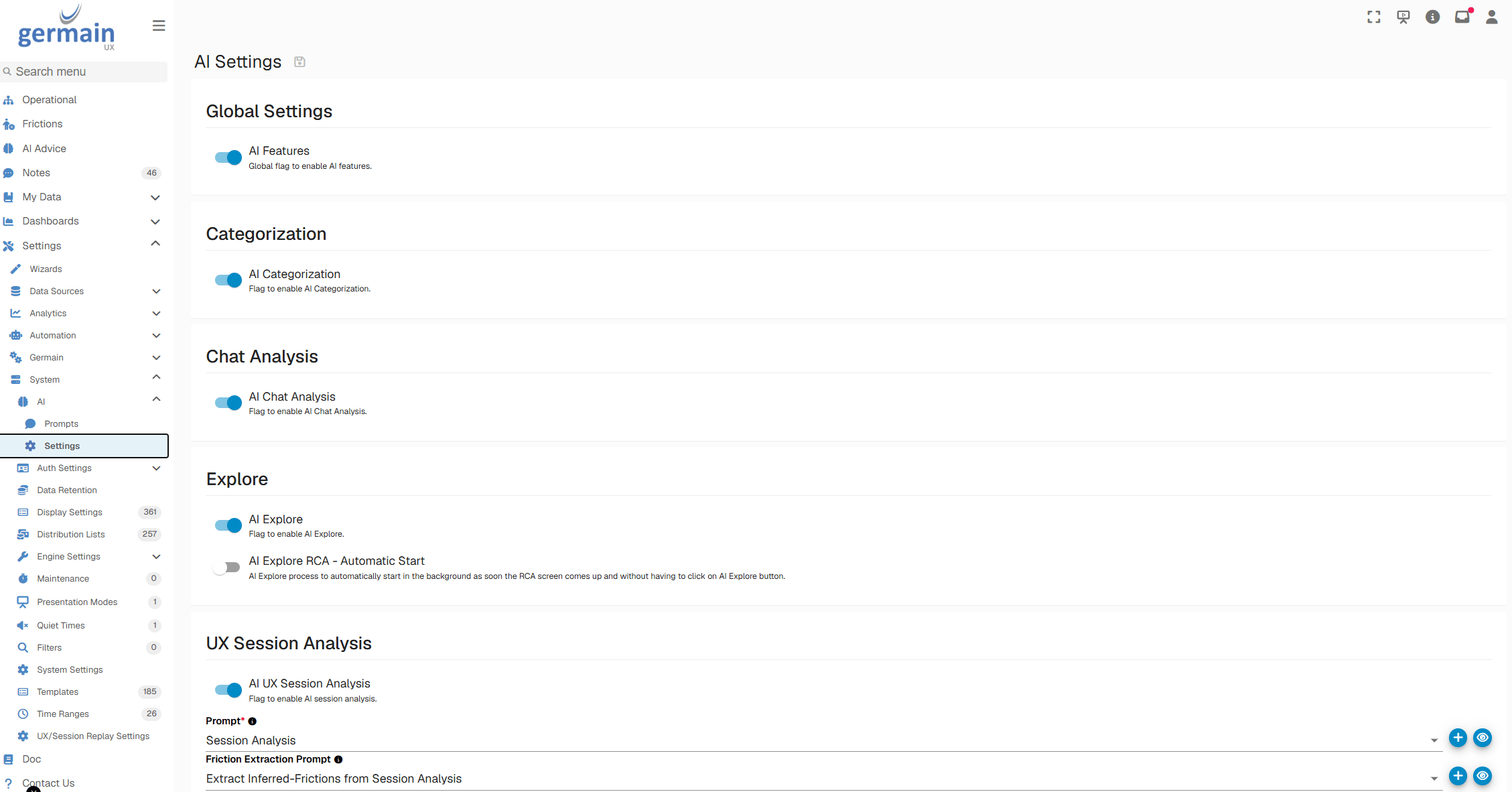
Enable or Disable AI Feature - GermainUX
Customize AI Prompts
Prompts can be customized to use preconfigured or custom KPIs. This allows organizations to tailor AI-generated analysis, summaries, recommendations, and automated workflows to their terminology and operational requirements. In the left menu, go to Settings > System > AI > Prompts. Select a prompt, and then edit it in the right panel. Before deploying a customized prompt:- Validate it with representative data.
- Confirm that sensitive information is handled appropriately.
- Review the generated results for accuracy and consistency.
- Test failure and incomplete-data scenarios.
- Control access to prompt configuration.
- Maintain a version history for production prompts.
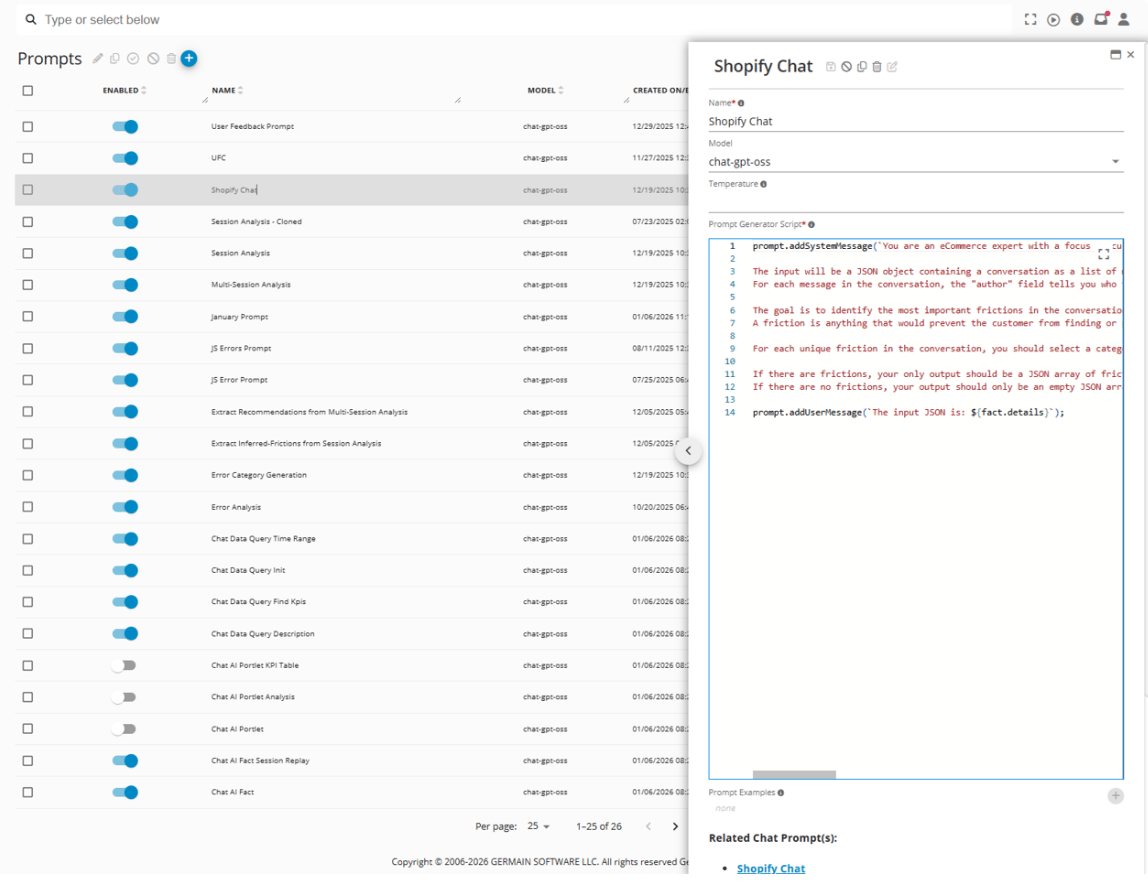
Edit an AI Prompt - GermainUX
The chat analysis prompts (Agentforce, Live Chat, Shopify Chat and Vercel AI Chat) ask the AI for the conversation’s frictions and a short summary. When you customize one of them, keep the instruction to summarize the conversation. Without it, GermainUX records frictions only, and no AI Chat Summary. See Chat Analysis.
Additional Resources
AI
Insights & Recommendations
Management
More Management Features
Analytics
More Analytics Features
Automation
More Automation Features
Dashboards
Dashboards and reports overview
Reports
Automatic and scheduled reports
Get Help
Contact GermainUX Support
The GermainUX team helps you get up and running faster, empower your team, turn data into actionable insights, and optimize performance to deliver measurable business outcomes.
Can't Find What You Need?
Search all GermainUX docs with Ctrl + K, or use the feedback buttons at the bottom of this page to tell us what is missing.
The content of this document is proprietary to GERMAIN SOFTWARE.