

Real-Time Conversion Analysis
Track conversion impact live
Checkout Monitoring
Follow supported checkout steps
Database Monitoring
Correlate MySQL with storefront
Alerts and Automation
Automated responses to issues
Overview
Monitor and optimize the customer experience, conversion, performance, availability, and operational health of WooCommerce storefronts with GermainUX. GermainUX combines Real User Monitoring, Session Replay, conversion analytics, business-process monitoring, application and infrastructure observability, JavaScript diagnostics, synthetic transactions, and automated analysis to help teams identify the issues that cause customer frustration, cart abandonment, failed transactions, and lost revenue.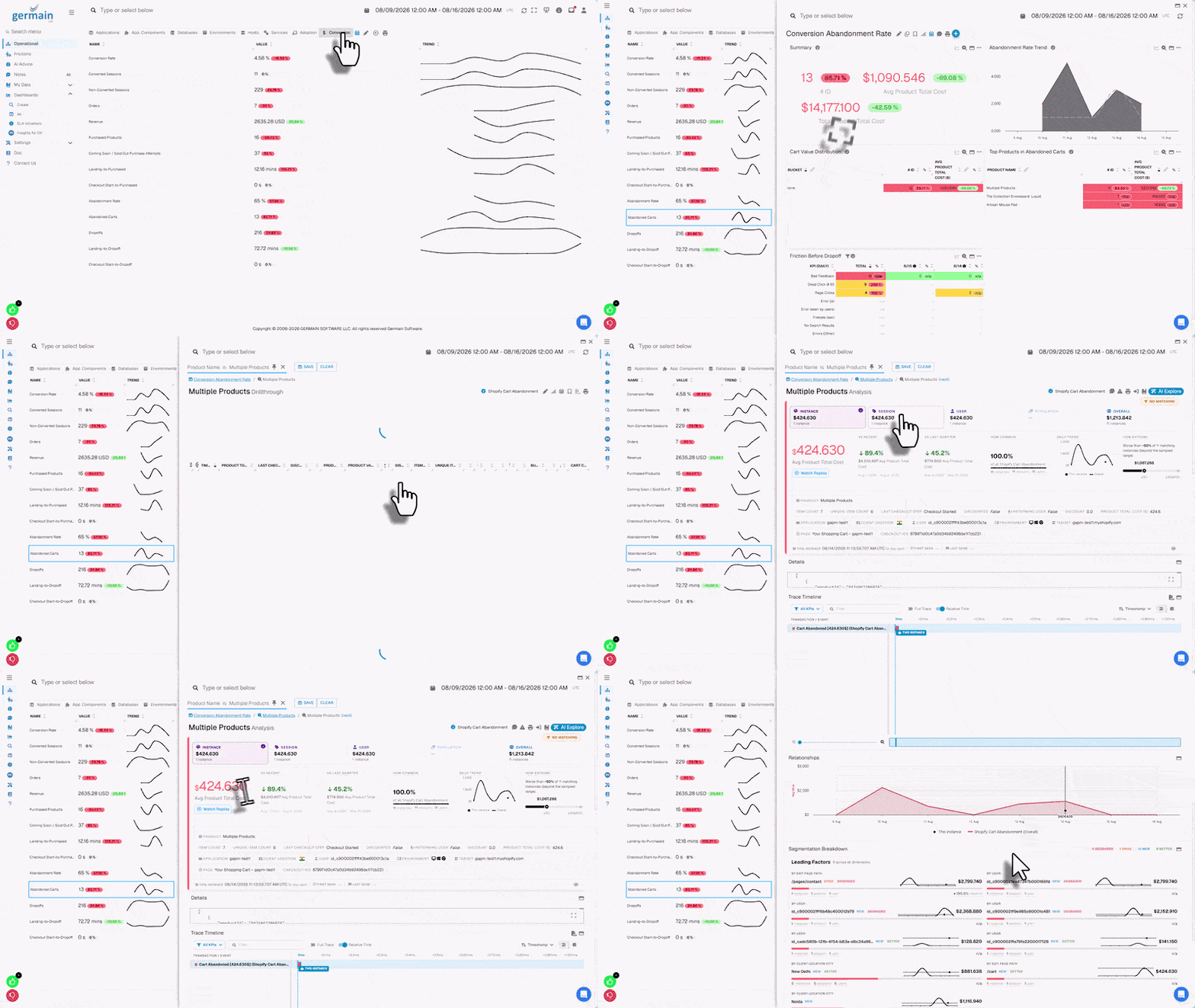
Real-Time Conversion Analysis
Analyze the complete WooCommerce conversion journey in real time. Examples include:- Landing Page → Product → Add to Cart → Checkout → Payment → Order Confirmation
- Conversion rate
- Funnel progression
- Drop-off
- Cart abandonment
- Checkout abandonment
- Failed transactions
Show all 11
Show all 11
- Performance delays
- Errors
- User friction
- Customers affected
- Revenue affected when the required business data is available
Real User Monitoring
Understand how real customers experience the WooCommerce storefront. GermainUX can monitor:- User sessions
- Page views
- Navigation
- Product interactions
- Clicks
- Search activity
Show all 12
Show all 12
- Cart activity
- Checkout activity
- Browser performance
- Network requests
- JavaScript errors
- Business events
Session Replay
GermainUX Session Replay reconstructs customer activity across supported WooCommerce pages. Use Session Replay to investigate:- Navigation issues
- Dead clicks
- Rage clicks
- Error clicks
- Repeated actions
- Product-selection problems
Show all 12
Show all 12
- Cart issues
- Checkout problems
- JavaScript errors
- Slow interactions
- Failed workflows
- Abandonment
Customer Journey Analysis
Monitor customer journeys such as:Product Discovery
Landing PageSearchProduct ListProduct View
Cart
Product ViewAdd to CartCart
Checkout
CartCheckoutShippingPaymentConfirmation
Account
RegistrationLoginAccount Activity
GermainUX can measure:
- Completion rate
- Duration
- Drop-off
- Repeated actions
- Errors
- Performance delays
- User friction
- Differences by device, browser, geography, campaign, product, or customer segment
Product Discovery Monitoring
Analyze how customers find and interact with products. Depending on the storefront implementation, monitor:- Search
- Categories
- Filters
- Sorting
- Product lists
- Product views
Show all 9
Show all 9
- Product variations
- Product images
- Reviews
Cart Monitoring
Monitor customer activity within the cart. Examples include:- Add to cart
- Remove from cart
- Quantity changes
- Coupon application
- Cart view
- Cart abandonment
Checkout Monitoring
Monitor supported customer-controlled checkout steps. Depending on the WooCommerce implementation, analyze:- Checkout start
- Customer-details entry
- Shipping selection
- Payment-method selection
- Validation errors
- Payment result
- Order submission
- Order confirmation
Transaction Performance Comparison
When analyzing a slow or failed WooCommerce transaction, use Comparison to compare its performance with another execution of the same transaction, such as the fastest, slowest, most recent, first seen, or last seen. Comparison can reveal:- Differences in execution time for the same WooCommerce transaction
- Which steps, checkout stages, or plugin integrations caused the slowdown
- Performance differences between successful and failed WooCommerce transactions
- Errors or bottlenecks affecting WooCommerce checkout and payment
- Potential root causes of transaction performance degradation
Third-Party Payment and Checkout Monitoring
WooCommerce checkout can depend on:- Payment providers
- Financing providers
- Fraud-detection services
- Authentication providers
- Third-party checkout pages
- Navigation to the provider
- Return navigation
- Redirect duration
- Browser-visible result
- WooCommerce order status
- API response
Show all 9
Show all 9
- Webhook status
- Integration logs
- Synthetic validation
Order Processing Monitoring
Monitor the WooCommerce order lifecycle when the required server-side information is available. Depending on the architecture and authorized data sources, analyze:- Order creation
- Payment result
- Order status
- Background processing
- Integration processing
- Fulfillment-related workflows
Inventory and Product Monitoring
When the required WooCommerce API, database, or integration information is available, GermainUX can monitor operational conditions associated with:- Products
- Inventory
- Stock availability
- Product updates
- Related integrations
Application Performance
Monitor the availability and performance of the WooCommerce storefront. Analyze:- Website availability
- Response time
- HTTP status
- Redirects
- TLS certificates
- Page performance
Show all 10
Show all 10
- Interaction response time
- Browser processing
- API response time
- Backend performance
JavaScript Error and Browser Monitoring
Detect browser-side conditions such as:- JavaScript exceptions
- Browser console errors
- Failed network requests
- Slow network requests
- Resource-loading failures
- Theme conflicts
Show all 10
Show all 10
- Plugin conflicts
- Third-party script issues
- Browser freezes
- Long-running JavaScript
Advanced JavaScript Diagnostics
Use GermainUX JS Profiler when deeper browser analysis is required. JS Profiler can help investigate:- JavaScript exceptions
- Theme behavior
- Plugin behavior
- Slow browser execution
- Network activity
- Payment and checkout integrations
Show all 9
Show all 9
- Third-party scripts
- Browser freezes
- Client-side bottlenecks
WooCommerce REST API Monitoring
GermainUX Engine can monitor authorized WooCommerce REST APIs. Depending on permissions and requirements, monitor:- Availability
- Response time
- HTTP status
- Authentication
- Failures
- Products
- Customers
- Orders
Webhook Monitoring
Monitor customer-accessible WooCommerce webhooks and their downstream processing. Depending on the implementation, analyze:- Delivery
- Response time
- Failures
- Retries
- Destination availability
WordPress and WooCommerce Application Monitoring
Because WooCommerce runs on WordPress, GermainUX can extend monitoring beyond the storefront. Depending on hosting access, monitor:- WordPress
- WooCommerce
- Scheduled actions
- Background jobs
- Plugin behavior
- PHP
Show all 12
Show all 12
- Web server
- Database
- Logs
- Operating system
- Containers
- Cloud infrastructure
Database Monitoring
When the hosting environment permits database access, monitor the MySQL or MariaDB database supporting WooCommerce. Analyze:- Availability
- Connections
- Query performance
- Capacity
- Locks
- Errors
Log Monitoring
Monitor accessible:- WooCommerce logs
- WordPress logs
- PHP logs
- Web-server logs
- Payment logs
- Integration logs
- Operating-system logs
Integration Monitoring
Monitor integrations supporting WooCommerce, such as:- Payment
- Shipping
- Tax
- Inventory
- ERP
- CRM
Show all 10
Show all 10
- Search
- CDN
- Fraud detection
Synthetic Transactions
Use GermainUX RPA Bot Recorder to proactively execute critical WooCommerce scenarios. Examples include:- Open Store → Search → Product → Add to Cart → Verify Cart
- Open Store → Product → Cart → Checkout → Complete Approved Test Purchase → Verify Order
Root Cause Analysis
GermainUX can correlate customer activity with available technical telemetry. For example:
This helps teams move from conversion impact to the likely technical cause.
Automated Analytics
GermainUX can identify conditions such as:- Conversion degradation
- Abnormal abandonment
- Increased checkout failures
- Performance regression
- JavaScript error increase
- API degradation
Show all 10
Show all 10
- Payment integration failures
- Outliers
- Abnormal server behavior
- Infrastructure capacity issues
Alerts and Automation
When a condition requires attention, GermainUX can:- Send an alert
- Notify subscribed users through a Watch
- Generate a report
- Trigger approved diagnostics
- Execute approved automation
Additional Resources
Deploy
Monitoring or automation for WooCommerce
Configure
Monitoring or automation for WooCommerce
AI
Insights & Recommendations
Analytics
More Analytics Features
Automation
More Automation Features
Dashboards
Dashboards and reports overview
Reports
Automatic and scheduled reports
Get Help
Contact GermainUX Support
The GermainUX team helps you get up and running faster, empower your team, turn data into actionable insights, and optimize performance to deliver measurable business outcomes.
Can't find what you need?
Search all GermainUX docs with Ctrl + K, or use the feedback buttons at the bottom of this page to tell us what is missing.
The content of this document is proprietary to GERMAIN SOFTWARE.