
Deploy Monitoring for MarkoJS
Deploy GermainUX monitoring for MarkoJS to capture real user experience, Session Replay, application performance, errors, and user journeys.
For most MarkoJS applications, GermainUX RUM JS is the primary monitoring component. Additional GermainUX components can be deployed when deeper JavaScript troubleshooting, synthetic monitoring, or backend monitoring is required.
⚙️ Monitoring Options
GermainUX can monitor MarkoJS across multiple access points:
|
MarkoJS Access Point |
GermainUX Monitoring |
|---|---|
|
User Interface / Browser |
Real User Monitoring and Session Replay via RUM JS |
|
JavaScript / Browser |
Advanced JavaScript, browser, network, and integration troubleshooting via JS Profiler |
|
User Journeys |
Proactive issue detection and synthetic monitoring via RPA Bot Recorder |
|
REST APIs |
Health, usage, performance, and troubleshooting via Engine |
|
Logs |
Application health and troubleshooting via Engine |
|
Database |
Database health and performance via Engine |
Deploy only the monitoring capabilities required for your environment.
🚀 1. Start the MarkoJS Wizard
From Germain Workspace, navigate to:
Left Menu → Wizards → MarkoJS
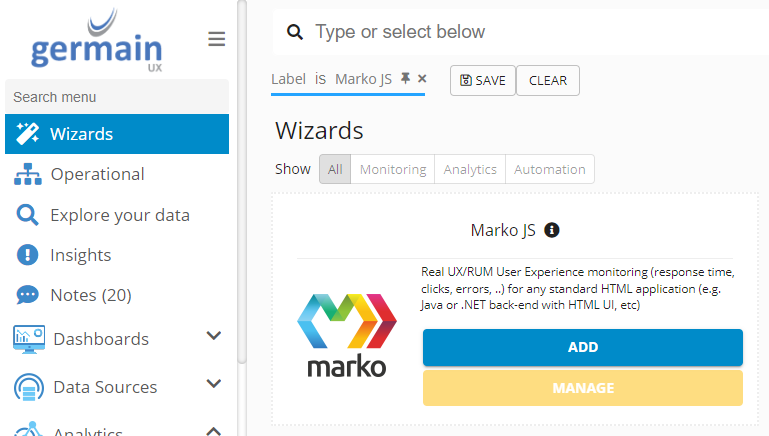
The MarkoJS Wizard guides you through the initial configuration and deployment of Real User Monitoring.
🏷️ 2. Configure the MarkoJS Application
Enter the:
-
Application Name
-
Application URL
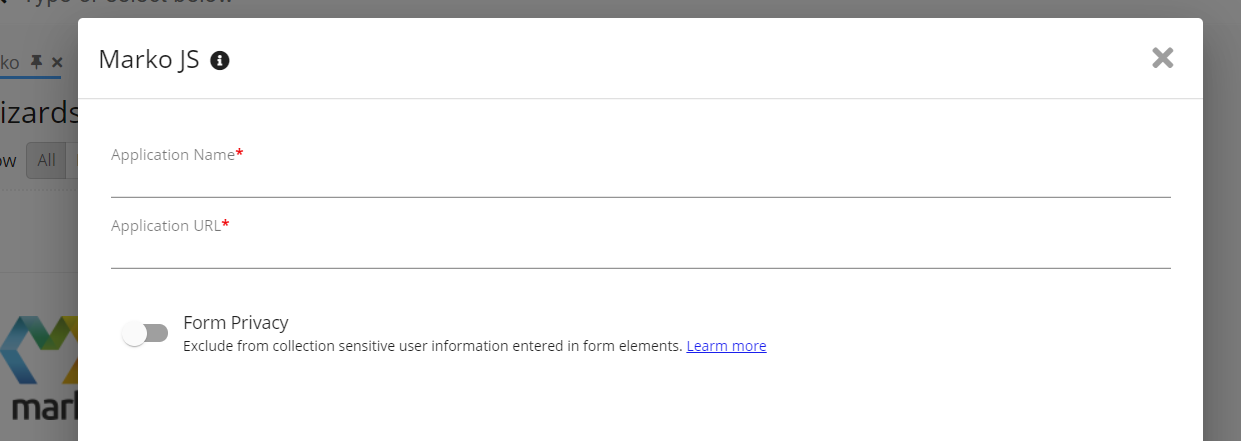
The Application Name identifies the MarkoJS application throughout GermainUX.
The Wizard creates the corresponding UX Monitoring Profile and generates deployment instructions for the application.
📦 3. Deploy RUM JS
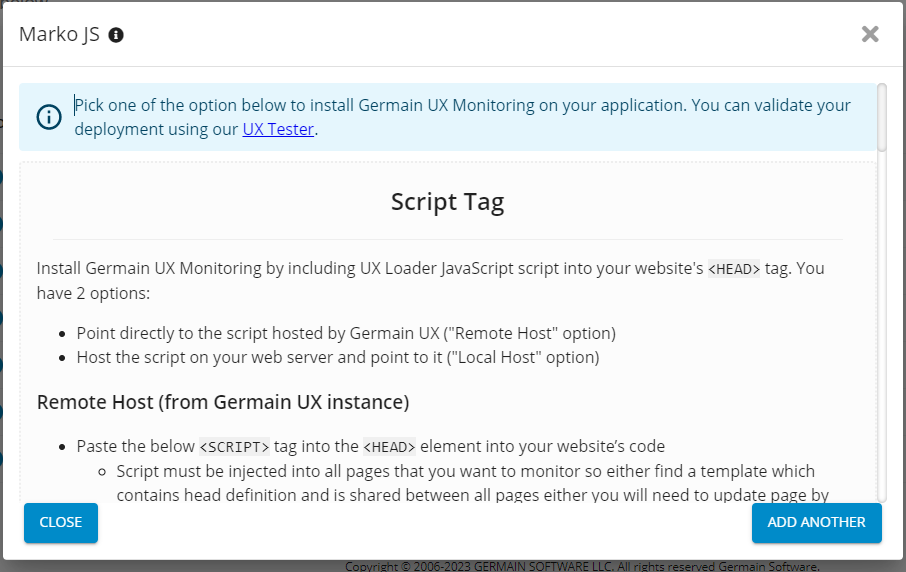
From the MarkoJS Wizard summary, select the deployment method appropriate for your environment.
Three deployment options are available:
Script Tag Injection
Deploy GermainUX RUM JS using script tag injection.
Script injection can be performed locally or remotely depending on your environment.
Package Dependency
Add GermainUX RUM JS to your application using:
-
npm
-
yarn
Follow the package installation and initialization instructions generated by the Wizard.
JavaScript Code Snippet
Add the JavaScript code generated by the Wizard directly to your MarkoJS application.
The generated code contains the configuration associated with the UX Monitoring Profile created for your application.
🎥 4. Validate Real User Monitoring
Once RUM JS is deployed, open the MarkoJS application and perform a representative user journey.
For example:
Open Application → Login → Navigate → Perform Critical Action
Verify in GermainUX that:
-
The user session is captured
-
User actions are visible
-
Session Replay is available
-
Browser and JavaScript errors are captured
-
Network activity is monitored
-
Performance telemetry is available
-
The session is associated with the correct application
🚨 5. Configure Error Monitoring — Optional
GermainUX RUM JS automatically captures browser-side errors and failed network requests affecting MarkoJS users.
The UX Monitoring Profile can be customized when application-specific error detection, categorization, or exclusions are required.
For example:
-
Classify application-specific errors
-
Exclude known or benign errors
-
Customize error categories
-
Identify user-impacting errors
-
Add application-specific context
GermainUX analytics, dashboards, alerts, and reports can then be used to identify and prioritize important errors.
🚀 6. Enable Advanced JavaScript Troubleshooting — Optional
Deploy the GermainUX JS Profiler when deeper browser-side troubleshooting is required.
The JS Profiler can provide additional visibility into:
-
JavaScript execution
-
Browser performance
-
Network activity
-
Integration issues
-
Slow or expensive JavaScript operations
Use JS Profiler when standard Real User Monitoring identifies an issue requiring deeper code-level analysis.
🤖 7. Configure Synthetic Monitoring — Optional
Use the GermainUX RPA Bot Recorder to proactively monitor critical MarkoJS user journeys.
For example:
Open Application → Login → Navigate → Execute Transaction → Validate Result
Synthetic transactions can continuously verify application availability and critical workflows without waiting for an actual user to encounter an issue.
Alerts or automated actions can be triggered when a synthetic transaction fails or exceeds defined thresholds.
🔗 8. Configure Backend Monitoring — Optional
Use the GermainUX Engine when additional monitoring is required beyond the browser.
Depending on your architecture, GermainUX can monitor:
REST APIs
Monitor the health, usage, performance, and errors of APIs supporting the MarkoJS application.
Logs
Monitor application logs to detect errors, warnings, and other events relevant to application health.
Database
Monitor the supporting database to identify health or performance conditions affecting the application.
Combining browser and backend monitoring provides broader visibility across:
User → MarkoJS → API / Service → Database
🔐 9. Review Data Privacy
Before enabling production monitoring, review the data collected from your MarkoJS application.
Configure the appropriate privacy controls for sensitive information such as:
-
User input
-
Authentication information
-
Personal information
-
Business-sensitive data
-
Application-specific sensitive fields
Validate privacy and exclusion settings before enabling monitoring for production users.
🔄 Revisit Deployment Instructions
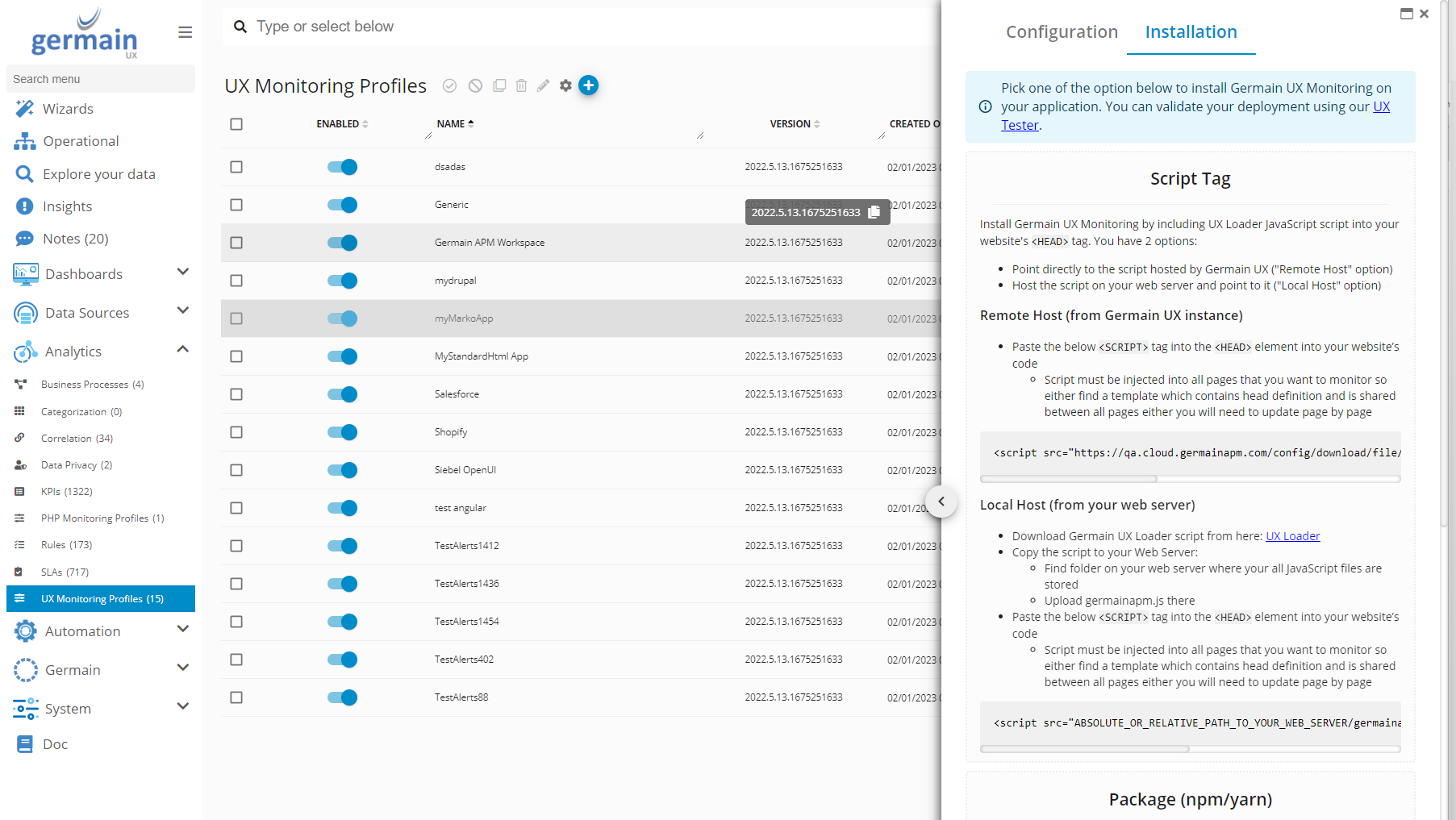
You can return to the generated deployment instructions at any time.
Navigate to:
Germain Workspace → Analytics → UX Monitoring Profiles
Then:
-
Select the UX Monitoring Profile created for the MarkoJS application.
-
Click Installation in the Configuration Editor.
-
Follow the deployment instructions displayed for that profile.
📊 Next Steps
Once monitoring is deployed, configure the analytics and automation appropriate for your application, including:
-
User experience and friction analysis
-
Session Replay and AI-powered session insights
-
Application and JavaScript performance
-
Error analysis
-
Network/API performance
-
Real-time dashboards
-
Automated reports
-
Alerts and SLA monitoring
-
Operational automation
See Marko Operational Experience Intelligence for details about the MarkoJS monitoring, analytics, and automation capabilities available in GermainUX.
ℹ️ Get More Information
GermainUX monitoring is configurable and can be tailored to your MarkoJS application's architecture, user journeys, performance requirements, and supporting systems.
The GermainUX team can help configure the appropriate monitoring scope, privacy controls, analytics, alerts, and automation for your environment.
Please contact us for any help.
Component: Engine, JS Profiler, RPA Bot Recorder, RUM JS
Feature Availability: 2017.1 or later