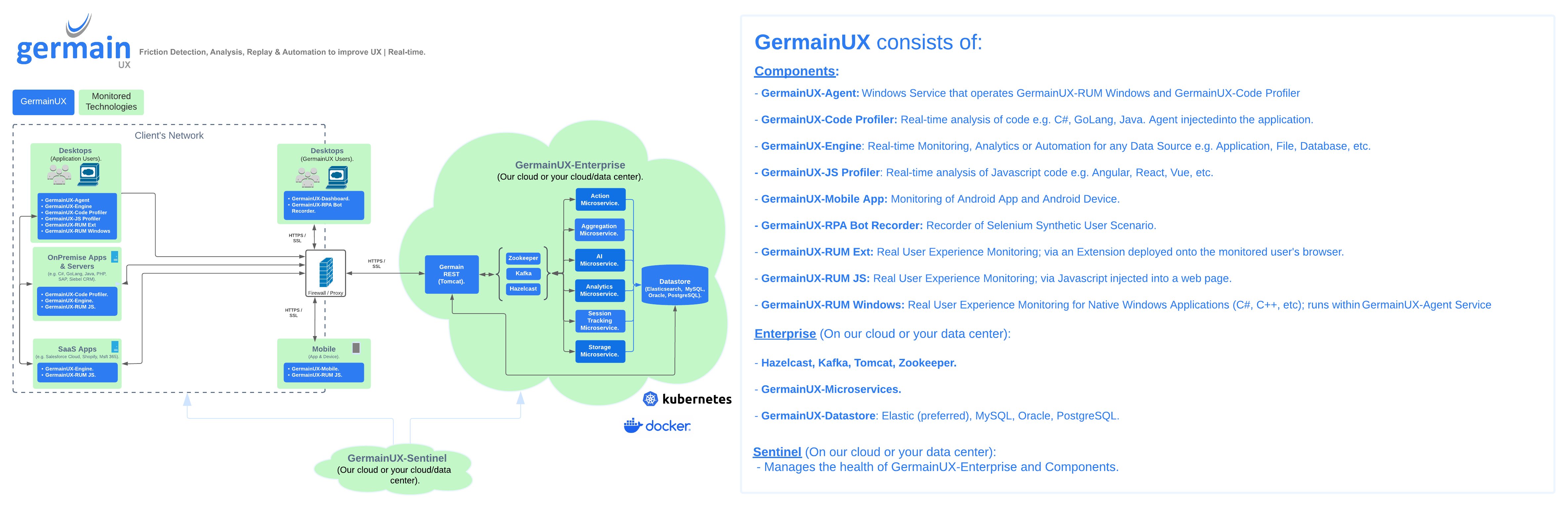
⚙️ GermainUX Components for Automated Issue Detection, Analysis, and Resolution
GermainUX is a modular Digital Experience Intelligence platform that helps organizations automatically detect, analyze, prioritize, and resolve issues affecting users, business workflows, and technology.
Its components work together to provide:
|
Features |
Description / Details |
|---|---|
|
Real User Monitoring and Session Replay |
Continuously captures user interactions, journeys, application usage, errors, performance, and technical activity across browser-based, mobile, and native Windows applications. Session Replay helps teams reproduce issues, understand user behavior, and identify the causes of poor experiences, lost conversions, low adoption, and reduced productivity. |
|
Application and Code-Performance Monitoring |
Monitors frontend and backend application performance across technologies such as JavaScript, Java, C#, .NET, Go, and Node.js. Correlates user actions with network requests, services, code execution, databases, logs, and infrastructure to identify performance bottlenecks and failures. |
|
Business-Process and Workflow Monitoring |
Automatically discovers and analyzes user journeys, business processes, and operational workflows. Identifies abandonment, repeated actions, delays, failed steps, inefficient transitions, and time lost across applications, teams, and user populations. |
|
Real-Time Analytics and Root-Cause Analysis |
Analyzes user, workflow, business, and technology data in real time. Uses trends, baselines, correlations, segmentation, related KPIs, technical traces, and individual instances to measure business impact and move rapidly from a detected issue to its evidence-backed root cause. |
|
Alerts, Reports, and Automated Actions |
Detects SLA violations, unusual behavior, errors, performance degradation, and business-impacting conditions. Automatically sends alerts and reports or executes corrective actions through scripts, APIs, SQL, SSH, ServiceNow, Slack, RPA bots, and other integrations. |
|
Synthetic Transaction Monitoring |
Continuously executes recorded user scenarios and other automated checks to validate the availability, functionality, and performance of critical applications and business journeys—even when real users are not active. |
|
Centralized Dashboards, Configuration, and Administration |
Provides a unified Workspace for operational dashboards, analysis, Session Replay, reporting, search, data exploration, automation, and platform administration. Centralizes the management of KPIs, SLAs, integrations, users, permissions, data privacy, retention, and system configuration. |
|
Continuous Monitoring of the GermainUX Platform Itself |
GermainUX Sentinel provides “monitoring of the monitoring” by continuously validating the health, availability, connectivity, and data processing of GermainUX Enterprise and its components. It helps detect platform issues and data interruptions before they affect monitoring coverage. |
GermainUX can be deployed in the cloud or on-premises and scaled according to the applications, users, data volumes, security requirements, and use cases being supported.
🏗️ Architecture Overview
The GermainUX architecture consists of three primary layers:
|
Layer |
Purpose |
|---|---|
|
Data collection and execution components |
Monitor users, applications, code, infrastructure, files, databases, and workflows—or execute automated transactions. |
|
GermainUX Enterprise |
Ingests, processes, correlates, analyzes, stores, and presents the collected data. It also manages alerts and automated actions. |
|
GermainUX Sentinel |
Continuously monitors the health and availability of GermainUX Enterprise and its components. |
The GermainUX Workspace provides the central interface for dashboards, analysis, Session Replay, data exploration, automation, configuration, and platform management.
🛰️ Data Collection and Execution Components
Only the components required for your applications and use cases need to be deployed.
|
Component |
Primary purpose |
Deployment |
Supported environment |
|---|---|---|---|
|
Operates GermainUX Code Profiler and GermainUX RUM Windows |
Installed locally on the monitored Windows device |
Windows |
|
|
Real-time analysis and profiling of backend code |
Installed with or alongside the monitored application |
Unix/Linux or Windows |
|
|
Real-time monitoring, analytics, and automation across many data sources |
Deployed locally or remotely as a service |
Unix/Linux or Windows |
|
|
Real-time analysis of JavaScript execution |
Installed as a browser extension |
Google Chrome |
|
|
Real-time monitoring of Android applications and devices |
Integrated with the monitored mobile application or device |
Android |
|
|
Records synthetic user scenarios for automated execution |
Installed in the browser used to record scenarios |
Chrome or Edge |
|
|
Real User Monitoring and Session Replay for browser-based applications |
Installed in each monitored browser |
Chrome, Edge, or Firefox |
|
|
Real User Monitoring and Session Replay through JavaScript instrumentation |
Added to the monitored web application |
JavaScript-enabled browsers |
|
|
Real User Monitoring and Session Replay for native Windows applications |
Operated locally through GermainUX Agent |
Windows |
🖥️ GermainUX Agent
GermainUX Agent is a locally deployed Windows service that operates:
-
GermainUX Code Profiler
-
GermainUX RUM Windows
It manages the monitoring functions required on the device and securely communicates the resulting telemetry to GermainUX Enterprise.
🔍 GermainUX Code Profiler
GermainUX Code Profiler provides continuous analysis of backend code execution for technologies such as:
-
C# and .NET
-
Go
-
Java
-
Node.js
It helps teams identify slow methods, failed calls, execution bottlenecks, excessive resource consumption, and other code-level problems affecting application performance.
GermainUX Code Profiler:
-
Operates continuously in real time
-
Captures detailed code-execution telemetry
-
Correlates backend activity with related user actions and transactions
-
Is deployed with or alongside the monitored application
🧭 GermainUX Engine
GermainUX Engine provides real-time monitoring, analytics, and automation across a wide variety of data sources, including:
-
Applications and services
-
Databases
-
Files and logs
-
Infrastructure and operating systems
-
Networks
-
APIs and web services
-
Business applications and workflows
-
Third-party monitoring and enterprise platforms
Depending on its configuration, GermainUX Engine can collect data, execute queries, evaluate rules, run synthetic transactions, trigger actions, and automate technical or business operations.
It can be deployed locally or remotely on Unix/Linux and Windows systems.
📜 GermainUX JS Profiler
GermainUX JS Profiler analyzes JavaScript code execution within browser-based applications, including applications built with:
-
Angular
-
React
-
Vue.js
-
JavaScript and related frameworks
It helps identify the JavaScript functions and execution paths responsible for slow interactions, rendering delays, excessive browser processing, and other frontend performance issues.
The profiler operates continuously and is installed locally as a browser extension.
📱 GermainUX Mobile App
GermainUX Mobile App provides monitoring and analysis for Android applications and devices.
Its capabilities include:
-
Application usage and user-interaction monitoring
-
Android device monitoring
-
Application performance analysis
-
Error detection
-
Network and HTTP request analysis
-
Correlation of mobile activity with related services and transactions
The monitoring component is deployed within or alongside the monitored Android application.
🤖 GermainUX RPA Bot Recorder
GermainUX RPA Bot Recorder helps teams create synthetic user scenarios by recording interactions in a browser.
Recorded scenarios can be used to:
-
Proactively validate critical user journeys
-
Detect application availability or performance issues
-
Test business transactions continuously
-
Reproduce repeatable workflows
-
Generate alerts when a scenario fails or exceeds an SLA
The extension is available for Chrome and Edge.
Watch the RPA Bot Recorder how-to video.
🧩 GermainUX RUM Extension
GermainUX RUM Extension provides Real User Monitoring and Session Replay for browser-based applications, including applications for which direct JavaScript instrumentation is unavailable, restricted, or impractical.
It can capture:
-
User interactions and navigation
-
Application usage and adoption
-
Page and interaction performance
-
Browser errors and console activity
-
Network and HTTP activity
-
User-facing issues
-
Session Replay
-
Technical metrics available from the browser
The extension supports continuous, real-time monitoring and is available for Chrome, Edge, and Firefox.
🌐 GermainUX RUM JS
GermainUX RUM JS provides Real User Monitoring and Session Replay through JavaScript instrumentation added to a web application.
It can monitor applications built with JavaScript and frameworks such as Angular, React, and Vue.js, as well as eCommerce and content-management platforms that support JavaScript injection.
Its capabilities include:
-
User-behavior analysis
-
User journey and conversion monitoring
-
Application adoption analysis
-
Page and interaction performance
-
Errors and failed user actions
-
Browser and network activity
-
Session Replay
-
Technical metrics exposed by the browser
GermainUX RUM JS supports continuous, real-time monitoring without requiring a browser extension.
🪟 GermainUX RUM Windows
GermainUX RUM Windows provides Real User Monitoring and Session Replay for native Windows applications, including applications developed with C++, C#, and .NET.
It can capture and analyze:
-
Application launches and closures
-
User interactions
-
Mouse and keyboard activity
-
Window and screen changes
-
Searches and text input
-
Application freezes and crashes
-
User productivity and time lost
-
Session Replay
-
Technical information available from Windows
GermainUX RUM Windows operates locally through GermainUX Agent.
🗄️ GermainUX Enterprise
GermainUX Enterprise is the core platform that receives, processes, analyzes, stores, and presents the data collected by GermainUX components.
It can be deployed in the cloud or on-premises and includes the services required for:
|
Enterprise capability |
Remote deployment |
Local deployment |
Supported operating systems |
|---|---|---|---|
|
Core platform services—including Hazelcast, Kafka, Tomcat, and ZooKeeper |
Yes |
Yes |
Unix/Linux and Windows |
|
GermainUX Microservices |
Yes |
Yes |
Unix/Linux and Windows |
|
GermainUX Datastore |
Yes |
Yes |
Unix/Linux and Windows |
-
Data ingestion
-
Real-time processing
-
Analytics and correlation
-
Session tracking
-
Aggregation
-
AI-assisted analysis
-
Data storage
-
Alerts and automated actions
-
Dashboards and Session Replay
-
Configuration and administration
🛠️ Core Platform Services
Technologies such as Hazelcast, Kafka, Tomcat, and ZooKeeper support the core operation of GermainUX Enterprise.
Together, these services help:
-
Ingest and distribute data and events
-
Facilitate communication between GermainUX components
-
Aggregate and process telemetry
-
Correlate related user, workflow, and technology activity
-
Transfer data between GermainUX components, services, the datastore, and the Workspace
-
Support real-time analytics and predictions
The exact services deployed depend on the GermainUX version and selected architecture.
⚙️ GermainUX Microservices
GermainUX Enterprise includes specialized microservices for different platform functions.
|
Microservice |
Primary responsibility |
|---|---|
|
Action |
Executes alerts, reports, scripts, transactions, and other automated actions. |
|
Aggregation |
Calculates and maintains aggregated measures used by dashboards, analysis, and reports. |
|
AI |
Supports AI-assisted analysis, categorization, recommendations, and related functions. |
|
Analytics |
Evaluates telemetry, KPIs, SLAs, relationships, trends, rules, and detected conditions. |
|
Session Tracking |
Reconstructs and correlates activities belonging to the same user session or journey. |
|
Storage |
Manages the storage and retrieval of data and metadata. |
These services can run locally or remotely on Unix/Linux and Windows systems.
🗃️ GermainUX Datastore
GermainUX Datastore stores the telemetry, metadata, configuration, and analytical results generated or used by GermainUX.
Elasticsearch is the preferred datastore for scalable storage, search, aggregation, and retrieval of operational experience data.
Depending on the type of data and deployment requirements, GermainUX can also work with:
|
Datastore |
Details |
|---|---|
|
Elasticsearch |
Preferred datastore for high-volume telemetry, providing scalable storage, fast search, real-time aggregation, analytics, and retrieval of user, workflow, application, and technology data. |
|
MySQL |
Relational database used to store GermainUX configuration, metadata, and other structured platform data. |
|
Oracle Database |
Supported relational database option for storing GermainUX configuration, metadata, and other structured data in organizations using Oracle database infrastructure. |
|
PostgreSQL |
Supported relational database option for storing GermainUX configuration, metadata, and other structured platform data. |
🖥️ GermainUX Workspace
GermainUX Workspace is the central interface for using and administering the platform.
It enables authorized users to:
-
View real-time operational dashboards
-
Analyze adoption, conversion, productivity, and technology issues
-
Investigate individual events and sessions
-
Replay real user sessions
-
Explore trends, correlations, segments, and root causes
-
Search and filter collected data
-
Configure KPIs, SLAs, alerts, rules, and automated actions
-
Build dashboards and reports
-
Perform data analysis
-
Manage users, permissions, integrations, privacy, retention, and other platform settings
🛡️ GermainUX Sentinel
GermainUX Sentinel provides “monitoring of the monitoring.”
It continuously validates the health and availability of GermainUX Enterprise and its components so that platform failures, communication problems, data interruptions, or unhealthy services can be detected and addressed.
Learn more about GermainUX Sentinel.
📦 Supported Environments
Depending on the component and configuration, GermainUX supports:
|
Environment |
|---|
|
AIX |
|
Debian Linux |
|
Red Hat Enterprise Linux |
|
SUSE Linux |
|
Ubuntu |
|
Solaris |
|
Windows |
|
Google Chrome |
|
Microsoft Edge |
|
Mozilla Firefox |
|
Opera |
|
Safari |
Always consult the deployment guide for the selected component to confirm current operating-system, browser, application, and version requirements.
📋 Compatibility Matrix
The following matrix identifies the principal technology versions associated with recent GermainUX releases.
|
Technology |
2023.3 |
2023.4 |
2024.1 |
2024.2 |
2024.3 |
2025.1 |
|---|---|---|---|---|---|---|
|
Java |
JDK 11 |
JDK 11 |
JDK 17 |
JDK 17 |
JDK 17 |
JDK 17 |
|
Elasticsearch |
Earlier than 8.15.x |
8.15.x or later |
|
Kibana |
Earlier than 8.15.x |
8.15.x or later |
|
MySQL |
8.x or later |
8.x or later |
8.x or later |
8.x or later |
8.x or later |
8.x or later |
|
Oracle Database |
11g Release 2 or later |
|
Kafka |
Not applicable |
3.4 |
3.4 |
3.4 |
3.7 |
3.7 |
|
ActiveMQ |
5.18.x |
5.18.x |
5.18.x |
5.18.x |
Not applicable |
Not applicable |
|
ZooKeeper |
3.6.3 |
3.6.3 |
3.6.3 |
3.6.3 |
3.8.x |
3.8.x |
|
Hazelcast |
5.2.3 |
5.2.3 |
5.2.3 |
5.2.3 |
5.5.x |
5.5.x |
GermainUX does not depend on a specific version of Docker or Kubernetes.
For requirements related to newer GermainUX releases, consult the corresponding deployment or release documentation.
🔗 Explore Supported Integrations
Review GermainUX’s preconfigured integrations and capabilities across supported applications, frameworks, databases, operating systems, infrastructure, and enterprise technologies.