

What GermainUX Measures
Workflow and step timing
Compare Users & Populations
Benchmark workflow timing groups
Investigate Why Work Takes Longer
Combine with other analytics
Configure a Business Process
Define the process to measure
Overview
GermainUX monitors business processes in real time to measure how long users spend completing specific tasks and workflows.
These insights help organizations identify opportunities to improve productivity, streamline workflows, and increase application adoption.
What GermainUX Measures
Once a business process is configured, GermainUX automatically tracks its execution and measures the time associated with the workflow and its individual steps.Workflow Duration
Measure the total time required to complete a business process. This helps identify workflows that consistently take longer than expected and compare actual completion times across different populations.Time by Process Step
Measure how much time users spend at each step of a workflow. This helps identify the specific steps responsible for the greatest amount of work time.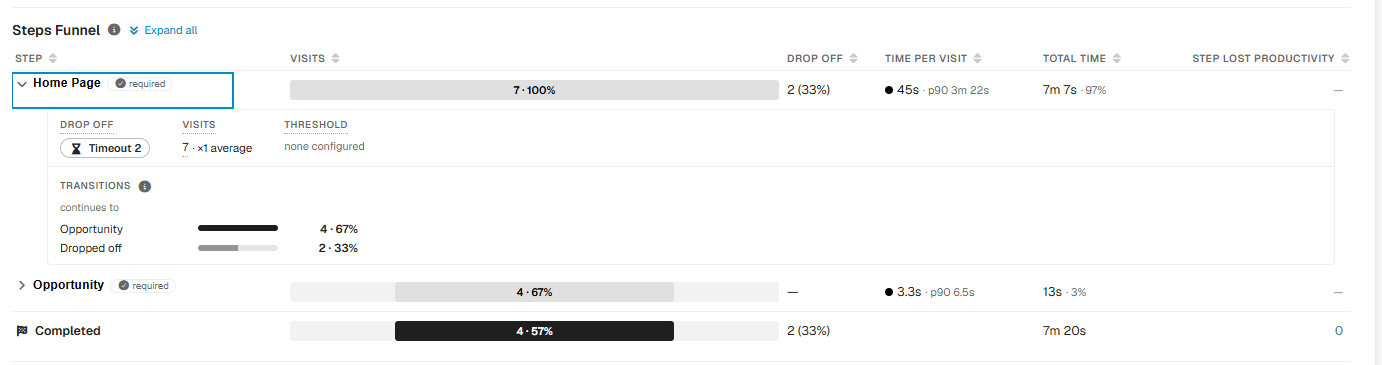
Time per visit and total time for each workflow step - GermainUX
Delays & Bottlenecks
Identify steps where users wait, pause, or spend significantly more time than expected. Bottlenecks can then be investigated using the available user, application, workflow, and technology context.Repeated or Unnecessary Actions
Identify workflows where users repeatedly perform the same actions or move back and forth between process steps. These patterns can indicate:- Workflow complexity
- Poor application usability
- Missing information
- Training opportunities
- Application or process inefficiencies
Process Overruns
Identify workflows or individual steps that exceed expected completion times. This helps teams focus on processes where actual work time differs significantly from the expected or targeted duration.
Checkout process timeline with duration and overrun per step - GermainUX
Lost Productivity
Measure the work time associated with inefficient processes, delays, repeated actions, errors, and other available sources of friction. This provides a way to move beyond individual UX issues and understand their potential productivity impact at scale.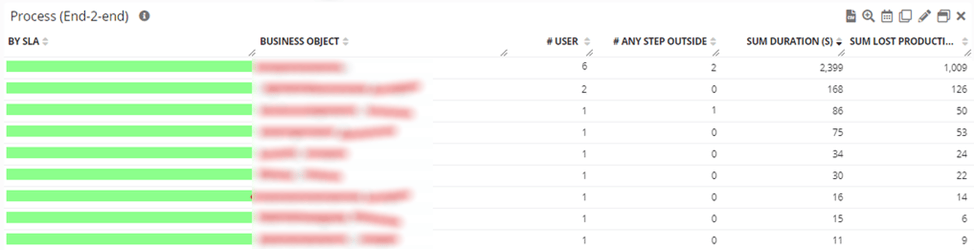
End-to-end processes with duration and lost productivity - GermainUX

User productivity loss caused by technology issues - GermainUX
Workflow Abandonment
Identify workflows that users start but do not complete as expected. Abandoned workflows can then be investigated to determine where users stopped and what happened before the drop-off.
Most common paths: completed vs. timed-out - GermainUX
Analyze Work Time at Scale
Work Time Insights can be analyzed across the entire monitored population or segmented using available dimensions such as:- Business process
- Process step
- Application
- User
- Team
- Role
- Department
- Location
- Other available business or user dimensions
How long does the work take?Where is time being spent?Who is affected?Why is it taking longer?What should we improve?
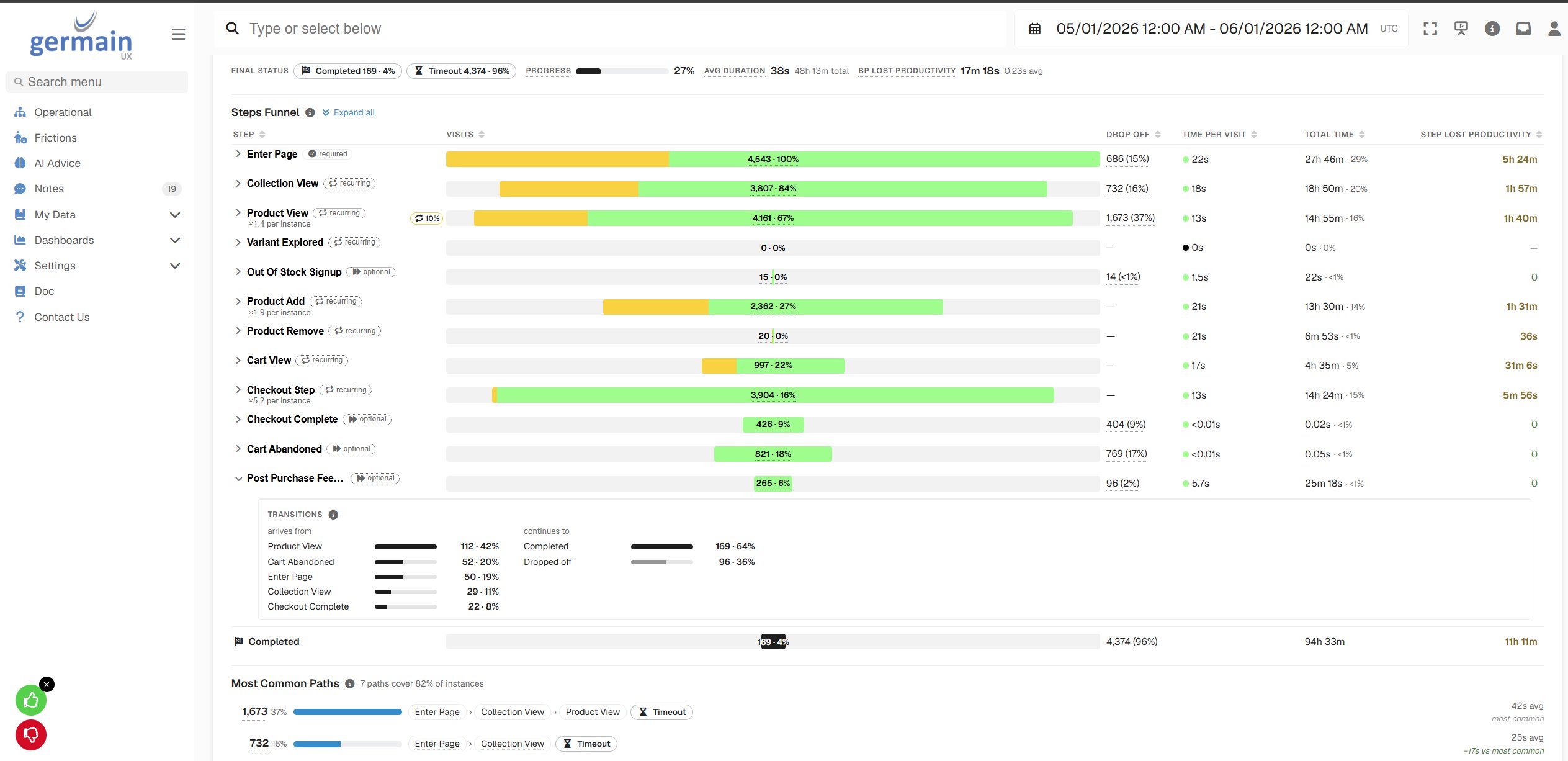
Steps Funnel with time and lost productivity per step - GermainUX
Compare Users & Populations
Work Time Insights can reveal significant differences in how users perform the same workflow. For example, GermainUX can help identify whether a process takes longer for:- Particular teams
- Specific roles
- New versus experienced users
- Particular applications or application versions
- Specific locations
- Other available populations
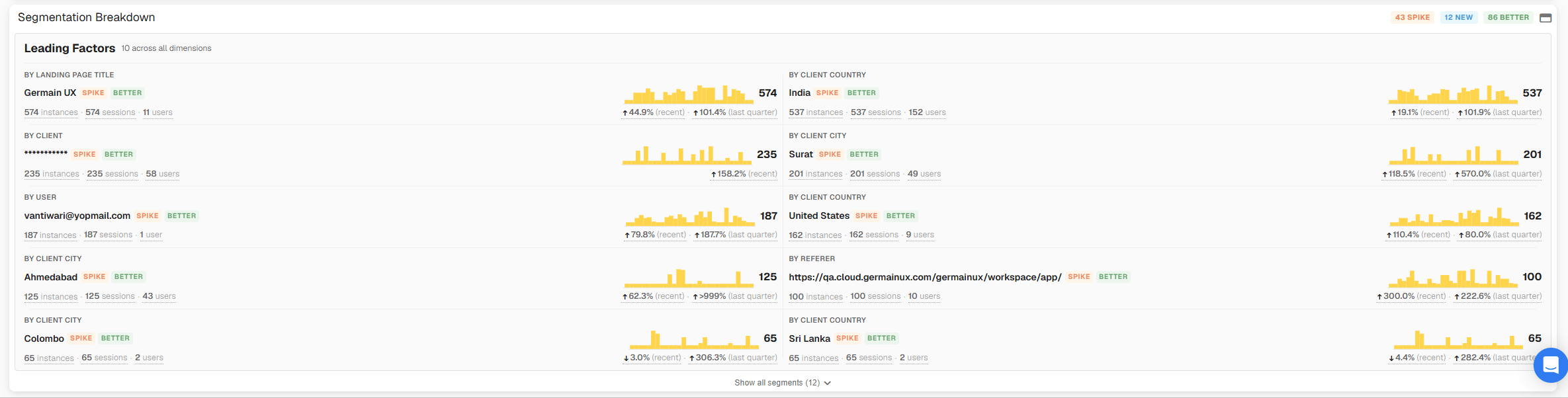
Segmentation breakdown with Leading Factors - GermainUX
Investigate Why Work Takes Longer
Work Time Insights can be combined with other GermainUX analytics to investigate why a workflow or step is taking longer than expected. Depending on the monitored application and available data, this can include:- User behavior
- Errors
- Application performance
- Network activity
- Repeated actions
- Dead, Error, and Rage Clicks
- Drop-offs
- Business-process events
- Session Replay
- Other available KPIs and monitored context
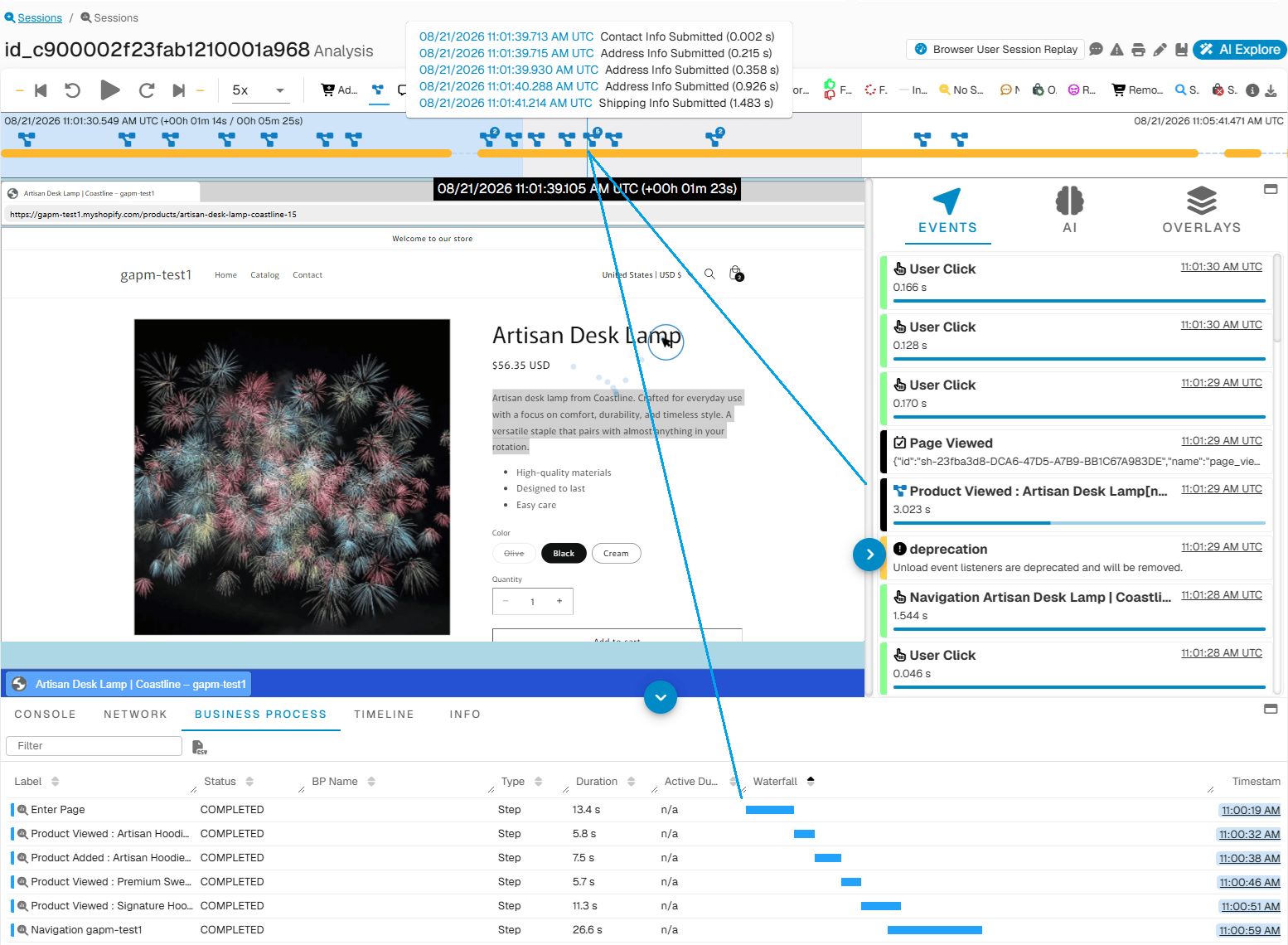
Process Mining for Individual User Session - GermainUX
Monitor Business Processes
GermainUX monitors configured workflows from beginning to end. For each business process, GermainUX can identify its:StartStepsProgressionCompletion or Drop-Off
The resulting data can then be analyzed across individual workflow executions or at population scale.
See Business Process & Workflow Mining for additional information about monitoring and analyzing business processes.
Configure a Business Process
To generate Work Time Insights, define the business process and the criteria GermainUX should use to identify:- Process start
- Process steps
- Process progression
- Process completion
- Potential drop-off
Use Work Time Insights with Adoption Insights
Work Time Insights focuses on how efficiently users complete work. Adoption Insights can provide complementary information about how applications, features, and workflows are being used. Together, they can help answer: Are users adopting the application? and Are they able to complete their work efficiently once they use it? This is particularly useful for CRM, ERP, and other enterprise applications where adoption alone does not necessarily mean that users are productive.Additional Resources
Business Process & Workflow Mining
Read more
Session Replay Player
Read more
AI
Insights & Recommendations
Adoption Insights
Read more
Conversion Insights
Read more
Analytics
More Analytics Features
Automation
More Automation Features
Dashboards
Dashboards and reports overview
Reports
Automatic and scheduled reports
Management
More Management Features
Get Help
Contact GermainUX Support
The GermainUX team helps you get up and running faster, empower your team, turn data into actionable insights, and optimize performance to deliver measurable business outcomes.
Can't Find What You Need?
Search all GermainUX docs with Ctrl + K, or use the feedback buttons at the bottom of this page to tell us what is missing.
The content of this document is proprietary to GERMAIN SOFTWARE.