

Real User Monitoring
Understand Wix visitor experience
Wix Bookings Monitoring
Verify confirmed booking outcomes
Advanced JavaScript Analysis
Profile deep browser issues
Alerts and Automation
Respond to detected Wix conditions
Overview
Monitor and optimize the availability, performance, user experience, conversion, and critical business workflows of Wix websites with GermainUX. GermainUX combines Real User Monitoring, Session Replay, conversion analytics, customer-journey analysis, browser performance, JavaScript error monitoring, synthetic transactions, and integration monitoring to help teams identify issues affecting visitors and business outcomes.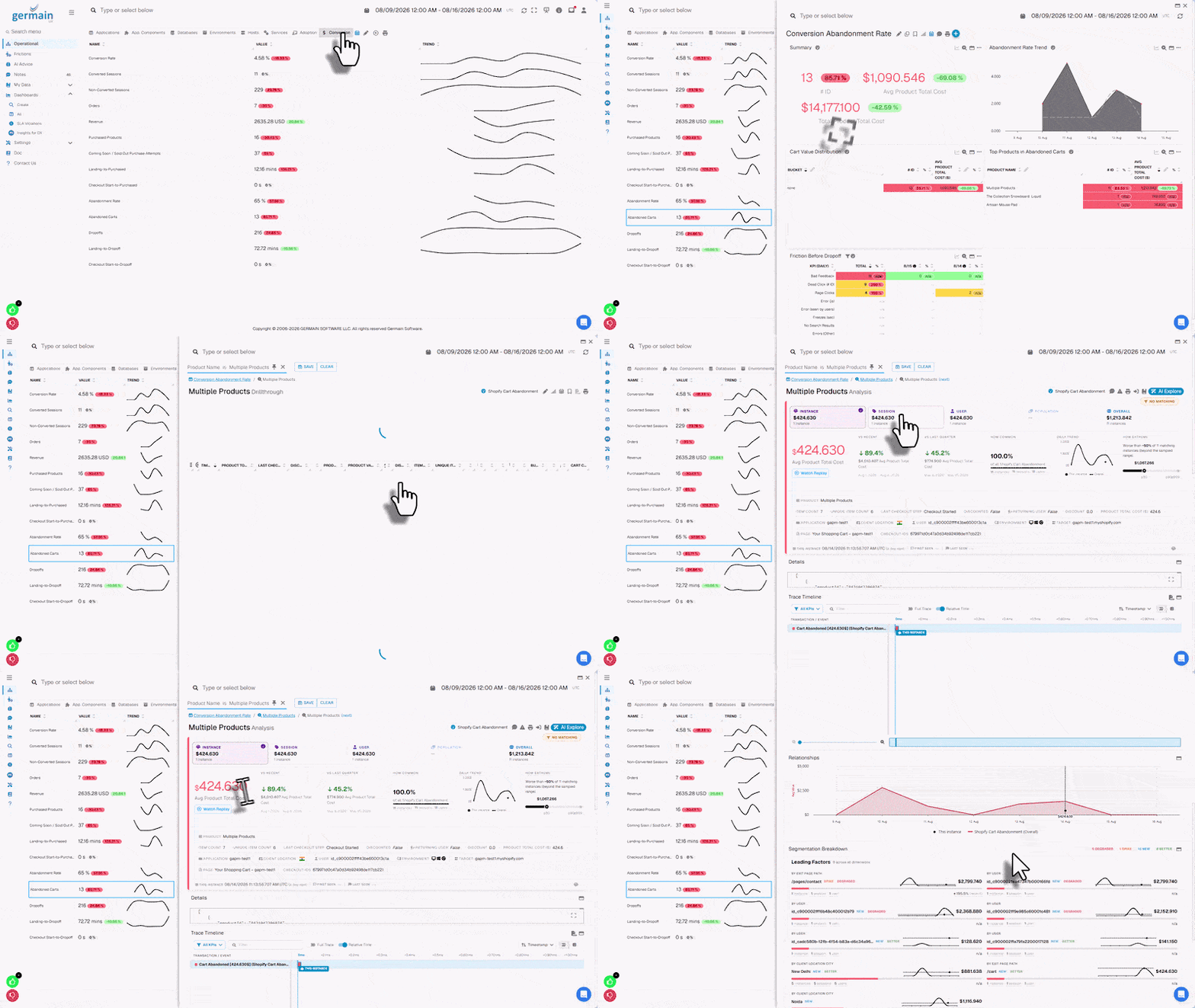
Real User Monitoring
Understand how real users experience your Wix website. GermainUX can monitor:- User sessions
- Page views
- Navigation
- Clicks and interactions
- Page-load performance
- User interaction performance
Show all 11
Show all 11
- Browser activity
- Network requests
- JavaScript errors
- Customer journeys
- Business workflows
Session Replay
GermainUX Session Replay reconstructs user activity across supported Wix pages. Use Session Replay to investigate:- Navigation issues
- Dead clicks
- Rage clicks
- Error clicks
- Repeated actions
- Slow interactions
Show all 10
Show all 10
- JavaScript errors
- Form issues
- Failed workflows
- Conversion abandonment
Conversion Analysis
Monitor the journeys that lead to important business outcomes. Examples include:Landing PageProductCartCheckoutOrder Confirmation
CampaignLanding PageFormConfirmation
ServiceBookingConfirmation
GermainUX can analyze:
- Conversion rate
- Funnel progression
- Abandonment
- Repeated actions
- Errors
- Performance delays
- User friction
- Revenue or other business impact when the required business data is available
Customer Journey Analysis
Analyze how visitors move through the Wix website. Depending on the Wix applications used, journeys can include:- Content discovery
- Registration
- Login
- Forms
- Wix Stores
- Wix Bookings
Show all 9
Show all 9
- Wix Events
- Member activity
- Lead generation
- Completion
- Duration
- Drop-off
- Repeated steps
- Errors
- Performance
- Affected visitors
Wix Stores Monitoring
For customer-accessible Wix Stores pages and events, monitor journeys such as:SearchProduct ViewAdd to CartCheckoutOrder Confirmation
Depending on the data available to customer JavaScript and authorized integrations, GermainUX can analyze:
- Product views
- Cart activity
- Checkout initiation
- Order confirmation
- Conversion
- Abandonment
- Errors
- Performance
Transaction Performance Comparison
When analyzing a slow or failed Wix transaction, use Comparison to compare its performance with another execution of the same transaction, such as the fastest, slowest, most recent, first seen, or last seen. Comparison can reveal:- Differences in execution time for the same Wix transaction
- Which steps, checkout stages, or third-party integrations caused the slowdown
- Performance differences between successful and failed Wix transactions
- Errors or bottlenecks affecting Wix Stores and Bookings
- Potential root causes of transaction performance degradation
Wix Bookings Monitoring
Monitor supported booking journeys such as:Service ViewDate SelectionBooking StartBooking Confirmation
Analyze:
- Booking progression
- Completion
- Abandonment
- Errors
- Performance delays
- User friction
Wix Events Monitoring
Monitor supported event-registration journeys such as:Event ViewRegistrationPaymentConfirmation
Analyze:
- Registration progression
- Completion
- Drop-off
- Errors
- Performance
- User friction
Form Monitoring
Monitor important Wix form workflows. For example:Open FormEnter InformationSubmitConfirmation
Analyze:
- Form start
- Validation
- Submission
- Success
- Failure
- Abandonment
- Errors
- Performance
Website Performance
Monitor performance experienced by Wix visitors. Analyze:- Page-load time
- Interaction response time
- Browser processing
- Resource loading
- Network-request duration
- API response time
- Third-party service performance
- Performance trends
Error Monitoring
Detect errors affecting visitors, including:- JavaScript errors
- Browser console errors
- HTTP errors
- Failed network requests
- Resource-loading failures
- Third-party integration failures
Mobile and Cross-Browser Experience
Analyze Wix user experience across:- Desktop
- Mobile
- Tablet
- Browser
- Browser version
- Operating system
Advanced JavaScript Analysis
Use GermainUX JS Profiler when deeper browser troubleshooting is required. Analyze:- JavaScript exceptions
- Browser console events
- Slow or failed network requests
- Third-party scripts
- Browser freezes
- Long-running JavaScript
- Velo and other customer-controlled browser code
- Client-side performance bottlenecks
Wix API and Integration Monitoring
GermainUX Engine can monitor customer-accessible Wix APIs, webhooks, and integrations. Depending on the available interfaces and permissions, monitor:- API availability
- API response time
- HTTP status
- Response validation
- Authentication failures
- Webhook processing
Show all 14
Show all 14
- Payment integrations
- Booking integrations
- Order integrations
- Registration integrations
- CRM integrations
- Marketing integrations
- Email and messaging services
- Customer-defined Velo endpoints
Synthetic Transactions
Use GermainUX RPA Bot Recorder to proactively test important Wix journeys. Examples include:Open WebsiteNavigateVerify Critical Page
Open WebsiteSubmit Test FormVerify Confirmation
Open WebsiteSearchProductAdd to CartVerify Cart
Synthetic monitoring can detect functional or performance issues before real visitors encounter them.
Third-Party and Platform-Managed Pages
Some Wix journeys can move through:- Wix-managed pages
- Third-party domains
- Restricted iframes
- External payment providers
- External authentication providers
- Navigation into the external context
- Return navigation
- Redirect duration
- Browser-visible success or failure
- API responses
- Webhooks
- Integration data
- Synthetic transaction results
Root Cause Analysis
GermainUX can correlate user-experience and technical telemetry. For example:Checkout AbandonmentSlow InteractionFailed Third-Party Request
or:
Form FailureJavaScript ErrorAPI Failure
or:
Conversion DecreaseIncreased Page Response TimeAffected Mobile Visitors
This helps teams move from identifying an issue to understanding its likely cause and business impact.
Analytics
Analyze Wix monitoring data by:- User
- Session
- Page
- URL
- Interaction
- Workflow
Show all 14
Show all 14
- Browser
- Device
- Operating system
- Geography
- Error
- Network request
- Conversion status
- Time period
Alerts and Automation
Configure GermainUX to detect conditions such as:- Website unavailable
- Slow page
- Slow interaction
- JavaScript error increase
- Failed API request
- Form failure
Show all 10
Show all 10
- Booking failure
- Conversion degradation
- Synthetic transaction failure
- Third-party service degradation
- Send alerts
- Notify users through Watches
- Generate reports
- Trigger approved diagnostics
- Execute approved automation
Additional Resources
Deploy Monitoring or automation for Wix
Read more
Configure
Monitoring or automation for Wix
AI
Insights & Recommendations
Analytics
More Analytics Features
Automation
More Automation Features
Dashboards
Dashboards and reports overview
Reports
Automatic and scheduled reports
Get Help
Contact GermainUX Support
The GermainUX team helps you get up and running faster, empower your team, turn data into actionable insights, and optimize performance to deliver measurable business outcomes.
Can't find what you need?
Search all GermainUX docs with Ctrl + K, or use the feedback buttons at the bottom of this page to tell us what is missing.
The content of this document is proprietary to GERMAIN SOFTWARE.